


The rise of no-code platforms has democratized app development, making it accessible to anyone with an idea and a drive to create. These platforms cater to a plethora of needs, from streamlining business operations to crafting comprehensive SaaS products. With such diversity, selecting the ideal no-code tool for your project can be daunting.
To ease this process, we have juxtaposed two prominent no-code platforms: Bildr and Bubble. This comparison will delve into their functionalities, advantages, limitations, and distinguishing factors. By the conclusion of this discussion, you’ll possess the insights needed to discern which platform is most conducive to fulfilling the unique demands and aspirations of your business venture. Let's begin our in-depth examination!
- 01 Bildr vs Bubble: overview
- 02 What's the difference between Bildr and Bubble?
- 03 Bildr pros and cons
- 04 Bubble pros and cons
- 05 Bildr compared to Bubble
- 06 Bubble compared to Bildr
- 07 Features comparison
- 08 Bildr vs Bubble: Which is the best for your business?
- 09 Alternatives to Bildr & Bubble
- 10 Promotions on No-Code Development software
Start saving on the best SaaS
Secret has already helped tens of thousands of startups save millions on the best SaaS like Microsoft Teams, Google Workspace & many more. Join Secret now to buy software the smart way.

01 Bildr vs Bubble: overview
Bildr and Bubble stand out as prominent contenders in the competitive arena of no-code web application platforms, each boasting its unique set of features to cater to the varied demands of creators and enterprises.
Bildr emerges as a platform championing design freedom and customizability, allowing builders to craft web applications and sites with a high degree of visual and functional fidelity, without requiring coding expertise. It excels in offering a granular level of control over the user interface, making it ideal for designers seeking to bring their precise vision to life. Conversely, Bubble is celebrated for its comprehensive suite of development tools that empower users to construct complex, data-driven web applications. With its visual programming language, Bubble users can manage intricate backend processes and advanced data operations, thereby appealing to those who wish to push the boundaries of what can be achieved without traditional code.
As we compare Bildr versus Bubble, we aim to illuminate the path for you to select the most fitting no-code platform that aligns with your web application ambitions, whether they lean towards bespoke design or complex functionality.

Pricing Plan
Bildr is the more expensive option, but the flexibility and complexity it offers warrant it compared to Bubble’s cheaper pricing. Bubble's tiered pricing caters well to various development stages.

Bildr
Bubble
Customer Support
Bildr’s customer support is not something to write home about, with slow response times overall, according to user reviews. Similarly, Bubble doesn’t have much to boast about in this realm.
Bildr
Bubble
Ease of Use
Bildr is a more complex platform overall and requires knowledge of coding and CSS, whereas Bubble is more of a visual platform that is easier to use.
Bildr
Bubble
Customer Reviews
Bildr has no reviews on Capterra, but basing it off of other review sites, overall, it scores lower than Bubble, with users complaining about the lack of support and variety in integration as the main drawbacks.
Bildr
Bubble
Integrations
Bildr comes with integrations with popular services out of the box, and there is also an API for more custom integrations with tools like Stripe. Bubble is more generous with its integrations encompassing payment solutions, marketing tools, and more, including Zapier and Airtable.
Bildr
Bubble
Visual development interface
Bildr features a sleek design that enables faster app development, with a lot of drag-and-drop elements that speed up the design and production phases. Bubble's visual interface is oriented toward app development and may be less intuitive for users, primarily focused on web design.
Bildr
Bubble
Design capabilities
Bubble offers an intuitive editor that lets users effortlessly build applications even without coding knowledge. Moreover, Bubble provides a range of templates and plugins to help with the setup process. On the other hand, Bildr offers amazing features for building more complex Web3 applications.
Bildr
Bubble
Database management
Bubble provides a data editor that simplifies the management of an application's database. Similarly, Bildr allows editing the entries as you build out your application.
Bildr
Bubble
SEO capabilities
It's important to mention though that both platforms provide the option to make customizations that can improve your websites search engine optimization (SEO).
Bildr
Bubble
Academy
Bubble offers videos, manuals and boot camps, FAQs and much more. Similarly, Bildr offers videos, courses, FAQs, videos and a discord community.
Bildr
Bubble
02 What's the difference between Bildr and Bubble?

Bildr, on the other hand, is a more established platform with a lively community and numerous extensions, plugin support, and additional functionalities.
Bildr
Shape your vision into reality - No code needed.

Bubble, as a platform, provides a lot of pre-built frameworks for projects, making it a great option for users who are not looking to start from a blank canvas.
Bubble
Bubble is a code-free programming language that lets you build and host web applications without engineers.
Bubble, as a platform, provides a lot of pre-built frameworks for projects, making it a great option for users who are not looking to start from a blank canvas. This allows for swift creation without relying too much on visual composers or CSS style elements. It is a fairly young platform that shows a lot of promise with diverse capabilities, the lack of maturity is evident when community and plugins are scrutinized. Yet, it offers great customization options for decentralized Web3 applications, as such apps tend to be quite complex. There is also a robust decentralized community that offers support to users through a Discord chat
Bildr, on the other hand, is a more established platform with a lively community and numerous extensions, plugin support, and additional functionalities. It follows a specific workflow that requires knowledge of databases and actions you can take with them. This means it is more geared toward individuals with coding and CSS experience. The platform stands out with its user-friendly interface and numerous extensions that work out of the box, making it a great starting point for coding a web solution. It is also more affordable than Bubble (in some options), with a wealth of resources, users can fall back on if there is any confusion about the functionalities.
If speed is what you’re after, and you have little to no coding expertise, then Bubble could be a great starting point. With its numerous templates and no-to-low code approach, it can help fledgling entrepreneurs or programmers launch their ideas fairly quickly. If, however, you’re looking for a platform that allows more control over the appearance and user experience of your application, then Bildr could be a better choice. It focuses on more experienced users who have some coding knowledge. The choice between Bubble and Bildr depends on your specific requirements and circumstances, as both platforms offer distinct features.

Bubble
You don't need to be a coder to build software.
30% off on monthly plans for 1 year
Save up to $957
03 Bildr pros and cons
What are the advantages of Bildr?
- Design freedom: Bildr provides extensive customization options, allowing for precise design control and enabling creators to bring their unique vision to life without constraints.

- Real-time collaboration: It facilitates seamless collaboration among team members, allowing multiple people to work on a project simultaneously, enhancing workflow efficiency.
- Intuitive user interface: The platform's user-friendly drag-and-drop interface makes it accessible for users of all skill levels, from beginners to experienced designers.
- Responsive design: Bildr ensures that the applications created are automatically responsive, providing an optimal viewing experience across various devices and screen sizes.
- Extensibility through code: While being a no-code tool, Bildr allows developers to inject custom code, offering flexibility for those who need more advanced functionalities.
What are the disadvantages of Bildr?
- Learning curve: Despite its intuitive design, the wide array of features and customization options can be overwhelming for new users, requiring some learning time.

- Performance optimization: As with many no-code platforms, there may be limitations on optimizing the performance of complex applications built with Bildr.
- Integration limitations: While Bildr supports integrations, the range and depth of integrations may not match those of more established platforms, potentially limiting functionality.
- Community and support: As a newer entry into the no-code market, Bildr's user community may be smaller, which can impact the availability of third-party resources and peer support.
- Pricing transparency: For some users, the pricing structure might not be as transparent or as competitive as other no-code platforms, especially for startups or individual developers.
04 Bubble pros and cons
What are the advantages of Bubble?
- Comprehensive functionality: Bubble's powerful toolset allows for the creation of complex, feature-rich web applications, enabling users to incorporate advanced workflows and data operations.
- Visual programming interface: The platform employs a visual approach to programming, allowing users to build both the front-end and back-end aspects of applications without code.
- Extensive plugin library: Bubble boasts a vast ecosystem of plugins, expanding its native capabilities and allowing for easy integration with other services and tools.
- Active community: With a large, active user community, Bubble users have access to a wealth of community-driven resources, tutorials, and forums for support and learning.
- Scalability: Bubble is designed to scale with your project, offering the infrastructure necessary to manage increased traffic and complex operations as your user base grows.
What are the disadvantages of Bubble?
- Performance concerns: As applications become more complex, there can be performance issues due to the limitations inherent in the platform's server-side processing and hosting.
- Steep learning curve: The breadth of Bubble's features means there's a significant learning curve, which might be challenging for users new to no-code development.
- Customization limits: While Bubble is highly flexible, there are limits to customization, particularly for users with very specific design requirements or those needing advanced functionalities.
- Dependency on a single platform: Being a fully hosted solution, applications built on Bubble are dependent on the platform's continued existence and service quality.
- Pricing structure: As your application grows, the cost can increase significantly, making Bubble potentially expensive for larger or high-traffic applications.
Compare Bubble to other tools


Bubble vs FlutterFlow


AppGyver vs Bubble

Webflow vs Bubble

Retool vs Bubble

Bubble vs Airtable

Softr vs Bubble
05 Bildr compared to Bubble
Bildr and Bubble are two innovative no-code platforms that empower users to build web applications, but they cater to different user needs. Bildr stands out with its strong design capabilities and real-time collaboration features, ideal for teams prioritizing visual fidelity and co-creation.
Bubble, however, excels with its extensive functionalities, offering a more comprehensive development environment that includes backend services and a large plugin library. While Bildr appeals to users seeking design elegance and simplicity, Bubble is better suited for those who require deep customization and complex application logic without delving into traditional programming.
Is Bildr better than Bubble?
 Is Bildr better than Bubble?
Whether Bildr is better than Bubble depends on the user's priorities. Bildr excels in design flexibility and user interface customization, making it a preferred choice for visually intensive projects. Its real-time collaboration tools also make it ideal for teams. On the other hand, Bubble offers a robust set of features for building complex applications with intricate workflows and data manipulation, which can be more suitable for developers looking to create data-driven platforms.
Ultimately, Bildr is often favored for its design capabilities and collaboration, while Bubble stands out for its comprehensive development environment and depth of functionality.
What is Bildr best used for?
Bildr is best used for creating visually compelling, design-centric web applications without requiring users to write code. It shines in scenarios where customizability and aesthetics are paramount, allowing designers and developers to bring their most intricate visions to life with pixel-perfect accuracy.
The platform is particularly beneficial for projects that need rapid prototyping and collaborative real-time editing, enabling teams to work together seamlessly. Its user-friendly interface also makes it accessible for beginners, while offering the flexibility for more experienced creators to inject custom code, balancing simplicity with the potential for technical depth and integration.
Can Bildr replace Bubble?
Bildr can replace Bubble for users whose primary focus is on design and visual sophistication in web applications. It provides an environment conducive to detailed visual work and real-time collaboration, which can be essential for design-led projects.
However, for those who require a comprehensive no-code solution with the ability to handle complex back-end processes and a wide range of integrations, Bubble's extensive feature set might be irreplaceable. While Bildr offers a strong alternative for front-end development, Bubble remains the more robust choice for building intricate, data-driven applications without traditional coding.
Is Bildr cheaper than Bubble?
Assessing the cost-effectiveness of Bildr compared to Bubble, it's evident that Bildr’s pricing structure commands a higher price point. This premium is attributed to its advanced design capabilities and the flexibility it offers through custom code injections, positioning it as a tool for those who prioritize design intricacy and unique functionalities.
Bubble, while providing a robust platform for creating complex applications, comes at a more affordable rate, making it an attractive proposition for startups and individual developers on a budget. The choice between the two may ultimately hinge on the specific needs of the project and the value placed on the unique features each platform offers.
Is there a better No-Code Development software than Bildr?
When venturing into the realm of no-code web application platforms, it's vital to consider if there's a better fit than Bildr for your specific goals.
Alternatives to Bildr in the space such as Bubble, Wix, Webflow, Adalo, and OutSystems offer a spectrum of functionalities. Your choice should reflect the complexity of your project, the depth of customization you seek, how you anticipate scaling, and financial considerations. Bildr excels in visual design and user experience, but other platforms may offer more robust back-end capabilities, a wider array of integrations, or distinct features that could more closely align with your needs for building and deploying web applications.
06 Bubble compared to Bildr
Bubble and Bildr are both prominent no-code platforms, but they serve different niches within the application development landscape. Bubble is renowned for its comprehensive approach, allowing the creation of complex, data-driven web applications with extensive functionality, including backend processes. Its strength lies in its ability to scale and manage intricate workflows, making it ideal for developers aiming to build sophisticated apps without deep coding knowledge.
In contrast, Bildr focuses on the front-end, offering a more design-centric and intuitive experience, with particular emphasis on visual precision and real-time collaboration, catering to those who prioritize aesthetics and ease of use in web development.
Is Bubble better than Bildr?
Whether Bubble is better than Bildr hinges on the project requirements and user expertise. Bubble's forte lies in its comprehensive feature set that supports the creation of complex, dynamic web applications, complete with custom databases and user authentication systems. It's ideal for builders who want deep control over the functionality without coding. Bildr, with its strong design tools and collaborative environment, is preferred by those focusing on the aesthetic and user interface aspects of application development.
For projects demanding advanced data operations and scalability, Bubble often comes out on top, while Bildr is favored for its superior visual development experience.
What is Bubble best used for?
Bubble is best utilized for building intricate, data-driven web applications that require no coding. It enables users to construct complex workflows, manage databases, and design responsive user interfaces, all within a visual programming environment. This makes it particularly suitable for entrepreneurs and businesses looking to develop fully functional prototypes or launch scalable online platforms.
Bubble’s strong community support and rich library of plugins allow for extended functionality and customization. Whether for SaaS products, marketplaces, or social networks, Bubble provides the tools to develop and deploy applications with sophisticated feature sets that can evolve and grow with the needs of the business.
Can Bubble replace Bildr?
Bubble can replace Bildr for developers seeking to craft complex, feature-rich applications without engaging in traditional coding. It offers extensive database capabilities, logic workflows, and a plethora of plugins that can mimic and potentially exceed Bildr's functionality, especially on the back-end side.
While Bildr is tailored more towards design-intensive projects with a focus on front-end customization, Bubble's all-in-one platform approach is equipped to handle both the aesthetic and functional demands of web application development. For users whose projects require in-depth interactivity and data manipulation, Bubble stands as a comprehensive alternative to Bildr's design-centric environment.
Is Bubble cheaper than Bildr?
Bubble’s pricing structure presents a more cost-effective solution compared to Bildr, positioning itself as a budget-friendly alternative within the no-code platform market. Its affordability stems from a tiered pricing model that caters to a range of users, from hobbyists to professional developers, without sacrificing core functionalities essential for building complex web applications.
Bubble's competitive edge in pricing does not compromise its capability to offer a comprehensive development environment, which includes database management, a wide array of integrations, and scalability. For those looking to maximize their development budget, Bubble offers a substantial set of tools and features at a price point that undercuts Bildr's, providing significant value for money.
Is there a better No-Code Development software than Bubble?
When navigating the diverse no-code web application ecosystem, it's critical to evaluate if there's a platform that surpasses Bubble in meeting your unique project goals.
Alternatives to Bubble in the market such as Bildr, Wix, Webflow, Adalo, and OutSystems present a range of capabilities. Deciding on the best tool is dependent on the complexity of your endeavor, customization depth, scalability needs, and budget. While Bubble is robust for complex, data-driven applications with its integrated back-end services, competitors might offer superior design interfaces, simpler user experiences, or niche functionalities that align more closely with specific development objectives and user interaction requirements.
Bubble
You don't need to be a coder to build software.
30% off on monthly plans for 1 year
Save up to $957
07 Features comparison
Bubble's User-Friendly Advantage Over Bildr

Bubble's intuitive interface allows users to visually manipulate elements and define logic for applications, making the transition from idea to prototype exceptionally smooth.
When it comes to the ease of use in the realm of no-code platforms, Bubble often outshines Bildr. Bubble's intuitive interface allows users to visually manipulate elements and define logic for applications, making the transition from idea to prototype exceptionally smooth. For instance, creating a user registration system is a matter of dragging elements onto a canvas and defining workflows through point-and-click options, a process that is user-friendly even for those with limited technical expertise.
In comparison, while Bildr offers powerful design capabilities, its platform may require a steeper learning curve to master its robust design tools and collaborative features. Therefore, for those seeking a straightforward path to develop complex applications, Bubble's user-centric design and comprehensive tutorials position it as a leader in accessibility within the no-code development space.
Bubble Outshines Bildr with Expansive Integration Capabilities

Bubble's users enjoy a multitude of plugins and built-in connections to a wide array of services, from Google's suite of tools for analytics and productivity to Slack's communication platform and Salesforce's customer relationship management.
When assessing the integration capabilities of no-code platforms, Bubble stands out against Bildr with its expansive integration ecosystem. Bubble's users enjoy a multitude of plugins and built-in connections to a wide array of services, from Google's suite of tools for analytics and productivity to Slack's communication platform and Salesforce's customer relationship management. For example, integrating a payment system like Stripe or setting up automated email sequences with Mailchimp can be achieved with just a few clicks in Bubble's environment.
Bildr, while offering some integrations, lacks the same extensive range, making Bubble the clear choice for projects that demand a comprehensive set of external application integrations. This connectivity enables Bubble users to create more dynamic, feature-rich applications that can communicate across various platforms, providing a seamless and integrated user experience.
Bildr Offers More Advanced Visual Design Customization than Bubble

With Bildr, users have the liberty to tweak every visual element to their exact specifications, achieving a level of design detail that can elevate the user experience to new heights.
In the landscape of no-code platforms, Bildr's prowess in visual design customization sets it apart, offering unparalleled control for creating aesthetically exquisite and engaging web applications. With Bildr, users have the liberty to tweak every visual element to their exact specifications, achieving a level of design detail that can elevate the user experience to new heights. For instance, when crafting a homepage, Bildr allows intricate adjustments to elements like buttons, fonts, and images, ensuring every pixel aligns with the envisioned aesthetic.
Bubble's design capabilities, while robust with a drag-and-drop interface facilitating layout creation, fall short of Bildr's meticulous customization options. Therefore, for design-centric projects where brand identity and user interface precision are paramount, Bildr emerges as the definitive choice, offering creators the tools to forge visually stunning applications with fine-grained design control.
Bubble has Stronger Database Management Capabilities Compared to Bildr

Bubble enables users to construct complex data models, set up relational databases, and execute CRUD (Create, Read, Update, Delete) operations directly within its platform.
Bubble's comprehensive database management capabilities outshine those of Bildr, marking it as a powerhouse for developers who need to store, retrieve, and manipulate data within their applications. Bubble enables users to construct complex data models, set up relational databases, and execute CRUD (Create, Read, Update, Delete) operations directly within its platform. For example, an e-commerce site built on Bubble can effortlessly manage product inventories, customer profiles, and order histories with intricate relational data structures.
While Bildr facilitates dynamic content and interaction, it doesn't delve into the depths of data management that Bubble offers. This distinction makes Bubble the superior choice for developers requiring advanced database functionalities integral to their applications' core operations.
Drag-and-Drop Functionality is Evenly Matched in Both Bildr and Bubble

Users can visually assemble components, from basic text boxes to complex interactive elements, with ease.
Bildr and Bubble level the playing field in no-code application development with their intuitive drag-and-drop interfaces, which democratize the creation process. Users can visually assemble components, from basic text boxes to complex interactive elements, with ease. This method removes the intricacies of coding, making the platforms accessible to innovators who may lack technical programming skills.
Whether one is crafting a portfolio website on Bildr or setting up an online marketplace on Bubble, the process remains straightforward: select an element, drag it onto the canvas, and drop it into place, constructing functional web applications with visual ease. This approach positions both Bildr and Bubble as equally user-friendly options for those seeking to transform ideas into digital realities without the traditional coding hurdles.
Bildr’s Custom Code Injection Capability is More Powerful than Bubble Full Control Feature
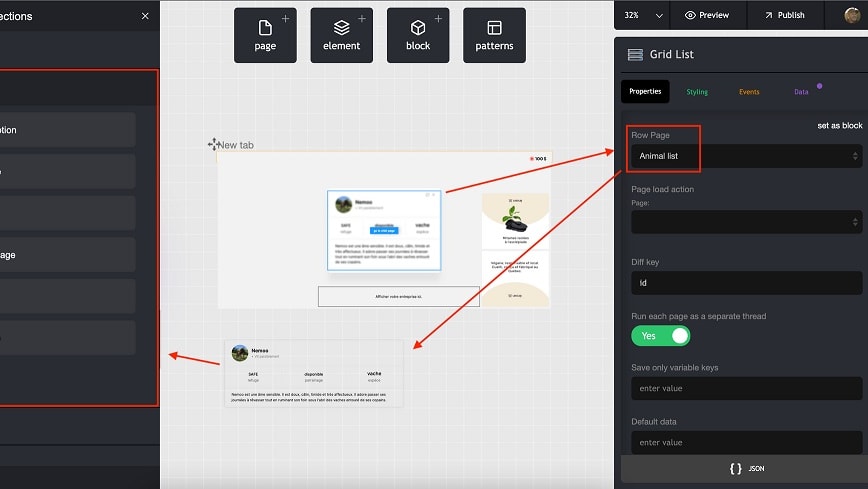
Bildr empowers users to embed HTML, CSS, or JavaScript directly, thereby tailoring functionalities to precise specifications.
When the battleground is custom functionality, Bildr ascends as the champion over Bubble, largely due to its custom code injection capability. This feature is a game-changer for developers aiming to push boundaries beyond the platform's standard offerings. Bildr empowers users to embed HTML, CSS, or JavaScript directly, thereby tailoring functionalities to precise specifications. For instance, a developer can integrate third-party libraries or craft unique animations, enhancing the application's uniqueness.
While Bubble provides a level of customization through its workflows and design elements, it lacks the granular control that comes with Bildr’s code injection, which can be pivotal for achieving advanced customization and innovation within projects.
Bubble and Bildr Provide Comparable Real-Time Collaboration and Team Development Features

Bubble's 'Collaboration and Team Development' feature allows developers to work on the same project with live versioning and role-based permissions, mirroring the collaborative environment found in traditional coding.
In the digital creation space where collaboration is key, both Bildr and Bubble understand the necessity of teamwork in app development. They provide features that enable multiple users to engage in the development process simultaneously. For example, Bubble's 'Collaboration and Team Development' feature allows developers to work on the same project with live versioning and role-based permissions, mirroring the collaborative environment found in traditional coding.
Similarly, Bildr's 'Real-Time Collaboration' offers a cohesive workspace for teams to design, edit, and review together in real time, ensuring that every team member is in sync. This shared emphasis on cooperative development ensures that, regardless of the platform chosen, teams can expect a harmonious and integrated workflow, making Bildr and Bubble equally adept at fostering collaboration.
08 Bildr vs Bubble: Which is the best for your business?
Bildr is the best tool for you if:
- You value design customization and want to build highly personalized, visually rich web applications without coding expertise.
- You're a designer looking for a no-code platform that offers pixel-perfect control and a focus on visual fidelity.
- You require a tool that facilitates the integration of complex functionalities through a user-friendly interface and flexible building blocks.
- You're interested in a platform that supports real-time collaboration, allowing teams to design and iterate together efficiently.
- You need a platform with a strong focus on user experience, providing intuitive drag-and-drop features for a streamlined workflow.
 You value design customization and want to build highly personalized, visually rich web applications without coding expertise.
Bubble is the best tool for you if:
- You need a no-code solution that offers a comprehensive set of tools for creating sophisticated, feature-rich web applications.
- You're seeking to handle complex data operations, workflows, and integrations without writing code, using a visual programming interface.
- You want to manage the entire development lifecycle, from database creation to front-end design and user authentication, in one place.
- You desire a platform with a strong community, extensive plugin options, and resources for learning and troubleshooting.
- You aim to scale your application easily with the flexibility to add custom code and utilize a reliable hosting infrastructure.
Bubble
You don't need to be a coder to build software.
30% off on monthly plans for 1 year
Save up to $957
09 Alternatives to Bildr & Bubble

Airtable
Used by 8830 members
$1,000 in credits on licences for 1 year
Save up to $1,000

Webflow
Used by 4937 members
40% off annual plans
Save up to $120

Slack
Used by 4000 members
25% off new plan purchases
Save up to $9,000

Base44
Used by 3315 members
10 Promotions on No-Code Development software
Bildr and Bubble are great tools, but Secret offers promo codes with discounts on over 2250+ different SaaS solutions. New deals are added regularly, helping you save money on your online subscriptions. Get access to codes for other No-Code Development software you might want to purchase

Promo code Make
3 months free on the Teams plan (240k credits included)
Webflow coupon
40% off annual plans

Softr offer
20% off monthly or annual Professional plan
Airtable coupon code 2026
$1,000 in credits on licences for 1 year

Notion free credits
3 months free on the Business plan with Unlimited AI

bolt.new promotion code
20% off all plans for the first 3 months

Pagemaker promo
30% off for 1 year

Coda promo code
7 days free + 15% off annual plans

Promo code Retool
1 year free on the monthly Team or Business plan

Storylane discount
20% off annual plans
Start saving on the best SaaS
Secret has already helped tens of thousands of startups save millions on the best SaaS like Microsoft Teams, Google Workspace & many more. Join Secret now to buy software the smart way.