


When it comes to website development there are two Saas platforms that often get compared for their capabilities and features. Webflow and Bubble. These platforms, respectively, offer tools to create appealing websites without requiring extensive coding knowledge.
Choosing between Webflow and Bubble depends on needs and opinions may vary. Each platform has its strengths and differences that set them apart in the market. In this article we will explore the features of both Webflow and Bubble comparing their differences to help you decide which platform is the best fit, for your website development requirements.
- 01 Webflow vs Bubble: overview
- 02 What's the difference between Webflow and Bubble?
- 03 Webflow pros and cons
- 04 Bubble pros and cons
- 05 Webflow compared to Bubble
- 06 Bubble compared to Webflow
- 07 Features comparison
- 08 Webflow vs Bubble: Which is the best for your business?
- 09 Alternatives to Webflow & Bubble
- 10 Promotions on No-Code Development software
Start saving on the best SaaS
Secret has already helped tens of thousands of startups save millions on the best SaaS like Microsoft Teams, Google Workspace & many more. Join Secret now to buy software the smart way.

01 Webflow vs Bubble: overview
Webflow and Bubble are notable contenders in the world of no-code website development platforms, each offering distinct features and advantages to cater to different user requirements.
Webflow stands out for its flexibility and design-oriented approach. It provides a powerful platform where users can visually design and develop websites, from simple landing pages to complex e-commerce sites, all within a unified interface. On the other hand, Bubble is recognized for its robust app-building capabilities without code. It offers a comprehensive toolbox for creating web applications with databases, user authentication, and complex functionality, all without the need for traditional coding.
Now, let's dive into the Webflow vs. Bubble comparison to assist you in making an informed choice when deciding on the right no-code website development platform that aligns with your specific needs.

Positive reviews
Both platforms score highly on Capterra. Furthermore, both are lauded as great no code solutions for building a website, with Webflow catering more to advanced users according to the reviews.

Webflow
Bubble
SEO capabilities
Webflow is more geared towards people who have coding skills while Bubble is designed to be user friendly and doesn't require any coding expertise. It's important to mention though that both platforms provide the option to make customizations that can improve your websites search engine optimization (SEO).
Webflow
Bubble
Ease of use
Webflow is the more complex solution with a steeper learning curve, according to the users. Bubble is somewhat simpler to use, but still it is not too kind to beginners.
Webflow
Bubble
Academy
Webflow offers Webflow University, perhaps one of the best guides to understanding all the features of the app. Bubble offers videos, manuals and boot camps, but it's not as efficient as what Webflow offers.
Webflow
Bubble
Visual development interface
Webflow provides a more robust visual design interface, making it particularly advantageous for web designers and developers who prioritize design control. Bubble's visual interface is oriented toward app development and may be less intuitive for users primarily focused on web design.
Webflow
Bubble
Customer support
Customer support for Webflow is one of its major flaws according to the review, with bugs and bad response times ruining an otherwise solid experience. Similarly, Bubble doesn’t have much to boast about in this realm.
Webflow
Bubble
Database management
Bubble provides a data editor that simplifies the management of an applications database. On the other hand Webflow takes it a step further by providing a user data editor along with a built in CMS. This exceptional combination enables users to effectively manage their websites data and easily create or modify content directly within the platform.
Webflow
Bubble
Pricing plans
Webflow is the cheaper option, starting at $15 a month, with Bubble starting at $32 per month. Though more expensive, Bubble has much more to offer and is thus better value for money, but only slightly.
Webflow
Bubble
Design capabilities
Bubble offers an intuitive editor that lets users effortlessly build applications even without coding knowledge. Moreover Bubble provides a range of templates and plugins to help with the setup process. On the other hand Webflow focuses on creating stunning websites. It offers an editor for building websites and also provides various templates and components to choose from.
Webflow
Bubble
Integrations
Webflow offers a limited number of integrations, but it does cover the more popular options like Google Analytics, Zapier and Mailchimp. Bubble is more generous with its integrations encompassing payment solutions, marketing tools and more.
Webflow
Bubble
02 What's the difference between Webflow and Bubble?
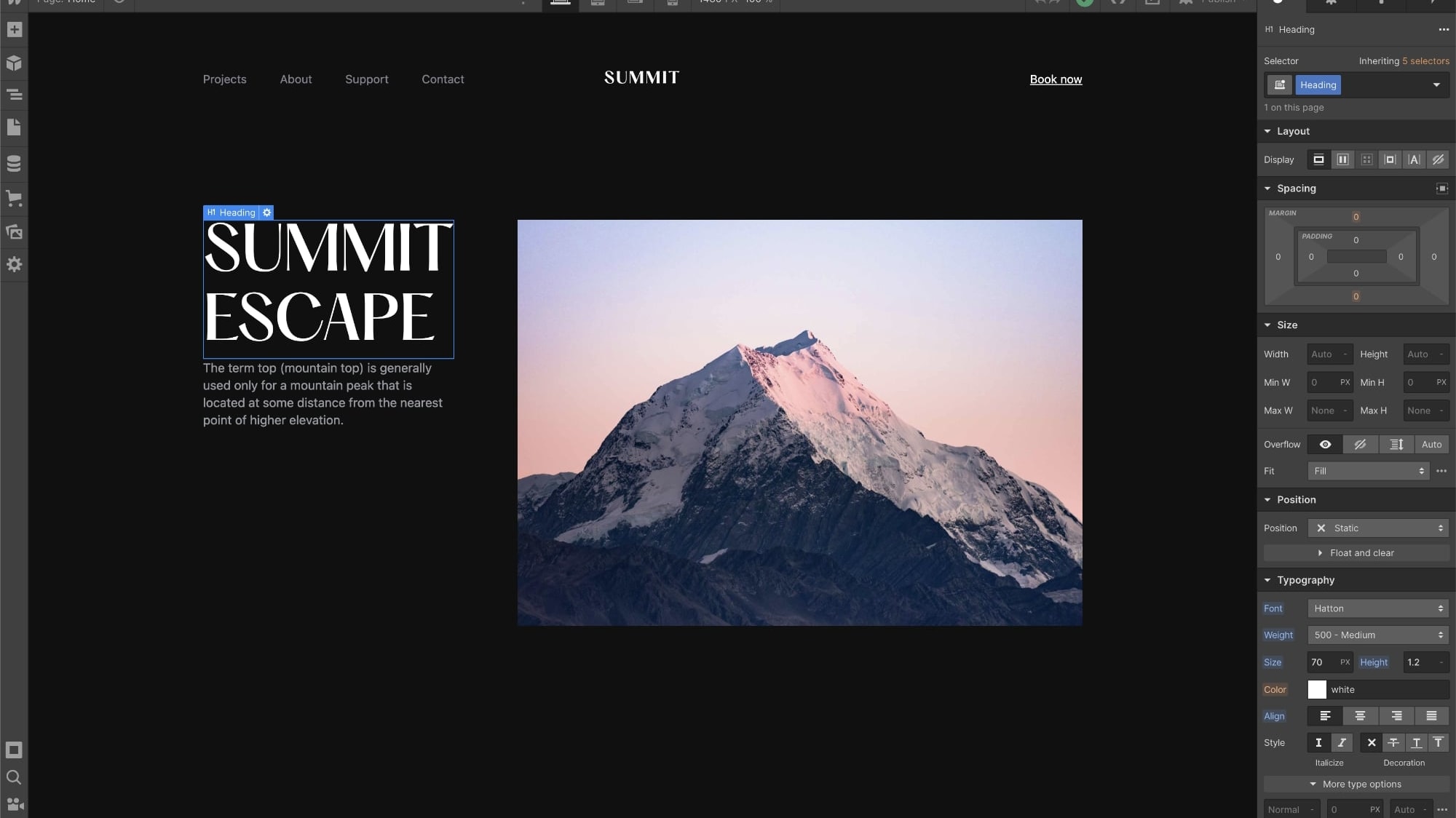
Webflow's No-Code Website Builder (HTML5, CSS3 and JavaScript)
Webflow
Build beautiful and powerful websites with Webflow
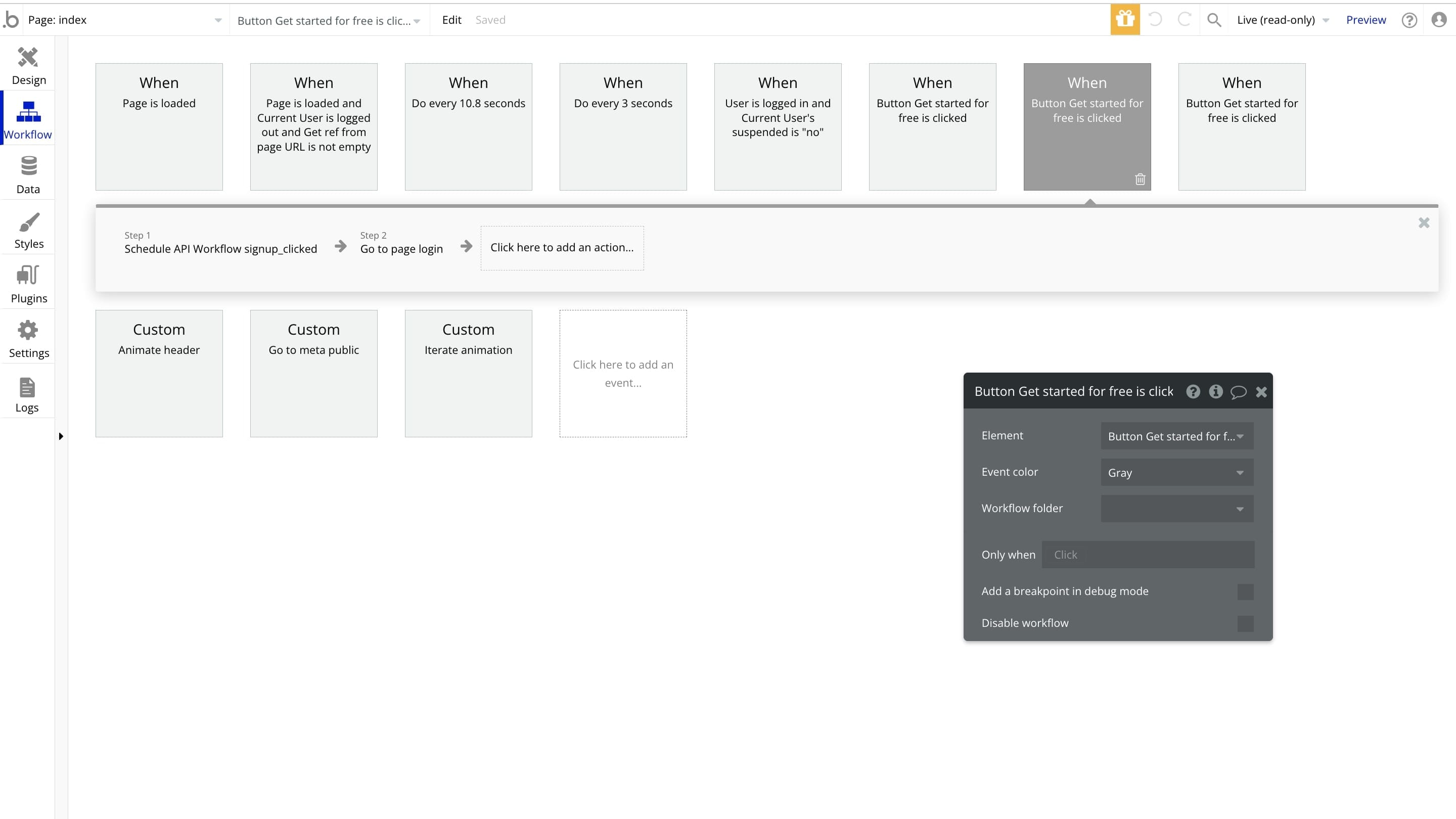
Logical Workflows on Bubble Allowing You to Determine Every Action and Reaction of your Application
Bubble
Bubble is a code-free programming language that lets you build and host web applications without engineers.
Webflow is a user website development platform that prioritizes design. It allows individuals to create adaptable websites without the need for coding expertise. With its array of tools users gain the ability to effortlessly design, construct and launch their websites. Its user-friendly interface allows for design of customizable layouts and seamless integration of animations and interactions. Additionally the platform excels, in its content management system (CMS) capabilities making it an ideal choice for websites, with content. One of the benefits of Webflow is its ability to generate code that is SEO optimized, ensuring optimal website performance.
Bubble is a visual programming platform that empowers individuals to construct web applications even without any coding expertise. It boasts a drag and drop interface enabling users to create intricate web applications by visually designing their logic and workflows. What's more, Bubbles robust backend capabilities seamlessly integrate databases, APIs and user authentication. Additionally the platform offers an array of ready-made plugins and templates making it a breeze to enhance web applications, with advanced features. Given Bubbles emphasis on application development it proves to be a choice for startups and entrepreneurs aiming to swiftly build and launch web applications.
When comparing Webflow and Bubble it's important to note that they both offer website development capabilities but have some differences. The main contrast lies in their approach to development. Webflow primarily focuses on empowering designers by enabling them to create appealing websites with optimized code. It gives designers control over design elements. On the other hand, Bubble targets users who want to build web applications without having to code. It places emphasis on developing logic and workflows making it a suitable choice for those with coding knowledge.
Webflow stands out in providing designers with a driven interface and generating code while Bubble empowers users to create web applications without the need for coding skills. By understanding these differences between the platforms, readers can choose the one that best aligns with their website development requirements.

Webflow
Used by 4902 members
40% off annual plans
Save up to $120

Bubble
Used by 1880 members
30% off on monthly plans for 1 year
Save up to $957
03 Webflow pros and cons
What are the advantages of Webflow?
- Design freedom: Webflow offers a highly intuitive visual design interface that allows you to create and customize websites with pixel-level precision. You have complete control over the design, which is great for designers who want creative freedom.

- Responsive design: Webflow promotes responsive design, making it easy to create websites that adapt to various screen sizes and devices. You can design for desktop, tablet, and mobile views within the same project.
- Hosting and CMS: Webflow provides hosting services and a built-in content management system (CMS), making it a one-stop solution for website creation and maintenance. This can save you time and effort compared to integrating third-party services.
- Interactions and animations: You can add interactive elements and animations without the need for custom code. Webflow's interactions allow for smooth transitions and engaging user experiences.
- E-commerce capabilities: Webflow's e-commerce features have improved, allowing you to build online stores with ease. It offers integration with popular payment gateways and supports various e-commerce functionalities.
What are the disadvantages of Webflow?
- Learning curve: While Webflow is user-friendly, it does have a learning curve, especially for beginners who might not be familiar with web design concepts. It can take time to become proficient.

- Pricing: Webflow's pricing can be relatively high, especially for professional or business plans. It may not be the most cost-effective solution for smaller projects or personal websites.
- Limited collaboration: Collaboration features are somewhat limited, which can be a drawback if you're working on larger projects with multiple team members. Co-editing capabilities are available, but there are restrictions.
- Export limitations: While Webflow allows you to export your code, it might not be as clean or easy to work with compared to starting a project from scratch with traditional coding.
- SEO and performance: While Webflow provides SEO tools, it might not be as robust as specialized SEO platforms. Additionally, optimizing performance, especially for complex sites, can require technical expertise.
Compare Webflow to other tools


Webflow vs Wix

Unbounce vs Webflow

Webflow vs WordPress.com

Webflow vs Squarespace

Softr vs Webflow
04 Bubble pros and cons
What are the advantages of Bubble?
- No-code development: Bubble is a true no-code platform, making it accessible to individuals with little to no coding experience. You can build complex web applications without writing a single line of code.
- Rapid prototyping: Bubble allows for rapid prototyping and development. You can create functional prototypes and even launch minimum viable products (MVPs) quickly, which is ideal for startups and entrepreneurs.
- Extensive plugin ecosystem: Bubble has a wide range of plugins and integrations, enabling you to extend the functionality of your web applications. You can integrate with various APIs, services, and databases to enhance your project.
- Scalability: While Bubble is often associated with rapid development, it can handle scalable applications. You can start small and grow your project as your user base increases, thanks to its scalable infrastructure.
- User management: Bubble provides built-in user authentication and management features, making it easy to create user registration and login systems, manage user roles, and implement security measures.
What are the disadvantages of Bubble?
- Learning curve: Despite being a no-code platform, Bubble still has a learning curve. It might take time to understand its visual programming concepts and build complex logic for your applications.
- Customization limitations: Bubble offers flexibility, but it may have limitations when it comes to highly specialized or unique functionality. Building advanced features might require workarounds or custom coding.
- Hosted environment: Your Bubble applications are hosted on Bubble's servers, which means you have less control over the hosting environment and might be subject to their uptime and downtime.
- Costs with scale: While Bubble can be cost-effective for small projects, as your application scales and requires more resources, the pricing can become relatively high, especially for larger projects.
- SEO challenges: SEO optimization can be more challenging in Bubble due to its dynamic and single-page application structure. Achieving top-notch SEO performance may require extra effort and technical know-how.
Compare Bubble to other tools


Bubble vs FlutterFlow

AppGyver vs Bubble

Bildr vs Bubble
Softr vs Bubble

Retool vs Bubble

Bubble vs Airtable
05 Webflow compared to Bubble
When comparing Webflow and Bubble, Webflow distinguishes itself with its design-focused approach and versatile website development capabilities. Webflow is the choice for users who value precise design control and the ability to create websites with pixel-level customization. Its responsive design features and integrated hosting make it an attractive option for those seeking a one-stop solution for web development.
Both Webflow and Bubble are potent no-code web development platforms, but your decision between the two depends on your specific needs. Webflow excels in offering a flexible and design-oriented solution, catering to users who want creative freedom and professional web design capabilities. In contrast, Bubble stands out for its no-code app-building prowess, making it a compelling choice for users aiming to create complex web applications without the need for traditional coding.
Is Webflow better than Bubble?
 Is Webflow better than Bubble?
Determining whether Webflow is better than Bubble depends on your specific web development needs. Webflow excels when design flexibility and control are paramount. It's a great choice for users who value pixel-level customization and responsive design features. If you prioritize professional web design capabilities and a visual approach to development, Webflow might be the superior option for your projects.
On the other hand, Bubble is notable for its no-code app-building capabilities. It shines when your goal is to create web applications with complex functionalities without writing code. Bubble offers a robust toolbox for app development, making it a compelling choice for those who prefer a no-code approach to building web applications.
What is Webflow best used for?
Webflow is a versatile and powerful web development tool best used for creating websites that demand precise design control and customization. It's an ideal choice for tasks such as building responsive and visually stunning websites, from simple portfolios and landing pages to complex e-commerce platforms.
Webflow excels in scenarios where users need a platform to bring their creative web design visions to life. Whether you're a professional web designer looking to create visually appealing sites or a business owner in need of an online presence with a unique design, Webflow's flexibility and design-oriented approach cater to a wide range of web development needs.
Can Webflow replace Bubble?
If you value a versatile and comprehensive approach to web development that extends beyond no-code app building, Webflow can be considered as a potential replacement for Bubble. Webflow's capability to create visually appealing and fully responsive websites with pixel-level design control makes it a suitable alternative for users looking for a more design-oriented and design-flexible web development platform.
However, if your primary objective is to create complex web applications with advanced functionalities without writing code, and you prefer the no-code approach to app development, Bubble may be a better fit for your specific needs. Bubble excels at no-code app building, making it a strong choice for users who want to develop web applications without the necessity for traditional coding.
Is Webflow cheaper than Bubble?
When comparing the pricing of Webflow and Bubble, it becomes evident that these two web development platforms follow distinct pricing structures.
Webflow offers a pricing model that includes both free and paid plans. The free plan provides limited functionality, while the paid plans offer additional features, including hosting and advanced design capabilities. Webflow's pricing scales based on factors like the number of projects and site traffic. For smaller-scale projects or personal websites, Webflow's free plan may be cost-effective. However, for larger or more complex projects, the cost can increase.
Bubble, on the other hand, follows a different pricing model. Bubble offers a free plan and a paid plan. Bubble's pricing depends on factors such as the number of app users and the level of support you require. Determining whether Webflow is cheaper than Bubble depends on your specific web development needs, the scale of your projects, and how each platform's pricing structure aligns with your budget and requirements.
Is there a better No-Code Development software than Webflow?
While Webflow is a powerful and versatile web development platform, it's worth exploring whether there might be a better-suited software for your specific web development needs.
Several noteworthy alternatives to Webflow in the web development space include WordPress, Wix, Squarespace, Shopify, and Weebly.
The choice of web development software depends on your individual or business requirements, including the type of website you're building, your familiarity with coding, and your design preferences. While Webflow offers design control and a visual development approach, other platforms may offer different features or ease of use that better align with your web development goals and preferences.

Webflow
Build beautiful and powerful websites with Webflow
40% off annual plans
Save up to $120
06 Bubble compared to Webflow
Bubble distinguishes itself with its no-code app-building capabilities, making it a valuable choice for those looking to create complex web applications without traditional coding. It's a compelling platform for individuals and teams seeking to develop custom apps, and Bubble offers a free plan for basic use, making it accessible to a wide range of users with varying app development needs and budgets.
The decision between Bubble and Webflow depends on your specific web development requirements. If you require a platform that focuses on no-code app development and offers robust database and logic capabilities, Bubble may be the better fit. On the other hand, if you value design flexibility, precise control over web design, and the ability to create visually stunning websites, Webflow could be the preferred option.
Is Bubble better than Webflow?
Determining whether Bubble is better than Webflow depends on your specific web development needs and priorities.
Bubble is known for its no-code app-building capabilities and is a strong choice for individuals and teams looking to create complex web applications without traditional coding. It provides robust database and logic capabilities, making it a versatile platform for app development.
The choice between Bubble and Webflow hinges on your web development goals. If you prioritize app development with a focus on functionality and data handling, Bubble may be the better fit. However, if you place a premium on web design and the ability to create visually appealing websites, Webflow could be the preferred option.
What is Bubble best used for?
Bubble is a versatile no-code app development platform primarily designed for individuals and teams seeking to create custom web applications without traditional coding. It excels in enabling users to build complex web applications with a wide range of functionalities, from databases and user authentication to complex logic and dynamic data handling. Bubble streamlines app development by providing a visual interface for designing and structuring applications.
With its no-code approach, Bubble is suitable for users who have app ideas but lack coding expertise or want to rapidly prototype and launch web applications. Whether for building startups, managing business processes, or creating web tools, Bubble enhances efficiency and empowers individuals and teams to bring their app ideas to life without the need for extensive coding knowledge.
Can Bubble replace Webflow?
Determining whether Bubble can replace Webflow depends on your specific web development requirements.
Bubble is a no-code app development platform focused on creating web applications with complex functionalities without the need for traditional coding. It provides a robust toolbox for app development, including database integration, user authentication, and dynamic data handling.
The decision to replace Webflow with Bubble or vice versa hinges on your web development goals. If your primary objective is to create visually appealing websites, Webflow remains the preferred option. However, if your focus is on app development and complex web application functionalities without coding, Bubble may effectively replace Webflow for your specific needs.
Is Bubble cheaper than Webflow?
Comparing the costs of Bubble and Webflow reveals that they follow different pricing models.
Bubble’s pricing structure includes a free plan and a paid plan. The cost of Bubble's paid plan depends on factors such as the number of app users and the level of support you require. This flexibility can make Bubble an economical choice, particularly for smaller apps or projects. As your app grows and requires more resources or user capacity, the costs may increase.
On the other hand, Webflow also has a pricing model with both free and paid plans. The pricing varies based on factors like the number of projects and site traffic. Webflow's pricing can be cost-effective for smaller-scale projects or personal websites on the free plan.
Is there a better No-Code Development software than Bubble?
While Bubble is a powerful no-code app development platform, it's crucial to explore whether there might be a more suitable software for your specific app development needs.
Several notable alternatives to Bubble in the no-code app development space include Adalo, OutSystems, Appy Pie, Wix and Airtable.
The choice of app development software depends on your specific project requirements, your familiarity with the platform, the level of customization needed, and your budget considerations. Each of these alternatives has its unique features and strengths, so it's important to assess which one aligns best with your app development goals and preferences.

Bubble
You don't need to be a coder to build software.
30% off on monthly plans for 1 year
Save up to $957
07 Features comparison
Webflow Surpasses Bubble in Customization

For instance, Webflow allows users to shape not only individual elements but also the layout and structure of their websites with pixel-level precision.
When it comes to customization, Webflow stands out as a clear winner. It provides an extensive suite of tools that empower users to tailor every aspect of their web designs to their exact specifications. For instance, Webflow allows users to shape not only individual elements but also the layout and structure of their websites with pixel-level precision. This level of control is invaluable for designers and businesses seeking a unique online presence.
Furthermore, Webflow offers robust SEO optimization features. Users can fine-tune SEO settings, customize meta tags, create SEO-friendly URLs, and optimize images for better online visibility. These SEO tools are essential for boosting a website's search engine ranking and driving organic traffic.
Bubble, while a strong platform for app development, has limitations in terms of customization and SEO optimization. While it does provide options for custom domains and branding, it lacks the depth of customization offered by Webflow. Additionally, Bubble's SEO optimization features are not as extensive, making it less suitable for users who prioritize online visibility and organic traffic.
Webflow Edges Out Bubble for Ease of Use
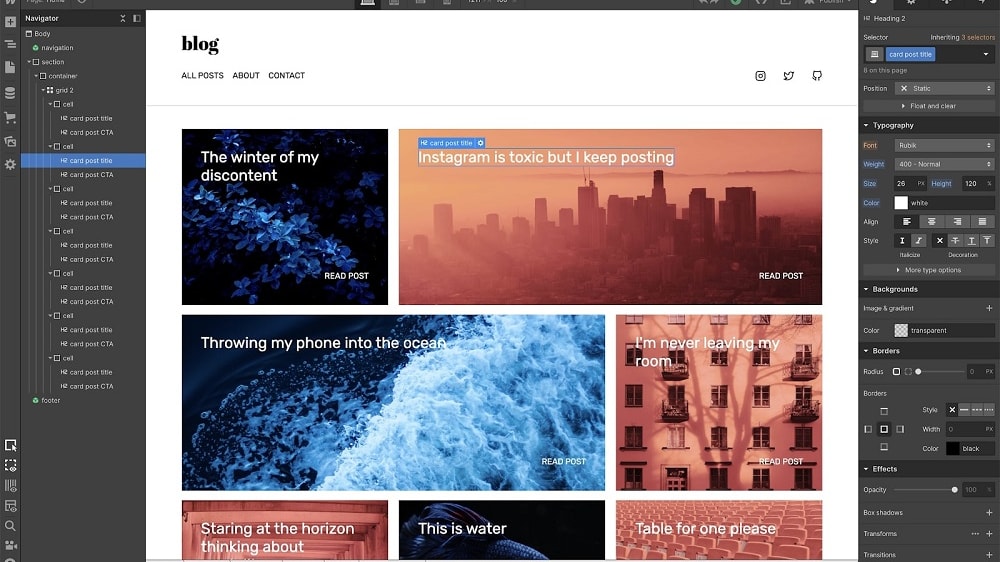
For instance, users can easily design responsive websites by visually adjusting elements in the web design canvas, and it doesn't require extensive coding knowledge.
Webflow excels over Bubble when it comes to user-friendliness. It provides a more intuitive platform for web development, making it a preferred choice for both novices and experienced developers. With its drag-and-drop functionality and a straightforward layout, Webflow simplifies the website building process. For instance, users can easily design responsive websites by visually adjusting elements in the web design canvas, and it doesn't require extensive coding knowledge.
On the other hand, while Bubble offers a drag-and-drop builder, its interface can be overwhelming, especially for beginners. It's packed with numerous features and options, which may confuse new users. In contrast, Webflow's clear and well-organized interface makes it an ideal choice for those starting their web development journey and looking for an easy-to-navigate yet powerful platform.
Bubble Trumps Webflow for Collaboration and Team Development

It offers a comprehensive suite of features that enable teams to work seamlessly together on projects.
In the realm of collaboration and team development, Bubble shines as the preferred choice. It offers a comprehensive suite of features that enable teams to work seamlessly together on projects. Users can assign roles, track changes, and leave comments, all within the platform. For instance, Bubble's role management allows project managers to assign specific tasks to team members, while tracking changes provides a clear view of project progress.
Bubble's robust collaborative tools make it an ideal platform for team-based projects, particularly for businesses that rely on seamless teamwork to achieve their goals. Conversely, Webflow does not highlight specific team collaboration features. While it excels in web design and development, it does not offer the same level of collaborative depth as Bubble.
Webflow Excels Ahead of Bubble in Animation and Interaction

Users can produce professional-grade animations effortlessly.
Webflow takes the lead in the realm of animation and interaction, offering an exceptional platform for web designers and developers to create visually stunning and interactive websites. What sets Webflow apart is its user-friendly approach to animation without the need for delving into CSS or JavaScript. Users can produce professional-grade animations effortlessly.
For example, Webflow's visual and intuitive interface allows users to apply various animation effects, from simple transitions to complex interactions. This flexibility empowers users to craft immersive web experiences, improving user engagement and aesthetics.
On the other hand, Bubble leans towards functionality over elaborate animations. While Bubble does allow responsive layouts and animations in a broader sense, it doesn't provide specific tools for advanced animations. Bubble primarily focuses on enabling users to build robust web applications without writing code.
Bubble Outdoes Webflow with its Database Management Capabilities
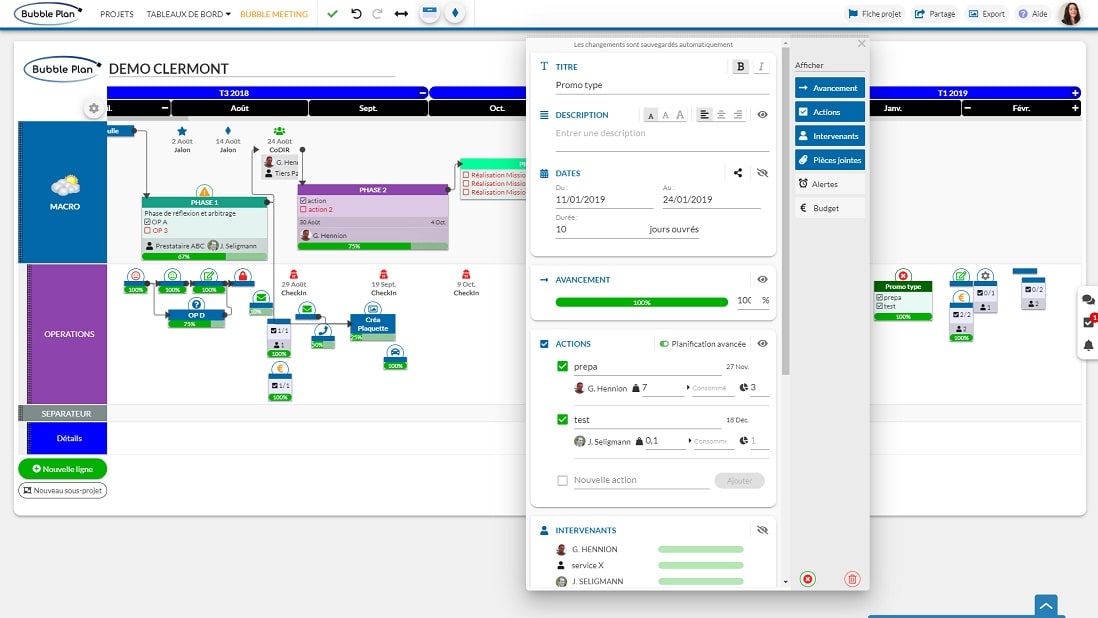
Bubble takes a decisive lead, particularly when handling complex data structures and intricate queries.
In the realm of database management, Bubble takes a decisive lead, particularly when handling complex data structures and intricate queries. Bubble's database management capabilities are nothing short of impressive. Users can define custom data types, create relationships between data objects, and perform intricate data manipulations with ease.
For example, Bubble allows users to create comprehensive databases that can handle complex data structures, making it a preferred choice for building web applications that rely heavily on data. Developers can establish relationships between different data types, set up rules for data validation, and execute complex queries to retrieve and manipulate data.
While Webflow does offer some data management capabilities, they don't match the depth and flexibility provided by Bubble. Webflow's primary focus is on web design and development, which includes basic database management for content-driven websites. Users can create collections, define fields, and integrate dynamic content into their websites, but it doesn't extend to the complex database structures and custom data types that Bubble offers.
Both Webflow and Bubble Shine with their Drag-and-Drop Editor

On the other hand, Bubble's drag-and-drop editor provides users with the flexibility to create responsive layouts and visually build web applications.
In the world of web development, both Webflow and Bubble stand out with their exceptional drag-and-drop editors, giving users the power to design and customize pages without the need for coding expertise. This drag-and-drop functionality simplifies the web development process, making it accessible to a broader audience.
For instance, Webflow's drag-and-drop editor allows users to create pixel-perfect designs with precision. It enables users to place elements exactly where they want them, adjust spacing, and fine-tune the layout to achieve the desired aesthetics. This level of control is invaluable for designers who demand pixel-level precision in their web designs.
On the other hand, Bubble's drag-and-drop editor provides users with the flexibility to create responsive layouts and visually build web applications. While Bubble's primary focus is on app development, its drag-and-drop capabilities empower users to design user interfaces and arrange elements with ease.
Bubble Outperforms Webflow with its Integration Variety

Bubble's open API allows for integration with a wide array of services, providing entrepreneurs and developers with unparalleled flexibility.
When it comes to integration capabilities, Bubble outshines Webflow with its remarkable versatility. In today's digital landscape, seamless integration with various services is not just an advantage but often a necessity. Bubble's open API allows for integration with a wide array of services, providing entrepreneurs and developers with unparalleled flexibility.
For instance, Bubble allows users to seamlessly integrate databases, authentication systems, payment gateways, and external APIs, giving them the freedom to create complex web applications without traditional coding. This level of flexibility enables businesses to optimize their website's performance and functionality by connecting with diverse third-party services.
Webflow, while still a formidable platform, provides a respectable number of integrations. It offers connections to popular services like Google Analytics, MailChimp, and Zapier, which are essential for many businesses. However, its integration capabilities are not as expansive as Bubble's.
08 Webflow vs Bubble: Which is the best for your business?
Webflow is the best tool for you if:
- As a designer, you're searching for an interface that places a strong emphasis on visual appeal when crafting websites with pixel-perfect precision
- Your goal is to have complete control over design elements and the ability to customize them as needed, down to the finest detail
- You prioritize not only code that enhances search engine optimization but also ensures the website's optimal performance for a seamless user experience
- Having content management system (CMS) capabilities at your disposal is essential, particularly for content-driven websites with dynamic content needs
- Ideally, you prefer a platform that's user-friendly and doesn't necessitate coding expertise, allowing you to bring your creative vision to life effortlessly
 As a designer, you're searching for an interface that places a strong emphasis on visual appeal when crafting websites with pixel-perfect precision
Bubble is the best tool for you if:
- You aspire to build web applications from scratch without any prior coding knowledge or experience, making development accessible
- You require the creation of intricate logic and workflows for your web application to handle complex business processes efficiently
- Seamlessly integrating databases, APIs, and user authentication is a top priority for your application's functionality and data management
- You appreciate a rich repository of pre-built plugins and templates, offering advanced features that enhance your web application's capabilities
- You're a startup or entrepreneur seeking rapid application development and a quick launch, allowing you to bring your ideas to market swiftly
Webflow
Used by 4902 members
40% off annual plans
Save up to $120
Bubble
Used by 1880 members
30% off on monthly plans for 1 year
Save up to $957
09 Alternatives to Webflow & Bubble

Carrd
Used by 2509 members
30% off for 1 year
Save up to $300

Framer
Used by 2522 members
1 year free on the Pro Plan
Save up to $360

Shopify
Used by 2471 members
$1/month for the first 3 months + 25% off annual plans
Save up to $2,734

Wix
Used by 993 members
10 Promotions on No-Code Development software
Webflow and Bubble are great tools, but Secret offers promo codes with discounts on over 2240+ different SaaS solutions. New deals are added regularly, helping you save money on your online subscriptions. Get access to codes for other No-Code Development software you might want to purchase

Make promotion
3 months free on the Teams plan (240k credits included)

Promo codes for Softr
20% off monthly or annual Professional plan

Airtable deal
$1,000 in credits on licences for 1 year

Notion discounts
3 months free on the Business plan with Unlimited AI

bolt.new coupon code
20% off all plans for the first 3 months

Pagemaker promo code 2026
30% off for 1 year

Coda free credits
7 days free + 15% off annual plans

Retool promotion
1 year free on the monthly Team or Business plan

Storylane promo code
20% off annual plans

Credits for Array
6 months free on the Essential plan
Start saving on the best SaaS
Secret has already helped tens of thousands of startups save millions on the best SaaS like Microsoft Teams, Google Workspace & many more. Join Secret now to buy software the smart way.