


Website builders are essential for creating a strong online presence, but choosing the right one can be challenging. In this comparison, we'll explore two of the top contenders, Webflow vs. Wix. These platforms empower users to design and launch websites efficiently, but their approaches and features vary significantly.
Join us as we delve into a comprehensive analysis of Webflow and Wix, examining their features, advantages, disadvantages, and primary use cases. Whether you're a seasoned developer or a novice, this comparison will provide the insights you need to make an informed decision about the best website builder for your project.
- 01 Webflow vs Wix: overview
- 02 What's the difference between Webflow and Wix?
- 03 Webflow pros and cons
- 04 Wix pros and cons
- 05 Webflow compared to Wix
- 06 Wix compared to Webflow
- 07 Features comparison
- 08 Webflow vs Wix: Which is the best for your business?
- 09 Alternatives to Webflow & Wix
- 10 Promotions on No-Code Development software
Start saving on the best SaaS
Secret has already helped tens of thousands of startups save millions on the best SaaS like Microsoft Teams, Google Workspace & many more. Join Secret now to buy software the smart way.

01 Webflow vs Wix: overview
Webflow and Wix are prominent contenders in the world of website-building platforms, each with its own set of unique features and advantages tailored to a wide range of web design needs.
Webflow is celebrated for its design flexibility and advanced customization options. It caters to users, including designers and developers, seeking complete creative control over their websites. Webflow supports both visual design and coding, making it an excellent choice for those who want to craft unique, responsive designs. Conversely, Wix excels in providing a user-friendly, all-in-one website-building experience. It offers a wide variety of professionally designed templates and an intuitive drag-and-drop editor. This simplicity makes it an ideal choice for beginners and individuals who want a hassle-free website creation process.
Let's delve deeper into the Webflow vs. Wix comparison to help you make an informed decision when choosing the right website-building platform for your specific web design needs.

Templates
Wix has hundreds more templates and pre-built blocks than Webflow does. You can get decent templates from Webflow, but its library is not as comprehensive.

Webflow
Wix
Ease of Use
Webflow is more customizable, so Wix’s user interface is easier to comprehend. But both apps are designed to be user-friendly.
Webflow
Wix
Customer Reviews
Webflow and Wix have a similar score from most review aggregators, ranging between 4-4.5 stars. Webflow has a better score on some platforms, but it’s a marginal difference.
Webflow
Wix
Integrations
Wix integrates with hundreds more apps than Webflow, but both tools feature crucial third-party add-ons like Zapier and Stripe.
Webflow
Wix
Customization
Webflow gives you access to a page’s code, which means more control over how your site looks. Wix doesn’t have the same level of customization, relying more on templates.
Webflow
Wix
Ecommerce
Both platforms have a decent Ecommerce suite, but Wix offers way more features for online stores.
Webflow
Wix
Customer Support
Both Webflow and Wix offer robust customer service, including live phone support. However, that feature is only available to Enterprise clients in Webflow.
Webflow
Wix
Extra Features
Wix gets ahead of Webflow in emerging technologies. They have an AI-powered website design tool that you can use to build your site faster.
Webflow
Wix
Pricing Plan
Webflow and Wix have a similar price point, and offer more or less the same features for under $20 per month. They also have a free plan, so you can try the tools without committing to anything.
Webflow
Wix
Performance
Webflow is optimized for clean code and good performance. Compared to Wix (and other similar drag-and-drop builders) it boasts slightly better loading times.
Webflow
Wix
02 What's the difference between Webflow and Wix?
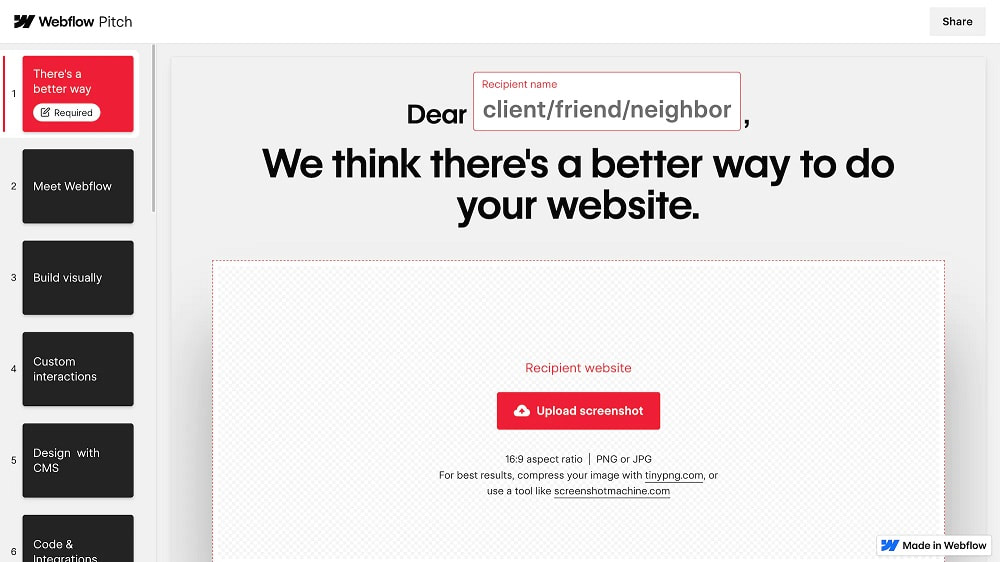
Webflow gives you more control over your pages, thanks to its advanced editor.
Webflow
Build beautiful and powerful websites with Webflow
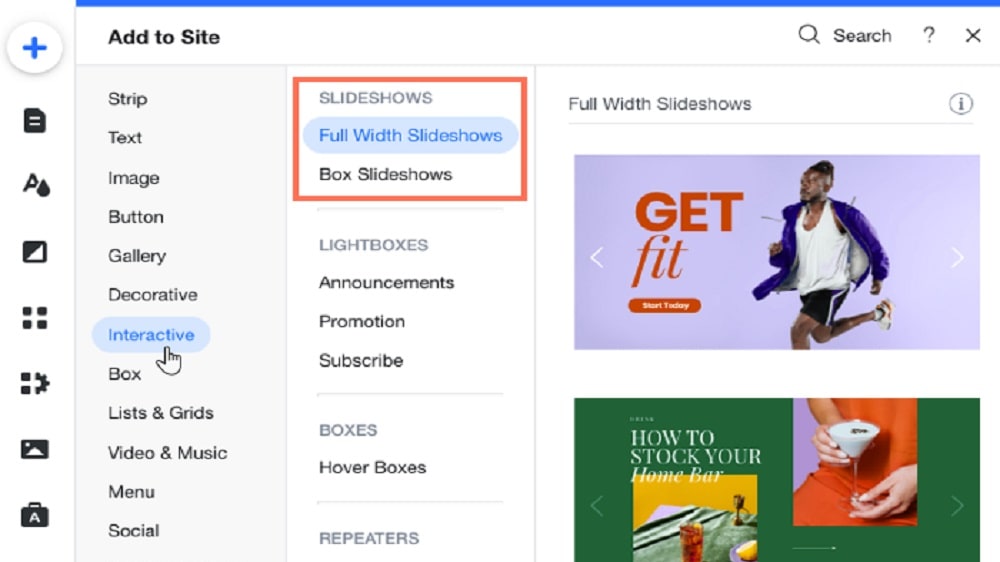
Wix also offers more features for Ecommerce sites
Wix
The all-in-one Wix tool offers you the possibility to develop your professional website. You can develop your presence on the internet or increase your sales in a simple and effective way.
Webflow and Wix have a lot of similarities. They’re both user-friendly, offer great support for ecommerce, and even have similar pricing plans.
But they’re also built for different people. Webflow gives you more control over your pages, thanks to its advanced editor. You can even add snippets of CSS, HTML and JavaScript to your site. This makes it ideal for designers and people with some experience building sites.
Not to mention, all of this control doesn’t mean you have to be extra careful about performance. Webflow’s pages feature simple code, and its performance is slightly better than that of other drag-and-drop builders. This is especially important if you care about SEO.
Wix tries to make up for it by providing way more templates than Webflow. These templates are helpful, however they don’t compare to the level of control you get with Webflow’s editor.
But this is a double-edged sword. The complex features of Webflow can make it intimidating for beginners, while Wix is much easier to use. If you don’t have any experience building sites, you’re better off with Wix.
Plus, Wix also offers more features for Ecommerce sites. For example, you get unlimited product listings, and the ability to charge your audience for subscription plans.
If you need to throw a beautiful site together, but you have no experience in the field, Wix is better than Webflow. Especially if you plan to open an online store. But if you’re not scared of adding CSS snippets, Webflow will give you more customization options.

Webflow
Build beautiful and powerful websites with Webflow
40% off annual plans
Save up to $120
03 Webflow pros and cons
What are the advantages of Webflow?
- Design freedom: Webflow offers unparalleled design flexibility and customization options, allowing you to create truly unique and visually stunning websites.

- Advanced interactions: It provides advanced interactions and animations without the need for extensive coding, enabling you to build interactive and engaging web experiences.
- Responsive design: Webflow makes it easy to create responsive websites that adapt seamlessly to various screen sizes and devices.
- Hosting included: Webflow provides hosting as part of its service, ensuring your website is hosted on a fast and secure platform.
- Robust e-commerce: Webflow's e-commerce features are robust and customizable, making it suitable for building online stores.
What are the disadvantages of Webflow?
- Learning curve: Webflow has a steeper learning curve, especially for beginners, due to its advanced design capabilities.

- Pricey: It can be relatively expensive, especially when compared to some other website builders.
- Limited third-party integrations: Webflow has fewer third-party integrations compared to platforms like WordPress, which may limit some functionality.
- Content export complexity: Exporting your content from Webflow can be challenging, making it less flexible for migration to other platforms.
- Maintenance required: Unlike fully managed platforms, Webflow may require more hands-on maintenance and updates, especially for complex websites.
Compare Webflow to other tools


Unbounce vs Webflow


Webflow vs Bubble

Webflow vs WordPress.com

Webflow vs Squarespace

Softr vs Webflow
04 Wix pros and cons
What are the advantages of Wix?
- User-friendly: Wix is known for its user-friendly interface and intuitive drag-and-drop website builder, making it accessible to beginners.
- Variety of templates: It offers a wide selection of professionally designed templates for various industries and purposes, saving time on design.
- App market: Wix has an extensive app market that allows users to add various functionalities and features to their websites easily.
- Hosting included: Hosting is included in Wix's plans, simplifying the website setup process.
- Affordability: Wix offers a range of pricing plans, including a free option, making it budget-friendly for individuals and small businesses.
What are the disadvantages of Wix?
- Limited design freedom: While user-friendly, Wix may limit design flexibility for those seeking highly customized and unique website designs.
- Template switching difficulties: Once a template is chosen, switching to a different one can be challenging, and it may require rebuilding parts of the website.
- Ads on free plan: Wix's free plan includes Wix-branded ads on your website, which can be distracting for visitors.
- SEO limitations: While improving, Wix has historically had limitations in terms of SEO optimization compared to some other platforms.
- E-commerce transaction fees: On lower-tier e-commerce plans, Wix charges transaction fees, which can impact profitability for online stores.
Compare Wix to other tools


Wix vs Flipsnack

Wix vs Jimdo

Wix vs Sellfy
Unbounce vs Wix
Wix vs Squarespace

Hostinger vs Wix
05 Webflow compared to Wix
Webflow and Wix are both popular website-building platforms, but they cater to different needs. Webflow is renowned for its design flexibility, making it an ideal choice for designers and developers seeking complete creative control. It supports both visual design and coding, offering the ability to craft unique, responsive websites.
In contrast, Wix is user-friendly, featuring a drag-and-drop editor and a wide selection of templates. It's perfect for beginners and those who prioritize ease of use. Choosing between Webflow and Wix depends on your design preferences and technical proficiency. Webflow offers more customization, while Wix emphasizes simplicity and accessibility.
Is Webflow better than Wix?
 Is Webflow better than Wix?
Determining whether Webflow is better than Wix depends on your specific web design needs. Webflow stands out for its unparalleled design flexibility and advanced customization options, making it an excellent choice for designers and developers who seek complete creative control. It supports both visual design and coding, offering the ability to craft unique, responsive websites.
Conversely, Wix excels in user-friendliness with its intuitive drag-and-drop editor and a vast array of templates. It's ideal for beginners and individuals who prioritize ease of use. The choice between Webflow and Wix ultimately hinges on your design preferences, technical proficiency, and the level of customization you require for your website. Both platforms have their strengths.
What is Webflow best used for?
Webflow is best used for creating highly customized and visually stunning websites. It's an ideal platform for web designers, developers, and creative professionals who value complete creative control over their projects. With Webflow, you can craft unique and responsive designs without the need for extensive coding knowledge. It's perfect for building portfolios, business websites, e-commerce stores, and other complex web applications.
Webflow also excels in supporting responsive design, making it suitable for creating sites that look and function seamlessly across various devices. In summary, Webflow is best utilized when you want to push the boundaries of web design and create tailored, one-of-a-kind websites.
Can Webflow replace Wix?
Whether Webflow can replace Wix depends on your specific web design needs. Webflow offers advanced design flexibility and customization options, making it a compelling choice for designers and developers seeking complete creative control over their websites. It supports both visual design and coding, allowing for highly customized and unique designs.
On the other hand, Wix prioritizes user-friendliness with its drag-and-drop editor and a wide range of templates, making it an excellent choice for beginners and those who value simplicity. While Webflow can replace Wix for those who require more advanced design and customization options, it may have a steeper learning curve.
Is Webflow cheaper than Wix?
When it comes to cost, Webflow and Wix have different pricing structures, and which one is cheaper depends on your specific needs. Wix offers a free plan with Wix-branded ads and limited features, making it budget-friendly for basic websites. However, for advanced features like e-commerce, you'll need to subscribe to one of their premium plans.
Webflow’s pricing structure, on the other hand, provides pricing flexibility with various plans catering to different needs, including a free plan with limitations. While it offers advanced features, it can be relatively expensive compared to Wix. In summary, determining which is cheaper depends on the features and resources you require for your website project, so it's crucial to evaluate your budget and needs carefully.
Is there a better No-Code Development software than Webflow?
Determining if there's a "better" software than Webflow depends on your specific web design and hosting needs. Webflow is renowned for its design flexibility and advanced customization options, making it an excellent choice for designers and developers seeking complete creative control. It supports both visual design and coding, offering the ability to craft unique and responsive websites.
However, alternatives to Webflow like Wix, Bubble, HubSpot CMS, and Squarespace may be more suitable for certain users. Wix offers a user-friendly, drag-and-drop website builder, while Squarespace prioritizes design aesthetics and simplicity. The choice of the "better" software hinges on your design preferences, technical expertise, and the level of customization you require for your website project.
Webflow
Build beautiful and powerful websites with Webflow
40% off annual plans
Save up to $120
06 Wix compared to Webflow
Wix and Webflow are both prominent website-building platforms, but they cater to different users. Wix stands out for its user-friendly interface, featuring a drag-and-drop website builder and a wide range of templates, making it accessible to beginners and those who prioritize ease of use. It's an excellent choice for individuals and small businesses seeking a hassle-free website-building experience.
In contrast, Webflow excels in design flexibility and customization options. It's a preferred choice for web designers and developers who want complete creative control. Webflow supports both visual design and coding, enabling the creation of highly customized and unique websites. Your choice between Wix and Webflow depends on your design preferences and technical proficiency.
Is Wix better than Webflow?
Deciding whether Wix is better than Webflow depends on your specific web design needs. Wix is user-friendly, featuring a drag-and-drop editor and a wide variety of templates, making it an excellent choice for beginners and those who prioritize ease of use. It simplifies website creation and is ideal for individuals and small businesses seeking a straightforward website-building experience.
On the other hand, Webflow offers advanced design flexibility and customization options, making it a preferred choice for web designers and developers who want complete creative control. It supports both visual design and coding, allowing for highly customized and unique websites. The choice between Wix and Webflow ultimately comes down to your design preferences, technical expertise, and the level of customization required for your website project.
What is Wix best used for?
Wix is best used for creating websites with ease and efficiency, making it an excellent choice for individuals, small businesses, and entrepreneurs. Its user-friendly drag-and-drop editor and a diverse range of professionally designed templates simplify the website-building process. Wix is ideal for those who prioritize a hassle-free online presence, whether it's for personal portfolios, blogs, small e-commerce stores, or informational websites.
The platform offers a comprehensive ecosystem, including hosting, domain registration, and various apps, making it an all-in-one solution. Wix caters to users seeking an accessible, budget-friendly, and visually appealing approach to web design and online visibility.
Can Wix replace Webflow?
Whether Wix can replace Webflow depends on your specific web design requirements. Wix offers user-friendly features like a drag-and-drop editor and a wide array of templates, making it an excellent choice for beginners and those who prioritize ease of use. However, Webflow stands out for its design flexibility and advanced customization options, catering to web designers and developers seeking complete creative control. Webflow supports both visual design and coding, enabling the creation of highly customized and unique websites.
In summary, while Wix is a solid choice for straightforward web design needs, it may not replace Webflow for those who require advanced design and customization capabilities.
Is Wix cheaper than Webflow?
When it comes to cost, Wix and Webflow have different pricing structures, and which one is cheaper depends on your specific needs. Wix’s pricing structure offers a free plan with Wix-branded ads and limited features, making it budget-friendly for basic websites. However, for advanced features like e-commerce, you'll need to subscribe to one of their premium plans.
Webflow, on the other hand, provides pricing flexibility with various plans catering to different needs, including a free plan with limitations. While it offers advanced features, it can be relatively expensive compared to Wix. In summary, determining which is cheaper depends on the features and resources you require for your website project, so it's crucial to evaluate your budget and needs carefully.
Is there a better E Commerce software than Wix?
Determining if there's a superior software to Wix depends on your specific web design and hosting needs. Wix offers a user-friendly drag-and-drop website builder and a wide range of templates, making it accessible to beginners and those who prioritize ease of use. It's suitable for individuals and small businesses seeking a straightforward website-building experience.
However, alternatives to Wix like Webflow, Hostinger, Bubble, and Squarespace may be more suitable for certain users. Webflow provides advanced design flexibility and customization options, while Squarespace prioritizes design aesthetics and simplicity. The choice of the most fitting website-building software depends on your unique design preferences, technical expertise, and the level of customization required for your website project.
07 Features comparison
Webflow and Wix are Equal at Providing Custom Animations

Webflow offers an intuitive animation timeline that simplifies the process of creating and fine-tuning animations
Both Webflow and Wix empower users to incorporate custom animations into their websites effortlessly, regardless of their coding proficiency. These animations enhance user engagement, adding a dynamic and professional touch to the web experience. Users can create animations such as scroll-triggered effects, hover animations, and more, all through user-friendly interfaces.
For instance, Webflow offers an intuitive animation timeline that simplifies the process of creating and fine-tuning animations. Similarly, Wix provides an easy-to-use animation editor that allows users to add movement and interactivity to their site elements.
The ease of use and the results provided by both tools in the realm of website animations are comparable, making it a tie between Webflow and Wix.
Wix Excels in User-Friendliness Compared to Webflow

Wix offers a remarkably user-friendly experience.
When it comes to ease of use, Wix outshines Webflow, making it an excellent choice, especially for beginners. Webflow, while powerful, boasts a more intricate set of advanced features and customization options, making it less accessible for those new to web design. In contrast, Wix offers a remarkably user-friendly experience. Its intuitive drag-and-drop interface empowers even individuals with no coding experience to craft professional-looking websites swiftly.
Wix's user-centric approach is complemented by a well-designed dashboard that simplifies navigation. This cohesive ecosystem caters to users who prioritize simplicity over complexity. For startups and those seeking an accessible yet potent platform for establishing an online presence, Wix proves to be an attractive choice.
Wix offers a remarkably user-friendly experience.
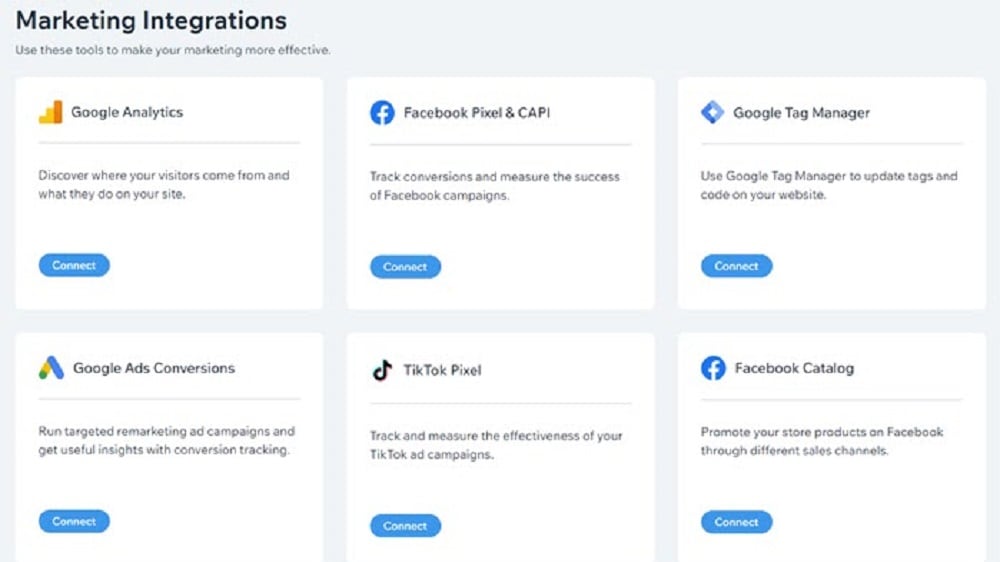
Wix offers a robust ecosystem with a wide array of third-party apps and services that users can seamlessly integrate into their websites
When it comes to integration possibilities, Wix takes the lead in this head-to-head comparison. Wix offers a robust ecosystem with a wide array of third-party apps and services that users can seamlessly integrate into their websites. Whether it's connecting with popular marketing tools, e-commerce platforms, or social media networks, Wix provides an extensive selection of options.
For instance, Wix offers integrations with email marketing services like Mailchimp and e-commerce solutions like Shopify. This versatility allows users to enhance their websites with various functionalities without the need for extensive coding or technical expertise.
In contrast, while Webflow offers integration capabilities, its selection may be more limited in comparison to Wix. For those seeking versatility and wide-ranging integration potential, Wix proves to be the better option for streamlining their web design workflow and expanding their website's functionality.
Webflow's Visual Website Builder is More Intuitive than Wix
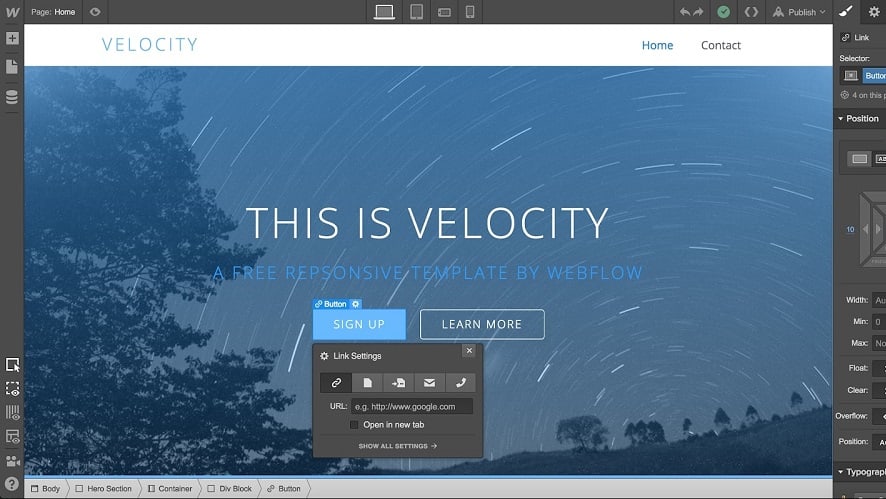
Webflow stands out for its intuitive, drag-and-drop visual website builder.
When it comes to user-friendliness in website building, Webflow stands out for its intuitive, drag-and-drop visual website builder. This feature enables users to create websites without requiring any coding skills, making it accessible to a wide range of individuals, from beginners to experienced designers.
Wix also offers a similar drag-and-drop editor, but Webflow's interface shines in terms of usability and flexibility. Its seamless workflow and user-friendly design system make it easier for users to understand and utilize effectively. Webflow's robust yet user-centric approach gives it a clear advantage over Wix, especially for those who prioritize a smooth and intuitive website design experience.
Wix Surpasses Webflow in Offering Comprehensive Support
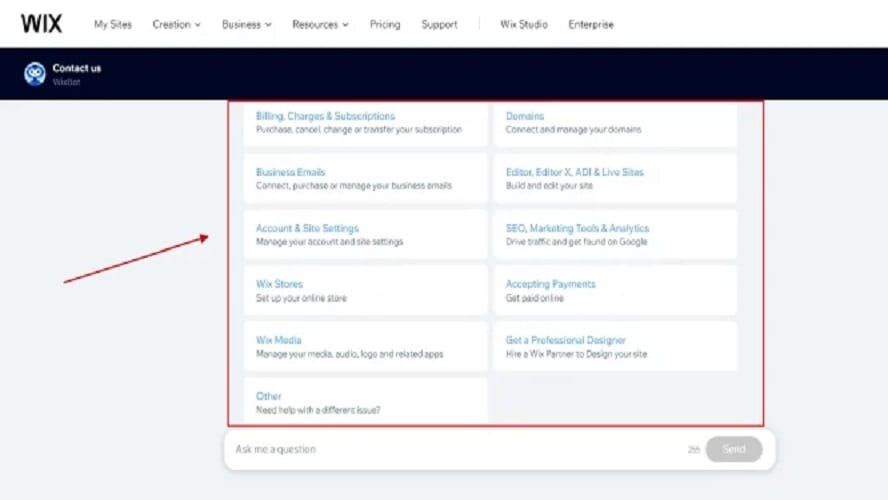
Wix boasts an extensive support center filled with a wealth of articles, tutorials, and resources, empowering users to find answers promptly and master the platform more efficiently.
In the realm of customer support, Wix takes the lead when compared to Webflow. Wix boasts an extensive support center filled with a wealth of articles, tutorials, and resources, empowering users to find answers promptly and master the platform more efficiently. This comprehensive support ecosystem caters to users of all levels, from beginners to advanced designers.
For instance, Wix offers step-by-step guides on various topics, video tutorials, and a vibrant community forum where users can seek help and exchange insights.
While Webflow also provides customer support, the depth and accessibility of Wix's support resources make it superior, ensuring that users can navigate the platform with confidence and receive assistance whenever needed.
Webflow's SEO Optimization is More Robust than Wix

Webflow offers custom meta tags, SEO-friendly URLs, alt text optimization for images, and more, empowering users to enhance their website's visibility on search engines.
When it comes to SEO optimization, Webflow and Wix both provide valuable tools, but Webflow takes the lead with its comprehensive set of features. Webflow offers custom meta tags, SEO-friendly URLs, alt text optimization for images, and more, empowering users to enhance their website's visibility on search engines.
For instance, Webflow allows users to customize meta titles and descriptions for individual pages, helping improve click-through rates in search results. It also offers control over URL structures, a crucial aspect of SEO.
While Wix does provide SEO tools, the granularity and comprehensiveness of Webflow's offerings outpace Wix, making Webflow the superior choice for users seeking robust SEO optimization capabilities to boost their website's search engine rankings.
Wix's Analytics Offers More Comprehensive Data than Webflow
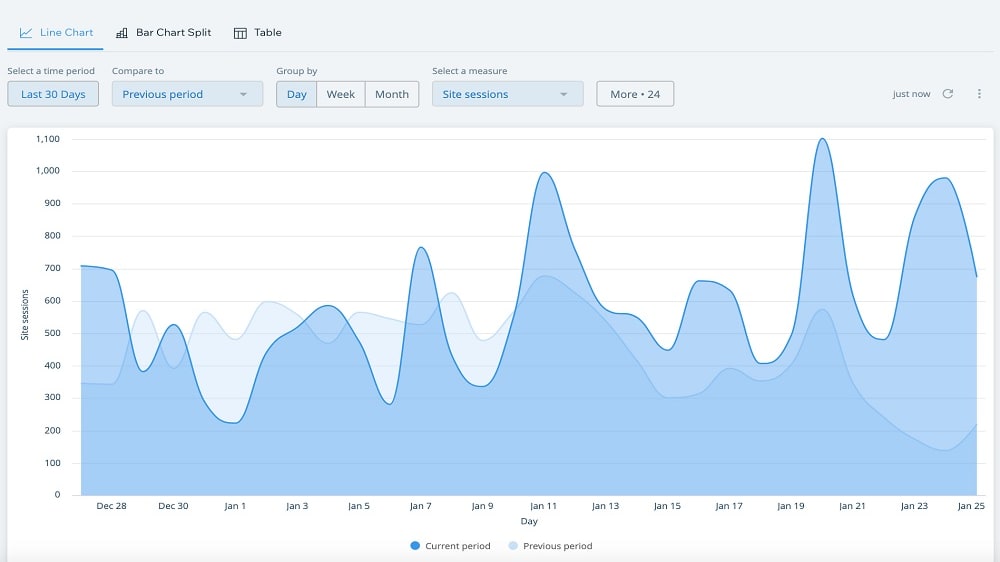
Wix's analytics empower users to gain comprehensive data about their websites, enabling a deeper understanding of visitor behavior and preferences.
In the realm of website analytics, Wix emerges as a powerful contender, offering robust insights presented through an easily accessible dashboard. Wix's analytics empower users to gain comprehensive data about their websites, enabling a deeper understanding of visitor behavior and preferences. This understanding, in turn, allows users to enhance the user experience, foster customer loyalty, and effectively manage their online businesses.
For instance, Wix provides data on visitor demographics, traffic sources, popular content, and more, helping users make informed decisions to optimize their websites.
While Webflow also offers analytics features, the depth and accessibility of Wix's insights give it a competitive advantage. For users seeking comprehensive data to drive website improvements, Wix proves to be a valuable tool.
08 Webflow vs Wix: Which is the best for your business?
Webflow is the best tool for you if:
- You are a web designer or developer looking for unparalleled creative control over your projects, enabling you to craft unique and visually captivating websites.
- You want to create highly customized and visually striking websites without requiring extensive coding expertise, empowering you to bring your design visions to life effortlessly.
- Ensuring responsive design across a variety of devices is crucial for your website, Webflow's comprehensive tools and features cater to this priority, ensuring an optimal user experience.
- You value the flexibility to combine visual design with coding for unique designs.
- You appreciate a platform that provides advanced customization options, even if it entails a learning curve, as it offers an extensive range of features for creating exceptional websites.
 You are a web designer or developer looking for unparalleled creative control over your projects, enabling you to craft unique and visually captivating websites.
Wix is the best tool for you if:
- You're a beginner or lack extensive technical knowledge in web design, offering a user-friendly interface that simplifies website creation.
- You require a quick website setup with its intuitive drag-and-drop builder, ensuring efficiency and ease in the design process.
- You prioritize a straightforward and hassle-free website-building experience.
- You're drawn to a platform that boasts an extensive library of templates and integrations, Wix provides a wide array of options to suit various website needs.
- You want an all-in-one solution for hosting, domain registration, and website creation to streamline the process of establishing your online presence efficiently
Webflow
Build beautiful and powerful websites with Webflow
40% off annual plans
Save up to $120
09 Alternatives to Webflow & Wix

Framer
Used by 2591 members
1 year free on the Pro Plan
Save up to $360

Carrd
Used by 2531 members
30% off for 1 year
Save up to $300

Shopify
Used by 2515 members
$1/month for the first 3 months + 25% off annual plans
Save up to $2,734

Bubble
Used by 1890 members
30% off on monthly plans for 1 year
Save up to $957
10 Promotions on No-Code Development and E Commerce software
Webflow and Wix are great tools, but Secret offers promo codes with discounts on over 2250+ different SaaS solutions. New deals are added regularly, helping you save money on your online subscriptions. Get access to codes for other No-Code Development and E Commerce software you might want to purchase

Make discounts
3 months free on the Teams plan (240k credits included)
Shopify promotion
$1/month for the first 3 months + 25% off annual plans

Softr coupon code 2026
20% off monthly or annual Professional plan

Stripe promo code
$500 in credits
Bubble discounts
30% off on monthly plans for 1 year

ShipBob promo code
$1,000 in shipping credits

Airtable promo code 2026
$1,000 in credits on licences for 1 year

Spocket free credits
25% off for 3 months

Deal for Notion
3 months free on the Business plan with Unlimited AI

Squarespace offer
50% off across Core, Plus and Advanced plans
Start saving on the best SaaS
Secret has already helped tens of thousands of startups save millions on the best SaaS like Microsoft Teams, Google Workspace & many more. Join Secret now to buy software the smart way.