


If you're in the market for a website builder that allows you to craft a personal blog, a business site, or an online store without delving into the complexities of coding, you're faced with many options. Among these, Wix and Jimdo stand out as two of the leading platforms, each offering a unique set of tools and features tailored to various needs and skill levels.
Deciding between Wix and Jimdo can be challenging, as both platforms provide a robust suite of functionalities designed to help you create a professional-looking website with ease. To assist you in making an informed decision, we delve into a detailed comparison of Wix vs. Jimdo, covering everything from their design flexibility and ease of use to pricing structures, eCommerce capabilities, and SEO tools.
- 01 Wix vs Jimdo: overview
- 02 What's the difference between Wix and Jimdo?
- 03 Wix pros and cons
- 04 Jimdo pros and cons
- 05 Wix compared to Jimdo
- 06 Jimdo compared to Wix
- 07 Features comparison
- 08 Wix vs Jimdo: Which is the best for your business?
- 09 Alternatives to Wix & Jimdo
- 10 Promotions on E Commerce software
Start saving on the best SaaS
Secret has already helped tens of thousands of startups save millions on the best SaaS like Microsoft Teams, Google Workspace & many more. Join Secret now to buy software the smart way.

01 Wix vs Jimdo: overview
Wix and Jimdo are two formidable contenders in the landscape of website building platforms, offering a diverse array of features and functionalities to cater to the varying needs of users worldwide.
Wix distinguishes itself with its highly intuitive and user-friendly drag-and-drop interface, making it an ideal choice for individuals and businesses aiming to design and launch websites without needing extensive technical knowledge. Jimdo, on the other hand, takes pride in its simplicity and efficiency, appealing to users looking for a straightforward approach to website creation. With Jimdo, the emphasis is on ease of use and speed, offering an AI-powered website builder that can generate a ready-to-publish website in minutes based on user responses.
Exploring the nuances between Wix and Jimdo will help you ascertain the most suitable website building platform that aligns with your unique business objectives, technical proficiency, and design aspirations. Whether you prioritize extensive customization options, ease of use, or quick website deployment, understanding the key differences and strengths of Wix and Jimdo is crucial in making an informed decision for your online presence.

Integrations
Wix boasts a large App Market with a wide variety of apps and services that can be integrated into your website, like HubSpot, Mailchimp, and Google Ads. Jimdo offers fewer integrations, focusing more on simplicity and the essentials for small business sites.

Wix
Jimdo
Template variety & customization
Wix offers a much larger selection of templates than Jimdo and provides more freedom in customization, allowing for a more unique and tailored website design.
Wix
Jimdo
SEO features
Wix has advanced SEO tools and guides to help optimize your site for search engines. Jimdo provides basic SEO settings, but its capabilities might not be as comprehensive as Wix's.
Wix
Jimdo
Ease of use
Jimdo scores slightly higher in ease of use with its AI-driven website builder, Jimdo Dolphin, which simplifies the website creation process. Wix is also user-friendly but offers more advanced features that can have a steeper learning curve.
Wix
Jimdo
Mobile optimization
Both platforms allow you to create mobile-optimized websites, but Wix's editor offers more control over the mobile appearance.
Wix
Jimdo
E-commerce capabilities
Wix provides a powerful e-commerce platform suitable for both small and medium-sized online stores, with more payment gateways and sales tools. Jimdo supports e-commerce but is more suited for smaller, simpler stores with fewer products.
Wix
Jimdo
Performance & speed
Both Wix and Jimdo sites generally offer good performance and speed, though this can depend on the specific design choices and features implemented on the website.
Wix
Jimdo
Customer support
Wix provides extensive customer support including a help center, email, and phone support. Jimdo's support is primarily via email, and while helpful, may not be as comprehensive or quick as Wix's.
Wix
Jimdo
Positive reviews
Wix is often praised for its extensive customization options and the wide range of templates. Jimdo is appreciated for its simplicity and ease of use, but it tends to have fewer features and design flexibility compared to Wix.
Wix
Jimdo
Pricing plans
Wix offers a variety of pricing plans, including a free tier with Wix branding. Jimdo also has a free option and its paid plans are competitively priced, often considered straightforward and affordable.
Wix
Jimdo
02 What's the difference between Wix and Jimdo?

Wix Has a Range of Themes, Backgrounds, and Transitions for You to Choose From When Customizing Your Own Website
Wix
Website creation solution
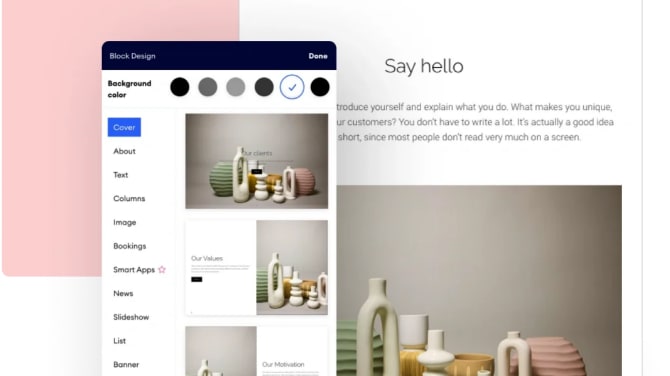
Jimdo Streamlines the Process of Creating Your Own Website
Jimdo
Jimdo offers you the possibility to create an aesthetic and performing website in a few moments. Ideal for small businesses, this platform contains all the necessary features to quickly produce the website you need.
Wix and Jimdo are both prominent players in the website building arena, offering platforms that enable users to create their own websites without the need for deep technical knowledge. However, their approaches and features cater to slightly different user needs and preferences, marking the main distinctions between the two.
Wix is renowned for its extensive customization capabilities, facilitated through a highly intuitive drag-and-drop interface. This platform appeals particularly to users seeking creative freedom and control over their website's design and functionality. Wix boasts a vast library of templates and allows for the incorporation of advanced features, such as animations, video backgrounds, and an app market with a wide range of third-party applications. These features make Wix ideal for users who prioritize design flexibility and the ability to scale their website with additional functionalities over time.
In contrast, Jimdo offers a more streamlined approach to website creation, focusing on simplicity and speed through its AI-powered design assistant, Jimdo Dolphin. This tool asks users a series of questions about their website's purpose and preferences, then automatically generates a website based on those inputs. While Jimdo provides fewer customization options than Wix, it simplifies the website building process, making it a strong option for users who value ease of use and efficiency, or those looking to get their site up and running quickly without much fuss.
Pricing structures between Wix and Jimdo also differ. Wix offers a broader range of pricing plans, catering to different types of users from personal to business and eCommerce sites. Jimdo's pricing is straightforward, aiming to be accessible for small businesses and individuals on tighter budgets. Jimdo's approach to pricing reflects its overall philosophy of simplifying the web creation process.
In summary, the choice between Wix and Jimdo hinges on what users prioritize: extensive design flexibility and functionality with Wix, or ease of use and speed of website creation with Jimdo.

Jimdo
Premium
Website design tool
50% off for 1 year
Save up to $234
03 Wix pros and cons
What are the advantages of Wix?
- User-friendly interface: Wix offers a highly intuitive drag-and-drop interface, making it easy for beginners to create and customize websites without any technical skills.

- Extensive template library: Wix provides a wide range of professionally designed templates covering various industries and purposes. This allows users to find a template that suits their needs and customize it to create a unique website.
- App market: Wix has an extensive app market offering a variety of third-party apps and integrations. These apps add additional functionality to your website, such as e-commerce features, contact forms, social media integration, and more.
- Hosting and security: Wix takes care of hosting your website on their servers, ensuring reliability and security. They also provide SSL encryption for all Wix sites, which is essential for protecting sensitive information and improving SEO.
- Customer support: Wix offers customer support through various channels, including phone, email, and live chat. They also have an extensive knowledge base and community forum where users can find answers to common questions and get help from other users.
What are the disadvantages of Wix?
- Limited design flexibility: While Wix's drag-and-drop interface is easy to use, it can be somewhat limiting in terms of design flexibility. Advanced users may find it challenging to customize certain elements or achieve specific design layouts compared to coding-based platforms.

- Template limitations: While Wix's template library is extensive, some users may find that the templates lack uniqueness or customization options. Additionally, once you choose a template and build your website, switching to a different template can be difficult without starting from scratch.
- Advertisement on free plans: Wix offers a free plan, but it displays Wix-branded advertisements on free websites. This can be distracting and unprofessional for users who want a more polished and professional-looking website.
- Scalability constraints: While Wix is suitable for small to medium-sized websites, it may not be the best option for large-scale or highly complex websites. As your website grows, you may encounter limitations in terms of performance, customization options, and scalability.
- Cost: While Wix offers a free plan, access to advanced features such as e-commerce functionality, custom domain names, and ad-free hosting requires a premium subscription. The cost of these premium plans can add up, especially for users who require additional features or have multiple websites.
Compare Wix to other tools


Wix vs Flipsnack


Webflow vs Wix

Wix vs Sellfy

Unbounce vs Wix

Wix vs Squarespace

Hostinger vs Wix
04 Jimdo pros and cons
What are the advantages of Jimdo?
- Ease of use: Jimdo offers a straightforward interface that makes it easy for users to create and customize websites without any technical expertise. The platform provides a simple drag-and-drop editor, allowing users to add elements, customize layouts, and design their sites with ease.
- Mobile-friendly templates: Jimdo offers a selection of mobile-responsive templates, ensuring that websites look good and function well on various devices, including smartphones and tablets. This is essential for providing a seamless browsing experience to visitors regardless of the device they use.
- Integrated e-commerce: Jimdo provides built-in e-commerce functionality, allowing users to create online stores and sell products directly from their websites. The platform offers features such as product listings, inventory management, payment processing, and order tracking, making it suitable for small businesses and entrepreneurs looking to sell online.
- SEO tools: Jimdo offers basic SEO tools and features to help users optimize their websites for search engines. These include customizable meta tags, page titles, and descriptions, as well as the ability to add alt text to images, which can improve visibility and ranking in search engine results.
- Customer support: Jimdo offers customer support through various channels, including email support and a help center with tutorials and FAQs. Additionally, Jimdo provides personalized support for users with premium plans, offering assistance with website setup, troubleshooting, and other issues.
What are the disadvantages of Jimdo?
- Limited design options: While Jimdo offers a decent selection of templates, the design options may feel somewhat limited compared to other website builders. Users may find it challenging to create highly customized designs or achieve specific layouts using the available templates and customization tools.
- Less flexibility in customization: Jimdo's customization options are somewhat limited compared to other website builders, particularly when it comes to advanced design features and functionality. Users may encounter constraints when trying to implement complex design elements or integrations.
- Scalability constraints: Jimdo may not be the best option for large-scale or highly complex websites, as it may lack the scalability and flexibility needed to accommodate significant growth or advanced features. Users with ambitious projects or specific customization requirements may find Jimdo limiting in this regard.
- Integration options: While Jimdo offers some integration options, such as social media integration and basic third-party tools, it may lack the extensive app market and integration capabilities of other website builders. Users with specific integration needs may find that Jimdo's options are limited.
- Pricing: While Jimdo offers a free plan, access to advanced features such as e-commerce functionality, custom domain names, and premium support requires a paid subscription. The cost of these premium plans may be a consideration for users with limited budgets or those looking for more affordable options.
Compare Jimdo to other tools


Jimdo vs Weebly

Shopify vs Jimdo
Squarespace vs Jimdo
05 Wix compared to Jimdo
Wix and Jimdo are both website building platforms aimed at users without coding knowledge. Wix stands out for its extensive template library and intuitive drag-and-drop interface, making it easy to create visually appealing websites. It offers a wide range of features, including an app market and robust customer support.
On the other hand, Jimdo offers simplicity and mobile-friendly templates, with integrated e-commerce capabilities suitable for small businesses. However, Jimdo may feel somewhat limited in design flexibility and scalability compared to Wix.
Is Wix better than Jimdo?
 Is Wix better than Jimdo?
Choosing between Wix and Jimdo hinges on the specific needs and goals of the user. While Wix boasts a comprehensive selection of templates and a user-friendly design process that appeals to those looking to craft aesthetically pleasing sites, it also enriches the website creation experience with diverse apps and strong support. This makes it an attractive option for users seeking depth and versatility in their web development endeavors.
Conversely, Jimdo champions a straightforward approach, focusing on ease of use and efficiency, particularly for entrepreneurs stepping into the digital marketplace. Its streamlined design process, though less flexible than Wix's, still effectively caters to users prioritizing a no-frills approach to website building and e-commerce integration.
What is Wix best used for?
Wix is best used for individuals and small businesses seeking to create professional-looking websites without coding knowledge. With its user-friendly drag-and-drop interface and extensive template library, Wix enables users to easily design and customize their websites to suit their brand and goals. It is ideal for showcasing portfolios, promoting services, or setting up online stores with its integrated e-commerce features.
Wix offers scalability, allowing users to start with a simple website and expand as their needs grow. Whether it's creating a personal blog, a business website, or an online store, Wix provides the tools and flexibility to bring ideas to life effortlessly.
Can Wix replace Jimdo?
While both Wix and Jimdo are website builders targeting users without coding knowledge, whether Wix can outright replace Jimdo depends on individual needs and preferences. Wix boasts a vast template library, intuitive interface, and robust features like an app market, making it suitable for a wide range of users, from individuals to small businesses.
However, Jimdo offers simplicity, mobile-friendly templates, and integrated e-commerce capabilities, which may appeal to specific audiences.
Is Wix cheaper than Jimdo?
Determining whether Wix’s pricing is cheaper than Jimdo requires consideration of various factors. While both platforms offer free plans, access to advanced features like e-commerce capabilities, custom domains, and ad-free hosting typically requires a paid subscription.
Pricing structures vary between Wix and Jimdo, with different tiers offering different features and pricing points. Factors such as the scale of the website, required features, and the duration of subscription commitments all impact the overall cost. Thus, while Wix and Jimdo both offer competitive pricing options, the final decision on which is cheaper depends on the specific needs and preferences of the user or business.
Is there a better E Commerce software than Wix?
While Wix is renowned for its user-friendly website building capabilities, it's crucial to explore if other software options might better align with your unique requirements.
Several notable alternatives to Wix in the website building space include Squarespace, WordPress, Weebly, Shopify, and Jimdo. The decision on the right website building platform depends on factors such as your website's specific objectives, budget constraints, and the level of customization and functionality needed. While Wix excels in providing easy-to-use tools for creating visually appealing websites, other platforms might offer specialized features, e-commerce solutions, or more extensive design flexibility that better suit your website development goals.
06 Jimdo compared to Wix
Jimdo and Wix are both popular website building platforms catering to users without coding expertise, yet they differ in various aspects. Wix offers an extensive template library and intuitive drag-and-drop interface, ideal for creating visually stunning websites. It provides robust features like an app market and comprehensive customer support.
Conversely, Jimdo emphasizes simplicity, offering mobile-responsive templates and integrated e-commerce capabilities suitable for small businesses. However, Jimdo may feel somewhat constrained in design flexibility and scalability compared to Wix.
Is Jimdo better than Wix?
When deciding between Jimdo and Wix, the choice often boils down to the user's priorities and technical preferences. Jimdo shines for those seeking an uncomplicated, straightforward website building experience, making it exceptionally well-suited for small business owners who wish to establish an online presence with minimal fuss. Its emphasis on mobile-optimized templates and seamless e-commerce integration underscores its commitment to providing practical, user-friendly solutions.
While it may not boast the same level of design customization or feature depth as Wix, Jimdo's appeal lies in its simplicity and effectiveness, offering a streamlined path to online entrepreneurship without the need for extensive technical skills or resources.
What is Jimdo best used for?
Jimdo is best used for individuals and small businesses seeking a straightforward solution for creating professional websites without coding knowledge. With its emphasis on simplicity and ease of use, Jimdo is ideal for users looking to quickly establish an online presence. Its mobile-responsive templates and integrated e-commerce functionality make it particularly suitable for entrepreneurs looking to sell products online.
Whether it's creating a personal portfolio, a blog, or an online store, Jimdo provides the tools and features necessary to build a functional and visually appealing website efficiently. Overall, Jimdo is best suited for those prioritizing simplicity, efficiency, and ease of use in website creation.
Can Jimdo replace Wix?
Determining whether Jimdo can replace Wix depends on individual needs and preferences. While both platforms cater to users without coding knowledge, they differ in features and capabilities. Wix boasts an extensive template library, advanced customization options, and robust features like an app market. In contrast, Jimdo emphasizes simplicity, offering mobile-responsive templates and integrated e-commerce capabilities suitable for small businesses.
Whether Jimdo can replace Wix hinges on factors such as desired features, design flexibility, scalability needs, and budget constraints. While Jimdo may offer a simpler solution for some users, Wix's broader feature set may better suit the needs of others.
Is Jimdo cheaper than Wix?
Determining whether Jimdo is cheaper than Wix involves considering various factors. Both platforms offer free plans, but access to advanced features typically requires a paid subscription. Pricing structures vary between Jimdo and Wix, with different tiers offering different features and pricing points. Factors such as the scale of the website, required features, and the duration of subscription commitments impact the overall cost.
While Jimdo’s pricing and Wix’s plan both offer competitive options, the final decision on which is cheaper depends on the specific needs and preferences of the user or business, as well as the desired level of functionality and customization.
Is there a better Website Builder software than Jimdo?
While Jimdo is well-regarded for its user-friendly website building capabilities, it's important to explore if other software options might better suit your unique needs.
Several significant alternatives to Jimdo in the website building space include Wix, Webflow, Hostinger, WordPress, and Weebly. Your choice of website building platform should align with your specific objectives, budget constraints, and the level of customization and functionality required. While Jimdo excels in providing a simple and intuitive website building experience, other platforms might offer more extensive design flexibility, e-commerce solutions, or specialized features that better fit your website development goals.
Jimdo
Premium
Website design tool
50% off for 1 year
Save up to $234
07 Features comparison
Wix Leads in Integration Versatility Over Jimdo

Integrate Your Wix Site Seamlessly with a Wide Range of Tools, including Google Analytics, TikTok, and More
Both Wix and Jimdo offer integration possibilities with various third-party tools and services. However, Wix outperforms Jimdo in terms of the sheer number and variety of integrations available. Wix offers a diverse range of integrations, spanning social media platforms, marketing automation tools like Mailchimp, analytics services such as Google Analytics, and more. For instance, users can effortlessly incorporate Facebook Pixel for targeted advertising or integrate with payment gateways like PayPal for seamless e-commerce transactions.
Moreover, Wix's App Market hosts a plethora of additional apps catering to various needs, further enhancing the website's functionality. While Jimdo supports integrations, its options are comparatively limited, making Wix the superior choice for those seeking versatile integration capabilities.
Wix's Superior Multilingual Capabilities Outshine Jimdo

Wix Gives You the Power to Translate Your Website into Over 180 Languages, including German, Spanish, and French
Wix outshines Jimdo with its automatic website translation feature. This functionality empowers users to effortlessly create multilingual websites, broadening their reach to international audiences with minimal effort. For instance, users can easily translate their website content into multiple languages, enabling them to connect with diverse customer bases across the globe.
In contrast, Jimdo lacks this feature, limiting its appeal for businesses seeking to expand their global presence. Wix's intuitive multilingual support makes it the preferred choice for those prioritizing seamless communication and engagement with international audiences, showcasing its superiority over Jimdo in this aspect.
Jimdo's Logo Creator Enhances Branding Superiority Over Wix
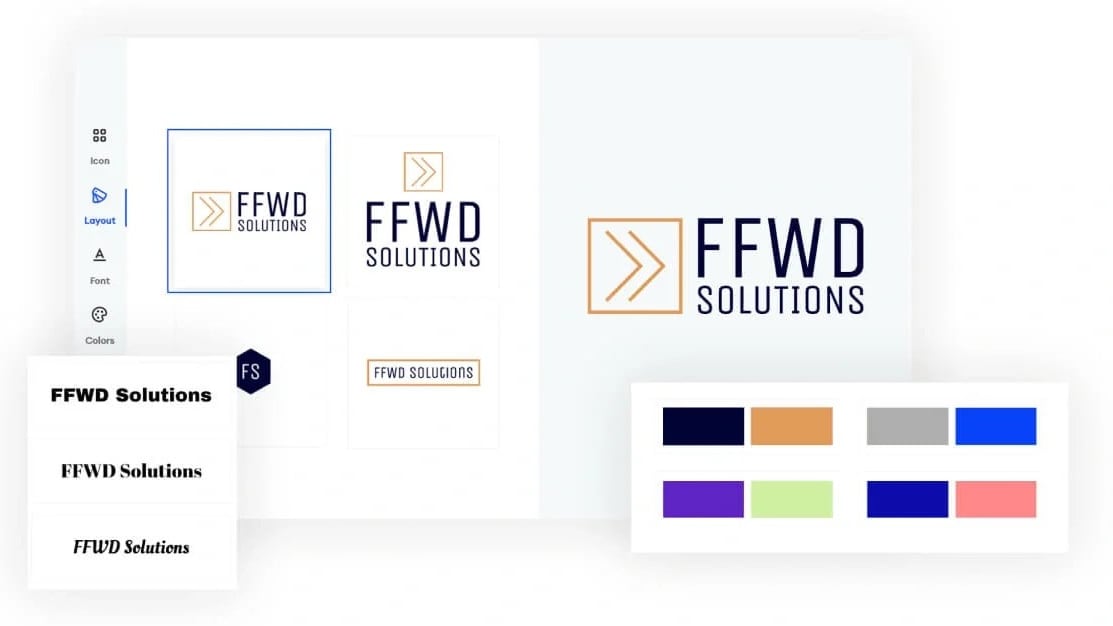
Create Your Own Professional Logo to Match Your Brand with Jimdo
In branding and logo creation, Jimdo takes the lead with its Logo Creator tool, enabling users to craft captivating logos swiftly. With this feature, users can design professional logos tailored to their brand identity in minutes, bolstering their visual appeal and brand recognition. Additionally, Jimdo grants users full ownership rights, allowing them to utilize their logos across various marketing channels without restrictions.
In contrast, Wix lacks a comparable feature, making Jimdo the preferred choice for businesses prioritizing brand building and logo creation. Jimdo's emphasis on empowering users with effective branding tools solidifies its superiority over Wix in this domain.
Jimdo Surpasses Wix in User-Friendliness and Simplicity
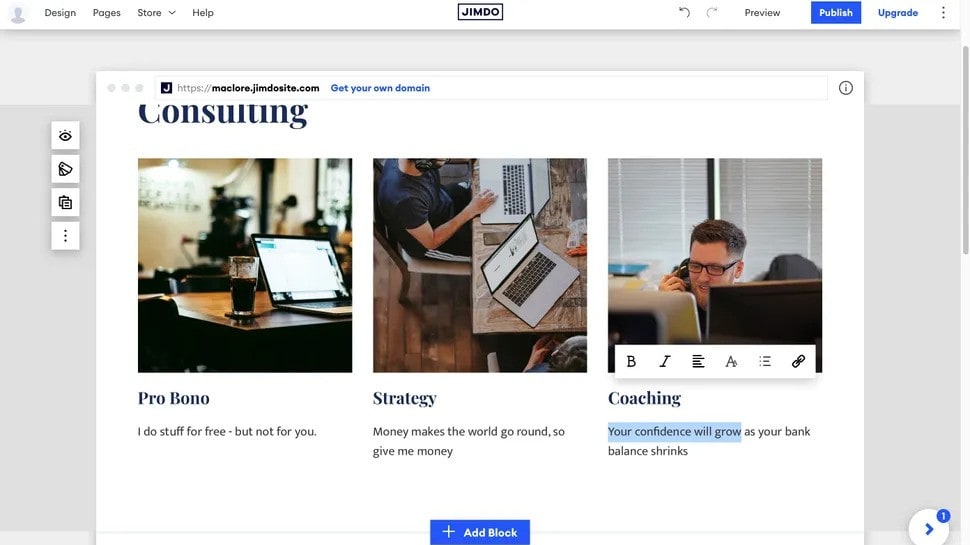
Create Your Own Jimdo Website with Ease, No Coding Required
In terms of user-friendliness and simplicity, Jimdo outshines Wix by a substantial margin. Jimdo's intuitive interface and streamlined design process make it exceptionally easy for users to create professional-looking websites without any coding knowledge. Unlike Wix, which can sometimes overwhelm users with its vast array of features and customization options, Jimdo offers a more straightforward and hassle-free experience.
For example, Jimdo's drag-and-drop editor allows users to effortlessly add and arrange elements on their pages, while Wix may require more time and effort to achieve similar results. Overall, Jimdo's focus on simplicity and ease of use makes it a standout choice for those seeking a straightforward website building solution.
Both Wix and Jimdo Offer Mobile-Friendly Designs

Choose Mobile-Responsive Web Templates to Design Your Website with Wix
Both Wix and Jimdo prioritize ensuring websites perform seamlessly on mobile devices. Wix facilitates mobile-friendly website creation through intuitive drag-and-drop functionality, enabling users to effortlessly design responsive layouts. Meanwhile, Jimdo goes a step further by offering mobile-specific SEO optimizations and a dedicated mobile site editor. With Jimdo, users can fine-tune their website's mobile experience, optimizing it for enhanced visibility and performance on smartphones and tablets.
While Wix excels in ease of use for mobile website creation, Jimdo's focus on mobile-specific SEO and customization options solidifies its position as a comprehensive solution for mobile optimization.
Jimdo Has a Better Handle at Promoting Businesses on Social Networks Compared to Wix

Drive Visitors and Increase Engagement with Your Website Through Social Networks Thanks to Jimdo
Jimdo stands out with its seamless connectivity to platforms like Facebook and Instagram, empowering businesses with effortless advertising and conversion opportunities. Jimdo's integration allows users to seamlessly display social media feeds, share content, and drive engagement directly from their websites.
Conversely, while Wix facilitates online visibility and visitor engagement, it lacks the same level of social media promotion capabilities as Jimdo. With Jimdo's robust social media integration, businesses can effectively leverage social platforms for growth, making it a superior option for those prioritizing social media marketing and engagement.
Wix Offers Better Communication with Visitors Through Live Chat than Jimdo

Connect with Your Visitors Instantly Through Wix's Live Chat Feature
Wix leads with its Live Chat feature, enabling businesses to interact with website visitors instantly, addressing queries, and fostering potential conversions. With Wix's Live Chat, businesses can provide immediate assistance, address concerns, and build rapport with visitors, ultimately enhancing customer satisfaction and loyalty.
In contrast, Jimdo lacks this immediate engagement capability, potentially limiting businesses' ability to provide timely support and assistance. Wix's emphasis on real-time customer service and engagement makes it the preferred choice for businesses prioritizing enhanced online interaction and conversion opportunities.
08 Wix vs Jimdo: Which is the best for your business?
Wix is the best tool for you if:
- You value creativity and design flexibility in your website. With its extensive template library and drag-and-drop interface, Wix allows for intricate customization, making each site uniquely yours.
- You're looking for an all-in-one platform with a wide range of features. Wix’s app market, robust customer support, and integrated functionalities cater to diverse online needs, from blogging to e-commerce.
- You prefer a platform that offers scalability. Wix supports your site’s growth with advanced SEO tools, marketing solutions, and the ability to add sophisticated functions as your business expands.
- Ease of use is a priority, but you don’t want to compromise on the quality of your site. Wix combines user-friendly design processes with professional-grade outcomes, ideal for beginners and experts alike.
- You intend to actively manage and update your site. Wix’s intuitive interface and dynamic content management system make it simple to maintain your website, ensuring it stays fresh and engaging.
 You value creativity and design flexibility in your website. With its extensive template library and drag-and-drop interface, Wix allows for intricate customization, making each site uniquely yours.
Jimdo is the best tool for you if:
- Simplicity and speed are your top priorities. Jimdo enables quick website creation with its user-friendly design and automated options, making it ideal for those who value efficiency.
- You’re focusing on mobile optimization from the start. With mobile-responsive templates, Jimdo ensures your website looks great on all devices, crucial for today’s smartphone-centric audience.
- Integrated e-commerce capabilities are essential for your small business. Jimdo provides seamless tools for selling products online, including payment processing and inventory management, without overwhelming you with complexity.
- You prefer a straightforward approach to website design. Jimdo's limited but carefully curated selection of templates means less time spent on decisions and more on creating content.
- You're new to website building and intimidated by extensive customization options. Jimdo’s simplicity helps you get online quickly, offering just enough features to create a professional-looking site without the hassle.
Jimdo
Premium
Website design tool
50% off for 1 year
Save up to $234
09 Alternatives to Wix & Jimdo

Google Workspace
Used by 10477 members
20% off Standard plans for 1 year
Save up to $3,460

Webflow
Used by 4938 members
40% off annual plans
Save up to $120

Slack
Used by 4001 members
25% off new plan purchases
Save up to $9,000

HubSpot
Used by 2924 members
90% off the Professional and Enterprise plans for 1 year
Save up to $7,000
10 Promotions on E Commerce and Website Builder software
Wix and Jimdo are great tools, but Secret offers promo codes with discounts on over 2250+ different SaaS solutions. New deals are added regularly, helping you save money on your online subscriptions. Get access to codes for other E Commerce and Website Builder software you might want to purchase

Shopify promo code
$1/month for the first 3 months + 25% off annual plans

Code for Lovable
15% off annual Pro and Business plans

Stripe discount code
$500 in credits

Code for WordPress.com
30% off all monthly plans

ShipBob discount code
$1,000 in shipping credits

bolt.new promotion code
20% off all plans for the first 3 months

Spocket coupon
25% off for 3 months

Elementor: Website Builder coupon code
17% off the annual One Agency plan

Squarespace promotion
50% off across Core, Plus and Advanced plans

Discount for Carrd
30% off for 1 year
Start saving on the best SaaS
Secret has already helped tens of thousands of startups save millions on the best SaaS like Microsoft Teams, Google Workspace & many more. Join Secret now to buy software the smart way.