


Efficient video editing and graphic design are crucial for various projects, whether it's creating promotional videos, designing social media graphics, or producing educational content. You need a robust platform that offers intuitive editing tools, a wide range of templates, and seamless collaboration features.
That's where InVideo and Canva come into play. In this comparison, we delve into the core features and distinctive aspects of these two leading platforms. By examining their capabilities and differences, you can determine which one aligns better with your creative requirements and budget constraints.
- 01 InVideo vs Canva: overview
- 02 What's the difference between InVideo and Canva?
- 03 InVideo pros and cons
- 04 Canva pros and cons
- 05 InVideo compared to Canva
- 06 Canva compared to InVideo
- 07 Features comparison
- 08 InVideo vs Canva: Which is the best for your business?
- 09 Alternatives to InVideo & Canva
- 10 Promotions on Video software
Start saving on the best SaaS
Secret has already helped tens of thousands of startups save millions on the best SaaS like Microsoft Teams, Google Workspace & many more. Join Secret now to buy software the smart way.

01 InVideo vs Canva: overview
InVideo and Canva stand as titans in the realm of video editing and graphic design platforms, each boasting a rich set of features and functionalities. Making a decision between these two industry-leading tools can be daunting, considering the breadth of their offerings.
To simplify your selection process, we've compiled a comprehensive comparison table that meticulously outlines the key attributes of InVideo and Canva. Through the use of a star-based rating system coupled with insightful analysis, our comparison table aims to equip you with the knowledge necessary to make a well-informed decision for your creative projects.
Whether your focus lies in video editing, graphic design, template variety, or collaborative capabilities, our comparison will serve as your guide through the InVideo vs Canva landscape, empowering you to select the platform that best aligns with your unique creative needs.

Integrations
InVideo integrates with some stock media libraries and social platforms, enhancing its video editing capabilities. Canva offers a broader range of integrations with platforms like social media, cloud storage, and productivity apps, including Google Drive, Later, and Frontify.

InVideo
Canva
Stock library
InVideo has a good selection of stock videos and images, which is integral to its service. Canva provides an extensive stock library of images, videos, and graphics, which is one of its standout features.
InVideo
Canva
Ease of Use
InVideo has a user-friendly interface specifically tailored for video editing, making it accessible for beginners. Canva is renowned for its simplicity and ease of use in creating professional-looking designs quickly.
InVideo
Canva
Customer Support
Both platforms offer reliable customer support with extensive online resources, tutorials, and responsive help centers.
InVideo
Canva
Export options
InVideo supports various export options tailored to video formats and platforms. Canva allows exports in multiple formats, including print-quality designs, but is less focused on video-specific formats.
InVideo
Canva
Video templates
InVideo specializes in video production, offering a wide variety of customizable video templates. Canva has video templates but with a focus more on short social media videos and presentations rather than extensive video editing.
InVideo
Canva
Pricing Plan
InVideo offers competitive pricing with a free version and paid subscriptions starting from $30/month. Canva also provides a free version with premium features available from $11.99/month, offering great value for its wide range of tools.
InVideo
Canva
Customer Reviews
InVideo is highly praised for its video creation and editing capabilities, while Canva receives excellent reviews for its versatility in graphic design and user-friendly interface.
InVideo
Canva
Collaboration
InVideo allows for team collaboration on video projects, which is useful for content teams. Canva excels in this area with its seamless collaboration features that make it easy for teams to work together on designs in real-time.
InVideo
Canva
Graphic templates
While InVideo provides essential graphics for videos, Canva leads with a vast library of graphic design templates suitable for all types of design needs.
InVideo
Canva
02 What's the difference between InVideo and Canva?

InVideo focuses primarily on video editing, providing users with a wide range of tools to create stunning videos efficiently.
InVideo
All-in-one video creation tool

Canva specializes in graphic design, offering an extensive library of templates, fonts, and graphics for creating visually appealing designs for various purposes, including social media posts, presentations, and marketing materials.
Canva
Canva is a browser-based design platform that makes it easy to create professional visuals without needing advanced design skills. It combines drag-and-drop editing with templates, stock assets, and increasingly powerful AI tools for content generation and editing.
When it comes to video editing and graphic design tools, InVideo and Canva emerge as top contenders, each with its own distinct set of features tailored to meet diverse creative needs. While both platforms offer robust editing capabilities and a plethora of design elements, they also exhibit notable differences that can influence your choice.
One key disparity lies in their core functionality. InVideo focuses primarily on video editing, providing users with a wide range of tools to create stunning videos efficiently. From customizable templates to advanced editing features like animations and transitions, InVideo empowers users to craft professional-quality videos with ease. On the other hand, Canva specializes in graphic design, offering an extensive library of templates, fonts, and graphics for creating visually appealing designs for various purposes, including social media posts, presentations, and marketing materials.
Moreover, the scope of collaboration differs between the two platforms. While both InVideo and Canva allow for team collaboration, their approaches vary. InVideo offers collaborative editing features that enable team members to work together on video projects in real-time, facilitating seamless communication and feedback. Canva, meanwhile, emphasizes collaboration through shared design folders and team templates, allowing multiple users to collaborate on design projects simultaneously.
Additionally, their pricing structures present distinct options for users. InVideo offers a range of subscription plans tailored to different user needs, with pricing tiers based on features and usage limits. Canva follows a similar model, with subscription plans catering to individuals, teams, and enterprises. However, the specific pricing tiers and features included may vary between the two platforms, making it essential to compare their offerings to determine the most cost-effective solution for your requirements.

InVideo
All-in-one video creation tool
50 free AI minutes on all AI plans
Save up to $28
03 InVideo pros and cons
What are the advantages of InVideo?
- User-friendly interface: InVideo offers an intuitive and user-friendly interface, making it accessible to both beginners and experienced video editors. Its drag-and-drop functionality and straightforward navigation streamline the video creation process.

- Extensive template library: InVideo boasts a vast library of customizable templates for various video types, including social media ads, presentations, and promotional videos. These templates serve as valuable starting points for users, saving time and effort in creating professional-looking videos.
- Built-in asset library: InVideo provides access to an extensive library of stock images, videos, and music tracks, eliminating the need for users to source external media for their projects. This integrated asset library enhances convenience and simplifies the content creation process.
- Real-time collaboration: InVideo offers real-time collaboration features, allowing multiple users to collaborate on video projects simultaneously. This facilitates seamless communication and teamwork, enabling teams to work efficiently and produce high-quality videos faster.
- Affordable pricing: InVideo offers competitive pricing plans with various subscription options to suit different user needs and budgets. Its affordable pricing makes professional-grade video editing accessible to individuals, small businesses, and organizations with limited resources.
What are the disadvantages of InVideo?
- Limited advanced editing features: While InVideo offers a range of basic editing tools and effects, it may lack some advanced features found in more robust video editing software. Users seeking highly advanced editing capabilities may find InVideo's feature set somewhat limiting.

- Customization constraints: Despite its extensive template library, users may encounter limitations in terms of customization options within InVideo. While templates provide a convenient starting point, users may find it challenging to achieve highly personalized or unique visual styles.
- Rendering times: InVideo's rendering times for exporting videos can vary depending on factors such as video length, complexity, and internet speed. Users may experience longer export times for larger or more complex projects, impacting workflow efficiency.
- Integration limitations: While InVideo offers integrations with platforms like YouTube and Facebook for seamless sharing and publishing of videos, it may lack integration options with certain third-party tools or platforms commonly used by users, limiting workflow integration possibilities.
- Customer support response time: Some users have reported occasional delays in receiving support from InVideo's customer service team, particularly during peak times or in response to complex queries. Improved response times and support availability could enhance the overall user experience.
Compare InVideo to other tools


Filmora vs InVideo

04 Canva pros and cons
What are the advantages of Canva?
- User-friendly interface: Canva features an intuitive and user-friendly interface, making it accessible to users with varying levels of design experience. Its drag-and-drop functionality and simple design tools enable users to create professional-quality graphics with ease.
- Extensive template library: Canva offers a vast library of customizable templates for various design projects, including social media graphics, presentations, posters, and more. These templates provide users with a wide range of design options and serve as valuable starting points for their projects.
- Versatility: Canva's versatility allows users to create a wide variety of design assets, ranging from simple social media posts to complex presentations and marketing materials. Its comprehensive set of design tools and features cater to diverse design needs, making it a versatile platform for individuals and businesses alike.
- Collaboration features: Canva provides robust collaboration features that enable users to collaborate with team members in real-time, regardless of their location. Users can share designs, leave comments, and collaborate on projects seamlessly, fostering teamwork and productivity.
- Integration with other platforms: Canva offers integrations with various platforms and tools, including social media platforms like Facebook and Instagram, as well as productivity tools like Google Drive and Dropbox. These integrations enhance workflow efficiency by allowing users to import and export content seamlessly.
What are the disadvantages of Canva?
- Limited customization options: While Canva offers a wide range of templates and design elements, some users may find its customization options limited compared to more advanced design software. Users seeking highly customized or complex designs may encounter constraints within Canva's interface.
- Premium features require subscription: While Canva offers a free version with basic features, access to advanced features and premium content requires a subscription. Some users may find the cost of subscription plans prohibitive, particularly for individual users or small businesses with limited budgets.
- Export options: Canva's export options may be limited compared to dedicated design software, particularly when it comes to file formats and resolution settings. Users requiring specific file formats or high-resolution output may find Canva's export options lacking.
- Learning curve for advanced features: While Canva's basic features are easy to grasp, mastering its more advanced features may require some learning and experimentation. Users seeking to leverage Canva's full potential may need to invest time in learning its advanced tools and functionalities.
- Performance issues: Some users have reported occasional performance issues with Canva, such as slow loading times or laggy performance, particularly when working on complex or large-scale projects. Improvements in performance optimization could enhance the overall user experience.
Compare Canva to other tools


Piktochart vs Canva

Prezi vs Canva

Visme vs Canva

Flipsnack vs Canva

Canva vs Powtoon

Gamma vs Canva
05 InVideo compared to Canva
InVideo and Canva both excel in their respective domains of video editing and graphic design. InVideo offers a robust platform tailored for video creation, boasting an extensive library of templates and built-in editing tools.
On the other hand, Canva specializes in graphic design, providing users with a wide array of customizable templates and design elements. While InVideo prioritizes video editing features and real-time collaboration, Canva emphasizes versatility and ease of use in graphic design projects.
Is InVideo better than Canva?
 Is InVideo better than Canva?
When comparing InVideo and Canva, it's essential to understand that each platform is designed with a specific focus in mind, making them cater to different creative needs rather than competing directly against each other. InVideo stands out as a dedicated solution for individuals and businesses looking to produce high-quality videos, offering a comprehensive set of tools that facilitate the creation process from start to finish.
Canva, however, shines as a user-friendly tool for graphic design, appealing to those who need to quickly create visually engaging content for social media, presentations, and more.
What is InVideo best used for?
InVideo is best used for creating professional-quality videos efficiently and effectively. With its user-friendly interface and extensive template library, InVideo caters to a wide range of video editing needs, including social media ads, marketing videos, presentations, and more. It is ideal for individuals, businesses, and marketers looking to produce engaging and visually appealing video content without the need for advanced technical skills.
InVideo's built-in editing tools, real-time collaboration features, and affordable pricing make it a valuable asset for content creators seeking to streamline their video creation process and stand out in today's competitive digital landscape
Can InVideo replace Canva?
InVideo and Canva serve distinct purposes in the realm of creative content creation. While InVideo excels in video editing, offering a robust platform with a vast library of templates and editing tools, Canva specializes in graphic design, providing users with customizable templates for various design projects.
While InVideo may offer some graphic design capabilities, it may not fully replace Canva for users primarily focused on graphic design tasks. However, for those prioritizing video content creation, InVideo can serve as a valuable complement to Canva, offering additional options for creating engaging and visually appealing video content.
Is InVideo cheaper than Canva?
Determining whether InVideo is cheaper than Canva depends on specific usage needs and subscription plans. InVideo’s pricing structure typically offers competitive pricing tailored for video editing, with various subscription tiers catering to different user requirements.
Canva, while renowned for its graphic design capabilities, may have different pricing structures based on design and collaboration features. Assessing factors such as included features, customization options, and team collaboration tools is crucial in evaluating the cost-effectiveness of each platform.
Is there a better Video software than InVideo?
Determining the ideal video editing software requires a thorough assessment of your individual requirements and creative objectives.
While InVideo excels in its intuitive interface and extensive template library, alternatives such as Adobe Creative Cloud, Final Cut Pro, Camtasia and DaVinci Resolve offer more advanced editing capabilities and professional-grade features. These alternatives provide robust tools for advanced editing techniques, color grading, visual effects, and audio processing, catering to the needs of professional videographers and filmmakers.
InVideo
All-in-one video creation tool
50 free AI minutes on all AI plans
Save up to $28
06 Canva compared to InVideo
Canva and InVideo each offer unique strengths in the realm of creative content creation. Canva specializes in graphic design, providing users with an extensive library of customizable templates and design elements for various projects, from social media graphics to presentations.
In contrast, InVideo focuses on video editing, offering a range of tools and templates tailored for creating professional-quality videos. While Canva may excel in static visual content, InVideo shines in dynamic video production.
Is Canva better than InVideo?
Determining whether Canva is better than InVideo hinges on the specific creative needs of the user. Canva's intuitive design platform makes it a go-to for those looking to quickly and easily create visually appealing graphic designs, catering especially to non-designers seeking to produce professional-looking content for digital and print media. Its strength lies in its simplicity and the vast array of design options available.
On the other hand, InVideo is the superior choice for users whose primary focus is on producing video content, thanks to its specialized video editing features.
What is Canva best used for?
Canva is best utilized for creating visually appealing graphic designs across a diverse range of projects. With its extensive library of customizable templates, users can effortlessly craft engaging social media graphics, presentations, posters, and more.
Whether for personal or professional use, Canva offers intuitive design tools that cater to individuals and businesses alike. Its user-friendly interface and versatile features make it ideal for users with varying levels of design experience. From amateur designers seeking to enhance their social media presence to marketing professionals looking to produce polished promotional materials, Canva provides a convenient platform for bringing creative ideas to life.
Can Canva replace InVideo?
Canva and InVideo serve distinct purposes within the realm of creative content creation. While Canva excels in graphic design, offering a vast array of customizable templates and design elements for various projects, InVideo specializes in video editing, providing tools and templates tailored specifically for creating professional-quality videos.
While Canva may offer some basic video editing capabilities, it may not fully replace InVideo for users primarily focused on video content creation. However, for individuals or businesses looking to incorporate simple video elements into their graphic designs, Canva can serve as a valuable complement to InVideo's video editing capabilities.
Is Canva cheaper than InVideo?
Determining whether Canva is cheaper than InVideo depends on individual usage needs and subscription plans. Canva typically offers competitive pricing structures tailored for graphic design, with various subscription tiers catering to different user requirements.
InVideo, on the other hand, focuses on video editing and may have different pricing tiers based on video duration and features. Assessing factors such as included features, customization options, and collaboration tools is crucial in evaluating the cost-effectiveness of each platform
Is there a better Design software than Canva?
Determining the ideal graphic design software depends on your specific creative requirements and design preferences.
While Canva stands out for its user-friendly interface and extensive template library, alternatives like Visme, Adobe Illustrator, Piktochart, Affinity Designer, and Sketch offer more advanced design capabilities and professional-grade features.
Consider factors such as your design skill level, project complexity, and desired output quality when making your selection. Whether you prioritize ease of use, advanced design tools, or seamless integration with other software, choosing the right graphic design software will empower you to bring your creative visions to life effectively.
07 Features comparison
Canva Surpasses InVideo in Integration Flexibility for Seamless Workflow

Canva seamlessly integrates with popular platforms
Delving into integrations, Canva holds a slight edge over InVideo. Canva seamlessly integrates with popular platforms like Dropbox, Google Drive, and Mailchimp, enabling users to import and export files effortlessly. For instance, graphic designers collaborating on projects can seamlessly access files stored in their Dropbox accounts directly within Canva's interface, streamlining their workflow.
In contrast, while InVideo offers some integrations, such as YouTube and Facebook for video sharing, its scope may be narrower compared to Canva's extensive range of compatible platforms. Thus, for users prioritizing seamless integration capabilities, Canva emerges as the preferred choice over InVideo.
InVideo and Canva Both Facilitate Seamless Collaboration

InVideo's collaborative features enable teams to work together on various aspects of video production, from editing to sound effects and image selection, within a unified platform.
InVideo and Canva excel in fostering seamless collaboration among users. InVideo's collaborative features enable teams to work together on various aspects of video production, from editing to sound effects and image selection, within a unified platform. For instance, marketing teams can collaborate on creating promotional videos by providing feedback and making edits in real-time.
Similarly, Canva facilitates collaboration by allowing users to invite team members or clients to view and edit design projects collaboratively. Whether editing videos or designing graphics, both InVideo and Canva prioritize efficient collaboration processes, enhancing teamwork and productivity in creative endeavors.
Canva Outperforms InVideo in User-Friendliness with Intuitive Design Interface

Canva's platform is explicitly crafted for non-designers, offering a seamless experience for users of all skill levels.
When it comes to user-friendliness, Canva stands out as the frontrunner, boasting an intuitive interface tailored for ease of use. Unlike InVideo, Canva's platform is explicitly crafted for non-designers, offering a seamless experience for users of all skill levels. With its drag-and-drop functionality and an extensive collection of pre-designed templates, Canva simplifies the design process, enabling anyone to create stunning visuals effortlessly.
For instance, individuals seeking to create eye-catching social media graphics or professional presentations can swiftly navigate Canva's interface without extensive training. While InVideo provides video editing capabilities, Canva's user-friendly approach sets it apart as the preferred choice for straightforward graphic design tasks.
Canva's Brand Consistency Advantage Over InVideo

Canva's brand kit features provide businesses with the tools they need to uphold brand consistency and strengthen their visual identity effectively.
For businesses looking to maintain brand consistency across designs, Canva emerges as a standout choice with its robust brand kit features. Users can effortlessly create and store brand-specific assets such as logos, colors, and fonts, ensuring cohesive design elements across various projects. For instance, marketing teams can seamlessly integrate branded assets into social media graphics, presentations, and marketing materials, maintaining a unified brand identity.
Conversely, while InVideo offers customizable templates for video creation, it lacks dedicated functionality for preserving brand identity across designs. Canva's brand kit features provide businesses with the tools they need to uphold brand consistency and strengthen their visual identity effectively.
InVideo Leads in Automated Video Creation Beyond Canva's Scope
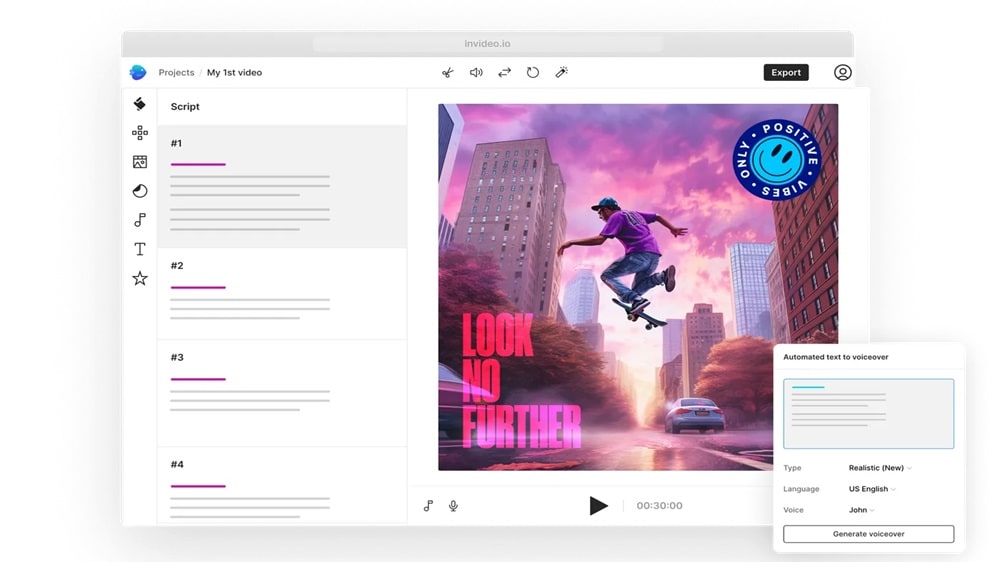
Using artificial intelligence, InVideo empowers users to transform written content, such as scripts, blogs, or articles, into engaging videos within minutes.
Using artificial intelligence, InVideo empowers users to transform written content, such as scripts, blogs, or articles, into engaging videos within minutes. For example, marketers can effortlessly repurpose blog posts into dynamic video content using InVideo's AI-driven conversion tools.
Additionally, InVideo streamlines the publishing process by offering direct resizing and publishing options for various online platforms, ensuring seamless distribution. Conversely, while Canva excels in graphic design capabilities, its lack of automated video creation tools limits its versatility compared to InVideo's advanced functionalities.
InVideo's Superior Support Infrastructure Compared to Canva

InVideo surpasses expectations in user support, providing an extensive array of resources to assist users in mastering the platform.
InVideo surpasses expectations in user support, providing an extensive array of resources to assist users in mastering the platform. With over 500 tutorials on YouTube and Instagram covering various aspects of video editing and marketing, users can access step-by-step guidance and tips for maximizing their creative potential.
Additionally, InVideo offers Udemy digital marketing courses, further enhancing users' skill sets and understanding of content creation strategies. Furthermore, InVideo's round-the-clock support ensures timely assistance for any queries or technical issues that may arise. While Canva offers support and tutorials, it lacks the breadth and depth of resources provided by InVideo, underscoring InVideo's commitment to user empowerment and proficiency.
Canva Dominates in Intuitive Design Interface Over InVideo
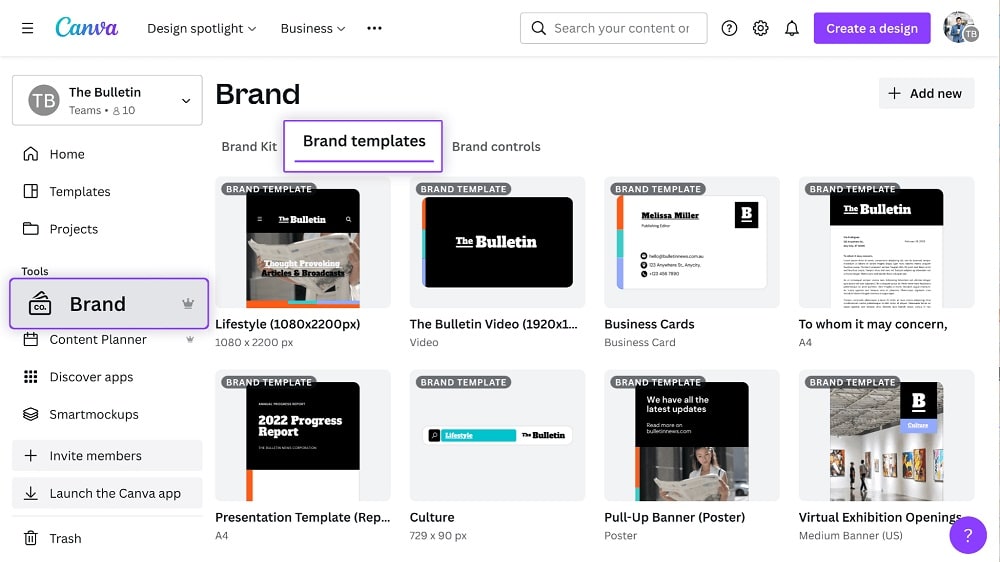
For instance, users can effortlessly create social media graphics by dragging and dropping text and images onto Canva's canvas.
Canva shines in its user-friendly drag-and-drop interface. This intuitive feature simplifies the process of adding various elements, including text, images, shapes, and icons, to designs. For instance, users can effortlessly create social media graphics by dragging and dropping text and images onto Canva's canvas.
While InVideo also offers a drag-and-drop editor for template customization, Canva's interface is widely regarded as more intuitive and beginner-friendly. Its straightforward approach caters to users of all skill levels, enhancing accessibility and usability in graphic design tasks.
08 InVideo vs Canva: Which is the best for your business?
InVideo is the best tool for you if:
- You're looking to create professional-quality videos without extensive knowledge in video editing, thanks to its intuitive interface and drag-and-drop functionality that simplifies the video creation process.
- Collaboration is key to your workflow, as InVideo offers real-time collaboration features that allow teams to work together seamlessly, making it ideal for businesses and content creators alike.
- You value a vast selection of templates and assets, with InVideo providing thousands of customizable templates and stock media options, facilitating the creation of unique and engaging videos.
- Timely content creation is crucial, and you need a tool that can help you produce videos quickly. InVideo's efficient editing tools and pre-designed templates enable rapid content production.
- You're aiming for versatility in video content, ranging from social media clips to marketing videos. InVideo's extensive range of features supports various video formats and styles, making it adaptable to any project.
 You're looking to create professional-quality videos without extensive knowledge in video editing, thanks to its intuitive interface and drag-and-drop functionality that simplifies the video creation process.
Canva is the best tool for you if:
- You prioritize ease of use and quick design solutions, with Canva's user-friendly interface and drag-and-drop features enabling anyone to create professional-looking graphics without prior design experience.
- Your projects range from social media graphics to presentations and flyers, as Canva offers a diverse library of templates and design elements catering to a wide array of needs.
- Collaboration and sharing are integral to your design process, thanks to Canva's seamless sharing capabilities and the ability for multiple users to edit designs in real-time.
- You require a versatile tool that not only supports graphic design but also allows for basic video editing and animation, making Canva a multifaceted platform for various content types.
- Accessibility and affordability are key considerations for your design projects. Canva provides a substantial free tier, along with cost-effective plans that unlock additional features and resources.
InVideo
All-in-one video creation tool
50 free AI minutes on all AI plans
Save up to $28
09 Alternatives to InVideo & Canva

Loom
Used by 3970 members
Free forever for up to 10 users
Save up to $750

Wix
Used by 993 members

VEO Google
Used by 947 members
$300 Gemini API credit
Save up to $300

Pippit AI
Used by 666 members
20% off annual plans
Save up to $187
10 Promotions on Video software
InVideo and Canva are great tools, but Secret offers promo codes with discounts on over 2240+ different SaaS solutions. New deals are added regularly, helping you save money on your online subscriptions. Get access to codes for other Video software you might want to purchase

Descript promotion code
35% off annual plans

OpenAI - ChatGPT discount code
$1,000 in credits across OpenAI's models through OpenRouter

CapCut discount
7 days free + 25% off annual plans

Picsart discount code
10% off monthly or annual plans

Promo code Snagit
50% off for 1 year

Deal for Magnific (ex. Freepik)
Additional 38% off the annual Business plan for 1 year

VEED.IO discount
30% off all annual and monthly plans

Promo code for Miro
$1,000 in credits (lifetime validity)

Tella (ex. Tella.tv) discount
30% off monthly or annual plans

Piktochart deal
50% off the annual Business plan
Start saving on the best SaaS
Secret has already helped tens of thousands of startups save millions on the best SaaS like Microsoft Teams, Google Workspace & many more. Join Secret now to buy software the smart way.