


Choosing the right survey tool is crucial for enhancing data collection, improving response rates, and gaining deeper insights from feedback. These tools not only facilitate the creation of engaging surveys but also streamline data analysis and improve interaction with respondents. Additionally, survey platforms can significantly increase the efficiency of feedback collection, automate report generation, and tailor surveys to specific audience needs.
With numerous survey tools available, deciding on the best one for your organization can be challenging. In this article, we assist you by offering a detailed comparison of two popular survey platforms, SurveySparrow vs Typeform. By examining their key features and fundamental differences, you'll be better equipped to make an informed decision that suits your business's unique needs.
- 01 SurveySparrow vs Typeform: overview
- 02 What's the difference between SurveySparrow and Typeform?
- 03 SurveySparrow pros and cons
- 04 Typeform pros and cons
- 05 SurveySparrow compared to Typeform
- 06 Typeform compared to SurveySparrow
- 07 Features comparison
- 08 SurveySparrow vs Typeform: Which is the best for your business?
- 09 Alternatives to SurveySparrow & Typeform
- 10 Promotions on Survey software
Start saving on the best SaaS
Secret has already helped tens of thousands of startups save millions on the best SaaS like Microsoft Teams, Google Workspace & many more. Join Secret now to buy software the smart way.

01 SurveySparrow vs Typeform: overview
SurveySparrow and Typeform are two significant players in the field of online survey and form-building tools, each offering distinctive benefits designed to cater to specific user preferences.
SurveySparrow is renowned for its engaging, conversation-style survey format which significantly enhances response rates. It offers a versatile platform that excels in collecting feedback through various channels, automating data collection, and generating detailed analytics to interpret results effectively. On the other hand, Typeform is known for its intuitive design and user-friendly interface, making it ideal for creating surveys that are not only aesthetically pleasing but also highly functional. Typeform supports a wide range of customizations and integrations, allowing for a tailored survey experience that can fit into nearly any business process.
When deciding between SurveySparrow and Typeform, it’s essential to consider your specific requirements for survey engagement, the type of data you need to gather, and how you intend to use the responses. SurveySparrow might be the better option for those looking for high engagement levels and detailed reporting tools, while Typeform could be preferable for those prioritizing design flexibility and ease of use.

Pricing plans
SurveySparrow offers flexible pricing tiers suitable for different needs, including a free plan. Typeform also has a range of pricing options, including a free version but typically requires a subscription for more advanced features.

SurveySparrow
Typeform
Ease of use
SurveySparrow offers an intuitive interface with easy-to-use survey tools. Typeform is known for its exceptionally user-friendly interface and minimalistic design.
SurveySparrow
Typeform
Positive reviews
SurveySparrow is praised for its omnichannel survey distribution and reporting features. Typeform is highly regarded for its design quality and user experience, making forms feel like conversations.
SurveySparrow
Typeform
Scalability
SurveySparrow is suitable for businesses of all sizes and scales well as company needs grow. Typeform is also scalable, especially popular among creative professionals and marketers.
SurveySparrow
Typeform
Market focus
SurveySparrow targets businesses looking for detailed feedback mechanisms and analytics. Typeform appeals broadly to those prioritizing engaging, interactive, and beautifully designed forms.
SurveySparrow
Typeform
Survey features
SurveySparrow excels with features tailored for customer and employee feedback, supporting recurring surveys and NPS. Typeform focuses on providing a smooth experience with highly customizable form and survey designs.
SurveySparrow
Typeform
Reporting & analytics
SurveySparrow provides comprehensive analytics with insights into survey performance and respondent behavior. Typeform offers detailed reporting tools but with a stronger focus on data visualization.
SurveySparrow
Typeform
Mobile experience
Both platforms ensure their surveys are optimized for mobile devices, offering a good user experience for respondents on the go.
SurveySparrow
Typeform
Customer support
Both platforms provide robust customer support with comprehensive help centers, live chat, and email support.
SurveySparrow
Typeform
Integrations
SurveySparrow integrates with CRM software like HubSpot, team collaboration tools like Slack, and email marketing services like Mailchimp. Typeform integrates broadly with apps including Google Sheets, Zapier, and Slack, enabling more automated workflows.
SurveySparrow
Typeform
02 What's the difference between SurveySparrow and Typeform?

Build Conversational Surveys with SurveySparrow's Drag-and-Drop Interface
SurveySparrow
Omnichannel experience management solution

Typeform's Easy-to-Use Logic Provides a Personalized Experience for Your Audience
Typeform
Typeform transforms the experience of taking online forms and surveys. No more ugly old interfaces and plummeting response rates, thanks to Typeform efficiently collect the data you need.
SurveySparrow and Typeform are leading platforms in the online survey and form-building arena, each presenting distinct methodologies to elevate user engagement and data collection efficacy. Understanding the differences between them is key to selecting the most appropriate tool for your needs.
SurveySparrow is acclaimed for its unique approach to surveys, offering a conversational interface that mimics a chat-like experience. This engaging format tends to yield higher response rates as it creates a more interactive and less tedious survey-taking experience. The platform is highly versatile, supporting various types of surveys, including NPS, employee feedback, and customer satisfaction surveys. Additionally, SurveySparrow provides robust automation capabilities that streamline follow-ups and data collection, coupled with rich analytics tools to analyze trends and generate actionable insights.
In contrast, Typeform prioritizes design and user experience, delivering surveys that are not only functional but also visually appealing. With its clean, minimalistic design, Typeform appeals to users who value aesthetics and ease of use. The platform excels in creating forms and surveys that feel more like a natural conversation rather than a series of questions. It also offers extensive customization options, allowing users to integrate videos, images, and custom design elements to enhance the survey experience. Typeform’s strong integration capabilities make it a favorite among professionals looking to incorporate surveys seamlessly into their business workflows.
Another significant difference lies in the data handling and reporting features of each platform. SurveySparrow offers detailed analytics and reporting options that help in deep data analysis, making it suitable for businesses that rely heavily on data-driven decision-making. Typeform, while providing essential analytics, focuses more on the survey experience and the aesthetic integration of surveys into websites and social media platforms.
When considering free plans, Typeform’s basic offerings include unlimited forms with some restrictions on question types and responses per month, whereas SurveySparrow provides a limited number of responses but with access to most of its features, making it vital to assess what aspects of survey functionality are most critical to your operations.

SurveySparrow
Used by 132 members
14 days free
Save up to $10

Typeform
Used by 4746 members
40% off all annual plans
Save up to $1,236
03 SurveySparrow pros and cons
What are the advantages of SurveySparrow?
- User-friendly interface: SurveySparrow is known for its intuitive and easy-to-use interface, making it accessible for both survey creators and respondents.

- Conversational surveys: It allows you to create surveys that feel more like conversations, which can increase respondent engagement and completion rates.
- Advanced survey logic: Offers advanced branching and skip logic features, allowing you to create complex surveys with conditional paths based on respondent answers.
- Multi-channel distribution: You can distribute surveys via multiple channels including email, SMS, web links, and social media, reaching a broader audience.
- Analytics and reporting: Provides comprehensive analytics and reporting tools, including real-time data visualization and export options, to help you interpret survey results effectively.
What are the disadvantages of SurveySparrow?
- Cost: Depending on the plan and features you need, SurveySparrow can be relatively more expensive compared to some other survey tools, especially for larger teams or extensive use.

- Customization limitations: While it offers decent customization options, some users find the design and branding capabilities somewhat limited compared to other survey tools.
- Integration options: Integration with other platforms and tools may be limited, especially for less common or niche applications, which can be a drawback for some users.
- Learning curve: Despite its user-friendly design, mastering all of SurveySparrow's features, especially the more advanced ones like logic and reporting, can take some time and effort.
- Customer support: There have been occasional reports of slower response times from customer support, which can be frustrating if you encounter issues that need immediate resolution.
04 Typeform pros and cons
What are the advantages of Typeform?
- Beautiful and interactive design: Typeform is highly praised for its visually appealing and interactive survey designs, which can help improve respondent engagement and completion rates.
- Ease of use: It offers a drag-and-drop interface that makes it easy for users to create surveys and forms without needing technical skills.
- Flexible question types: Typeform supports a wide range of question types, including multiple choice, open-ended, rating scales, and more, allowing for versatile survey creation.
- Conditional logic: Users can set up advanced logic branching based on respondent answers, enabling personalized survey experiences and more relevant follow-up questions.
- Integration options: It integrates seamlessly with various third-party tools and platforms such as Google Sheets, Mailchimp, and Zapier, allowing for easy data management and automation.
What are the disadvantages of Typeform?
- Pricing: Typeform can be relatively expensive compared to some other survey tools, especially for users with large or frequent survey needs.
- Limited response options: While Typeform offers visually appealing surveys, some users find the response options limited compared to more traditional survey formats.
- Data export restrictions: Exporting and analyzing survey data can be somewhat restrictive, especially for users on lower-tier plans, which may limit data management flexibility.
- Limited customization: Despite its beautiful design, customization options for branding and styling may be somewhat limited compared to other tools, which can be a drawback for users with specific branding needs.
- Learning curve for advanced features: While easy to use for basic surveys, mastering advanced features like complex logic and detailed reporting may require some learning and experimentation.
Compare Typeform to other tools


Tally vs Typeform

Jotform vs Typeform

Typeform vs Paperform

Typeform vs SurveyMonkey

Outgrow vs Typeform
05 SurveySparrow compared to Typeform
SurveySparrow and Typeform are both popular survey tools, each with distinct strengths. SurveySparrow excels with its user-friendly interface and advanced survey logic, making complex surveys manageable. It offers multi-channel distribution and robust analytics. However, it can be pricey and lacks extensive customization.
Typeform stands out for its visually appealing designs and interactive features, enhancing respondent engagement. It supports flexible question types and seamless integrations with various platforms. Yet, Typeform may also be expensive and has limitations in data export and customization options.
Is SurveySparrow better than Typeform?
 Is SurveySparrow better than Typeform?
Choosing between SurveySparrow and Typeform largely depends on specific user needs and priorities. While SurveySparrow facilitates the creation and management of complex surveys through its intuitive design and powerful analytics, it might be more suited for organizations looking for depth in feedback mechanisms.
On the other hand, Typeform offers an engaging user experience with its attractive aesthetics and interactive elements, making it ideal for businesses that prioritize engaging their audience. Both platforms carry a higher price tag and have certain customization restrictions, yet each provides unique advantages that could serve different aspects of survey administration effectively.
What is SurveySparrow best used for?
SurveySparrow is best used for creating intuitive surveys that engage respondents effectively. Its user-friendly interface allows for easy survey creation with advanced features like conversational surveys and branching logic. It's ideal for businesses seeking to gather detailed feedback through multiple channels such as email, SMS, and social media.
SurveySparrow excels in providing comprehensive analytics and reporting tools, enabling users to derive actionable insights from survey data swiftly. Whether for customer satisfaction surveys, employee feedback, or market research, SurveySparrow facilitates seamless data collection and analysis, making it a valuable tool for improving decision-making and enhancing user experience.
Can SurveySparrow replace Typeform?
While SurveySparrow offers robust survey creation features and analytics, it may not entirely replace Typeform for all users. SurveySparrow excels with its user-friendly interface, advanced logic, and multi-channel distribution options, making it suitable for comprehensive data collection.
However, Typeform's strengths lie in its visually appealing designs, interactive capabilities, and flexible question types, which appeal to users prioritizing aesthetic and engaging survey experiences. Choosing between SurveySparrow and Typeform depends on specific needs like ease of use, design preferences, and budget constraints, with both tools offering unique advantages that cater to different survey and form-building requirements.
Is SurveySparrow cheaper than Typeform?
SurveySparrow's pricing can be more cost-effective compared to Typeform for certain users. While both offer tiered pricing plans, SurveySparrow generally provides more competitive rates, especially for larger teams or those requiring extensive survey capabilities.
However, the actual cost comparison depends on specific feature requirements and usage volumes. Typeform, known for its sleek design and interactive survey features, may justify its higher cost for users prioritizing aesthetics and advanced customization options.
Is there a better Survey software than SurveySparrow?
When considering survey software alternatives to SurveySparrow, it's crucial to explore various options to find the best match for your specific survey creation and data collection needs.
Several notable alternatives to SurveySparrow in the survey and form-building space include Typeform, Google Forms, SurveyMonkey, and Outgrow.
Choosing the ideal survey software depends on factors such as user interface preferences, survey complexity requirements, integration capabilities, and budget considerations. SurveySparrow's strengths in user-friendly design and advanced survey logic may make it a strong contender for some users. However, exploring these alternatives can provide valuable insights and help you make an informed decision that best fits your surveying objectives and organizational requirements.

SurveySparrow
Omnichannel experience management solution
14 days free
Save up to $10
06 Typeform compared to SurveySparrow
Typeform and SurveySparrow are both popular survey tools, each with distinct strengths. Typeform is known for its visually appealing and interactive survey designs, fostering high respondent engagement. It supports a wide range of question types and seamless integrations, making it versatile for various survey needs.
SurveySparrow, on the other hand, excels with its user-friendly interface and advanced survey logic, ideal for creating complex surveys with ease. It offers multi-channel distribution and robust analytics.
Is Typeform better than SurveySparrow?
Determining whether Typeform is superior to SurveySparrow hinges on the specific requirements of the user. Typeform’s edge lies in its ability to captivate users with visually striking and interactive forms, which can significantly enhance engagement rates. This makes it especially beneficial for businesses aiming to connect actively with their audience through surveys.
In contrast, SurveySparrow is highly effective for those needing to navigate and execute more intricate survey setups due to its sophisticated logic and comprehensive analytics capabilities. Each platform offers unique benefits, suggesting that the better choice depends on whether user experience or survey complexity is the priority.
What is Typeform best used for?
Typeform is best used for creating visually appealing and interactive surveys and forms that enhance respondent engagement. Its sleek design and flexible question types make it ideal for gathering feedback, conducting market research, and collecting data in a user-friendly manner. Typeform excels in scenarios where aesthetics and user experience are crucial, such as customer satisfaction surveys, event registrations, and quizzes.
With seamless integrations and advanced features like conditional logic, Typeform enables businesses to create personalized survey experiences that yield actionable insights and improve decision-making processes based on comprehensive data collection and analysis.
Can Typeform replace SurveySparrow?
Typeform may not fully replace SurveySparrow for every user due to the distinct functionalities each platform offers. If a user prioritizes engaging, aesthetically pleasing surveys that captivate respondents, Typeform's visually impactful designs and interactive features would be indispensable.
However, for those who require complex survey structures with advanced logic and detailed analytics, SurveySparrow stands out as the more suitable choice. Both tools excel in their respective areas, and the decision to use one over the other would depend on the user's specific requirements for survey design, data collection efficiency, and overall user experience. Thus, Typeform could replace SurveySparrow only where its features align better with the user’s needs.
Is Typeform cheaper than SurveySparrow?
When it comes to affordability, Typeform may appear less cost-effective than SurveySparrow for some users, particularly when budget constraints are tight and extensive survey capabilities are required. SurveySparrow offers more competitive pricing, especially beneficial for larger teams who need comprehensive functionalities without a hefty price tag.
Although Typeform's pricing is higher, it reflects the value it provides through its sophisticated design and engaging interactive elements. Users drawn to its aesthetic appeal and customization might find the investment justifiable.
Is there a better Survey software than Typeform?
When considering alternatives to Typeform in the realm of survey and form-building tools, it's prudent to explore various options to find the best fit for your specific needs.
Several notable alternatives to Typeform in the survey software space include SurveySparrow, Jotform, Tally, and Paperform.
Choosing the optimal survey software hinges on factors such as design preferences, question complexity, integration capabilities, and budget considerations. Typeform is renowned for its visually appealing surveys and interactive features, which may be ideal for engaging respondents in creative ways. However, evaluating these alternatives can provide valuable insights and help you make an informed decision that best meets your surveying objectives and organizational requirements.

Typeform
Create beautiful forms and surveys that actually convert.
40% off all annual plans
Save up to $1,236
07 Features comparison
Typeform's Intuitive Design Sets it Apart from SurveySparrow in User-Friendliness

Typeform's Easy-to-Use Interface Allows You to Create Engaging Forms Seamlessly
When it comes to ease-of-use, both SurveySparrow and Typeform present user-friendly interfaces. SurveySparrow offers straightforward navigation and intuitive controls, suitable for creating surveys efficiently. However, Typeform distinguishes itself with a sleek, interactive design that enhances user engagement.
For instance, Typeform's visually appealing surveys with flexible question types make it easier for respondents to interact and provide feedback seamlessly. This intuitive approach not only simplifies survey creation but also elevates the overall user experience, setting Typeform ahead of SurveySparrow in terms of user-friendliness and design aesthetics for effective data collection and analysis.
Typeform Offers Superior Multi-Language Support Compared to SurveySparrow

Translate Your Typeform Surveys Into Multiple Languages to Increase Your Reach
Typeform excels in global audience engagement by offering multilingual support for forms, surveys, and quizzes. This feature enables businesses to reach diverse demographics effectively, allowing respondents to interact in their preferred language. For instance, multinational companies can gather feedback and data from customers and employees worldwide, ensuring inclusivity and maximizing response rates.
In contrast, while SurveySparrow provides a versatile survey platform, it lacks Typeform's specific capability to seamlessly create and manage surveys in multiple languages. Typeform's emphasis on linguistic flexibility enhances user experience and accessibility, making it the preferred choice for organizations aiming to engage global audiences through localized survey solutions.
SurveySparrow and Typeform are Equal at Offering Customizable Templates

Simplify Your Surveys with Ready-Made Templates Through SurveySparrow
SurveySparrow and Typeform excel in providing customizable templates for creating diverse forms, surveys, and quizzes. Both platforms offer a wide range of pre-built templates tailored for various purposes such as satisfaction surveys, polls, and registration forms. For example, SurveySparrow's templates cater to specific needs like customer feedback and employee evaluations, ensuring a professional appearance and ease of use.
Similarly, Typeform provides intuitive templates that enhance user engagement through visually appealing designs and interactive elements. This flexibility allows businesses to tailor surveys to their specific requirements, making both SurveySparrow and Typeform effective choices for customizable and professional survey creation.
SurveySparrow Optimizes Employee Engagement Better Than Typeform

Automate Your Employee Feedback with SurveySparrow's Employee Engagement Surveys
While both SurveySparrow and Typeform offer comprehensive survey solutions, SurveySparrow stands out with specialized features such as recruitment and pre-hire surveys, along with 360-degree employee evaluations. These capabilities enable organizations to gather detailed feedback on performance and organizational culture, fostering a more engaged workforce.
For example, conducting regular employee satisfaction surveys and pulse checks using SurveySparrow helps identify areas for improvement and strengthens employee morale. In contrast, while Typeform excels in creating visually appealing surveys for general feedback collection, it lacks the specific focus on employee engagement features offered by SurveySparrow. Choosing SurveySparrow can significantly enhance organizational productivity and employee satisfaction through tailored survey solutions.
Typeform's Modern Design is More User-Friendly Than SurveySparrow

Typeform's Modern Design Allows You to Cater Forms to Your Specific Needs, Making Them More Relevant to Your Audience
The aesthetic factor cannot be ignored when talking about user experience. Typeform excels with its sleek and modern design that guides respondents through surveys one question at a time. This approach minimizes cognitive overload and keeps participants focused, contributing to higher completion rates and improved data quality. For instance, Typeform's interactive forms with visually appealing layouts and animations create an engaging survey experience that encourages user interaction.
In contrast, while SurveySparrow offers user-friendly interfaces, its design aesthetic may not prioritize the same level of minimalist, distraction-free engagement that Typeform provides, making Typeform the preferred choice for enhancing user interaction and survey completion rates.
SurveySparrow Excels at Automating Feedback Tracking Over Typeform

Streamline Your Workflows with SurveySparrow, Creating Personalized Experiences Based on Specific Factors.png
One significant difference between the two platforms is how they handle feedback tracking. In this respect, SurveySparrow excels with its structured approach, including scheduled surveys for consistent monitoring and response to feedback. For example, using SurveySparrow, businesses can automate follow-up surveys to gauge customer satisfaction over time, fostering loyalty and service enhancements.
While Typeform offers real-time data insights, it lacks the automated feedback loop features that SurveySparrow integrates, which are crucial for ongoing customer engagement and operational improvements. SurveySparrow's emphasis on systematic feedback management ensures organizations can proactively address issues and refine strategies based on comprehensive, timely data, making it a preferred choice for businesses prioritizing continuous customer satisfaction and service quality enhancements.
Typeform Leads in Integration Versatility Over SurveySparrow
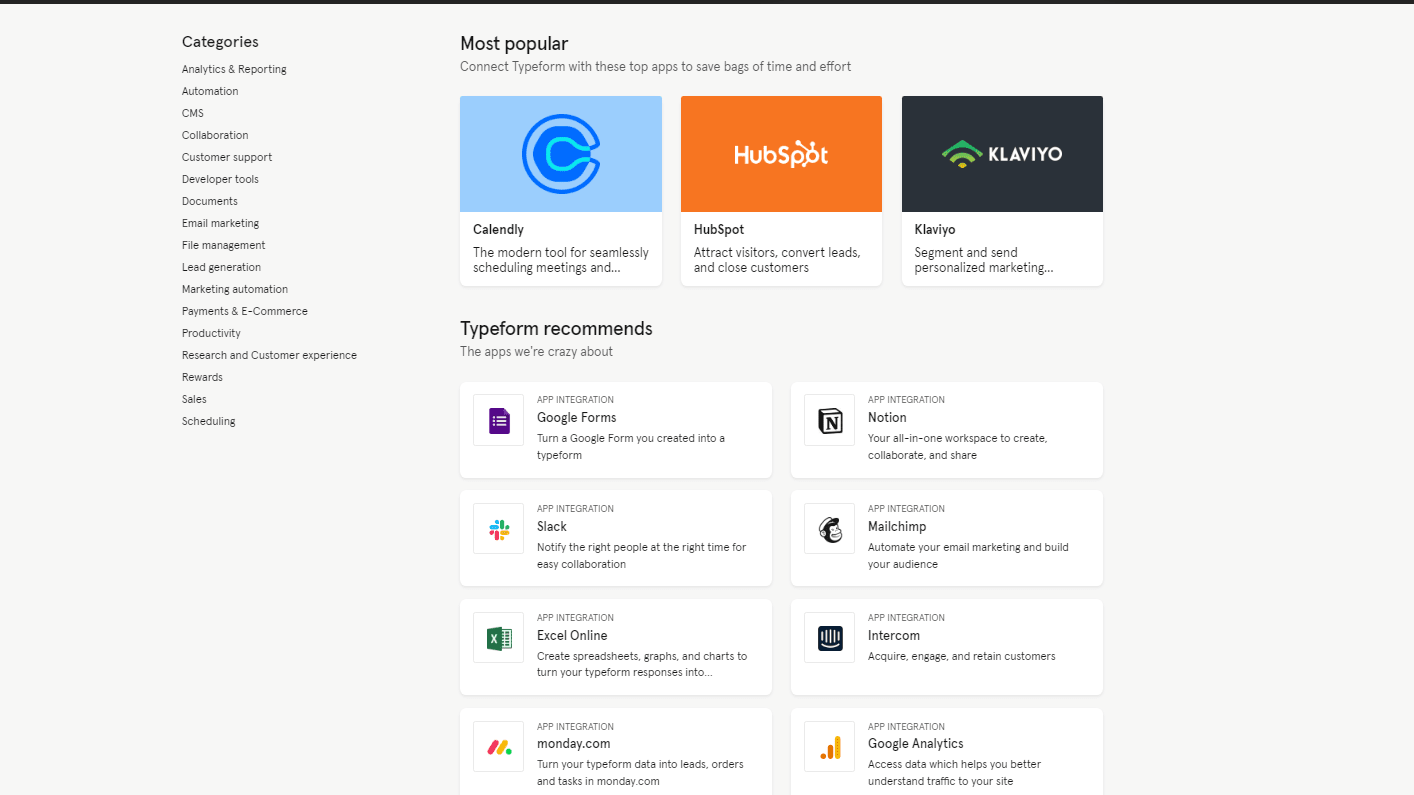
Typeform Provides Over 120 Integrations for You to Choose From, Including Notion, Monday, and Intercom
Looking at integration possibilities, Typeform emerges as a frontrunner due to its extensive compatibility with a diverse array of third-party apps and platforms. For instance, Typeform seamlessly integrates with Google Sheets for easy data management, email marketing software like Mailchimp, Slack for efficient team communication, and Zendesk for enhanced customer support workflows. These integrations empower businesses to automate data transfers and workflows across different tools, thereby optimizing operational efficiency and data utilization.
While SurveySparrow offers integrations with notable platforms like HubSpot, Salesforce, and Google Analytics, its integration ecosystem doesn't match the breadth and versatility provided by Typeform, making Typeform the preferred choice for businesses seeking comprehensive integration solutions.
08 SurveySparrow vs Typeform: Which is the best for your business?
SurveySparrow is the best tool for you if:
- You value a user-friendly interface that simplifies the creation of complex surveys with advanced branching logic and customizable workflows.
- Your focus is on multi-channel distribution, allowing you to reach respondents through email, SMS, and even offline modes seamlessly.
- Robust analytics are crucial for your decision-making, offering insightful data visualizations and comprehensive reporting features to understand respondent behavior deeply.
- You require a tool that supports extensive feedback collection capabilities, including 360-degree feedback that's ideal for HR departments and management teams.
- Scalability is important, with affordable plans that cater to both small businesses and large enterprises, ensuring the platform grows with your needs.
 You value a user-friendly interface that simplifies the creation of complex surveys with advanced branching logic and customizable workflows.
Typeform is the best tool for you if:
- You prioritize visually appealing surveys that engage participants with customizable backgrounds, images, and videos, making every interaction a reflection of your brand’s unique aesthetic.
- Interactive elements are key, and you want to utilize sliding scales, image-based selections, and conditional logic to create dynamic, conversational forms that improve response rates.
- Integration with other platforms is essential, as Typeform seamlessly connects with hundreds of apps like Google Sheets, Salesforce, and Slack to streamline data flow and automate workflows.
- Your surveys require varied response formats, enabling creative question types like rating scales, dropdowns, and open-ended questions that can adapt to diverse information gathering needs.
- You’re looking for a solution that offers easy sharing across web and social media platforms, enhancing the reach and accessibility of your surveys to a broader audience.
SurveySparrow
Used by 132 members
14 days free
Save up to $10
Typeform
Used by 4746 members
40% off all annual plans
Save up to $1,236
09 Alternatives to SurveySparrow & Typeform

Slack
Used by 3991 members
25% off new plan purchases
Save up to $9,000

Tally
Used by 819 members
50% off for 1 year
Save up to $145

Jotform
Used by 461 members
50% off annual plans for 1 year
Save up to $294

Doodle
Used by 324 members
20% off the monthly Pro plan
Save up to $30
10 Promotions on Survey software
SurveySparrow and Typeform are great tools, but Secret offers promo codes with discounts on over 2250+ different SaaS solutions. New deals are added regularly, helping you save money on your online subscriptions. Get access to codes for other Survey software you might want to purchase
Jotform promotion code
50% off annual plans for 1 year

Paperform free credits
50% off monthly plans for 1 year
Promo code Tally
50% off for 1 year

SurveyMonkey coupon code 2026
Additional 20% off annual Team plans

BlockSurvey deal
50% off the Standard Plan for 1 year

Discount for Zoho Forms
$100 in Zoho Wallet credits

Drag’n Survey free credits
50% off annual plans
Start saving on the best SaaS
Secret has already helped tens of thousands of startups save millions on the best SaaS like Microsoft Teams, Google Workspace & many more. Join Secret now to buy software the smart way.