


Survey tools are an essential component of any business's data collection and customer feedback strategy. They enable companies to gather insights directly from their target audience, which can be crucial for making informed decisions, improving products or services, and enhancing customer satisfaction. However, with so many survey platforms available, selecting the right one for your business needs can be a daunting task.
In this article, we delve into a detailed comparison between two of the leading survey platforms: Typeform and SurveyMonkey. By examining their key features, usability, customization options, and pricing structures, we aim to provide you with a comprehensive overview that will assist you in determining which platform is more suited to your business requirements.
- 01 Typeform vs SurveyMonkey: overview
- 02 What's the difference between Typeform and SurveyMonkey?
- 03 Typeform pros and cons
- 04 SurveyMonkey pros and cons
- 05 Typeform compared to SurveyMonkey
- 06 SurveyMonkey compared to Typeform
- 07 Features comparison
- 08 Typeform vs SurveyMonkey: Which is the best for your business?
- 09 Alternatives to Typeform & SurveyMonkey
- 10 Promotions on Survey software
Start saving on the best SaaS
Secret has already helped tens of thousands of startups save millions on the best SaaS like Microsoft Teams, Google Workspace & many more. Join Secret now to buy software the smart way.

01 Typeform vs SurveyMonkey: overview
Typeform and SurveyMonkey are two prominent contenders in the field of online survey platforms, each offering unique features and functionalities to address diverse surveying requirements.
Typeform is celebrated for its intuitive interface and visually appealing survey designs. It empowers users to craft engaging surveys, forms, and quizzes with customizable templates and interactive features. In contrast, SurveyMonkey boasts a long-standing reputation for its comprehensive survey solutions and robust analytics tools. With SurveyMonkey, users have access to a wide range of question types and survey templates, facilitating the creation of surveys tailored to specific research objectives.
Deciding between Typeform and SurveyMonkey depends on your specific surveying needs and preferences. If you prioritize an intuitive and visually appealing survey experience that encourages higher response rates, Typeform may be the preferred choice. However, if you require comprehensive survey solutions with advanced analytics capabilities to gather and analyze data effectively, SurveyMonkey is likely the more suitable option for your surveying endeavors.

Customer Reviews
Typeform is often praised for its user-friendly design and engaging respondent experience. SurveyMonkey is well-regarded for its robust survey functionality and extensive question bank.

Typeform
SurveyMonkey
Reporting and analytics
Typeform provides basic reporting and insights, which are beautifully designed but might lack depth for complex analysis. SurveyMonkey offers powerful analytics and reporting tools, suitable for detailed data analysis.
Typeform
SurveyMonkey
Accessibility
Typeform surveys are accessible and mobile-friendly, ensuring a wide reach. SurveyMonkey also prioritizes accessibility, with surveys that are responsive across devices.
Typeform
SurveyMonkey
Survey functionality
Typeform is suitable for creating engaging and interactive surveys but may lack some advanced analysis features. SurveyMonkey provides extensive survey functionality, including advanced analytics and logic branching.
Typeform
SurveyMonkey
Customer Support
Typeform provides good customer support with a helpful knowledge base and community. SurveyMonkey offers comprehensive support options, including tutorials, FAQs, and customer service channels.
Typeform
SurveyMonkey
Pricing Plan
Typeform offers a free plan with basic features and paid plans that unlock more customization and integrations. SurveyMonkey also has a free tier, with more advanced features available in its paid plans, which can be pricey for high-end features.
Typeform
SurveyMonkey
Design flexibility
Typeform excels in design flexibility, allowing for highly customizable forms that provide a unique user experience. SurveyMonkey offers customization options but is generally more limited in terms of design aesthetics.
Typeform
SurveyMonkey
Market presence
Typeform has a strong market presence, especially among businesses looking for creative survey solutions. SurveyMonkey, as one of the pioneers in the survey tool market, has a broader recognition and use across various industries.
Typeform
SurveyMonkey
Ease of Use
Typeform is known for its intuitive design and ease of creating visually appealing forms. SurveyMonkey also has a user-friendly interface, but with a slightly steeper learning curve due to its extensive features.
Typeform
SurveyMonkey
Integrations
Typeform offers seamless integrations with popular tools and services, like Mailchimp, Slack, and Intercom,, enhancing workflow automation. SurveyMonkey boasts a wide array of integrations as well, catering to various business needs.
Typeform
SurveyMonkey
02 What's the difference between Typeform and SurveyMonkey?
Typeform's focus on user experience ensures higher completion rates and more insightful responses from respondents.
Typeform
Create beautiful forms and surveys that actually convert.

SurveyMonkey's analytics capabilities enable users to analyze survey data in real-time, derive meaningful insights, and make informed decisions based on the results.
SurveyMonkey
SurveyMonkey is an AI-powered survey and feedback platform that helps you collect, analyze, and act on customer, employee, and market insights. It combines smart survey creation tools with automated sentiment analysis, reporting dashboards, and deep integrations for data-driven decision-making.
Typeform and SurveyMonkey are both powerful survey platforms designed to help users gather insights and feedback from their audience, but they have distinct differences in their approach and offerings.
Typeform stands out for its intuitive and visually appealing survey design capabilities. It offers users a user-friendly interface and customizable templates to create engaging surveys, forms, and quizzes. Typeform's focus on user experience ensures higher completion rates and more insightful responses from respondents. Additionally, Typeform provides advanced features such as conditional logic and respondent scoring, allowing users to tailor surveys based on respondents' answers and extract deeper insights.
In contrast, SurveyMonkey is known for its comprehensive survey solutions and robust analytics tools. It offers a wide range of question types and survey templates to cater to various research objectives. SurveyMonkey's analytics capabilities enable users to analyze survey data in real-time, derive meaningful insights, and make informed decisions based on the results. With features like A/B testing and customizable reports, SurveyMonkey empowers users to optimize their survey campaigns for maximum effectiveness.
Furthermore, Typeform and SurveyMonkey have different pricing structures. Typeform offers various pricing plans based on usage and features, starting at $25 per month for the Basic plan and going up to $89 per month for the Business plan. SurveyMonkey also offers multiple pricing tiers, starting at $30 per month per user for the Team Advantage plan and going up to $75 per month per user for the Team Premier plan. Each platform's pricing plans vary in terms of features, customization options, and support, allowing users to choose the plan that best suits their budget and requirements.

Typeform
Used by 4,771 members
40% off all annual plans
Save up to $1,236

SurveyMonkey
Used by 63 members
Additional 20% off annual Team plans
Save up to $2,208
03 Typeform pros and cons
What are the advantages of Typeform?
- Intuitive user interface: Typeform offers a user-friendly and intuitive interface that makes it easy for users to create engaging surveys, forms, and quizzes without extensive technical knowledge.

- Visually appealing design: Typeform provides visually appealing survey designs and customizable templates, allowing users to create surveys that capture the attention of respondents and encourage higher completion rates.
- Advanced features: Typeform offers advanced features such as conditional logic, respondent scoring, and question branching, enabling users to create dynamic and personalized surveys tailored to respondents' answers.
- Seamless integration: Typeform seamlessly integrates with a variety of third-party tools and platforms, including CRMs, email marketing software, and analytics tools, allowing users to streamline their workflow and maximize efficiency.
- Real-time analytics: Typeform provides real-time analytics and reporting tools, allowing users to monitor survey responses, track completion rates, and derive actionable insights to make informed decisions.
What are the disadvantages of Typeform?
- Limited customization options: While Typeform offers visually appealing designs and customizable templates, some users may find the customization options limited compared to other survey platforms.

- Pricing: Typeform's pricing plans can be relatively high compared to other survey platforms, especially for users with advanced surveying needs or larger teams.
- Limited question types: Typeform has a limited selection of question types compared to some other survey platforms, which may restrict users' ability to create complex surveys.
- Learning curve: While Typeform is relatively easy to use, some users may find it challenging to navigate and fully utilize its advanced features, especially if they are new to survey creation.
- Dependency on internet connection: Typeform is a cloud-based platform, meaning users need a stable internet connection to access and use the platform effectively. This dependency may pose challenges for users in areas with unreliable internet connectivity.
Compare Typeform to other tools


Tally vs Typeform

SurveySparrow vs Typeform

Jotform vs Typeform

Typeform vs Paperform

Outgrow vs Typeform
04 SurveyMonkey pros and cons
What are the advantages of SurveyMonkey?
- Wide range of question types: SurveyMonkey offers a diverse selection of question types, including multiple choice, open-ended, Likert scale, and matrix questions, providing users with flexibility to create comprehensive surveys.
- Robust analytics and reporting: SurveyMonkey provides powerful analytics and reporting tools, allowing users to analyze survey data in real-time, generate customizable reports, and derive actionable insights to inform decision-making.
- Customization options: SurveyMonkey offers extensive customization options, including customizable survey themes, branding, and survey logic, enabling users to create surveys that reflect their brand identity and meet their specific research objectives.
- Scalability: SurveyMonkey is suitable for both small-scale and large-scale survey projects, with scalable pricing plans and features to accommodate the needs of businesses and organizations of all sizes.
- Integrations: SurveyMonkey integrates with a variety of third-party tools and platforms, including CRMs, email marketing software, and data analytics tools, allowing users to streamline their workflow and enhance productivity.
What are the disadvantages of SurveyMonkey?
- Complexity for beginners: SurveyMonkey can be complex for beginners or users with limited surveying experience, especially when navigating advanced features such as survey logic and data analysis.
- Limited free plan: SurveyMonkey's free plan has limitations on the number of questions and responses per survey, which may not be sufficient for users with extensive surveying needs.
- Pricing: SurveyMonkey's pricing plans can be relatively high compared to other survey platforms, especially for users with advanced surveying needs or larger teams.
- Interface design: Some users may find SurveyMonkey's interface less intuitive and visually appealing compared to other survey platforms, which may impact user experience and satisfaction.
- Customer support: SurveyMonkey's customer support options may be limited, especially for users on lower-tier pricing plans, which may pose challenges for users requiring additional assistance or support.
Compare SurveyMonkey to other tools

Jotform vs SurveyMonkey
05 Typeform compared to SurveyMonkey
Typeform and SurveyMonkey are both popular survey platforms, each with its own strengths. Typeform stands out for its intuitive interface and visually appealing designs, making it ideal for creating engaging surveys and forms. It offers advanced features like conditional logic and respondent scoring.
On the other hand, SurveyMonkey offers a wide range of question types and robust analytics tools, making it suitable for comprehensive survey projects. While Typeform excels in user experience, SurveyMonkey provides deeper analytics capabilities. Choosing between them depends on specific needs: Typeform for user-friendly design and engagement, SurveyMonkey for comprehensive analytics and diverse question types.
Is Typeform better than SurveyMonkey?
 Is Typeform better than SurveyMonkey?
Determining whether Typeform is better than SurveyMonkey hinges on the specific requirements of your survey project. If the primary goal is to captivate respondents with visually striking and interactive forms, Typeform's sleek design and ease of use might tip the scales in its favor.
However, for projects that demand in-depth analysis and a broad spectrum of question options, SurveyMonkey's extensive analytical features could prove more advantageous. Ultimately, the choice between these platforms should align with your priorities—whether it's enhancing the respondent's experience or gaining detailed insights from your data collection efforts.
What is Typeform best used for?
Typeform excels in creating interactive and visually appealing surveys, forms, and quizzes. Its user-friendly interface and customizable templates make it ideal for capturing audience feedback, conducting market research, and gathering data for various purposes.
Typeform's advanced features like conditional logic and respondent scoring allow for tailored surveys, ensuring a personalized experience for respondents. It is particularly well-suited for businesses and organizations seeking to engage their audience effectively, improve user experience, and derive actionable insights from survey responses. Whether for customer feedback, lead generation, or event registrations, Typeform offers a versatile solution for creating engaging and effective forms and surveys.
Can Typeform replace SurveyMonkey?
While Typeform offers a visually appealing and user-friendly interface for creating surveys, it may not entirely replace SurveyMonkey for all users. SurveyMonkey provides a wide range of question types, robust analytics, and extensive customization options, making it suitable for comprehensive survey projects.
However, Typeform's intuitive design and advanced features like conditional logic and respondent scoring make it a strong contender. Depending on specific needs, Typeform can serve as a viable alternative or complement to SurveyMonkey, particularly for those prioritizing user engagement and interactive survey experiences.
Is Typeform cheaper than SurveyMonkey?
Comparing Typeform's pricing to SurveyMonkey's reveals nuanced differences. While Typeform offers competitive pricing plans tailored to various needs, including a free option with limited features, SurveyMonkey similarly provides tiered pricing options with varying levels of functionality.
The ultimate cost-effectiveness depends on factors such as the scale of surveying needs, desired features, and available budget. While Typeform's pricing may appear more affordable for certain users, particularly those with simpler survey requirements, SurveyMonkey's broader range of features and scalability may justify its higher price point for others.
Is there a better Survey software than Typeform?
When evaluating survey platforms, it's crucial to consider alternatives to Typeform to ensure you're choosing the best fit for your surveying requirements.
Several notable alternatives to Typeform include SurveyMonkey, Google Forms, JotForm, and Qualtrics.
Determining the most suitable software for your specific needs relies on various factors such as the complexity of your surveys, budget constraints, and desired features. Typeform is renowned for its visually appealing designs and user-friendly interface, making it a popular choice for many.

Typeform
Create beautiful forms and surveys that actually convert.
40% off all annual plans
Save up to $1,236
06 SurveyMonkey compared to Typeform
SurveyMonkey and Typeform are both leading survey platforms with distinct strengths. SurveyMonkey offers a wide range of question types, robust analytics, and extensive customization options, making it suitable for comprehensive survey projects.
In contrast, Typeform stands out for its visually appealing designs, intuitive interface, and advanced features like conditional logic. While SurveyMonkey excels in analytics and diverse question types, Typeform prioritizes user engagement and interactive survey experiences. Choosing between them depends on specific needs: SurveyMonkey for comprehensive analytics, Typeform for user-friendly design.
Is SurveyMonkey better than Typeform?
Whether SurveyMonkey is superior to Typeform largely depends on the objectives and requirements of your data collection initiative. If your focus is on obtaining thorough insights through detailed analytics and leveraging a vast array of question formats, SurveyMonkey's robust functionalities might be the deciding factor. Its capabilities are especially beneficial for extensive and complex surveys where data depth and analysis are paramount.
Conversely, if prioritizing the aesthetic appeal and engagement level of your surveys is key, Typeform's strengths would be more aligned with your needs.
What is SurveyMonkey best used for?
SurveyMonkey is best used for conducting comprehensive surveys and gathering actionable insights from respondents. With its wide range of question types, robust analytics tools, and extensive customization options, SurveyMonkey is ideal for various survey projects, including market research, customer satisfaction surveys, and employee feedback. Its powerful analytics capabilities allow users to analyze survey data in real-time, generate customizable reports, and derive meaningful insights to inform decision-making.
Whether for measuring customer satisfaction, assessing employee engagement, or conducting academic research, SurveyMonkey provides a versatile and reliable solution for organizations and individuals seeking to collect and analyze survey data effectively.
Can SurveyMonkey replace Typeform?
While SurveyMonkey offers robust surveying capabilities, it may not entirely replace Typeform for all users. SurveyMonkey excels in providing diverse question types, robust analytics, and extensive customization options, making it suitable for comprehensive survey projects.
However, Typeform's intuitive interface, visually appealing designs, and advanced features like conditional logic may offer a unique user experience not replicated by SurveyMonkey. Depending on specific surveying needs and preferences, SurveyMonkey can serve as a viable alternative or complement to Typeform, particularly for users prioritizing comprehensive analytics and diverse question types.
Is SurveyMonkey cheaper than Typeform?
Comparing SurveyMonkey's pricing to Typeform's unveils nuanced differences. While SurveyMonkey offers tiered pricing options catering to various needs, Typeform similarly provides pricing plans tailored to different user requirements. The cost-effectiveness ultimately hinges on factors such as surveying needs, desired features, and available budget.
While SurveyMonkey's pricing may seem more affordable for some users, especially those with extensive survey requirements, Typeform's user-friendly interface and advanced features may justify its higher price point for others.
Is there a better Survey software than SurveyMonkey?
When considering survey software options, it's crucial to explore whether there's a better fit for your needs than SurveyMonkey.
Several notable alternatives to SurveyMonkey in the surveying space include Typeform, Zoho Surveys, SurveySparrow, ClickUp, and Smartsurvey.
Selecting the right survey software depends on factors like survey complexity, analytical capabilities, and budget considerations. SurveyMonkey stands out for its diverse question types and robust analytics, yet examining these alternatives can unveil which platform best aligns with your unique surveying goals.

SurveyMonkey
Smarter surveys powered by real-time AI insights
Additional 20% off annual Team plans
Save up to $2,208
07 Features comparison
SurveyMonkey Excels in Collaboration and Team Management

SurveyMonkey allows team members to work concurrently on surveys, facilitating efficient collaboration and project completion.
SurveyMonkey shines in fostering collaboration among team members with its robust features. Users can collaborate in real-time on surveys, assigning roles and permissions to ensure smooth workflow management. For instance, SurveyMonkey allows team members to work concurrently on surveys, facilitating efficient collaboration and project completion.
Additionally, the platform offers automated alerts to notify team members of specific events, enhancing communication and task coordination. In contrast, Typeform lacks these advanced collaboration features, making SurveyMonkey the preferred choice for teams seeking streamlined collaboration and efficient project management capabilities.
SurveyMonkey Surpasses Typeform in Advanced Data Analysis

SurveyMonkey allows for filtering, segmenting, and cross-tabulating data, providing deeper insights and identifying trends that may not be readily apparent.
SurveyMonkey excels in providing comprehensive data analysis capabilities, surpassing Typeform in this aspect. The platform offers a wide range of features, including charts, graphs, and data visualizations, enabling users to interpret survey results effectively. For example, SurveyMonkey allows for filtering, segmenting, and cross-tabulating data, providing deeper insights and identifying trends that may not be readily apparent.
By offering robust analytical tools, SurveyMonkey empowers users to derive actionable insights from their survey data, enhancing decision-making processes. In contrast, Typeform may lack the depth and versatility of analytical features found in SurveyMonkey, making it the preferred choice for users prioritizing advanced data analysis capabilities.
Typeform and SurveyMonkey are Equally Adept at Providing Customizable Templates
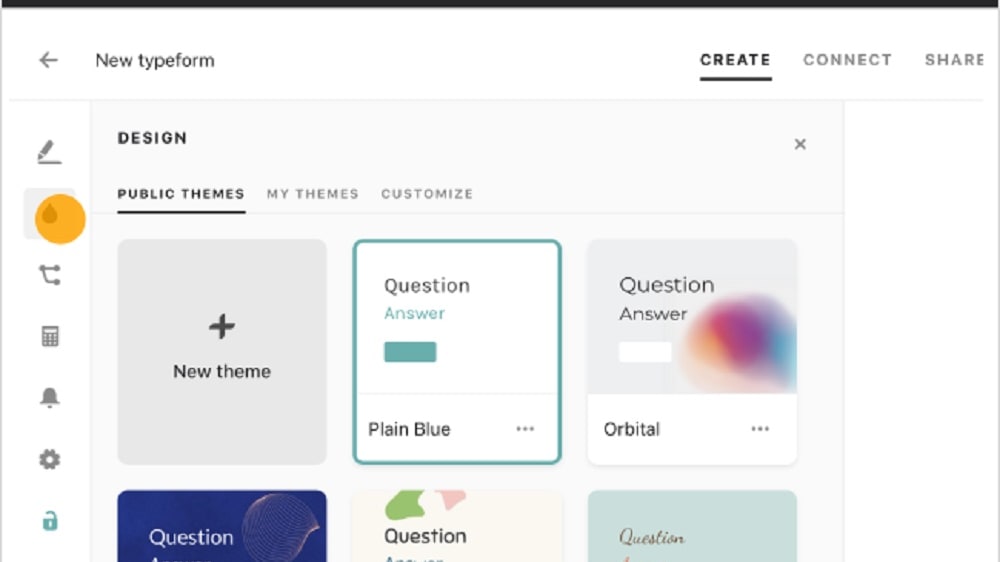
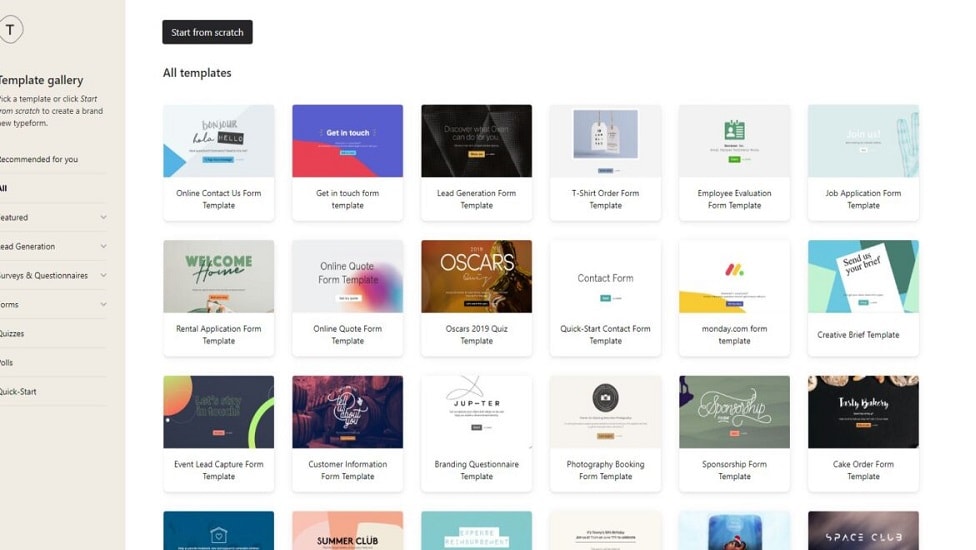
Typeform offers templates tailored to various objectives, such as lead generation and customer feedback, exemplified by its sleek and modern designs.
Both Typeform and SurveyMonkey present users with a diverse selection of customizable templates, aimed at streamlining the survey creation process and enhancing professionalism. Typeform offers templates tailored to various objectives, such as lead generation and customer feedback, exemplified by its sleek and modern designs. For instance, Typeform provides templates specifically crafted for event registration and market research, ensuring versatility in survey creation.
Similarly, SurveyMonkey boasts over 100 survey templates across different categories, catering to a wide range of surveying needs. Whether users seek conversion-focused templates in Typeform or a vast array of options in SurveyMonkey, both tools offer customizable templates to suit diverse requirements.
Typeform Leads in User Experience Over SurveyMonkey

Typeform distinguishes itself with a sleek and modern interface, optimizing user experience by displaying one question at a time
Typeform distinguishes itself with a sleek and modern interface, optimizing user experience by displaying one question at a time. This approach reduces respondent overwhelm and enhances engagement. For example, its conversational format mimics natural conversation, fostering a more interactive survey experience.
In contrast, while SurveyMonkey provides customizable themes in its survey builder, it lacks the aesthetic appeal and user-friendliness of Typeform's design. SurveyMonkey's traditional list-based format may feel less engaging to respondents compared to Typeform's visually appealing interface. Overall, Typeform's focus on user experience sets it apart as the preferred choice for creating engaging and intuitive surveys.
Typeform's Engaging Chatbot Feature Outshines SurveyMonkey
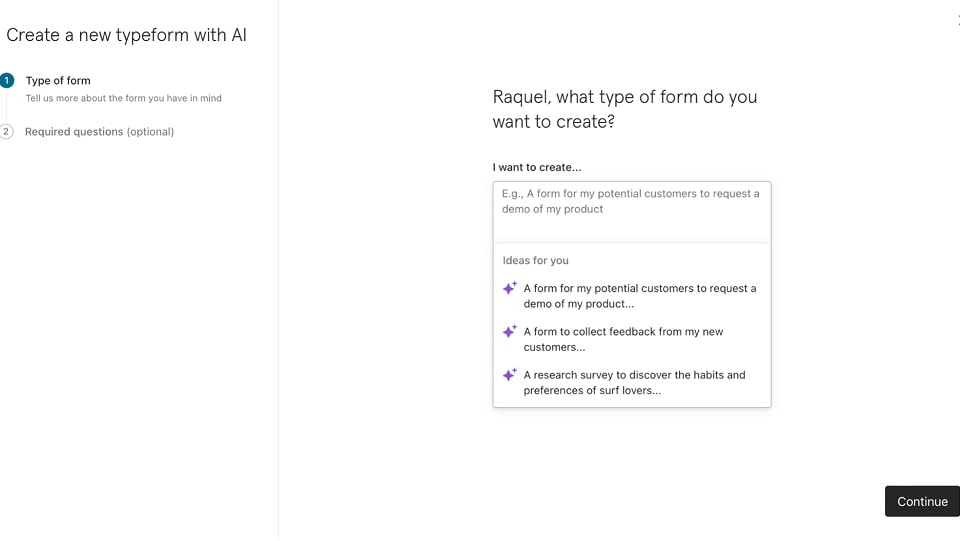
Typeform's chatbot functionality allows for personalized interactions and dynamic responses based on user inputs, enhancing user engagement and satisfaction.
Typeform sets itself apart with its interactive, no-code chatbot feature designed to elevate respondent engagement. This innovative feature aims to boost lead conversion rates by creating a more enjoyable form completion experience for users. For instance, Typeform's chatbot functionality allows for personalized interactions and dynamic responses based on user inputs, enhancing user engagement and satisfaction.
In contrast, SurveyMonkey, while boasting numerous strengths, currently lacks a comparable interactive feature such as a chatbot. Typeform's focus on enhancing user engagement through innovative features positions it as the preferred choice for users seeking interactive survey experiences not found in SurveyMonkey.
Typeform Triumphs in Usability Battle Against SurveyMonkey
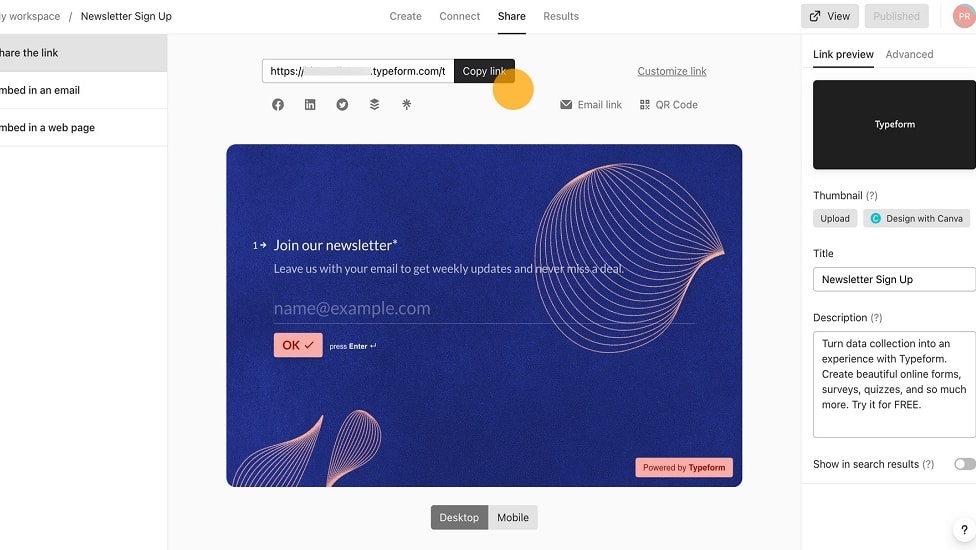
For instance, Typeform's use of conditional logic allows for dynamic survey experiences tailored to respondents' answers.
When considering overall usability, Typeform emerges as the frontrunner in the comparison with SurveyMonkey. While both platforms aim to simplify form and survey creation, Typeform distinguishes itself with its innovative approach. Its conversational interface fosters greater respondent engagement, exemplified by its intuitive drag-and-drop builder and customizable design options. For instance, Typeform's use of conditional logic allows for dynamic survey experiences tailored to respondents' answers.
Conversely, SurveyMonkey, though robust, relies on a more traditional list-based survey format, potentially lacking the interactivity and visual appeal found in Typeform's interface. Overall, Typeform's user-centric design elevates usability to new heights compared to SurveyMonkey.
SurveyMonkey Surpasses Typeform in Integration Versatility

While both platforms seamlessly integrate with popular apps like CRM systems and email marketing software, SurveyMonkey boasts a wider range of integration options.
Exploring the integration capabilities of these two market leaders, SurveyMonkey outshines Typeform with its extensive array of possibilities. While both platforms seamlessly integrate with popular apps like CRM systems and email marketing software, SurveyMonkey boasts a wider range of integration options. For instance, SurveyMonkey offers integrations with project management tools such as Asana and Trello, enhancing workflow efficiency.
Additionally, its advanced analytics and reporting features complement other data analysis tools, providing a comprehensive solution. While Typeform offers robust integration features, SurveyMonkey's versatility in this aspect positions it as the preferred choice for businesses seeking a well-rounded integration experience.
08 Typeform vs SurveyMonkey: Which is the best for your business?
Typeform is the best tool for you if:
- You prioritize engaging your audience with beautifully designed forms and surveys that enhance user experience and increase completion rates through its clean, modern interface and user-friendly navigation.
- Customization is key to your strategy, as Typeform offers extensive design options, allowing you to align your surveys and forms with your brand identity through customizable templates and creative layouts.
- Interactive and dynamic content is crucial for your data collection efforts, with features like conditional logic that tailor the survey path based on respondent answers, making each interaction feel personalized.
- You're looking for a platform that integrates seamlessly with other tools and services, enhancing your workflow with automated processes, from data collection to analysis, through its wide range of integrations.
- The quality of the respondent's experience is a top priority, and you aim to create forms that are not only visually appealing but also fun and easy to complete, encouraging higher response rates.
 You prioritize engaging your audience with beautifully designed forms and surveys that enhance user experience and increase completion rates through its clean, modern interface and user-friendly navigation.
SurveyMonkey is the best tool for you if:
- Comprehensive data analysis and reporting are critical for your projects, as SurveyMonkey offers advanced analytics tools that help in dissecting survey results for detailed insights and informed decision-making.
- You require a wide variety of question types and customization options to cater to complex survey needs, ensuring precision in data collection and flexibility in survey design.
- Scalability and reliability are non-negotiable for your large-scale survey campaigns, with SurveyMonkey's proven track record of managing high response volumes and providing robust data security measures.
- Integration with a broad ecosystem of apps and services is essential, enabling you to streamline workflows, automate data transfer, and enhance overall productivity with minimal manual intervention.
- You value access to a large respondent pool for market research, benefiting from SurveyMonkey's audience panels that allow you to target specific demographics for accurate and relevant feedback.
Typeform
Used by 4,771 members
40% off all annual plans
Save up to $1,236
SurveyMonkey
Used by 63 members
Additional 20% off annual Team plans
Save up to $2,208
09 Alternatives to Typeform & SurveyMonkey

Google Cloud (GCP)
Used by 12,038 members
$2,000 in credits for 1 year if you never raised funds // $350,000 in credits for 2 years if you did
Save up to $350,000

Tally
Used by 833 members
50% off for 1 year
Save up to $145

Jotform
Used by 474 members
50% off annual plans for 1 year
Save up to $294

Array
Used by 323 members
6 months free on the Essential plan
Save up to $300
10 Promotions on Survey software
Typeform and SurveyMonkey are great tools, but Secret offers promo codes with discounts on over 2250+ different SaaS solutions. New deals are added regularly, helping you save money on your online subscriptions. Get access to codes for other Survey software you might want to purchase
Jotform promotion code
50% off annual plans for 1 year

Paperform free credits
50% off monthly plans for 1 year
Promo code Tally
50% off for 1 year

SurveySparrow promotion code
14 days free

BlockSurvey deal
50% off the Standard Plan for 1 year

Discount for Zoho Forms
$100 in Zoho Wallet credits

Drag’n Survey free credits
50% off annual plans
Start saving on the best SaaS
Secret has already helped tens of thousands of startups save millions on the best SaaS like Microsoft Teams, Google Workspace & many more. Join Secret now to buy software the smart way.