


Choosing the right form builder is crucial for enhancing user engagement, collecting accurate data, and improving overall efficiency in digital interactions. These tools facilitate the creation of intuitive and responsive forms that not only capture information but also integrate smoothly with other digital systems, boosting operational productivity. Additionally, advanced form builders offer analytics to understand user behavior and conversion rates, further optimizing your strategies.
With a range of form-building platforms available, selecting the ideal one for your needs can be challenging. In this article, we assist you by providing an in-depth comparison of two notable form-building tools, Tally and Typeform. By examining their main features, usability, and key differences, you’ll be better equipped to make an informed choice that aligns with your business objectives.
- 01 Tally vs Typeform: overview
- 02 What's the difference between Tally and Typeform?
- 03 Tally pros and cons
- 04 Typeform pros and cons
- 05 Tally compared to Typeform
- 06 Typeform compared to Tally
- 07 Features comparison
- 08 Tally vs Typeform: Which is the best for your business?
- 09 Alternatives to Tally & Typeform
- 10 Promotions on Web Development software
Start saving on the best SaaS
Secret has already helped tens of thousands of startups save millions on the best SaaS like Microsoft Teams, Google Workspace & many more. Join Secret now to buy software the smart way.

01 Tally vs Typeform: overview
Tally and Typeform are two distinguished contenders in the arena of online form- and survey-building platforms, each bringing unique strengths tailored to suit different user needs.
Tally is celebrated for its straightforward and intuitive interface, making it a favorite among users who prioritize ease of use and quick form creation without the need for extensive technical knowledge. On the other hand, Typeform stands out for its engaging user experience and aesthetic design, ideal for creating forms that require a more personalized interaction.
To decide between Tally and Typeform, it’s important to weigh your specific needs regarding form complexity, user engagement, and integration capabilities. If simplicity and speed are your top priorities, Tally might be the perfect fit. Conversely, if you’re aiming for high engagement levels and a polished, professional look with deeper customization, Typeform could be the superior choice for your projects.

Positive reviews
Tally is often commended for its simplicity and the free tier offering. Typeform is praised for its conversational interface and design aesthetics that improve user engagement.

Tally
Typeform
Customer support
Tally offers basic support channels. Typeform is known for its responsive customer service with more extensive support options and resources.
Tally
Typeform
Form customization
Tally offers a high level of customization within its sleek interface. Typeform leads with customizable templates and a design-first approach that is highly engaging for users.
Tally
Typeform
Templates & examples
Tally has a growing library of templates for various use cases. Typeform boasts a wide array of professionally designed templates catering to diverse needs.
Tally
Typeform
Pricing plans
Tally provides a very generous free plan with unlimited forms and questions, and a clear, affordable pro plan. Typeform's plans are pricier but offer advanced features and templates.
Tally
Typeform
Ease of use
Both platforms are user-friendly, with Tally being particularly straightforward, while Typeform provides a more guided and design-centric creation process.
Tally
Typeform
Reporting & analytics
Tally provides basic reporting tools. Typeform offers comprehensive analytics and reporting features that provide deeper insights into respondent behavior.
Tally
Typeform
Accessibility
Both Tally and Typeform comply with basic accessibility standards, ensuring forms are usable by people with disabilities.
Tally
Typeform
Payment processing
Tally allows for simple payment processing in forms. Typeform offers more advanced payment features, integrating with Stripe and presenting a more seamless payment experience.
Tally
Typeform
Integrations
Tally integrates with tools such as Zapier, which connects to various apps, and Notion for database syncing. Typeform has direct integrations with platforms like Google Sheets, Airtable, and Mailchimp.
Tally
Typeform
02 What's the difference between Tally and Typeform?

Most of Tally's Features Are Included in its Free Plan, Including Unlimited Forms
Tally
Create forms efficiently, in just a few seconds.
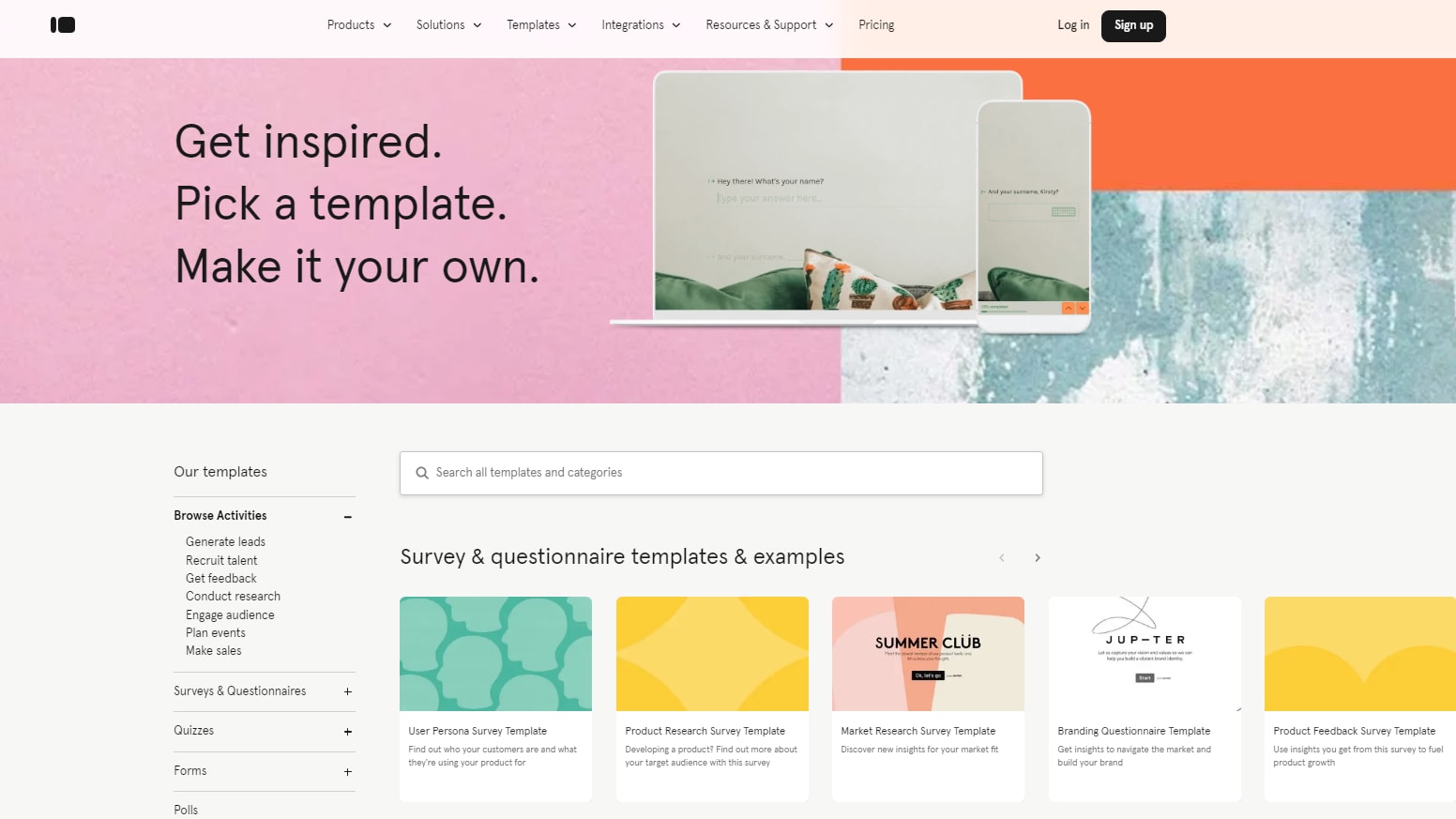
Typeform Has Over 600 Templates For You to Choose From, Including Lead Generation, Feedback, and Event Planning
Typeform
Typeform transforms the experience of taking online forms and surveys. No more ugly old interfaces and plummeting response rates, thanks to Typeform efficiently collect the data you need.
Tally and Typeform are robust online form-building platforms offering distinct approaches to creating, managing, and optimizing digital forms. As you explore these options, understanding their differences can assist you in selecting the most suitable tool for your needs. Tally is recognized for its simplicity and efficiency, making it a preferred choice for users who need to quickly set up forms without a steep learning curve. It's particularly appealing to small businesses, non-profits, and individual users who value straightforward form-building tools that still offer essential functionalities and customization.
On the other hand, Typeform prioritizes user engagement and aesthetic appeal, providing a unique form experience through its conversational interface. This platform is excellent for businesses that aim to create highly interactive and visually appealing forms, making it ideal for surveys, quizzes, and any application where user experience is a priority. Typeform's features include a wide range of integrations and design options, which, while powerful, may require a bit more time to master compared to Tally's simpler interface.
Another point of comparison is the variety of templates and customization options each platform offers. Tally focuses on providing a clean, no-frills approach with sufficient options to get the job done efficiently, whereas Typeform offers extensive customization that allows for a more branded and engaging user interface.
Furthermore, it's beneficial to consider the free plans of each platform if budget is a constraint. Tally’s free plan is quite generous, offering unlimited forms and questions with basic features, making it very accessible. Typeform's free plan, while more limited in terms of responses and form fields, includes powerful design tools and templates that can be crucial for creating engaging forms.

Tally
Used by 833 members
50% off for 1 year
Save up to $145

Typeform
Used by 4,769 members
40% off all annual plans
Save up to $1,236
03 Tally pros and cons
What are the advantages of Tally?
- Ease of use: Tally is known for its user-friendly interface, making form creation as simple as typing in a text document. This accessibility makes it suitable for users of all technical levels.

- No limits on forms and submissions: It offers unlimited forms and submissions for free, which is beneficial for businesses and organizations that require extensive data collection without additional costs.
- Customization and branding: Users can customize forms to align with their branding, including adding logos, custom page covers, and thank-you pages. This helps maintain a consistent brand image across customer interactions.
- Robust integration capabilities: Tally integrates with popular third-party tools like Zapier, Google Sheets, Notion, and Airtable, facilitating seamless workflow automation and data management.
- Data privacy and security: It prioritizes data security and compliance with GDPR, ensuring user data is encrypted and handled with care.
What are the disadvantages of Tally?
- Performance issues: Some users have reported slowdowns when dealing with very large or complex forms, although improvements in this area are a priority for Tally.

- Limited advanced features in free plan: While Tally is generous with its basic offerings, some advanced features, such as detailed analytics and custom CSS, require upgrading to the Tally Pro plan.
- Fair use policy: Although advertised as offering unlimited forms and submissions, there is a fair use policy that may impose limits if usage is deemed excessive, which could affect larger users unexpectedly.
- Limited layout options: Compared to some competitors, Tally might offer fewer layout and design options, which might be a drawback for users seeking highly stylized form designs.
- Dependency on third-party integrations for some features: While integrations are robust, reliance on third-party services like Zapier for certain functionalities might not be ideal for all users, especially those looking for a more all-in-one solution.
04 Typeform pros and cons
What are the advantages of Typeform?
- Intuitive interface: Typeform offers a user-friendly interface that allows users to create visually appealing and interactive forms without needing any coding knowledge. Its drag-and-drop editor and intuitive design make the form creation process simple and straightforward.
- Highly customizable: Typeform provides extensive customization options, allowing users to personalize their forms with different question types, fonts, colors, and images. This flexibility enables users to create forms that align with their brand identity and capture the specific information they need.
- Mobile optimization: Typeform's forms are optimized for mobile devices, ensuring a seamless experience for respondents who access the forms on smartphones or tablets. This mobile responsiveness increases accessibility and ensures that respondents can easily complete the forms from any device.
- Advanced features: Typeform offers a range of advanced features, such as logic branching, question piping, and integration with third-party tools like Google Sheets, Zapier, and Slack. These features enable users to create dynamic and interactive forms that adapt based on respondents' answers and integrate seamlessly with their existing workflows.
- Analytics and insights: Typeform provides built-in analytics and reporting tools that allow users to track form performance, monitor completion rates, and analyze respondents' answers. This data enables users to gain valuable insights into user behavior, identify trends, and make informed decisions to improve their forms.
What are the disadvantages of Typeform?
- Limited free plan: Typeform's free plan has limitations on the number of forms and responses allowed, as well as restrictions on certain features and customization options. Users may need to upgrade to a paid plan to access advanced features and remove these limitations, which could be a drawback for budget-conscious users.
- Learning curve: While Typeform's interface is intuitive, mastering its more advanced features and customization options may require some time and experimentation. Users with limited technical skills or experience may find it challenging to fully utilize all of Typeform's capabilities.
- Cost: Typeform's pricing plans can be relatively expensive compared to some other form builder options, especially for businesses or organizations with large-scale form creation and data collection needs. The cost of upgrading to a higher-tier plan to unlock additional features and remove limitations may not be feasible for all users.
- Limited template variety: While Typeform offers a variety of templates for different types of forms, some users may find the template selection limited compared to other form builder platforms. This could result in users needing to create custom forms from scratch more often, which may be time-consuming.
- Data ownership and security concerns: Users may have concerns about data ownership and security when using Typeform, especially when collecting sensitive information through forms. While Typeform has measures in place to protect data security, users should carefully review Typeform's privacy policies and data handling practices to ensure compliance with applicable regulations and standards.
Compare Typeform to other tools


SurveySparrow vs Typeform

Jotform vs Typeform

Typeform vs Paperform

Typeform vs SurveyMonkey

Outgrow vs Typeform
05 Tally compared to Typeform
Tally and Typeform serve as robust online form builders, each with unique strengths. Tally offers an easy-to-use interface that simplifies form creation, allowing unlimited forms and submissions at no cost, which appeals especially to users with high volume needs. It supports extensive customizations and integrations, making it versatile for various applications.
On the other hand, Typeform focuses on creating aesthetically pleasing forms that facilitate a conversational user experience. While it provides an intuitive design process, its free version limits the number of questions and responses, pushing users towards its paid plans for more comprehensive features.
Is Tally better than Typeform?
 Is Tally better than Typeform?
When comparing Tally and Typeform, it becomes apparent that the choice between these two platforms depends heavily on user priorities. Tally is ideal for those who need to manage large volumes of data without incurring costs, thanks to its policy of unlimited forms and submissions. This makes it particularly beneficial for users looking for affordability combined with flexibility.
Conversely, Typeform is more suitable for those prioritizing form aesthetics and user engagement through a conversational interface. Although Typeform’s free version is more restrictive, its design capabilities may justify the investment for businesses focusing on user experience and brand alignment.
What is Tally best used for?
Tally is best utilized for creating a wide range of online forms, from simple surveys to complex quizzes and everything in between, without requiring any coding knowledge. Its intuitive interface resembles a text document, making it accessible to beginners while still powerful enough for advanced users.
Tally is particularly effective for businesses and organizations that need to collect data extensively due to its provision of unlimited forms and submissions for free. Additionally, its capabilities for detailed customizations and integrations make it ideal for tailoring forms to match specific branding requirements and automating data workflows.
Can Tally replace Typeform?
Tally can indeed replace Typeform for many users, especially those seeking a no-cost solution with extensive functionality. Tally’s appeal lies in its ability to offer unlimited forms and submissions without charge, coupled with robust customization options that allow forms to be finely tailored to match a brand’s identity. Its user-friendly interface makes form creation accessible to users of all skill levels, from beginners to advanced.
While Typeform has its strengths, particularly in creating visually engaging, conversational forms, Tally’s generous free tier and flexible features make it a compelling alternative for users with varied form-building needs.
Is Tally cheaper than Typeform?
Tally generally offers a more cost-effective solution compared to Typeform, especially for users with extensive form-building and data collection needs. Tally's free plan includes unlimited forms and submissions, plus a range of customization options, making it accessible without any initial investment.
In contrast, Typeform's free version is more limited, capping the number of responses and questions per form, which can necessitate a move to paid plans for fuller functionality. For more advanced features, Tally Pro is competitively priced and includes additional capabilities such as advanced analytics and custom branding, often at a lower cost than comparable Typeform plans.
Is there a better Web Development software than Tally?
While Tally offers an impressive range of features for form building and data collection, considering alternative software might help you find the best fit for your specific needs.
Notable alternatives to Tally in the form and survey building space include Typeform, Google Forms, JotForm, and SurveyMonkey.
Choosing the right form builder depends on your particular requirements, such as the complexity of the forms, integration capabilities, budget constraints, and the importance of aesthetic design. While Tally is excellent for users seeking unlimited forms and responses without cost, exploring these alternatives can provide valuable insights and help you make an informed decision that aligns perfectly with your data collection and form-building needs.

Tally
Premium
Create forms efficiently, in just a few seconds.
50% off for 1 year
Save up to $145
06 Typeform compared to Tally
Typeform and Tally serve similar purposes as form builders but cater to different user preferences and needs. Typeform is renowned for its sleek, minimalist design and conversational user interface, making it ideal for engaging surveys and feedback forms that require a high level of interactivity and visual appeal. It focuses on one question at a time, enhancing the user's experience and reducing distractions.
In contrast, Tally emphasizes functionality with a no-frills, straightforward approach that allows for the creation of forms with unlimited questions and submissions for free. Tally's interface is highly customizable and particularly suits users looking for a cost-effective, flexible solution for extensive data collection without the constraints of a freemium model.
Is Typeform better than Tally?
When assessing whether Typeform outperforms Tally, much depends on the specific needs of the user, especially in terms of design and interaction. Typeform excels in creating a visually appealing and engaging experience that captivates users, making it exceptionally effective for surveys and forms where user interaction is critical. Its approach to presenting one question at a time helps maintain focus and reduces user fatigue, which can increase response rates and improve data quality.
While Tally offers a more utilitarian and expansive service, Typeform’s emphasis on design and user experience often makes it the preferred choice for businesses that value brand presentation and customer engagement.
What is Typeform best used for?
Typeform is best utilized for creating interactive, user-friendly forms that prioritize a conversational experience, making it particularly effective for surveys, feedback collection, and lead generation. Its unique design allows each question to be presented one at a time, which helps to keep respondents engaged and reduces the feeling of being overwhelmed by content.
This approach suits applications where user experience is critical, such as customer feedback forms, event registrations, and marketing quizzes. Typeform's aesthetic appeal and smooth user interface also make it a preferred choice for brands looking to maintain a strong visual identity and high engagement levels in their interactions.
Can Typeform replace Tally?
Typeform could replace Tally depending on the specific needs and priorities of the user. While Typeform excels in creating visually appealing and engaging forms that deliver a smooth, conversational user experience, it may not suit all budget constraints due to its more restrictive free tier.
Typeform's focus on design and user engagement makes it ideal for applications requiring high interaction levels, like customer surveys and event sign-ups. However, for those needing unlimited forms and responses without additional cost, Tally's more generous free offerings and customization capabilities might be more appropriate.
Is Typeform cheaper than Tally?
Typeform is generally not cheaper than Tally when comparing the full range of features and unlimited usage. Tally offers a free plan that includes unlimited forms and responses, making it highly accessible for users with extensive form needs without any financial commitment.
On the other hand, Typeform's free plan is more limited, imposing caps on the number of questions per form and the number of responses per month. For access to advanced features and higher limits, Typeform requires users to subscribe to paid plans, which can be more expensive than Tally's pricing structure for comparable features.
Is there a better Survey software than Typeform?
While Typeform excels at creating interactive and visually appealing forms that enhance user engagement through a conversational interface, it's beneficial to consider alternative software to ensure you find the best match for your specific needs.
Several notable alternatives to Typeform in the form-building and survey space include Tally, Outgrow, Paperform, Jotform, and SurveySparrow..
Selecting the ideal form-building platform depends on your requirements for design, functionality, and integration. If you value engaging, aesthetic form experiences, Typeform may be a great choice. However, exploring these alternatives can provide valuable insights and help you make an informed decision that perfectly aligns with your data collection and interaction needs.

Typeform
Create beautiful forms and surveys that actually convert.
40% off all annual plans
Save up to $1,236
07 Features comparison
Typeform Shines in User Engagement with Modern Design

Typeform Gives You the Power to Gather Important Information From Users While Keeping Design Simple and Not Overwhelming
Typeform's sleek and modern design, featuring a one-question-at-a-time format, enhances user engagement and improves completion rates. For example, its linear design guides respondents through each question seamlessly, eliminating overwhelm and keeping users focused.
This aesthetic and user-friendly interface elevate the overall form-filling experience, distinguishing Typeform as a standout option for those prioritizing engagement and aesthetics. While Tally facilitates easy form sharing, Typeform's focus on user engagement through design innovation sets it apart in terms of enhancing the respondent experience.
Typeform Surpasses Tally with Dynamic Conditional Logic

Set Up Your User's Response Path Easily Based on Their Answers with Typeform's Conditional Logic and Branching
Typeform distinguishes itself with its advanced conditional logic capabilities, a feature absent in Tally. This intelligent feature enables questions within a form to adapt dynamically based on user responses, creating a personalized survey experience. For example, if a respondent selects a specific option, subsequent questions can adjust accordingly, offering tailored follow-up queries. This dynamic adjustment enhances engagement and boosts response rates by ensuring relevance and reducing survey fatigue.
In contrast, while Tally facilitates data collection and payment processing, it lacks Typeform's dynamic conditional logic functionality, making Typeform the preferred choice for those seeking highly personalized and interactive survey experiences.
Tally Outshines Typeform in Simplicity for Form Creation
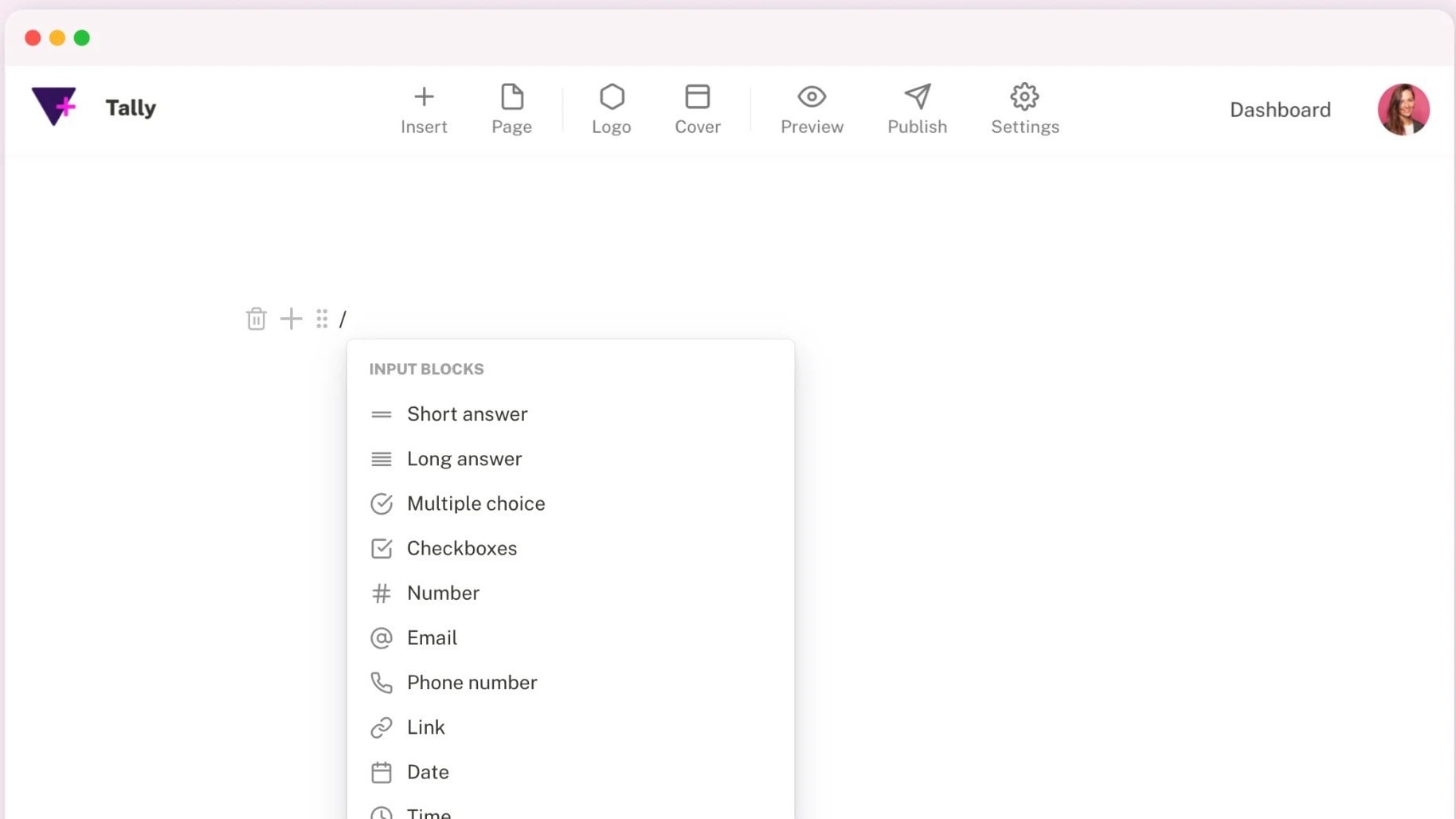
Tally Allows You to Create Any Type of Form Easily By Simply Typing
When it comes to ease-of-use, Tally holds a slight advantage over Typeform, offering a more straightforward interface tailored for form creation tasks. Tally's design emphasizes simplicity without sacrificing functionality, catering to users who prioritize efficiency without extensive training. For instance, its intuitive drag-and-drop functionality streamlines form design and data management, making it accessible even to novices.
Conversely, while Typeform boasts user-friendly features, its broader range of capabilities can occasionally introduce complexity, demanding a steeper learning curve. Consequently, for those prioritizing simplicity in form creation, Tally stands out as the more user-friendly option, ensuring seamless navigation and enhanced productivity.
Tally Leads in Team Collaboration and Management Control

Easily Manage and Add Members to Your Workspaces to Give Them Access to Creation & Editing of Forms
Tally's interface is tailored for collaborative work environments, enabling multiple team members to work on different forms simultaneously. For instance, it offers robust access management tools, allowing administrators to control permissions and determine who can access and modify specific forms. This ensures a seamless workflow and enhances management control over form creation processes.
In contrast, while Typeform facilitates form creation and sharing, it doesn't explicitly offer the same level of granular management control features as Tally, making Tally the preferred choice for teams requiring advanced collaboration capabilities.
Typeform and Tally are Equal at Data Collection

Collect All the Important Data You Need with Tally's Forms and its Advanced Features
Both Tally and Typeform excel at data collection. Tally emphasizes its ability to collect various types of information, including payments, providing a streamlined solution for financial transactions. Conversely, Typeform's comprehensive features extend beyond basic data collection, offering interactive chatbots, customizable templates, and conditional logic.
For instance, Typeform enables diverse forms of data gathering such as user feedback, event registrations, and lead generation, enhancing engagement and user experience. While Tally excels in financial data collection, Typeform stands out for its versatility in collecting diverse types of data, making it a preferred choice for multifaceted data collection needs.
Typeform Provides Superior Chatbot Interactivity Compared to Tally

Typeform Chat Collects Responses to Your Typeform From Platforms Like Facebook to Increase Engagement
Typeform offers an interactive no-code chatbot feature that engages visitors and increases conversion rates. This innovative tool enables businesses to engage website visitors and boost conversion rates through intuitive chatbot interactions. For instance, Typeform allows users to easily create and customize chatbots without requiring any coding knowledge, facilitating seamless automation of initial customer interactions.
In contrast, Tally does not offer a similar chatbot feature, potentially making Typeform the preferred choice for businesses seeking to enhance customer engagement and automate interactions on their websites. Typeform's chatbot capabilities exemplify its commitment to providing versatile and engaging solutions for businesses.
Typeform Leads Tally in Integration Capabilities for Enhanced Productivity

Typeform Connects to Over 120 Different Apps, Including Slack, Mailchimp, and Intercom
On the integrations front, Typeform emerges as the frontrunner, boasting an extensive array of over 120 integration possibilities. This comprehensive suite enables seamless connections with popular marketing platforms, data management tools, and more like Mailchimp, Google Sheets, Zapier, and more, facilitating enhanced productivity and streamlined workflows. For instance, Typeform's integration with Zapier allows users to automate tasks and trigger actions across multiple platforms, optimizing efficiency.
Conversely, while Tally offers some similar integrations, its range falls short of Typeform's versatility. Therefore, for those heavily reliant on interoperability between various SaaS platforms, Typeform proves superior, ensuring smooth data flow and maximizing utility across integrated tools.
08 Tally vs Typeform: Which is the best for your business?
Tally is the best tool for you if:
- You require an economical solution for extensive data collection, as it offers unlimited forms and submissions without any charges, reducing operational costs.
- Customization and flexibility are key to your data collection needs, with its highly adaptable interface allowing for personalized form design that caters to specific requirements.
- You're managing high-volume responses and need a tool that can handle scale efficiently without additional fees, making it ideal for large projects or events.
- Integration with other platforms is essential, as Tally supports numerous third-party applications, enhancing the functionality and automation of your data processes.
- Simplicity and ease of use are priorities, as Tally’s straightforward design allows even beginners to create and deploy forms quickly with minimal learning curve.
 You require an economical solution for extensive data collection, as it offers unlimited forms and submissions without any charges, reducing operational costs.
Typeform is the best tool for you if:
- You value engaging, aesthetically pleasing forms that capture attention and enhance user experience through a sleek, conversational interface ideal for surveys and customer feedback.
- Personalization is critical, as Typeform allows you to tailor each form's look and feel, aligning perfectly with your brand identity and user engagement strategies.
- You need to keep users focused and enhance response quality, benefiting from Typeform's unique one-question-at-a-time presentation that reduces distractions and decision fatigue.
- Advanced analytics and insights are necessary for your projects, with Typeform offering detailed data analysis tools that help understand customer behavior and gather meaningful feedback.
- Integration with a broad ecosystem of tools is important, as Typeform seamlessly connects with various CRM, marketing, and automation platforms to streamline workflows and enhance efficiencies.
Tally
Used by 833 members
50% off for 1 year
Save up to $145
Typeform
Used by 4,769 members
40% off all annual plans
Save up to $1,236
09 Alternatives to Tally & Typeform

Slack
Used by 4,057 members
25% off new plan purchases
Save up to $9,000

ClickUp
Used by 3,497 members
Additional 20% off Unlimited and Business plans for 1 year
Save up to $1,000

Zoho
Used by 1,647 members
$3,000 in credits for 1 year
Save up to $3,000

Monday
Used by 1,568 members
First month free
Save up to $80
10 Promotions on Web Development and Survey software
Tally and Typeform are great tools, but Secret offers promo codes with discounts on over 2250+ different SaaS solutions. New deals are added regularly, helping you save money on your online subscriptions. Get access to codes for other Web Development and Survey software you might want to purchase

Shopify free credits
$1/month for the first 3 months + 25% off annual plans

Paperform discount code
50% off monthly plans for 1 year

JetBrains coupon
6 months free + 50% off all JetBrains tools (up to 10 licences)

SurveyMonkey discounts
Additional 20% off annual Team plans

Cobalt promotion
75% off the Growth and Scale plans for 1 year

Promo codes for SurveySparrow
14 days free

Namecheap discount code
Additional 10% off domain registration / 65% off Shared hosting packages for 1 year

BlockSurvey offer
50% off the Standard Plan for 1 year

Unbounce promo code
20% off for 3 months or 35% off for 1 year

Zoho Forms free credits
$100 in Zoho Wallet credits
Start saving on the best SaaS
Secret has already helped tens of thousands of startups save millions on the best SaaS like Microsoft Teams, Google Workspace & many more. Join Secret now to buy software the smart way.