


Enhanced productivity, maximum sales, and overall business success rely heavily on streamlined workflow management and CRM strategies. But without the right system in place, the wheels can easily fall off your project and sales management. As a result, you could lose customers and miss project deadlines, costing you valuable time and money.
Fortunately, there are many tools available to help you with workflow management and CRM. This article compares two popular project management solutions, Pipedrive and Trello, including their primary use cases, key features, and pricing plans. By understanding their main differences, you can choose the one that best suits your projects.
- 01 Pipedrive vs Trello: overview
- 02 What's the difference between Pipedrive and Trello?
- 03 Pipedrive pros and cons
- 04 Trello pros and cons
- 05 Pipedrive compared to Trello
- 06 Trello compared to Pipedrive
- 07 Features comparison
- 08 Pipedrive vs Trello: Which is the best for your business?
- 09 Alternatives to Pipedrive & Trello
- 10 Promotions on Prospecting software
Start saving on the best SaaS
Secret has already helped tens of thousands of startups save millions on the best SaaS like Microsoft Teams, Google Workspace & many more. Join Secret now to buy software the smart way.

01 Pipedrive vs Trello: overview
Pipedrive and Trello are well-known players in the realm of task and project management. Both platforms offer a diverse set of features, making it a challenge to determine which one reigns supreme in the Pipedrive vs Trello comparison.
To assist you in making an informed decision for your business, we've compiled a comprehensive comparison table outlining the key attributes of each platform. Each criterion is evaluated using a star rating system and accompanied by insightful commentary, providing you with a clear overview of the capabilities of Pipedrive and Trello. Explore the table below to guide your choice and align it with your specific project management requirements.

Collaboration
Pipedrive lets you share customer data with your team and manage tasks and alerts. With Trello’s checklist functions, you can easily see who has done what.

Pipedrive
Trello
Positive reviews
Pipedrive and Trello receive mainly positive reviews, although some users note that Pipedrive’s subscription model can add up.
Pipedrive
Trello
Customer support
Pipedrive offers 24/7 live chat and email support in 5 languages, while Trello provides chat and email service support during business hours.
Pipedrive
Trello
Pricing plans
Trello offers a free plan; paid plans range from $5 - $17.50/month/user. With no free version, Pipedrive’s plans cost between $14.90 - $99/month/user.
Pipedrive
Trello
Integrations
Pipedrive offers 450+ integrations with other apps, including Calendly, Mailchimp, and DocuSign, while Trello has integrations with 191+ apps like Google Drive, Toggl, and GitHub.
Pipedrive
Trello
Workflow automation
Both tools include robust built-in automation features to create automatic workflows and templates. Trello has an AI assistant that suggests automation based on usage.
Pipedrive
Trello
Customization
Both are fully customizable. For example, Pipedrive lets you add stages to the sales pipeline, while Trello enables you to add custom fields to cards.
Pipedrive
Trello
Reporting and analytics
Pipedrive includes performance and forecasting reports. Trello’s dashboard view offers basic insights into project status/workloads; you must purchase an add-on for more in-depth analytics.
Pipedrive
Trello
Task management
Both platforms use Kanban boards with cards that can be drag-and-dropped to easily organize your CRM and projects.
Pipedrive
Trello
Ease of use
Both platforms’ user interfaces are intuitive and user-friendly. Their Kanban-style boards provide easy-to-understand visual representations of a project or workflow.
Pipedrive
Trello
02 What's the difference between Pipedrive and Trello?

Pipedrive’s Activities View, Listing Actions Taken in a Sale
Pipedrive
Stay focused on sales and collect more leads with this lead management software

Trello’s Home Page, with Arrows to Links leading to Workspaces and Boards
Trello
Trello brings value by providing a visual organization and collaboration tool for individuals and teams, helping to streamline workflows, improve productivity, and increase transparency across projects.
Pipedrive and Trello are popular organizational tools that use Kanban boards to track projects, client information, and tasks. A critical difference between them is their approach to pricing. While Trello is a freemium app, Pipedrive doesn’t offer a free version, although every paid subscription includes a free trial.
However, the main difference is their intended use cases. While Pipedrive is specifically designed as a CRM tool, Trello is a project management app with broader applications. Pipedrive helps sales teams store and track customer information like contact details, preferences, status, and history on cards on a Kanban board representing the sales process. You can move these cards across the board as a customer progresses through the sales funnel. Pipedrive also includes lead management features and can give you insights into your sales revenue. Pipedrive’s paid add-ons are specifically relevant to sales teams. For example, LeadBoosters lets you add live chat and chatbots to your website. Despite this focus on CRM features, Pipedrive does include some general project management functionalities. Once a sale is closed, the Project add-on lets you continue to manage a project.
Compared to Pipedrive, Trello is a project management tool with various use cases, including CRM, conducting website audits, and rolling out content plans. It’s designed to help improve individual and team project and task management workflows. To do this, you can create customized cards and place them on a Kanban board to map your project plan. Each card contains detailed information about a task, such as checklists, images, links, and notes. These cards can be moved across the board as tasks are updated or completed, making it easy to see the status of a project at a glance. Trello’s visually pleasing, easy-to-use interface improves productivity by breaking a project into its elements, centrally storing project-related documents and information, and facilitating collaboration.

Pipedrive
Used by 3028 members
30% off for 12 months
Save up to $3,564

Trello
Used by 997 members
Free forever for up to 10 users
Save up to $600
03 Pipedrive pros and cons
What are the advantages of Pipedrive?
- Intuitive interface: Pipedrive offers a user-friendly and intuitive interface, making it easy for users to navigate and manage their sales processes.

- Customizable pipelines: The platform allows you to create and customize multiple sales pipelines tailored to your specific business needs and sales stages.
- Visual sales tracking: Pipedrive's visual sales pipeline provides a clear overview of deals in progress, helping teams prioritize and manage their sales activities effectively.
- Email integration: Seamless integration with email platforms allows for efficient communication tracking, enabling users to log emails and interactions directly within the system.
- Sales insights: Pipedrive offers in-depth sales analytics and reporting, providing valuable insights into sales performance, conversion rates, and areas for improvement.
What are the disadvantages of Pipedrive?
- Limited marketing features: Pipedrive's primary focus is on sales, so it lacks advanced marketing automation features compared to dedicated marketing platforms.

- Complex workflows: While customizable, creating complex workflows in Pipedrive may require a learning curve and technical expertise.
- Limited collaboration: Pipedrive's collaboration features are more focused on individual sales processes, which may be less suitable for extensive team collaboration.
- Price scaling: As your team grows, Pipedrive's pricing can become more expensive, especially if you require access to advanced features and integrations.
- Integration options: While Pipedrive offers integrations with popular tools, the range of available integrations may not be as extensive as some other platforms.
Compare Pipedrive to other tools


Pipedrive vs Zoho CRM

Pipedrive vs Monday

Pipedrive vs Salesforce

Pipedrive vs Close

Pipedrive vs HubSpot

Pipedrive vs ActiveCampaign
04 Trello pros and cons
What are the advantages of Trello?
- Visual workflow: Trello's visual interface and use of boards, lists, and cards make it easy to organize tasks and projects in a highly visual and intuitive manner.
- Customizable and flexible: Trello's flexibility allows teams to create custom workflows and adapt the platform to fit their specific project management needs.
- Collaboration and communication: Trello promotes collaboration by allowing team members to easily share updates, comments, attachments, and notifications on tasks and cards.
- Integration options: Trello offers a wide range of integrations with other tools and platforms, enhancing its functionality and enabling seamless workflows.
- User-friendly: Trello's simplicity and straightforward design make it accessible to users of all technical levels, making it quick to adopt and onboard new team members.
What are the disadvantages of Trello?
- Limited complexity: While great for simple project management, Trello may lack the depth required for complex project structures or detailed process management.
- Lack of advanced features: Trello's basic feature set may not fully satisfy teams seeking advanced project management capabilities, like detailed reporting or resource management.
- Task dependency: While Trello has some capabilities for task relationships, it may not handle complex task dependencies as effectively as dedicated project management tools.
- Limited time tracking: Trello's time tracking features are relatively basic, which may be insufficient for teams requiring in-depth time management and reporting.
- Overwhelming boards: As projects grow in scale, Trello boards can become crowded and challenging to manage, potentially leading to information overload.
Compare Trello to other tools

Trello vs Monday

Asana vs Trello

Trello vs Todoist

Flow vs Trello

Notion vs Trello

ClickUp vs Trello
05 Pipedrive compared to Trello
When comparing Pipedrive and Trello, Pipedrive emerges as a specialized CRM platform designed to streamline sales processes and customer relationship management. Pipedrive offers robust features such as lead tracking, sales forecasting, and deal management, making it a preferred choice for businesses seeking a comprehensive sales solution.
While Trello offers a broad range of project management capabilities, Pipedrive's focus on sales-oriented features makes it an optimal choice for businesses primarily concerned with improving their sales performance and customer interactions.
Is Pipedrive better than Trello?
 Is Pipedrive better than Trello?
Determining whether Pipedrive is better than Trello depends on the specific needs and priorities of your business. Pipedrive is a specialized CRM platform designed to enhance sales processes and customer relationship management. It excels in managing leads, deals, and sales activities, making it an ideal choice for sales-focused teams.
On the other hand, Trello is a versatile project management tool known for its visual and customizable approach to task and project organization. It is suitable for a wide range of teams and projects, facilitating collaboration, task tracking, and project workflows.
If your primary goal is to improve sales processes and manage customer interactions, Pipedrive could be the better option. However, if you are looking for a general project management tool that can be customized to various use cases, Trello might be the more suitable choice.
What is Pipedrive best used for?
Pipedrive is best used as a customer relationship management (CRM) tool that focuses on improving and streamlining sales processes. It is particularly well-suited for businesses and sales teams that are looking to effectively manage their leads, deals, and interactions throughout the sales cycle. Pipedrive provides a platform for organizing and tracking sales activities, automating repetitive tasks, and analyzing sales performance.
Key use cases for Pipedrive include lead management, deal tracking, sales automation, communication & collaboration, and reporting & analytics.
Overall, Pipedrive empowers sales teams to effectively manage their leads, engage with prospects, and close deals, making it an essential tool for businesses that prioritize sales optimization and growth.
Can Pipedrive replace Trello?
Pipedrive and Trello serve different primary purposes, so whether Pipedrive can replace Trello depends on the specific needs of your business and the functionalities you require.
Pipedrive is primarily a customer relationship management (CRM) tool focused on managing sales processes, tracking leads, and facilitating deal management. It's designed to help sales teams streamline their operations, automate tasks, and improve sales efficiency.
While there may be some overlap in terms of task management and organization, Pipedrive is more sales-focused, while Trello is more versatile for broader project and task management.
Is Pipedrive cheaper than Trello?
The pricing of Pipedrive and Trello varies based on the specific plans and features you choose. However, in general, Trello offers a range of pricing plans that may be more budget-friendly for smaller teams and businesses compared to Pipedrive's pricing.
Pipedrive offers different pricing plans, primarily focused on sales and CRM functionality. These plans may be more tailored to businesses with specific sales needs. While Pipedrive provides valuable sales-related features, it might come at a higher cost compared to Trello's lower-tier plans.
It's important to note that the comparison of pricing goes beyond just the cost. You should consider the specific features, integrations, and capabilities offered by each tool in relation to your business needs. While Trello might offer more budget-friendly options, Pipedrive's pricing might be justified if its sales-focused features align closely with your requirements.
Is there a better Prospecting software than Pipedrive?
Identifying the "better" prospecting software than Pipedrive depends on your specific needs and preferences. Pipedrive is well-known for its sales-focused CRM features, including lead management, pipeline tracking, and deal automation.
However, there are several other prospecting software options available in the market that you might consider based on your requirements, including HubSpot Sales Hub, Salesforce Sales Cloud, Zoho CRM and Freshsales.

Pipedrive
Stay focused on sales and collect more leads with this lead management software
30% off for 12 months
Save up to $3,564
06 Trello compared to Pipedrive
When comparing Trello and Pipedrive, Trello shines as a versatile and visual project management tool that excels in facilitating task organization, collaboration, and project tracking. Its user-friendly interface, customizable boards, and card system make it a preferred choice for teams seeking a flexible and intuitive way to manage their projects and workflows.
While Pipedrive caters specifically to sales-related activities, Trello's adaptability extends to various industries and use cases, allowing teams to manage projects, tasks, and workflows in a highly customizable manner.
Is Trello better than Pipedrive?
Determining whether Trello is better than Pipedrive depends on the specific needs and goals of your business. Trello and Pipedrive serve different purposes and cater to different aspects of business operations.
Trello is primarily a visual project management tool that uses boards, lists, and cards to help teams organize tasks and collaborate on projects. It's particularly effective for managing tasks, workflows, and projects in a visual and intuitive manner. Trello is commonly used by teams across various industries to track progress, assign tasks, and ensure effective communication.
If your primary need is visual project management and task collaboration, Trello could be a better choice. It excels at helping teams stay organized and work together on projects. However, if your main goal is to improve your sales processes, manage leads, and optimize your sales pipeline, Pipedrive would likely be the more suitable option.
What is Trello best used for?
Trello is best used for visual project management and task collaboration. It provides a user-friendly and intuitive platform for organizing tasks, projects, and workflows using a system of boards, lists, and cards. Teams and individuals across various industries can leverage Trello to manage their tasks, plan their projects, collaborate together, create agile workflows, create engaging content, and more.
Trello's visual and customizable approach makes it adaptable to various needs and industries. It helps users streamline their work, improve communication, and enhance overall productivity. Whether it's managing complex projects or organizing day-to-day tasks, Trello provides a versatile platform for individuals and teams to stay organized and efficient.
Can Trello replace Pipedrive?
While Trello and Pipedrive both offer valuable features, they serve different primary purposes, and one may not completely replace the other in all scenarios.
Trello is primarily designed for visual project management and task collaboration. It excels at helping teams organize tasks, projects, and workflows using boards, lists, and cards. It is ideal for managing tasks, projects, content creation, event planning, and more, with a focus on visual representation and collaboration.
While Trello's flexibility and visual approach may help manage some aspects of sales or lead tracking, it may not provide the same level of specialized functionality and customization that Pipedrive offers for sales-specific processes.
In summary, while Trello can be used for certain project management and organizational tasks, it may not fully replace Pipedrive's dedicated sales and CRM capabilities. The choice between the two depends on the specific needs of your business – Trello for project management and collaboration, and Pipedrive for sales and lead management. Some businesses may even choose to integrate both tools to leverage their respective strengths.
Is Trello cheaper than Pipedrive?
Trello and Pipedrive have different pricing models and plans, so the cost comparison between the two depends on your specific needs and the features you require.
Trello offers a range of pricing tiers, including a free plan with basic features and limited usage. The paid plans offer more advanced features, integrations, and additional storage, and come at a lower cost compared to some other project management tools.
While Trello's pricing might be lower compared to Pipedrive's higher-tier plans, it's important to consider the specific needs of your business. If you're primarily looking for project management and collaboration, Trello's pricing could be more budget-friendly. However, if your focus is on sales and CRM functionalities, Pipedrive's pricing plans would be more relevant.
Is there a better Collaboration software than Trello?
The choice of a collaboration software depends on your specific needs and preferences. While Trello is a popular and user-friendly tool for visual project management and collaboration, there are several alternatives that you might consider based on your requirements, including Asana, Monday.com, Wrike, ClickUp, Notion and Basecamp.
The "better" collaboration software depends on factors such as the size of your team, the complexity of your projects, preferred features, integrations, and overall user experience. It's recommended to evaluate each tool based on your specific needs and potentially try out a few options to see which one aligns best with your team's workflow and objectives.

Trello
Organize anything, together
Free forever for up to 10 users
Save up to $600
07 Features comparison
Pipedrive Leads in Task Automation Compared to Trello

By harnessing Pipedrive's automation capabilities, you can effectively streamline processes, such as sending follow-up emails, assigning tasks based on specific triggers, or updating contact information.
Pipedrive surpasses Trello in its capacity to alleviate the burden of manual and repetitive administrative tasks through seamless task automation. By harnessing Pipedrive's automation capabilities, you can effectively streamline processes, such as sending follow-up emails, assigning tasks based on specific triggers, or updating contact information.
This automation liberates your valuable time, empowering you to concentrate on higher-priority business endeavors, innovative strategies, and customer interactions that demand your personalized attention. As a result, your workflow becomes more efficient, enabling enhanced productivity and strategic decision-making.
Pipedrive Provides a Broader Range of Extensive Integrations

Pipedrive's integration marketplace boasts a comprehensive selection of pre-built integrations spanning various categories including CRM, marketing automation, customer support, and project management.
Both Pipedrive and Trello recognize the significance of smooth collaboration and present an array of integration options with popular third-party applications. However, Pipedrive distinguishes itself by offering a broader and more diverse spectrum of integrations, empowering users to construct a tailored ecosystem to suit their unique requirements.
Pipedrive's integration marketplace boasts a comprehensive selection of pre-built integrations spanning various categories including CRM, marketing automation, customer support, and project management. From renowned tools like Salesforce and Mailchimp to specialized applications catering to specific industries, Pipedrive furnishes users with a vast array of choices for seamless connectivity. This adaptability empowers users to centralize workflows, eradicate manual data transfers, and streamline operations more effectively.
In contrast, while Trello also extends integration capabilities, the scope of available integrations is relatively narrower. While it accommodates essential integrations such as Google Drive and Slack, the breadth may not match that of Pipedrive. However, users with a primary focus on these core tools might find Trello's integration offerings satisfactory.
In summary, Pipedrive's integration marketplace grants entrepreneurs the flexibility to establish and expand their technology stack effortlessly. The diverse array of pre-built integrations empowers users to harmonize Pipedrive with their essential business tools, facilitating seamless collaboration and elevating overall efficiency.
Trello is Best at Data Synchronization than Pipedrive
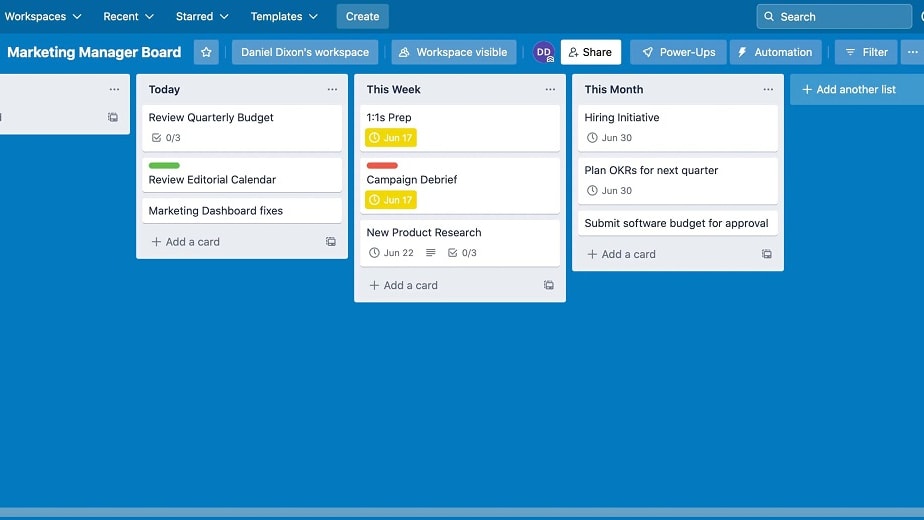
Trello's exceptional real-time data synchronization capability enables you to maintain your data current and accessible on all your devices.
Trello's exceptional real-time data synchronization capability enables you to maintain your data current and accessible on all your devices. This ensures that you constantly possess the latest information, enhancing collaboration and facilitating precise decision-making.
For instance, when you update a task or project status on one device, the changes are immediately reflected on all other connected devices, allowing seamless coordination among team members, even if they are working remotely. This data synchronization empowers teams to work cohesively and make well-informed choices based on the most up-to-date insights.
Trello Organizes and Prioritizes Tasks Better than Pipedrive
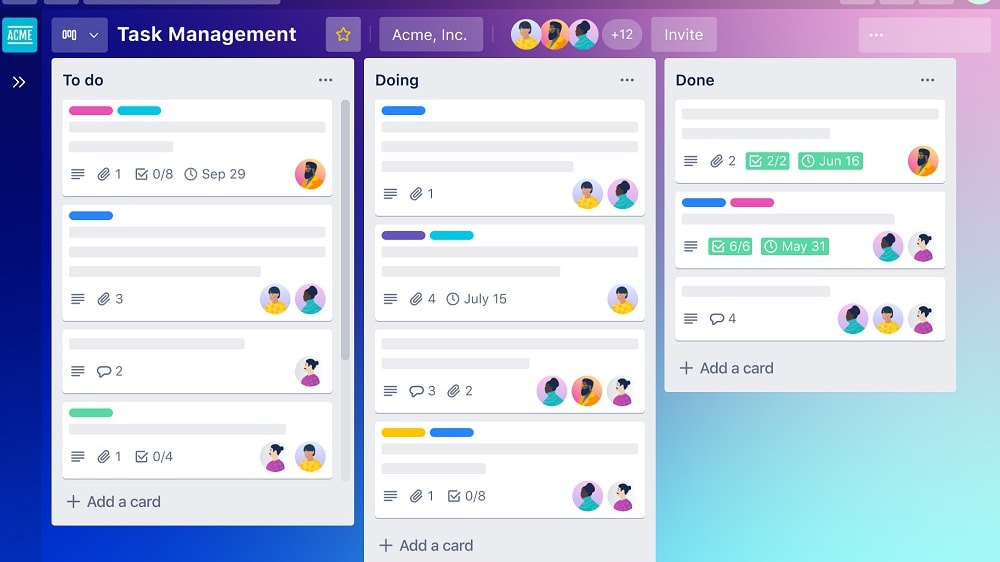
Trello's distinctive board layout provides an exceptional means to visually categorize and prioritize tasks.
Trello's distinctive board layout provides an exceptional means to visually categorize and prioritize tasks. By seamlessly shifting cards across the board, you can readily identify upcoming tasks and maintain your team's focus.
This visual methodology for task management distinguishes Trello as a superior choice for efficiently organizing and prioritizing assignments. The fluid interaction of cards on the board allows teams to swiftly adapt to changing priorities and allocate resources where needed, resulting in streamlined workflows and heightened productivity. With Trello's intuitive interface, task management becomes an intuitive and visually engaging process, enhancing overall efficiency and task completion.
Pipedrive and Trello Both Track Team Communications Effectively
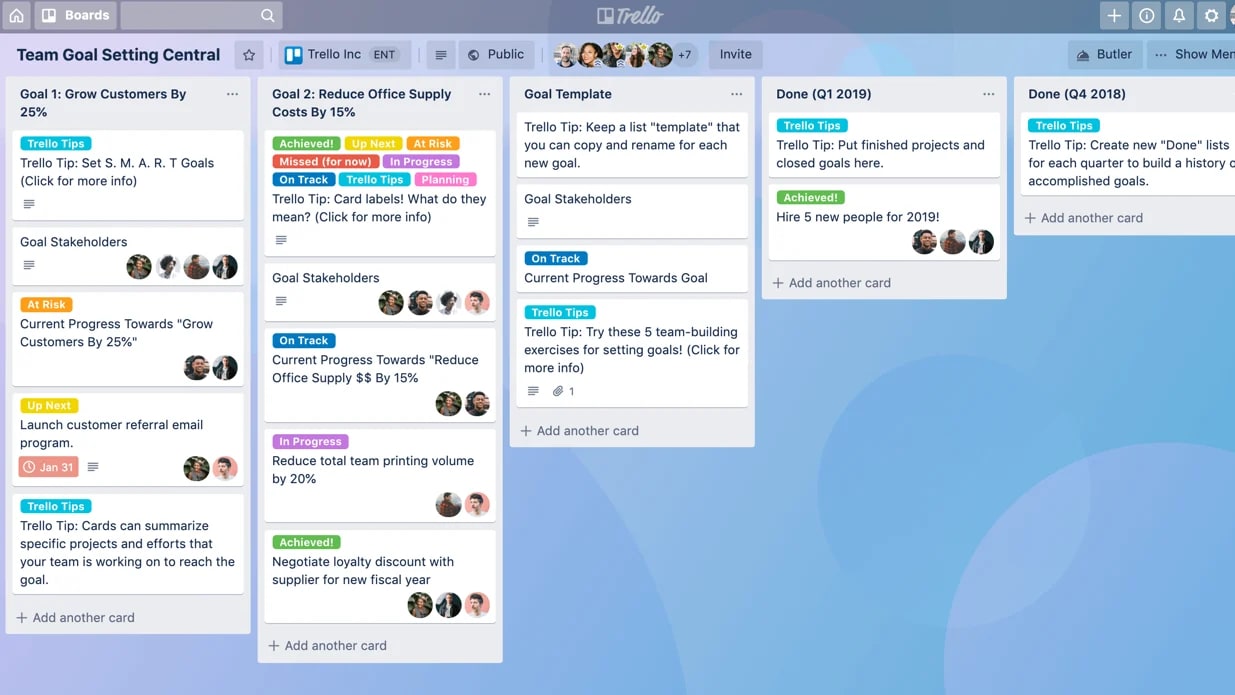
Trello's CRM functionalities empower you to meticulously track and evaluate customer interactions.
Both Pipedrive and Trello boast efficient features for monitoring team communications with prospects. Pipedrive facilitates easy access to the complete contact history between your sales teams and potential clients.
Meanwhile, Trello's CRM functionalities empower you to meticulously track and evaluate customer interactions. These tools collectively provide valuable insights into your team's communication strategies, enabling you to fine-tune engagement efforts and optimize the process of sealing deals.
Whether it's comprehending the evolution of client conversations or pinpointing areas for enhancement, both platforms contribute significantly to enhancing customer engagement and facilitating successful conversions.
Pipedrive is Better for Efficient Prospect Management Compared to Trello

Pipedrive's exceptional feature of crafting tailored pipelines for your sales process and seamlessly incorporating prospects for progress tracking provides it a distinct advantage in efficient prospect management.
Pipedrive's exceptional feature of crafting tailored pipelines for your sales process and seamlessly incorporating prospects for progress tracking provides it a distinct advantage in efficient prospect management.
Through Pipedrive, your sales team gains a clear roadmap for each prospect, guiding them on precise actions required for a seamless and well-organized sales journey. For instance, a sales representative can assign follow-up tasks, schedule meetings, and monitor interactions with prospects within Pipedrive's structured environment. This facilitates a systematic approach, enabling your team to focus their efforts strategically and nurture prospects effectively toward conversion.
Pipedrive Holds an Advantage in User-Friendly Interface Over Trello
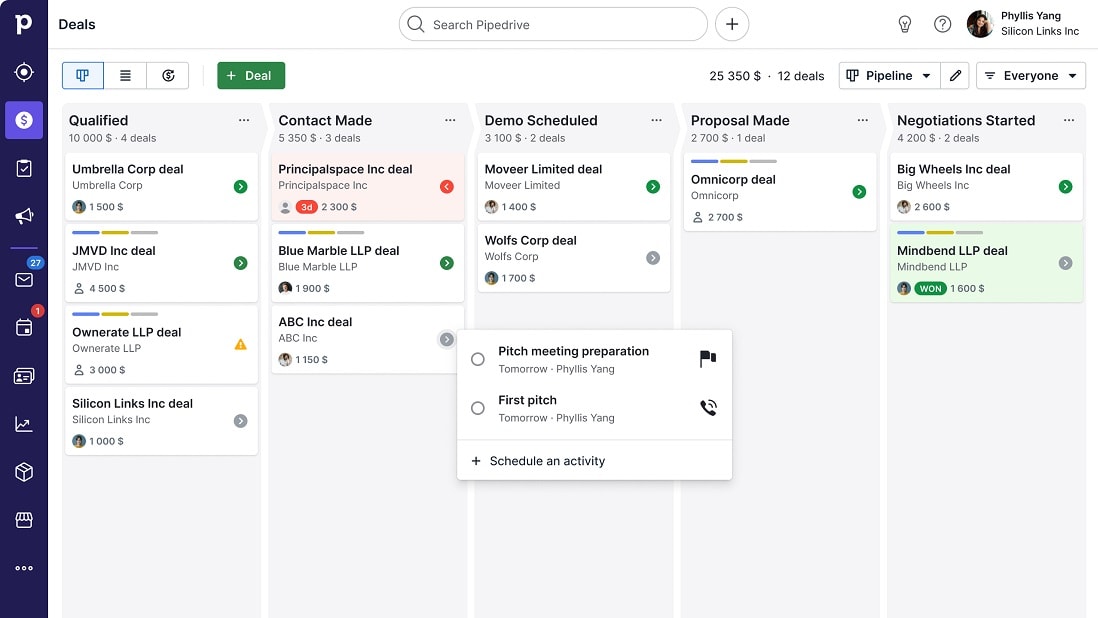
Pipedrive's strength lies in its simplicity and minimalist approach, enabling users to swiftly navigate its features.
In terms of user-friendliness, Pipedrive and Trello both prioritize intuitive interfaces. However, Pipedrive distinguishes itself with a streamlined and easily navigable design.
Pipedrive's strength lies in its simplicity and minimalist approach, enabling users to swiftly navigate its features. Its uncluttered layout ensures effortless access to essential tools. Pipedrive goes the extra mile by providing comprehensive onboarding, including interactive guides and tutorial videos, ensuring users quickly grasp its capabilities and enhance their productivity.
Conversely, Trello, while user-friendly, can present complexity for larger projects and intricate task management. Customization options can contribute to a steeper learning curve. Nevertheless, mastering Trello unlocks potent capabilities for efficient workflows.
In summary, Pipedrive's intuitive design and user-focused approach offer rapid adoption and an optimal experience. Its accessible layout and robust onboarding empower users to seamlessly integrate its tools into their operations and prioritize business expansion.
08 Pipedrive vs Trello: Which is the best for your business?
Pipedrive is the best tool for you if:
- Your sales team is seeking a dedicated CRM tool with sales-focused features like lead-tracking, deal management, and sales forecasting
- You need to create customizable, visual sales pipelines tailored to your sales strategies and collect a range of data to optimize your processes and prospect management
- An extensive range of third-party integrations is a priority so you can adapt your CRM to your business’s needs
- Your business wants to increase sales and improve customer interactions using detailed sales metrics and data like conversion rates and revenue projections
- You need email tracking functionality to manage customer email conversations and collate metrics
 Your sales team is seeking a dedicated CRM tool with sales-focused features like lead-tracking, deal management, and sales forecasting
Trello is the best tool for you if:
- You’re in the market for software with broader features to manage and optimize projects and workflows including content planning, website audits, and event planning
- You would like the ability to create customized workflows specific to your project, team, and organization’s needs
- You need a tool that facilitates collaboration on cross-functional tasks and projects, with real-time data synchronization, comments, and notifications
- Your team prefers a visual tool to organize and manage projects and tasks and quickly see real-time updates on a project
- Due to your budget, you’re looking for a free version or more affordable paid plans
Pipedrive
Used by 3028 members
30% off for 12 months
Save up to $3,564
Trello
Used by 997 members
Free forever for up to 10 users
Save up to $600
09 Alternatives to Pipedrive & Trello

Slack
Used by 3996 members
25% off new plan purchases
Save up to $9,000

ClickUp
Used by 3436 members
Additional 20% off Unlimited and Business plans for 1 year
Save up to $1,000

HubSpot
Used by 2922 members
90% off the Professional and Enterprise plans for 1 year
Save up to $7,000

Zoho
Used by 1613 members
$3,000 in credits for 1 year
Save up to $3,000
10 Promotions on Prospecting and Collaboration software
Pipedrive and Trello are great tools, but Secret offers promo codes with discounts on over 2250+ different SaaS solutions. New deals are added regularly, helping you save money on your online subscriptions. Get access to codes for other Prospecting and Collaboration software you might want to purchase

Clay deal
14 days free + 10% off annual plans

Discount for Google Workspace
20% off Standard plans for 1 year
Code for HubSpot
90% off the Professional and Enterprise plans for 1 year

Airtable promotion code
$1,000 in credits on licences for 1 year

Promo code Apollo.io
50% off the annual Basic or Professional plan for 1 year (Up to 5 seats)

Notion offer
3 months free on the Business plan with Unlimited AI

Discount for Crunchbase
20% off for 1 year
Credits for Slack
25% off new plan purchases

Waalaxy (ex. ProspectIn) offer
14 days free + 50% off annual plans

Miro coupon code
$1,000 in credits (lifetime validity)
Start saving on the best SaaS
Secret has already helped tens of thousands of startups save millions on the best SaaS like Microsoft Teams, Google Workspace & many more. Join Secret now to buy software the smart way.