


Notion and Trello are two project management tools popular with businesses of all sizes and across all industries. They offer excellent project management capabilities including workflow automation, customizable boards, and collaboration tools. But with so many shared features, deciding between the two can feel like a hard choice.
This article helps you by comparing the two platforms, stepping you through their core features, key differences, and primary use cases. By the end, you’ll be able to determine which tool is best for your business. Read on for our Notion vs Trello round-up!
- 01 Notion vs Trello: overview
- 02 What's the difference between Notion and Trello?
- 03 Notion pros and cons
- 04 Trello pros and cons
- 05 Notion compared to Trello
- 06 Trello compared to Notion
- 07 Features comparison
- 08 Notion vs Trello: Which is the best for your business?
- 09 Alternatives to Notion & Trello
- 10 Promotions on Collaboration software
Start saving on the best SaaS
Secret has already helped tens of thousands of startups save millions on the best SaaS like Microsoft Teams, Google Workspace & many more. Join Secret now to buy software the smart way.

01 Notion vs Trello: overview
Notion and Trello stand as prominent contenders in the realm of project and task management software, each catering to distinct user requirements.
Notion is celebrated for its versatility, serving as an all-in-one workspace that combines notes, databases, wikis, and project boards. It offers extensive customization options, making it ideal for users looking to create a tailored project management environment. Conversely, Trello specializes in simplicity and visual project management. It employs boards, lists, and cards to facilitate straightforward task tracking.
Now, let's dive into the comparison between Notion and Trello. We'll explore their key features and functionality to help you make an informed decision when selecting the ideal project management platform for your business.

Ease of use
Both tools have simple user interfaces for easy board creation and management. There can be an initial learning curve with the scope of Notion’s features.

Notion
Trello
Task and project management
Both offer task and project management functionality via drag-and-drop Kanban boards. Notion also offers Gantt charts.
Notion
Trello
Workflow automation
Both have built-in automation. Notion has an automation hub with templates and guidance, while Trello’s Butler suggests automation based on use.
Notion
Trello
Collaboration
Notion allows for live document collaboration, comments, and mentions. Trello includes a checklist function and a range of integrations with collaboration tools.
Notion
Trello
Permissions and user controls
Trello includes public or private boards; user-based permissions are available with the premium subscription. Notion lets you create role and department-based permissions.
Notion
Trello
Reporting and analytics
Trello offers basic insights into project status and workloads, with add-ons for in-depth analytics. Notion offers workspace and page analytics relating to engagement.
Notion
Trello
Integrations
Notion has 62+ integrations including Asana, Google Workspace, and Loom. Trello offers 191+ integrations including Google Drive, Jotform, and Google Calendar.
Notion
Trello
Pricing plans
Both offer a free version. Notion’s paid plans range from $8-$15/user/month. Trello’s paid plans are between $5-$17.50/user/month.
Notion
Trello
Customer support
24/7 support is available with paid Notion plans. Trello offers business hour support via user login; email support is also available. Neither offer phone support.
Notion
Trello
Positive reviews
Both Notion and Trello receive overall positive reviews online. Some users experience an initial learning curve with Notion’s features.
Notion
Trello
02 What's the difference between Notion and Trello?

Example Notion Company Wiki with Resources like the Office Manual and Employee Directory
Notion
Organize teamwork and increase productivity
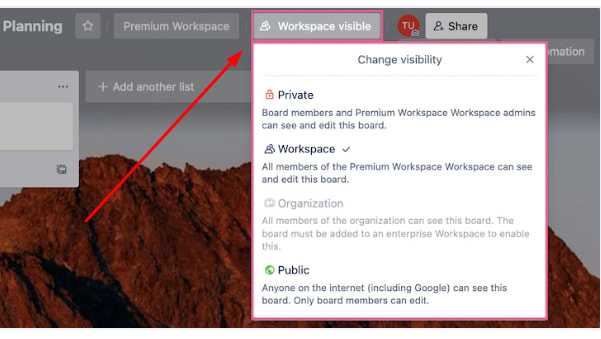
Example Trello Board for Project Planning with the Visibility Settings Menu Open
Trello
Trello brings value by providing a visual organization and collaboration tool for individuals and teams, helping to streamline workflows, improve productivity, and increase transparency across projects.
Robust project management tools in their own right, there are some key differences between Notion and Trello. Firstly, the main difference is the scope of their features. Originally a note-taking tool, Notion has expanded into broader productivity applications beyond project management. It lets you organize your information in various formats, including Kanban boards and Gantt charts. You can also use it to create information databases, wikis, and to-do lists. It also offers budgeting and billing capabilities. As a result, Notion can be used across departments and divisions within your organization for joint projects.
Trello is equally popular with users but takes a simplified approach, focusing on core project management features. It lets you create, organize, and view tasks in several formats. Trello primarily uses Kanban boards, but you can access timeline, table, and calendar views with a subscription to the Premium or Enterprise plans. This makes Trello suited to coordinating projects within a single team. As a result of its expanded functionality, Notion is highly customizable and flexible. However, the trade-off is that it can have a steeper learning curve compared to Trello, especially for its advanced features. Trello’s simplicity means that it’s very user-friendly, even for beginners.
A final key difference between the two platforms is their use of AI technology. Trello uses built-in AI in its automation feature, Butler. This feature uses machine learning to recognize repeated actions and provide automation tips. Trello also offers several AI power-ups, like Strategy AI to create strategy profiles and Chat GPT AI Assistant for note-taking. On the other hand, Notion has a built-in AI feature to help improve your writing, translate text, generate summaries, and brainstorm ideas and drafts. Designed to make your use of Notion and project management more efficient, Notion’s AI feature costs an additional $8/user/month.

Notion
Used by 21,680 members
3 months free on the Business plan with Unlimited AI
Save up to $720

Trello
Used by 1,026 members
Free forever for up to 10 users
Save up to $600
03 Notion pros and cons
What are the advantages of Notion?
- Versatility: Notion is incredibly versatile, serving as an all-in-one workspace for note-taking, project management, documentation, and more.

- Customization: Notion offers extensive customization options, enabling you to tailor your workspace to your specific needs. You can create custom templates, design databases, and organize information according to your preferences.
- Collaboration: Notion excels in collaboration, allowing real-time editing and commenting on documents and databases. It's an ideal tool for remote teams and collaborative projects.
- Cross-platform: Notion is available on multiple platforms, including web, desktop, and mobile. This ensures that you can access and work on your projects from anywhere.
- Free plan: Notion offers a free plan with generous features, making it accessible to individuals and small teams with budget constraints.
What are the disadvantages of Notion?
- Learning curve: Due to its versatility and extensive features, Notion has a steeper learning curve, and it may take time to fully harness its capabilities.

- Pricing: While there is a free plan, the premium plans can become relatively expensive as your team and requirements grow.
- Performance: Some users have reported performance issues, particularly with larger databases and complex projects.
- Limited integrations: While Notion does offer integrations, it has fewer integrations compared to some other project management tools.
- Mobile app limitations: While the mobile app is useful, it may not offer the same level of functionality as the web or desktop versions, which can be limiting for on-the-go users.
Compare Notion to other tools


Notion vs Monday

Notion vs Asana

Coda vs Notion

ClickUp vs Notion

Notion vs Fibery

Notion vs Slab
04 Trello pros and cons
What are the advantages of Trello?
- Ease of use: Trello is exceptionally user-friendly and has a simple, intuitive interface. Users can quickly create boards, lists, and cards, making it accessible even to those new to project management tools.
- Visual approach: Trello's visual organization with boards, lists, and cards makes it easy to grasp project status and progress at a glance. It's a great tool for those who prefer a visual representation of tasks and projects.
- Integration: Trello offers a wide range of integrations with popular tools like Slack, Google Drive, and more, allowing users to connect Trello with their existing workflows.
- Collaboration: Trello supports real-time collaboration and commenting, making it suitable for teams. Members can easily communicate, share files, and assign tasks within the platform.
- Free plan: Trello provides a free plan with basic features, which is perfect for individuals and small teams with limited budgets.
What are the disadvantages of Trello?
- Limited features: While Trello's simplicity is a strength, it can also be a limitation for complex project management needs. It lacks some of the advanced features offered by more comprehensive project management tools.
- Dependency on add-ons: To access certain advanced features like Gantt charts and time tracking, users may need to rely on third-party integrations or add-ons, which can add complexity.
- Scaling challenges: Trello can become less effective for larger teams or complex projects as the visual simplicity may not scale well.
- Limited automation: Trello's automation capabilities are somewhat limited compared to other project management tools, which can lead to manual task management in some cases.
- Pricing tiers: While there's a free plan, the pricing for Trello's premium and enterprise plans can become expensive as your team or organization grows, especially when compared to other competitive alternatives.
Compare Trello to other tools

Trello vs Monday
Asana vs Trello

Trello vs Todoist

Flow vs Trello

Pipedrive vs Trello
ClickUp vs Trello
05 Notion compared to Trello
When comparing Notion to Trello, each tool presents distinct advantages tailored to specific project management needs.
Notion is celebrated for its exceptional versatility. It operates as an all-in-one workspace, encompassing notes, databases, wikis, and project boards. This makes it ideal for users looking to create a highly customized project management environment. Notion excels in handling complex projects and accommodating teams seeking comprehensive documentation and knowledge management alongside project tracking.
To determine the superior choice between Notion and Trello, it's imperative to align the platform's features with the specific needs and scale of your projects and teams. Whether you prioritize flexibility and comprehensive features (Notion) or user-friendly simplicity (Trello), your selection should align with your unique project management objectives.
Is Notion better than Trello?
 Is Notion better than Trello?
Determining whether Notion is superior to Trello isn't a straightforward proposition. Both tools possess exceptional qualities, and the decision between them hinges on specific business needs. If your demands gravitate toward comprehensive note-taking, wiki creation, and integrated task management, then Notion emerges as a superior option. For instance, Notion's ability to seamlessly combine a knowledge base with project management is invaluable.
Conversely, if your emphasis lies in agile project management with a visual, card-based system, Trello emerges as the more fitting choice. Trello excels in providing a simplified yet effective approach to task and project tracking, ideal for teams seeking a straightforward visual representation of their work.
Ultimately, the choice between Notion and Trello is a matter of aligning the tool's features with your precise business needs, whether it's comprehensive versatility (Notion) or visual simplicity (Trello).
What is Notion best used for?
Notion serves as an exceptionally versatile all-in-one workspace, consolidating essential work applications into a single platform. Its ideal use cases encompass a wide spectrum of functionalities. For instance, it excels in creating custom workflows tailored to your specific business processes. Whether it's managing tasks and projects or establishing an extensive knowledge base, Notion is adept at streamlining various facets of work.
Furthermore, Notion shines when businesses seek a centralized hub for document collaboration, databases, and project tracking. For example, teams can effortlessly collaborate on documents, maintain structured databases, and keep tabs on project progress, all within the same workspace. This comprehensive approach to work management makes Notion an invaluable tool for organizations seeking an efficient and integrated solution.
Can Notion replace Trello?
Notion has the capacity to serve as a viable alternative to Trello, but the decision should be informed by your distinct requirements. Notion boasts a wide array of features, encompassing documentation, databases, and project management. This makes it a compelling choice for users seeking multifunctional software that can consolidate various aspects of work. For instance, you can seamlessly transition from managing tasks to collaborating on documents or structuring databases within the same platform.
However, if your primary emphasis revolves around a simple, user-friendly project management tool with a Kanban view, Trello's straightforwardness and visual organization may be challenging to replicate. Trello's intuitive card-based system remains an effective solution for teams focused on agile task and project tracking.
Is Notion cheaper than Trello?
Determining whether Notion is more cost-effective than Trello depends on your specific requirements and budget. Trello offers an enticing free tier, and its Standard plan comes at a competitive $5 per user per month. This makes Trello an economical choice for teams seeking a straightforward Kanban-style project management system.
On the other hand, Notion’s pricing options include a free version for individuals and also plans that start from $10 per month per user. While it may have a higher price point, Notion's value becomes evident when you consider its multifaceted features. It serves as an all-in-one workspace, encompassing documentation, databases, and project management, making it a comprehensive solution for businesses with diverse needs. Therefore, the choice between Notion and Trello involves weighing the cost against the scope of features and functionalities required.
Is there a better Collaboration software than Notion?
While Notion offers a range of versatile features, it's important to explore alternative options, considering factors like scalability, integration capabilities, required functionalities, and more.
Notable alternatives to Notion in the project management sphere include Trello, Asana, Monday.com, and Airtable. Each of these tools excels in different aspects, whether it's visual task management, team collaboration, or complex project tracking.
The choice ultimately hinges on your project management needs, team dynamics, and specific preferences. However, if you're in search of a project management solution known for its user-friendly simplicity, visual organization, and ease of use, Notion might remain your top choice for efficient and intuitive project management.

Notion
Organize teamwork and increase productivity
3 months free on the Business plan with Unlimited AI
Save up to $720
06 Trello compared to Notion
In the realm of project management, Trello distinguishes itself with its user-friendly simplicity and visual approach. Trello's boards, lists, and cards provide an intuitive way to manage tasks and projects, making it ideal for individuals and small teams seeking straightforward task tracking and project organization.
The choice between Trello and Notion hinges on your specific project management requirements. Trello's simplicity and visual organization are ideal for those who prefer an easy-to-grasp, visual representation of tasks and projects. Notion, with its customization and comprehensive features, is well-suited for users with more complex project management needs and a preference for a highly adaptable workspace.
Is Trello better than Notion?
Determining whether Trello is better than Notion requires careful consideration of your organization's specific requirements. Trello excels as a project management tool, offering visually engaging Kanban boards for streamlined project tracking and collaboration.
However, if you're seeking a tool that combines documentation, databases, and project management within a single platform, Notion might hold a distinct advantage. Notion's versatility allows you to create comprehensive workflows and manage various aspects of your business, making it an appealing option for teams with diverse needs.
What is Trello best used for?
Trello excels as a project management tool, particularly in agile environments. Its popularity stems from its user-friendly interface and visually engaging Kanban boards. These boards facilitate intuitive progress tracking and provide a clear visualization of workflows, making Trello an ideal choice for teams that prioritize simplicity and visual organization.
Software development teams can create boards for tasks, with columns representing different stages of development, such as "To Do," "In Progress," and "Done." Team members can then move task cards across these columns, offering transparency and clarity into project status. This simplicity and adaptability render Trello effective for a wide range of projects and industries.
Can Trello replace Notion?
In terms of basic project management, Trello can certainly serve as a replacement for Notion. However, the suitability of this replacement depends on the depth of features you require. If your primary need revolves around streamlined task tracking and visual project management, Trello is well-equipped to fulfill this role. For example, software development teams can effectively use Trello's Kanban boards to manage tasks across different stages of a project.
Conversely, Notion's value becomes apparent when you seek more extensive functionalities, such as collaborative document creation, note-taking, or the construction of customized databases. Notion's capacity to combine these diverse features within a single platform makes it indispensable for users requiring multifunctional capabilities beyond basic project management. Thus, while Trello can technically replace Notion for certain purposes, it may not match the comprehensive versatility that Notion offers.
Is Trello cheaper than Notion?
When considering cost, Trello’s pricing does present a potentially more cost-effective option. Trello offers a free tier and a Standard plan at a modest $5 per user per month. In contrast, Notion's pricing starts at $10 per member per month for the Team plan.
While Notion undoubtedly provides a broader range of features, Trello's affordability can be particularly appealing for users whose primary focus lies in streamlined project management. For example, small startups or teams with limited budgets may find Trello's cost structure more accommodating, especially when their requirements align with Trello's user-friendly Kanban-style project management system. Ultimately, the choice between Trello and Notion encompasses a balance between cost and feature set.
Is there a better Collaboration software than Trello?
While Trello offers a user-friendly and visually intuitive approach to project management, it's essential to explore alternative options to ensure you choose the best fit for your specific needs.
Notable alternatives to Trello in the project management landscape include Asana, Monday.com, Wrike, and ClickUp. These platforms offer diverse features, ranging from comprehensive task tracking to advanced team collaboration and automation capabilities.
The selection ultimately depends on your project management requirements, team dynamics, and preferences. However, if you're in pursuit of a project management tool renowned for its simplicity, visual organization, and ease of use, Trello remains a strong contender for efficient and straightforward project management.

Trello
Organize anything, together
Free forever for up to 10 users
Save up to $600
07 Features comparison
Notion Takes the Lead Against Trello for Ease of Use

Whether you're creating documentation, managing databases, or tracking projects, Notion's layout ensures that you can effortlessly access the tools you need.
In the realm of user-friendliness, both Notion and Trello exhibit commendable strengths. However, a closer examination reveals that Notion leads the way with its intuitive and seamless user interface compared to Trello. Notion's design strikes a balance between robust functionality and user accessibility, offering a strikingly simple yet comprehensive workspace.
For instance, within Notion, all features are thoughtfully designed to be just a click away, creating an environment that is immediately usable even for beginners. The interface is visually clean and uncluttered, enhancing the overall user experience. Whether you're creating documentation, managing databases, or tracking projects, Notion's layout ensures that you can effortlessly access the tools you need.
On the other hand, Trello presents a user-friendly Kanban-style approach, which is especially effective for visual project management. However, when compared to Notion's rich information density and uncluttered design, it may fall short in providing the same level of intuitive navigation.
In summary, when evaluating the user experience, Notion stands out as a tool that strikes a balance between simplicity and functionality, offering an accessible and visually pleasing workspace that caters to users of all levels of expertise.
Notion and Trello Both Approach Project Management in Different Manners

Notion adds a layer of flexibility with its customizable templates, allowing users to tailor their project management approach to specific needs.
Notion and Trello both bring project management to the table, but they come at it from slightly different angles. Notion offers a Kanban-style board akin to Trello's board system, which is excellent for organizing tasks. However, Notion adds a layer of flexibility with its customizable templates, allowing users to tailor their project management approach to specific needs.
For example, Notion's templates can be adapted for everything from software development sprints to content creation workflows. This adaptability can be a game-changer for businesses with diverse project requirements. Trello, meanwhile, shines with its crystal-clear, visual format that's incredibly user-friendly. Trello's board system is interactive, making it a breeze to move tasks around, providing an unparalleled user experience for project management. The simplicity and straightforwardness of Trello's interface can make it a top choice for teams prioritizing ease of use.
In summary, Notion and Trello both offer valuable project management features, but the choice between them boils down to the level of customization and simplicity your team requires. Notion's adaptability suits businesses with varied project needs, while Trello's intuitive board system excels in delivering a user-friendly project management experience.
Notion’s Task Database Overpowers That of Trello
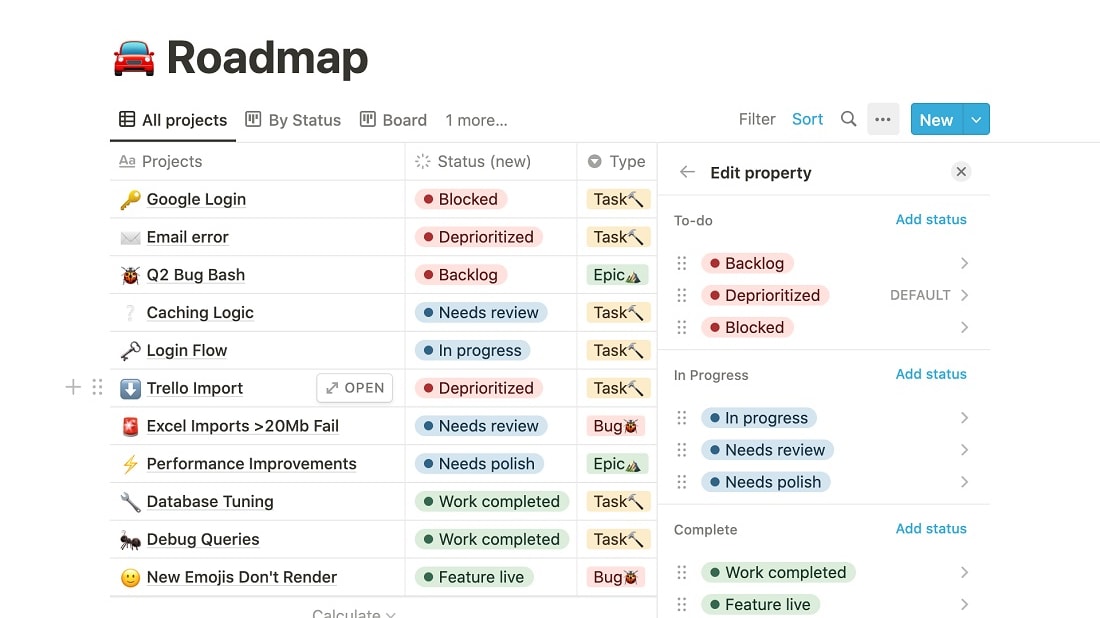
Notion introduces a task database that offers a comprehensive and integrated solution for managing tasks.
Both Notion and Trello provide valuable features yet Notion's approach takes task tracking to the next level compared to Trello. Notion introduces a task database that offers a comprehensive and integrated solution for managing tasks.
For example, within Notion's task database, you can effortlessly set deadlines, monitor progress, and collaborate seamlessly with your team. This centralized approach ensures that all task-related information is easily accessible in one place, simplifying the workflow and enhancing collaboration. On the other hand, Trello does allow users to create checklists for individual tasks and track progress. However, it falls slightly short in providing the centralized control and integrated experience that Notion's task database delivers.
In summary, when it comes to task management, Notion's task database elevates the experience by offering a more comprehensive and integrated solution, making it a preferred choice for teams seeking streamlined task tracking and collaboration.
Trello Leads in Data Synchronization Against Notion
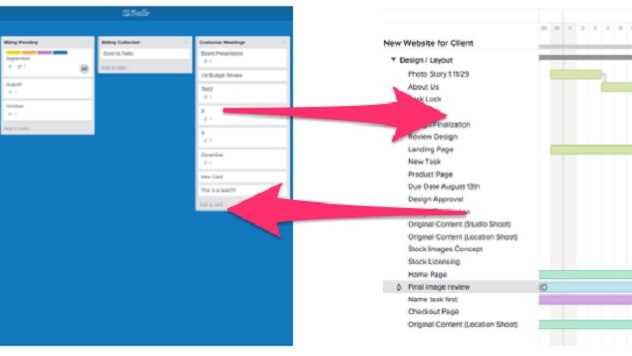
Trello excels in its commitment to keeping data consistent across all devices through real-time synchronization.
Trello emerges as the frontrunner for data synchronization compared to Notion. Trello excels in its commitment to keeping data consistent across all devices through real-time synchronization.
For instance, when you make changes or updates on your Trello boards, these modifications are instantaneously reflected on all your connected devices. This seamless data synchronization ensures that your team is always working with the most up-to-date information, regardless of the device they're using. In contrast, while Notion offers robust project management features, it doesn't explicitly mention a data synchronization feature. This could be a consideration for businesses seeking a tool that ensures data consistency across devices.
In summary, when it comes to data synchronization, Trello's real-time updates provide a competitive edge, making it a preferred choice for teams who prioritize data consistency across all devices and platforms.
Both Notion and Trello Shine with Comprehensive Content Management Features
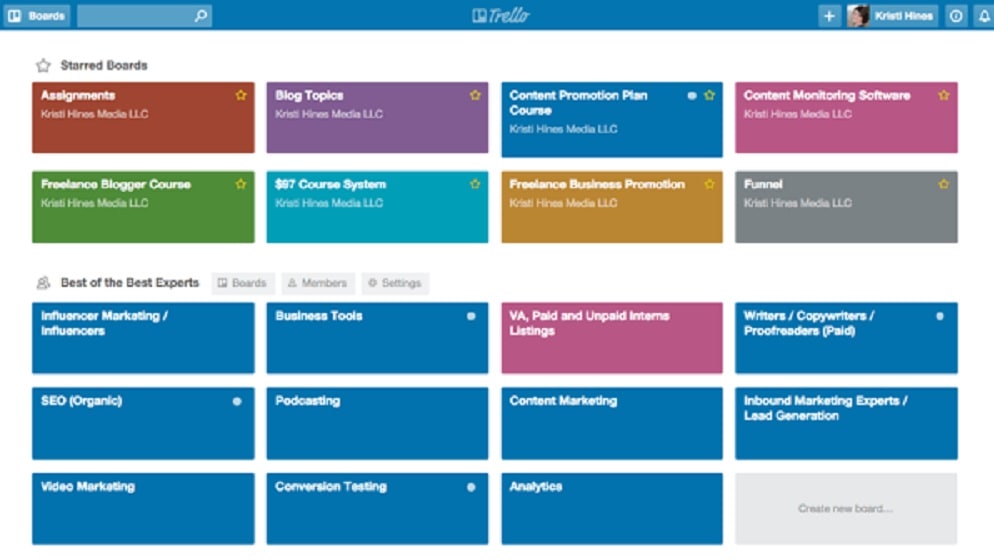
Trello excels in planning, creating, and collaborating on content across teams. It provides a dynamic platform for content-related workflows.
Notion and Trello both offer content management features, but their strengths lie in different areas. Trello excels in planning, creating, and collaborating on content across teams. It provides a dynamic platform for content-related workflows.
For instance, you can use Trello's boards to outline content calendars, assign tasks to team members, and track progress seamlessly. This makes it an excellent choice for businesses with content-heavy projects. Conversely, Notion specializes in efficient note-taking, idea capture, and document storage. It simplifies the process of creating, organizing, and finding notes and documents. For businesses that prioritize streamlined documentation and rapid note-taking, Notion offers a robust toolset.
In summary, the choice between Notion and Trello for content management depends on your business's specific needs. Trello shines in content planning and collaboration, while Notion excels in note-taking and document management, making it a preferred choice for businesses emphasizing documentation efficiency.
Trello’s Surpasses Notion with its CRM Functionality

Trello's CRM features are designed to efficiently track and analyze customer interactions, ultimately enhancing customer satisfaction.
When it comes to customer relationship management (CRM), Trello surpasses Notion in its CRM functionalities. Trello's CRM features are designed to efficiently track and analyze customer interactions, ultimately enhancing customer satisfaction.
For instance, businesses using Trello can create dedicated boards to manage customer interactions, log communication history, and track the progress of customer-related tasks. This robust CRM integration ensures that businesses can maintain strong relationships with their clients. On the other hand, while Notion's task database is a valuable tool for managing and tracking internal tasks and projects, it doesn't seamlessly extend to external customer interactions as Trello's CRM does.
In summary, if your business places a significant emphasis on customer relationship management, Trello's dedicated CRM features make it a preferred choice for nurturing and enhancing client interactions.
Trello Outperforms Notion with its Extensive App Directory

Trello's power-ups extend its functionality by establishing connections with numerous other SaaS platforms, including popular communication and collaboration software, and software development tools like Slack, Google Drive, and GitHub.
When it comes to integrating with third-party applications, both Notion and Trello offer valuable capabilities. However, a closer inspection reveals that Trello outperforms Notion by seamlessly connecting with a broader spectrum of applications. Trello's power-ups extend its functionality by establishing connections with numerous other SaaS platforms, including popular communication and collaboration software, and software development tools like Slack, Google Drive, and GitHub.
While Notion certainly provides integration options, its list is currently less extensive than Trello's. This disparity makes Trello the preferred choice for users who rely on multiple software tools, offering a more flexible approach to streamlining workflows within a unified system.
In summary, Trello's wide-ranging integration capabilities make it the go-to option for businesses seeking to seamlessly connect and coordinate various software applications, ultimately streamlining their workflow and enhancing overall productivity.
08 Notion vs Trello: Which is the best for your business?
Notion is the best tool for you if:
- You want a versatile project management tool incorporating note-taking, database, wiki, task management, project board, and budgeting functionality
- You’re looking for a tool for collaboration to coordinate complex inter-company or inter-divisional projects involving multiple parties
- You require a platform with a high degree of customization to tailor your project and task management for a diverse range of projects
- You need to create custom workflows for each of your projects and want a tool that offers flexibility and robust automation features
- You’re after a user-friendly tool with an intuitive, easy-to-navigate interface that doesn’t compromise functionality
 You want a versatile project management tool incorporating note-taking, database, wiki, task management, project board, and budgeting functionality
Trello is the best tool for you if:
- You’re looking for an easy-to-use project management platform that everyone in your business, including beginners, can use from day one
- You’re a freelancer or small team needing a solution to coordinate tasks and collaboration on a single project
- Your business relies on agile project management and you want a tool that gives you a clear visual representation of your work to support this
- You have a limited budget and are in the market for an affordable project and task management solution
- You work on content-heavy projects and want an engaging, straightforward visual representation of your tasks and projects
Notion
Used by 21,680 members
3 months free on the Business plan with Unlimited AI
Save up to $720
Trello
Used by 1,026 members
Free forever for up to 10 users
Save up to $600
09 Alternatives to Notion & Trello

Airtable
Used by 8,911 members
$1,000 in credits on licences for 1 year
Save up to $1,000

Slack
Used by 4,061 members
25% off new plan purchases
Save up to $9,000

ClickUp
Used by 3,498 members
Additional 20% off Unlimited and Business plans for 1 year
Save up to $1,000

Zoom Meetings
Used by 2,944 members
$20 off per user on the annual Workplace Pro plan
Save up to $180
10 Promotions on Collaboration software
Notion and Trello are great tools, but Secret offers promo codes with discounts on over 2250+ different SaaS solutions. New deals are added regularly, helping you save money on your online subscriptions. Get access to codes for other Collaboration software you might want to purchase

Google Workspace promo code 2026
20% off Standard plans for 1 year
Airtable discount code
$1,000 in credits on licences for 1 year
Slack promo code
25% off new plan purchases

Miro coupon
$1,000 in credits (lifetime validity)

Monday coupon
First month free

Asana deal
75% off the annual Starter and Advanced plans for 1 year
Promo code for ClickUp
Additional 20% off Unlimited and Business plans for 1 year

Promo code bolt.new
20% off all plans for the first 3 months

xTiles deal
20% off monthly or annual plans

Google Drive coupon code 2026
20% off Standard plans for 1 year
Start saving on the best SaaS
Secret has already helped tens of thousands of startups save millions on the best SaaS like Microsoft Teams, Google Workspace & many more. Join Secret now to buy software the smart way.