


When working in a team, the challenges of managing information, deadlines, and collaboration can feel daunting. The solution? Productivity software steps in to improve your time management, streamline communication, and organize your data so it’s readily accessible. The good news is you have a wealth of options for finding a productivity tool. The bad news is that deciding which is best for you can be difficult.
But don’t worry! By the end of this article comparing two popular solutions—Notion vs Monday.com—you’ll be confident in making that choice. Let’s dive in and take a look at their main features and key differences.
- 01 Notion vs Monday: overview
- 02 What's the difference between Notion and Monday?
- 03 Notion pros and cons
- 04 Monday pros and cons
- 05 Notion compared to Monday
- 06 Monday compared to Notion
- 07 Features comparison
- 08 Notion vs Monday: Which is the best for your business?
- 09 Alternatives to Notion & Monday
- 10 Promotions on Collaboration software
Start saving on the best SaaS
Secret has already helped tens of thousands of startups save millions on the best SaaS like Microsoft Teams, Google Workspace & many more. Join Secret now to buy software the smart way.

01 Notion vs Monday: overview
Notion and Monday are two prominent players in the realm of project management and collaboration tools, each bringing unique capabilities and advantages tailored to diverse user preferences.
Notion distinguishes itself with its flexible and customizable workspace, allowing users to create databases, wikis, task lists, and more, all within a single platform. On the other hand, Monday excels in providing a visual and intuitive project management experience. It specializes in task tracking, project timelines, and workflow automation.
Now, let's delve into the Notion vs. Monday comparison to help you make an informed decision when selecting the right project management and collaboration tool for your specific needs.

Integrations
Notion has 62+ integrations, including Slack, Figma, and ClickUp. Monday offers 200+ integrations (native and community-built), including Google Drive, Toggl, and Dropbox.

Notion
Monday
Templates
Both provide a range of templates, although Notion offers slightly more.
Notion
Monday
Project management
Monday is a dedicated project management tool with advanced functionality. Notion has a range of use cases, including project management.
Notion
Monday
Customization
Notion offers a high degree of flexibility and customization of views and workflows. Monday takes a more structured approach with some customization.
Notion
Monday
AI features
Notion’s AI tool helps users improve their writing, provides writing prompts, and helps with automation. Monday’s AI Assistant is in beta and is not currently available to all customers.
Notion
Monday
Reporting and analytics
Notion relies on third-party tools for most reporting features, while Monday offers solid reporting features, including risk analysis and budget tracking.
Notion
Monday
Ease of use
While the platforms offer different UI experiences, they are both user-friendly. Some users find there is an initial learning curve to learn all the features.
Notion
Monday
Pricing plans
Both offer free plans. Notion’s paid plans range between $8-$15/user/per month. Monday’s paid plans are $8-$16/seat/month.
Notion
Monday
Customer support
Notion offers 24/7 support on all paid plans. Monday provides 24/7 live chat and email customer service on all plans, including its free one.
Notion
Monday
Positive reviews
Both receive primarily positive reviews, although users note there can be an initial learning curve due to the platforms’ range of features.
Notion
Monday
02 What's the difference between Notion and Monday?

A Notion Database for a Project Roadmap with the Views and Status Column Highlighted
Notion
Organize teamwork and increase productivity

A Monday Dashboard Showing Team Goals and KPIs with the Gantt Chart View Highlighted
Monday
monday.com lets you manage projects from planning to delivery on a single platform, utilizing AI to streamline workflows and enhance team collaboration, ensuring you can track everyone's progress effectively.
Notion and Monday are both popular productivity tools in their own right. They offer an array of features to streamline workflows, improve communication, and manage tasks and projects. However, a crucial difference between them may guide your selection. Notion is a highly flexible, all-in-one workspace, while Monday is a dedicated project management tool and work operating system (OS). With a focus solely on project management, Monday provides advanced functionalities. In contrast, Notion aims to consolidate various software into one application, enabling teams to work from a shared workspace. While it caters to a range of use cases, including note-taking, project management, CRM, and content management, Notion’s strength lies in knowledge management.
This pivotal difference influences the features the two platforms offer. For example, Notion offers built-in note-taking and wiki-building tools, simplifying the organization of internal information. Meanwhile, Monday provides a Gantt chart view tailored to project management needs. While Notion has a timeline view similar to a Gantt chart, it doesn’t offer a dedicated Gantt chart function. Reflecting its project management focus, Monday also provides an integrated time-tracking widget. However, this is only available on its Pro and Enterprise plans. In comparison, Notion lacks native time-tracking but offers a customizable time-tracking template and integrates seamlessly with various time-tracking apps.
Finally, Notion’s calendar view is available with all its plans, whereas Monday only includes it with its higher-tier plans. While these are minor points of difference, they may help you decide on the right tool for your use case. For example, Notion is ideal for smaller projects requiring highly adaptable workflows. In comparison, Monday may suit larger, more complex projects requiring advanced project management features.

Notion
Used by 21,680 members
3 months free on the Business plan with Unlimited AI
Save up to $720

Monday
Used by 1,568 members
First month free
Save up to $80
03 Notion pros and cons
What are the advantages of Notion?
- Versatility and customization: Notion is incredibly versatile and allows users to create a wide range of content types, including notes, databases, wikis, task lists, calendars, and more. You can customize it to suit your specific needs, making it adaptable for various personal and professional use cases.

- Collaboration: Notion offers robust collaboration features, making it easy for teams to work together in real-time. You can share pages and databases, assign tasks, and leave comments, facilitating seamless collaboration and communication.
- Cross-platform compatibility: Notion is available on multiple platforms, including web, desktop (Windows and macOS), and mobile (iOS and Android). This ensures that you can access and work on your content from virtually anywhere.
- Integrations: Notion supports various integrations with other popular tools and services, allowing you to connect your workflows and enhance productivity. Examples include Google Drive, Slack, and Trello.
- Free plan available: Notion offers a free plan with robust features, making it accessible to individuals and small teams with limited budgets. This allows you to explore and use the platform without a financial commitment.
What are the disadvantages of Notion?
- Learning curve: While Notion is powerful, its flexibility can result in a steep learning curve for some users. Setting up complex databases and workflows may require time and effort to master.

- Pricing for advanced features: While the free plan is generous, some advanced features, such as access to unlimited file uploads and advanced permissions, are only available in the paid plans, which can be costly for larger teams or organizations.
- Offline access: Notion's offline access is somewhat limited, and it may not be as robust as some dedicated offline note-taking apps. Users who rely heavily on offline work may find this limitation inconvenient.
- Performance issues: Notion's performance can vary depending on the complexity of your workspace and the number of entries in your databases. Some users have reported slower load times when working with extensive databases.
- Search functionality: While Notion has a search feature, some users find it less powerful compared to dedicated search engines or tools. Finding specific information within extensive databases can sometimes be challenging.
Compare Notion to other tools


Notion vs Asana

Coda vs Notion

ClickUp vs Notion

Notion vs Slab

Notion vs Trello

Notion vs OneNote
04 Monday pros and cons
What are the advantages of Monday?
- Visual and intuitive interface: Monday's visual interface is user-friendly and intuitive, making it easy for teams to understand and adopt quickly. The drag-and-drop functionality simplifies task and project management.
- Customization: Monday allows users to create customized workflows and boards to fit their specific project management needs. You can tailor boards to match your team's processes and goals.
- Collaboration and communication: The platform offers robust collaboration features, including task assignments, @mentions, comments, and file sharing. It facilitates real-time communication among team members and keeps everyone on the same page.
- Automation: Monday provides automation capabilities, allowing you to streamline repetitive tasks and processes. You can create automation recipes to trigger actions based on specific conditions, saving time and reducing manual effort.
- Integration ecosystem: Monday integrates seamlessly with a wide range of third-party apps and services, such as Slack, Google Workspace, and Trello. This enables users to connect their favorite tools and centralize their work processes.
What are the disadvantages of Monday?
- Pricing: Monday can be relatively expensive, especially for larger teams or organizations. The cost can add up quickly as you scale, and some advanced features are only available in higher-tier plans.
- Learning curve: While the platform is user-friendly, setting up complex workflows and automations may require a learning curve for some users. It might take time to fully harness its potential.
- Limited free plan: Monday offers a limited free plan with basic features, making it less suitable for small businesses or individuals with tight budgets who need more advanced functionality.
- Overwhelming options: The extensive customization options and features available in Monday can be overwhelming for some users. It may take time to configure the platform to meet your specific needs.
- Mobile app limitations: While Monday has a mobile app, some users have reported that the mobile version lacks certain features and functionalities compared to the web version. This can be a drawback for users who rely heavily on mobile access.
Compare Monday to other tools

Asana vs Monday

Zoho Projects vs Monday
ClickUp vs Monday

Slack vs Monday

Monday vs HubSpot

Pipedrive vs Monday
05 Notion compared to Monday
When comparing Notion and Monday.com, Notion stands out with its exceptional versatility and customizable workspace. Notion offers users the ability to create a wide array of content types, including notes, databases, wikis, task lists, and calendars, all within a single platform. This flexibility makes it an excellent choice for individuals and teams seeking a tool that adapts to their unique requirements.
Notion's strengths also include its robust collaboration features and cross-platform compatibility. Teams can collaborate seamlessly, and users can access their content from various devices. The choice between Notion and Monday depends on your specific needs and preferences. Notion offers versatility and extensive customization, while Monday excels in visual project management.
Is Notion better than Monday?
 Is Notion better than Monday?
Deciding whether Notion is better than Monday hinges on your particular project management and collaboration needs. Notion shines when it comes to versatility and customization, making it an excellent choice for users who value adaptability and the ability to create a wide variety of content types within a single platform. Its flexibility allows it to cater to a broad range of use cases, from note-taking to complex project tracking.
Conversely, Monday excels in providing a visually intuitive project management experience, simplifying task tracking, project timelines, and workflow automation. It is favored by those who prioritize a streamlined and visually organized approach to managing projects and tasks.
What is Notion best used for?
Notion excels as a versatile workspace that caters to a wide range of needs. It is best used for those seeking a flexible platform to organize, collaborate, and manage information. Notion can function as a digital notebook, task manager, knowledge base, and project management tool all in one. Its strength lies in its adaptability, allowing users to customize databases, wikis, calendars, and more, making it ideal for individuals, teams, and businesses looking for a unified solution to streamline their work processes.
Whether you need a personal note-taking tool or a collaborative workspace for complex projects, Notion offers the versatility to accommodate your specific requirements.
Can Notion replace Monday?
Notion is a robust workspace and project management tool known for its versatility and customization options. However, whether it can fully replace Monday depends on your specific project management and collaboration needs.
If you value flexibility and the ability to create various content types within a single platform, Notion can serve as a powerful alternative to Monday. Its adaptability allows it to handle a wide range of tasks, from note-taking to complex project tracking.
Nevertheless, if you prioritize a visually intuitive project management experience with features like task tracking, project timelines, and workflow automation, Monday may remain a better fit. Monday's streamlined approach to project management simplifies complex workflows and is particularly well-suited for teams seeking a visually organized solution.
Is Notion cheaper than Monday?
When it comes to pricing, there are significant distinctions between Notion and Monday. Notion employs a transparent pricing model with a free plan available, making it accessible to individuals and small teams. While some advanced features may require a subscription, its pricing is generally straightforward and can be cost-effective for those with diverse needs.
In contrast, Monday's pricing structure can become more intricate, and the costs can escalate as your team or organization expands. For some users, Notion's pricing, with its free plan and clear options, may represent a more budget-friendly alternative to Monday's tiered pricing system, particularly for smaller teams or those with evolving requirements.
Is there a better Collaboration software than Notion?
While Notion is a versatile and customizable workspace for many users, it's essential to consider whether there might be a more suitable software solution for your specific needs.
Several notable alternatives to Notion in the realm of project management and collaboration tools include Monday.com, Trello, Asana, and ClickUp.
The selection of project management and collaboration software hinges on factors such as your team's workflow, project complexity, and integration requirements. While Notion excels in its adaptability and content variety, other platforms may provide more streamlined project management features, specialized task tracking, or enhanced workflow automation that aligns better with your team's goals and preferences.

Notion
Organize teamwork and increase productivity
3 months free on the Business plan with Unlimited AI
Save up to $720
06 Monday compared to Notion
Monday.com distinguishes itself with its visual and intuitive project management capabilities, making it an appealing choice for teams and organizations seeking a streamlined platform. Monday offers a range of pricing plans, including options for small teams and enterprise-level organizations, accommodating users with varying project management needs and budgets.
While both Monday and Notion excel in their respective areas, the decision between the two depends on your specific requirements. Monday provides a visually organized and intuitive solution for teams aiming to streamline project management, track tasks, and automate workflows effectively. It's particularly well-suited for those who prioritize visual project tracking and seamless collaboration.
Is Monday better than Notion?
The comparison between Monday and Notion depends on your distinct project management and collaboration needs. Monday stands out for its visual and intuitive project management approach, making it a solid choice for teams aiming for a streamlined and visually organized platform. If you prioritize simplicity, task tracking, and workflow automation, Monday may be the better option.
However, it's crucial to acknowledge that Notion offers its own array of strengths, particularly in versatility and customization. If you value the ability to create various content types within a single platform, adaptability for diverse tasks, and a customizable workspace, Notion becomes an attractive choice for your project management and collaboration requirements.
What is Monday best used for?
Monday is a versatile project management and collaboration platform primarily designed to help teams and organizations streamline their work processes. It excels in providing a visual and intuitive interface for task management, project tracking, and workflow automation. Monday is best used for organizing and managing projects, tracking tasks and deadlines, and improving team collaboration. It's an essential tool for teams looking to centralize their work, enhance productivity, and ensure everyone is aligned on project goals and progress.
Moreover, Monday offers customization options that make it suitable for various industries and use cases, including marketing campaigns, software development, event planning, and more, making it a valuable tool for businesses and teams aiming to boost efficiency and project management effectiveness.
Can Monday replace Notion?
Monday and Notion are both versatile platforms, but whether Monday can effectively replace Notion depends on your specific project management and collaboration needs.
Monday excels in providing a visual and intuitive project management experience with features like task tracking, project timelines, and workflow automation. It is ideal for teams seeking a streamlined and visually organized platform for managing tasks and projects.
If your primary focus is on visually organized project management, task tracking, and workflow automation, Monday may be a suitable replacement for Notion. However, it's essential to consider that Notion offers a wider range of content types, customization options, and is often used for knowledge management and documentation, making it better suited for certain use cases where flexibility and content variety are essential.
Is Monday cheaper than Notion?
When comparing the cost of Monday and Notion, it becomes apparent that Monday may have a different pricing structure.
Monday's pricing structure can vary based on the number of users and the features required but also includes a free plan for up to 2 team members. Depending on your team's size and requirements, Monday.com may have a different pricing model that could be more or less cost-effective compared to Notion, which offers a free plan and straightforward pricing for small and medium-sized teams.
The cost comparison between Monday and Notion depends on your team's size, feature needs, and budget considerations. It's essential to evaluate your specific requirements to determine which platform offers the most cost-effective solution for your project management and collaboration needs.
Is there a better Collaboration software than Monday?
Monday is a widely used project management and collaboration platform, but it's crucial to consider whether there might be a more fitting software solution for your particular needs.
There are several notable alternatives to Monday in the realm of project management and collaboration tools, including Notion, Coda, Google Workspace, and ClickUp. The selection of project management and collaboration software depends on factors such as your team's workflow, project complexity, integration requirements, and budget constraints.

Monday
Easily manage all your projects and become more productive and efficient.
First month free
Save up to $80
07 Features comparison
Monday’s Integration Capabilities Triumph Over Notion’s

Moreover, Monday offers an open API, empowering businesses to craft bespoke integrations tailored precisely to their unique requirements.
When it comes to integration capabilities, Monday unquestionably stands out. While Notion does provide integrations with some popular tools like Google Drive and Figma, Monday takes integration to the next level with a vast array of over 200 third-party apps in its arsenal. These encompass essential communication tools, marketing platforms, finance systems, and more, such as Slack, Google Drive, Zoom, and Microsoft Teams, to name just a few.
Moreover, Monday offers an open API, empowering businesses to craft bespoke integrations tailored precisely to their unique requirements. This extensive spectrum of integrations renders Monday highly versatile, catering to a broader range of operational demands than Notion. Consequently, it emerges as the favored choice for businesses seeking seamless integration of their SaaS platform with a myriad of tools.
Monday’s Real-Time Collaboration Features are More Comprehensive than Notion’s

Monday distinguishes itself as a comprehensive platform for real-time collaboration, offering a multifaceted hub for seamless teamwork.
Monday distinguishes itself as a comprehensive platform for real-time collaboration, offering a multifaceted hub for seamless teamwork. Within the platform, users can engage in real-time chat, effortlessly share files, brainstorm ideas, and meticulously track progress, all conveniently consolidated in one location. This holistic approach ensures that teams remain interconnected and well-informed, regardless of their physical location or time zone.
While Notion does provide collaborative features, Monday's incorporation of real-time chat confers a decisive advantage, offering a dynamic and synchronized workspace for teams. This real-time chat capability cements Monday as the preferred choice for organizations that prioritize streamlined and uninterrupted collaboration.
Notion Excels Over Monday for Note-Taking and Document Management
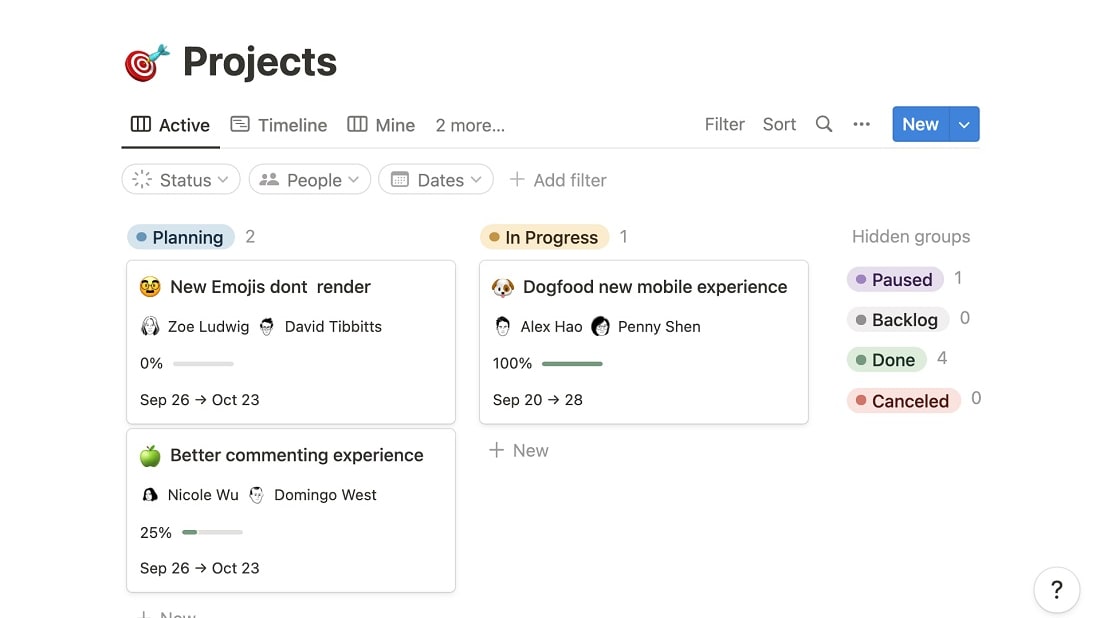
Within Notion, users benefit from a versatile platform that facilitates the effortless capture of vital information during meetings or brainstorming sessions
Notion offers a robust note-taking and document organization feature that surpasses Monday's capabilities. Within Notion, users benefit from a versatile platform that facilitates the effortless capture of vital information during meetings or brainstorming sessions. This powerful functionality ensures that important notes are readily accessible and never misplaced. While Monday provides certain file management options, it falls short in the realm of comprehensive note-taking, setting Notion distinctly ahead in this aspect.
Notion's supremacy in this domain is further exemplified by its customizable templates and databases, allowing users to structure and categorize notes and documents according to their specific needs. With Notion, users can create dedicated spaces for project documentation, research notes, meeting minutes, or personal journals, enhancing both organization and productivity. Consequently, Notion's note-taking and document management capabilities make it a formidable choice for individuals and teams seeking a comprehensive and adaptable solution.
Monday’s Automation Task Features are Superior in Comparison to Notion

Monday empowers users with an array of automation tools that prove invaluable for efficient task management
Monday possesses a significant edge over Notion in terms of its robust automation capabilities. Monday empowers users with an array of automation tools that prove invaluable for efficient task management. Users can configure alerts and email notifications that cater to various critical task-related events, such as impending due dates, task completion, or updates in task status. This level of automation is instrumental in ensuring timely responses and keeping teams aligned.
Although Notion does offer a notification system, it pales in comparison to Monday's comprehensive automation. Notion's notifications primarily focus on user interactions within the platform, while Monday extends its automation prowess to encompass external communication and task-related actions. Consequently, for companies seeking sophisticated and automated task management, Monday emerges as the superior choice, providing a streamlined workflow that enhances productivity and responsiveness.
Notion is Best for Creating Customizable Templates than Monday

Notion elevates the experience by offering users the capability to craft their own custom templates, tailored precisely to their distinctive requirements.
Notion takes a notable lead over Monday in the realm of customizable templates. Although both platforms provide a diverse array of pre-designed templates, Notion elevates the experience by offering users the capability to craft their own custom templates, tailored precisely to their distinctive requirements. This empowering feature extends the creative freedom to teams and individuals, fostering efficiency and productivity.
For instance, a marketing team can design a custom project template that aligns with their specific campaign workflow, including tasks, deadlines, and content creation processes. Similarly, a product development team can create templates for product roadmaps, sprint planning, and bug tracking, streamlining their work processes.
Both Notion and Monday are Equally Efficient for Project Management
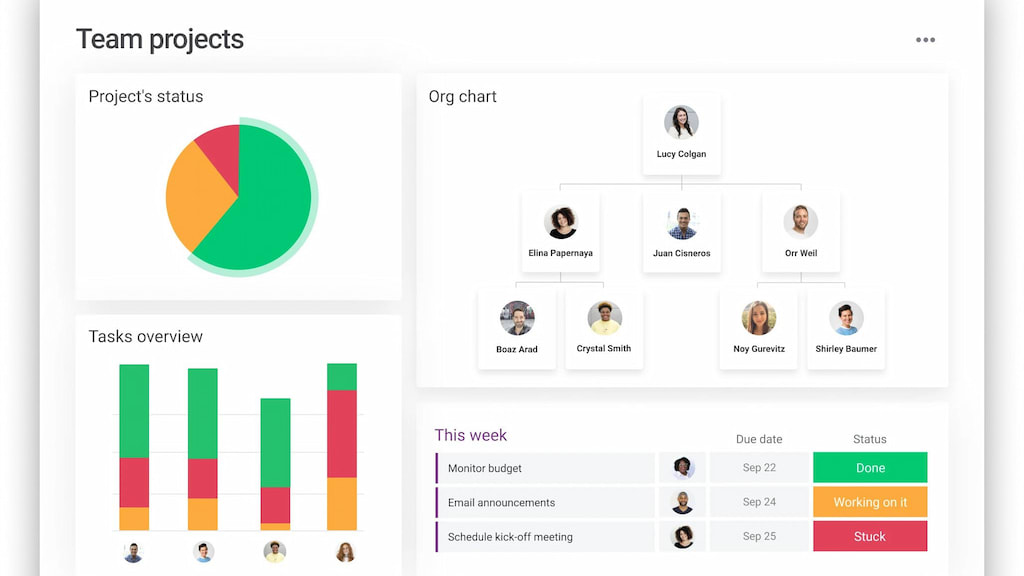
Conversely, Monday's strength lies in its visual and intuitive project management approach, enhancing task tracking and workflow automation.
Both Notion and Monday excel in delivering robust project management features, encompassing vital functionalities like Kanban boards, task assignment, progress tracking, and more. These capabilities are instrumental in facilitating effective project management, ensuring tasks are organized, assigned, and monitored seamlessly.
Notion distinguishes itself with its adaptability and versatility, offering a broad spectrum of content types and customization options. It's particularly ideal for users seeking an all-in-one solution for both project management and knowledge management. Conversely, Monday's strength lies in its visual and intuitive project management approach, enhancing task tracking and workflow automation. It caters to teams aiming for a visually organized platform to streamline projects efficiently.
Notion’s Interface Proves More User-Friendly Compared to Monday

Notion boasts a clean, minimalist layout that enhances usability for individuals of varying technical backgrounds
In the realm of user-friendly platforms, Notion holds a slight edge over Monday. Notion boasts a clean, minimalist layout that enhances usability for individuals of varying technical backgrounds. Its straightforward configurations and options make it more approachable when compared to the somewhat intricate interface of Monday.
Notion goes the extra mile by offering user-friendly tutorials, making it exceptionally welcoming to newcomers, and simplifying the learning curve for mastering its feature set. This means that even those with limited technical expertise can confidently navigate and utilize Notion's capabilities, demonstrating its commitment to user accessibility and a hassle-free experience.
08 Notion vs Monday: Which is the best for your business?
Notion is the best tool for you if:
- You’re in the market for a productivity tool that simplifies the organization, collaboration, and management of information from a central location
- You’re seeking a flexible platform to create and collaborate on databases, wikis, task lists, calendars, and notes
- Versatility is a priority for you and you need a solution that enables you to create various content and customize your workspaces to align with your business, projects, and workflows
- You value a minimalist, easy-to-navigate layout that team members with varying degrees of technical skill can use
- To ensure seamless onboarding, you want a productivity tool with online tutorials to assist with learning its feature set
 You’re in the market for a productivity tool that simplifies the organization, collaboration, and management of information from a central location
Monday is the best tool for you if:
- You’re after a visually intuitive project management tool with advanced functionalities for task tracking, managing project timelines, and workflow automation
- It’s the first time you’ve used a productivity tool and you want access to a free version with 24/7 support
- Collaboration is vital to your projects and you’re looking for a platform offering robust collaboration features such as task assignments and file sharing
- You already have an extensive tech stack and need to find a project management tool that seamlessly integrates with it
- You would like to find a user-friendly productivity solution that offers tiered pricing plans to accommodate the growth of your business
Notion
Used by 21,680 members
3 months free on the Business plan with Unlimited AI
Save up to $720
Monday
Used by 1,568 members
First month free
Save up to $80
09 Alternatives to Notion & Monday

Airtable
Used by 8,911 members
$1,000 in credits on licences for 1 year
Save up to $1,000

Slack
Used by 4,061 members
25% off new plan purchases
Save up to $9,000

ClickUp
Used by 3,498 members
Additional 20% off Unlimited and Business plans for 1 year
Save up to $1,000

Zoom Meetings
Used by 2,944 members
$20 off per user on the annual Workplace Pro plan
Save up to $180
10 Promotions on Collaboration software
Notion and Monday are great tools, but Secret offers promo codes with discounts on over 2250+ different SaaS solutions. New deals are added regularly, helping you save money on your online subscriptions. Get access to codes for other Collaboration software you might want to purchase

Google Workspace promo code 2026
20% off Standard plans for 1 year
Airtable discount code
$1,000 in credits on licences for 1 year
Slack promo code
25% off new plan purchases

Miro coupon
$1,000 in credits (lifetime validity)

Asana deal
75% off the annual Starter and Advanced plans for 1 year
Promo code for ClickUp
Additional 20% off Unlimited and Business plans for 1 year

Promo code bolt.new
20% off all plans for the first 3 months

xTiles deal
20% off monthly or annual plans

Google Drive coupon code 2026
20% off Standard plans for 1 year
Zoom Meetings promotion code
$20 off per user on the annual Workplace Pro plan
Start saving on the best SaaS
Secret has already helped tens of thousands of startups save millions on the best SaaS like Microsoft Teams, Google Workspace & many more. Join Secret now to buy software the smart way.