


You're likely looking for a centralized hub for your team to house meeting notes, project documentation & knowledge to prevent them from spreading throughout inboxes & random documents. Both tools could be an option. While I've seen many teams choose one of these options, they have used each for completely different reasons. In this comparison we will discuss how Notion & OneNote are different in actual day-to-day workflow applications such as building wikis, collaboration, using templates, working offline, and cost.
If you want product deep dives before choosing, you can start with our Notion review and our Microsoft OneNote review.
- 01 Notion vs OneNote: overview
- 02 What's the difference between Notion and OneNote?
- 03 Notion pros and cons
- 04 OneNote pros and cons
- 05 Notion compared to OneNote
- 06 OneNote compared to Notion
- 07 Features comparison
- 08 Notion vs OneNote: Which is the best for your business?
- 09 Alternatives to Notion & OneNote
- 10 Promotions on Collaboration software
- 11 Notion vs OneNote: Conclusion
Start saving on the best SaaS
Secret has already helped tens of thousands of startups save millions on the best SaaS like Microsoft Teams, Google Workspace & many more. Join Secret now to buy software the smart way.

01 Notion vs OneNote: overview
Both Notion & OneNote are tools to assist in writing, organizing & retrieving notes; however, they function differently when going beyond simply "saving" information & focusing on how well they can be used as an "operating environment".
Notion is an open-workspace platform where pages can act as structured-data containers. You can create databases for tasks, meeting notes, content, client, or internal requests, then segment that data with views, filters, or template options. Notion is the type of product that can become a light-weight operating system for teams.
Microsoft OneNote is a digital notebook created for rapid-note-capture and familiar organizational structure (notebooks, sections, & pages). The value proposition will be most attractive to organizations currently using Microsoft 365 or those seeking simple, friction-free note-taking that does not require creating a front-end operational framework.
Now let's make that a real-world comparison of features.

Ease of use
OneNote wins for instant capture and a familiar notebook model. Notion is easy once set up, but its flexibility adds onboarding overhead.

Notion
OneNote
Customer support
Both offer extensive documentation and community resources. Microsoft support can be stronger in enterprise contexts. Notion support is product focused and responsive.
Notion
OneNote
Customer reviews
Users love Notion for flexibility and system building, while OneNote is praised for reliability and low friction. Satisfaction depends mostly on your workflow.
Notion
OneNote
Templates
Notion templates scale nicely across teams, meeting notes, SOPs, briefs. OneNote can use templates, but they’re not as central to the product experience.
Notion
OneNote
Offline and cross-device
OneNote remains the safer offline-first choice. Notion now supports offline access, but certain blocks and embedded content can still be limited offline.
Notion
OneNote
Pricing plan
OneNote is often bundled with Microsoft 365, making it cost efficient for existing customers. Notion’s pricing is seat based and scales with collaboration needs.
Notion
OneNote
Collaboration
Notion is great for shared docs and team spaces with structured permissions. OneNote collaborates well, especially in Microsoft environments, but feels less wiki like.
Notion
OneNote
Integrations and ecosystem
OneNote benefits from Microsoft 365 cohesion. Notion integrates broadly with third-party tools, but Microsoft-first organizations often prefer OneNote’s native fit.
Notion
OneNote
Search and retrieval
Both are strong, but in different ways. OneNote is great for fast recall within notebooks. Notion works best when your workspace is consistently structured.
Notion
OneNote
Databases and workflows
Notion supports database-driven workflows, properties, views, relations. OneNote is note centric, so tracking work requires external tools or manual conventions.
Notion
OneNote
Organization and structure
Notion excels for structured workspaces, wikis, project hubs, standardized documentation. OneNote is simpler and consistent, but less system oriented.
Notion
OneNote
02 What's the difference between Notion and OneNote?

Notion helps you turn notes into a working system
Notion
Organize teamwork and increase productivity
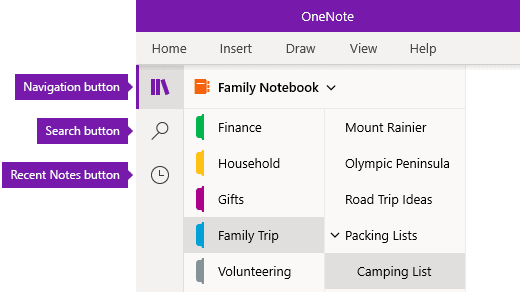
Microsoft OneNote makes note-taking effortless from day one
OneNote
OneNote brings the value of efficient organization and seamless collaboration. It is a powerful note-taking and information management tool that allows users to capture, organize, and share their ideas, thoughts, and information across multiple devices and platforms.
A workspace in Notion is what you design it to be. As an example, using Notion's pages and databases, you can take your notes and turn them into a working asset (i.e., a "meeting note" becomes a rolled-up "project page," "tasks" are turned into a "filtered board", etc.), a "wiki" that new hires do not have to learn from the "tribal knowledge". This is one reason why many startups and high-velocity teams choose Notion; they need a "single source of truth" as well as some form of lightweight workflow tracking.
Microsoft OneNote is simply a notebook where you put all your information. The benefit of using OneNote is the ease at which you can begin writing immediately. There is no thinking about "What database does this go into?" or "Is there the right template for this?", you create a page and begin writing. Many teams will find that the simple nature of OneNote results in easier to adopt and less likely to abandon tools for their teams needs (e.g., quick-capture, meeting minutes, research notes, training notes).
The free-plan conversation is nuanced. Notion has a free tier and then paid tiers for more robust collaboration and admin controls, with publicly listed plan pricing on its pricing page, Notion pricing. OneNote can be used for free, and it’s also commonly used through Microsoft 365 subscriptions. Microsoft details its consumer Microsoft 365 plans on its OneNote page, Microsoft OneNote and Microsoft 365. In practice, if you already pay for Microsoft 365, OneNote tends to be the “already there” option. If you need a structured wiki plus a workflow layer, Notion usually justifies its seat cost.

Notion
Organize teamwork and increase productivity
3 months free on the Business plan with Unlimited AI
Save up to $720
03 Notion pros and cons
What are the advantages of Notion?
- Database-native organization: Notion databases allow you to use fields (owner, status, etc.) to store data and display the same data in multiple ways, making notes become dynamic rather than static.

- Scalable wiki building: You can create an organized space for your team including clean links, clean documentation and onboarding without having to constantly ask "Where did we write that?"
- Templates that enforce consistency: Templates provide the ability to enforce consistency throughout a team to capture the decision process, next steps and other context each time.
- One tool for docs and lightweight workflows: Many teams find themselves reducing their dependency on separate tools for documenting, taking project notes and internal knowledge sharing using Notion.
- Offline access now exists: Notion supports offline access and syncing changes once you reconnect. Third-party reporting also highlights that embeds and certain interactive blocks may be limited offline, TechCrunch on Notion offline mode.
What are the disadvantages of Notion?
- Workspace design overhead: Notion works well if you have a set of conventions, name structure, templates, and a defined person responsible for managing databases. If this doesn't exist, workspaces tend to devolve into page sprawl, and search results become unreliable.

- Steeper learning curve for non-technical users: The relational nature of databases, views, and the like provide power and flexibility, but require a level of thinking or mental model. Teams often need education or enablement to ensure that they don't create fragile systems.
- Performance depends on how you build: While Notion is great at being able to handle a large amount of data, heavy pages, very large databases, and nested structures too far down in a hierarchy can cause performance issues. Smart architecture is much more important in Notion than in Notebook applications.
- Permission complexity at scale: As your team grows you'll likely need to implement tighter controls, private spaces, and more granular permissions. This is possible but requires ongoing administrative effort.
- Offline isn’t equal across content types: While offline note entry is supported by Notion, there are still limitations around embedded content and other block types that will deteriorate offline. This is particularly relevant to field workers and travelers.
Compare Notion to other tools


Notion vs Monday


Notion vs Asana

Coda vs Notion

ClickUp vs Notion

Notion vs Fibery

Notion vs Slab
04 OneNote pros and cons
What are the advantages of OneNote?
- Instant note capture: OneNote was created to facilitate rapid recording of ideas. From a meeting, brainstorm session or research project, there is no reason why you should have to develop a process to use OneNote on Day 1.
- Intuitive notebook hierarchy: he way that notebooks, sections and pages are organized is very much like a physical notebook, which makes it easy for most people to adopt this tool across entire organizations.
- Microsoft 365 synergy: If your organization uses other Microsoft applications, OneNote will fit right into your current technology environment and follow many of the same processes and practices that you already know.
- Offline-first reliability: OneNote has proven itself to be reliable even when connection is spotty. This is a key factor for travel, remote work and security requirements.
- Freeform layout: OneNote’s canvas approach works well for mixed media notes, typed text, pasted screenshots, quick sketches, and ad hoc structure.
What are the disadvantages of OneNote?
- Not database-driven: OneNote does not provide a database structure to manage projects, track status, assign owners, manage pipelines, etc. While you can replicate some of these functions, you will never receive the Notion-type views and attributes.
- Harder to standardize documentation: In order to keep documents standardized across teams, each team member needs to have access to the same template and documentation standards. However, in OneNote, this is not as automatic as it would be in Notion.
- Wiki building is less natural: You can certainly create documentation within OneNote, however linking documents, establishing a logical navigation structure, and maintaining a single-source-of-truth discipline requires more manual effort than in Notion.
- Knowledge can become siloed: As multiple departmental teams create separate notebooks, locating the correct information becomes increasingly difficult.
- Limited as an operations layer: If your goal is to run projects and knowledge from one place, OneNote is excellent for notes, but you’ll often need extra tools for execution.
05 Notion compared to OneNote
When comparing Notion and OneNote, the major question is do you want a knowledge management system or a note-taking tool? Notion fits closer to a knowledge system; it encourages thoughtful organization and will provide the benefits of clarity, the ability to reuse material, and consistent documentation.
OneNote fits closer to the latter; it provides almost no friction for capturing your notes, therefore is still popular in organizations that have heavily invested in Microsoft products, as well as in teams that place the highest priority on speed and familiarity (versus customizing their processes).
Is Notion better than OneNote?
 Is Notion better than OneNote?
For most companies developing and maintaining documentation and onboarding processes, and providing product notes and internal FAQs, Notion is usually better since it allows the development of a structured, reusable body of content. Templates and databases enable users to take their individual notes and create a documented process (i.e., a library) versus a collection of static documents.
OneNote can certainly satisfy the needs of an organization, however, when you require a scalable, internal wiki combined with tracking processes and execution, it typically does not meet the requirements of the business. When you need to track the status, owner, priority, etc. of your notes, Notion's database model is generally a better choice to support these functions.
What is Notion best used for?
Notion is best for developing an organizational knowledge base that is organized, curated, standardized, provides playbooks, onboarding paths, project hubs and decision logs. Notion excels at this task when documentation needs to be accessible to new staff members and not just familiar to those that created the documentation.
It is also ideal for small-scale operational uses, content calendars, project management, meeting note libraries, and internal request queues. The "win" is not necessarily more features. Rather, it is less lost context, due to the ability to link related information together and query the information.
Can Notion replace OneNote?
Yes, especially if you primarily utilize OneNote for typing meeting minutes, sharing documents, and low-documentation purposes. Notion is a clear replacement for OneNote when teams wish to standardize the methods in which they document meetings using templates and linking databases.
If you rely on OneNote for offline-first capture, a free-form drawing canvas, or rapid, unstructured personal note taking, Notion may seem excessive. In such cases, a hybrid approach may be successful by capturing in OneNote and publishing completed knowledge to Notion.
Is Notion cheaper than OneNote?
This ultimately depends on your existing technology stack. If you already subscribe to Microsoft 365, OneNote is likely included with your subscription making it very economical. However, if you are purchasing OneNote separately and still subscribing to additional wiki or workflow tools, your costs can quickly escalate.
In terms of actual cost, Notion is more affordable in many instances where it replaces multiple subscription services and eliminates the operational overhead associated with searching, copying, and recreating documentation and trackers from scratch.
For a current view of Notion’s plan pricing, you can cross-check the official Notion pricing page. To save on Notion, use our deal here.
Is there a better Collaboration software than Notion?
Depending on your interpretation of better, there may be alternative software applications available to meet the specific needs of your team. If you desire a more formal documentation process with enhanced governance capabilities, you may find a dedicated wiki application to be a better solution. Alternatively, if you seek a solution for personal knowledge management that is dependent on being able to access information locally, a software application developed specifically to manage local files may be a better choice.
A good way to decide is to choose your constraint first, offline reliability, governance, workflow tracking, simplicity, then pick the tool that optimizes that constraint. If you want a curated shortlist, start here with Notion alternatives.
Should I switch from OneNote to Notion?
You should consider switching to Notion if your primary issue is "we capture things, but we can't use what we've captured". Notion provides significant value when you want meeting notes to drive dashboard metrics, when onboarding must occur consistently, or when documentation must be consistent across departments.
You should NOT switch to Notion if you are currently achieving success with OneNote for rapid capture and you primarily require a personal notebook. In such cases, while Notion may provide value as a team-wide wiki, OneNote may continue to be the more practical application for day-to-day documentation capture.
Notion
Organize teamwork and increase productivity
3 months free on the Business plan with Unlimited AI
Save up to $720
06 OneNote compared to Notion
When comparing Notion and OneNote, the major question is do you want a knowledge management system or a note-taking tool? Notion fits closer to a knowledge system; it encourages thoughtful organization and will provide the benefits of clarity, the ability to reuse material, and consistent documentation.
OneNote fits closer to the latter; it provides almost no friction for capturing your notes, therefore is still popular in organizations that have heavily invested in Microsoft products, as well as in teams that place the highest priority on speed and familiarity (versus customizing their processes).
Is OneNote better than Notion?
Yes, if you prioritize ease of use and familiarity. OneNote is usually easier to implement since its conceptual model is universal (notebooks, sections, pages). As such, there is little to no debate regarding where items belong, and few "meta" decisions regarding structural elements.
Additionally, OneNote is the safer choice when you require robust off-line note taking, or when your IT department would prefer all knowledge tools operate from within Microsoft 365. Additionally, if your team does not desire the use of database work flows, OneNote can feel refreshing in comparison.
What is OneNote best used for?
Microsoft OneNote is best suited for high volume capture, meeting minutes, training notes, customer call summaries, personal research, and brief brainstorm pages. OneNote is a good example of the "get it down now, organize it later" style workflow.
Additionally, OneNote excels at supporting pages with a variety of formats. If your notes include screenshots, sketchy drawings, rough outlines, and/or clipping of content, OneNote's free-form layout is usually a better fit than structured workspace tools.
Can OneNote replace Notion?
OneNote can replace Notion if your Notion workspace is comprised primarily of static pages, and documents that are not reliant upon property fields, statuses, multiple views, or structured workflows. In this case, OneNote is usually preferred as it is simpler and quicker to implement.
However, if your Notion workspace includes databases to support task lists, editorial pipelines, request systems, or internal workflow systems, OneNote cannot duplicate these functionalities without additional tools. When attempting to use a combination of OneNote and another tool to support structured workflows, you are likely to create fragmentation by separating the execution and documentation of your processes once again.
Is OneNote cheaper than Notion?
In many companies, yes, because OneNote is frequently used as part of Microsoft 365 subscriptions. That makes the marginal cost of using OneNote very low compared to adding a new seat-based workspace tool.
That said, if you want to reduce Notion spend, it’s worth checking our Notion offers. The cheaper tool isn’t always the cheaper outcome if it creates extra tooling and more time spent searching for the latest info.
Is there a better Productivity software than OneNote?
If you want a workspace that doubles as a wiki and a lightweight operations layer, then yes, tools like Notion can be a better fit. If you want offline-first personal knowledge management, other approaches can outperform a traditional notebook app.
If you’d like to explore options adjacent to OneNote, you can start with the Notion alternative landscape. OneNote sits in that competitive set. It’s a useful jumping-off point for comparing note-taking, wikis, and team productivity tools.
Why not use OneNote?
The most frequent business-related reason why organizations choose not to utilize OneNote is that OneNote can easily become a repository of individual notebooks rather than a collaborative knowledge base. Individuals document their thoughts, however, the documentation does not converge to form a comprehensive resource that is easy to search and manage.
The second reason is related to operation. OneNote was not developed with the intent to track structured workflow activity. While your team may need to view owners, status, priority, and pipeline in a single location, without requiring additional tools to accomplish the same, OneNote's notebook model can feel restrictive.
07 Features comparison
OneNote Excels Ahead of Notion for Low-Friction Note Capture

Microsoft OneNote excels at low-friction note capture
The most significant benefit of OneNote, and ultimately the reason for adoption, is its open and write experience. Users will not need to learn a new process, design a template, nor determine to which database their note belongs.
While Notion can be fast to get going once you’ve established your work space, there is a noticeable amount of friction at the start of the process. This can result in lost momentum for teams as they begin to perceive the tool as requiring a large amount of architecture prior to seeing any value.
If your organization already uses standardized Microsoft tools, OneNote’s native integration can help to avoid adding one more optional platform to the list of tools available to users.
For teams that want more structure than OneNote offers, I’d point them to our deeper comparison page between Notion vs Microsoft OneNote.
Notion Surpasses OneNote for Template-Driven Standardization

Notion drives consistency with template-based documentation
Templates are how you prevent knowledge degradation in team environments. Notion makes templates central. You can define consistent meeting notes, decisions, risks, next steps, consistent project briefs, and consistent onboarding documents.
While OneNote allows for templates, it is more common for teams to develop unique formats for their notes, leading to reduced searchability and more difficulty in knowledge transfer.
If you require documentation to remain usable for months after it was created by someone other than the author, Notion's template driven methodology represents a major strategic advantage.
OneNote Remains Stronger for Offline Reliability and Field-Friendly Access

Microsoft OneNote stays reliable when you’re offline
OneNote has long provided a dependable means for offline work and cross-device access of notes. For teams that travel, work on-site, or deal with intermittent network connections, that reliability is not a "nice-to-have." It's operational safety.
Notion has supported offline access since 2017, allowing you to download pages for offline use and sync changes afterward. External coverage has noted that some types of content such as embeds may not function properly offline, TechCrunch coverage, therefore, it is recommended to test your most critical workflows in both offline and online states.
If offline operation is mission-critical, OneNote should be considered the conservative solution. If offline operation is rare, Notion's newer offline features provide all of the benefits of structured knowledge while providing additional flexibility.
Pricing: OneNote Is Often Already Paid For, While Notion Wins on Consolidation Value

How Notion pricing scales with your company
OneNote is frequently used via Microsoft 365 subscriptions, so it can be cost efficient if your organization is already licensed. Microsoft outlines consumer Microsoft 365 plans, including OneNote, on its official page, Microsoft OneNote and Microsoft 365.
Notion is seat based, with published pricing tiers on its official pricing page, Notion pricing. The ROI tends to appear when Notion replaces multiple tools and reduces time spent hunting for the latest document or rebuilding trackers from scratch.
If you’re planning to adopt Notion, it’s worth using our offer to reduce the effective cost, Notion deals. And for a quick on-site summary, see Notion vs Microsoft OneNote.
Notion Outperforms OneNote for Database-Driven Workflows

Notion outperforms for database-driven workflows
Notion's databases represent a game-changing feature for you. You can track tasks, meeting notes, projects, and requests as items with attributes, and then display them as tables, boards, calendars, or filtered dashboards.
You can write action items on a page in OneNote, but you cannot easily roll them up, filter them by owner, or get a reliable view of what is blocking you without using third-party tools.
If you’re choosing a tool to run lightweight operations, Notion’s workflow capabilities are hard to beat. For readers who want an even more execution-focused comparison, consider, ClickUp vs Notion.
Notion Leads OneNote for Building Structured Wikis and Knowledge Bases
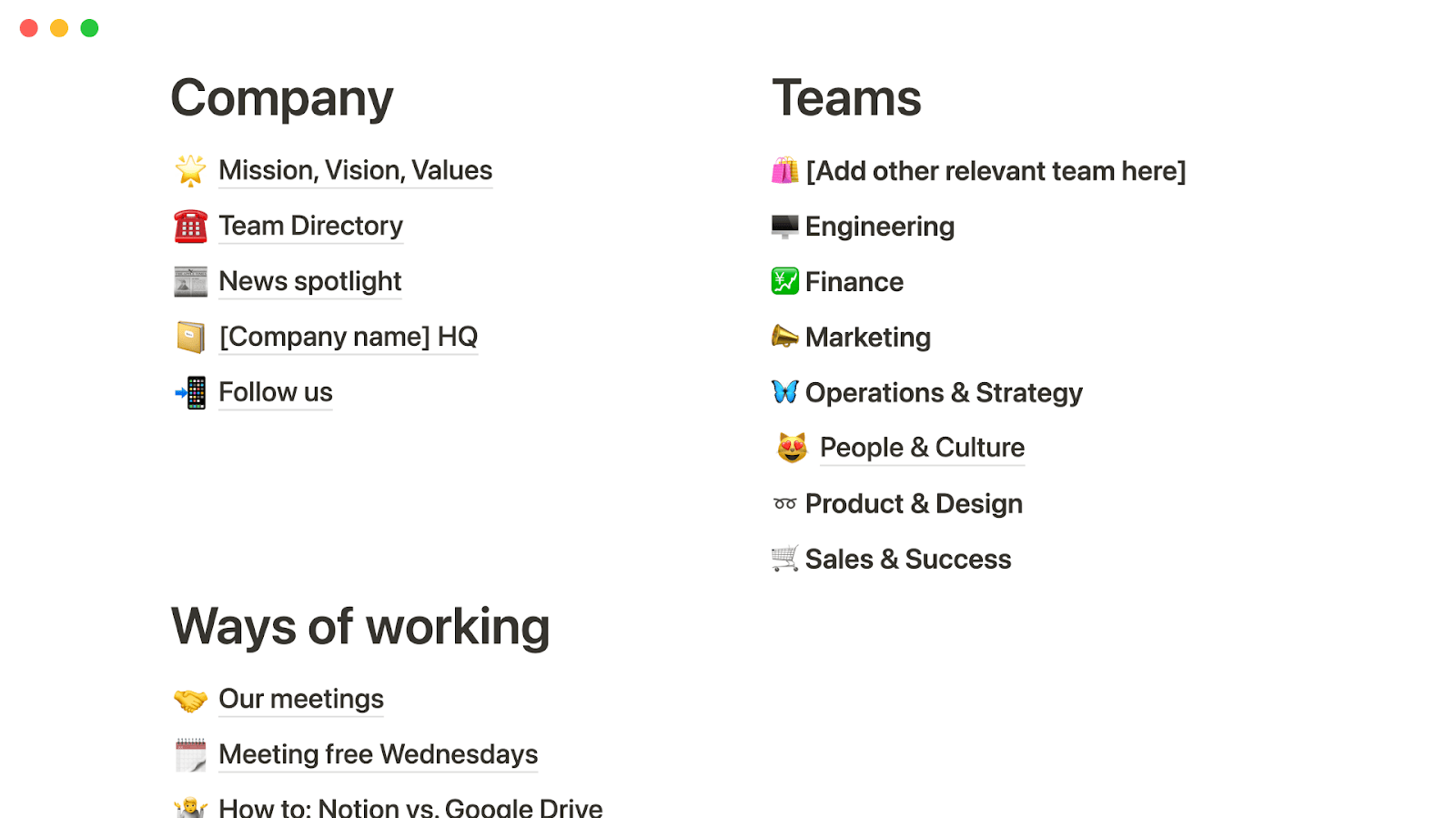
Notion leads for structured wikis and shared knowledge
Notion is intended to capture knowledge that will be reused, such as policies, playbooks, onboarding paths, product specifications and decision records. You can establish a consistent information architecture with clean linking between pages and consistent documentation through the use of templates.
Although OneNote can certainly hold documentation, maintaining a wiki quality structure across many teams is much less intuitive. The notebook model is very useful for personal organization, however, it is much more difficult for shared knowledge to remain organized and avoid being stored in silos.
If creating a structure for shared knowledge is a core aspect of your workflow, Notion’s structured approach typically yields results that are beneficial.
As a next step for readers exploring similar documentation tools, you might also compare Notion with wiki-oriented platforms via Notion vs Confluence.
08 Notion vs OneNote: Which is the best for your business?
Notion is the best tool for you if:
- You want a scalable internal wiki, onboarding, SOPs, policies, with consistent structure.
- You need databases to track work, tasks, projects, content, requests, in the same place as documentation.
- You care about operational visibility, owners, statuses, priorities, without gluing together multiple tools.
- You want templates to standardize recurring workflows, meetings, specs, retros, launch plans.
- You have a team lead who can own workspace governance, architecture, permissions, naming conventions.
 You want a scalable internal wiki, onboarding, SOPs, policies, with consistent structure.
OneNote is the best tool for you if:
- You prioritize fast capture over building structured systems.
- Your organization is deeply standardized on Microsoft 365 and prefers native tools.
- Offline reliability is non-negotiable for on-site or travel-heavy teams.
- You want a familiar, low-training notebook model for broad adoption.
- Your notes don’t need to become structured workflows with dashboards and views.
Notion
Organize teamwork and increase productivity
3 months free on the Business plan with Unlimited AI
Save up to $720
09 Alternatives to Notion & OneNote

Airtable
Used by 8846 members
$1,000 in credits on licences for 1 year
Save up to $1,000

Slack
Used by 4011 members
25% off new plan purchases
Save up to $9,000

ClickUp
Used by 3442 members
Additional 20% off Unlimited and Business plans for 1 year
Save up to $1,000

Zoom Meetings
Used by 2890 members
$20 off per user on the annual Workplace Pro plan
Save up to $180
10 Promotions on Collaboration software
Notion and OneNote are great tools, but Secret offers promo codes with discounts on over 2250+ different SaaS solutions. New deals are added regularly, helping you save money on your online subscriptions. Get access to codes for other Collaboration software you might want to purchase

Google Workspace promo
20% off Standard plans for 1 year

Promo codes for Make
3 months free on the Teams plan (240k credits included)
Credits for Airtable
$1,000 in credits on licences for 1 year

Google Calendar promo
20% off Standard plans for 1 year
Slack discount
25% off new plan purchases

Promo code QuillBot
30% off the annual Premium plan

Miro discount code
$1,000 in credits (lifetime validity)

Google Docs promotion
20% off Standard plans for 1 year

Monday discount code
First month free

Promo codes for Retool
1 year free on the monthly Team or Business plan
11 Notion vs OneNote: Conclusion
One way to sum up my experience with both Notion and OneNote is that Notion is better at creating a knowledge system, while OneNote is better at making it easy to capture a lot of information as quickly and easily as possible. Notion will win if you need to create documentation that you will reuse over time, or needs to be organized, and linked to light weight processes and work flows. OneNote will win if you are looking for speed and adoption (and you already use Microsoft Office) so that note taking feels natural and not like architecture.
Practically speaking, if your team is having trouble retaining knowledge because it gets lost and duplicated, I would recommend moving towards Notion and creating a basic workspace with some templates and a few basic databases. On the other hand, if your team members do not take the time to document their thoughts and ideas, then OneNote's "notebook" approach may yield better results.
If you’re ready to act, start with our deals and comparisons. Grab the best offer on Notion deals, review the product overview on our Notion review, and read the head-to-head breakdown in Notion vs Microsoft OneNote. For OneNote, you can also check our Microsoft OneNote review to confirm it matches your day-to-day workflow.
Start saving on the best SaaS
Secret has already helped tens of thousands of startups save millions on the best SaaS like Microsoft Teams, Google Workspace & many more. Join Secret now to buy software the smart way.