


Whether it’s jotting down an idea for a new product, planning out the steps of a website audit, or keeping a record of an important meeting, effective note-taking plays a crucial role in most businesses. Keeping these notes organized ensures your team has the information they need to do their job at their fingertips and supports effective collaboration.
Notion and Microsoft OneNote are popular digital tools for creating, storing, and organizing professional notes. But how do you choose the right one for your business? Look no further—this article has an in-depth comparison of Notion vs OneNote, including their main features and points of difference.
- 01 Notion vs Microsoft OneNote: overview
- 02 What's the difference between Notion and Microsoft OneNote?
- 03 Notion pros and cons
- 04 Microsoft OneNote pros and cons
- 05 Notion compared to Microsoft OneNote
- 06 Microsoft OneNote compared to Notion
- 07 Features comparison
- 08 Notion vs Microsoft OneNote: Which is the best for your business?
- 09 Alternatives to Notion & Microsoft OneNote
- 10 Promotions on Collaboration software
Start saving on the best SaaS
Secret has already helped tens of thousands of startups save millions on the best SaaS like Microsoft Teams, Google Workspace & many more. Join Secret now to buy software the smart way.

01 Notion vs Microsoft OneNote: overview
When comparing Notion and OneNote, both stand as prominent contenders in the realm of note-taking and productivity software. Notion offers a versatile workspace that goes beyond simple note-taking, allowing users to create databases, wikis, and project management boards. On the other hand, OneNote excels in its integration with Microsoft Office suite, seamless handwriting recognition, and intuitive organization.
To aid your decision-making process, we've compiled a comparative overview of Notion and OneNote. This table highlights their key features, rated with a star system, and is accompanied by insightful commentary to simplify your assessment and guide you towards the software that best aligns with your needs.

Customization
Notion’s block system offers users a high degree of flexibility. OneNote lets users customize built-in templates, backgrounds, and to-do lists.

Notion
Microsoft OneNote
Pricing plans
Notion has a free plan plus paid subscriptions ranging from $8-$15/user/month. OneNote is free for personal use. Business users must subscribe to Microsoft 365, costing between $6-$22/user/month.
Notion
Microsoft OneNote
Integrations
Notion offers 62+ integrations, including Asana, Google Drive, and Qonto, but not Google Calendar. OneNote has a range of integrations, including CloudHQ, Feedly, Zapier, and other Microsoft apps.
Notion
Microsoft OneNote
Positive reviews
Both apps receive many positive reviews, although some Notion users report an initial learning curve, and some OneNote users say they have issues exporting notes.
Notion
Microsoft OneNote
Customer support
Both offer 24/7 service support to paid users via live chat and phone (OneNote only). Notion subscribers with 100+ users get a dedicated success manager.
Notion
Microsoft OneNote
Ease of use
While Notion has a simple user interface, some users report it takes time to learn all its features. OneNote is easy for beginners to use.
Notion
Microsoft OneNote
Permissions and user controls
OneNote lets users password-protect notebooks. With Notion, users can set permission groups based on roles or departments.
Notion
Microsoft OneNote
Note-taking
Both apps offer high-level note-taking features using various content types, including images, videos, files, text, drawings, and audio and video recordings.
Notion
Microsoft OneNote
Storage
All Notion plans include unlimited storage. However, the file upload size for free plans is limited (5MB). OneNote offers 5GB storage on free accounts.
Notion
Microsoft OneNote
Search functionality
Both platforms include search and filtering functionality to locate notes or specific content quickly.
Notion
Microsoft OneNote
02 What's the difference between Notion and Microsoft OneNote?

Notion’s Dashboard Showing a List of Projects and Status Updates
Notion
Organize teamwork and increase productivity

OneNote Notepad Highlighting Where You Can Type and Handwrite Notes
Microsoft OneNote
OneNote brings the value of efficient organization and seamless collaboration. It is a powerful note-taking and information management tool that allows users to capture, organize, and share their ideas, thoughts, and information across multiple devices and platforms.
Notion and OneNote are popular note-taking tools with a key difference—OneNote embraces simplicity and functionality while Notion is more feature-rich yet complex. OneNote is a more traditional note-taking tool that closely resembles a physical notebook. You can add notes to a page within a notebook and arrange different sections on the page. The app offers straightforward yet flexible note creation and organization. OneNote makes creating notes in various formats like text, handwritten notes, drawings, or maths calculations easy. With a simple user interface and standard Microsoft features, OneNote is a popular choice for many existing Microsoft users.
Compared to OneNote, Notion is more feature-rich but can also be more complex to use—especially for beginners. You can organize your notes in content blocks on a page, add subpages to create a note-taking hierarchy, and set out the information in your preferred layout. The app offers additional organizational features to manage and link large volumes of notes. For example, Notion lets you label each note or content block so you can quickly search and filter the content you’re looking for. These extra features make the note-taking process more complicated but offer users greater flexibility once they’re familiar with Notion’s features.
Another difference is the way these apps facilitate collaboration. Notion lets you add comments or mentions to pages and specific content on a page. Multiple uses can work on a page simultaneously, with changes shared in real-time. In contrast, OneNote doesn’t include any real-time collaboration features. Instead, the app lets you share notes via email, and the recipient can edit them. Their approach to security and permissions also varies. With OneNote, you can password-protect notebooks or specific notebook sections. Notion doesn’t offer password protection, instead letting you control user permissions to restrict who has access to a note.

Notion
Organize teamwork and increase productivity
3 months free on the Business plan with Unlimited AI
Save up to $720
03 Notion pros and cons
What are the advantages of Notion?
- Versatile workspace: Notion offers a wide range of tools for various purposes, from note-taking and project management to knowledge bases and databases.

- Customizable layouts: Users can design their own layouts using blocks, allowing for flexible content organization and creativity.
- Collaborative features: Real-time collaboration, comments, and version history make it easy for teams to work together on projects.
- Cross-platform syncing: Notion seamlessly syncs across devices, ensuring access to your information wherever you are.
- Rich media integration: You can embed videos, files, images, and more directly into your notes, enhancing their content and context.
What are the disadvantages of Notion?
- Learning curve: The variety of features and customization options can be overwhelming for new users, requiring time to fully grasp its capabilities.

- Pricing structure: While offering a free plan, advanced features require a subscription, which might be costly for some users.
- Limited offline access: Notion's offline mode has limitations, potentially hindering productivity in areas with poor connectivity.
- Complexity for simplicity: In its quest for versatility, Notion may sometimes feel overly complex for users seeking straightforward note-taking.
- Exporting data: Users have raised concerns about data portability and the ease of transferring information out of Notion.
Compare Notion to other tools


Notion vs Monday


Notion vs Asana

Coda vs Notion

ClickUp vs Notion

Notion vs Fibery

Notion vs Slab
04 Microsoft OneNote pros and cons
What are the advantages of Microsoft OneNote?
- Microsoft integration: OneNote seamlessly integrates with other Microsoft Office applications, allowing for easy sharing and collaboration.
- Multi-platform support: Available on Windows, Mac, iOS, and Android, OneNote ensures cross-device accessibility and synchronization.
- Flexible note-taking: Users can create notes with various formats, including text, images, handwriting, audio, and even sketches.
- Organization options: OneNote's notebook, section, and page structure enables users to organize content in a hierarchical manner.
- Ink and drawing tools: Well-suited for digital inking, OneNote offers a range of drawing tools and handwriting recognition.
What are the disadvantages of Microsoft OneNote?
- Complex interface: The extensive features may make the interface feel overwhelming, especially for new users.
- Synchronization issues: While cross-platform syncing is available, some users have experienced synchronization delays or errors.
- Limited cross-device search: Search capabilities are sometimes restricted to the device you're using, affecting seamless navigation.
- Formatting challenges: Formatting issues may arise when copying and pasting content between OneNote and other applications.
- Cloud dependency: OneNote relies on cloud synchronization, potentially causing accessibility problems in areas with poor connectivity.
05 Notion compared to Microsoft OneNote
When comparing Notion and OneNote, Notion stands out with its versatile workspace and customizable structure. Notion provides a platform where users can create and organize various content types in a seamless manner. In contrast, OneNote's interface may feel more familiar to those accustomed to Microsoft Office, but it could also appear intricate due to its numerous features and options, potentially overwhelming new users.
Notion's focus on customization and its ability to adapt to various workflows make it a preferred choice for those seeking flexibility and creativity. On the other hand, OneNote appeals to users who are comfortable with Microsoft's ecosystem and prefer a more integrated approach to note-taking and organization.
Is Notion better than Microsoft OneNote?
 Is Notion better than Microsoft OneNote?
Deciding between Notion and OneNote hinges on individual needs and preferences. Notion shines in its customizable workspace, accommodating various content types and workflows. For instance, project managers might appreciate its adaptable databases for task tracking.
Conversely, OneNote seamlessly integrates with Microsoft Office suite, ideal for users deeply ingrained in that ecosystem. Its familiar interface and cross-device compatibility make it a top choice for those valuing cohesion. Both tools offer distinct advantages, and the choice ultimately depends on whether you prioritize expansive flexibility or integrated familiarity for efficient note-taking and organization.
What is Notion best used for?
Notion excels as a dynamic platform for organizing information and enhancing project collaboration. Its adaptable framework empowers users to design personalized databases, build wikis, and establish efficient note-taking systems. From freelancers tracking tasks to marketing teams streamlining campaigns, Notion caters to diverse needs. Its versatility proves invaluable, offering individuals and groups a unified space to manage tasks, brainstorm ideas, and foster seamless teamwork.
Whether you're a student juggling assignments or a startup orchestrating product development, Notion's customizable interface transforms chaotic workflows into streamlined processes, making it an exceptional choice for a wide spectrum of professional and creative endeavors.
Can Notion replace Microsoft OneNote?
When considering whether Notion can serve as a replacement for OneNote, it's important to recognize their unique strengths. Notion offers robust organizational tools and collaborative capabilities, making it a compelling option for project management and knowledge sharing.
However, if your workflow heavily relies on OneNote's seamless integration with Microsoft Office, or if you frequently use handwritten notes and drawings, OneNote's specialized features may continue to be indispensable. While Notion presents a versatile alternative, the decision hinges on evaluating your specific requirements and determining which tool best aligns with your work style and priorities.
Is Notion cheaper than Microsoft OneNote?
Delving into the cost comparison between Notion and OneNote reveals distinct pricing models. Notion's pricing plans introduces both free and paid tier pricing options, with premium plans offering enhanced features and storage options.
OneNote, however, stands out by providing a completely free platform, devoid of premium subscriptions. This cost advantage positions OneNote as an economical choice for users seeking comprehensive note-taking without the necessity for paid upgrades.
Notion's paid plans may offer specific benefits that cater to those requiring advanced collaboration and organizational functionalities, making the decision contingent on individual budget and requirements.
Is there a better Collaboration software than Notion?
Exploring the realm of project management tools unveils a multitude of options, each showcasing unique capabilities. Notable contenders like Evernote, Google Workspace, and ClickUp emerge as compelling alternatives to Notion.
Finding the best tool depends on what you like, what you need, and the features you want. It's a good idea to try different tools and see which one works best for you. When you use different project management software, you can find the one that fits well with how you work and helps you organize your projects better. This way, your goals and work can come together smoothly, making things easier and more effective.
Notion
Organize teamwork and increase productivity
3 months free on the Business plan with Unlimited AI
Save up to $720
06 Microsoft OneNote compared to Notion
When comparing Notion and OneNote, OneNote stands out with its seamless integration within the Microsoft ecosystem. OneNote provides a familiar interface and experience for users who are already accustomed to Microsoft Office tools. In contrast, Notion offers a more open and flexible workspace, allowing users to create a wide variety of content and customize their workflows, which may require a bit more exploration to fully utilize.
OneNote's integration with other Microsoft applications and its cohesive experience across devices make it a preferred choice for individuals and teams already entrenched in the Microsoft environment. On the other hand, Notion caters to users looking for a versatile and adaptable platform that can accommodate different work styles and content types.
Is Microsoft OneNote better than Notion?
Comparing OneNote and Notion unveils a diverse landscape of capabilities. Notably, OneNote stands out with its exceptional integration within the Microsoft Office ecosystem, fostering a cohesive environment for productivity. Its prowess in handling handwritten notes and drawings adds a distinctive layer of utility, particularly for those inclined towards visual ideation. This empowers users to seamlessly transition between tasks, capitalizing on the synergy between applications.
While Notion excels in information organization, OneNote's specialized features cater to unique needs, amplifying its appeal to users seeking seamless cross-application harmony and enhanced creative expression.
What is Microsoft OneNote best used for?
OneNote shines as a versatile platform for note-taking, particularly catering to those who find value in the tactile experience of handwritten or drawn annotations. Its seamless integration with the broader Microsoft Office suite renders it a powerhouse for users heavily engaged with Word, Excel, and PowerPoint. This harmony ensures a fluid transition from jotting down ideas to presenting them comprehensively, encompassing a user-centric continuum.
Whether capturing brainstorming sessions, sketching visual concepts, or harmonizing project elements across Office tools, OneNote serves as a dynamic canvas fostering creativity, knowledge management, and seamless collaboration within a familiar ecosystem.
Can Microsoft OneNote replace Notion?
The prospect of OneNote stepping into Notion's shoes hinges on your unique requirements. If your focal point lies in efficient note-taking, particularly coupled with the seamless Microsoft Office interplay, OneNote stands as a potential substitute for Notion.
Yet, for those deeply entrenched in Notion's realm of customizable databases and robust collaborative capabilities, replicating such dynamics within OneNote might prove intricate. The decision ultimately hinges on aligning your distinctive needs with the tool that seamlessly harmonizes with your workflow, ensuring optimal productivity and satisfaction.
Is Microsoft OneNote cheaper than Notion?
OneNote holds the purse strings advantage by being entirely cost-free, positioning itself as a budget-friendly alternative in contrast to Notion's subscription-based pricing structure. This financial savvy grants OneNote an appealing edge, catering to thrifty individuals and enterprises aiming to curtail expenditures with the optimal pricing option
By opting for OneNote, you can harness robust note-taking capabilities without incurring any financial commitment, a commendable choice for those striving to strike a balance between utility and economic prudence.
Is there a better Productivity software than Microsoft OneNote?
When it comes to taking notes, there are lots of choices available, each proving to be a top alternative to OneNote’s solution.
Other good options, such as Evernote, Google Workspace, and Bear, have their own strong points too. Deciding on the best tool is all about your preferences, needs, and the features you want. By exploring different possibilities, you can discover the note-taking tool that suits your work style, helping you become better at staying organized and efficient with your digital notes.
07 Features comparison
Notion and OneNote Both Provide an Wide Range of Templates

Examples of Notion's Ready-Made, Customizable Templates
Notion and OneNote are popular note-taking and productivity tools that offer users a wide range of templates to streamline various tasks and projects. Notion's template gallery includes options for project management, content creation, and personal organization, making it versatile for both individual and team use.
On the other hand, OneNote provides a robust set of templates, particularly suitable for educational and professional environments, with templates for meeting notes, research, and more. These templates empower users to structure their notes and documents efficiently, enhancing organization and productivity. Whether you prefer Notion's flexibility or OneNote's specialized templates, both tools simplify your work processes.
Both Notion and OneNote Offer Robust Integration Options

Examples of Notion's Integration Options to Allow for Seamless Data Exchange and Increase Efficiency
Seamless integrations are pivotal in elevating productivity and refining workflows. Both Notion and OneNote deliver robust integration options, enabling users to effortlessly collaborate across diverse tools.
Notion impresses with its extensive integration spectrum, supporting popular collaboration and productivity apps like Google Drive, Dropbox, Slack, and Trello. This ensures a fluid data exchange between Notion and preferred applications, streamlining multitasking across platforms.
On the other hand, OneNote harmonizes effortlessly with the Microsoft Office suite and other Microsoft services. This facilitates smooth data sharing across various Microsoft applications. Additionally, OneNote syncs seamlessly with Outlook, ensuring tasks, events, and reminders are in sync.
In sum, Notion boasts dynamic design, versatile tools, and wide-ranging integrations, while OneNote, with its user-friendly interface and Microsoft compatibility, serves as a reliable note-taking partner for diverse users.
Notion Takes the Lead Ahead of OneNote for User-Friendliness

Notion's User-Friendly Interface, Allowing for Easy Setup and Customization of Documents and Workspaces
When it comes to user-friendliness, both Notion and OneNote offer intuitive interfaces for efficient note-taking and organization. Yet, notable distinctions set them apart.
Notion boasts a clean, minimalist design that simplifies navigation through its features. Its drag-and-drop feature enables effortless customization and arrangement of notes, catering to those who favor a visual and adaptable approach. Moreover, Notion's block-based system empowers users to fuse diverse elements like text, images, and tables within a single note, yielding dynamic content.
Conversely, OneNote presents a familiar, user-friendly interface akin to a traditional notebook. Its tabbed layout and hierarchical organization ensure an uncomplicated experience. Rich formatting tools further allow personalization.
In terms of ease and design, Notion's dynamic structure and customization options propel it ahead, providing an intuitive and visually pleasing note-taking journey.
OneNote is Best at Recording than Notion

OneNote gives You the Power to Record Audio and Video from the Notes Dashboard
When it comes to recording capabilities, OneNote takes the lead. With OneNote, recording audio or video is effortless—simply click "Insert" and choose "Record Audio" or "Record Video". This feature is exceptionally useful for capturing interviews, vital notes in your own voice, or any required audio-visual content.
By seamlessly integrating recording functions, OneNote provides a comprehensive solution for those relying on recordings in their work or studies. OneNote empowers you to preserve crucial information in a format that suits your needs, ensuring no essential details are overlooked.
Notion is the Best Choice Over OneNote for Project Management
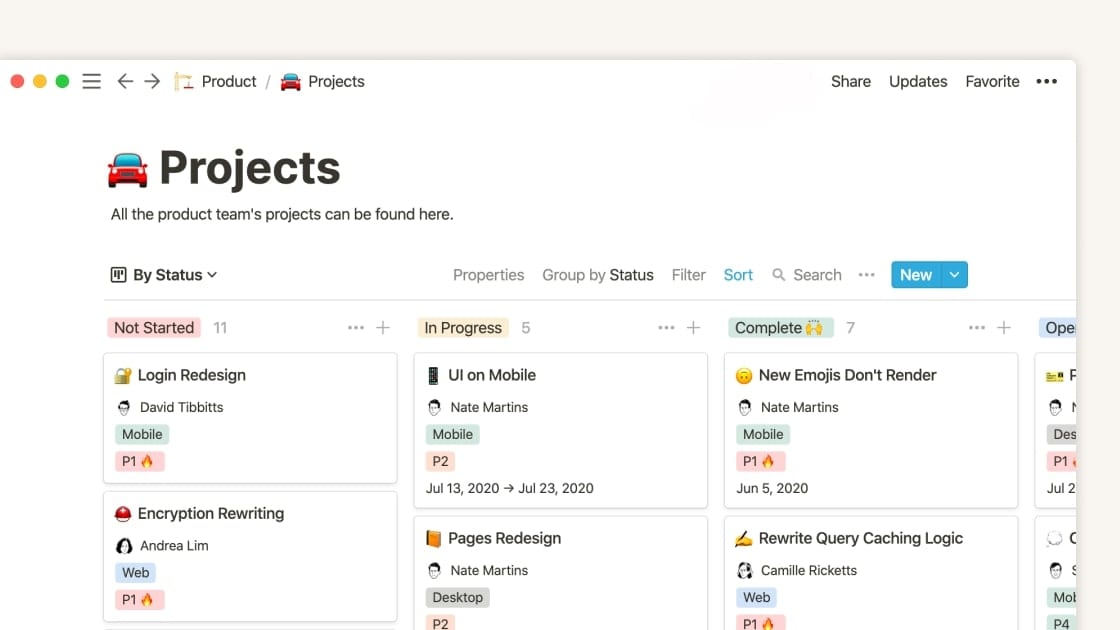
Notion's Project Management Capability, Ensuring A Comprehensive View of Tasks and Status
Notion reigns supreme in project management, offering a diverse array of features that streamline project coordination and progression tracking. Craft Kanban boards, allocate tasks, establish notifications, and effortlessly monitor project advancement within Notion's realm. This framework of organization and collaborative synergy guarantees timely task completion and ensures no details are overlooked. Notion's task repository proves particularly advantageous, centralizing task and project oversight. It facilitates progress tracking, deadline management, and seamless team collaboration.
With Notion at your side, project management evolves into a seamless endeavor, empowering you to master your workload and accomplish objectives with remarkable efficiency.
OneNote Excels Ahead of Notion at Web Clipping

OneNote's Web Clipper to Save, Annotate, and Organize Your Notes From the Web
OneNote's standout feature is its remarkable web clipper. This tool enables effortless extraction and preservation of web page content directly into your notebooks. Particularly beneficial during research or project resourcing, the web clipper simplifies gathering references. By clipping pertinent webpages, you secure accessible access across devices—be it computers, tablets, or phones.
OneNote's web clipper streamlines the information collection process, freeing you to focus on content instead of organizing or risking data loss. With OneNote's adept web clipper, you possess a robust resource to seamlessly curate and archive online content.
Notion’s Note-Taking Capabilities Outshine OneNote’s

Notion's Note-Taking Feature to Help Keep Everyone on the Team Up-To-Date
When it comes to note-taking and document organization, Notion stands out among its peers. With its user-friendly platform, Notion simplifies note-taking and ensures logical, accessible organization. The worry of losing vital documents becomes a thing of the past, thanks to Notion's robust system for storing and categorizing notes.
Whether you opt for a simple text format or desire to embed images, audio, or video, Notion accommodates your preferences. Its intuitive interface facilitates effortless note creation, editing, and retrieval, ensuring you locate specific notes whenever necessary. Notion empowers you to enhance productivity, efficiently capturing and retrieving information, ultimately saving time and keeping you consistently prepared.
08 Notion vs Microsoft OneNote: Which is the best for your business?
Notion is the best tool for you if:
- You need a flexible, highly customizable note-taking tool with broader project management functionalities including wikis and databases
- Collaboration is a top priority and you’re looking for a solution with features like real-time editing, mentions, and version history
- You want complete control over user permissions to tailor who can access specific documents based on their role or department
- In terms of user experience, you prefer a minimalist user interface with simple navigation and easy-to-use drag-and-drop features
- You work in project management and require templates to create custom workflows, relational databases, and information hierarchies
 You need a flexible, highly customizable note-taking tool with broader project management functionalities including wikis and databases
Microsoft OneNote is the best tool for you if:
- You’re an existing Microsoft user looking for a solution that integrates seamlessly with other Microsoft products
- You rely on handwritten notes and want a product that can recognize and convert your handwriting into typed notes
- You prefer a simple, easy-to-use note-taking solution that requires limited training due to its familiar, traditional notebook-style layout
- You’re an individual or business looking for an affordable note-taking tool to store and organize your notes
- Your work involves a lot of brainstorming or working with visual concepts and you need the ability to add drawings to your notes
Notion
Organize teamwork and increase productivity
3 months free on the Business plan with Unlimited AI
Save up to $720
09 Alternatives to Notion & Microsoft OneNote

Airtable
Used by 8846 members
$1,000 in credits on licences for 1 year
Save up to $1,000

Slack
Used by 4011 members
25% off new plan purchases
Save up to $9,000

ClickUp
Used by 3442 members
Additional 20% off Unlimited and Business plans for 1 year
Save up to $1,000

Zoom Meetings
Used by 2890 members
$20 off per user on the annual Workplace Pro plan
Save up to $180
10 Promotions on Collaboration software
Notion and Microsoft OneNote are great tools, but Secret offers promo codes with discounts on over 2250+ different SaaS solutions. New deals are added regularly, helping you save money on your online subscriptions. Get access to codes for other Collaboration software you might want to purchase

Deal for Google Workspace
20% off Standard plans for 1 year

Make promotion
3 months free on the Teams plan (240k credits included)
Airtable deal
$1,000 in credits on licences for 1 year

Deal for Google Calendar
20% off Standard plans for 1 year
Promo code for Slack
25% off new plan purchases

Code for QuillBot
30% off the annual Premium plan

Miro promotion code
$1,000 in credits (lifetime validity)

Google Docs discount
20% off Standard plans for 1 year

Monday promotion code
First month free

Retool promotion
1 year free on the monthly Team or Business plan
Start saving on the best SaaS
Secret has already helped tens of thousands of startups save millions on the best SaaS like Microsoft Teams, Google Workspace & many more. Join Secret now to buy software the smart way.