


Whether you're managing a small team or overseeing complex projects in a large organization, choosing the right project management tool is essential for streamlining workflows and enhancing team collaboration. In the realm of project management software, Zoho Projects and Monday.com stand out as prominent options, each offering unique features tailored to different types of users and businesses.
In this article, we delve into the specifics of Zoho Projects versus Monday. While both platforms are designed to optimize project management and team collaboration, they cater to distinct needs and offer varying functionalities. We will explore the strengths and limitations of each tool, comparing their features, usability, customization options, and pricing. This comparison aims to provide a comprehensive overview, helping you determine which platform aligns best with your project management requirements and business objectives.
- 01 Zoho Projects vs Monday: overview
- 02 What's the difference between Zoho Projects and Monday?
- 03 Zoho Projects pros and cons
- 04 Monday pros and cons
- 05 Zoho Projects compared to Monday
- 06 Monday compared to Zoho Projects
- 07 Features comparison
- 08 Zoho Projects vs Monday: Which is the best for your business?
- 09 Alternatives to Zoho Projects & Monday
- 10 Promotions on Collaboration software
Start saving on the best SaaS
Secret has already helped tens of thousands of startups save millions on the best SaaS like Microsoft Teams, Google Workspace & many more. Join Secret now to buy software the smart way.

01 Zoho Projects vs Monday: overview
Zoho Projects and Monday.com are both prominent contenders in the field of project management tools, each offering a unique set of features and benefits tailored to meet varied organizational needs.
Zoho Projects is renowned for its comprehensive project management capabilities, including in-depth task management, time tracking, and detailed reporting features. It's particularly suited for teams that require a multifaceted approach to project management, encompassing various aspects like resource allocation, budget management, and custom workflows. On the other hand, Monday is celebrated for its highly intuitive interface and exceptional customization options. It stands out with its visually appealing dashboards and ease of use, making it a favorite among teams that prioritize user experience and straightforward project tracking.
Let's dive deeper into the comparison between Zoho Projects and Monday.com to help you determine the best fit for your organization's project management needs.

Ease of Use
Zoho Projects is praised for its intuitive design and comprehensive features, while Monday stands out for its user-friendly, visually engaging interface, making project management more accessible and efficient.

Zoho Projects
Monday
Time tracking
Zoho Projects and Monday include time tracking capabilities, allowing teams to record time spent on tasks, aiding in productivity analysis and project billing, although Monday may prove less comprehensive than Zoho Projects.
Zoho Projects
Monday
Automation
Automation features in both platforms streamline repetitive tasks and workflows, such as automatic status updates and notifications.
Zoho Projects
Monday
Customer Support
Zoho Projects provides responsive support with extensive documentation and direct assistance, while Monday offers robust community forums, dedicated accounts managers, and 24/7 customer service.
Zoho Projects
Monday
Task management
Both Zoho Projects and Monday offer robust task management features, including task assignment, deadlines, and progress tracking, for efficient project workflow coordination.
Zoho Projects
Monday
Pricing Plan
Zoho Projects offers cost-effective pricing with a free tier, ideal for small teams, while Monday features flexible plans, catering to various business sizes and needs, but generally higher priced.
Zoho Projects
Monday
Customer Reviews
Both Zoho Projects and Monday receive praise for their user-friendly interfaces, robust customization options, and effective tools for improving team collaboration and project management efficiency.
Zoho Projects
Monday
Customizable dashboards
Both offer customizable dashboards, enabling users to personalize views and reports, ensuring relevant project information is readily accessible and easy to monitor.
Zoho Projects
Monday
Collaboration tools
Each platform provides comprehensive collaboration tools, such as team chat, file sharing, and comments, to enhance team communication and project transparency.
Zoho Projects
Monday
Integrations
Zoho Projects integrates well with other Zoho apps and tools like Slack, while Monday offers broader integrations including Slack, Microsoft Teams, and various CRM and marketing platforms.
Zoho Projects
Monday
02 What's the difference between Zoho Projects and Monday?

Zoho Projects, tout en proposant des outils de collaboration, met davantage l'accent sur l'exécution des tâches et le suivi des projets, ce qui convient aux équipes qui accordent plus d'importance à la gestion détaillée de projet qu'aux aspects de collaboration.
Zoho Projects
Turning ideas into achievements with Zoho Projects!

Monday.com is recognized for its strong collaboration features, such as team chat and shared boards
Monday
monday.com lets you manage projects from planning to delivery on a single platform, utilizing AI to streamline workflows and enhance team collaboration, ensuring you can track everyone's progress effectively.
Zoho Projects and Monday, both leading project management tools, share several core functionalities but differ significantly in their design, target audiences, and specific features they offer.
Zoho Projects is tailored more towards businesses that require a comprehensive project management solution. It excels in detailed task management, time tracking, and in-depth reporting features, making it suitable for teams that need a multifaceted approach to manage projects. The platform is known for its integration within the Zoho ecosystem, which is beneficial for businesses already using other Zoho applications. It also offers advanced features like issue tracking and Gantt charts, making it a robust choice for complex project management needs. However, these advanced features can sometimes introduce a steeper learning curve.
Conversely, Monday.com is designed with a focus on flexibility and user experience. It is renowned for its visually appealing interface and ease of use, attracting teams that value intuitive design and quick setup. Monday.com offers a high degree of customization in its boards, allowing users to adapt the tool to a wide range of project types and workflows. This adaptability makes it particularly appealing to teams in creative industries or those that require frequent adjustments to their project management approach.
In terms of templates, Zoho Projects offers a variety of pre-set templates for different project types, which can be customized further. Monday.com, on the other hand, provides a wide array of customizable templates that cater to various industries and project requirements, enhancing its appeal for users seeking ready-to-use solutions.
A notable distinction is in their approach to integrations. While Zoho Projects offers seamless integration with other Zoho apps and popular third-party tools like Slack, Monday.com boasts a broader range of integrations with numerous external applications including CRM, marketing, and software development tools.
Finally, Monday.com is recognized for its strong collaboration features, such as team chat and shared boards, which are designed to enhance team communication and collaborative efforts. Zoho Projects, while offering collaboration tools, places more emphasis on task execution and project tracking, catering to teams that prioritize detailed project management over collaboration aspects.

Zoho Projects
Used by 114 members
$100 in Zoho Wallet credits
Save up to $100

Monday
Used by 1479 members
First month free
Save up to $80
03 Zoho Projects pros and cons
What are the advantages of Zoho Projects?
- Comprehensive project management features: Zoho Projects offers a wide array of project management tools including task management, milestone tracking, and time tracking, making it highly effective for detailed project planning and execution.

- Integration with Zoho suite: It seamlessly integrates with other Zoho applications like Zoho CRM and Zoho Books, offering a unified platform for businesses already using the Zoho ecosystem.
- Customization and automation: The platform provides extensive customization options, allowing teams to tailor the software to their specific needs. Additionally, it offers automation capabilities to streamline repetitive tasks.
- Cost-effective pricing: Zoho Projects is known for its affordable pricing plans, including a free tier, which is particularly appealing for small businesses and startups.
- Collaboration tools: It includes collaboration features such as forums, chat, and document sharing, facilitating effective team communication and collaboration within projects.
What are the disadvantages of Zoho Projects?
- Learning curve: Due to its comprehensive set of features, new users might experience a steep learning curve, especially those not familiar with robust project management tools.

- Limited third-party integrations: While it integrates well within the Zoho ecosystem, its integration with external tools and apps is not as extensive as some competitors, potentially limiting flexibility.
- Performance with large projects: Users have reported that the platform can become slow or less responsive when handling very large projects with numerous tasks and users.
- Mobile app limitations: The mobile version of Zoho Projects, while convenient, does not offer the full range of functionalities available on the desktop version, which may affect on-the-go project management.
- Basic interface: Some users find the user interface less modern or intuitive compared to more visually-oriented project management tools, which might impact user experience and adoption.
04 Monday pros and cons
What are the advantages of Monday?
- User-friendly interface: Monday.com is highly praised for its intuitive and visually appealing interface, making it easy for new users to adapt and start managing projects quickly.
- High customizability: The platform offers extensive customization options for its boards, allowing teams to tailor the tool to their specific workflow requirements, making it ideal for a variety of project types.
- Strong collaboration features: It includes robust collaboration tools such as team chat, file sharing, and visual project timelines, enhancing teamwork and communication within and across projects.
- Wide range of integrations: Monday.com boasts a broad array of integrations with other tools and platforms, including CRM systems, marketing tools, and development software, increasing its versatility.
- Automation capabilities: The platform offers powerful automation features that help in reducing repetitive tasks and streamlining workflow processes, thus enhancing overall productivity.
What are the disadvantages of Monday?
- Pricing: Compared to some other project management tools, Monday.com can be relatively expensive, especially for smaller teams or businesses on a tight budget.
- Overwhelming for simple projects: The extensive features and customization options can sometimes be overwhelming for users managing simple or small-scale projects.
- Learning curve for advanced features: While the basic functionalities are user-friendly, mastering the more advanced features and customizations can require a significant learning effort.
- Limited free plan: The free version of Monday.com is quite limited in terms of features and capabilities, pushing businesses towards paid plans for full functionality.
- Performance issues with large data sets: Users have reported occasional performance issues, such as slow loading times, when dealing with very large boards or extensive data sets.
Compare Monday to other tools


Asana vs Monday

Slack vs Monday

Trello vs Monday

Airtable vs Monday

ClickUp vs Monday

Pipedrive vs Monday
05 Zoho Projects compared to Monday
Zoho Projects and Monday are both robust project management tools, yet they cater to different user needs and preferences. Zoho Projects shines with its comprehensive project management features and seamless integration within the Zoho suite, making it ideal for users seeking a detailed, all-encompassing management tool.
In contrast, Monday.com stands out for its highly intuitive and customizable interface, appealing to teams that prioritize ease of use and visual project tracking. While Zoho Projects offers cost-effectiveness and is well-suited for businesses deeply integrated with Zoho apps, Monday.com excels in collaboration and customization, albeit at a higher price point, making it a favorite for diverse teams and project types.
Is Zoho Projects better than Monday?
 Is Zoho Projects better than Monday?
Determining whether Zoho Projects is better than Monday.com largely depends on specific organizational needs and preferences. Zoho Projects offers a more traditional, feature-rich project management experience, excelling in detailed task tracking and integration with other Zoho tools, making it a strong choice for businesses seeking comprehensive project oversight.
On the other hand, Monday.com is renowned for its user-friendly, customizable interface, catering to teams that value visual project management and ease of use. Thus, while Zoho Projects might be better for in-depth project management and Zoho ecosystem users, Monday.com could be the superior choice for teams prioritizing flexibility and a modern, intuitive user experience.
What is Zoho Projects best used for?
Zoho Projects is best utilized for managing complex and detailed projects, particularly in environments where comprehensive task management, in-depth reporting, and time tracking are essential. It excels in offering a multifaceted approach to project management, enabling teams to monitor progress meticulously, allocate resources effectively, and meet project milestones. Its strength lies in its ability to seamlessly integrate with other Zoho applications, making it an ideal choice for businesses already invested in the Zoho ecosystem.
With its advanced features like Gantt charts and issue tracking, Zoho Projects is especially suitable for teams that require a robust, all-in-one platform for managing large-scale projects and diverse team collaborations.
Can Zoho Projects replace Monday?
Zoho Projects can replace Monday.com for businesses seeking a more traditional, comprehensive project management tool with extensive task and time tracking capabilities. It's particularly effective for those already using the Zoho ecosystem.
However, for teams that prioritize a highly intuitive and visually appealing interface with extensive customization options, Monday.com might be irreplaceable. The decision to replace Monday with Zoho Projects should be based on the specific needs, workflows, and preferences of the team or organization.
Is Zoho Projects cheaper than Monday?
Generally, Zoho Projects is considered more cost-effective than Monday.com. It offers a free tier and its paid plans are typically less expensive than those of Monday.com, making it a more budget-friendly option, especially for small businesses and startups. However, the actual cost-effectiveness depends on the specific features and scale of use required by a business.
While Zoho Projects’s pricing structure provides a comprehensive set of project management tools at a lower cost, Monday.com's pricing reflects its broader range of integrations and highly customizable interface.
Is there a better Collaboration software than Zoho Projects?
Whether there's a better software than Zoho Projects depends on your specific project management needs and objectives. Zoho Projects offers a comprehensive suite for project tracking and management, well-suited for businesses seeking detailed task management and integration within the Zoho ecosystem.
However, alternatives to Zoho Projects like Monday.com, Asana, and Trello might be more suitable for certain organizations. Monday.com is known for its user-friendly interface and customization, Asana for workflow management, and Trello for its simple, card-based system. The choice of a "better" software hinges on your unique requirements, team size, and desired project management style.

Zoho Projects
Turning ideas into achievements with Zoho Projects!
$100 in Zoho Wallet credits
Save up to $100
06 Monday compared to Zoho Projects
Monday.com, compared to Zoho Projects, is known for its user-friendly, visually engaging interface and extensive customization options, making it ideal for teams that prioritize ease of use and flexible project tracking.
While Zoho Projects excels in detailed project management with comprehensive task and time tracking, Monday.com stands out for its adaptability to various project types and its focus on collaboration and team engagement. The choice between Monday.com and Zoho Projects depends on whether a team values intuitive usability and customization (Monday.com) or in-depth, traditional project management capabilities (Zoho Projects).
Is Monday better than Zoho Projects?
Whether Monday is better than Zoho Projects depends on what a team or business values more in a project management tool. Monday.com excels in user experience with its intuitive, visually appealing interface, and offers a high degree of customization, making it ideal for teams seeking a flexible, easy-to-use platform.
In contrast, Zoho Projects is more traditional, offering comprehensive project management features, which might be preferred by teams that need detailed task tracking and integration with other Zoho applications. Ultimately, the "better" option is subjective and depends on the specific needs and preferences of the users.
What is Monday best used for?
Monday.com is best used for managing projects that benefit from a highly customizable and visually intuitive interface. It's ideal for teams that require flexibility in project management, adapting quickly to different types of workflows and industries.
The platform excels in enhancing team collaboration and engagement through its user-friendly design and easy-to-understand visual project boards. It's particularly suitable for creative industries, marketing teams, and any project management scenario where ease of use and adaptability are key priorities.
Can Monday replace Zoho Projects?
Monday.com can replace Zoho Projects for teams prioritizing a user-friendly interface, extensive customization, and a flexible approach to project management. Its strength lies in its ability to adapt to various project types and its focus on enhancing team collaboration.
However, for organizations that require more traditional project management features, like detailed time tracking and in-depth reporting, as offered by Zoho Projects, Monday.com may not be a complete substitute. The feasibility of replacing Zoho Projects with Monday.com depends on the specific project management needs and existing workflow of an organization.
Is Monday cheaper than Zoho Projects?
Monday.com is generally considered more expensive than Zoho Projects, especially when comparing the full range of features offered at different pricing tiers. While Monday.com provides a highly customizable and user-friendly interface, its pricing reflects this level of functionality and flexibility.
Zoho Projects, known for its comprehensive project management features, offers more budget-friendly options, including a free tier, making it a cost-effective choice for small businesses and startups. The final cost comparison would depend on the specific features and scale of use required by the organization.
Is there a better Collaboration software than Monday?
Deciding if there's a superior software to Monday.com depends on your distinct project management needs and objectives.
Alternatives to Monday.com include Zoho Projects, Asana, and Trello, each with its own strengths. For instance, Zoho Projects is great for detailed project management within the Zoho ecosystem, Asana for workflow management, and Trello for its simplicity and visual approach. The choice of the optimal software largely hinges on your individual project types, team size, and feature preferences. Thoroughly evaluating these factors is crucial in selecting the tool that best aligns with your project management goals.

Monday
Easily manage all your projects and become more productive and efficient.
First month free
Save up to $80
07 Features comparison
Monday Outshines Zoho Projects in User-Friendly Interface Design

Monday's color-coded boards and drag-and-drop functionality make it exceptionally straightforward for new users to grasp the system's essentials.
When comparing the ease-of-use of Zoho Projects and Monday, Monday.com takes a lead with its more visually engaging and intuitive interface. Monday's color-coded boards and drag-and-drop functionality make it exceptionally straightforward for new users to grasp the system's essentials. This design philosophy is particularly evident in features like the timeline view, where different project stages are vividly represented, enabling quick orientation and efficient task tracking. Teams that require rapid deployment and minimal training time often find Monday's layout more conducive to their needs.
In contrast, while Zoho Projects offers a clear and organized dashboard, it leans towards a more traditional project management layout. Its interface, though user-friendly, doesn’t match the visual appeal of Monday.com. It's structured to support detailed project planning and tracking, with features like Gantt charts and time tracking, which are more oriented towards users seeking depth in project management rather than simplicity in design. For example, Zoho's issue tracker is a powerful tool for teams needing to manage complex projects, but it might not be as instantly accessible to new users compared to Monday's straightforward task boards.
Zoho Projects and Monday.com Equally Excel in Gantt Chart Capabilities

These Gantt chart features enable teams to have a comprehensive view of their entire project at a glance.
Both Zoho Projects and Monday.com provide users with powerful and interactive Gantt charts, a crucial tool for visualizing and managing project timelines, dependencies, and key milestones effectively. These Gantt chart features enable teams to have a comprehensive view of their entire project at a glance. Users can easily adjust task schedules, rearrange deadlines, and shift priorities as needed, ensuring projects remain agile and adaptable to changing circumstances.
For example, in Zoho Projects, the Gantt chart functionality allows for a detailed breakdown of project tasks, showing how each task interlinks and the impact of any changes on the overall project timeline. This level of detail is particularly useful for managers who need to oversee complex projects with multiple dependencies. It facilitates efficient resource allocation and helps in identifying potential bottlenecks before they cause delays.
Similarly, Monday.com's Gantt chart feature provides a dynamic and visually appealing interface. It allows team members to track project progress in real-time and make adjustments on the fly. The drag-and-drop functionality makes it simple to change task durations and dependencies, enhancing the tool's usability and flexibility. This is especially valuable for teams that require a high level of collaboration and need to frequently update their project plans.
Monday.com Outperforms Zoho Projects in Customizable Resource Allocation

Monday.com distinguishes itself in simplifying day-to-day operations through highly customizable workflows, which is a significant aspect of its resource allocation capabilities.
Monday.com distinguishes itself in simplifying day-to-day operations through highly customizable workflows, which is a significant aspect of its resource allocation capabilities. The platform enables users to adapt and personalize workflows to align perfectly with their specific project needs, offering a level of flexibility that is particularly advantageous in dynamic project environments. For instance, teams can create custom boards in Monday.com that reflect their unique processes, assign resources to tasks effortlessly, and adjust allocations as project priorities shift.
Zoho Projects provides effective tools for resource management, including viewing team member workloads and assigning tasks based on availability. However, the platform's strength lies more in its comprehensive project management capabilities than in the degree of personalization it offers for resource allocation. For example, while Zoho Projects allows you to see how resources are distributed across tasks, adjusting these allocations doesn't offer the same ease and fluidity as in Monday.com.
Zoho Projects Leads in Project Collaboration Efficiency Over Monday.com

Zoho Projects stands out with its ability to handle complex project needs through functionalities like granular task assignments, precise deadline settings, and meticulous progress tracking.
When it comes to creating a collaborative environment tailored specifically for project management, Zoho Projects excels, offering a more detailed and nuanced set of features than Monday.com. Zoho Projects stands out with its ability to handle complex project needs through functionalities like granular task assignments, precise deadline settings, and meticulous progress tracking. For instance, its Gantt chart feature provides an in-depth view of task timelines and dependencies, a level of detail that is invaluable for intricate project planning and is not as extensively mirrored in Monday.com.
In contrast, while Monday.com offers a collaborative workspace, it focuses more on a user-friendly interface and general task management rather than the in-depth project management tools that Zoho Projects offers. Monday.com is excellent for teams that require a high level of customization and visual task tracking, but for those who need detailed project oversight, Zoho Projects provides a more focused solution.
Zoho Projects Dominates in Comprehensive Document Management Compared to Monday.com

Its platform allows users to securely store all project documents in one central location.
Zoho Projects excels in managing project-related documents, offering a more robust and feature-rich document management system than Monday.com. Its platform allows users to securely store all project documents in one central location. This centralized storage is enhanced with version control, ensuring that team members always have access to the latest versions of documents while also being able to track changes over time. For instance, if a project plan is updated, team members can easily view the revision history to understand what changes were made and by whom.
While Monday.com does offer basic file management functionalities, allowing users to attach files to tasks and projects, it lacks the depth of document management features found in Zoho Projects. Monday.com’s system is more suited for straightforward file storage and access, rather than the comprehensive document management, version control, and collaborative editing features that Zoho Projects provides.
Monday.com Outshines Zoho Projects in Task Automation Features
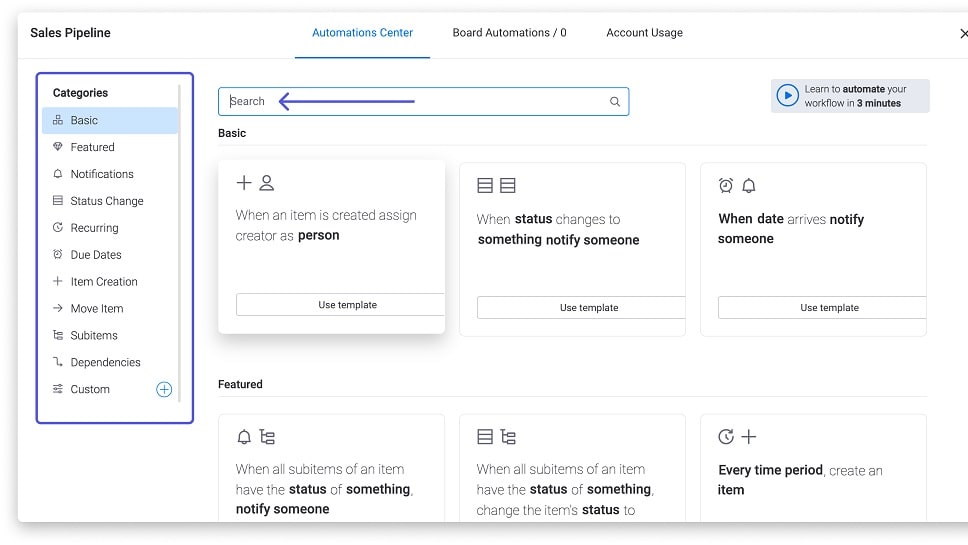
Its platform is designed to streamline repetitive tasks with a high degree of efficiency.
Monday.com takes the lead in task automation, significantly enhancing productivity and reducing manual workload compared to Zoho Projects. Its platform is designed to streamline repetitive tasks with a high degree of efficiency. For instance, Monday.com enables users to set up custom automation rules that trigger actions like sending alerts and email notifications for approaching due dates, status updates, or task completions. This functionality allows teams to stay on top of their projects without constant manual monitoring.
In contrast, while Zoho Projects does offer some automation capabilities, they are not as comprehensive or user-friendly as those found in Monday.com. Zoho's automation features are more focused on project management processes, such as setting task dependencies and automating workflow transitions. However, they lack the depth and flexibility in automation that Monday.com offers, especially regarding customizable notifications and triggers.
Monday Surpasses Zoho Projects in Integration Capabilities

Monday’s extensive integration network allows it to seamlessly connect with a wide array of external applications and services.
In the realm of integration possibilities, it becomes clear that Monday.com holds a significant advantage. Monday’s extensive integration network allows it to seamlessly connect with a wide array of external applications and services. For instance, Monday.com users can easily integrate their boards with popular tools like Slack, Google Drive, and Microsoft Teams, enhancing collaborative workflows and data accessibility. These integrations facilitate a more streamlined process, where teams can synchronize their work across different platforms without leaving the Monday.com environment.
Zoho Projects, while offering robust integrations within the Zoho suite, such as with Zoho CRM and Zoho Books, tends to have more limited options when it comes to third-party applications. This can be a drawback for businesses that rely on a diverse set of tools outside the Zoho ecosystem. For example, a team using Salesforce for CRM might find it easier to integrate their CRM data with Monday.com compared to Zoho Projects.
08 Zoho Projects vs Monday: Which is the best for your business?
Zoho Projects is the best tool for you if:
- You need in-depth project management features like detailed task tracking, Gantt charts, and time tracking for complex project planning.
- Your business already utilizes the Zoho ecosystem, as it offers seamless integration with other Zoho apps, enhancing overall productivity.
- You prioritize comprehensive document management with features like version control and secure file sharing for collaborative projects.
- You require a cost-effective solution with a free tier and affordable pricing plans, making it ideal for small businesses.
- You value a traditional project management approach with robust reporting and analytics features to track project progress and team performance.
 You need in-depth project management features like detailed task tracking, Gantt charts, and time tracking for complex project planning.
Monday is the best tool for you if:
- You value a highly intuitive, user-friendly interface with customizable workflows and visual project tracking, ideal for teams seeking ease of use.
- You need a platform with extensive third-party integrations, allowing seamless collaboration with various business tools like CRM and marketing software.
- You prefer a flexible tool that adapts to various project types, from simple task management to complex, multi-phase projects.
- Your team requires robust collaboration features, like shared boards and team chat, to enhance communication and streamline workflows.
- You’re looking for advanced automation capabilities to reduce manual work, with custom rules for alerts, notifications, and task assignments.
Zoho Projects
Used by 114 members
$100 in Zoho Wallet credits
Save up to $100
Monday
Used by 1479 members
First month free
Save up to $80
09 Alternatives to Zoho Projects & Monday

Notion
Used by 19588 members
6 months free on the Business plan with Unlimited AI
Save up to $12,000

Slack
Used by 3826 members
25% off new plan purchases
Save up to $9,000

ClickUp
Used by 3333 members
Additional 20% off Unlimited and Business plans for 1 year
Save up to $1,000

Asana
Used by 897 members
75% off the annual Starter and Advanced plans for 1 year
Save up to $22,491
10 Promotions on Collaboration software
Zoho Projects and Monday are great tools, but Secret offers promo codes with discounts on over 2210+ different SaaS solutions. New deals are added regularly, helping you save money on your online subscriptions. Get access to codes for other Collaboration software you might want to purchase

Discount for Google Workspace
20% off Plus plans for 1 year

Airtable promotion code
$1,000 in credits on licences for 1 year
Notion offer
6 months free on the Business plan with Unlimited AI
Credits for Slack
25% off new plan purchases

Miro coupon code
$1,000 in credits (lifetime validity)
Asana offer
75% off the annual Starter and Advanced plans for 1 year
ClickUp coupon code 2026
Additional 20% off Unlimited and Business plans for 1 year

Code for bolt.new
20% off all plans for the first 3 months

xTiles offer
20% off monthly or annual plans

Google Drive discounts
20% off Plus plans for 1 year
Start saving on the best SaaS
Secret has already helped tens of thousands of startups save millions on the best SaaS like Microsoft Teams, Google Workspace & many more. Join Secret now to buy software the smart way.