


Team collaboration and project management are essential components of modern businesses' workflows. Whether you're a small startup or a large enterprise, having the right tools can significantly impact your team's productivity and efficiency. However, with so many options available, such as Slack and Monday, selecting the best platform for your organization can be a daunting task.
In this article, we'll delve into the comparison between Slack and Monday, two leading solutions in the realm of team communication and project management. We'll explore their key features, pricing structures, and customer support offerings to help you make an informed decision about which platform aligns best with your team's needs and objectives.
- 01 Slack vs Monday: overview
- 02 What's the difference between Slack and Monday?
- 03 Slack pros and cons
- 04 Monday pros and cons
- 05 Slack compared to Monday
- 06 Monday compared to Slack
- 07 Features comparison
- 08 Slack vs Monday: Which is the best for your business?
- 09 Alternatives to Slack & Monday
- 10 Promotions on Collaboration software
Start saving on the best SaaS
Secret has already helped tens of thousands of startups save millions on the best SaaS like Microsoft Teams, Google Workspace & many more. Join Secret now to buy software the smart way.

01 Slack vs Monday: overview
Slack and Monday are two heavyweight contenders in the arena of team collaboration and project management, each offering distinct features tailored to suit various organizational requirements.
Slack is renowned for its intuitive interface and seamless communication capabilities. Designed to facilitate real-time messaging, file sharing, and integrations with third-party apps, Slack excels in fostering efficient team communication and collaboration. Conversely, Monday prides itself on its versatile project management tools, providing users with customizable workflows, task tracking, and project timelines. With its emphasis on visual organization and task delegation, Monday is ideal for teams seeking a comprehensive solution for project planning and execution.
In this comparison of Slack vs. Monday, we'll explore the unique features, functionalities, and pricing structures of each platform to assist you in making an informed decision about which solution best suits your team's collaboration and project management needs.

Customization
Slack offers considerable customization in terms of workspace and notification settings. Monday goes further, allowing users to fully customize workflows, dashboards, and even the appearance of project boards.

Slack
Monday
Ease of use
Slack is renowned for its intuitive chat interface, making it very easy to use for teams of all sizes. Monday has a steeper learning curve due to its extensive project management features but is still user-friendly.
Slack
Monday
Integrations
Slack integrates with over 2,000 third-party apps including Google Drive, Trello, and Asana, which enhances its communication capabilities. Monday has around 200 integrations focused on project management, like Dropbox, Excel, and various CRM systems.
Slack
Monday
Collaboration
Slack excels in instant messaging and integration with other collaboration tools, making team communication seamless. Monday complements this with strong collaboration features geared towards project tracking and task assignments.
Slack
Monday
Customer reviews
Both Slack and Monday are highly rated for their user interface and collaboration capabilities. However, Slack is often praised for its communication features, while Monday is noted for its project management tools.
Slack
Monday
Reporting
Slack provides basic reporting on usage statistics, but Monday offers comprehensive reporting features that allow for in-depth tracking of projects, workload, and performance.
Slack
Monday
Customer support
Slack provides extensive online resources and ticket-based support, with a fast response time. Monday also offers strong support with additional visual resources like video tutorials, which users find helpful.
Slack
Monday
Pricing plans
Slack offers a free plan with limited features and paid plans starting at $6.75 per user/month. Monday offers a free individual plan with more robust paid plans beginning at $8 per seat/month, which can offer better value for project management needs.
Slack
Monday
File sharing
Slack allows easy file sharing directly in the chat, but with a limit on storage in its free plan. Monday also allows file sharing with better organization within tasks and projects, and generous storage on paid plans.
Slack
Monday
Mobile experience
Slack’s mobile app is highly functional, mirroring the desktop experience closely. Monday's app is good but some users find it less intuitive than the desktop version, especially for complex project management tasks.
Slack
Monday
02 What's the difference between Slack and Monday?

Slack caters to a wide range of businesses and teams across different industries, offering a flexible communication and collaboration platform suitable for teams of all sizes.
Slack
Enhance team communication and collaboration.

Monday is geared towards project management and workflow optimization, making it particularly attractive to teams seeking comprehensive tools for project planning and execution.
Monday
monday.com lets you manage projects from planning to delivery on a single platform, utilizing AI to streamline workflows and enhance team collaboration, ensuring you can track everyone's progress effectively.
When considering Slack vs. Monday, several distinctions can aid in determining which platform aligns best with your team's needs. Firstly, the target audience varies between the two products. Slack caters to a wide range of businesses and teams across different industries, offering a flexible communication and collaboration platform suitable for teams of all sizes. In contrast, Monday is geared towards project management and workflow optimization, making it particularly attractive to teams seeking comprehensive tools for project planning and execution.
Another critical difference lies in their core functionalities. Slack prioritizes real-time messaging and file sharing, providing users with a seamless communication experience. With its extensive integration options and customizable channels, Slack excels in fostering collaboration among team members. Conversely, Monday emphasizes task management and project tracking, offering features like customizable workflows, task dependencies, and visual timelines to streamline project execution.
Additionally, the user interface and overall user experience differ between Slack and Monday. Slack is known for its intuitive interface and ease of use, making it accessible to users with varying levels of technical proficiency. On the other hand, Monday offers a highly customizable interface, allowing users to tailor the platform to their specific workflows and preferences.
Whether you prioritize seamless communication, robust project management capabilities, or a combination of both, evaluating the distinct features and functionalities of each platform will help you make an informed decision that enhances your team's productivity and collaboration.

Slack
Used by 4,043 members
25% off new plan purchases
Save up to $9,000

Monday
Used by 1,562 members
First month free
Save up to $80
03 Slack pros and cons
What are the advantages of Slack?
- Real-time communication: Slack enables instant messaging and communication, fostering quick collaboration among team members regardless of their location. This real-time aspect enhances productivity and efficiency, particularly for remote or distributed teams.

- Organized channels: Slack allows users to create channels for different topics, projects, or teams, helping to organize conversations and keep discussions focused. This feature reduces clutter and makes it easier to find relevant information, improving overall workflow management.
- Integration capabilities: Slack offers a wide range of integrations with other tools and services, such as Google Drive, Trello, and Asana. This integration ecosystem allows users to centralize their workflow and access various functionalities within Slack, minimizing the need to switch between multiple platforms.
- Customizable notifications: Slack allows users to customize notification settings for each channel or conversation, enabling individuals to control their level of engagement and reduce unnecessary interruptions. This flexibility ensures that users stay informed without being overwhelmed by notifications.
- Search functionality: Slack provides robust search capabilities, allowing users to easily find past messages, files, or conversations. This feature is particularly useful for retrieving important information or referencing previous discussions, enhancing knowledge sharing and collaboration.
What are the disadvantages of Slack?
- Potential for distractions: While real-time communication can enhance collaboration, it also has the potential to create distractions and interrupt workflow. Constant notifications and messages may lead to decreased focus and productivity if not managed effectively.

- Learning curve: Slack's rich feature set and customization options can result in a steep learning curve for new users. Navigating channels, understanding integrations, and mastering advanced functionalities may require time and training, especially for less tech-savvy individuals.
- Message overload: In busy channels or large teams, Slack can become inundated with messages, making it difficult to keep up with conversations and stay organized. Without proper moderation and channel management, important information may get lost amidst the noise.
- Cost for advanced features: While Slack offers a free version with basic features, access to advanced functionalities such as unlimited message archives, group video calls, and advanced analytics requires a paid subscription. For budget-conscious teams or small businesses, these additional costs may be prohibitive.
- Security concerns: As with any online communication platform, there are potential security risks associated with Slack, including data breaches, phishing attacks, and unauthorized access. While Slack implements security measures such as data encryption and two-factor authentication, users must remain vigilant and adhere to best practices to mitigate these risks.
Compare Slack to other tools


Slack vs Microsoft Teams

Slack vs Google Workspace

Slack vs WhatsApp

Asana vs Slack

Lark vs Slack

ClickUp vs Slack
04 Monday pros and cons
What are the advantages of Monday?
- Versatile project management: Monday offers a wide range of customizable project management tools, including task boards, timelines, calendars, and Gantt charts. This versatility allows teams to tailor their workflows to fit their specific needs and project requirements, enhancing collaboration and productivity.
- Visual interface: Monday provides a visually appealing and intuitive interface, making it easy for users to navigate and understand their projects at a glance. The visual nature of the platform aids in project planning, tracking progress, and identifying bottlenecks or dependencies.
- Automation and integration: Monday offers robust automation features and seamless integrations with other tools and services, such as Zapier, Slack, and Google Drive. These automation capabilities streamline repetitive tasks, reduce manual effort, and ensure data consistency across various platforms, improving overall efficiency.
- Customizable workflows: With Monday, teams can create custom workflows to reflect their unique processes and methodologies. Whether following agile, waterfall, or hybrid project management methodologies, Monday's flexible customization options empower teams to adapt the platform to their preferred workflow structure.
- Collaboration features: Monday facilitates collaboration among team members through features like @mentions, comments, file sharing, and activity tracking. This collaborative environment fosters communication, transparency, and accountability, enabling teams to work together effectively towards common goals.
What are the disadvantages of Monday?
- Steep learning curve: Despite its intuitive interface, Monday may have a steep learning curve for new users, particularly those unfamiliar with project management software. Understanding the various features, customization options, and workflow configurations may require time and training.
- Cost: While Monday offers different pricing plans to accommodate various team sizes and needs, access to advanced features such as automation, integrations, and custom templates may require a higher-tier subscription. For small businesses or budget-conscious teams, these additional costs may be prohibitive.
- Complexity with scale: As projects and teams grow in size and complexity, managing them within Monday can become challenging. Without proper organization and governance, the platform may become cluttered with tasks, boards, and dependencies, making it difficult to maintain visibility and control.
- Limited mobile experience: While Monday offers a mobile app for on-the-go access, some users may find the mobile experience less robust compared to the desktop version. Certain features and functionalities may be limited or less intuitive on mobile devices, impacting user experience and productivity.
- Dependency on internet connectivity: Like many cloud-based platforms, Monday relies on internet connectivity for access and functionality. In environments with unreliable or limited internet access, users may experience disruptions or delays in accessing their projects and collaborating with team members.
Compare Monday to other tools

Asana vs Monday

Zoho Projects vs Monday
ClickUp vs Monday

Notion vs Monday

Monday vs HubSpot

Pipedrive vs Monday
05 Slack compared to Monday
Slack and Monday are both popular platforms for team collaboration and project management. Slack focuses primarily on real-time messaging and communication, offering features like channels, direct messaging, and file sharing. It excels in fostering quick and efficient communication among team members, making it ideal for remote or distributed teams.
In contrast, Monday is geared towards comprehensive project management, providing tools for task tracking, timelines, and workflow automation. It emphasizes visual organization and customization, allowing teams to tailor the platform to their specific project needs.
Is Slack better than Monday?
 Is Slack better than Monday?
Choosing between Slack and Monday depends on your team's primary needs. If seamless, instant communication is your top priority, Slack's robust messaging capabilities ensure that team members stay connected and informed in real time. Its platform is designed to support the dynamic flow of conversations, making it a powerhouse for fostering collaboration in teams that thrive on immediate feedback and discussions.
On the other hand, if your focus is on structured project management with an emphasis on tracking progress and managing workflows, Monday stands out. Its suite of project management features, including detailed planning and visualization tools, makes it a go-to for teams that require a high level of organization and strategic oversight.
What is Slack best used for?
Slack is best used for facilitating real-time communication and collaboration within teams. It provides a platform for instant messaging, file sharing, and group discussions, allowing team members to communicate seamlessly regardless of their location. Slack's organized channels and customizable notifications make it easy to stay updated on relevant discussions and tasks.
Additionally, Slack integrates with a wide range of third-party tools and services, enhancing productivity by centralizing workflow management. Whether for project coordination, team meetings, or informal chats, Slack streamlines communication and fosters a collaborative environment conducive to efficient teamwork.
Can Slack replace Monday?
While Slack excels in real-time communication and team collaboration, it is not designed to fully replace Monday as a comprehensive project management tool. Slack's primary focus is on facilitating instant messaging, file sharing, and channel-based communication, making it ideal for quick exchanges and informal discussions.
In contrast, Monday offers robust project management features such as task tracking, timelines, and workflow automation. While Slack can complement Monday by enhancing communication within projects, it lacks the advanced project planning and execution capabilities provided by Monday. Therefore, while Slack can be a valuable tool for teams, it cannot entirely replace the functionality of Monday.
Is Slack cheaper than Monday?
Determining whether Slack is cheaper than Monday depends on the specific needs and scale of the organization. Slack’s pricing structure offers a range of pricing plans, including a free tier with basic features and paid plans with additional functionalities.
However, as the team size and feature requirements increase, Slack's pricing can become comparable to or even higher than Monday's subscription fees. Monday also offers various pricing tiers tailored to different team sizes and needs, with additional features available at higher price points.
Is there a better Collaboration software than Slack?
When exploring alternatives to Slack, it's crucial to assess various team communication and collaboration tools to find the most suitable option for your organization's requirements.
Among the noteworthy contenders in the team communication space are Microsoft Teams, Discord, Zoom, and Twist.
Choosing the ideal software entails evaluating factors such as functionality, integration capabilities, user experience, and pricing. If you prioritize seamless real-time communication, extensive integration options, and a user-friendly interface, Slack may emerge as the optimal solution for enhancing your team's collaboration efforts.

Slack
Enhance team communication and collaboration.
25% off new plan purchases
Save up to $9,000
06 Monday compared to Slack
Monday and Slack are both popular tools for team collaboration, but they serve different purposes. Monday is primarily focused on project management, offering features like task tracking, timelines, and workflow automation. It provides a visual interface for organizing and managing projects effectively.
On the other hand, Slack is centered around real-time communication, providing instant messaging, file sharing, and channel-based discussions. While Slack can complement project management tools like Monday by facilitating team communication, it lacks the advanced project planning and tracking capabilities of Monday.
Is Monday better than Slack?
Deciding whether Monday is better than Slack hinges on what aspects of team collaboration you prioritize. Monday shines for teams seeking a robust, centralized platform for managing projects from inception to completion. Its strengths lie in its ability to offer a comprehensive overview of project statuses, responsibilities, and deadlines through an intuitive, highly customizable interface. This makes it invaluable for teams that need to maintain tight control over project timelines and deliverables.
Conversely, while Slack excels in enabling real-time communication and fostering a collaborative team environment, it may not suffice as a standalone project management solution. For organizations where detailed project oversight and management are critical, Monday offers a more specialized set of features tailored to these needs, positioning it as a potentially better choice for project-driven teams.
What is Monday best used for?
Monday is best used for comprehensive project management, offering a wide range of tools to streamline task tracking, project planning, and workflow automation. It excels in providing visual representations of project progress through customizable boards, timelines, and Gantt charts.
Monday's flexible interface allows teams to tailor workflows to fit their specific needs and methodologies, enhancing collaboration and productivity. With features like task dependencies, integrations, and customizable automations, Monday empowers teams to manage projects efficiently and effectively. Whether for agile development, marketing campaigns, or event planning, Monday provides the tools and flexibility needed to organize and execute projects successfully.
Can Monday replace Slack?
While Monday excels in project management functionalities, it's not designed to fully replace Slack's real-time communication features. Monday offers robust tools for task tracking, workflow automation, and project planning, making it ideal for organizing and managing projects effectively.
However, Slack focuses primarily on instant messaging, file sharing, and team collaboration, providing a platform for quick communication and discussions. While Monday can complement Slack by enhancing project coordination, it lacks the same level of real-time interaction and communication features. Therefore, while Monday can be a valuable tool for project management, it's unlikely to entirely replace the functionality and purpose of Slack.
Is Monday cheaper than Slack?
Determining whether Monday is cheaper than Slack depends on various factors such as team size, feature requirements, and subscription plans. Monday’s pricing structure offers pricing tiers tailored to different team sizes and needs, with additional features available at higher price points.
In contrast, Slack also offers various pricing plans, including a free tier with basic features and paid plans with additional functionalities. However, as the team size and feature requirements increase, Slack's pricing can become comparable to or even higher than Monday's subscription fees.
Is there a better Collaboration software than Monday?
When evaluating project management tools, it's crucial to explore various options to find the best fit for your organization's needs.
Several noteworthy alternatives to Monday in the project management landscape include Asana, Trello, ClickUp, and Wrike.
Choosing the optimal software entails considering factors such as features, usability, scalability, and pricing. If you prioritize comprehensive project management capabilities, customizable workflows, and visual organization, Monday might emerge as the ideal solution for streamlining your project planning and execution processes.

Monday
Easily manage all your projects and become more productive and efficient.
First month free
Save up to $80
07 Features comparison
Slack's Channel Organization Surpasses Monday.com's Structure
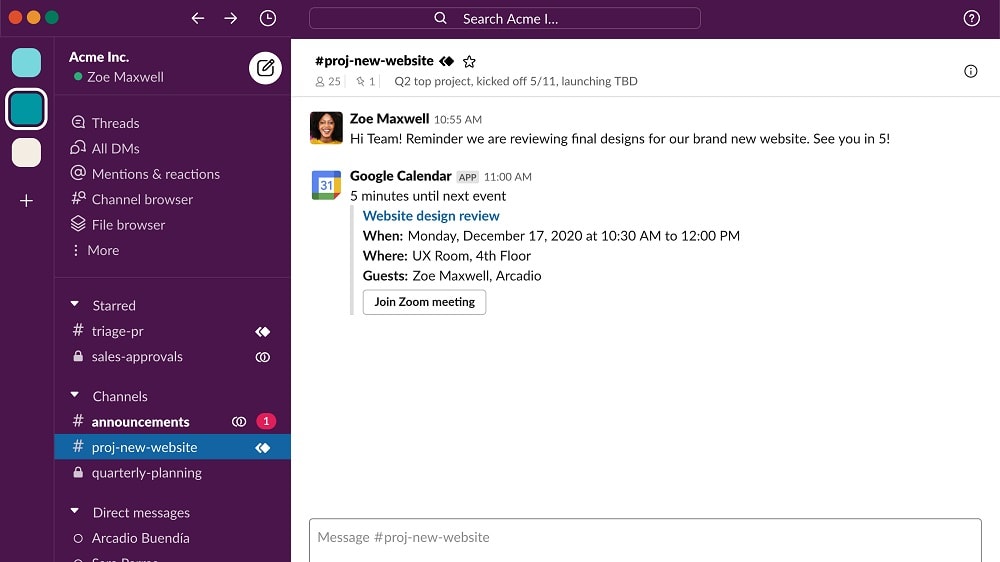
Slack's Channel feature establishes dedicated spaces for specific topics or teams, fostering organized communication and easy information retrieval.
Slack's Channel feature establishes dedicated spaces for specific topics or teams, fostering organized communication and easy information retrieval. For instance, teams can create channels for projects, departments, or specific discussions, ensuring that conversations remain focused and clutter-free. This structured approach enhances team alignment and reduces the likelihood of important information getting lost amidst unrelated discussions.
In contrast, while Monday.com promotes real-time collaboration, it lacks the emphasis on subject-specific spaces found in Slack's Channel feature. Slack's dedicated channels provide a superior organizational structure for communication compared to Monday.com, enhancing team productivity and coordination.
Slack's Seamless Usability Surpasses Monday.com

For instance, Slack's channel-based organization simplifies communication and project tracking, allowing users to find information easily.
When comparing the ease of use between Slack and Monday.com, Slack emerges as the frontrunner. Its intuitive interface, coupled with its sleek design, facilitates effortless navigation, enabling teams to adapt swiftly. For instance, Slack's channel-based organization simplifies communication and project tracking, allowing users to find information easily.
In contrast, Monday.com, while robust, may require a longer onboarding period due to its complexity. Slack's simplicity doesn't compromise functionality; it offers a myriad of features for team collaboration, such as integrations with apps like Google Drive and Trello, ensuring seamless workflow management from the outset.
Slack Surpasses Monday.com with Extensive Integration Potential
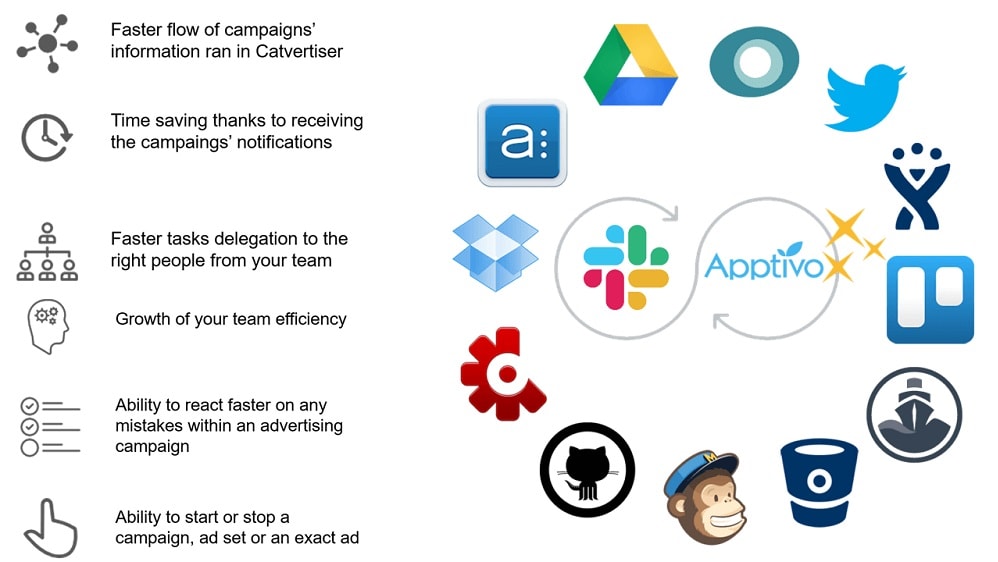
For instance, Slack seamlessly integrates with popular productivity tools
When evaluating integration capabilities, both Slack and Monday.com boast a wide array of possibilities. Yet, Slack shines with its remarkable versatility. For instance, Slack seamlessly integrates with popular productivity tools like Google Drive, allowing users to share files effortlessly within the platform. Additionally, its integration with project management tools such as Asana and Trello enhances workflow efficiency by centralizing task management.
While Monday.com also offers robust integration options, Slack's extensive compatibility with a diverse range of apps and services provides users with unparalleled flexibility, empowering teams to streamline communication and collaboration seamlessly across various platforms.
Slack Outperforms Monday.com in Private Messaging

Slack's direct messaging feature surpasses expectations by offering a secure platform for private, one-on-one communication or sensitive discussions.
Slack's direct messaging feature surpasses expectations by offering a secure platform for private, one-on-one communication or sensitive discussions. For instance, team members can engage in confidential conversations without cluttering public channels, ensuring that crucial information remains confidential and focused.
In contrast, while Monday.com provides centralized communication, it doesn't emphasize the significance of private messaging as effectively. Slack's dedicated space for private discussions enhances collaboration by enabling users to address sensitive matters discreetly, contributing to a more efficient and streamlined communication process within teams.
Monday.com's Dashboard Dominates Project Oversight

Monday.com emerges as the frontrunner in overseeing project progress with its customizable Dashboard.
Monday.com emerges as the frontrunner in overseeing project progress with its customizable Dashboard. This feature provides a coherent snapshot of project achievements and current statuses, offering users an immediate overview of their tasks and project milestones. For example, users can track progress, identify bottlenecks, and allocate resources efficiently within a single interface.
In contrast, while Slack excels in communication, it lacks the robust project monitoring capabilities offered by Monday.com's Dashboard. Monday.com's emphasis on visualizing project data enhances transparency and accountability, making it the preferred choice for comprehensive project oversight and management compared to Slack.
Monday.com Surpasses Slack in Workflow Customization

Monday.com establishes itself as a leader in managing and optimizing daily operations with its customizable workflows.
Monday.com establishes itself as a leader in managing and optimizing daily operations with its customizable workflows. For instance, teams can tailor workflows to fit their unique business processes, ensuring projects remain on track from inception to execution.
In contrast, while Slack excels in communication capabilities, it doesn't prioritize workflow management and operational organization to the same extent. Monday.com's emphasis on customizable workflows empowers teams to streamline processes, allocate resources efficiently, and maintain clarity throughout project lifecycles, highlighting its superiority in operational optimization compared to Slack.
Slack and Monday.com are Equally Robust at File Sharing

Slack enables users to share various types of content directly within conversations, providing a straightforward and efficient method of collaboration.
Both Slack and Monday.com offer robust file sharing features, facilitating seamless collaboration within teams. Slack enables users to share various types of content directly within conversations, providing a straightforward and efficient method of collaboration. For example, users can share documents, images, videos, and links effortlessly, enhancing communication and productivity.
Similarly, Monday.com allows files to be shared, stored, and collaborated upon within the platform. Additionally, it provides visualizations for all files shared, offering more context and visibility to the team, ensuring that important information is easily accessible and well-organized for efficient project management.
08 Slack vs Monday: Which is the best for your business?
Slack is the best tool for you if:
- Your team values instant communication and the ability to quickly share ideas, files, and feedback in a dynamic, real-time environment, enhancing collaboration and responsiveness among members.
- You're looking for a platform that integrates seamlessly with a wide range of third-party applications, allowing you to customize your workspace to fit your team's unique workflow and needs.
- The nature of your work requires flexible, informal communication channels that can be easily organized by topic, project, or team, making information retrieval straightforward and efficient.
- You prefer a communication-centric approach to collaboration, where building a strong team culture and ensuring everyone is connected and informed is as important as task management.
- Remote work is a significant component of your operation, necessitating a tool that supports virtual presence and fosters a sense of community and inclusion among distributed team members.
 Your team values instant communication and the ability to quickly share ideas, files, and feedback in a dynamic, real-time environment, enhancing collaboration and responsiveness among members.
Monday is the best tool for you if:
- You need a comprehensive project management solution with advanced features for task tracking, timelines, and workflow automation, offering a clear, visual overview of all project aspects.
- Customization and flexibility in project management are crucial for your team, requiring a platform that allows for the tailoring of workflows, boards, and integrations to fit specific project needs.
- Visual project planning and tracking are essential, and you value the ability to use Gantt charts, Kanban boards, and other visual tools to organize tasks and monitor progress.
- Your team's work involves complex projects with multiple phases and dependencies, necessitating a platform that can handle detailed planning, scheduling, and resource allocation.
- Collaboration and communication need to be structured around projects, with a focus on achieving clear, actionable objectives and milestones within a centralized project management environment.
Slack
Used by 4,043 members
25% off new plan purchases
Save up to $9,000
Monday
Used by 1,562 members
First month free
Save up to $80
09 Alternatives to Slack & Monday

Notion
Used by 21,475 members
3 months free on the Business plan with Unlimited AI
Save up to $720

Make
Used by 12,642 members
3 months free on the Teams plan (240k credits included)
Save up to $600

Google Workspace
Used by 10,616 members
20% off Standard plans for 1 year
Save up to $3,460

Airtable
Used by 8,898 members
$1,000 in credits on licences for 1 year
Save up to $1,000
10 Promotions on Collaboration software
Slack and Monday are great tools, but Secret offers promo codes with discounts on over 2250+ different SaaS solutions. New deals are added regularly, helping you save money on your online subscriptions. Get access to codes for other Collaboration software you might want to purchase
Google Workspace promo
20% off Standard plans for 1 year
Credits for Airtable
$1,000 in credits on licences for 1 year
Notion coupon code 2026
3 months free on the Business plan with Unlimited AI

Miro discount code
$1,000 in credits (lifetime validity)

Asana coupon code 2026
75% off the annual Starter and Advanced plans for 1 year

ClickUp promo code 2026
Additional 20% off Unlimited and Business plans for 1 year

bolt.new coupon
20% off all plans for the first 3 months

xTiles coupon code 2026
20% off monthly or annual plans

Discount for Google Drive
20% off Standard plans for 1 year

Zoom Meetings deal
$20 off per user on the annual Workplace Pro plan
Start saving on the best SaaS
Secret has already helped tens of thousands of startups save millions on the best SaaS like Microsoft Teams, Google Workspace & many more. Join Secret now to buy software the smart way.