


In an ideal business environment, communication and collaboration tools should seamlessly integrate into your workflows, enhancing productivity without adding complexity. This is particularly crucial when considering platforms like Slack and Microsoft Teams, which have become essential in today’s remote and hybrid work cultures.
In this comparison, we delve deep into Slack versus Microsoft Teams, two leading communication platforms in the market. We'll explore their distinct features, key differences, and how they approach integration with other tools and pricing. By examining aspects such as user interface, file sharing capabilities, video conferencing quality, and third-party integrations, this article aims to provide comprehensive insights. With this information, you'll be better positioned to choose the platform that aligns most effectively with your organization's communication needs and preferences.
- 01 Slack vs Microsoft Teams: overview
- 02 What's the difference between Slack and Microsoft Teams?
- 03 Slack pros and cons
- 04 Microsoft Teams pros and cons
- 05 Slack compared to Microsoft Teams
- 06 Microsoft Teams compared to Slack
- 07 Features comparison
- 08 Slack vs Microsoft Teams: Which is the best for your business?
- 09 Alternatives to Slack & Microsoft Teams
- 10 Promotions on Collaboration software
Start saving on the best SaaS
Secret has already helped tens of thousands of startups save millions on the best SaaS like Microsoft Teams, Google Workspace & many more. Join Secret now to buy software the smart way.

01 Slack vs Microsoft Teams: overview
Slack and Microsoft Teams are leading contenders in the world of team collaboration and communication platforms, each offering distinct features and advantages tailored to diverse organizational needs.
Slack is celebrated for its user-friendly interface and robust integration capabilities. It excels in providing a seamless experience for real-time messaging, file sharing, and collaboration with external parties. On the other hand, Microsoft Teams is part of the broader Microsoft 365 ecosystem, known for its comprehensive suite of productivity tools. Teams integrates deeply with Microsoft's suite, including Office applications, making it a go-to for businesses already entrenched in the Microsoft environment.
In this comparison of Slack vs. Microsoft Teams, we aim to provide detailed insights to help you choose the most suitable platform for your team's communication and collaboration needs, considering factors like user experience, integration capabilities, and the specific needs of your organization.

Pricing Plan
Both have free plans and robust paid subscriptions. But Teams is half the price of Slack, and has better features in the free plan.

Slack
Microsoft Teams
Ease of Use
Teams is slightly harder to set-up, but both tools have a a decent user interface, and they’re user-friendly once you learn to navigate them.
Slack
Microsoft Teams
Customer Reviews
Slack et Teams bénéficient des meilleures évaluations en ligne, avec environ 4,5 étoiles sur presque tous les agrégateurs.
Slack
Microsoft Teams
Messaging
Both Teams and Slack offer advanced messaging features, like a search engine and multimedia sharing. However, Slack’s messaging interface is slightly more customizable.
Slack
Microsoft Teams
Automation
Both the Slackbot and Microsoft’s add-on bots can automate menial tasks, and you can do even more with Zapier.
Slack
Microsoft Teams
Customer Support
Both tools have a robust knowledge base and prompt customer service over the web. But Teams also offers live phone support to paying clients.
Slack
Microsoft Teams
Video Calls
Slack has limited video calling features, while Teams offers an advanced video conferencing suite.
Slack
Microsoft Teams
Security
Both platforms are secure, and maintain ISO frameworks compliance. However, Teams is safer thanks to end-to-end encryption, and other advanced features.
Slack
Microsoft Teams
Data limits
Microsoft Teams has decent storage for messages, and better video calling limits. But Slack comes out on top because you get unlimited message history with all paid plans.
Slack
Microsoft Teams
Integrations
Teams is part of Microsoft 365, so it integrates well with Microsoft products like Drive or Outlook. But both have thousands of integrations, including with each other.
Slack
Microsoft Teams
02 What's the difference between Slack and Microsoft Teams?

Slack is better at messaging thanks to its unlimited archive on any paid plan, and its more customizable interface.
Slack
Enhance team communication and collaboration.

Teams is also safer, thanks to end-to-end encryption, as well as some other security and compliance features.
Microsoft Teams
Microsoft Teams brings value by providing a collaborative platform for teams to communicate, collaborate, and stay organized. It integrates various tools and features such as chat, video calls, file sharing, task management, and third-party app integrations, all in one place. Teams allows users to work together in real-time, improving productivity and streamlining workflows. Additionally, it offers a secure and reliable infrastructure, making it suitable for businesses of all sizes.
Teams and Slack have a lot of features that overlap. For example, both have robust messaging tools that features multimedia content, an advanced search engine, and an extensive archive of old messages. Both tools have some form of video calling, you can add guests to your workspaces in both, and they’re similarly priced.
A lot of organizations actually use them together - Slack for messaging, and Teams for video calling. They even have integrations with each other. And that’s the set-up we recommend too.
Slack is better at messaging thanks to its unlimited archive on any paid plan, and its more customizable interface. However, it doesn’t have any useful group calling features on the free plan, and it’s lacking even on paid plans.
Microsoft Teams does have some benefits over Slack in terms of messaging too. For example, you can create sub-channels in Teams, and you get support for 8 extra languages. But its biggest perk is video conferencing, which is much more advanced. Even in the free plan, you can host group calls for up to 60 minutes, and one-on-one meetings for up to 30 hours.
Teams is also safer, thanks to end-to-end encryption, as well as some other security and compliance features. And it’s also slightly cheaper. Its lowest tier will only cost you $4/month/user, while Slack’s cheapest plan is $7.25/month/user.
If you have to pick one or the other, we recommend Microsoft Teams. But you can use both at the same time, and they even integrate well with each other.

Slack
Enhance team communication and collaboration.
25% off new plan purchases
Save up to $9,000
03 Slack pros and cons
What are the advantages of Slack?
- Efficient communication: Slack offers real-time messaging, which enhances team communication and collaboration. The ability to create channels for different topics or projects keeps conversations organized.

- Integration with other tools: It integrates with a multitude of other applications and services, such as Google Drive, Trello, and GitHub, allowing teams to centralize their work processes in one platform.
- User-friendly interface: Slack is known for its intuitive and easy-to-navigate interface, making it accessible for users of all technical skill levels.
- Customizable notifications: Users can customize notifications based on channels, keywords, or direct messages, helping them stay focused on relevant conversations and reducing information overload.
- File sharing and search functionality: Slack enables easy file sharing and has a powerful search feature that allows users to quickly find past messages, files, and conversations.
What are the disadvantages of Slack?
- Can be distracting: The constant flow of messages and notifications can be overwhelming and distracting, potentially interrupting workflow and reducing productivity.

- Limited free version: The free version of Slack has limitations, such as a cap on searchable message history and restricted access to some features, which might necessitate an upgrade to paid plans for full functionality.
- Privacy concerns: In a shared workspace, sensitive information can potentially be exposed to unintended recipients, raising concerns about data privacy and security.
- Learning curve for new users: While Slack is user-friendly, new users might find it challenging to understand all its features and best practices for effective usage, such as managing channels and notifications.
- Dependence on internet connectivity: Being an online platform, Slack requires a stable internet connection. Any connectivity issues can disrupt communication and hinder workflow.
Compare Slack to other tools


Slack vs Monday


Slack vs Google Workspace

Slack vs WhatsApp

Asana vs Slack

Lark vs Slack

ClickUp vs Slack
04 Microsoft Teams pros and cons
What are the advantages of Microsoft Teams?
- Integration with Microsoft 365 suite: Teams is seamlessly integrated with the Microsoft 365 suite, including Office applications like Word, Excel, and PowerPoint, which is highly beneficial for businesses already using these tools.
- Comprehensive communication features: It offers a wide range of communication options, including chat, video calls, and meetings, with robust features like meeting recording, screen sharing, and background blur.
- Team collaboration spaces: Teams allows for creating dedicated spaces for different projects or departments, making it easier to organize and access relevant documents, conversations, and meetings all in one place.
- High security and compliance standards: Being a part of the Microsoft ecosystem, Teams adheres to high security and compliance standards, making it a reliable choice for businesses concerned about data security.
- Customizable and scalable: Teams is highly customizable with various third-party app integrations, and it’s scalable, catering to the needs of both small businesses and large enterprises.
What are the disadvantages of Microsoft Teams?
- Can be overwhelming for new users: The wide array of features and integrations can be overwhelming for new users, leading to a steeper learning curve compared to simpler platforms.
- Dependence on Microsoft ecosystem: For those not already using the Microsoft 365 suite, the heavy integration can be a downside, as it encourages or sometimes necessitates the use of other Microsoft products.
- Performance issues with large teams: Some users have reported performance issues, such as slow loading times and lag, especially when dealing with large teams or multiple integrations.
- Complex pricing structure: Microsoft Teams' pricing can be complex, often bundled with other Microsoft 365 services, making it difficult for users to understand the standalone cost or value of Teams.
- Limited customization in free version: The free version of Teams has limitations in terms of meeting duration, file storage, and access to certain advanced features, pushing businesses towards a paid subscription for full functionality.
Compare Microsoft Teams to other tools

Microsoft Teams vs Google Workspace

Zoom Meetings vs Microsoft Teams
05 Slack compared to Microsoft Teams
Slack and Microsoft Teams are popular communication and collaboration platforms, each with its own strengths. Slack is known for its user-friendly interface, extensive integration options, and robust chat capabilities. It's ideal for smaller teams and startups looking for simplicity and flexibility.
On the other hand, Microsoft Teams offers a comprehensive suite of productivity tools, tightly integrated with Microsoft 365. It excels in larger organizations where seamless document sharing, video conferencing, and calendar management are crucial. Teams also benefits from Microsoft's security infrastructure, making it a top choice for enterprises.
Is Slack better than Microsoft Teams?
 Is Slack better than Microsoft Teams?
Whether Slack is better than Teams depends on your specific needs. Slack is favored for its intuitive interface, extensive third-party integrations, and chat-centric approach, making it ideal for smaller teams and startups seeking flexibility.
On the other hand, Teams boasts a comprehensive suite of Microsoft 365 tools, making it a powerful choice for larger organizations heavily invested in the Microsoft ecosystem. Teams excels in document sharing, video conferencing, and calendar management, with strong security features. Ultimately, the choice should align with your organization's size, preferences, and existing software infrastructure. Both platforms have strengths, so consider your requirements carefully.
What is Slack best used for?
Slack is best used for fostering efficient communication and collaboration within teams. It excels in real-time messaging, allowing instant communication through channels and direct messages. Teams can share files, links, and integrate with numerous third-party apps, streamlining workflows and enhancing productivity.
Slack's threaded conversations help maintain organized discussions, and its searchable message history simplifies information retrieval. It's particularly valuable for remote or distributed teams, as it bridges geographical gaps and facilitates quick decision-making. Overall, Slack is a versatile tool that enhances teamwork, whether for small businesses, startups, or large enterprises, by centralizing conversations and simplifying information sharing.
Can Slack replace Microsoft Teams?
Whether Slack can replace Teams depends on an organization's specific needs and existing infrastructure. Slack excels in streamlined communication, third-party app integrations, and is user-friendly for smaller teams and startups. However, Teams is deeply integrated with Microsoft 365, offering a comprehensive suite of tools for larger enterprises, including document sharing, video conferencing, and calendar management, with robust security features.
To replace Teams with Slack, consider factors like your organization's size, software ecosystem, and the features essential for your workflow. Transitioning may require adjustments and evaluating if Slack can provide equivalent functionality. Ultimately, it's possible to replace Teams with Slack, but careful planning and consideration are necessary to ensure a smooth transition.
Is Slack cheaper than Microsoft Teams?
The cost comparison between Slack and Teams varies depending on an organization's specific requirements. Slack’s pricing structure offers a free basic version and paid plans with varying features. It can be cost-effective for smaller teams or businesses with basic needs. In contrast, Teams is often included in Microsoft 365 subscriptions, making it a cost-efficient choice for organizations already using Microsoft's suite of productivity tools.
However, as organizations grow and require additional features, the cost dynamics can change. Teams' pricing can increase with the addition of advanced features, while Slack's pricing may remain competitive with its feature-rich paid plans.
Is there a better Collaboration software than Slack?
The search for software better than Slack hinges on your distinct requirements and preferences.
Although renowned for its real-time messaging and collaboration features, there are alternatives to Slack worth considering. Microsoft Teams, for instance, offers comprehensive integration with Microsoft 365 and robust security features. Discord is popular among gaming and niche communities for its voice and text chat capabilities. Mattermost and Rocket.Chat are self-hosted options providing more control over data.
To identify the superior software, evaluate your organization's size, communication needs, and any existing software ecosystem. Weigh factors like ease of use, scalability, and cost-effectiveness to determine the best fit for your specific situation.
Slack
Enhance team communication and collaboration.
25% off new plan purchases
Save up to $9,000
06 Microsoft Teams compared to Slack
Teams and Slack are prominent collaboration platforms, each with unique strengths. Microsoft Teams integrates seamlessly with Microsoft 365, offering a comprehensive suite of productivity tools, including document sharing, video conferencing, and calendar management. It's well-suited for larger enterprises heavily invested in the Microsoft ecosystem.
Slack, on the other hand, is lauded for its user-friendly interface and extensive third-party app integrations, making it ideal for smaller teams and startups seeking flexibility and customization. Both platforms excel in fostering communication, but the choice between Teams and Slack ultimately hinges on factors like organization size, software preferences, and existing infrastructure.
Is Microsoft Teams better than Slack?
Determining whether Teams is better than Slack depends on an organization's specific needs and priorities. Teams offers robust integration with Microsoft 365, making it a powerful choice for enterprises already utilizing Microsoft's productivity tools. It excels in document sharing, video conferencing, and calendar management, with strong security features.
In contrast, Slack is known for its user-friendly interface, extensive third-party app integrations, and chat-centric approach, making it ideal for smaller teams and startups seeking flexibility. The choice between Teams and Slack should align with an organization's size, existing software ecosystem, and the features critical to its workflow, with careful consideration of each platform's strengths and limitations.
What is Microsoft Teams best used for?
Teams is best used as a comprehensive collaboration and communication hub, particularly in larger organizations. It excels in facilitating teamwork through features like document sharing, video conferencing, and calendar management, all tightly integrated with Microsoft 365. Teams is ideal for businesses looking to centralize their workflow, foster real-time collaboration, and streamline productivity.
It also offers a secure environment with extensive admin controls and compliance capabilities, making it a suitable choice for enterprises with strict data security and regulatory requirements. In essence, Teams enhances organizational efficiency by providing a unified platform for seamless communication and collaboration among teams, making it indispensable for businesses of scale.
Can Microsoft Teams replace Slack?
Replacing Slack with Teams is feasible but depends on an organization's specific needs and existing infrastructure. Microsoft Teams offers a comprehensive suite of tools, well-suited for larger enterprises heavily invested in Microsoft 365. It excels in document sharing, video conferencing, and calendar management, with robust security features.
However, Slack is renowned for its user-friendly interface and extensive third-party app integrations, making it ideal for smaller teams and startups seeking flexibility. To make the switch, evaluate your organization's size, software preferences, and required features, ensuring a smooth transition that aligns with your communication and collaboration needs.
Is Microsoft Teams cheaper than Slack?
Determining whether Teams is cheaper than Slack depends on your organization's specific circumstances. Teams is often included in Microsoft 365 subscriptions, making it cost-effective for organizations already using Microsoft's suite of productivity tools. However, the cost may increase with additional features.
In contrast, Slack offers a free basic version and paid plans with varying features, making it cost-efficient for smaller teams or businesses with basic needs. As organizations grow and require more advanced functionality, the cost dynamics can change. Ultimately, the cost comparison should be based on your organization's size, needs, and budget constraints to determine which platform offers better value.
Is there a better Video Conferencing software than Microsoft Teams?
Determining if there's a "better" software than Teams depends on your specific goals and requirements. Microsoft Teams is a robust collaboration platform known for its integration with Microsoft 365, making it an ideal choice for organizations already invested in Microsoft's ecosystem.
However, alternatives to Teams like Slack, Zoom, and Discord offer unique strengths. Slack excels in real-time messaging and third-party app integrations. Zoom is a leader in video conferencing. Discord is popular among gaming and niche communities for its chat features. The choice of the "better" software depends on factors like your organization's size, communication needs, and existing software ecosystem, so it's essential to select the tool that best aligns with your specific business objectives.
07 Features comparison
Slack Surpasses Teams in User-Friendly Experience

Slack's interface is not only user-friendly but also intuitive, catering effortlessly to both novices and those who are more technologically adept.
When discussing user-friendliness in team collaboration tools, Slack undeniably excels, particularly when compared to Microsoft Teams. Slack's interface is not only user-friendly but also intuitive, catering effortlessly to both novices and those who are more technologically adept. This approachability is evident in its streamlined design, which prioritizes ease of use. For instance, Slack's straightforward layout makes it simple for new users to navigate through various features like channels and direct messaging. Teams transitioning to Slack find the experience seamless, as the platform excels in simplifying daily tasks like message organization and file sharing.
On the other hand, Microsoft Teams, while robust and feature-rich, presents a somewhat more complex landscape for users, especially those unfamiliar with the Microsoft Office 365 Suite. Its deep integration with Microsoft's suite of tools, though beneficial in many aspects, introduces a learning curve that might initially hinder a team's productivity. New users might find themselves spending extra time understanding the intricacies of Teams' functionalities, such as navigating through various applications and understanding the integration points, which can delay the smooth adoption and full utilization of the platform.
Slack Leads with Superior Channel-Based Communication System Over Teams
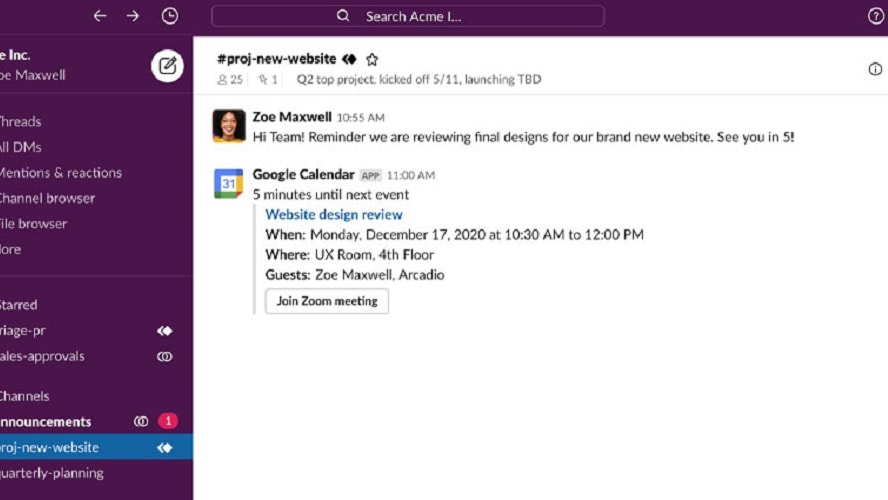
Slack's innovative system organizes communication into channels, each tailored for a specific purpose, be it a project, topic, or team.
In the realm of team communication tools, both Slack and Microsoft Teams provide robust messaging capabilities, yet Slack distinguishes itself with its superior channel-based organization. Slack's innovative system organizes communication into channels, each tailored for a specific purpose, be it a project, topic, or team. This structure is particularly effective in maintaining clarity and focus within conversations. For example, a marketing team could have separate channels for social media strategies, content creation, and campaign analytics, ensuring that discussions remain on-topic and easily retrievable.
Conversely, while Microsoft Teams also supports real-time chat and messaging, its structure sometimes falls short in terms of conversation organization. Users may find it more challenging to navigate and track individual conversations in Teams, as they might get intermingled within the same chat space without clear segmentation. This could lead to important messages being overlooked or lost in the volume of general chat, a situation less likely in Slack due to its distinct channel divisions.
Slack and Teams Equally Efficient in File Sharing and Collaboration Capabilities

Users can quickly share a Google Doc and collaborate on it live within the app
In the sphere of modern workplace tools, both Slack and Microsoft Teams stand out for their excellence in file sharing and collaboration. These platforms enable users to effortlessly share a wide array of content types, including files, documents, images, and more, directly within conversations. This feature fosters a centralized hub for all shared resources, streamlining access and reference.
Furthermore, both Slack and Teams shine in supporting real-time collaboration on documents. For example, in Slack, users can quickly share a Google Doc and collaborate on it live within the app, while Teams integrates seamlessly with Microsoft Office files like Word, Excel, and PowerPoint, allowing multiple users to work on the same document simultaneously. This real-time collaboration significantly boosts teamwork and productivity by enabling immediate feedback and edits.
Teams Outperforms Slack in Advanced Video Conferencing Capabilities

Teams excels with its high-quality video conferencing features, which include not only screen sharing and participant management but also advanced functionalities like background blur and custom backgrounds.
In the landscape of workplace communication tools, the superiority of Microsoft Teams in video conferencing is evident when compared to Slack. Teams excels with its high-quality video conferencing features, which include not only screen sharing and participant management but also advanced functionalities like background blur and custom backgrounds. These features enhance the professionalism and focus of virtual meetings.
In contrast, while Slack does provide video and voice calling capabilities, these are more basic in comparison. Slack's video conferencing features are sufficient for smaller, quick meetings but lack the depth and breadth of functionalities offered by Teams. Features like large webinar support, advanced meeting controls, and in-depth participant management are areas where Slack falls short.
Teams' Superior Meeting Recording Feature vs. Slack's Efficient Search Functionality

Teams enables users to record their virtual meetings and store them for future reference.
In the comparison of Slack and Microsoft Teams, each platform demonstrates distinct strengths in their respective features. Slack's search functionality is notably efficient, offering users the ability to easily locate past messages and files even in extensive archives. This feature is particularly useful in managing large volumes of communication, allowing users to quickly find specific conversations, files, or shared content. For instance, a user can effortlessly retrieve an important decision or document shared months ago, simply by using keywords or filter options.
On the other hand, Microsoft Teams stands out with its exceptional meeting recording capability. Teams enables users to record their virtual meetings and store them for future reference. This functionality is invaluable for various purposes like training, where recorded sessions can be used for onboarding new employees, or for documentation, where meeting records serve as a reference for decisions made and actions to be taken. Additionally, for review purposes, team members who missed a meeting can catch up with the recorded session, ensuring everyone stays on the same page.
Teams' Emphasis on Security Versus Slack's Advanced Notification Customization
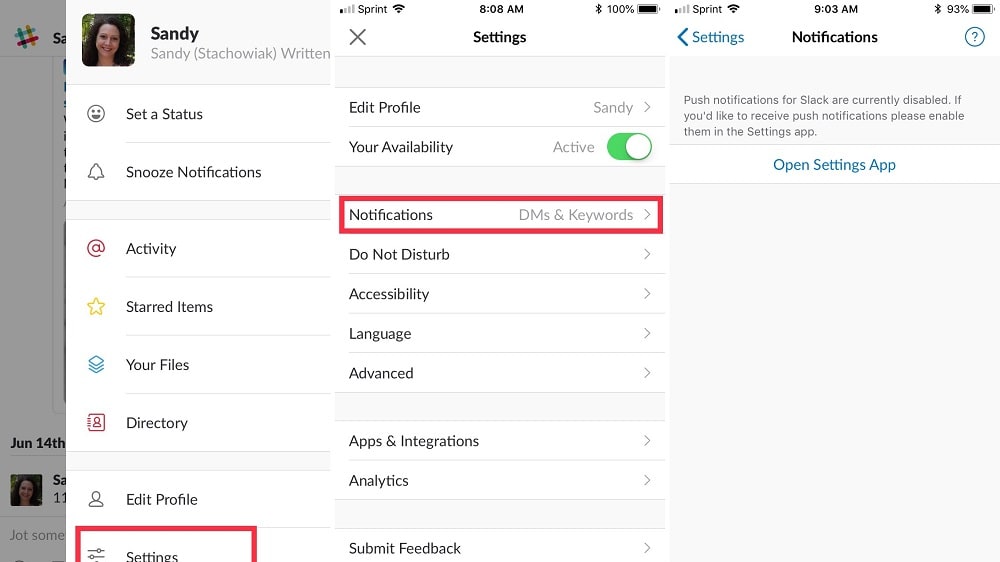
Slack excels in its customizable notification system, which significantly enhances user experience.
When contrasting the features of Microsoft Teams and Slack, each platform shines in different areas. Teams is particularly strong in its security measures, offering robust features like data encryption and multi-factor authentication. These security protocols are crucial for businesses handling sensitive information, ensuring that all communications and data within the platform are protected from unauthorized access. For instance, Teams' data encryption safeguards both in-transit and at-rest data, providing a secure environment for confidential business discussions and file exchanges.
On the other hand, Slack excels in its customizable notification system, which significantly enhances user experience. Slack users can fine-tune their notifications, choosing to receive alerts for specific keywords, mentions, or channels. This level of customization is extremely beneficial in a fast-paced work environment, where receiving numerous irrelevant notifications can be distracting. For example, a team member can set notifications only for mentions of their name or for updates in critical project channels, ensuring they stay focused on important messages without being overwhelmed by less relevant alerts.
Slack Outshines Teams in Extensive Integration Capabilities

Slack is renowned for its extensive support of over 2,600 apps, encompassing a diverse array of categories
When evaluating the integration capabilities of Slack and Microsoft Teams, both platforms demonstrate strong performance, yet Slack edges ahead with its broader range of integrations. Slack is renowned for its extensive support of over 2,600 apps, encompassing a diverse array of categories such as project management tools like Trello and Asana, version control systems like GitHub, and customer support platforms like Zendesk. This wide-ranging compatibility empowers businesses to construct a highly integrated and customized workspace, perfectly tailored to their specific operational requirements.
Conversely, Microsoft Teams excels in its native integration with the Microsoft Office 365 suite, offering unparalleled synergy with tools like Microsoft Word, Excel, PowerPoint, and OneDrive. This makes Teams an ideal choice for organizations that are deeply embedded in the Microsoft ecosystem, as it ensures a seamless and cohesive working environment. However, when it comes to the variety of third-party app integrations, Teams is somewhat limited compared to Slack. This limitation might be a deciding factor for businesses that rely on a wide array of tools and services outside the Microsoft landscape.
08 Slack vs Microsoft Teams: Which is the best for your business?
Slack is the best tool for you if:
- You value real-time communication and collaboration with team members across various locations and time zones.
- You're looking for an intuitive platform that integrates seamlessly with numerous third-party applications and services.
- You prefer an organized workspace where you can easily manage projects, share files, and track team progress.
- You need a customizable and secure environment for sensitive business communications and data sharing.
- You appreciate having a user-friendly interface with features like direct messaging, channels, and searchable history for efficient teamwork.
 You value real-time communication and collaboration with team members across various locations and time zones.
Microsoft Teams is the best tool for you if:
- You require a comprehensive collaboration tool that integrates well with Microsoft Office applications and other Microsoft ecosystem products.
- You value high-quality video conferencing features, including large meetings, webinars, and robust live event capabilities.
- You're seeking a secure, enterprise-level collaboration platform with advanced security and compliance features built-in.
- You prefer a unified communication solution that offers chat, calls, meetings, and file sharing in one platform.
- You need an accessible and user-friendly tool with features like screen sharing, document collaboration, and team channels.
Slack
Enhance team communication and collaboration.
25% off new plan purchases
Save up to $9,000
09 Alternatives to Slack & Microsoft Teams

Notion
Used by 21,743 members
3 months free on the Business plan with Unlimited AI
Save up to $720

Make
Used by 12,677 members
3 months free on the Teams plan (240k credits included)
Save up to $600

Google Workspace
Used by 10,657 members
20% off Standard plans for 1 year
Save up to $3,460

Airtable
Used by 8,926 members
$1,000 in credits on licences for 1 year
Save up to $1,000
10 Promotions on Collaboration and Video Conferencing software
Slack and Microsoft Teams are great tools, but Secret offers promo codes with discounts on over 2250+ different SaaS solutions. New deals are added regularly, helping you save money on your online subscriptions. Get access to codes for other Collaboration and Video Conferencing software you might want to purchase
Google Workspace offer
20% off Standard plans for 1 year

Zoom Video Webinars promo code
$20 off per user on the annual Workplace Pro plan
Airtable promo code 2026
$1,000 in credits on licences for 1 year

Promo code Livestorm
Forever Free Plan with 25 live attendees per event
Deal for Notion
3 months free on the Business plan with Unlimited AI

Deal for ZoomInfo
14 days free

Promo code for Miro
$1,000 in credits (lifetime validity)

Google Meet discounts
20% off Standard plans for 1 year

Promo code for Monday
First month free

Flutin deal
50% off for the first year
Start saving on the best SaaS
Secret has already helped tens of thousands of startups save millions on the best SaaS like Microsoft Teams, Google Workspace & many more. Join Secret now to buy software the smart way.