


In your search for a task and project management tool, chances are you’ve come across both Asana and Trello. Founded in 2011, Trello is now owned by Atlassian, while Asana was started in 2008. Today, these two tools are popular with businesses looking to enhance their task and project management. But how do you know which tool best aligns with your business needs?
In this article, we look closely at the platforms, including their features, key differences, and pricing strategies. By the end, you’ll be equipped with the necessary insights to make an informed decision for your business between Asana vs Trello.
- 01 Asana vs Trello: overview
- 02 What's the difference between Asana and Trello?
- 03 Asana pros and cons
- 04 Trello pros and cons
- 05 Asana compared to Trello
- 06 Trello compared to Asana
- 07 Features comparison
- 08 Asana vs Trello: Which is the best for your business?
- 09 Alternatives to Asana & Trello
- 10 Promotions on Collaboration software
Start saving on the best SaaS
Secret has already helped tens of thousands of startups save millions on the best SaaS like Microsoft Teams, Google Workspace & many more. Join Secret now to buy software the smart way.

01 Asana vs Trello: overview
Asana and Trello are two prominent players in the field of project management and task tracking tools, each catering to distinct preferences and requirements.
Asana is renowned for its robust project management capabilities and task automation features. It offers a comprehensive platform for organizing tasks, setting priorities, and collaborating with teams. Asana excels at handling complex projects and providing in-depth project tracking and reporting, making it a suitable choice for businesses seeking a detailed approach to project management. On the other hand, Trello is celebrated for its user-friendly and visual approach to task management. Its intuitive Kanban board system simplifies task organization and encourages a more agile and flexible workflow, making it particularly appealing to teams and individuals who prefer a more straightforward and visually-oriented task management approach.
Now, let's dive into the Asana vs. Trello comparison to help you make an informed decision when it comes to selecting the right project management and task tracking tool for your specific needs.

Customer Reviews
Both platforms receive many positive reviews, scoring 4.5 on Capterra from 12,000+ (Asana) and 23,000+ (Trello) reviews.

Asana
Trello
Pricing Plan
Asana and Trello offer free versions. Asana’s paid plans cost between $10.99 and $24.99/user/month, while Trello’s cost between $5 and $17.50/month/user.
Asana
Trello
Customer Support
Asana offers support via chatbot and help tickets. Trello offers increasing support with its plans, culminating in phone support on its Enterprise plan.
Asana
Trello
Ease of Use
Both platforms are simple and intuitive to use, with user-friendly interfaces. Given its range of features, some Asana users experience a slight learning curve.
Asana
Trello
Task management
Both tools offer extensive task management features, including task automation, assignment, and tracking.
Asana
Trello
Collaboration
Both offer built-in task collaboration tools. Trello’s range of integrations supports collaboration, e.g., making video calls directly from a board.
Asana
Trello
Permissions and user controls
Asana’s user-based permissions control access to specific teams, projects, or tasks. Trello also allows users to set user-based permissions and make boards public or private.
Asana
Trello
Templates
Asana has an extensive range of templates for various use cases and lets users create custom templates. Trello also offers a large template library.
Asana
Trello
Reporting and analytics
Asana has broad reporting capabilities, with advanced reporting available with its Advanced plan and higher. Trello offers basic project insights with add-ons required for more in-depth analytics.
Asana
Trello
Integrations
Asana gives users access to 200+ integrations like Salesforce, Jira, and Zoom. Trello offers 191+ integrations, including Google Drive, Adobe, and Slack.
Asana
Trello
02 What's the difference between Asana and Trello?

Asana’s features emphasize task management, allowing users to detail, assign, and track tasks and sub-tasks.
Asana
Project management platform
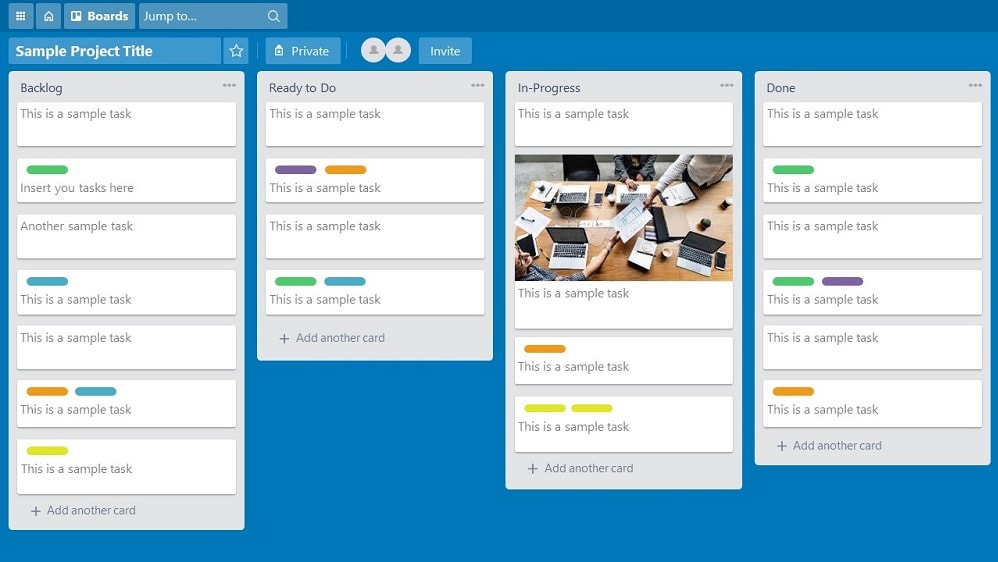
Trello focuses on supporting visual project management, primarily through a Kanban-style setup.
Trello
Trello brings value by providing a visual organization and collaboration tool for individuals and teams, helping to streamline workflows, improve productivity, and increase transparency across projects.
Asana and Trello are popular task and project management solutions for individuals and enterprises across a range of industries. While both platforms offer various templates, user permissions controls, and integrations to help users streamline project management, there are differences in their approaches. Asana’s features emphasize task management, allowing users to detail, assign, and track tasks and sub-tasks. For efficient project management, you can automate tasks and create visual workflows, with a range of visualization options available, including Kanban-style, Gantt charts, timelines, and calendars. Asana’s broad range of features, like complex workflows and advanced automation, makes it ideal for managing larger or multiple projects. While Trello offers third-party integrations for task dependencies, Asana has built-in functionality.
On the other hand, Trello focuses on supporting visual project management, primarily through a Kanban-style setup. Users can move cards into different columns as tasks progress, creating a dynamic and visual representation of projects. Other views are available with Trello’s higher plans. Users can add descriptions, attachments, checklists, comments, and automation to tasks. While Trello’s functionality may be considered more simplistic compared to Asana’s, it still offers flexibility. For example, Trello allows multiple assignees for a task, which isn’t possible with Asana. Trello’s simplicity positions it as a user-friendly solution, especially for individuals and smaller teams.
Another key difference between the platforms is their free plans. Trello offers a generous free plan for unlimited users. While limited to 10 boards per workspace, users benefit from unlimited cards (for tasks) and file storage. Trello’s built-in automation features are also accessible on its free plan. Similarly, Asana’s free plan offers unlimited tasks, projects, and file storage. Plus, users have full access to integrations. However, Asana’s free plan is limited to 10 users and workflow automation isn’t included.

Asana
Used by 881 members
75% off the annual Starter and Advanced plans for 1 year
Save up to $22,491

Trello
Used by 741 members
Free forever for up to 10 users
Save up to $600
03 Asana pros and cons
What are the advantages of Asana?
- Powerful task management: Asana offers robust task management features, allowing you to create, assign, and track tasks with ease. You can set due dates, priorities, dependencies, and recurring tasks, ensuring comprehensive control over your projects.

- Collaboration and communication: Asana facilitates team collaboration by enabling users to comment on tasks, attach files, and have discussions within tasks. This promotes transparent communication and keeps all project-related information in one place.
- Project visualization: Asana provides various views, including lists, boards, timelines, and calendars, allowing you to choose the visualization that suits your project best. This flexibility ensures that teams can work in the way that suits them most.
- Automation and integration: Asana offers automation features through its "Rules" function, which allows you to automate repetitive tasks and workflows. Additionally, it integrates seamlessly with a wide range of third-party tools and applications to streamline your workflow.
- Customization and reporting: Asana allows you to customize your workspace with custom fields, tags, and templates, making it adaptable to various project types. It also offers reporting and analytics features to track project progress and identify bottlenecks.
What are the disadvantages of Asana?
- Learning curve: Asana's extensive feature set can be overwhelming for new users, resulting in a steeper learning curve. It may take some time for teams to fully grasp and utilize its capabilities.

- Pricing: While Asana offers a free basic plan, its more advanced features and functionalities are available in paid plans. This can be costly for smaller businesses or startups with tight budgets.
- Overwhelming notifications: Asana can generate numerous notifications, especially in larger projects with many team members. Managing notifications and email overload can be challenging.
- Limited offline access: Asana's offline functionality is somewhat limited, which may be a drawback for users who need to work on tasks without a consistent internet connection.
- Complexity for simple projects: For very simple projects or personal to-do lists, Asana's extensive features may be seen as overkill, and a simpler task management tool might be more appropriate.
Compare Asana to other tools


Asana vs Monday

Asana vs ClickUp

Notion vs Asana

Airtable vs Asana

Asana vs Process Street

Asana vs Todoist
04 Trello pros and cons
What are the advantages of Trello?
- Simplicity and user-friendly interface: Trello is known for its straightforward and visually intuitive Kanban board system. It's easy for users to grasp quickly, making it a great choice for teams and individuals who prefer a simple, no-frills approach to task management.
- Flexibility and adaptability: Trello's flexibility allows users to customize boards, lists, and cards to fit their unique workflow. This adaptability makes it suitable for a wide range of project types and industries.
- Collaboration: Trello facilitates collaboration through features like card comments, attachments, and team member assignments. It's easy for team members to communicate and share information within the context of specific tasks.
- Integration: Trello integrates seamlessly with numerous third-party apps and services, allowing users to extend its functionality and connect it to other tools they already use.
- Free and affordable plans: Trello offers a free plan with many useful features, making it accessible to individuals and small teams. Paid plans are available for those who need more advanced capabilities, but the free version can still be quite powerful.
What are the disadvantages of Trello?
- Limited complexity: While Trello's simplicity is a strength for many users, it can be a limitation for those who require advanced project management features. It may not be suitable for handling complex projects with intricate dependencies and automation needs.
- Lack of in-depth reporting: Trello's reporting and analytics capabilities are relatively basic compared to some other project management tools. Users seeking comprehensive project analytics may find Trello's options limited.
- No built-in time tracking: Trello lacks built-in time tracking features. Users who need to track the time spent on tasks may need to rely on third-party integrations or additional tools.
- Card overload: In large and complex projects, Trello boards can become cluttered with numerous cards, which may make it challenging to navigate and manage tasks effectively.
- Limited task hierarchy: Trello offers a relatively flat task hierarchy, with boards, lists, and cards. Users who require more levels of hierarchy or sub-tasks may find this structure limiting.
Compare Trello to other tools

Trello vs Monday
Trello vs Todoist

Flow vs Trello

Pipedrive vs Trello
Notion vs Trello
ClickUp vs Trello
05 Asana compared to Trello
Asana and Trello are popular project management tools, each with distinct strengths. Asana offers robust task management, automation, and in-depth project tracking, making it ideal for complex projects and teams seeking comprehensive control.
Trello, on the other hand, is known for its user-friendly Kanban board system, fostering a visual and agile approach to task management. Its simplicity and adaptability make it a go-to choice for individuals and smaller teams. When choosing between them, consider your project's complexity; Asana for detailed control and Trello for a straightforward, visually-oriented workflow. Both tools excel in their respective niches, catering to diverse project management needs.
Is Asana better than Trello?
 Is Asana better than Trello?
Whether Asana is better than Trello depends on your specific needs. Asana offers robust project management features, automation, and advanced task tracking, making it suitable for complex projects and larger teams. It excels in providing comprehensive control and reporting. In contrast, Trello's strength lies in its simplicity, user-friendly Kanban system, and adaptability for various project types. It's an excellent choice for smaller teams or individuals seeking a straightforward, visual approach.
The choice between Asana and Trello hinges on project complexity; Asana for detailed control and Trello for a simpler, visually-oriented workflow. Both tools cater to different project management preferences.
What is Asana best used for?
Asana is best used for managing and coordinating complex projects and tasks. Its robust project management features, automation, and task tracking capabilities make it ideal for businesses and teams that require comprehensive control and organization. Asana excels in handling large and intricate projects, allowing users to set priorities, dependencies, and deadlines while providing detailed reporting and analytics.
It's particularly suited for teams that need to collaborate closely, share project-related information, and ensure transparent communication. Asana's flexibility also makes it adaptable for various industries, from software development to marketing, where detailed project tracking and management are essential for success.
Can Asana replace Trello?
Asana can replace Trello for many users. Asana offers robust project management features, task tracking, automation, and detailed reporting, making it a suitable choice for those seeking a comprehensive project management tool. Its flexibility allows for the adoption of a Kanban-style board similar to Trello's if desired.
However, the transition may require adjustment, as Asana's feature set is more extensive, potentially offering more capabilities than some users need. Assess your specific project requirements; if you require advanced project management features and reporting, switching from Trello to Asana can be a seamless transition, but it may entail a learning curve for some.
Is Asana cheaper than Trello?
Asana and Trello offer various pricing plans, and whether one is cheaper than the other depends on your specific needs and team size. Both tools have free plans with basic features, making them accessible to individuals and small teams. However, when it comes to premium plans,
Trello's pricing tends to be more straightforward and affordable for smaller teams, whereas Asana's pricing can become costlier as team size and feature requirements increase. Therefore, for smaller teams or those with simpler needs, Trello may appear cheaper, but for larger organizations needing advanced features, the pricing comparison can vary.
Is there a better Collaboration software than Asana?
Whether there's a "better" software than Asana depends on your specific project management needs and preferences. Asana offers a comprehensive set of features, including advanced task management, automation, and reporting capabilities.
However, alternatives to Asana like Trello, Monday.com, and Wrike may better suit certain teams or individuals. Trello excels in simplicity and visual task management. Monday.com provides customizable workflows and integrations. Wrike emphasizes versatility and collaboration. The choice of the "better" software hinges on your unique project requirements, team size, and preferred workflow.

Asana
Premium
Project management platform
75% off the annual Starter and Advanced plans for 1 year
Save up to $22,491
06 Trello compared to Asana
Trello and Asana are popular project management tools, each offering distinct advantages. Trello is known for its user-friendly Kanban board system, promoting visual task management and agility. It's a great choice for individuals and smaller teams seeking simplicity and flexibility.
In contrast, Asana provides robust project management features, automation, and in-depth task tracking, making it ideal for complex projects and larger teams requiring comprehensive control and reporting. The choice between Trello and Asana largely depends on your project's complexity and your team's preferences; Trello for a simpler, visually-oriented workflow, and Asana for more comprehensive project tracking and management capabilities.
Is Trello better than Asana?
Determining whether Trello is better than Asana depends on your specific project management needs. Trello is favored for its straightforward Kanban board system, which simplifies task management and fosters a visual, agile workflow. It's an excellent choice for smaller teams or individuals who prefer simplicity and flexibility.
Conversely, Asana stands out for its comprehensive project management features, automation, and detailed task tracking capabilities, making it ideal for complex projects and teams requiring in-depth control and reporting. Your preference should align with your project's complexity and your team's workflow preferences, with Trello excelling in simplicity and Asana offering more extensive project management capabilities.
What is Trello best used for?
Trello is best used for managing and organizing tasks and projects in a visual and straightforward manner. Its Kanban board system is particularly suited for individuals and teams seeking a simplified and intuitive approach to task management. Trello is highly adaptable and can be applied to a wide range of use cases, from project planning and content management to personal to-do lists.
It excels in facilitating collaboration, enabling users to easily track progress, assign tasks, and communicate within the context of specific projects or workflows. Trello's flexibility and user-friendly interface make it a valuable tool for those who prefer a visually-oriented, agile task management process.
Can Trello replace Asana?
Whether Trello can replace Asana depends on your specific project management needs. Trello is known for its simplicity and visual task management through its Kanban boards, making it an excellent choice for smaller teams and individuals seeking a straightforward approach. However, Asana offers more advanced project management features, automation, and comprehensive task tracking, making it suitable for complex projects and larger teams requiring in-depth control and reporting.
Transitioning from Asana to Trello may involve some adjustments, particularly if you rely on Asana's advanced functionalities. Assess your project requirements to determine if Trello can effectively meet your needs or if Asana's capabilities are indispensable.
Is Trello cheaper than Asana?
Trello and Asana offer various pricing plans, and the cost comparison between them depends on your specific requirements. Both tools provide free plans with basic features, making them accessible to individuals and small teams. However, in terms of premium plans, Trello's pricing tends to be more straightforward and may appear cheaper for smaller teams. Asana's pricing structure can become costlier as team size and feature needs grow.
Therefore, for smaller organizations with simpler needs, Trello may seem more budget-friendly. Still, the cost difference varies based on team size and the specific features required, so a thorough assessment is essential to determine which tool aligns best with your budget.
Is there a better Collaboration software than Trello?
Deciding whether there's a better software than Trello depends on your specific project management needs and objectives. Numerous alternatives cater to various workflow preferences.
Alternatives to Trello include Asana, Monday.com, and Wrike, each with its own unique strengths. Asana, for example, excels in robust task tracking and automation. The selection of the ideal software largely depends on your particular project requirements, team size, and workflow preferences. A comprehensive evaluation of these factors is essential in choosing the tool that aligns most effectively with your project management goals and budget.

Trello
Organize anything, together
Free forever for up to 10 users
Save up to $600
07 Features comparison
Asana Surpasses Trello in User-Friendliness and Versatility
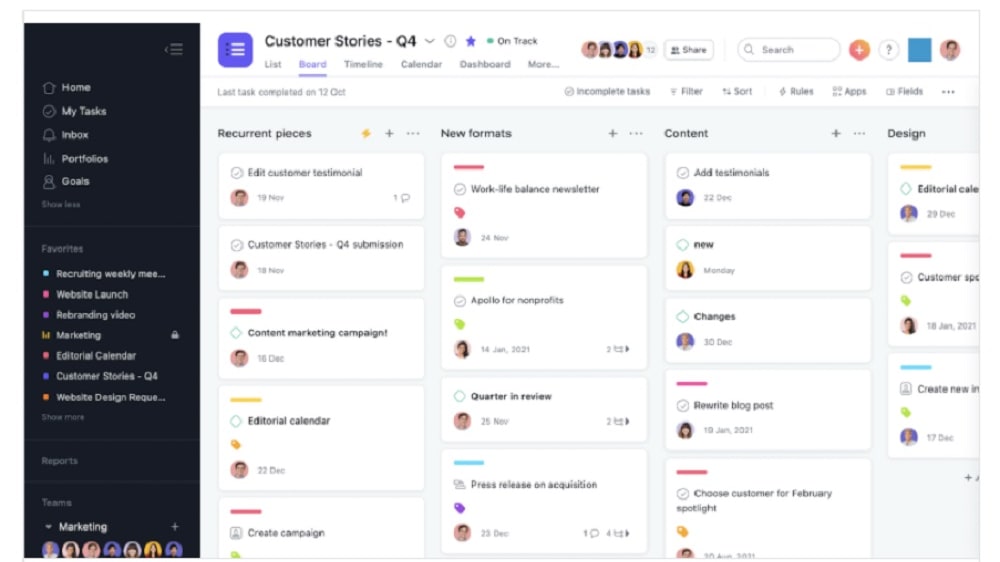
Users can effortlessly transition between boards, list views, and timelines, simplifying project tracking and management.
Asana stands out as the more user-friendly option compared to Trello. While both platforms aim for ease of use, Asana's intuitive interface and straightforward navigation truly shine. Users can effortlessly transition between boards, list views, and timelines, simplifying project tracking and management. For example, if a marketing team needs to manage a campaign with multiple tasks and deadlines, Asana's flexibility allows them to create boards for each task category, switch to a list view for detailed task management, and utilize the timeline for tracking project milestones.
In contrast, Trello's primary focus on its card-based system, while intuitive for smaller projects, can become overwhelming for larger, complex endeavors. Therefore, if you're seeking a tool that offers ease of use and versatility across various project types and sizes, Asana emerges as the preferred choice.
Asana Outshines Trello in Task Automation and Efficiency

With Asana, users can create custom rules and utilize forms to automate recurring tasks seamlessly.
In the realm of task automation and efficiency, Asana takes the lead over Trello. While both tools provide functionalities for task management, Asana's distinctive feature set for task automation sets it apart. With Asana, users can create custom rules and utilize forms to automate recurring tasks seamlessly. For example, a content marketing team can set up rules in Asana to automatically assign new blog post tasks to specific team members based on their expertise or availability, streamlining the content creation process.
This not only significantly reduces the risk of errors but also simplifies the process of sending and receiving work requests, ultimately enhancing productivity. In contrast, Trello, while offering some automation features, does not match the level of task automation and efficiency achieved by Asana. If your organization requires advanced task automation to streamline workflows and reduce manual workloads, Asana proves to be the superior choice.
Trello Excels in Testing/QA Management More Than Asana

Trello's dedicated platform for testing and QA offers a specialized environment for efficiently tracking bugs, assigning tasks, and fostering collaboration in resolving issues.
In the realm of managing testing and quality assurance (QA), Trello emerges as the frontrunner over Asana. Trello's dedicated platform for testing and QA offers a specialized environment for efficiently tracking bugs, assigning tasks, and fostering collaboration in resolving issues. For instance, a software development team can utilize Trello to create a board specifically for bug tracking. They can attach screenshots, error logs, and assign tasks to team members responsible for investigating and resolving each issue.
This specialized approach simplifies the journey from problem identification to resolution, making it easier for teams to manage testing and QA processes effectively. In contrast, while Asana provides task management capabilities, it lacks the tailored environment and dedicated features that Trello offers for this specific purpose. If your organization places a significant emphasis on efficient testing and QA management, Trello proves to be the superior choice.
Asana Provides a More Detailed Visualization of Project Timelines than Trello
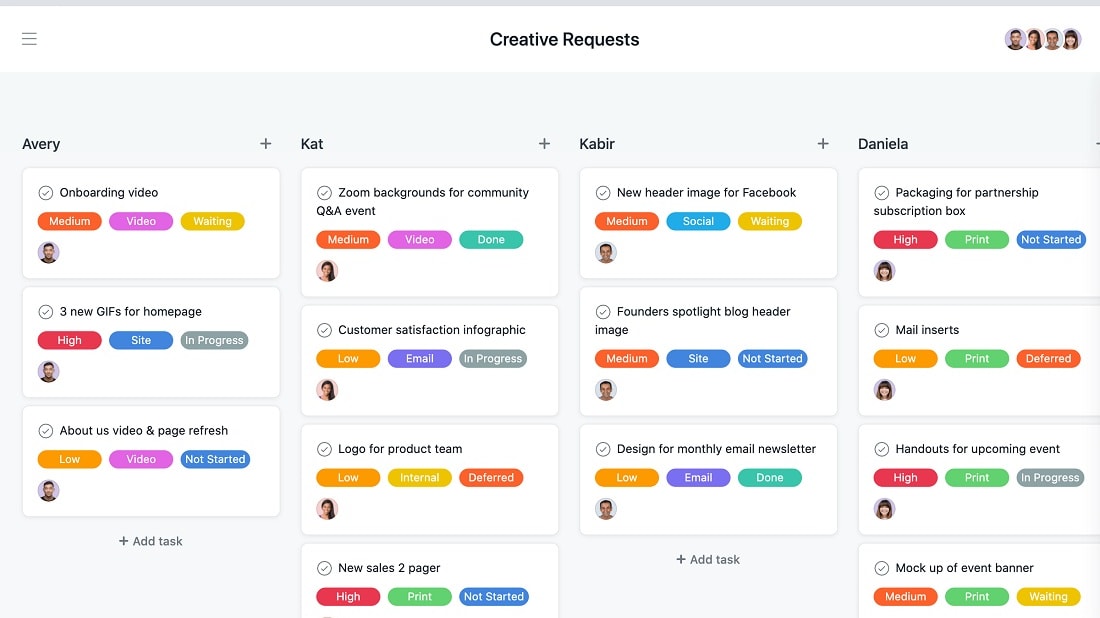
Asana's timeline functionality enables users to create visual representations of project schedules and dependencies, offering a clear and intuitive way to understand the project's timeline at a glance.
When it comes to visualizing project timelines, Asana surpasses Trello with its powerful timeline feature. Asana's timeline functionality enables users to create visual representations of project schedules and dependencies, offering a clear and intuitive way to understand the project's timeline at a glance.
For instance, a construction project manager can utilize Asana's timeline feature to create a visual roadmap of tasks, highlighting dependencies between activities, and easily identifying potential bottlenecks or delays. This allows for proactive adjustments to keep the project on schedule, ensuring a smoother workflow and efficient project management.
While Trello offers valuable features for task management, its visual representation of project timelines may not match the depth and clarity provided by Asana's timeline feature. If your projects require comprehensive timeline visualization to ensure timely delivery, Asana proves to be the superior choice.
Trello is Best at Content Management Compared to Asana

Trello's content management functionality empowers users to efficiently plan, generate, and collaborate on content across various teams and platforms, offering a streamlined process for content creation.
When it comes to content management, Trello takes the lead with its more robust feature set compared to Asana. Trello's content management functionality empowers users to efficiently plan, generate, and collaborate on content across various teams and platforms, offering a streamlined process for content creation.
For example, a content marketing team can use Trello to create a dedicated content calendar board, with cards representing individual content pieces, due dates, and responsible team members. Team members can collaborate within cards, attach drafts and assets, and move cards through custom workflow columns, ensuring a smooth content production process.
In contrast, while Asana excels in project and task management, it doesn't offer a specific feature dedicated to content management. This makes Trello the preferred choice for teams seeking comprehensive content management capabilities. If your organization relies heavily on content creation, Trello's content management features provide the tools necessary for efficient content planning and collaboration.
Asana and Trello are Equal at Facilitating Collaboration

Asana facilitates seamless interaction between teams and departments through shared projects and task assignments.
Both Asana and Trello excel in fostering team collaboration, offering distinct approaches to suit various team preferences and modes of operation.
Asana facilitates seamless interaction between teams and departments through shared projects and task assignments. For instance, a marketing team can create a project for a new product launch, assign tasks to team members responsible for different aspects, and collaborate on a centralized platform. Asana's communication features, such as task comments and file attachments, enhance collaboration and transparency.
On the other hand, Trello invites team members to collaborate on tasks, share documents, and track progress together on a unified board. For example, a software development team can use Trello to manage a project's workflow, with cards representing individual tasks and team members collaborating by adding comments, attachments, and moving cards across the board's columns.
Asana's Integration Versatility Outshines Trello

Asana boasts a wide array of third-party integrations, allowing users to seamlessly connect their favorite tools and applications to enhance their workflow.
When it comes to integration possibilities, Asana holds a substantial advantage over Trello. Asana boasts a wide array of third-party integrations, allowing users to seamlessly connect their favorite tools and applications to enhance their workflow. For instance, teams can integrate Asana with communication tools like Slack for real-time updates or connect it with time-tracking software such as Harvest to streamline project tracking and billing processes.
In contrast, Trello, while offering some integrations, does not match the extensive integration options provided by Asana. If your workflow heavily relies on connecting multiple tools and systems for enhanced productivity and collaboration, Asana's integration versatility makes it the superior choice for optimizing your project management process.
08 Asana vs Trello: Which is the best for your business?
Asana is the best tool for you if:
- You need comprehensive project management capabilities, including task tracking, automation, and detailed reporting.
- Your team values collaboration and transparent communication within tasks and projects.
- You require a platform that integrates seamlessly with various third-party tools and applications.
- You manage complex projects with intricate dependencies and require advanced project tracking.
- Customization and adaptability to different project types and industries are crucial for your workflow.
 You need comprehensive project management capabilities, including task tracking, automation, and detailed reporting.
Trello is the best tool for you if:
- You prefer a straightforward and visually-oriented task management approach using Kanban boards.
- You're part of a smaller team or an individual looking for simplicity and flexibility in task organization.
- Integration with third-party apps is important for extending functionality.
- Your projects are relatively simple and don't require extensive project tracking or automation.
- Agile and adaptable workflows align with your project management style, and you want a tool that's easy to grasp quickly.
Asana
Used by 881 members
75% off the annual Starter and Advanced plans for 1 year
Save up to $22,491
Trello
Used by 741 members
Free forever for up to 10 users
Save up to $600
09 Alternatives to Asana & Trello

Notion
Used by 17075 members
6 months free on the Business plan with Unlimited AI
Save up to $12,000

Google Workspace
Used by 9066 members
20% off Plus plans for 1 year
Save up to $518

Airtable
Used by 8227 members
$1,000 in credits for 1 year
Save up to $1,000

Slack
Used by 3738 members
25% off new plan purchases
Save up to $9,000
10 Promotions on Collaboration software
Asana and Trello are great tools, but Secret offers promo codes with discounts on over 2190+ different SaaS solutions. New deals are added regularly, helping you save money on your online subscriptions. Get access to codes for other Collaboration software you might want to purchase
Google Workspace offer
20% off Plus plans for 1 year
Airtable promo code 2026
$1,000 in credits for 1 year
Deal for Notion
6 months free on the Business plan with Unlimited AI
Slack coupon code
25% off new plan purchases

Promo code for Miro
$1,000 in credits (lifetime validity)

Promo code for Monday
First month free

Promo codes for ClickUp
Additional 20% off Unlimited and Business plans for 1 year

Deal for xTiles
20% off monthly or annual plans

Google Drive promotion
20% off Plus plans for 1 year

Discount for Zoom Meetings
$20 off per user on the annual Workplace Pro plan
Start saving on the best SaaS
Secret has already helped tens of thousands of startups save millions on the best SaaS like Microsoft Teams, Google Workspace & many more. Join Secret now to buy software the smart way.