


When it comes to project management, you need a reliable solution to streamline workflows, enhance task management and prioritization, and facilitate team communication. Fortunately, there are various platforms available designed for this. But with so many choices, deciding which is the better tool for your business can feel overwhelming.
To help you out, we compare two popular project management and productivity platforms—Asana vs Todoist. With our in-depth exploration of their features, points of difference, and pricing structures, we aim to simplify the decision-making process so you can choose the right platform for your project management needs. Let’s dive in!
- 01 Asana vs Todoist: overview
- 02 What's the difference between Asana and Todoist?
- 03 Asana pros and cons
- 04 Todoist pros and cons
- 05 Asana compared to Todoist
- 06 Todoist compared to Asana
- 07 Features comparison
- 08 Asana vs Todoist: Which is the best for your business?
- 09 Alternatives to Asana & Todoist
- 10 Promotions on Collaboration software
Start saving on the best SaaS
Secret has already helped tens of thousands of startups save millions on the best SaaS like Microsoft Teams, Google Workspace & many more. Join Secret now to buy software the smart way.

01 Asana vs Todoist: overview
Asana and Todoist are two prominent players in the realm of task management and productivity software, each offering distinct features and advantages tailored to different organizational and personal needs.
Asana is well-known for its robust task management capabilities and collaboration tools. It provides a comprehensive platform for organizing tasks, setting priorities, and tracking project progress. On the other hand, Todoist is celebrated for its simplicity and efficiency. It offers a highly intuitive and user-friendly platform that excels in individual task management.
Now, let's delve into the Asana vs. Todoist comparison to assist you in making an informed decision when selecting the right task management software for your specific requirements.

Task management
While both tools offer robust task management functionalities, Asana’s features are broader, including workflow automation and task dependencies.

Asana
Todoist
Storage
Asana includes unlimited storage with all plans, with file uploads limited to 100MB. Todoist limits file uploads to 5MB (free plan) and 100MB (paid plans).
Asana
Todoist
Permissions and user controls
Asana has user-based permissions to control access to specific teams, projects, or tasks. With Todoist, users can assign admins, members, and guests for different access levels.
Asana
Todoist
Templates
Asana offers an extensive range of templates for various use cases, plus users can create custom templates. Todoist’s template library is more limited.
Asana
Todoist
AI features
Asana Intelligence is available with all paid plans and includes AI-powered features to optimize content. Todoist has an AI Assistant extension, e.g., for task generation.
Asana
Todoist
Pricing Plan
Asana and Todoist offer free plans. Asana’s paid plans range from $10.99 to $24.99/user/month. Todoist costs between $4 and $6/user/month.
Asana
Todoist
Ease of Use
Both platforms are intuitive to use, with clean user interfaces. Users may experience a minimal learning curve when learning all of Asana’s features.
Asana
Todoist
Customer Reviews
Both platforms receive mainly positive reviews. Asana has a 4.5 rating on Capterra, while Todoist has a 4.6 rating.
Asana
Todoist
Integrations
Asana offers 200+ integrations like Microsoft Teams, GitLab, and Loom. In comparison, Todoist has 90+ integrations, including Alexa, Gmail, and Everhour.
Asana
Todoist
Customer Support
Asana offers service support via chatbot and support tickets. 24/7 support is available with its Enterprise plans. Todoist offers email support via tickets.
Asana
Todoist
02 What's the difference between Asana and Todoist?

Asana offers a more expansive suite of features beyond to-do lists.
Asana
Project management platform

Todoist’s features and pricing make it a popular choice for individuals and small teams.
Todoist
Todoist is a highly efficient task management and to-do list application, designed to help individuals and teams organize their work. With its user-friendly interface, Todoist allows users to create tasks, set deadlines, and categorize them with labels and priorities.
Asana and Todoist are excellent solutions for managing project tasks and priorities. Both platforms let you assign and prioritize tasks, set deadlines, and add notes, ensuring your team is always on the same page. While they share some common features, several key differences may guide your decision about the best platform for your business.
The primary difference between Asana and Todoist is the scope of their features. Todoist is a dedicated task manager, while Asana offers broader project management functionality. With Todoist, you can view tasks in a list or on a Kanban board. Its functionalities extend to workflow management, allowing the creation of task lists, prioritization, and addition of sub-tasks. Todoist also includes practical features like recurring tasks and location-based reminders. Despite offering more basic features than Asana, Todoist’s pricing is affordable, with even the top-tier plan priced at only $6/user/month. Todoist’s features and pricing make it a popular choice for individuals and small teams.
Asana, on the other hand, offers a more expansive suite of features beyond to-do lists. While task management remains a strong focus, Asana provides diverse project management functionalities. These include allowing you to view your projects and tasks in various formats, including Kanban-style, Gannt chart, and timeline. It offers higher-level capabilities, like the ability to create task dependencies, and templates, making Asana an ideal solution for businesses managing larger or multiple projects. If you’re in the market for a free version, it’s worth closely comparing the inclusions in Asana and Todoist’s free plans. Todoist’s is designed for personal use. It’s limited to 5 personal projects and you can collaborate with up to 5 others and access one week’s worth of history. Asana’s free plan is the more generous, accommodating collaboration with up to 10 others on a project and includes unlimited tasks, projects, and activity logs.

Asana
Used by 895 members
75% off the annual Starter and Advanced plans for 1 year
Save up to $22,491

Todoist
Used by 1993 members
20% off annual plans
Save up to $24
03 Asana pros and cons
What are the advantages of Asana?
- Robust task management: Asana provides a powerful platform for creating and organizing tasks. You can assign tasks to team members, set due dates, create subtasks, and add attachments and comments, allowing for detailed task tracking.

- Collaboration and communication: Asana includes built-in collaboration tools, such as comments and project discussions, which facilitate communication among team members. This helps teams stay on the same page and reduces the need for separate communication tools.
- Customizable workflows: Asana offers flexibility in setting up workflows. You can create custom project templates, automate repetitive tasks with rules, and design project boards that suit your team's unique needs.
- Integration capabilities: Asana integrates with a wide range of third-party applications, including Google Workspace, Microsoft Office, Slack, and many others. This allows you to connect Asana with your existing tools and streamline your workflow further.
- Reporting and analytics: Asana provides reporting and analytics features that allow you to track project progress, monitor team performance, and identify bottlenecks. This data-driven approach helps teams make informed decisions and improve efficiency.
What are the disadvantages of Asana?
- Learning curve: Some users may find Asana's feature set initially overwhelming, especially if they are new to project management software. It can take time to learn how to use all the tools effectively.

- Pricing: Asana's pricing can be a downside for smaller teams or individuals, as some of its more advanced features require a premium subscription. While there is a free version, it has limitations.
- Complexity for simple tasks: Asana's extensive capabilities may feel like overkill for very simple tasks or personal to-do lists. It might not be the most efficient choice for individual users with minimal task management needs.
- Limited time tracking: While Asana offers basic time tracking features, it may not be as robust as some specialized time tracking tools, which can be a drawback for organizations that heavily rely on time tracking.
- Dependency on internet connectivity: Asana is a cloud-based application, which means it requires a stable internet connection to function. This can be a limitation for users who need to access their tasks and projects offline.
Compare Asana to other tools


Asana vs Monday

Notion vs Asana

Taskade vs Asana

Asana vs Trello

Asana vs Smartsheet

Airtable vs Asana
04 Todoist pros and cons
What are the advantages of Todoist?
- Simple and intuitive interface: Todoist is known for its clean and user-friendly interface. It's easy to get started with, making it accessible for both beginners and experienced users.
- Cross-platform compatibility: Todoist is available on a wide range of platforms, including web browsers, mobile devices (iOS and Android), desktop applications, and browser extensions. This ensures that you can access your tasks from almost anywhere.
- Task organization: Todoist offers a flexible task organization system. You can create projects, sub-projects, and tasks, and use labels and filters to categorize and prioritize your work. This versatility allows you to adapt the tool to your specific needs.
- Natural language input: One of Todoist's standout features is its natural language input. You can quickly add tasks by typing or speaking them in plain language, and Todoist will automatically parse and schedule them accordingly.
- Integration options: Todoist integrates with popular apps and services, such as Google Calendar, Dropbox, and Slack, allowing you to connect it with your existing tools and streamline your workflow.
What are the disadvantages of Todoist?
- Limited free plan: While Todoist offers a free plan, it has limitations, such as limited project and task sharing and the inability to use some advanced features. Users looking for more functionality may need to upgrade to a paid plan.
- Task dependency: Todoist lacks a built-in task dependency feature, which can be a drawback for projects that require tasks to be completed in a specific order. Users may need to find workarounds or use external tools for dependency management.
- Advanced features require subscription: Some of Todoist's more advanced features, such as custom project templates and advanced search filters, are only available to premium subscribers, which may not be suitable for budget-conscious users.
- Limited team collaboration: While Todoist is excellent for personal task management, it may not be as robust as some other tools when it comes to team collaboration and project management. It lacks features like Gantt charts and team workload management.
- Learning curve for advanced features: While Todoist's basic features are straightforward, mastering some of the more advanced features and customization options may require some time and effort.
Compare Todoist to other tools

Trello vs Todoist
Notion vs Todoist

ClickUp vs Todoist
Todoist vs Taskade

Todoist vs Microsoft To Do
05 Asana compared to Todoist
Asana and Todoist are both popular task management tools, but they cater to different needs. Asana is a robust project management platform with comprehensive task tracking, collaboration features, and customization options, making it ideal for teams and complex projects.
Todoist, on the other hand, focuses on simplicity and personal task management, excelling in individual productivity. Its user-friendly interface, natural language input, and cross-platform compatibility make it suitable for individuals and small teams seeking an efficient way to organize tasks. Ultimately, the choice between Asana and Todoist depends on your specific requirements, whether it's team collaboration or personal productivity.
Is Asana better than Todoist?
 Is Asana better than Todoist?
Determining whether Asana is better than Todoist depends on your specific needs. Asana is a robust project management tool with extensive task management capabilities, making it suitable for teams and complex projects. It offers collaboration tools, custom workflows, and reporting features. Todoist, in contrast, focuses on simplicity and personal task management, making it an excellent choice for individuals and small teams. It boasts a user-friendly interface, natural language input, and cross-platform compatibility.
The choice hinges on whether you require comprehensive project management features (Asana) or a streamlined, individual task management solution (Todoist).
What is Asana best used for?
Asana is best used for managing and organizing complex projects and tasks within teams and organizations. It excels in providing a comprehensive platform for task management, project planning, and collaboration. Asana's features, including task assignment, due dates, subtasks, and comments, facilitate efficient teamwork and project tracking.
Its customizable workflows, project templates, and integration capabilities make it an ideal choice for businesses of all sizes looking to streamline their project management processes. Asana helps teams set priorities, monitor progress, and communicate effectively, making it a valuable tool for improving productivity and ensuring projects are completed successfully.
Can Asana replace Todoist?
While Asana and Todoist both offer task management capabilities, they serve different purposes and have distinct strengths. Asana is a robust project management platform suitable for teams and complex projects, with features like task assignment, collaboration tools, and custom workflows. Todoist, on the other hand, focuses on individual task management, providing a simple and efficient solution for personal productivity.
Whether Asana can replace Todoist depends on your specific needs. If you require comprehensive project management and team collaboration, Asana is a suitable choice. However, if you seek a streamlined personal task manager, Todoist may better meet your requirements.
Is Asana cheaper than Todoist?
Asana and Monday.com offer various pricing plans, and whether Asana is cheaper than Asana and Todoist offer different pricing structures, and the cost comparison depends on your specific requirements. Asana’s pricing offers both free and premium plans, with the premium plans offering more features.
Todoist also provides a free version, but its premium plans are typically more affordable compared to Asana's premium offerings. However, the choice between the two should not solely be based on price. Consider the features and capabilities you need for your task or project management, as well as the number of users or team members, to determine which tool provides better value for your specific use case.
Is there a better Collaboration software than Asana?
Whether there's a "better" software than Asana depends on your specific project management needs and goals. Asana is renowned for its robust task management, collaboration, and automation features, making it a solid choice for many teams and businesses.
However, alternatives to Asana like Todoist, ClickUp, and Notion may better suit certain individuals and organizations. Todoist is known for its simplicity and personal task management capabilities, while ClickUp offers a wide range of features and customization options. Notion provides a versatile platform for task management and knowledge sharing. The determination of the "better" software hinges on your unique workflow, individual preferences, and the scope of your tasks and projects.

Asana
Premium
Project management platform
75% off the annual Starter and Advanced plans for 1 year
Save up to $22,491
06 Todoist compared to Asana
Todoist and Asana are two popular task management tools, each with its own strengths. Todoist excels in simplicity and individual task management. Its user-friendly interface, natural language input, and cross-platform compatibility make it ideal for personal productivity and small teams.
On the other hand, Asana is a comprehensive project management platform suitable for teams and complex projects. It offers robust task management, collaboration features, and customization options. Asana's strength lies in its ability to manage projects holistically, with task assignments, due dates, subtasks, and more. The choice between Todoist and Asana depends on whether you need streamlined personal task management or comprehensive project and team coordination.
Is Todoist better than Asana?
Determining whether Todoist is better than Asana depends on your specific needs and preferences. Todoist is excellent for individual task management, offering simplicity and ease of use. Its natural language input and cross-platform compatibility make it a top choice for personal productivity. However, Asana excels in comprehensive project management and team collaboration, with robust features for task assignment, project tracking, and workflow customization.
The choice between Todoist and Asana hinges on whether you prioritize streamlined individual task management (Todoist) or require a more extensive solution for team coordination and complex projects (Asana). It's essential to align your choice with your specific use case and objectives.
What is Todoist best used for?
Todoist is best used for efficient personal task management and individual productivity. Its simplicity and user-friendly interface make it ideal for organizing to-do lists, setting priorities, and tracking personal tasks and goals. With features like natural language input and cross-platform compatibility, Todoist helps individuals stay organized and on top of their tasks regardless of their location or device.
Whether you're managing work-related tasks, personal projects, or a combination of both, Todoist offers a straightforward and effective solution for creating, organizing, and completing tasks, making it an excellent choice for enhancing personal productivity and time management.
Can Todoist replace Asana?
While Todoist and Asana are both task management tools, they serve different purposes and have distinct strengths. Todoist is primarily designed for personal task management, offering simplicity and ease of use. It excels at organizing to-do lists, setting priorities, and tracking individual tasks. Asana, on the other hand, is a comprehensive project management platform designed for team collaboration and complex projects, providing features like task assignment, project tracking, and customizable workflows.
Whether Todoist can replace Asana depends on your specific needs. If you require team coordination and project management, Asana may be the better choice. However, for personal task management and individual productivity, Todoist is a suitable alternative.
Is Todoist cheaper than Asana?
The cost comparison between Todoist and Asana depends on your specific needs and budget. Todoist’s pricing offers a free version with basic features, making it a cost-effective choice for individuals and small teams. However, Todoist also offers premium plans with additional features at an affordable price. Asana, on the other hand, provides a free plan with limitations, and its premium plans can be more expensive than Todoist's premium options.
The choice between Todoist and Asana, in terms of cost, should be based on your requirements and whether the additional features offered by Asana justify the potentially higher price for your specific task or project management needs.
Is there a better Task Management software than Todoist?
Determining whether there's a superior software to Todoist depends on your specific task management needs and objectives. Various alternatives cater to diverse individual and team requirements.
Alternatives to Todoist include Asana, Microsoft To Do, Any.do, and TickTick, each offering unique strengths. For instance, Microsoft To Do seamlessly integrates with other Microsoft Office apps, while Any.do offers a sleek and intuitive design. The choice of the optimal software depends on your individual circumstances, preferences, and the scale of your task management. A thorough evaluation of these factors is essential to select the tool that best aligns with your task management goals and enhances your personal or team productivity.

Todoist
Simplify your tasks and boost your productivity
20% off annual plans
Save up to $24
07 Features comparison
Asana's Superior Process Customization Elevates Project Management Compared to Todoist

Asana allows you to create custom project templates with specific workflows, dependencies, and task assignments.
In the realm of customizing processes, especially in areas like product development, IT requests, and creative development, Asana stands out as the clear frontrunner. While Todoist offers some customization options, Asana's dedicated project generator takes customization to the next level. This feature empowers users to tailor and design processes in a highly flexible manner, aligning them precisely with their business's unique requirements.
For example, Asana allows you to create custom project templates with specific workflows, dependencies, and task assignments. This level of customization facilitates more efficient inter-team coordination, streamlines complex processes, and significantly improves overall performance. Whether you're managing a creative team's project or handling IT requests, Asana's comprehensive customization capabilities provide a robust platform for optimizing your workflows.
Todoist Triumphs in Task Management Simplicity Over Asana

Todoist's intuitive interface provides a seamless experience for efficient task and project management.
Todoist outshines Asana when it comes to task management with its exceptional simplicity and user-friendliness. Todoist's intuitive interface provides a seamless experience for efficient task and project management. Users can effortlessly set due dates, create reminders, and organize tasks into various projects, ensuring a structured workflow.
For instance, Todoist's natural language input feature allows users to quickly add tasks using plain language, simplifying the task creation process. While Asana also offers similar task management features, Todoist's straightforward design and ease of use give it a significant edge in this aspect. Whether you're managing personal to-do lists or team projects, Todoist's simplicity enhances task management efficiency.
Todoist is Best at Staying Organized on the Go than Asana

This level of accessibility ensures that Todoist users can stay organized wherever they are, offering unparalleled convenience and mobility.
When it comes to mobile task management, Todoist takes the lead over Asana with its universal availability across all devices, including computers, smartphones, and tablets. This level of accessibility ensures that Todoist users can stay organized wherever they are, offering unparalleled convenience and mobility.
For instance, Todoist's seamless cross-platform compatibility allows users to access their tasks and projects from virtually any device, ensuring that critical information is always at their fingertips. Moreover, Todoist's voice command feature enables users to add tasks quickly and efficiently, a level of flexibility and convenience that Asana cannot match.
Asana and Todoist are Equally Robust for Team Collaboration

Todoist allows users to collaborate on projects by sharing access and assigning tasks to team members. T
Both Todoist and Asana excel in the realm of team collaboration, offering robust features that facilitate seamless cooperation within teams. These platforms enable users to create shared projects, assign tasks to individuals or teams, and engage in effective communication, ensuring alignment and collective efforts toward project success.
For example, Todoist allows users to collaborate on projects by sharing access and assigning tasks to team members. The platform's comments feature enables real-time communication and discussion within the task context. Similarly, Asana provides a comprehensive platform for team collaboration, allowing users to set priorities, assign tasks, and monitor project progress collaboratively.
Asana's Timeline View Revolutionizes Project Planning Beyond Todoist

Asana's timeline view allows you to create Gantt-like charts that clearly illustrate project timelines, task dependencies, and critical milestones.
In the domain of project planning, Asana takes a significant leap ahead of Todoist with its remarkable timeline view feature. This unique functionality enables users to create visual representations of project schedules and dependencies, providing invaluable insights for project management.
For instance, Asana's timeline view allows you to create Gantt-like charts that clearly illustrate project timelines, task dependencies, and critical milestones. This visual representation helps users swiftly grasp the project's overall timeline, identify potential bottlenecks, and make necessary adjustments to ensure projects stay on track. It's a powerful tool for project managers, allowing for efficient resource allocation and timeline optimization.
While Todoist offers task management capabilities, it does not provide the advanced visual project planning offered by Asana's timeline view, making Asana the superior choice for complex project scheduling and management.
Todoist Takes the Lead in Usability Over Asana
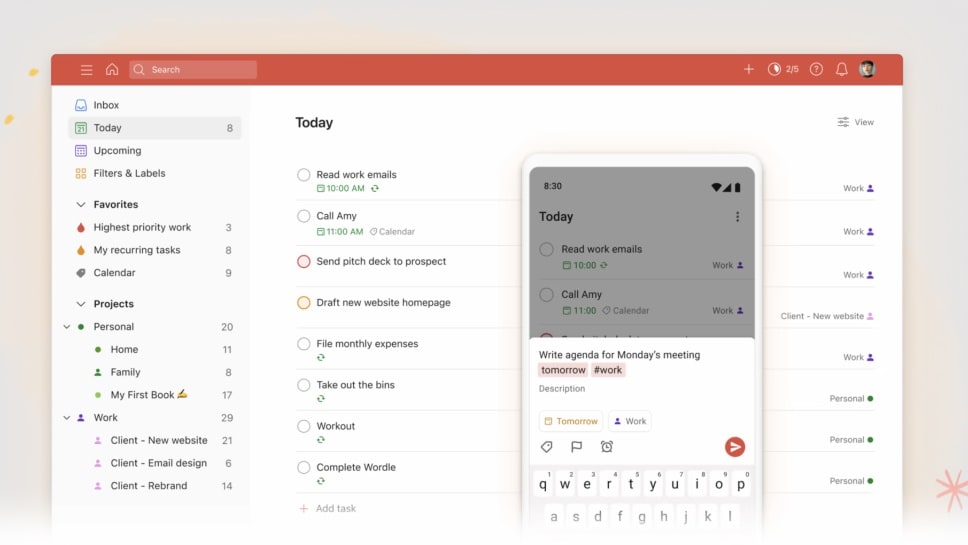
However, when it comes to usability, Todoist takes the lead with its straightforward design and intuitive features.
In the realm of task management, both Asana and Todoist are known for their user-friendly interfaces, simplifying the process for users. However, when it comes to usability, Todoist takes the lead with its straightforward design and intuitive features. For instance, Todoist's natural language input allows users to create tasks quickly by typing or speaking tasks in plain language, making it incredibly user-friendly. Its cross-platform compatibility ensures a seamless experience across various devices.
While Asana offers robust task management capabilities, Todoist's simplicity shines through, making it an excellent choice for those seeking a hassle-free and efficient task management solution.
Asana Leads the Way in Integration Versatility Over Todoist
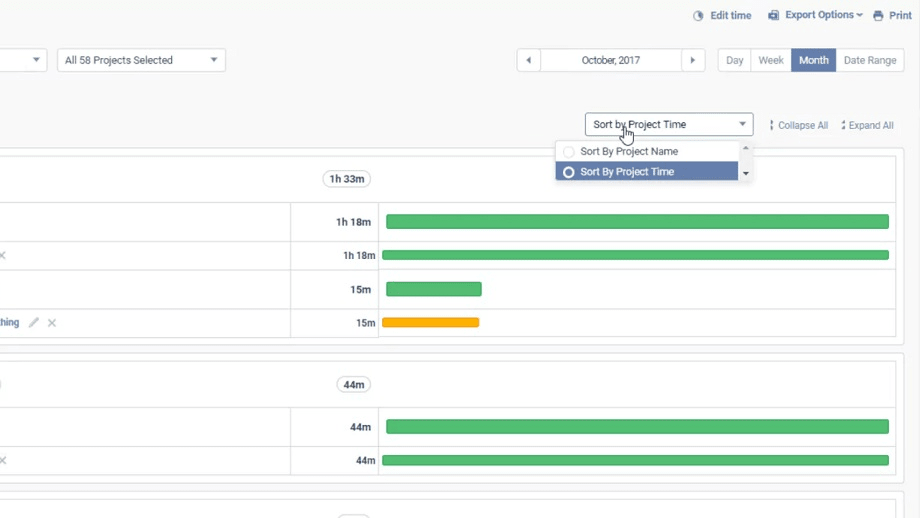
Asana boasts an extensive ecosystem of integrations that span across productivity, communication, and collaboration tools.
When it comes to integrating with various applications and platforms, Asana takes the lead over Todoist. Asana boasts an extensive ecosystem of integrations that span across productivity, communication, and collaboration tools. For instance, it seamlessly connects with popular apps like Google Workspace, Microsoft Office 365, Slack, and Adobe Creative Cloud, allowing users to streamline their workflow by syncing tasks and data between these applications.
On the other hand, while Todoist offers integrations with several third-party apps, its selection is more limited compared to Asana. Therefore, if you prioritize extensive integration possibilities to enhance your workflow, Asana proves to be the superior choice.
08 Asana vs Todoist: Which is the best for your business?
Asana is the best tool for you if:
- You need a comprehensive project management platform with features like task assignment, timelines, and collaboration tools.
- Your team requires a customizable workspace to adapt workflows to specific project needs.
- You want to integrate your project management tool with a wide range of third-party applications.
- You need advanced reporting and analytics to track project progress and team performance.
- Your organization values a data-driven approach to decision-making and project optimization.
 You need a comprehensive project management platform with features like task assignment, timelines, and collaboration tools.
Todoist is the best tool for you if:
- You're seeking a straightforward and user-friendly task management solution for personal or small team use.
- Cross-platform compatibility and natural language input are essential for your productivity.
- You value simplicity and efficiency in managing individual tasks and to-do lists.
- You want a cost-effective task management tool with both free and affordable premium options.
- You prioritize mobility and accessibility, as Todoist offers universal availability across devices and voice command features.
Asana
Used by 895 members
75% off the annual Starter and Advanced plans for 1 year
Save up to $22,491
Todoist
Used by 1993 members
20% off annual plans
Save up to $24
09 Alternatives to Asana & Todoist

Notion
Used by 19433 members
6 months free on the Business plan with Unlimited AI
Save up to $12,000

Google Workspace
Used by 9511 members
20% off Plus plans for 1 year
Save up to $518

Airtable
Used by 8445 members
$1,000 in credits on licences for 1 year
Save up to $1,000

Slack
Used by 3823 members
25% off new plan purchases
Save up to $9,000
10 Promotions on Collaboration software
Asana and Todoist are great tools, but Secret offers promo codes with discounts on over 2210+ different SaaS solutions. New deals are added regularly, helping you save money on your online subscriptions. Get access to codes for other Collaboration software you might want to purchase
Google Workspace discounts
20% off Plus plans for 1 year

Deal for nTask
25% off all plans for 1 year
Airtable promo
$1,000 in credits on licences for 1 year

Promo code for Routine
20% off all annual plans
Notion promotion
6 months free on the Business plan with Unlimited AI
Slack promotion code
25% off new plan purchases

Miro promo code 2026
$1,000 in credits (lifetime validity)

Monday promo code 2026
First month free

ClickUp offer
Additional 20% off Unlimited and Business plans for 1 year

Promo code for bolt.new
20% off all plans for the first 3 months
Start saving on the best SaaS
Secret has already helped tens of thousands of startups save millions on the best SaaS like Microsoft Teams, Google Workspace & many more. Join Secret now to buy software the smart way.