


Choosing the right project management tool is instrumental in improving productivity by tracking tasks, streamlining workflows, and analyzing project performance. These tools also enhance collaboration and real-time communication, enhancing task efficiency. Plus, project management platforms can promote accountability, support resource management, and direct task prioritization.
Various solutions are available for your project management needs—how do you choose the best one for your business? In this article, we help you out by providing a detailed comparison of two popular project management tools, Asana vs Smartsheet. By looking at their main features and fundamental differences, you’ll feel more confident in making the right decision for your business.
- 01 Asana vs Smartsheet: overview
- 02 What's the difference between Asana and Smartsheet?
- 03 Asana pros and cons
- 04 Smartsheet pros and cons
- 05 Asana compared to Smartsheet
- 06 Smartsheet compared to Asana
- 07 Features comparison
- 08 Asana vs Smartsheet: Which is the best for your business?
- 09 Alternatives to Asana & Smartsheet
- 10 Promotions on Collaboration software
Start saving on the best SaaS
Secret has already helped tens of thousands of startups save millions on the best SaaS like Microsoft Teams, Google Workspace & many more. Join Secret now to buy software the smart way.

01 Asana vs Smartsheet: overview
Asana and Smartsheet are two prominent players in the realm of project management and collaboration tools, each offering unique advantages tailored to meet specific user requirements.
Asana is widely recognized for its robust project management capabilities, particularly among teams focused on task-oriented workflows. It provides a powerful platform that excels in streamlining project tasks, setting priorities, and facilitating team communication. On the other hand, Smartsheet offers a comprehensive suite of collaboration and work management tools suitable for a wide range of industries. In addition to project management, Smartsheet provides features like spreadsheet-based data tracking, resource management, and automation.
To make an informed decision between Asana and Smartsheet, it's crucial to consider your specific business needs, team dynamics, and project goals. Asana may be the ideal choice for teams looking for a highly organized and task-oriented project management solution, whereas Smartsheet offers a broader array of collaboration and work management capabilities, making it suitable for teams with diverse needs and workflows.

Customer Support
Asana offers chatbot and ticket service support, while Smartsheet provides a customer support portal. 24/7 support is available on the platforms’ higher-tier plans.

Asana
Smartsheet
Reporting and analytics
Asana generally offers broad reporting capabilities and advanced reporting with its higher-tier plans. Smartsheet includes unlimited reports with all plans and work analytics with its Enterprise plan.
Asana
Smartsheet
Customer Reviews
The platforms receive favorable ratings, both scoring 4.5 on Capterra from 12,301 reviews (Asana) and 3,102 reviews (Smartsheet).
Asana
Smartsheet
Pricing Plan
Asana and Smartsheet offer free plans. Asana’s plans range between $10.99 and $24.99/user/month, while Smartsheet’s cost between $7 and $25/user/month.
Asana
Smartsheet
AI features
Asana Intelligence includes features to optimize content and is available with all paid plans. SmartSheet AI is currently in beta.
Asana
Smartsheet
Templates
Both provide various templates for a range of use cases, including social media calendars, resource management, and marketing budgets. Asana offers 27+ templates, while Smartsheet includes 350+.
Asana
Smartsheet
Ease of Use
Asana’s highly intuitive interface is easy to learn and use. Smartsheet has a slightly more complex user interface due to its advanced features.
Asana
Smartsheet
Task management
Asana offers detailed and flexible task management. Smartsheet takes a more structured approach with its spreadsheet-like format.
Asana
Smartsheet
Customization
Asana lets you customize fields and workflows, while Smartsheet is a highly customizable platform with advanced customization features.
Asana
Smartsheet
Integrations
Asana provides 200+ integrations like Salesforce, Google Drive, and Canva. Smartsheet offers 300+ integrations, including Microsoft Teams, HubSpot, and DocuSign.
Asana
Smartsheet
02 What's the difference between Asana and Smartsheet?

Asana is a highly flexible, visual project management tool that emphasizes task management and collaboration
Asana
Project management platform
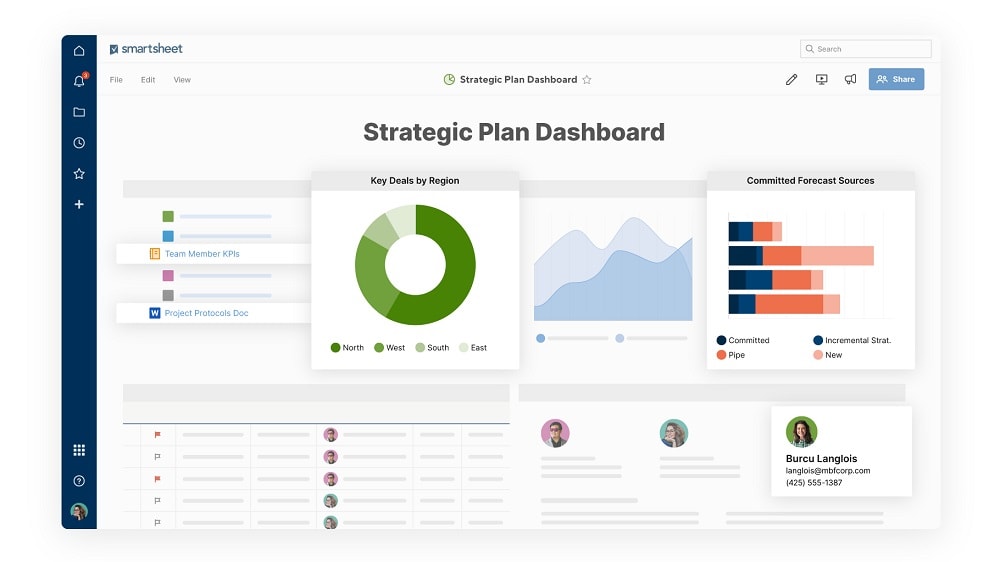
Smartsheet adopts a more structured approach to task and project management, offering various advanced features that make it ideal for large, complex projects.
Smartsheet
Smartsheet provides a cloud-based platform for flexible work management and automation, empowering teams and organizations to plan, track, automate, and report on work.
Asana and Smartsheet are versatile project management platforms offering unique approaches to improving communication, collaboration, and project efficiency. As you navigate the decision-making process, understanding these differences can help guide you toward the most suitable tool for your projects. Asana is a highly flexible, visual project management tool that emphasizes task management and collaboration. Easy to learn and use, Asana is ideal for smaller teams, start-ups, remote teams, and individual projects. With features that facilitate task setting, organization, assignment, and tracking, Asana is popular with agile project management teams.
Compared to Asana, Smartsheet adopts a more structured approach to task and project management, offering various advanced features that make it ideal for large, complex projects. With a tabular interface similar to a spreadsheet, Smartsheet is popular with businesses that manage their data on Google Sheets or Excel. The platform offers a high level of customization and advanced features, like advanced automation, making it especially useful for detailed resource management and project planning. Users may initially experience a slight learning curve because of these advanced features, but it pays off in terms of the breadth of Smartsheet’s functionality.
Another difference to note is the variety of views each platform offers. Asana includes Kanban boards, timelines, lists, calendars, and Gannt charts, while Smartsheet offers Gannt charts, grids, cards, and calendars. Finally, if you’re in the market for a free plan, it’s worth closely comparing Asana and Smartsheet’s respective offerings. Asana’s free plan caters to individuals and small teams, providing access to three project views, basic workflows, and basic reporting, with unlimited tasks, projects, and storage, but not automation. Smartsheet’s free plan is for one user and up to two editors. It includes two sheets, 500MB of storage, and up to 100 automation triggers per month. By checking the platforms’ inclusions on their free plans, you can find the one that best suits your business.

Asana
Premium
Project management platform
75% off the annual Starter and Advanced plans for 1 year
Save up to $22,491
03 Asana pros and cons
What are the advantages of Asana?
- Intuitive user interface: Asana's user-friendly interface makes it easy for teams to get started quickly without extensive training. Its clean design promotes user adoption.

- Task management: Asana excels in task management, allowing users to create, assign, prioritize, and track tasks effectively. You can set due dates, dependencies, and subtasks, making it easy to manage complex projects.
- Collaboration features: Asana offers robust collaboration tools, including comments, file attachments, and @mentions, which facilitate communication and ensure all team members are on the same page.
- Customization: Asana allows users to customize workflows and project structures to fit their specific needs. You can create custom fields, templates, and rules to automate processes.
- Integration ecosystem: Asana integrates seamlessly with a wide range of third-party applications, enabling you to connect it with other tools your team uses, such as Slack, Google Workspace, and more.
What are the disadvantages of Asana?
- Learning curve for advanced features: While the basic features of Asana are straightforward, some of the more advanced capabilities, like automations and reporting, may require a steeper learning curve.

- Limited free version: Asana's free plan has limitations, including fewer features and a limited number of users. To access more advanced functionalities, you'll need to upgrade to a paid plan.
- Cost: Asana's pricing can be relatively high for larger teams or organizations, which may make it less budget-friendly compared to some other project management tools.
- Dependency on internet connection: As a cloud-based tool, Asana relies on an internet connection. If you have a poor or unreliable internet connection, it may affect your ability to access and work in Asana.
- Overwhelming for simple tasks: For very small projects or simple to-do lists, Asana's extensive features might feel like overkill, and a simpler tool might be more efficient.
Compare Asana to other tools


Asana vs Monday


Notion vs Asana

Taskade vs Asana

Asana vs Trello

Asana vs Todoist

Airtable vs Asana
04 Smartsheet pros and cons
What are the advantages of Smartsheet?
- Versatile spreadsheet-based interface: Smartsheet's spreadsheet-like interface is familiar and easy to use for many users. It allows for flexible data tracking, making it suitable for a wide range of use cases beyond project management.
- Customization and automation: Smartsheet provides extensive customization options, including custom columns, templates, and automated workflows. This flexibility allows you to adapt the tool to your specific needs.
- Collaboration and communication: Smartsheet offers collaboration features such as comments, file attachments, and notifications to enhance communication among team members and stakeholders.
- Integration capabilities: Smartsheet integrates with various third-party applications, including popular tools like Microsoft Office, Google Workspace, and more, allowing for seamless data synchronization and workflow automation.
- Resource management: Smartsheet includes resource management features that help allocate and track team members' workloads, making it valuable for resource-intensive projects.
What are the disadvantages of Smartsheet?
- Learning curve: While the basic functions are straightforward, mastering more advanced features, formulas, and automation workflows in Smartsheet may require time and effort.
- Complexity for simple tasks: Smartsheet's extensive features can make it feel overwhelming for smaller teams or simpler projects. A simpler tool may be more efficient for basic task tracking.
- Cost: The cost of Smartsheet's paid plans can be relatively high, especially for larger teams or organizations. The pricing structure may not be budget-friendly for some users.
- Limited Gantt chart functionality: While Smartsheet offers Gantt chart views, it may not have the same level of sophistication as dedicated project management tools like Microsoft Project for complex project scheduling.
- Mobile experience: Some users find the mobile experience of Smartsheet less user-friendly compared to the web version, which can be a drawback for teams that require mobile access.
Compare Smartsheet to other tools

Airtable vs Smartsheet
05 Asana compared to Smartsheet
Asana and Smartsheet are two versatile project management and work collaboration tools, each with distinct strengths. Asana excels in task management and team collaboration, offering an intuitive interface and robust communication features. It's an ideal choice for teams seeking streamlined project workflows.
Smartsheet, on the other hand, provides a spreadsheet-based platform that's highly customizable, making it suitable for a wide range of use cases beyond project management. It shines in data tracking and resource management. The choice between Asana and Smartsheet depends on your specific needs; Asana for task-oriented teams, and Smartsheet for those requiring adaptable work management and data organization.
Is Asana better than Smartsheet?
 Is Asana better than Smartsheet?
Determining whether Asana is better than Smartsheet depends on your specific needs and preferences. Asana excels in task management and team collaboration, offering an intuitive interface and robust communication features, making it ideal for streamlined project workflows. Smartsheet, with its spreadsheet-based platform, is highly customizable and versatile, suitable for various use cases beyond project management, especially in data tracking and resource management.
To decide, consider your requirements; Asana is great for task-oriented teams, while Smartsheet is valuable for those needing adaptable work management and data organization. Ultimately, the choice hinges on which tool aligns better with your unique workflow and objectives.
What is Asana best used for?
Asana is best used for efficient project and task management. It excels in organizing, tracking, and prioritizing tasks, making it ideal for teams and individuals seeking streamlined workflows. Asana's intuitive interface and collaboration features promote effective team communication and project coordination. It's particularly valuable for businesses, including e-commerce, marketing, and software development teams, as well as any organization that needs to manage complex projects.
With customizable features, Asana adapts to a wide range of needs, from simple to intricate task tracking, making it a versatile tool for enhancing productivity and project success.
Can Asana replace Smartsheet?
Whether Asana can replace Smartsheet depends on your specific requirements. Asana excels in task management and team collaboration, offering an intuitive interface and streamlined project workflows. However, Smartsheet's strength lies in its spreadsheet-based versatility and extensive customization options, making it valuable for various work management scenarios beyond project management.
While Asana may suit task-oriented teams, Smartsheet's adaptability is ideal for complex data tracking and resource management. Consider your needs and workflows; Asana and Smartsheet serve different purposes, and the decision to replace one with the other should align with your unique business demands and objectives.
Is Asana cheaper than Smartsheet?
The cost comparison between Asana and Smartsheet varies depending on the specific plans and features you require. Asana’s pricing structure offers a free basic plan but has limitations, while Smartsheet also has a limited free plan. When it comes to paid plans, Asana's pricing can be competitive, especially for smaller teams.
Smartsheet, on the other hand, may have a higher cost for larger teams or those requiring more advanced features. The choice between the two should consider your budget and the specific functionalities you need. Ultimately, it's advisable to compare the pricing details of both tools based on your organization's size and requirements.
Is there a better Collaboration software than Asana?
While Asana offers a robust array of project management and collaboration features, it's essential to explore alternative software options to ensure you discover the best fit for your specific needs.
Several notable alternatives to Asana in the project management and work collaboration space include Trello, Monday.com, Wrike, and Jira.
The selection of the ideal project management software depends on your organization's unique requirements, workflow preferences, and goals. If you value intuitive task management, efficient team collaboration, and user-friendly interfaces, Asana may be a strong contender. However, exploring these alternatives can provide valuable insights and assist you in making an informed decision that aligns perfectly with your project management needs.
Asana
Premium
Project management platform
75% off the annual Starter and Advanced plans for 1 year
Save up to $22,491
06 Smartsheet compared to Asana
Smartsheet and Asana are distinct project management and work collaboration tools, each offering unique strengths. Smartsheet's spreadsheet-based interface provides flexibility and customization, making it suitable for a wide range of work scenarios. It excels in data tracking and resource management.
On the other hand, Asana is known for its intuitive task management and team collaboration features, ideal for streamlined project workflows. The choice between Smartsheet and Asana depends on your specific needs and preferences. Smartsheet suits those requiring adaptable work management and extensive customization, while Asana is valuable for task-oriented teams seeking efficient project coordination and communication.
Is Smartsheet better than Asana?
Determining whether Smartsheet is better than Asana depends on your specific requirements. Smartsheet offers a spreadsheet-based, highly customizable platform suitable for various work management scenarios, including data tracking and resource management. Asana, on the other hand, excels in task management and team collaboration, with an intuitive interface ideal for streamlined project workflows. The choice hinges on your unique needs and workflow preferences.
Smartsheet is a versatile choice for those seeking extensive customization, while Asana is valuable for task-oriented teams emphasizing efficient project coordination and communication. Assess your priorities and objectives to make an informed decision that aligns with your goals.
What is Smartsheet best used for?
Smartsheet is best used for versatile work management and data organization. Its spreadsheet-based platform allows for extensive customization and adaptability, making it suitable for a wide range of use cases. Smartsheet excels in data tracking, resource management, and collaborative project planning. It's ideal for teams and businesses that require structured data management, project coordination, and automation of workflows.
Whether you're managing complex projects, tracking inventory, or maintaining schedules, Smartsheet's flexibility and robust feature set make it a valuable tool for enhancing productivity and efficiency in various industries and work scenarios.
Can Smartsheet replace Asana?
Whether Smartsheet can replace Asana depends on your specific needs and preferences. Asana specializes in task management and team collaboration, offering an intuitive interface for streamlined project workflows. Smartsheet, in contrast, is highly customizable and versatile, ideal for various work management scenarios, including data tracking and resource management.
If your emphasis is on task-oriented projects with efficient communication, Asana may be the better fit. However, Smartsheet's adaptability is valuable for complex data organization and workflow automation. The decision to replace one with the other should align with your unique business demands and objectives, considering factors such as project complexity and team workflow.
Is Smartsheet cheaper than Asana?
The cost comparison between Smartsheet and Asana varies depending on your specific requirements and the size of your organization. Smartsheet offers a variety of pricing plans, including a free basic version with limitations. Asana, too, has a free plan with restrictions.
When considering paid plans, Smartsheet's pricing can be competitive, especially for smaller teams. Asana, on the other hand, may offer more budget-friendly options for certain organizations. To determine which is cheaper, it's crucial to assess your team's size, needs, and desired features, then compare the pricing structures of both tools to find the best fit for your budget.
Is there a better Collaboration software than Smartsheet?
While Smartsheet offers a versatile spreadsheet-based platform for work management and data organization, it's wise to explore alternative software options to ensure you discover the best fit for your specific needs.
Several noteworthy alternatives to Smartsheet in the work management and project collaboration space include Asana, Monday.com, Trello, and Wrike.
The selection of the ideal work management software depends on your organization's unique requirements, workflow preferences, and objectives. If you value adaptability and extensive customization for various work scenarios, Smartsheet may be the right choice. Nevertheless, considering these alternatives can provide valuable insights and assist you in making an informed decision that aligns perfectly with your work management needs.
07 Features comparison
Asana's Data Reporting Supersedes Smartsheet for In-Depth Workload Insights
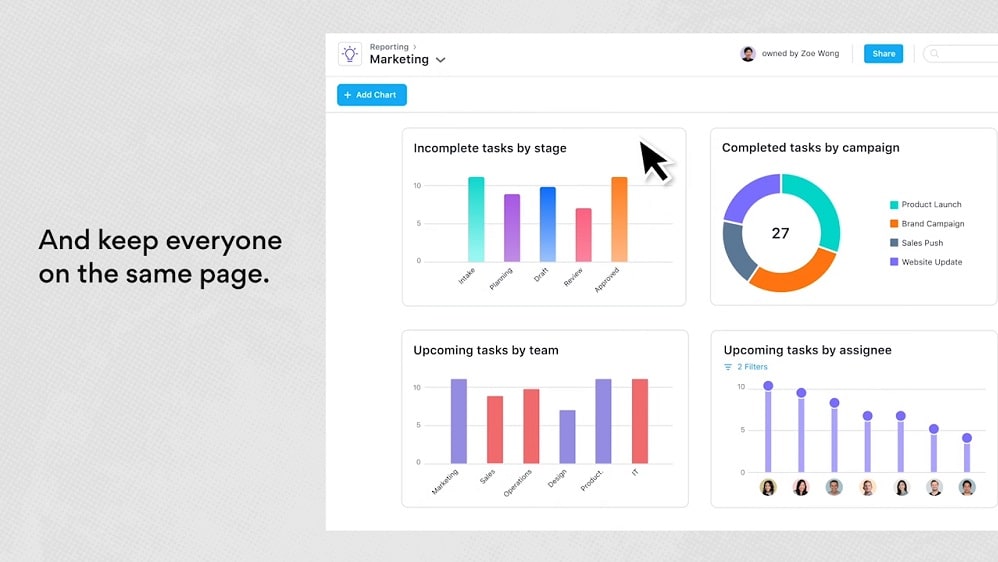
Asana's platform enables users to collaboratively track workloads and monitor task progress with remarkable efficiency.
In the realm of data reporting and workload management, Asana takes the lead by offering powerful features that provide unparalleled insights and proactive project monitoring. Asana's platform enables users to collaboratively track workloads and monitor task progress with remarkable efficiency.
For instance, Asana's dashboards and reporting tools allow you to create customized reports, visualize project data, and gain real-time insights into project health. You can easily identify bottlenecks, allocate resources efficiently, and address potential issues promptly, ensuring projects stay on track.
While Smartsheet offers real-time updates and communication capabilities, it doesn't delve as deeply into data representation and workload management as Asana. Smartsheet's interface, which leans towards a spreadsheet-style format, may not provide the same level of in-depth data analysis and proactive project tracking.
Asana and Smartsheet are Equally Robust in Repetitive Task Automation
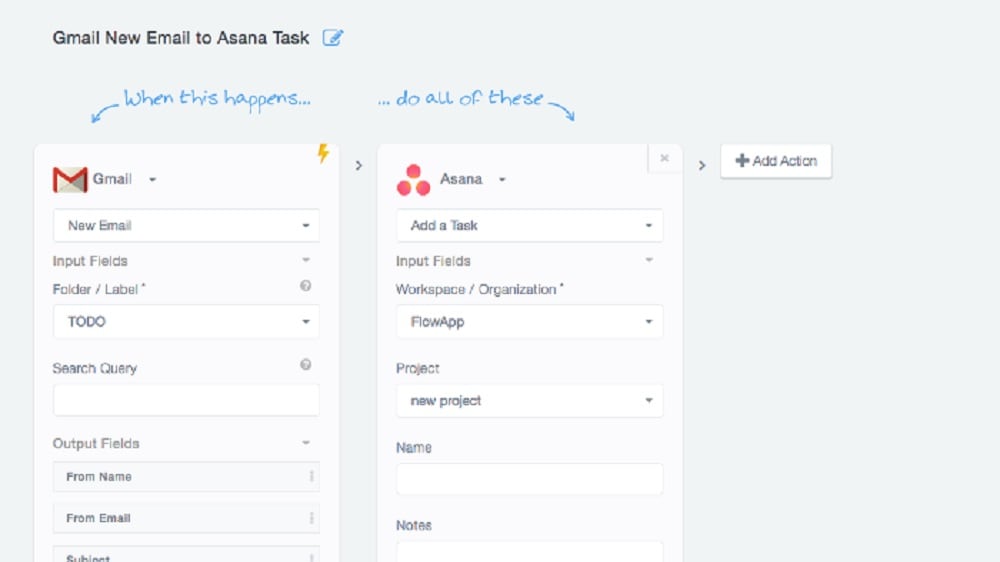
Asana streamlines work requests using custom rules and forms.
Both Asana and Smartsheet recognize the importance of automation in modern workflow, offering features to automate recurring tasks. Asana streamlines work requests using custom rules and forms. For instance, you can create rules that automatically assign tasks based on specific triggers or conditions, ensuring tasks flow seamlessly through your workflow. Forms facilitate the capture of structured data, automating data input processes and reducing manual errors.
On the other hand, Smartsheet employs automation to free up valuable time for users to concentrate on more strategic aspects of their work. It allows you to automate actions based on changes in sheets, ensuring that repetitive tasks are executed without manual intervention.
Smartsheet's Cloud-Based Accessibility Trumps Asana for Remote Collaboration
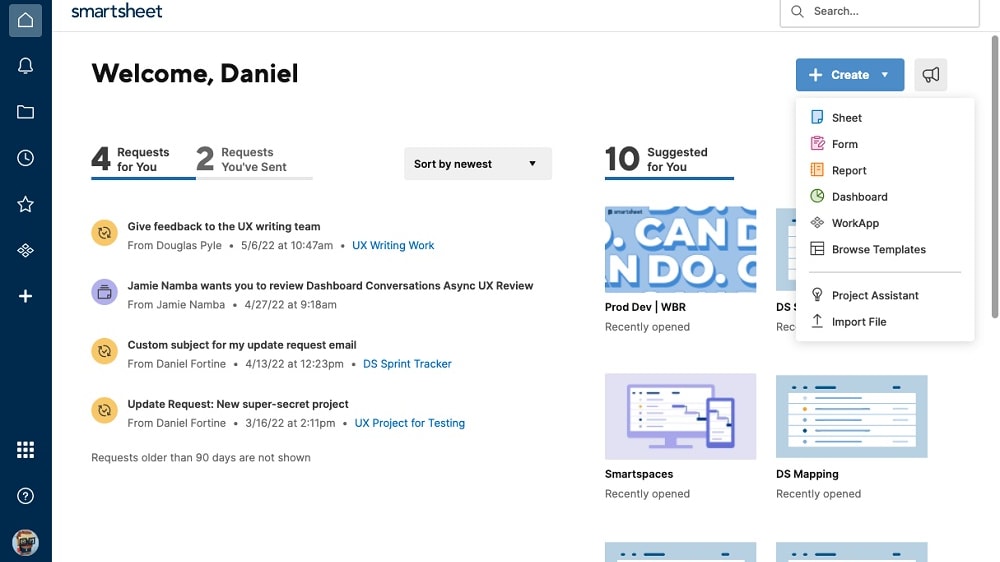
Smartsheet's cloud infrastructure allows users to access their work from anywhere, facilitating seamless on-the-go productivity and accommodating teams spread across different locations.
Smartsheet takes the lead with its robust cloud-based functionality. Smartsheet's cloud infrastructure allows users to access their work from anywhere, facilitating seamless on-the-go productivity and accommodating teams spread across different locations.
Smartsheet's superior accessibility ensures that remote teams can collaborate effectively without geographical constraints. Team members can update project data, track progress, and communicate in real-time, regardless of their physical location. This accessibility is especially valuable in today's world, where remote work and distributed teams have become increasingly prevalent.
In contrast, while Asana offers shared spaces and project visualization options, it currently falls behind Smartsheet in terms of tool accessibility. Users may encounter limitations when trying to access Asana from different locations or devices, potentially hindering the efficiency of geographically dispersed teams.
Asana's User-Friendly Interface Trumps Smartsheet's Complexity

Asana's advantage is immediately apparent with its visually appealing interface, featuring an aesthetically pleasing color palette and an intuitive design
When it comes to user-friendly interfaces and ease of navigation, Asana excels ahead of Smartsheet. Asana's advantage is immediately apparent with its visually appealing interface, featuring an aesthetically pleasing color palette and an intuitive design. Its main dashboard is thoughtfully structured, facilitating efficient task management, project setup, and team communication. For instance, users can effortlessly create tasks, assign them to team members, and set due dates with just a few clicks.
In contrast, Smartsheet relies on a spreadsheet-like interface that may pose challenges for users not well-versed in similar environments, such as Microsoft Excel. This learning curve can be especially steep for individuals without technical backgrounds or extensive spreadsheet experience.
Asana's Process Customization Outshines Smartsheet for Enhanced Workflow Flexibility
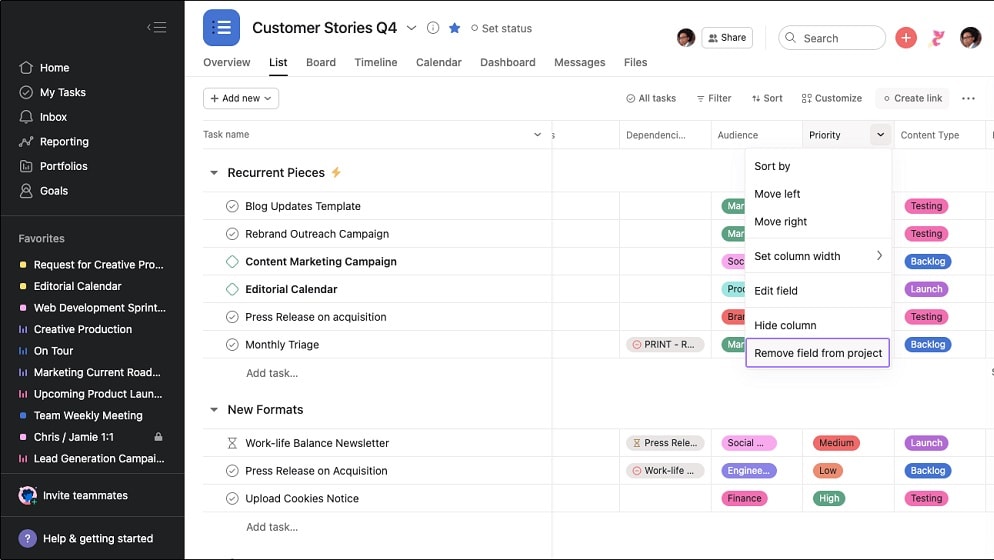
Asana excels at providing users with the flexibility to tailor their processes to specific needs, whether it's managing product development, handling IT requests, or overseeing creative development projects.
When comparing Asana and Smartsheet in terms of process customization and workflow flexibility, Asana emerges as the superior choice. Asana excels at providing users with the flexibility to tailor their processes to specific needs, whether it's managing product development, handling IT requests, or overseeing creative development projects.
Asana empowers users to create and customize workflows with dedicated task generators, ensuring seamless inter-team coordination. For instance, you can set up automated workflows that streamline project approval processes, assign tasks based on project milestones, and create customized templates for recurring projects, all within the platform.
On the other hand, while Smartsheet offers real-time collaboration capabilities, it doesn't match Asana's depth of customization for specialized processes. Smartsheet's interface, which leans towards a spreadsheet-style format, may not provide the same level of tailored process management and automation as Asana.
Smartsheet's Robust Project Management Toolbox Surpasses Asana
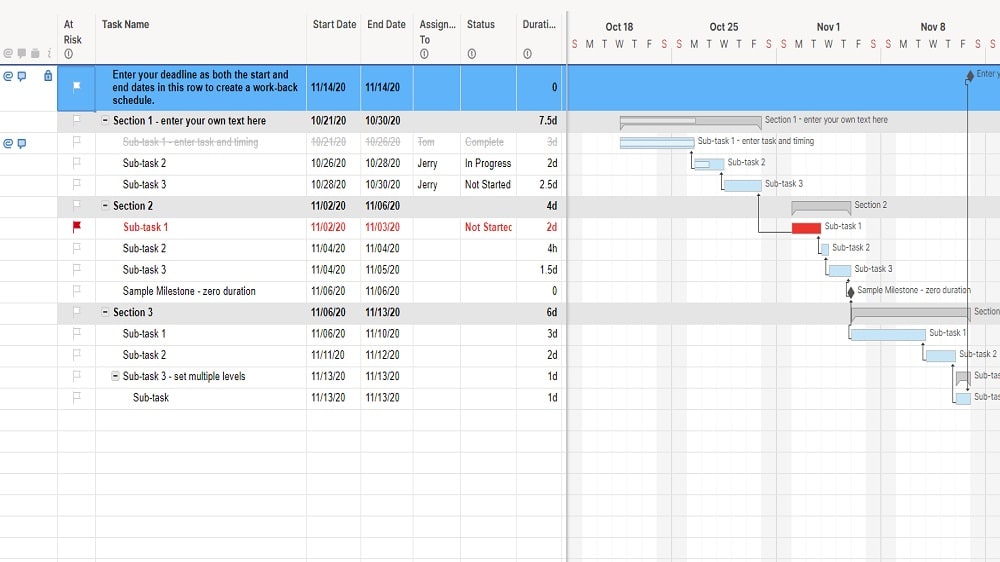
Smartsheet's extensive toolkit includes Gantt charts, interactive calendars, and powerful automated workflows, all designed to simplify project tracking and execution.
When it comes to project management capabilities, both Smartsheet and Asana offer valuable features, but Smartsheet stands out as the leader in this category. Smartsheet's extensive toolkit includes Gantt charts, interactive calendars, and powerful automated workflows, all designed to simplify project tracking and execution.
For instance, Smartsheet's Gantt charts enable users to create visual project timelines, identify critical path tasks, and visualize dependencies among tasks. This aids in efficient project planning and ensures teams stay on track with project schedules.
While Asana offers its timeline view for project visualization and dependency management, it doesn't match the breadth of project management tools that Smartsheet provides. Smartsheet's comprehensive set of features empowers project managers to handle complex projects with precision and ease.
Smartsheet's Extensive Integration Ecosystem Outpaces Asana
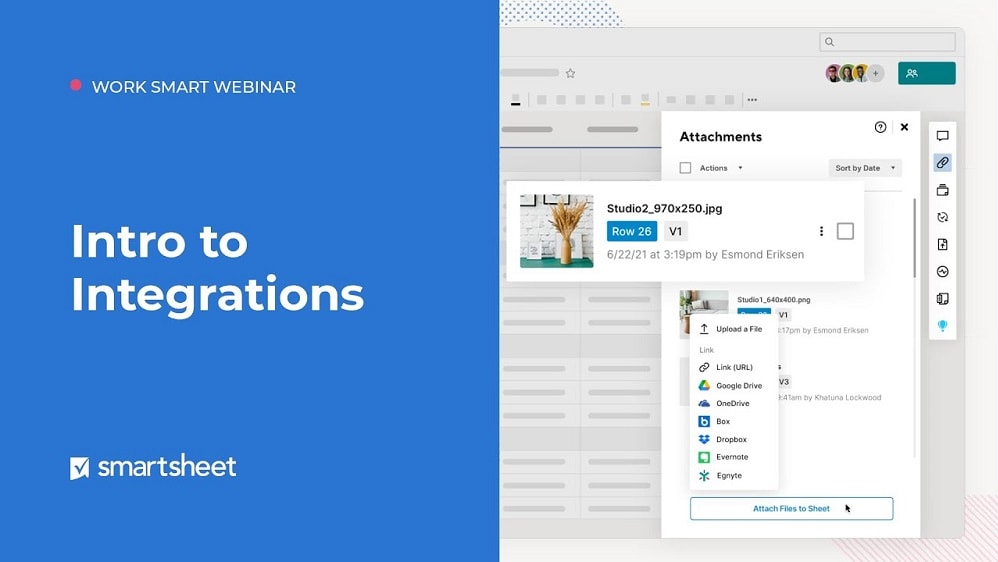
Smartsheet's extensive integration ecosystem enhances its compatibility with a broader range of third-party tools
When evaluating the integration capabilities of both Asana and Smartsheet, it becomes evident that both tools offer impressive connectivity with a wide array of software applications. However, in this regard, Smartsheet holds a slight advantage. While Asana boasts integration with over 200+ apps, including popular ones like Slack, Microsoft Teams, and Gmail, Smartsheet takes it a step further, offering integration with over 300+ applications.
Smartsheet's extensive integration ecosystem enhances its compatibility with a broader range of third-party tools. For example, it seamlessly integrates with Tableau, Salesforce, Google Workspace, and many more. This extended connectivity can be particularly advantageous for businesses that rely on diverse sets of software tools in their daily operations.
08 Asana vs Smartsheet: Which is the best for your business?
Asana is the best tool for you if:
- You need a user-friendly project management platform that simplifies task tracking and collaboration, enhancing team productivity effortlessly.
- You seek a comprehensive solution to streamline project workflows, from planning and scheduling to execution and reporting.
- You value customizable features and integrations, allowing you to tailor the platform to your specific project management needs.
- You desire a platform that fosters transparency within your team, promoting clear communication and accountability.
- You want to enhance your overall project management efficiency, enabling you to meet deadlines and achieve your goals with ease.
 You need a user-friendly project management platform that simplifies task tracking and collaboration, enhancing team productivity effortlessly.
Smartsheet is the best tool for you if:
- You require a versatile work management platform that combines spreadsheet functionality with project planning and collaboration features seamlessly.
- You need a solution that empowers teams to create, automate, and manage various work processes, from project tracking to resource allocation.
- You value scalability and want to accommodate both simple task lists and complex project portfolios within a single platform.
- You seek real-time visibility into project status and progress, allowing for informed decision-making and improved accountability.
- You aim to enhance productivity by automating repetitive tasks, creating custom workflows, and integrating with other essential business tools.
Asana
Premium
Project management platform
75% off the annual Starter and Advanced plans for 1 year
Save up to $22,491
09 Alternatives to Asana & Smartsheet

Notion
Used by 20586 members
3 months free on the Business plan with Unlimited AI
Save up to $720

Google Workspace
Used by 10298 members
20% off Standard plans for 1 year
Save up to $3,460

Airtable
Used by 8755 members
$1,000 in credits on licences for 1 year
Save up to $1,000

Slack
Used by 3955 members
25% off new plan purchases
Save up to $9,000
10 Promotions on Collaboration software
Asana and Smartsheet are great tools, but Secret offers promo codes with discounts on over 2240+ different SaaS solutions. New deals are added regularly, helping you save money on your online subscriptions. Get access to codes for other Collaboration software you might want to purchase
Promo codes for Google Workspace
20% off Standard plans for 1 year
Promo code for Airtable
$1,000 in credits on licences for 1 year
Discount for Notion
3 months free on the Business plan with Unlimited AI
Code for Slack
25% off new plan purchases

Credits for Miro
$1,000 in credits (lifetime validity)

Credits for Monday
First month free

ClickUp promo
Additional 20% off Unlimited and Business plans for 1 year

bolt.new discount code
20% off all plans for the first 3 months

Discount for xTiles
20% off monthly or annual plans

Deal for Google Drive
20% off Standard plans for 1 year
Start saving on the best SaaS
Secret has already helped tens of thousands of startups save millions on the best SaaS like Microsoft Teams, Google Workspace & many more. Join Secret now to buy software the smart way.