


In the modern business environment, project management tools are no longer a luxury; they are a necessity. The quest to find the best project management tool can be overwhelming, given the multitude of options available. It's not merely about finding a tool; it's about finding the right tool that best aligns with your business needs and goals.
In this comprehensive guide, we delve into a detailed comparison between two of the industry’s leading project management tools: Airtable and Smartsheet. We’ll dissect their features, ease of use, customization capabilities, and much more to provide you with the information you need to make a better-informed decision.
- 01 Airtable vs Smartsheet: overview
- 02 What's the difference between Airtable and Smartsheet?
- 03 Airtable pros and cons
- 04 Smartsheet pros and cons
- 05 Airtable compared to Smartsheet
- 06 Smartsheet compared to Airtable
- 07 Features comparison
- 08 Airtable vs Smartsheet: Which is the best for your business?
- 09 Alternatives to Airtable & Smartsheet
- 10 Promotions on Collaboration software
Start saving on the best SaaS
Secret has already helped tens of thousands of startups save millions on the best SaaS like Microsoft Teams, Google Workspace & many more. Join Secret now to buy software the smart way.

01 Airtable vs Smartsheet: overview
Airtable and Smartsheet are prominent contenders in the world of collaborative work management and data organization software, each bringing a unique set of features and capabilities to the table.
Airtable excels with its flexible database and spreadsheet hybrid, offering users a platform to create custom workflows, design databases, and manage projects with ease. It's highly visual and user-friendly, making it suitable for a wide range of use cases, from project management to event planning. On the other hand, Smartsheet is a robust work management and collaboration tool, ideal for businesses looking to streamline processes and manage projects with Gantt charts, resource management, and automation. It caters to diverse industries, from marketing and finance to construction and healthcare.
Now, let's explore the Airtable vs Smartsheet comparison to help you make an informed decision about selecting the right collaborative work management and data organization solution for your specific business needs.

Ease of Use
Both platforms are intuitive and user-friendly, but Airtable’s extensive customization features can introduce a steeper learning curve for some new users.

Airtable
Smartsheet
Customization
Airtable offers a level of customization that is unparalleled, allowing users to create intricate workflows and data structures, which is not as easily achievable in Smartsheet.
Airtable
Smartsheet
Collaboration
Both platforms excel in collaboration with features like real-time updates, task assignments, and file sharing. However, they cater to different types of collaborative efforts based on project complexity.
Airtable
Smartsheet
Resource Management
Smartsheet stands out for its advanced resource management features, making it a more suitable choice for large projects with intricate resource allocation needs.
Airtable
Smartsheet
Learning Curve
Smartsheet offers a more straightforward approach for newcomers. Airtable, while powerful, may require a longer time investment to understand its full range of capabilities.
Airtable
Smartsheet
Integrations
Both offer a wide array of third-party integrations. Smartsheet has a slight advantage with more ready-to-use, out-of-the-box solutions for enterprise users. They both integrate with top saas including Integrates with over 1,000 apps and services, including Zapier, Slack, Google Workspace, Microsoft 365, and Salesforce among others.
Airtable
Smartsheet
Scalability
Both platforms are highly scalable but Smartsheet provides more enterprise-level features, which may be essential for larger or rapidly-growing organizations.
Airtable
Smartsheet
Customer Support
Both platforms offer reliable customer support with various channels of communication. Smartsheet is often cited for its rapid problem resolution, making it slightly better in urgent scenarios.
Airtable
Smartsheet
Customer Reviews
Both platforms are highly regarded, with users often praising their versatility. Airtable slightly edges out due to its user-friendly interface and customization options.
Airtable
Smartsheet
Pricing Plan
Airtable's free forever plan makes it an attractive choice for small teams or startups, whereas Smartsheet’s free plan has limited usage allowance in many of its features, making it more cost-value prohibitive for smaller operations. The paid plan billed monthly starts at $7 for Smartsheet and $24 for Airtable, allowing Smartsheets to be more cost-effective with significant capabilities.
Airtable
Smartsheet
02 What's the difference between Airtable and Smartsheet?
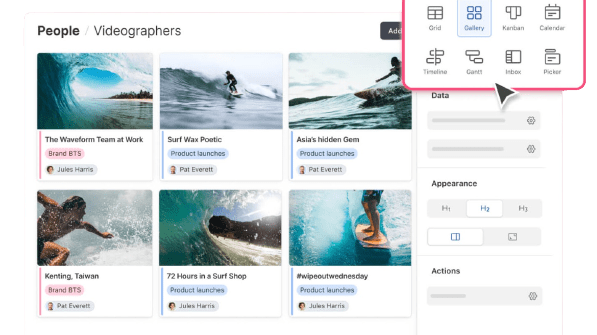
Airtable's Design and Customization Options for Your Own Application
Airtable
Easily store and organize your data

Smartsheet's Resource Management for Easy Access to Team Availability and Resource Planning
Smartsheet
Smartsheet provides a cloud-based platform for flexible work management and automation, empowering teams and organizations to plan, track, automate, and report on work.
Airtable and Smartsheet are both robust platforms designed to enhance project management, but they diverge significantly when it comes to their core functionalities and ideal use-cases.
Firstly, let's talk about customization and flexibility. Airtable's unique selling point is its incredible customization capabilities. This tool can transform into whatever you need it to be, from a CRM to a content management system, or even an inventory tracker. The built-in database engine allows users to create complex relational databases without any coding. This means that Airtable can evolve along with your project or business needs. In contrast, Smartsheet is designed to be a project management tool from the ground up. While it does offer a good degree of customization with its features like Gantt charts, project timelines, and resource management, these elements are fine-tuned for project management tasks as compared to Airtable's jack-of-all-trades approach.
The second significant difference lies in the type of projects each platform excels at. Smartsheet is ideal for complex projects with multiple dependencies. Its resource management capabilities, coupled with specialized views like Gantt charts, make it a strong contender for industries like construction, large-scale event planning, or extensive software development projects. Airtable, on the other hand, may not have native Gantt chart functionalities such as automatic data adjustments or start/end data display customizations, but its varied views including grids, calendars, and Kanban boards make it exceptionally flexible. This flexibility makes it better suited for more creative or agile projects where tasks and priorities can change frequently.
Finally, let's delve into pricing and scalability. Airtable offers a 'Free Forever' plan, which is an excellent starting point for small teams or startups to experiment and understand the platform's capabilities. Smartsheet does offer a free plan, but has less accessibility compared to Airtable, making it a bit less accessible for smaller companies or individual users. Yet, when comparing paid plans, Smartsheets is significantly cheaper. However, when it comes to scalability, both platforms offer a lot. Smartsheet edges out with its enterprise-level solutions and features that are geared toward larger organizations, whereas Airtable, though scalable, may require third-party integrations or manual workarounds for more complex, enterprise-level operations.

Airtable
Premium
Easily store and organize your data
$1,000 in credits on licences for 1 year
Save up to $1,000
03 Airtable pros and cons
What are the advantages of Airtable?
- Flexibility and customization: Airtable allows you to create customized databases, spreadsheets, and project management tools with ease. You can tailor it to your specific needs, making it suitable for a wide range of use cases.

- User-friendly interface: Airtable offers an intuitive and visually appealing interface, making it accessible to users of all levels, from beginners to advanced users.
- Collaboration: It excels in collaborative work, allowing multiple users to edit and comment on data simultaneously. Real-time collaboration features make it an excellent choice for team projects.
- Integration capabilities: Airtable supports a variety of integrations with other software and services, including popular apps like Slack, Zapier, and Google Workspace, which can enhance its functionality.
- Mobile accessibility: Airtable has mobile apps for both iOS and Android, enabling you to access and edit your data on the go, which is essential for businesses with remote or field workers.
What are the disadvantages of Airtable?
- Pricing: While Airtable offers a free plan, more advanced features and higher usage levels come at a cost, and this can become expensive as your needs grow.

- Limited advanced features: Although Airtable is highly customizable, it may lack some of the advanced features found in dedicated software for specific tasks, such as advanced project management or complex data analysis.
- Scaling challenges: Airtable may face limitations when it comes to scaling for very large datasets or complex enterprise-level operations.
- Learning curve: While it's user-friendly, creating complex databases or workflows may still require some learning, and beginners might need time to get up to speed.
- Offline access: Airtable relies heavily on an internet connection, which may not be ideal for users who need offline access to their data.
Compare Airtable to other tools


Airtable vs Monday


Airtable vs Asana

Airtable vs Coda

Airtable vs Excel

Airtable vs Google Sheets

Pipedrive vs Airtable
04 Smartsheet pros and cons
What are the advantages of Smartsheet?
- Versatile project management: Smartsheet is a versatile project management and collaboration tool that enables users to create Gantt charts, task lists, and other project-related structures. It's well-suited for managing a variety of project types.
- User-friendly interface: Smartsheet offers an intuitive and familiar spreadsheet-like interface, making it accessible to users with varying levels of expertise.
- Collaboration and teamwork: Smartsheet excels in team collaboration. It allows real-time collaboration, file sharing, and commenting on tasks, which is essential for project teams and remote work.
- Automation and integration: Smartsheet supports automation through workflows and offers a range of integrations with popular apps such as Microsoft Office, Google Workspace, and Trello, enhancing its functionality.
- Templates and reports: Smartsheet provides a library of templates for various use cases, saving time and effort in creating project plans. It also offers robust reporting and data visualization capabilities.
What are the disadvantages of Smartsheet?
- Cost: Smartsheet can be relatively expensive, especially if you require advanced features, and the cost may increase as your organization's needs grow
- Complexity for novice users: While the interface is user-friendly, creating complex project plans and workflows may require a learning curve for less experienced users.
- Limited database capabilities: Smartsheet is not designed as a full-fledged database system, which may limit its functionality for users requiring advanced database management.
- Scaling challenges: Smartsheet may face limitations in handling very large projects or complex enterprise-level operations, potentially leading to performance issues.
- Dependency on internet connection: Smartsheet heavily relies on an internet connection, which may be a limitation in environments with poor connectivity or when users need offline access.
Compare Smartsheet to other tools

Asana vs Smartsheet
05 Airtable compared to Smartsheet
When comparing Airtable and Smartsheet, Airtable stands out with its flexible database and spreadsheet hybrid, offering users the ability to create highly customizable databases, spreadsheets, and project management tools. It's a top choice for those looking for tailored, adaptable solutions for diverse tasks, from project tracking to inventory management. Airtable's strength lies in its capacity to provide versatile and visually appealing data organization.
The choice between Airtable and Smartsheet depends on the level of customization, versatility, and visual appeal required for your data management and collaboration needs. Airtable excels in providing flexible and visually engaging solutions, while Smartsheet offers a more structured and spreadsheet-like approach, ideal for managing various projects and tasks with a familiar interface.
Is Airtable better than Smartsheet?
 Is Airtable better than Smartsheet?
Determining whether Airtable is better than Smartsheet depends on your specific data management and collaboration requirements. Airtable stands out with its flexibility and versatility, allowing users to create custom databases, spreadsheets, and project management tools. It's the go-to choice for those seeking tailored and adaptable solutions for a wide range of tasks, from task tracking to content planning. Its strength lies in its capacity to provide highly customizable and visually engaging data organization.
On the other hand, Smartsheet offers a structured and spreadsheet-like approach, ideal for managing projects and tasks with a familiar interface. It's a comprehensive work management and collaboration tool that caters to various industries. The choice between Airtable and Smartsheet depends on your need for customization, versatility, and your preference for a visually engaging platform versus a structured, spreadsheet-oriented solution for data management and collaboration.
What is Airtable best used for?
Airtable excels as a highly flexible and adaptable data organization and collaboration platform. It is best used for businesses and individuals seeking to create custom solutions for their specific needs. Airtable empowers users to build databases, spreadsheets, and project management tools tailored to their unique requirements. This makes it ideal for a wide range of use cases, from project tracking to content planning and event management.
With its visual and user-friendly interface, it enables users to collaborate on data and projects seamlessly. Airtable's strength lies in its capacity to provide versatile and visually engaging data organization, making it a valuable tool for businesses and individuals looking to streamline their data management and collaboration efforts in a way that suits their specific workflows and preferences.
Can Airtable replace Smartsheet?
Whether Airtable can replace Smartsheet depends on your specific data management and collaboration needs. Airtable excels in its flexibility and adaptability, allowing users to create highly customizable databases, spreadsheets, and project management tools tailored to their unique requirements. It's an excellent choice for those looking for versatile and visually engaging data organization.
The decision between Airtable and Smartsheet hinges on the level of customization, versatility, and visual appeal you require for your data management and collaboration. Airtable is a great choice for highly customized solutions, while Smartsheet provides a more structured and spreadsheet-oriented platform for data management and collaboration.
Is Airtable cheaper than Smartsheet?
When it comes to pricing, it's important to consider the differences between Airtable and Smartsheet. Airtable's pricing structure can often be more budget-friendly for businesses due to its flexible approach that lets you pay for the features and user levels you require. This flexibility can be a significant advantage for businesses seeking to align their expenses with their specific needs.
In contrast, Smartsheet employs a tiered pricing model that may become more expensive as your requirements grow. While Smartsheet offers a free basic plan, accessing advanced features and scaling up may lead to higher expenses. Therefore, businesses looking for a cost-effective solution should carefully evaluate the pricing models of Airtable and Smartsheet to determine the best fit for their budget and requirements.
Is there a better Collaboration software than Airtable?
While Airtable is highly regarded for its flexible data organization and collaboration capabilities, it's important to explore whether there might be a more suitable software for your specific needs.
Several notable alternatives to Airtable in the data organization and collaboration space include Smartsheet, Microsoft Excel, Google Sheets, and Notion.
The choice of data organization and collaboration software depends on your specific goals, budget, and the level of customization and collaboration features you require. While Airtable excels in providing a highly customizable and visually engaging platform, other software may offer more structured spreadsheet-like solutions or seamless integration with your existing tools that align better with your data management and collaboration objectives.
Airtable
Premium
Easily store and organize your data
$1,000 in credits on licences for 1 year
Save up to $1,000
06 Smartsheet compared to Airtable
Smartsheet distinguishes itself with its structured and spreadsheet-oriented approach, making it an appealing choice for organizations seeking a familiar interface for project management and data organization. Smartsheet's pricing structure offers a range of plans, accommodating users with varying project and collaboration needs, regardless of their budget.
While both Smartsheet and Airtable excel in data management and collaboration, the choice between the two depends on your specific requirements. Smartsheet provides a structured and spreadsheet-like solution for businesses and individuals aiming to manage projects and tasks using a recognizable interface. It's ideal for those looking to leverage a structured approach and a broad range of project management features while maintaining flexibility in their collaboration.
Is Smartsheet better than Airtable?
Determining whether Smartsheet is better than Airtable centers on your specific data management and collaboration needs and objectives. Smartsheet is notable for its structured and spreadsheet-oriented approach, making it a suitable choice for businesses and individuals seeking a familiar interface for project management and data organization. If you prioritize having a structured and spreadsheet-like platform for your projects and data, Smartsheet may be the preferable choice.
However, it's important to acknowledge that Airtable excels in providing highly customizable and visually engaging solutions, allowing users to build tailored databases and project management tools. If your primary focus is on flexibility, adaptability, and visual appeal in data organization and collaboration, Airtable remains a compelling option.
What is Smartsheet best used for?
Smartsheet is a highly structured and spreadsheet-oriented platform, making it best suited for businesses and individuals looking to manage projects, tasks, and data with a familiar interface. It excels in project management, offering features like Gantt charts, task lists, and resource management.
Smartsheet's structure is ideal for businesses seeking to plan and execute projects, monitor progress, and collaborate on tasks effectively. It provides a unified platform for project tracking, collaboration, and data organization. Additionally, Smartsheet's reporting and data visualization tools empower data-driven decision-making, making it an ideal choice for organizations prioritizing structured project management and data organization strategies.
Can Smartsheet replace Airtable?
Whether Smartsheet can effectively replace Airtable depends on your specific data management and collaboration needs. Smartsheet is structured and spreadsheet-oriented, making it a compelling choice for businesses and individuals looking for a familiar platform for project management and data organization.
However, Airtable is highly flexible and visually engaging, offering customization and adaptability. If your primary focus is on versatile and visually appealing data organization and collaboration, Airtable may offer features and capabilities that align better with your specific data management and collaboration strategy.
Is Smartsheet cheaper than Airtable?
When comparing the cost of Smartsheet and Airtable, it's important to consider the differences in their pricing models. Smartsheet typically offers a range of plans, accommodating users with various project and collaboration needs, including a free basic plan. However, accessing advanced features and scaling up may result in higher expenses.
On the other hand, Airtable's pricing is often structured based on the features and user levels you need, potentially providing a more cost-effective choice, especially for businesses and individuals seeking to align their expenses with their specific data management and collaboration requirements.
Is there a better Collaboration software than Smartsheet?
While Smartsheet is a powerful and structured project management and collaboration tool, it's important to explore whether there might be a more suitable software solution for your specific needs.
Several notable alternatives to Smartsheet in the project management and collaboration software space include Airtable, Microsoft Project, Trello, and Wrike.
The choice of project management and collaboration software should align with your unique objectives, budget, and the level of customization and collaboration features you require. While Smartsheet offers structured and spreadsheet-like solutions, other platforms may offer more flexibility, visual appeal, or specialized tools that better match your data management and collaboration needs and goals.
07 Features comparison
Airtable Excels Ahead of Smartsheet in User-Friendly Design

The vibrant, aesthetically pleasing grid view in Airtable facilitates effortless data organization and customization.
Airtable boasts an edge in user-friendliness over Smartsheet. Its intuitive design ensures users enjoy a seamless interaction, easing navigation and efficient use of the platform. The vibrant, aesthetically pleasing grid view in Airtable facilitates effortless data organization and customization.
Conversely, Smartsheet, with its undeniable functionality, can sometimes come across as intricate, particularly for newcomers. Its conventional spreadsheet design might not resonate with everyone, possibly feeling less immersive. Consequently, for business enthusiasts prioritizing a tool that requires minimal acclimation and promises an engaging interface, Airtable emerges as the undoubted champion in this comparison.
Airtable is Best for Data Visualization Compared to Smartsheet
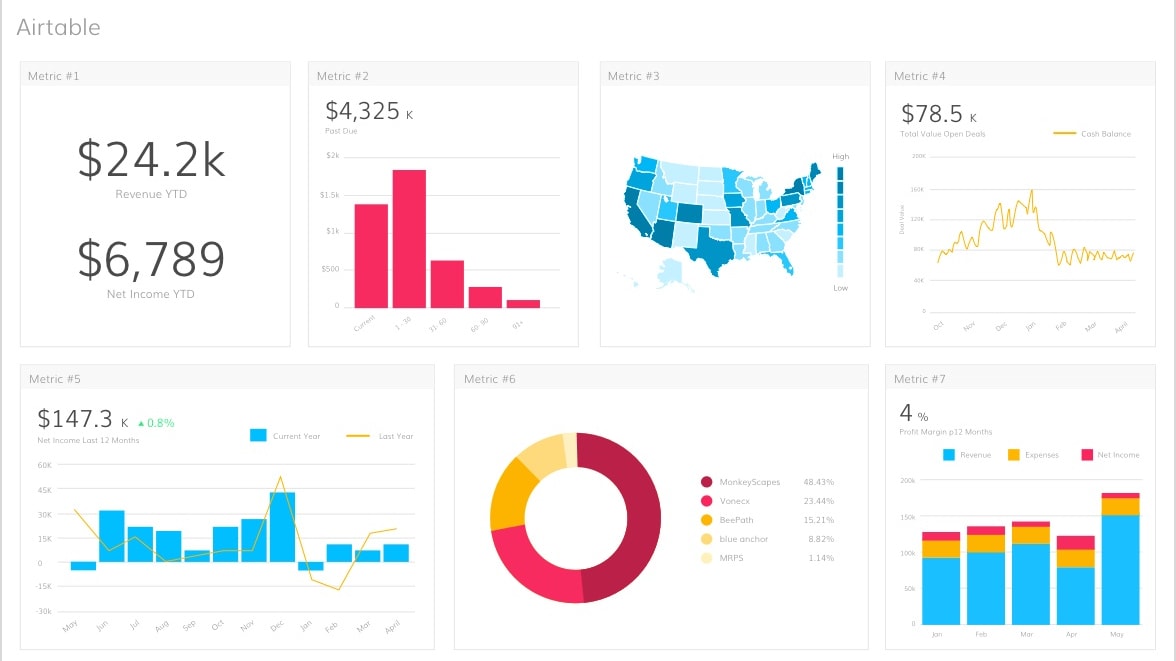
Airtable stands out for its prowess in converting raw data into visually comprehensible segments via its integrated charting mechanisms
Airtable stands out for its prowess in converting raw data into visually comprehensible segments via its integrated charting mechanisms. Users can harness this to craft pie charts, bar graphs, and line charts, elucidating discernible patterns, trends, and intricate relationships inherent in the data. This facilitates clearer insights and enhanced understanding.
Contrarily, Smartsheet doesn't place an equally strong emphasis on this facet of data visualization. When comparing the two, if visualization prowess is paramount, Airtable undeniably takes the lead, serving as an invaluable tool.
Smartsheet Excels Ahead of Airtable in Project Management

Smartsheet distinguishes itself with intricate tracking tools, notably Gantt charts and automated processes.
Both Smartsheet and Airtable aid in project management, but Smartsheet distinguishes itself with intricate tracking tools, notably Gantt charts and automated processes. It converges all project-centric tasks, streamlining management and offering a consolidated view. Airtable, competent in its own right, doesn't quite rival Smartsheet when zeroing in on these specialized project tools.
If project tracking precision and automation are at the forefront of needs, Smartsheet clearly emerges superior in this comparison. Yet, the choice ultimately hinges on users' specific tool preferences.
Both Airtable and Smartsheet Provide Equally Robust Workflow Automation Capabilities

Airtable's capability to set conditional rules for sequential actions contrasts with Smartsheet's proficiency in automating routine tasks.
Smartsheet and Airtable are both engineered to heighten productivity through automation of recurring tasks and standard business operations. Airtable's capability to set conditional rules for sequential actions contrasts with Smartsheet's proficiency in automating routine tasks.
Essentially, both platforms aim to minimize mundane efforts, enabling users to shift their focus to more impactful activities. By reducing manual interventions and streamlining processes, these tools are instrumental in amplifying efficiency. While each has its unique features, their common goal remains clear: enhancing productivity by mitigating trivial tasks.
Smartsheet is Superior in Expense Management Compared to Airtable

Designed with business requisites in mind, Smartsheet boasts a distinctive expense tracking feature. It empowers users to classify and associate expenses with particular projects, streamlining financial oversight.
Designed with business requisites in mind, Smartsheet boasts a distinctive expense tracking feature. It empowers users to classify and associate expenses with particular projects, streamlining financial oversight. In contrast, Airtable doesn't emphasize such detailed expense tracking, directing its strengths towards broader data management.
While Smartsheet provides a refined tool for meticulous financial assessment linked to projects, Airtable attends more holistically to diverse data needs. For businesses zeroing in on precise expense management, Smartsheet's specialized capability might be more appealing.
Smartsheet’s Impressive Integration Ecosystem Outperforms Airtable’s

Smartsheet's extensive integration potential lets users synchronize effortlessly with vital platforms, such as Microsoft Office 365, Google Workspace, and Salesforce
Integration capabilities are pivotal in SaaS software selection. Comparing Airtable and Smartsheet, the latter significantly excels in this domain. Smartsheet's extensive integration potential lets users synchronize effortlessly with vital platforms, such as Microsoft Office 365, Google Workspace, and Salesforce. These connections ensure fluid data transfer across platforms, optimizing efficiency and productivity.
On the other hand, Airtable, while offering integration features, has a narrower range, majorly aligning with cloud storage solutions like Dropbox and Google Drive. For organizations leveraging a diverse set of software tools and seeking comprehensive integration opportunities, Smartsheet clearly emerges as the more fitting choice.
Airtable Offers More Fluid Collaboration than Smartsheet
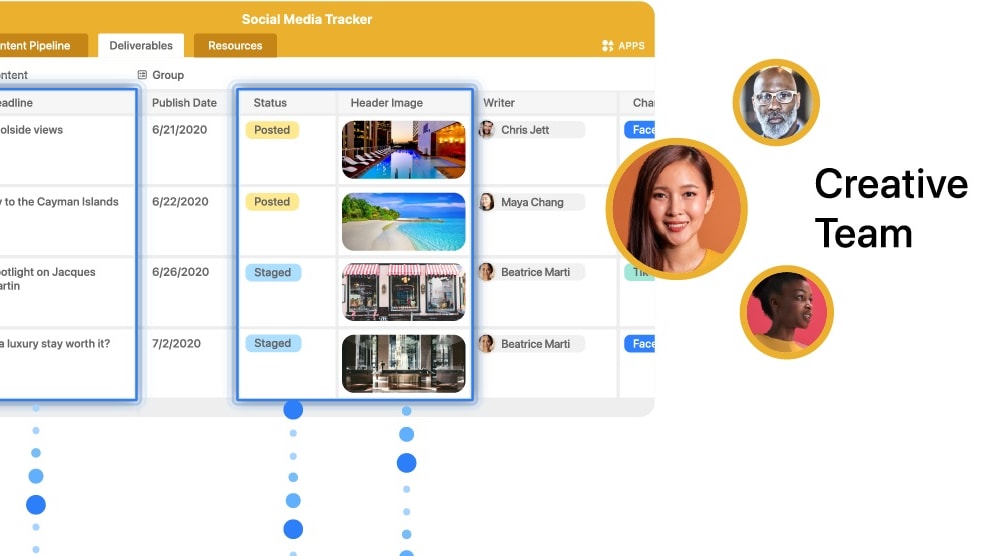
Airtable champions real-time collaboration, permitting several users to operate on a unified base concurrently, thereby bolstering teamwork and efficiency.
Airtable champions real-time collaboration, permitting several users to operate on a unified base concurrently, thereby bolstering teamwork and efficiency. In contrast, Smartsheet, although equipped with collaboration tools, doesn't provide as seamless an experience when it comes to simultaneous work on datasets.
The intuitive co-working environment Airtable crafts holds a distinct advantage in fostering instantaneous teamwork. While both tools aim to facilitate cooperation, for those prioritizing on-the-spot collaboration within datasets, Airtable might hold a more palpable edge.
08 Airtable vs Smartsheet: Which is the best for your business?
Airtable is the best tool for you if:
- You need a versatile platform that seamlessly combines project management, collaboration, and automation functionalities.
- Real-time collaboration with team members, tracking project progress, and customizable templates are crucial for your operations.
- You value integrating various apps and tools, ensuring a unified workspace that boosts productivity and efficiency.
- Robust reporting, dashboards, and visualization tools are essential to derive insights and drive decision-making processes.
- You're seeking a cloud-based solution that's user-friendly, scalable, and consistently offers innovative updates and improvements.
 You need a versatile platform that seamlessly combines project management, collaboration, and automation functionalities.
Smartsheet is the best tool for you if:
- You desire a flexible workspace merging the simplicity of a spreadsheet with the complexity of robust relational databases.
- Custom views like kanban, grid, calendar, and gallery are essential to visualize and manage your diverse projects.
- Integration with other apps and automating workflows without code to streamline processes and enhance productivity is crucial.
- You appreciate a platform where you can build custom apps tailored to your team's specific needs and objectives.
- Collaboration in real-time, rich field types, and dynamic content are paramount to your operations and data organization.
Airtable
Premium
Easily store and organize your data
$1,000 in credits on licences for 1 year
Save up to $1,000
09 Alternatives to Airtable & Smartsheet

Notion
Used by 21,598 members
3 months free on the Business plan with Unlimited AI
Save up to $720

Make
Used by 12,653 members
3 months free on the Teams plan (240k credits included)
Save up to $600

Slack
Used by 4,047 members
25% off new plan purchases
Save up to $9,000

ClickUp
Used by 3,461 members
Additional 20% off Unlimited and Business plans for 1 year
Save up to $1,000
10 Promotions on Collaboration software
Airtable and Smartsheet are great tools, but Secret offers promo codes with discounts on over 2250+ different SaaS solutions. New deals are added regularly, helping you save money on your online subscriptions. Get access to codes for other Collaboration software you might want to purchase

Google Workspace offer
20% off Standard plans for 1 year
Deal for Notion
3 months free on the Business plan with Unlimited AI
Slack coupon code
25% off new plan purchases

Promo code for Miro
$1,000 in credits (lifetime validity)

Promo code for Monday
First month free

Deal for Asana
75% off the annual Starter and Advanced plans for 1 year
Promo codes for ClickUp
Additional 20% off Unlimited and Business plans for 1 year

Credits for bolt.new
20% off all plans for the first 3 months

Deal for xTiles
20% off monthly or annual plans

Google Drive promotion
20% off Standard plans for 1 year
Start saving on the best SaaS
Secret has already helped tens of thousands of startups save millions on the best SaaS like Microsoft Teams, Google Workspace & many more. Join Secret now to buy software the smart way.