


When it comes to optimizing your sales processes and effectively managing your business operations, having access to the right tools is paramount. Two notable options for enhancing your sales and data management are Pipedrive and Airtable. These platforms offer a range of features and functionalities, each with its own distinct advantages and limitations.
Pipedrive and Airtable cater to different aspects of business operations, and your choice between the two will largely depend on your specific business needs. In this article, we'll explore the key differences between Pipedrive and Airtable to help you make an informed decision and select the best solution to streamline your sales and data management processes, ultimately contributing to the growth and success of your business.
- 01 Pipedrive vs Airtable: overview
- 02 What's the difference between Pipedrive and Airtable?
- 03 Pipedrive pros and cons
- 04 Airtable pros and cons
- 05 Pipedrive compared to Airtable
- 06 Airtable compared to Pipedrive
- 07 Features comparison
- 08 Pipedrive vs Airtable: Which is the best for your business?
- 09 Alternatives to Pipedrive & Airtable
- 10 Promotions on Prospecting software
Start saving on the best SaaS
Secret has already helped tens of thousands of startups save millions on the best SaaS like Microsoft Teams, Google Workspace & many more. Join Secret now to buy software the smart way.

01 Pipedrive vs Airtable: overview
Pipedrive and Airtable are two notable contenders in the realm of business software, each offering its unique set of capabilities tailored to address the diverse needs of businesses across various industries.
Pipedrive is renowned for its streamlined approach to sales and customer relationship management (CRM), empowering sales teams with tools for lead management, sales pipeline tracking, and automation of sales processes. Its user-friendly interface is particularly appealing to organizations seeking efficiency in their sales efforts. On the other hand, Airtable is a versatile and collaborative database tool designed to handle a wide range of data management tasks. It provides users with the flexibility to create customized databases, project management tools, and more, allowing for a high degree of adaptability to various business needs.
To assist you in making an informed decision between Pipedrive and Airtable for your business management requirements, let's delve into a detailed comparison of their features, strengths, and suitability for different business scenarios.

Data Visualization
Airtable's powerful table creation tools are perfect for data organization, whereas Pipedrive shines brighter in presenting visual sales pipelines, showing a clear growth of leads.

Pipedrive
Airtable
Pricing Plan
Pipedrive offers competitive pricing with various plans. Airtable provides flexible pricing tiers but can become costly as users and features increase.
Pipedrive
Airtable
Ease of Use
Both SaaS tools prioritize a user-friendly interface. While Airtable requires a slight learning curve, it's highly regarded for its ease of use once users get the hang of it.
Pipedrive
Airtable
Customization
Customizability is where Airtable truly excels, allowing users to tailor tables as needed. Pipedrive, in contrast, lags a bit, especially when compared to robust enterprise platforms.
Pipedrive
Airtable
Deployment Options
From cloud-based solutions to desktop applications and mobile apps, both platforms offer a myriad of deployment options, catering to users with different preferences.
Pipedrive
Airtable
Built-in Features
Airtable is equipped with a range of features designed to ensure organized planning. Pipedrive, with its CRM-centric focus, offers specialized functionalities that help in lead management.
Pipedrive
Airtable
Reliability
While Airtable is revered for its consistent and reliable functionalities, Pipedrive has had instances where support clarity was lacking, making it slightly less reliable in dire situations.
Pipedrive
Airtable
Customer Reviews
Pipedrive generally receives positive customer reviews for its sales-focused features. Airtable earns praise for versatile database management and collaboration.
Pipedrive
Airtable
Customer Support
Superior customer service is a hallmark of both platforms. With 24/7 live rep support, phone support, and extensive FAQs, users can expect top-notch service support from both.
Pipedrive
Airtable
Integrations
Pipedrive offers integrations with common tools like MailChimp and Zapier. Airtable excels with a wide range of integrations, including Slack and Google Drive.
Pipedrive
Airtable
02 What's the difference between Pipedrive and Airtable?

Pipedrive is primarily a specialized CRM (Customer Relationship Management) tool, meticulously designed to help businesses manage and optimize their sales processes
Pipedrive
Stay focused on sales and collect more leads with this lead management software

Airtable serves as a versatile database platform, offering the power of a robust database with the user-friendliness of a spreadsheet
Airtable
The power of a relational database, without the need to code or use Excel, is enhanced by AI in Airtable to streamline data organization and optimize workflows efficiently.
Airtable and Pipedrive are distinct tools, each catering to specific business needs. Airtable serves as a versatile database platform, offering the power of a robust database with the user-friendliness of a spreadsheet. It's designed for teams that need to create customized tables and adapt them to their unique workflows. Airtable's flexibility is a standout feature, especially in terms of data visualization and organization. Teams can easily design their workflows or manage projects in a visually appealing and highly customizable environment.
Airtable's strength lies in its ability to create tables that can be tailored to a wide range of professional requirements. While it may pose a slight learning curve for new users, its extensive set of built-in features ensures that tasks like planning, recording, and tracking become more organized and efficient.
On the other hand, Pipedrive is primarily a specialized CRM (Customer Relationship Management) tool, meticulously designed to help businesses manage and optimize their sales processes. Its core focus is on visualizing the growth of leads and opportunities, making it an ideal choice for sales and lead management. With Pipedrive, companies can easily oversee their sales pipelines, ensuring that no potential customer or deal is overlooked. It stands out for its visual representation, offering sales teams a quick snapshot of their sales journey and enabling data-driven decision-making.
Pipedrive's commitment to providing value is evident through its free plan, making it accessible to businesses of various sizes. However, its customization options may not be as extensive as those offered by enterprise-level platforms.
In summary, the difference between Airtable and Pipedrive is clear. Airtable excels in data organization and customization, making it a versatile choice for diverse project management needs. Pipedrive, with its CRM-centric approach, is the preferred solution for businesses looking to optimize their sales pipelines and lead management processes.

Pipedrive
Used by 3028 members
30% off for 12 months
Save up to $3,564

Airtable
Used by 8824 members
$1,000 in credits on licences for 1 year
Save up to $1,000
03 Pipedrive pros and cons
What are the advantages of Pipedrive?
- User-friendly interface: Pipedrive is known for its intuitive and user-friendly interface, which helps sales teams quickly adapt to the platform, reducing the learning curve and boosting productivity.

- Sales pipeline management: Pipedrive excels in managing sales pipelines. It provides a visual and customizable pipeline view, allowing sales teams to track deals, prioritize tasks, and forecast revenue effectively.
- Sales automation: The software offers robust automation features that help streamline repetitive tasks, such as sending emails, assigning leads, and updating deal stages. This automation can save time and improve efficiency.
- Integration capabilities: Pipedrive seamlessly integrates with various third-party apps and services, such as email, calendar, marketing automation, and customer support tools, enhancing its versatility and adaptability to your existing tech stack.
- Sales analytics and reporting: Pipedrive provides comprehensive reporting and analytics features, allowing sales managers and teams to gain insights into performance, track key metrics, and make data-driven decisions to improve sales strategies.
What are the disadvantages of Pipedrive?
- Limited CRM features beyond sales: Pipedrive is primarily designed for sales teams, which means it may lack certain CRM features that are more customer-focused, such as advanced customer support or marketing automation capabilities.

- Pricey for advanced features: While Pipedrive offers competitive pricing for its core features, some advanced features, such as automation and reporting enhancements, are only available in higher-tier plans, which can be costly for small businesses.
- Complex workflow automation: While Pipedrive has automation capabilities, setting up complex workflows may require technical expertise or additional support from Pipedrive's Professional Services, incurring extra costs.
- Data security and compliance: Pipedrive's security features may not meet the stringent requirements of industries with strict compliance regulations, such as healthcare or finance. Users in these sectors may need to consider alternative solutions.
- Steep learning curve for complex uses: While basic usage is straightforward, creating complex databases or workflows can have a steeper learning curve, and users may need time to fully leverage its capabilities.
Compare Pipedrive to other tools


Pipedrive vs Zoho CRM

Pipedrive vs Monday

Pipedrive vs Salesforce

Pipedrive vs Close

Pipedrive vs HubSpot

Pipedrive vs Trello
04 Airtable pros and cons
What are the advantages of Airtable?
- Flexibility and customization: Airtable's strength lies in its flexibility and adaptability. Users can create custom databases and workflows to suit a wide range of needs, from project management and content calendars to inventory tracking and CRM systems.
- User-friendly interface: Airtable features a user-friendly and visually appealing interface that makes it accessible to individuals with varying levels of technical expertise. It combines the familiarity of a spreadsheet with the functionality of a database.
- Collaboration and sharing: Airtable supports real-time collaboration, allowing multiple users to work on the same database simultaneously. Users can also share their databases and project boards with team members, clients, or collaborators easily.
- Integration capabilities: Airtable integrates seamlessly with various third-party apps and services, offering users the ability to connect their data with tools like Slack, Google Drive, and Zapier. This enhances its versatility and utility within existing workflows.
- Cross-platform accessibility: Airtable is accessible on multiple platforms, including web browsers, mobile devices (iOS and Android), and desktop applications (Windows and macOS), ensuring users can access their data and collaborate from anywhere.
What are the disadvantages of Airtable?
- Limited advanced features: While Airtable is highly customizable, it may not offer the same advanced features and capabilities found in dedicated database management systems or project management tools. It may not be suitable for complex enterprise-level applications.
- Scaling challenges: As data and workflows become more complex, managing large-scale projects or databases in Airtable can be challenging. Performance issues may arise as the complexity increases.
- Learning curve for complex uses: While basic usage is straightforward, creating complex databases or workflows can have a steeper learning curve, and users may need time to fully leverage its capabilities.
- Data security and compliance: Airtable's security features may not meet the stringent requirements of industries with strict compliance regulations, such as healthcare or finance. Users in these sectors may need to consider alternative solutions.
- Costly for advanced features: To access advanced features like custom branding, custom blocks, and advanced data sync, users may need to subscribe to higher-tier paid plans, which can be relatively expensive for small businesses or individuals.
Compare Airtable to other tools

Airtable vs Monday

Airtable vs Asana

Airtable vs Coda

Airtable vs Notion

Airtable vs Google Sheets

Airtable vs Smartsheet
05 Pipedrive compared to Airtable
Pipedrive and Airtable are versatile business tools, but they serve distinct purposes. Pipedrive is a specialized customer relationship management (CRM) platform, tailored for sales teams to manage leads, deals, and sales pipelines efficiently. It excels in automating sales processes and provides in-depth sales analytics.
In contrast, Airtable is a flexible database and project management tool that suits various needs beyond sales. It offers customizable solutions for tasks, project tracking, and data management, making it a versatile choice for diverse business functions. Both platforms are user-friendly but cater to different aspects of business operations, with Pipedrive focusing on sales and Airtable offering broader customization possibilities.
Is Pipedrive better than Airtable?
 Is Pipedrive better than Airtable?
Pipedrive and Airtable serve different purposes, making it challenging to declare one better than the other definitively. Pipedrive excels as a specialized CRM, streamlining sales processes and offering comprehensive sales-focused features. It's ideal for sales teams looking to enhance lead management and pipeline tracking. On the other hand, Airtable is a versatile database and project management tool with broader applications beyond sales. Its strength lies in customization for various business needs.
The choice depends on your specific requirements; Pipedrive for sales-centric tasks, and Airtable for more flexible database and project management across different functions.
What is Pipedrive best used for?
Pipedrive is best used for streamlining and optimizing sales processes. It serves as an excellent tool for managing leads, tracking sales pipelines, and automating various sales-related tasks. Sales teams benefit from its user-friendly interface, customizable features, and advanced sales analytics, which enable them to prioritize leads, close deals efficiently, and forecast revenue accurately.
Pipedrive's specialized focus on customer relationship management (CRM) makes it particularly well-suited for businesses looking to enhance their sales operations, improve customer interactions, and drive revenue growth.
Can Pipedrive replace Airtable?
Pipedrive and Airtable serve distinct purposes, making a direct replacement challenging. Pipedrive excels as a specialized CRM tool, ideal for managing sales processes and customer relationships. In contrast, Airtable offers versatile database and project management capabilities suitable for various tasks beyond sales.
While Pipedrive can enhance sales operations, it may not fully replace the broader functionalities of Airtable. However, businesses looking for sales-specific solutions can integrate Pipedrive with Airtable to benefit from both platforms, allowing each to play to its strengths within their specific business processes. The choice depends on the specific needs and workflows of your organization.
Is Pipedrive cheaper than Airtable?
The pricing of Pipedrive and Airtable varies, and it's challenging to categorically declare one as cheaper than the other. Pipedrive’s pricing is competitive, with options suitable for different business sizes. It primarily focuses on CRM and sales-related features.
In contrast, Airtable provides various pricing tiers, offering flexibility and versatility in usage across diverse functions. The cost depends on the specific plan chosen and the extent of customization or integration required. Comparing the two solely in terms of cost may not be straightforward, as they serve different purposes, and the pricing consideration should align with the specific needs and objectives of the user or organization.
Is there a better Prospecting software than Pipedrive?
When considering alternatives to Pipedrive, it's crucial to evaluate whether there's a software solution that better suits your unique business needs.
Several noteworthy competitors to Pipedrive in the realm of customer relationship management (CRM) and sales automation include Salesforce, HubSpot CRM, Zoho CRM, Freshsales, and Insightly.
Choosing the right CRM and sales automation platform hinges on your specific goals, the complexity of your sales processes, and the extent of customization required. While Pipedrive offers an intuitive approach to sales management, other platforms may excel in specific areas, such as marketing automation, advanced analytics, or industry-specific features.

Pipedrive
Stay focused on sales and collect more leads with this lead management software
30% off for 12 months
Save up to $3,564
06 Airtable compared to Pipedrive
Airtable and Pipedrive serve different purposes, making a direct comparison challenging. Airtable is a flexible database and project management tool ideal for custom solutions across various business functions. It excels in versatility and adaptability.
In contrast, Pipedrive is a specialized CRM tool specifically tailored for managing sales processes and customer relationships. It focuses on lead management, sales pipelines, and automation to enhance sales operations. The choice between Airtable and Pipedrive depends on your specific needs – Airtable for customizable database solutions, and Pipedrive for streamlining sales processes and customer relationship management within sales-centric organizations.
Is Airtable better than Pipedrive?
Airtable and Pipedrive are designed for different purposes, making a direct comparison challenging. Airtable offers versatile database and project management capabilities, catering to diverse needs beyond sales. Pipedrive, on the other hand, specializes in CRM, excelling in lead and sales pipeline management.
Whether Airtable is better than Pipedrive depends on your specific requirements. Airtable is ideal for customizable solutions across various business functions, while Pipedrive is focused on enhancing sales processes and customer relationship management. The choice between the two hinges on your organization's unique needs and objectives, with each serving its distinct role effectively.
What is Airtable best used for?
Airtable is best used for flexible database management and project tracking. Its adaptable nature makes it versatile for various tasks, such as project planning, content management, task tracking, and CRM.
Airtable's customizable tables and views cater to diverse business needs, allowing users to create tailored solutions that fit their unique workflows. It excels in simplifying data organization, collaboration, and task management, making it an excellent choice for teams and individuals seeking a user-friendly yet highly customizable tool that can adapt to a wide range of projects and processes across different industries.
Can Airtable replace Pipedrive?
Replacing Pipedrive with Airtable may not be straightforward due to their different core functions. Pipedrive is a specialized CRM designed for sales teams, focusing on lead management, sales pipelines, and customer relationship management. In contrast, Airtable is a versatile database and project management tool that serves a wide range of business needs beyond sales.
While Airtable can be customized for certain CRM aspects, it may not provide the specialized features and automation required for sales processes. It's essential to assess your specific requirements carefully and consider whether Airtable can effectively address your sales needs before making a switch.
Is Airtable cheaper than Pipedrive?
The pricing comparison between Airtable and Pipedrive depends on your specific needs and usage. Airtable offers various pricing tiers to accommodate different user requirements, making it flexible and cost-effective for many users.
In contrast, Pipedrive, while competitive in pricing, specializes in CRM and sales management, with pricing structured around these features. The cost consideration should align with your organization's specific goals and workflows. It's important to assess the features, functionality, and pricing plans of both platforms to determine which one offers the best value for your particular business requirements and budget.
Is there a better Collaboration software than Airtable?
When exploring alternatives to Airtable, it's crucial to assess whether there's a software solution that better aligns with your specific database and project management requirements.
Several noteworthy competitors in the database and project management space include Trello, Notion, Monday.com, Smartsheet, and Asana.
The choice of a platform depends on your objectives, the complexity of your projects, and the extent of customization needed. While Airtable offers exceptional flexibility and customization options, other platforms may shine in terms of task management, collaboration features, or industry-specific solutions.

Airtable
Premium
Easily store and organize your data
$1,000 in credits on licences for 1 year
Save up to $1,000
07 Features comparison
Pipedrive is Best at Managing Prospects Efficiently than Airtable

Pipedrive stands out with its robust prospect management system that empowers users to design tailored sales processes and pipelines.
Pipedrive stands out with its robust prospect management system that empowers users to design tailored sales processes and pipelines. This enables efficient addition of prospects and meticulous tracking of their progress, providing sales teams with a strategic advantage in planning and executing actions to drive conversions. Pipedrive's specialized focus on prospect management enhances its suitability for businesses reliant on effective lead nurturing.
In contrast, while Airtable offers strong data management capabilities, it does not offer the same level of streamlined prospect management as Pipedrive. Its flexibility and adaptability excel in various areas, but for businesses prioritizing efficient and focused prospect management, Pipedrive's dedicated features prove to be the optimal choice.
Pipedrive Excels Ahead of Airtable for User-Friendliness

Pipedrive is celebrated for its user-friendly interface, offering a clear and concise pipeline visualization that simplifies complex sales processes.
Pipedrive is celebrated for its user-friendly interface, offering a clear and concise pipeline visualization that simplifies complex sales processes. Its intuitive design is a perfect fit for entrepreneurs of all levels, making sales workflow management a breeze.
In contrast, Airtable is a versatile platform adaptable to various business needs. While its flexibility is commendable, it may present a steeper learning curve, especially for users new to database management. For entrepreneurs prioritizing simplicity in setting up and managing sales pipelines, Pipedrive emerges as the more accessible choice. Its seamless navigation and clarity empower users, allowing them to focus on sales without the complexities that come with a highly flexible but potentially more intricate platform like Airtable.
Airtable Excels in Data Automation Compared to Pipedrive

Airtable shines with its robust automation capabilities that enable the creation of workflows to efficiently handle recurring tasks and various business processes.
Airtable shines with its robust automation capabilities that enable the creation of workflows to efficiently handle recurring tasks and various business processes. This automation not only reduces manual labor but also significantly enhances overall operational efficiency. For instance, users can automate email notifications for project updates or trigger actions based on specific data inputs.
In contrast, Pipedrive's automation is primarily tailored to administrative sales tasks. While it excels in streamlining sales processes, Airtable offers a broader scope for data automation across different functional areas. This versatility makes Airtable an excellent choice for businesses seeking comprehensive workflow automation solutions that extend beyond sales-focused administrative functions.
Pipedrive Surpasses Airtable in Sales Forecasting Capabilities

Pipedrive's sales forecasting tools empower businesses with a comprehensive view of their sales pipeline, enabling a deep understanding of potential revenue.
Pipedrive's sales forecasting tools empower businesses with a comprehensive view of their sales pipeline, enabling a deep understanding of potential revenue. This toolset facilitates quick assessments of deal closure probabilities, facilitating agile adjustments to sales strategies. For instance, it can predict quarterly or yearly revenue based on existing opportunities and historical data, helping sales teams set realistic targets.
In contrast, while Airtable excels in data visualization, it lacks a dedicated sales forecasting tool like Pipedrive. While Airtable offers great flexibility for custom database management and project tracking, it may not provide the specialized features required for precise sales revenue predictions. Businesses focused on sales forecasting may find Pipedrive's dedicated tools more suitable for their needs.
Both Pipedrive and Airtable are Equally Robust for Report Generation
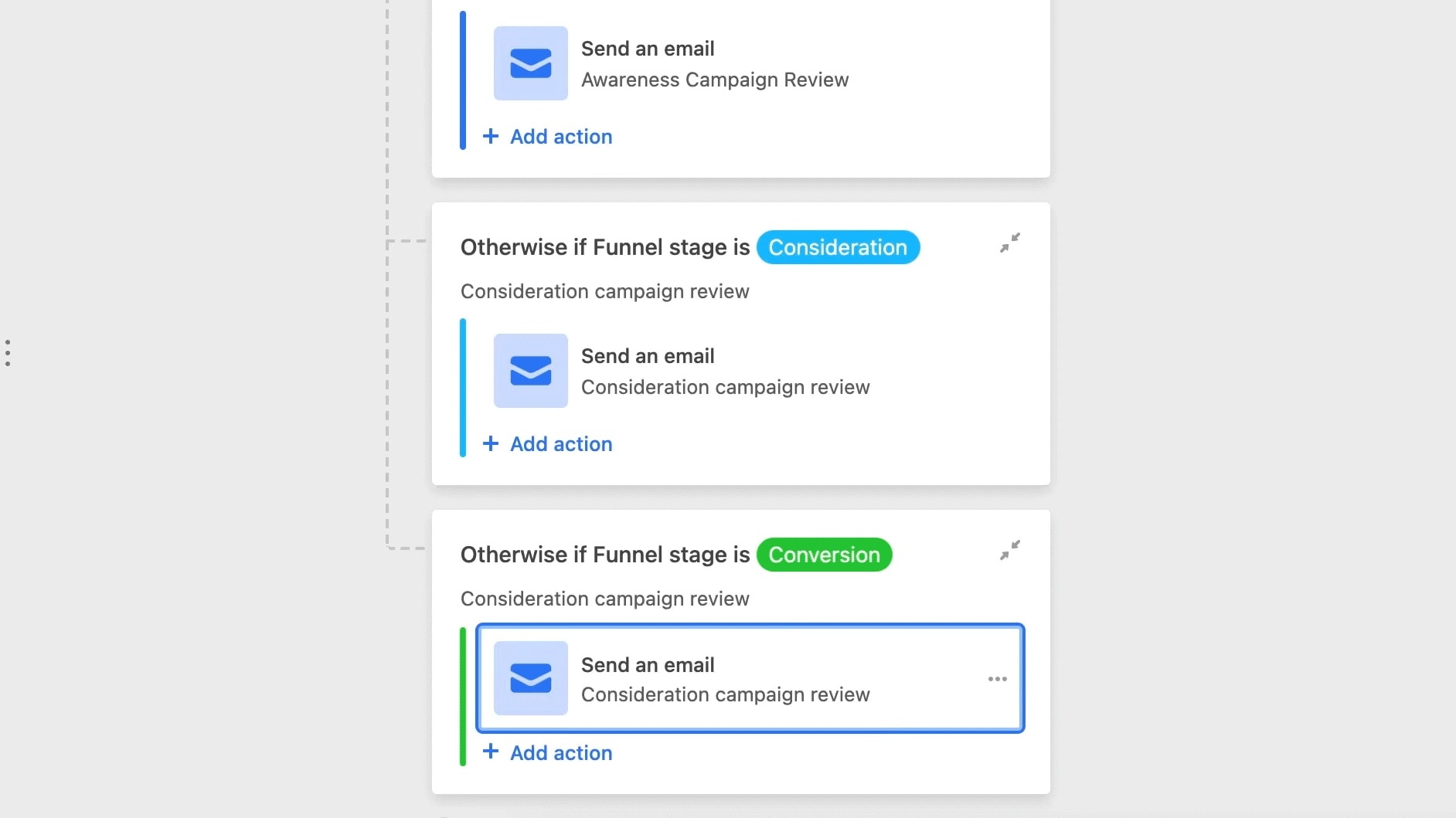
Airtable simplifies custom report creation with just a few clicks, allowing users to tailor reports to their specific needs.
Pipedrive and Airtable offer robust reporting capabilities that empower users to generate in-depth insights from their data. Pipedrive's interactive dashboards and customizable reports enable businesses to move beyond traditional spreadsheets, providing a dynamic and visual representation of critical sales metrics. For instance, you can create interactive sales performance dashboards that track deal progress, conversion rates, and revenue forecasts.
Similarly, Airtable simplifies custom report creation with just a few clicks, allowing users to tailor reports to their specific needs. This flexibility extends to diverse business functions, from project tracking to content management. By harnessing these reporting features, both Pipedrive and Airtable enable users to leverage data-driven decision-making for enhanced operational efficiency and strategic planning.
Airtable Outperforms Pipedrive in Real-Time Collaboration
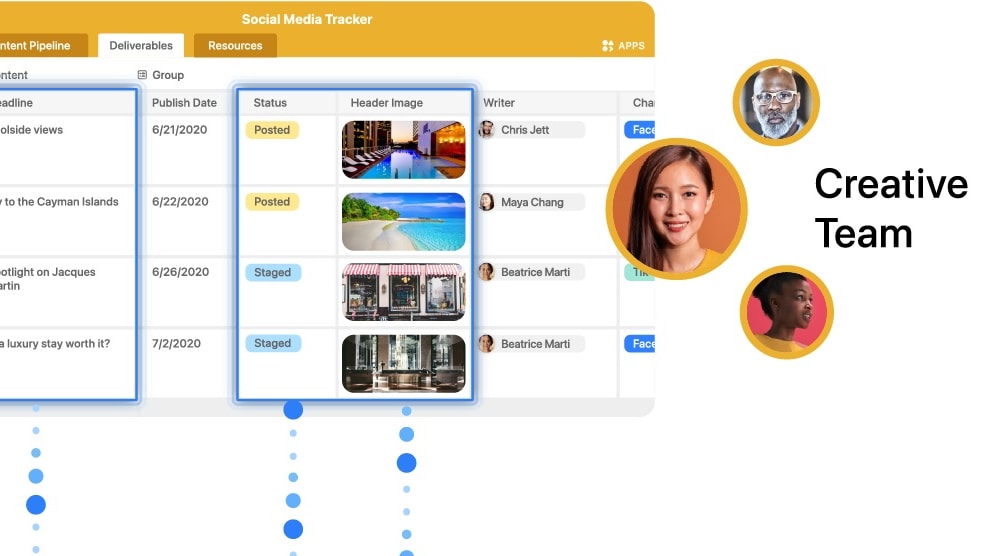
Airtable distinguishes itself with its exceptional real-time collaboration capabilities, enabling multiple users to collaborate simultaneously on the same database.
Airtable distinguishes itself with its exceptional real-time collaboration capabilities, enabling multiple users to collaborate simultaneously on the same database. This functionality promotes seamless teamwork and productivity by ensuring that updates occur in real-time, granting everyone access to the most current information. For instance, teams can collaborate on project timelines, make updates to shared databases, or collectively manage content calendars, all in real-time.
While Pipedrive excels in tracking team communications and sales-related activities, it does not provide the same level of real-time collaboration as Airtable. Businesses reliant on extensive collaborative efforts across different functions may find Airtable's concurrent editing and instant updates a valuable asset to streamline their operations and enhance overall productivity.
Airtable Takes the Lead Over Pipedrive in Integration Capabilities

It boasts an extensive selection of pre-built integrations that connect with numerous popular communications software, document management tools, and more, such as Slack, Google Drive, Dropbox, and many more.
When it comes to integration capabilities, Airtable emerges as a powerhouse. It boasts an extensive selection of pre-built integrations that connect with numerous popular communications software, document management tools, and more, such as Slack, Google Drive, Dropbox, and many more. By offering these integrations, Airtable enables users to streamline their operations, consolidate their data, and increase their productivity.
Pipedrive, while offering integrations with common tools like Mailchimp, Google Apps, and Zapier, doesn't quite match up to Airtable's expanse. However, it does provide a robust API for custom integrations, which can be beneficial for firms with specific software requirements. Summarily, if you're looking for breadth and depth in pre-built integrations, Airtable might be your ideal choice, whereas Pipedrive may be suited to those seeking customization through API use.
08 Pipedrive vs Airtable: Which is the best for your business?
Pipedrive is the best tool for you if:
- You require a dedicated CRM that excels in managing sales and leads effectively, providing a specialized solution.
- Your primary focus is visualizing sales pipelines and closely tracking the growth of your sales, Pipedrive offers robust features to meet these priorities.
- You place a high value on a user-friendly interface that simplifies complex sales processes, making it accessible for teams of all skill levels.
- Customization is key, and Pipedrive delivers with the ability to tailor sales workflows and generate detailed reports to match your specific business needs precisely
- You're in search of a cost-effective CRM, especially for smaller teams, Pipedrive's affordable plans combined with its feature-rich offerings makes it an ideal choice for optimizing your sales operations
 You require a dedicated CRM that excels in managing sales and leads effectively, providing a specialized solution.
Airtable is the best tool for you if:
- You require a versatile database solution that can seamlessly adapt to diverse business functions.
- Your project management relies on customizable tables and workflows tailored to your specific needs, Airtable offers the ideal platform.
- You seek a tool that seamlessly blends the robustness of a database with the simplicity of a spreadsheet, Airtable delivers.
- Prioritizing real-time collaboration among your team members is necessary as Airtable excels in facilitating collaborative efforts, enhancing operational efficiency.
- For those valuing extensive customization and a wide array of data visualization options, Airtable offers a versatile and comprehensive platform
Pipedrive
Used by 3028 members
30% off for 12 months
Save up to $3,564
Airtable
Used by 8824 members
$1,000 in credits on licences for 1 year
Save up to $1,000
09 Alternatives to Pipedrive & Airtable

Slack
Used by 3996 members
25% off new plan purchases
Save up to $9,000

ClickUp
Used by 3436 members
Additional 20% off Unlimited and Business plans for 1 year
Save up to $1,000

HubSpot
Used by 2922 members
90% off the Professional and Enterprise plans for 1 year
Save up to $7,000

Zoho
Used by 1613 members
$3,000 in credits for 1 year
Save up to $3,000
10 Promotions on Prospecting and Collaboration software
Pipedrive and Airtable are great tools, but Secret offers promo codes with discounts on over 2250+ different SaaS solutions. New deals are added regularly, helping you save money on your online subscriptions. Get access to codes for other Prospecting and Collaboration software you might want to purchase

Clay coupon code 2026
14 days free + 10% off annual plans

Deal for Google Workspace
20% off Standard plans for 1 year
HubSpot coupon code
90% off the Professional and Enterprise plans for 1 year

Notion discounts
3 months free on the Business plan with Unlimited AI

Apollo.io coupon
50% off the annual Basic or Professional plan for 1 year (Up to 5 seats)
Promo code for Slack
25% off new plan purchases

Deal for Crunchbase
20% off for 1 year

Miro promotion code
$1,000 in credits (lifetime validity)

Waalaxy (ex. ProspectIn) discounts
14 days free + 50% off annual plans

Monday promotion code
First month free
Start saving on the best SaaS
Secret has already helped tens of thousands of startups save millions on the best SaaS like Microsoft Teams, Google Workspace & many more. Join Secret now to buy software the smart way.