


When choosing a CRM it can seem simple enough until you understand that you are buying a sales operating system and that it will be the operational backbone of how your teams qualify new leads, contact these leads, forecast when your deals will close and never allow deals to perish in the pipe. It is little wonder therefore that “Pipedrive vs Zoho CRM” is one of the most commonly asked questions within the sales CRM area: although both are significant players in the CRM marketplace they also have their own strengths and weaknesses.
This post’s intention is to give you a true comparison of the strong points of each product across the key areas of Pipeline discipline, workflow depth, reporting, support and pricing in order for you to be able to select your tool based on your Go To Market (GTM) strategy and not on what the marketers tell you about the product. Before making your final decision, please refer to our in-depth articles about Pipedrive and Zoho.
- 01 Pipedrive vs Zoho CRM: overview
- 02 What's the difference between Pipedrive and Zoho CRM?
- 03 Pipedrive pros and cons
- 04 Zoho CRM pros and cons
- 05 Pipedrive compared to Zoho CRM
- 06 Zoho CRM compared to Pipedrive
- 07 Features comparison
- 08 Pipedrive vs Zoho CRM: Which is the best for your business?
- 09 Alternatives to Pipedrive & Zoho CRM
- 10 Promotions on Prospecting software
- 11 Pipedrive vs Zoho CRM: Conclusion
Start saving on the best SaaS
Secret has already helped tens of thousands of startups save millions on the best SaaS like Microsoft Teams, Google Workspace & many more. Join Secret now to buy software the smart way.

01 Pipedrive vs Zoho CRM: overview
Although both Pipedrive and Zoho CRM are CRMs they offer two very different approaches to implementing CRM philosophy in their respective systems, both designed to assist you in creating, managing and converting leads; however, each system offers its own methodology for achieving this objective through differing philosophies and methods.
Pipedrive is a sales-centric CRM that uses activity-driven follow-up (visual pipelines) and rapid on-boarding to provide a streamlined environment for your reps to advance your deals through focusing on the next step, using limited automation and providing pipeline-focused reports that don't require the resources of a RevOps team to maintain.
Zoho CRM is an extremely customizable CRM that will truly shine when utilized as a process engine instead of just as a pipeline-tracking tool. Additionally, Zoho CRM will excel when there is a plan to connect CRM to a much larger universe of business applications (marketing, support, finance, etc.) where data and workflows do not exist in separate silos.
Let us now compare the features of both systems with a side-by-side feature-by-feature comparison.

Customization (fields, modules)
Zoho CRM is typically the better choice for custom data models and complex processes. Pipedrive stays more sales-shaped, which improves usability but limits flexibility.

Pipedrive
Zoho CRM
Integrations and ecosystem
Pipedrive plays well in best-of-breed stacks. Zoho CRM gains an edge if you plan to standardize across Zoho apps and reduce integration sprawl.
Pipedrive
Zoho CRM
Automation and workflows
Zoho CRM generally wins on workflow depth and process enforcement. Pipedrive automations are excellent for core sales flows without turning into an admin project.
Pipedrive
Zoho CRM
Reporting and dashboards
Zoho CRM tends to be stronger for complex analytics needs. Pipedrive reporting is clean, sales-centric, and ideal for weekly pipeline reviews.
Pipedrive
Zoho CRM
Email and communications
Both cover email sync and tracking. Zoho CRM can go deeper when paired with other Zoho tools, Pipedrive stays focused on sales communications inside the deal view.
Pipedrive
Zoho CRM
Customer reviews
Pipedrive is consistently praised for usability and pipeline clarity. Zoho CRM gets credit for breadth and value, but complexity can create mixed experiences.
Pipedrive
Zoho CRM
Customer support
Both offer solid support channels. In practice, Pipedrive can be easier to troubleshoot because the product is more focused and less dependent on heavy configuration.
Pipedrive
Zoho CRM
Ease of use
Pipedrive is pipeline-native and rep-friendly. Zoho CRM is powerful, but typically needs more setup and governance to stay simple for frontline users.
Pipedrive
Zoho CRM
Pipeline and deal management
Pipedrive is built to prevent stale pipelines through activities and stage movement. Zoho CRM is strong, but less opinionated about day-to-day deal hygiene.
Pipedrive
Zoho CRM
Pricing plan
Zoho CRM often looks more cost-effective at entry and scales well. Pipedrive can win on ROI when faster adoption and cleaner pipeline execution matter more than raw price.
Pipedrive
Zoho CRM
02 What's the difference between Pipedrive and Zoho CRM?

Track and move deals through your sales pipeline with Pipedrive
Pipedrive
Stay focused on sales and collect more leads with this lead management software

Zoho CRM helps you build custom workflows for complex teams
Zoho CRM
Zoho CRM is the ultimate customer relationship management solution designed to streamline your sales, marketing, and support processes. Harness the power of automation, analytics, and collaboration to build stronger customer connections and drive business growth.
You may find it easiest to describe the difference between the two systems by stating that Pipedrive is for Sales Execution and Zoho CRM is for Process Customization and Suite Expansion. These are represented in the amount of time for a team to get started with each system, the amount of administrative effort required to utilize each system, and the ability of each platform to expand past the realm of sales.
Pipedrive has an opinion about how the product should be structured. The pipeline is the product (the stages, deal cards, activities, reminders, and the rhythm that creates the habits of consistent follow-up with your reps.) If the major problem you see is "We have leads but our team does not consistently follow up," Pipedrive is likely to solve this problem quickly since the user experience (UX) is built around making the correct actions simple to perform.
Zoho CRM is the better choice when the CRM needs to reflect a more complex environment than the one Pipedrive was designed for; multiple teams, approval flows, complex routing, unique objects, and governance rules. Zoho CRM also has a real free version for up to three users, which can be attractive to very small teams who want to use CRM basics without spending money at the same time. Zia, the AI assistant built into Zoho CRM, can offer workflow suggestions and automate reps productivity for teams that are ready to implement it. Some examples of what Zia can do, along with other features within Zoho CRM, can be found through official resources from Zoho, such as Zoho’s Zia AI feature overview and Zoho CRM pricing.

Pipedrive
Stay focused on sales and collect more leads with this lead management software
30% off for 12 months
Save up to $3,564
03 Pipedrive pros and cons
What are the advantages of Pipedrive?
- Pipeline clarity that drives behavior: Pipedrive makes it hard to hide deals in spreadsheets or inboxes. Your team sees exactly what’s stuck and what needs a next step.

- Activity-based follow-up discipline: The system encourages reps to schedule the next action, not just log notes. That’s a subtle design choice with a massive impact on conversion.
- Fast onboarding for SMB teams: You can implement a workable sales process without a dedicated admin. That reduces change fatigue and accelerates adoption.
- Lead capture options via add-ons: If you need chat, chatbots, and web forms, Pipedrive’s LeadBooster add-on bundles these tools into a lead generation toolset. See the official breakdown on Pipedrive Web Chat.
- Sales-focused reporting: Dashboards and reports are built for pipeline reviews, forecasting conversations, and rep coaching, not just vanity metrics.
What are the disadvantages of Pipedrive?
- Less suited to complex, org-wide workflows: If your CRM must support multi-department processes with heavy logic, Pipedrive can feel constrained compared to platform-style CRMs.

- Customization is strong but sales-shaped: You can tailor fields and pipelines, but if you need deep custom modules and complex objects, Zoho CRM is typically more flexible.
- Advanced analytics may require integrations: For deeper attribution or multi-source analytics, you’ll often rely on external tooling rather than keeping everything native.
- Scaling governance can become work: As you grow, you may need more granular permissioning and admin patterns than a lean sales CRM naturally emphasizes.
- Marketing suite expectations can be a mismatch: If you want an all-in-one suite inside one vendor, Pipedrive is intentionally not trying to be that.
Compare Pipedrive to other tools


Pipedrive vs Monday


Pipedrive vs Salesforce

Pipedrive vs Close

Pipedrive vs Freshsales Suite

Pipedrive vs HubSpot

Pipedrive vs ActiveCampaign
04 Zoho CRM pros and cons
What are the advantages of Zoho CRM?
- High customization ceiling: Zoho CRM is well suited when your sales process is non-standard and you need custom modules, layouts, and workflow rules.
- Strong value and entry options: The free edition, up to three users, helps very small teams start without friction, then upgrade when requirements become clearer.
- Workflow depth and process enforcement: Zoho CRM supports more sophisticated process design, which matters when how we sell has compliance or operational constraints.
- AI-assisted productivity: Zia can support automation ideas and workflow suggestions, especially when your organization has repeatable patterns worth codifying.
- Suite ecosystem leverage: If your roadmap includes connecting CRM with help desk, finance, or analytics under one umbrella, Zoho’s ecosystem becomes a strategic advantage.
What are the disadvantages of Zoho CRM?
- Heavier setup and governance needs: Zoho CRM shines when you invest in configuration. Without that, teams can experience cluttered layouts and inconsistent usage.
- More complex user experience by default: Power is the upside, onboarding friction is the cost. Training and role-based layouts often make the difference.
- Admins need to protect simplicity: The temptation to over-customize is real, it can slow reps down if every screen becomes a cockpit.
- Suite lock-in can be a trade-off: Consolidation is great, until you want to swap one component for a best-of-breed alternative and workflows start to fray.
- Optimization takes time: Zoho CRM often delivers more long-term value, but it’s rarely the fastest route to clean the pipeline next week.
Compare Zoho CRM to other tools

Freshsales Suite vs Zoho CRM
05 Pipedrive compared to Zoho CRM
The competitive advantage of Pipedrive lies in its ability to function as a sales execution engine. Pipedrive has been built to help drive the movement of deals, to ensure follow-ups occur, and to conduct pipeline reviews based on actual performance rather than theoretical performance.
The competitive advantage of Zoho CRM lies in its comprehensive set of features and the ability to configure them to meet the unique needs of an organization. Zoho offers a high ceiling for a CRM that can serve as a long-term system supporting all of your teams and processes; however, it requires more operational accountability from users.
Is Pipedrive better than Zoho CRM?
 Is Pipedrive better than Zoho CRM?
In cases where your success is contingent upon your sales team adopting the CRM, Pipedrive is generally a better solution due to the user experience (UX) being designed around the daily activities of a salesperson. Therefore, users will always know what to do next without needing to develop a playbook.
However, when you have a complex process requiring enforcement of certain processes, Zoho CRM is generally better than Pipedrive. If the main issue is that your sales team does not update the CRM, a more flexible system may cause additional issues as long as you are willing to invest time and money into developing processes to support the new system and enable/mandate your team to adopt the new process.
What is Pipedrive best used for?
Pipedrive is ideal for teams that utilize the traditional pipeline sales model: prospecting, qualification, meetings, proposal development, negotiation, closing. Pipedrive is especially suitable for companies seeking a CRM that promotes discipline to take the next step versus providing a passive method of record-keeping.
Additionally, Pipedrive is suitable for founders and sales managers who desire to regularly conduct pipeline reviews and coaching sessions since the tool will illustrate how the sales process is performing and where the bottle necks are located.
Can Pipedrive replace Zoho CRM?
Yes - if you are utilizing Zoho CRM primarily for managing basic contact, deal, task, and automation functionality and do not require the use of complex custom modules or multi-app suite workflow capabilities. In doing so, you will likely reduce your administrative overhead while increasing the speed of execution.
No - if your Zoho CRM is heavily integrated into many different areas of your business (e.g., multi-team approval workflows, complex routing logic, intricate customizations, etc.) and is highly coupled with other Zoho applications. While replacement is theoretically possible, it would most likely be a systems migration and not simply a simple CRM swap.
Is Pipedrive cheaper than Zoho CRM?
Generally, when comparing first costs for entry into a competitor's solution, Zoho CRM can be lower than competitors (which could make the apparent cost difference even greater when considering the totally free version). When solely considering the cost per user for the lowest cost solution, Zoho will generally be less costly than competitors.
However, in addition to the "cost per user", there are other costs to consider within the total cost of ownership; including time-to-value, onboarding time, training, compliance/governance costs, and administrative time. If Pipedrive can get customers up and running quickly and if the pipeline data is easier to maintain (the cleaner the data, the less time spent maintaining), then it could ultimately be a lower-cost solution overall.
If you want to reduce cost immediately, you can also claim the Pipedrive offer through our CRM software deals page.
Is there a better Prospecting software than Pipedrive?
Beginning with, better depends on the type of optimization you are seeking. For instance, if you need a full featured set of all your marketing, sales, and service needs in a single system, a CRM with a broad ecosystem (suite) would be a better choice. On the other hand, if you require a platform with a data model that can be customized deeply to meet specific needs, you may prefer a Platform First CRM.
As a possible alternative to Pipedrive, I would recommend beginning by comparing Pipedrive with an example of a suite style CRM, such as Pipedrive vs HubSpot.
Can Zoho replace Google?
Zoho has a potential to replace some elements of a "Google" type solution for a number of organizations as they evaluate combining their email, document, project, CRM functions into one organization-wide platform and managing those from a single source.
One of the greatest benefits of using Zoho is reducing the number of vendors that need to be integrated and managed, along with the number of places to integrate your applications and data. Replacement rarely occurs in a black and white manner. Most replacement decisions involve defining the specific workflows you wish to standardize (e.g. sales, support, invoicing, collaboration) and evaluating the complexity of migrating from one application to another, and the amount of end-user adoption required. If the decision to utilize.
Zoho is strictly for CRM, it is likely better to focus on the CRM application that provides the best opportunity to drive growth within the revenue-generating processes of your organization; and once that decision is made, you can then consider adding additional solutions to your overall strategy.
Pipedrive
Stay focused on sales and collect more leads with this lead management software
30% off for 12 months
Save up to $3,564
06 Zoho CRM compared to Pipedrive
At face value, Zoho CRM is generally less expensive than Pipedrive. In fact, for smaller teams, it is often a very cost-effective solution. The costs associated with Zoho CRM are most notably reduced by allowing users to purchase and use several of Zoho’s other applications together.
For example, using Zoho CRM to integrate with Zoho Books and Zoho Inventory allows users to combine three separate software applications into one — which reduces the overall cost of ownership and can reduce the time and money spent on purchasing and managing software licenses.
Is Zoho CRM better than Pipedrive?
Yes. If you are currently using a sales-focused CRM and you need to expand your use of CRM to manage a variety of different processes and support multiple departments, then Zoho CRM may be a viable alternative to Pipedrive. However, Zoho CRM does not inherently possess the same level of usability as Pipedrive.
If your team prefers a light-weight, action-oriented interface, then you should carefully consider how you configure and enable the platform in order to continue to drive user adoption.
What is Zoho CRM best used for?
Zoho CRM is best utilized when a CRM is being implemented as a company-wide system of record and not just as a sales tool. This includes operational workflow processes, structural approval processes, or more advanced automation models requiring corporate-level oversight.
Zoho CRM is also suitable for organizations seeking to implement a basic version of CRM (including the free version), and then evolve into more advanced versions of CRM as their organization develops and matures its internal processes.
Can Zoho CRM replace Pipedrive?
You should use Zoho CRM instead of Pipedrive when your current CRM application has limited capabilities and you need a more flexible CRM solution that will allow you to create a comprehensive process layer above your existing pipelines. Zoho CRM provides both a CRM application and a process management application — so while it can still handle pipelines, it offers a more complete view of your sales process.
Additionally, if your organization views CRM as part of a larger operational framework — rather than just a sales tool — then Zoho CRM may be a better choice because it is a suite-based solution and will allow you to develop a unified operating layer across departments.
Is Zoho CRM cheaper than Pipedrive?
At first glance, yes, sometimes Zoho CRM appears to be less expensive than Pipedrive, and this can be true in many ways depending upon the size of your team(s) and whether or not you elect to utilize other components of the Zoho suite. For example, smaller organizations that need to implement CRM as well as some additional applications may find that utilizing Zoho CRM, and possibly one or two other applications from the Zoho suite, may be less expensive than purchasing separate products and applications. Also, Zoho CRM has the potential to lower your total cost of ownership by reducing your spend on separate products and simplifying the procurement process.
If you’re comparing deals, our CRM software deals page lists offers for both Pipedrive and Zoho, so you can evaluate pricing with incentives included rather than guessing.
Is there a better CRM software than Zoho CRM?
If you do not want the additional complexity of a suite product and simply want a pipeline engine, then Pipedrive would likely be the better option for your needs.
Alternatively, if you prefer best-of-breed solutions — versus first choosing a suite — you may elect to use a CRM that emphasizes being less about an ecosystem model.
For comparison, you may also wish to look at other Zoho comparative analyses within adjacent categories, such as Zoho vs Zendesk, which is useful if CRM and support are part of your evaluation. For a broader shortlist, add the internal Zoho alternatives link from your alternatives inventory when you publish.
What is so special about Zoho?
Zoho has a unique strategic advantage in that Zoho is not just a CRM provider but an entire business ecosystem. This enables the user to connect all of their departments (e.g., sales, customer service, finance, etc.) utilizing CRM without requiring the use of multiple software systems or API's.
Additionally, Zoho provides a strategic advantage through its flexibility, as Zoho CRM can be customized to meet the operational needs of your organization and its AI-powered assistant can assist in creating ideas to automate workflow processes. There are, however, limitations and restrictions on how customizable Zoho CRM can be and Zoho CRM will likely perform at its best when one individual is assigned ownership of the architecture of the CRM application. This will allow the system to be usable and powerful and not just extremely powerful.
07 Features comparison
Zoho CRM Outclasses Pipedrive for Customization and Data Modeling
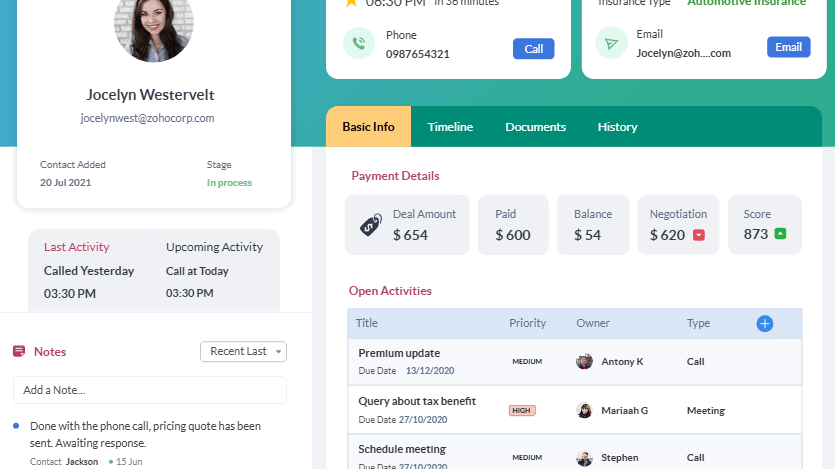
Manage detailed customer records and workflows with Zoho CRM
Zoho CRM is generally limited in its ability to customize when a business requires specific entity forms, unique relationships among records, and specific layouts for each user/role. At that point, Zoho CRM starts to feel more like a customizable business platform and less like a CRM.
While Pipedrive does offer some level of customization, its design is heavily centered around optimizing the sales workflow. Although that will contribute to greater adoption, it may limit the potential to utilize the CRM as an operational backbone across various departments.
When the system must reflect the complexities of the real world, select Zoho CRM. When you want the system to simply sell quickly and easily, select Pipedrive.
Zoho CRM Can Be Stronger Than Pipedrive for Ecosystem Consolidation

Connect Zoho CRM with your favorite sales and business tools
While Pipedrive is a great "citizen" in an ideal best-of-breed solution stack - you can integrate with many other tools including scheduling, data enrichment, proposal generation, chat and customer service to your Pipedrive instance without ever having to be part of a single vendor's world.
When you elect to pursue a suite strategy (consolidate), Zoho CRM becomes a more viable option to you. The benefits of a suite include fewer seams between applications due to integration, central administration and better cross-functional visibility if your company is capable of executing on this type of strategy.
Therefore, Pipedrive gives you much more freedom than Zoho CRM. However, if your goal is to build a unified CRM environment, then Zoho CRM may give you a better strategic fit.
Zoho CRM Leads Pipedrive for Workflow Automation Depth

Automate complex workflows and approvals with Zoho CRM
Teams that wish to create automation for the movement of a process within a company, such as approval levels, routing based on rules, multi-level automated processes to increase consistency in an organization should consider using Zoho CRM. Zoho's workflow depth is one of its strong points in companies that run multiple pipelines for different departments, or those that need to strictly follow processes.
I would refer to Pipedrive as high leverage simplicity when describing automation. This is best suited to maintain the "housekeeping" aspect of operational health, move deals through stages, create tasks, send internal notifications, etc., and prevent items from becoming silent stalls.
If you view your automation needs as part of the "revenue operations" model, Zoho CRM is likely going to be a better fit. If your automation needs simply mean you want to keep your team on task, without hindering their work, Pipedrive is probably a better choice.
Pipedrive Often Feels Easier to Support and Troubleshoot Day-to-Day

Monitor performance with Pipedrive's sales dashboards
Support in this situation can be simply defined by what is termed as response time; however, more importantly, it is also determined by how difficult it is for your support team to find the root cause of the issue when a workflow breaks down; or when an integration fails to perform as desired; or when an end-user is unable to find an item in the application. In many cases, Pipedrive's narrow focus will make it easier to identify and resolve issues that arise.
While Zoho CRM allows you to create very complex applications and systems, its broader capabilities can also create new areas of potential configuration that can create more friction throughout your organization. However, most organizations will have enough personnel to manage the complexity of developing such systems through designating someone to act as the "CRM Owner".
Therefore, while organizations that are resource-challenged administratively and require the maintenance of a healthy CRM system without excessive overhead costs; Pipedrive is likely to provide a more practical solution than Zoho CRM.
Pipedrive Excels Ahead of Zoho CRM for User-Friendliness
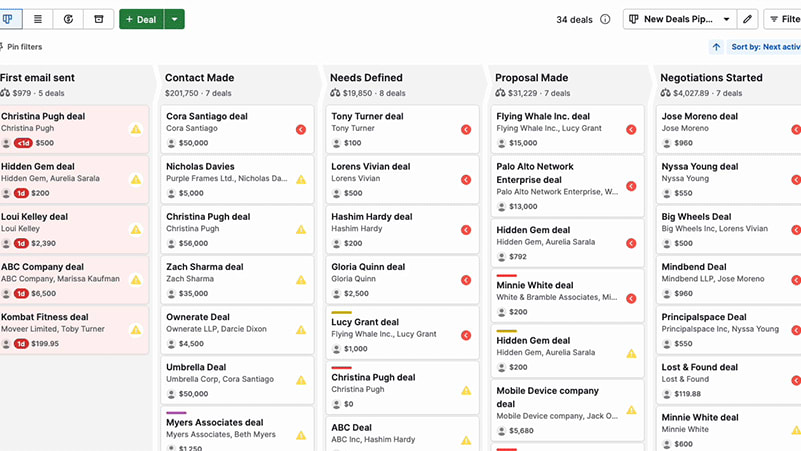
Manage your sales pipeline easily with Pipedrive's intuitive interface
As a result of being built specifically as a sales environment and not as a settings interface, representatives are able to navigate deals through different stages via drag-and-drop, document interactions with customers, and schedule follow-ups with minimal knowledge of where to find the needed information. As ease of use is not merely a surface-level feature of an application, the usability factor has a significant effect on the reliability of forecasts and the overall quality of the data within the system.
Although Zoho CRM is capable of being easy to use after you have configured the layout, field names and permissions, most users will find it difficult to easily use Zoho CRM until they configure their system. Pipedrive, on the other hand, is immediately usable.
In general, if you're looking to rapidly deploy a system across a small to medium sized business (SMB) sales team, Pipedrive provides the superior usability advantage. If you want to see a feature by feature comparison of suites, please refer to Pipedrive vs HubSpot.
Pipedrive Beats Zoho CRM for Pipeline Discipline and Deal Hygiene
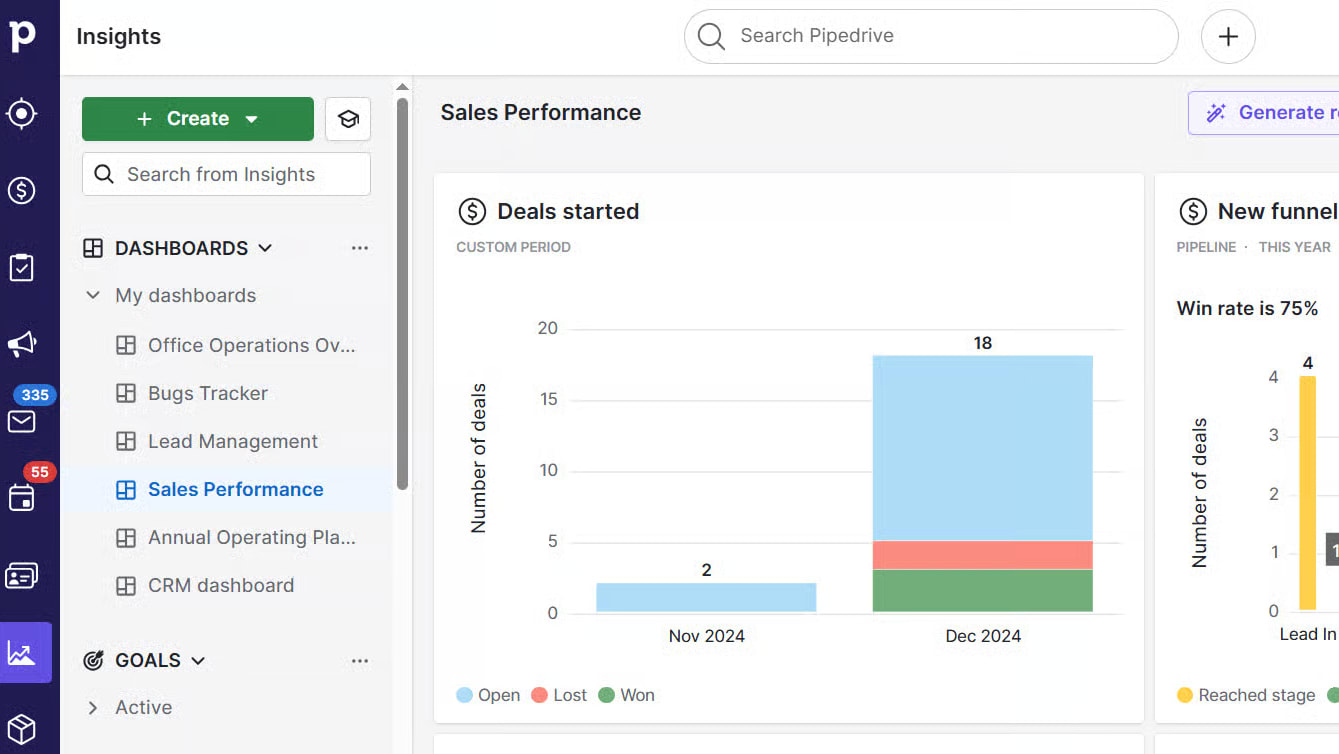
Track sales performance and pipeline insights with Pipedrive
Pipedrive has the best pipeline management features. It ensures that pipeline management becomes a habitual practice for reps. It continuously reminds reps to take the next step in their pipeline, and it clearly displays when an opportunity has sat idle. For managers, this means they spend less time debating where their deals are in their pipeline, and more time teaching their reps how to close their opportunities.
Although Zoho CRM can be used to manage pipelines just as well as Pipedrive, Zoho does not have the same level of focus on deal hygiene. Without proper governance, teams may create multiple fields and workflows that look right on paper, but ultimately slow down the speed of execution.
If you hold regular pipeline review meetings and want a CRM system to promote accountability by design, then Pipedrive is typically going to provide a more refined experience, and fewer barriers to entry than Zoho CRM.
Zoho CRM Usually Wins on Entry Pricing, While Pipedrive Often Wins on Time-to-Value

Start with affordable Zoho CRM pricing
Zoho CRM is priced reasonably for small teams and provides a great way to test the product at no cost which makes it an attractive option when the organization does have a very small budget to spend on sales software and/or needs a lot of functionality from the sales software.
If Pipedrive can get the organization to adopt the product quicker and adhere to using the pipeline more accurately than Zoho CRM then Pipedrive will likely provide the best ROI; and also minimize the hidden costs of utilizing a CRM such as user training time, varying degrees of usage by the user base and quality of forecasts produced. (See Pipedrive vs. Zoho CRM)
If you wish to consider incentives in your decision-making process, please reference our CRM software deals page to compare offers for both products before you commit.
08 Pipedrive vs Zoho CRM: Which is the best for your business?
Pipedrive is the best tool for you if:
- You want a CRM that reps adopt quickly without heavy training.
- Your biggest problem is inconsistent follow-up and stale opportunities.
- You run a pipeline-driven sales motion and need high deal visibility.
- You prefer simple, reliable automation that reinforces selling habits.
- You want pipeline reporting designed for coaching and forecasting cadence.
 You want a CRM that reps adopt quickly without heavy training.
Zoho CRM is the best tool for you if:
- You need deep customization across modules, layouts, and workflows.
- CRM must serve multiple departments, not just sales.
- You want a suite strategy to reduce tool sprawl and integration overhead.
- You’re ready to invest in governance to keep the system clean.
- You want a cost-effective entry point with room to scale.
Pipedrive
Stay focused on sales and collect more leads with this lead management software
30% off for 12 months
Save up to $3,564
09 Alternatives to Pipedrive & Zoho CRM

Slack
Used by 3993 members
25% off new plan purchases
Save up to $9,000

ClickUp
Used by 3434 members
Additional 20% off Unlimited and Business plans for 1 year
Save up to $1,000

HubSpot
Used by 2922 members
90% off the Professional and Enterprise plans for 1 year
Save up to $7,000

Zoho
Used by 1611 members
$3,000 in credits for 1 year
Save up to $3,000
10 Promotions on Prospecting and CRM software
Pipedrive and Zoho CRM are great tools, but Secret offers promo codes with discounts on over 2250+ different SaaS solutions. New deals are added regularly, helping you save money on your online subscriptions. Get access to codes for other Prospecting and CRM software you might want to purchase

Promo code for Clay
14 days free + 10% off annual plans
Zoho discounts
$3,000 in credits for 1 year
HubSpot coupon
90% off the Professional and Enterprise plans for 1 year

Notion coupon code 2026
3 months free on the Business plan with Unlimited AI

Apollo.io discounts
50% off the annual Basic or Professional plan for 1 year (Up to 5 seats)

Zendesk promo
6 months free (with AI Agents and Copilot)

Crunchbase promo
20% off for 1 year

Code for Freshworks
14 days free on Freshdesk

Waalaxy (ex. ProspectIn) coupon code 2026
14 days free + 50% off annual plans

ActiveCampaign free credits
90% off any annual plan for the first year
11 Pipedrive vs Zoho CRM: Conclusion
For the most part I would recommend using Pipedrive for any sales team looking for an immediate solution to create follow-up’s and to keep their pipeline honest. The design of Pipedrive allows you to get into a rhythm of creating follow up’s and to keep your pipeline honest so much so that the use of the tool becomes almost automatic. If on the other hand you have a CRM that is going to be a highly customized process platform across multiple departmental functions then Zoho CRM will ultimately be the long term answer.
Zoho CRM has the ability to continue to grow and evolve from a configuration standpoint and from a workflow perspective and also has the ability to extend beyond the confines of sales into all aspects of a business. While Zoho can be very effective and can be very successful in performing well for a company, there is still an operational reality. For example, while Zoho CRM will provide good results for a company, it works best for companies that designate someone to take on the responsibility of architecting the overall design and ensuring that the usability of the application is maintained as the system grows and evolves.Before you choose, I recommend doing two practical things: read our product reviews for Pipedrive and Zoho, then claim the best offer available on our CRM software deals page to reduce your cost while you validate product fit.
Start saving on the best SaaS
Secret has already helped tens of thousands of startups save millions on the best SaaS like Microsoft Teams, Google Workspace & many more. Join Secret now to buy software the smart way.