


Choosing the right project management tool is not just a matter of convenience; it's a critical factor that can significantly impact the efficiency, collaboration, and ultimate success of your business operations. Whether your tasks involve intricate workflows requiring a range of data types and high-level automation or simply entail straightforward data tracking and analysis, selecting the best tool for your specific needs can make a world of difference.
The better your tool aligns with your objectives, the more streamlined and effective your operations will become. In this blog, we offer a detailed, comprehensive comparison between Airtable and Google Sheets to help you identify the best platform for your needs, empowering you to make a more informed and effective decision.
- 01 Airtable vs Google Sheets: overview
- 02 What's the difference between Airtable and Google Sheets?
- 03 Airtable pros and cons
- 04 Google Sheets pros and cons
- 05 Airtable compared to Google Sheets
- 06 Google Sheets compared to Airtable
- 07 Features comparison
- 08 Airtable vs Google Sheets: Which is the best for your business?
- 09 Alternatives to Airtable & Google Sheets
- 10 Promotions on Collaboration software
Start saving on the best SaaS
Secret has already helped tens of thousands of startups save millions on the best SaaS like Microsoft Teams, Google Workspace & many more. Join Secret now to buy software the smart way.

01 Airtable vs Google Sheets: overview
Airtable and Google Sheets are formidable contenders in the world of project management software and online spreadsheet & database management solutions, each offering a distinct array of features and capabilities.
Airtable stands out with its flexible and visually intuitive database system, making it a go-to choice for those looking to structure data creatively. Users can create customized databases, complete with various field types, linked records, and rich data visualization options. On the other side of the ring, we have Google Sheets, a versatile and widely adopted spreadsheet tool that's part of the G Suite. It offers robust collaboration features, real-time editing, and integration with other Google services, making it an ideal choice for teams and businesses of all sizes.
Now, let's embark on the Airtable vs. Google Sheets showdown to help you pick the perfect spreadsheet and database solution for your unique needs.

Customization
Airtable provides high-level customization, whereas Google Sheets offers basic customization like fonts and colors. They both have a wide range of templates, with Airtable’s templates overpowering Google sheets with its diversity and detail for purpose.

Airtable
Google Sheets
Customer support
Both platforms offer strong customer support, but Airtable provides more specialized assistance for individual use cases, such as a phone number to call for live assistance.
Airtable
Google Sheets
Automation
Airtable excels in automation with complex workflows and has several guides online for tips and methods, while Google Sheets offers basic automation features with limited guides.
Airtable
Google Sheets
Data presentation
Airtable offers multiple ways to visualize data, while Google Sheets is confined to a basic spreadsheet format that can be changed in sizes. They both offer ways to visualize data in charts and graphs.
Airtable
Google Sheets
Pricing plans
Airtable's pricing starts at $20/month, which may be a barrier for small businesses. Google Sheets is free for personal use, and is included with the Google Workspace subscription.
Airtable
Google Sheets
Data types
Airtable supports a broader range of data types including files and images that are easier to manage, making it more versatile. However, Google sheets also support charts, and images equally.
Airtable
Google Sheets
Positive reviews
Airtable is lauded for its high customizability and advanced features whereas Google Sheets is praised for its user-friendly interface that caters to a larger range of audiences, including students and professionals.
Airtable
Google Sheets
Ease of use
Google Sheets offers a simpler interface and lower learning curve than Airtable since it caters to all kinds of audiences, be it students or professionals.
Airtable
Google Sheets
Scalability
Airtable's feature-rich environment scales better with growing businesses, while Google Sheets may have limitations since it is meant for simpler projects compared to Airtable.
Airtable
Google Sheets
Integrations
Both platforms offer solid integration options, although Airtable integrates better with advanced project management tools including Google Workspace, Jira and Slack. Yet, Google sheet integrates with a wide range of softwares including Filter and Clickfunnels.
Airtable
Google Sheets
02 What's the difference between Airtable and Google Sheets?
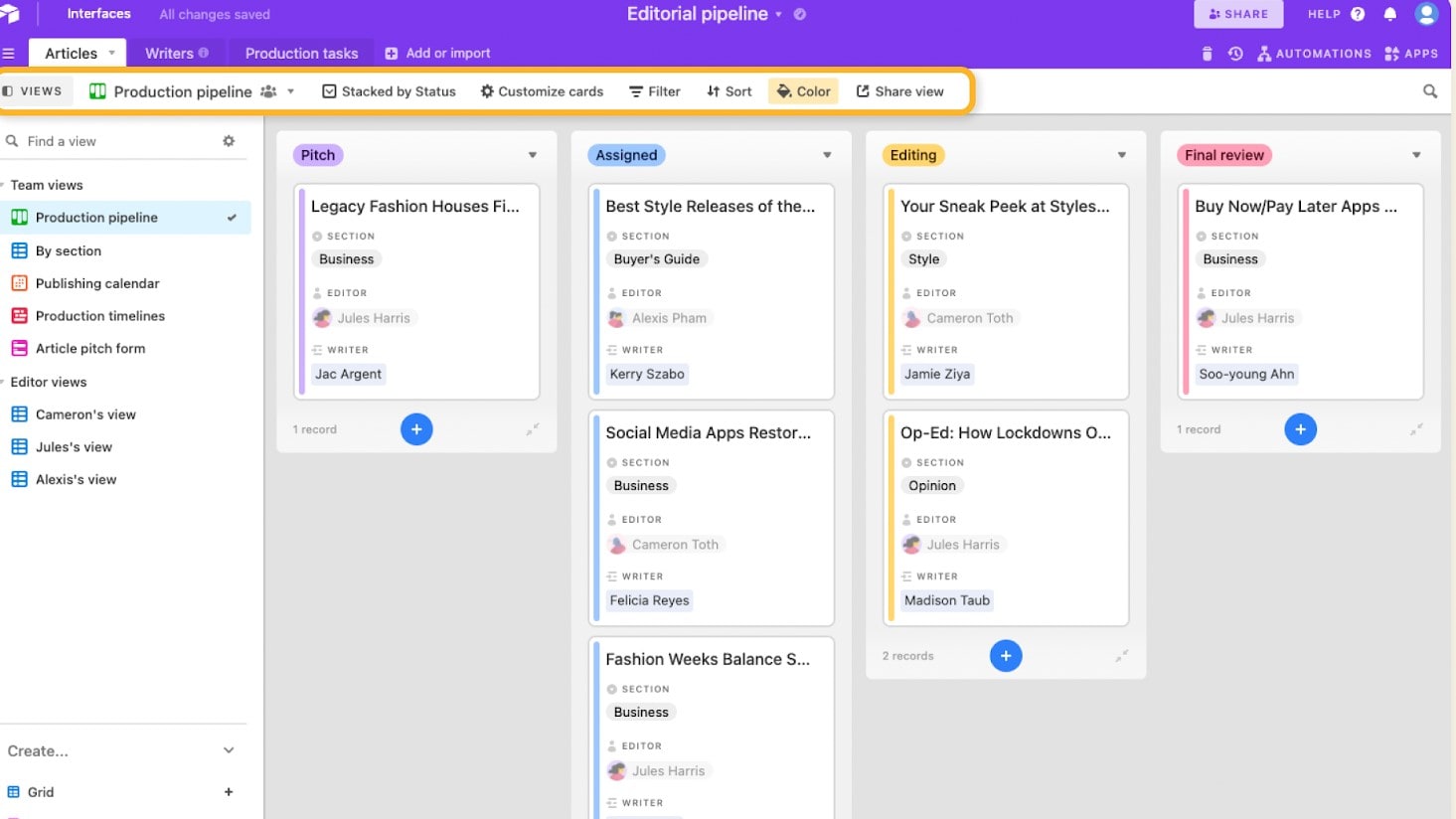
Airtable's Pipeline View for Easy View of and Access to Important Data
Airtable
Easily store and organize your data

Google Sheets's Spreadsheet with Multiple Tabs and Team Members Collaborating in Real-Time
Google Sheets
Google Sheets is a cloud-based spreadsheet platform that helps teams create, edit, analyze, and share data collaboratively in real time from any device.
The core difference between Airtable and Google Sheets lies in their fundamental design philosophies and capabilities. Airtable is structured as a relational database management system, offering a more advanced suite of features that accommodate a wide array of data types, including text, numbers, dates, images, and files. This makes it particularly useful for handling complex workflows, project management tasks, and detailed data analysis. Its customizability extends to multiple data presentation options like Kanban boards, calendars, and Gantt charts, which allow for a more dynamic and versatile way to visualize and manage data. Simply put, Airtable is built to handle complexity and offers the best features for businesses that require a robust, multi-faceted project management tool.
Compared to Airtable, Google Sheets is essentially a spreadsheet application optimized for ease of use and simplicity. While it may lack the advanced functionalities and customizability that Airtable boasts, Google Sheets excels in its straightforward, user-friendly design. It is particularly well-suited for quick data analysis, real-time collaboration, and simple tracking tasks. Because it's designed to be easily accessible, Google Sheets is better for individuals or teams that do not require advanced features and functionalities. It offers a familiar spreadsheet view for data and allows for basic automation capabilities, making it best for simpler tasks and projects.
When it comes to pricing, Airtable starts at $20 per month, which may appear steep for small businesses or individual users. However, the cost can be justified if your project demands advanced functionalities, multiple data types, and complex workflows. On the other hand, Google Sheets is a cost-effective choice as it is free for personal use and offers paid plans for additional features and business use. This makes Google Sheets a better financial fit for those who do not need the high-level features that Airtable provides.

Airtable
Used by 8670 members
$1,000 in credits on licences for 1 year
Save up to $1,000

Google Sheets
Used by 81 members
20% off Standard plans for 1 year
Save up to $3,460
03 Airtable pros and cons
What are the advantages of Airtable?
- Flexible database structure: Airtable offers a highly flexible and user-friendly database structure, allowing users to create and customize databases to fit their unique needs.

- Visual interface: Its visual and intuitive interface makes data entry, organization, and visualization simple, even for users without extensive technical skills.
- Collaboration: Airtable excels in team collaboration, enabling real-time editing and the ability to comment and share data with team members.
- Rich data types: Users can incorporate various data types, including text, attachments, checkboxes, and more, making it versatile for a wide range of use cases.
- Integration capabilities: Airtable integrates with various other applications and services, enhancing its functionality and adaptability.
What are the disadvantages of Airtable?
- Limited complexity: While Airtable is versatile, it might not be the ideal choice for highly complex databases or those requiring advanced data modeling.

- Pricing: The cost of Airtable can add up, particularly if you need advanced features, and this might be prohibitive for smaller businesses or individuals.
- Offline access: Airtable primarily functions online, and while there's a mobile app, you may encounter limitations when working offline.
- Learning curve: For those new to the platform, there can be a learning curve when it comes to utilizing all its features effectively.
- Scaling challenges: Airtable might face limitations in handling extensive data or large-scale enterprise-level use, which could be a drawback for larger organizations.
Compare Airtable to other tools


Airtable vs Monday

Airtable vs Asana

Airtable vs Coda

Airtable vs Excel

Airtable vs Smartsheet

Pipedrive vs Airtable
04 Google Sheets pros and cons
What are the advantages of Google Sheets?
- Collaborative editing: Google Sheets excels in real-time collaboration, allowing multiple users to work on a document simultaneously, making it an excellent choice for teams.
- Cloud-based: As a cloud-based platform, Google Sheets offers easy access from any device with an internet connection, providing flexibility for users on the go.
- Integration with Google services: It seamlessly integrates with other Google services like Google Drive, Gmail, and Google Forms, enhancing overall productivity.
- Version history: Google Sheets keeps a detailed version history, enabling users to track changes and restore previous versions of a document.
- Free to use: Google Sheets is available for free, making it accessible to individuals and businesses with tight budgets.
What are the disadvantages of Google Sheets?
- Limited offline access: While Google Sheets is primarily cloud-based, it might not be as functional offline, which can be a limitation for users in areas with unreliable internet connections.
- Complex data modeling: For highly complex data modeling and advanced analytical tasks, Google Sheets might be less capable compared to dedicated spreadsheet software.
- Security concerns: Some users, particularly in sensitive industries, might have security concerns about storing data in the cloud.
- Limited features: Google Sheets may not have as extensive a feature set as some desktop spreadsheet applications, which could be limiting for advanced users.
- Large datasets: Handling large datasets can be slower and less efficient in Google Sheets compared to more specialized tools, which could affect performance for data-intensive tasks.
05 Airtable compared to Google Sheets
When contrasting Airtable and Google Sheets, Airtable stands out with its exceptional flexibility and user-friendly database management. It is the go-to choice for those looking to craft custom databases, incorporating diverse field types and visually creative data representation. Airtable's strength lies in its versatility and adaptability to meet unique data structuring needs.
The decision between Airtable and Google Sheets depends on the level of data flexibility, collaboration, and customization required for your specific tasks. Airtable excels in providing a flexible and visually intuitive database structure, while Google Sheets offers a cloud-based, collaborative environment ideal for real-time teamwork and extensive integration with other Google services.
Is Airtable better than Google Sheets?
 Is Airtable better than Google Sheets?
The answer depends on your specific data management and collaboration needs. Airtable shines with its flexibility and visually intuitive database management, making it a top choice for custom data structuring and creative data visualization. Its strength lies in providing a highly adaptable platform for a wide range of uses.
On the other hand, Google Sheets is a cloud-based spreadsheet tool designed for real-time collaboration, which makes it ideal for teams working on spreadsheets simultaneously and offers seamless integration with other Google services. The choice between Airtable and Google Sheets relies on the depth of your data flexibility and collaboration requirements, as well as your preference for structured database management versus cloud-based, collaborative spreadsheet functionality.
What is Airtable best used for?
Airtable is an exceptional choice for individuals and businesses in need of a flexible and user-friendly database management system. It shines as a platform for creating customized databases with diverse field types, linked records, and rich data visualization. Airtable's strengths lie in its adaptability and creative data structuring, making it a valuable tool for a wide range of use cases, from project management and content planning to inventory tracking and customer relationship management.
With its visually intuitive interface, Airtable empowers users to design databases that fit their unique needs, enhancing efficiency and organization in various tasks. Whether you're a creative professional, a project manager, or a small business owner, Airtable offers the flexibility and adaptability to streamline data management and organization according to your specific requirements.
Can Airtable replace Google Sheets?
Airtable is an excellent choice for individuals and businesses seeking a flexible and visually intuitive database management system. It's particularly well-suited for custom data structuring and creative data visualization.
On the other hand, Google Sheets is a cloud-based spreadsheet tool known for its real-time collaboration features. It's ideal for teams that need to work on spreadsheets simultaneously and offers seamless integration with other Google services. The decision between Airtable and Google Sheets hinges on the depth of your data structuring and collaboration requirements, as well as your preference for structured database management versus cloud-based spreadsheet functionality.
Is Airtable cheaper than Google Sheets?
Airtable’s pricing model is flexible and can be cost-effective for users, with a free plan available and various paid plans for more advanced features and storage needs. This flexibility allows businesses to align their expenses with their actual data management requirements.
On the other hand, Google Sheets is part of Google Workspace (formerly G Suite), which involves a subscription fee. While it offers a range of collaboration and productivity tools beyond Google Sheets, this subscription cost may be higher for users with extensive storage, advanced security, and support needs.
So, whether Airtable is more budget-friendly than Google Sheets depends on the scale of your data management and collaboration requirements, as well as your preference for flexible pricing versus an integrated suite of office and productivity tools.
Is there a better Collaboration software than Airtable?
While Airtable is known for its flexibility in database management, it's worth exploring whether there might be a more suitable software for your specific data and collaboration needs.
There are several notable alternatives to Airtable in the realm of data management and collaboration tools, including Google Sheets, Microsoft Excel, Zoho Sheets, Make, and Smartsheet.
The choice of data management software depends on your specific use case, organizational requirements, and the level of collaboration and data structuring you need. While Airtable offers unique flexibility, other platforms may provide specific features, integrations, or industry-focused solutions that align more closely with your data management and collaboration objectives.

Airtable
Premium
Easily store and organize your data
$1,000 in credits on licences for 1 year
Save up to $1,000
06 Google Sheets compared to Airtable
Google Sheets stands out with its cloud-based spreadsheet and data collaboration capabilities, making it an appealing choice for individuals and teams looking for real-time editing, easy access from anywhere, and integration with other Google services. Google Sheets offers a tiered pricing model, including free access, which can accommodate users with a range of data management and collaboration needs.
While both Google Sheets and Airtable are effective for data management and collaboration, the choice between the two depends on your specific requirements. Google Sheets provides a cloud-based, collaborative platform for individuals and teams aiming to work on spreadsheets simultaneously and leverage the full suite of Google services. It's an excellent choice for those seeking real-time collaboration and cloud accessibility for their data and project management needs.
Is Google Sheets better than Airtable?
The answer hinges on your unique data management and collaboration needs. Google Sheets is a cloud-based spreadsheet tool renowned for its real-time collaboration features and seamless integration with other Google services. If you prioritize cloud accessibility, real-time teamwork, and a full suite of Google tools, Google Sheets may be the superior choice for your data management and project collaboration.
However, it's crucial to recognize that Airtable stands out with its flexible and visually intuitive database management system, making it an ideal selection for users in need of customizable data structuring and creative data visualization. If your focus is on structuring data uniquely and intuitively, Airtable remains a compelling option for your data management and organization requirements.
What is Google Sheets best used for?
Google Sheets is a versatile and collaborative cloud-based spreadsheet tool ideal for a variety of data management and collaboration needs. It's particularly well-suited for real-time teamwork, accessible from anywhere, and integration with other Google services.
Whether you're tracking project data, conducting data analysis, managing budgets, or collaborating on spreadsheets, Google Sheets offers a flexible and accessible solution. Its versatility and ease of sharing and publishing data make it a practical choice for individuals and teams seeking efficient data management and collaboration.
Can Google Sheets replace Airtable?
Google Sheets is a versatile cloud-based spreadsheet tool known for its real-time collaboration features and integration with other Google services. It can be a suitable choice for individuals and teams looking to collaborate on data and projects in a cloud-based environment.
However, it's essential to recognize that Airtable offers unique flexibility and a visually intuitive database management system, making it an excellent choice for users in need of customizable data structuring and creative data visualization. If your focus is on structuring data in a highly tailored and visually appealing manner, Airtable may offer features and capabilities that align better with your data management and organization needs.
Is Google Sheets cheaper than Airtable?
The answer can vary depending on your specific budget and needs. Google Workspace’s pricing includes access to Google Sheets, offering also a free version with some limited features. The cost can increase as you require more advanced features, additional storage, and enhanced support.
In contrast, Airtable offers a flexible pricing model that includes a free plan and various paid plans for advanced features, making it a cost-effective choice for users with varying data management and collaboration requirements. The choice between Google Sheets and Airtable depends on your budget and the depth of data management and collaboration features you need.
Is there a better Productivity software than Google Sheets?
While Google Sheets is a robust cloud-based spreadsheet tool known for its real-time collaboration features and integration with other Google services, there are several notable alternatives to consider.
Alternatives to Google Sheets include Microsoft Excel, Zoho Sheets, Smartsheet, ClickUp, and Airtable.
The choice of data management and collaboration software should align with your unique objectives, organizational requirements, and the level of data structuring and collaboration features you require. While Google Sheets offers an array of features and cloud accessibility, other platforms may provide specific advantages, tailored solutions, or industry-focused tools that better meet your data management and collaboration needs.

Google Sheets
Turn data into decisions from anywhere
20% off Standard plans for 1 year
Save up to $3,460
07 Features comparison
Google Sheets Offers More Advanced Cell-Based Data Entry than Airtable
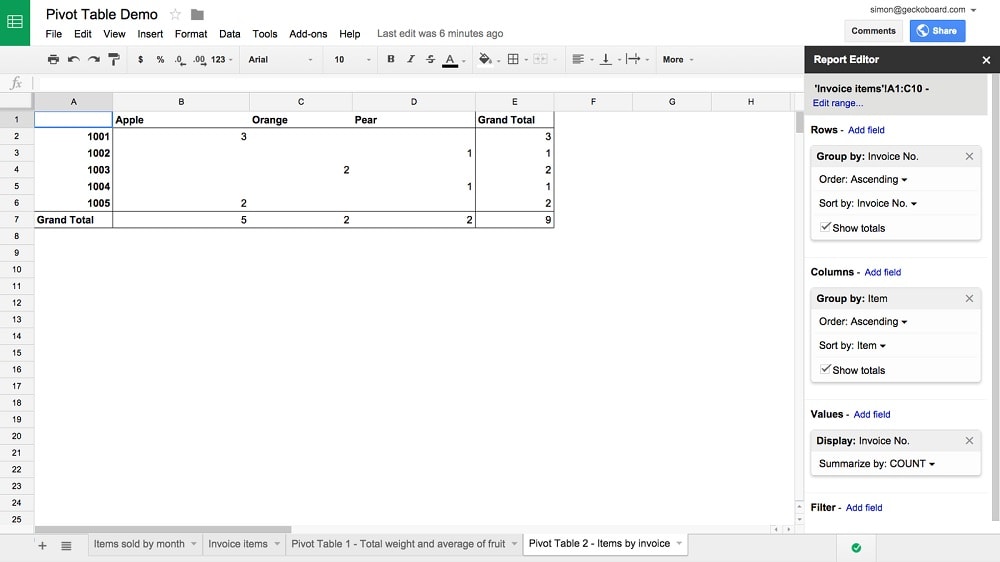
Google Sheets stands out with its more advanced cell-based data entry system
While both Airtable and Google Sheets enable users to input diverse data types, Google Sheets stands out with its more advanced cell-based data entry system. Google Sheets is specifically designed to simplify the organization and manipulation of data within individual cells, offering greater flexibility and precision than Airtable's field types. This user-friendly approach ensures that users can efficiently manage and analyze data on a granular level, making Google Sheets an ideal choice for tasks that require detailed data handling.
In contrast, Airtable's approach, while versatile, may not offer the same level of granularity and control, particularly for users who require precise cell-based data management.
Airtable Offers Superior Data Automation Compared to Google Sheets

Airtable elevates efficiency to a whole new level with its automation capabilities. Airtable empowers users to automate recurring tasks and streamline complex business processes effortlessly.
While Google Sheets offers a variety of valuable formulas and functions for performing calculations, Airtable elevates efficiency to a whole new level with its automation capabilities. Airtable empowers users to automate recurring tasks and streamline complex business processes effortlessly. This robust workflow automation feature not only saves a substantial amount of time but also minimizes the potential for human errors.
By automating routine actions, Airtable enhances productivity and allows users to focus on more strategic aspects of their work, making it an indispensable tool for organizations looking to optimize their operations and boost overall efficiency.
Airtable Outperforms Google Sheets for Custom Report Creation

Airtable stands out as an exceptional platform for crafting custom reports, offering users the ability to create and automate reports tailored to their specific business needs.
Airtable stands out as an exceptional platform for crafting custom reports, offering users the ability to create and automate reports tailored to their specific business needs. This empowers users to extract and utilize meaningful insights effectively. In contrast, although Google Sheets provides robust data analysis capabilities with formulas and charts, it lacks a dedicated feature for generating custom reports.
This makes Airtable the preferred choice for those seeking a streamlined and automated approach to report generation, especially when focused on extracting valuable, business-specific information. With Airtable's dedicated reporting functionality, users can efficiently access and leverage insights that truly matter to their operations.
Airtable Provides More Efficient Notification and Reminder Features than Google Sheets

A standout feature of Airtable is its robust notifications and reminders system
A standout feature of Airtable is its robust notifications and reminders system. This functionality allows users to set up alerts triggered by various events, such as record updates, approaching deadlines, or specific conditions being met. Unlike Google Sheets, which lacks this feature, Airtable excels in keeping users organized and preventing tasks from slipping through the cracks.
With Airtable's notification capabilities, users can proactively manage their work, stay on top of critical updates, and ensure that important deadlines and conditions are met, making it the superior choice for those seeking comprehensive task management and organization.
Google Sheets Excels Ahead of Airtable in User-Friendly Design
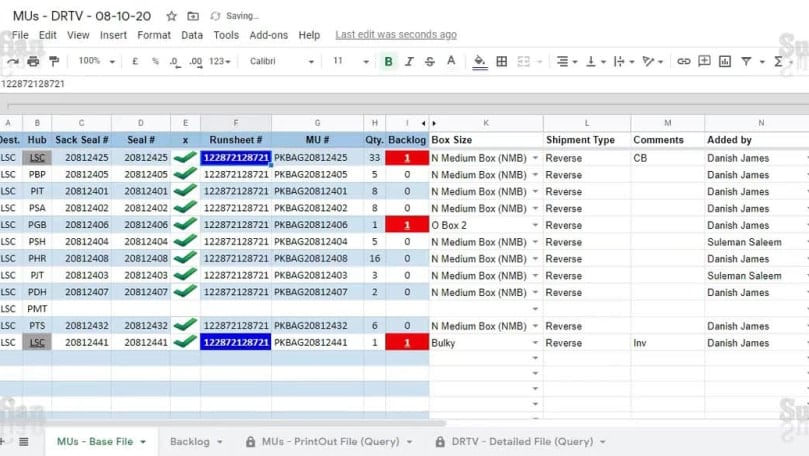
Google Sheets' straightforward interface and familiar spreadsheet layout make it accessible and easy to navigate for users of all levels of expertise.
In terms of user-friendliness, Google Sheets stands out as the more intuitive option when contrasted with Airtable. Google Sheets' straightforward interface and familiar spreadsheet layout make it accessible and easy to navigate for users of all levels of expertise. Whether you're a beginner or an experienced spreadsheet user, Google Sheets offers a comfortable and user-friendly environment for data management and analysis.
In contrast, while Airtable provides robust features, its interface may appear more complex to users, requiring a steeper learning curve. Therefore, for those seeking a hassle-free and user-centric experience, Google Sheets takes the lead in ease-of-use over Airtable.
Both Airtable and Google Sheets Allow Teams to Collaborate in Real-Time

Team members can work together in real-time, making edits, adding information, and sharing insights effortlessly.
Airtable and Google Sheets share a common strength in facilitating real-time collaboration among teams. Both platforms support concurrent access for multiple users, enabling them to collaborate on databases or spreadsheets simultaneously. This collaborative environment promotes seamless updates and enhances overall team productivity in both systems. Team members can work together in real-time, making edits, adding information, and sharing insights effortlessly.
Whether using Airtable or Google Sheets, the ability to work concurrently and see changes in real-time significantly contributes to efficient and effective teamwork, making these platforms valuable tools for organizations seeking collaborative solutions to enhance their productivity and data management.
Airtable Takes Center Stage for Integrations, Ahead of Google Sheets

Airtable places its focus on integrating with various project management platforms, communications software, and automation tools such as Slack, Asana, Trello, and Zapier.
When it comes to integrations, both Airtable and Google Sheets excel but in different domains. Google Sheets seamlessly integrates with the extensive suite of Google services, including Gmail, Google Docs, and Google Slides, providing a unified platform for all workplace requirements. This makes Google Sheets an optimal choice for businesses deeply ingrained in the Google ecosystem.
Conversely, Airtable places its focus on integrating with various project management platforms, communications software, and automation tools such as Slack, Asana, Trello, and Zapier. This versatility allows Airtable to adapt to a wide array of existing workflows, thereby enhancing overall productivity. For teams utilizing diverse sets of tools and seeking a more adaptable solution for managing their work, Airtable's expansive integration capabilities establish it as the superior choice.
08 Airtable vs Google Sheets: Which is the best for your business?
Airtable is the best tool for you if:
- You need sophisticated project management features. Airtable offers a wide range of project management features, including Kanban boards, Gantt charts and custom workflows
- You require high levels of automation for complex workflows, with Airtable's automation capabilities allowing you to automate repetitive tasks such as data entry and email notifications
- You prefer multiple views for presentation of varied data. Airtable offers multiple views for data presentation, including Kanban boards, calendars and spreadsheets
- You are looking for extensive customisation options. Airtable is highly customisable so you can change the look and feel of your workspace, create custom fields, and add integrations with other applications
- It handles a variety of data types, such as images, files, etc. Airtable supports a wide variety of data types, such as text, numbers, dates, images, files, etc
 You need sophisticated project management features. Airtable offers a wide range of project management features, including Kanban boards, Gantt charts and custom workflows
Google Sheets is the best tool for you if:
- You need a simple and straightforward data management tool, as Google Sheets is designed for ease of use, making it the best choice for companies that need a simple and intuitive data management tool and do not require advanced functionality
- You have a limited budget for project management software. Google Sheets, with its free personal use and affordable enterprise plans, offers a cost-effective project management solution
- You prioritise collaborative projects among team members with Google Sheets, which excels at real-time collaboration. Team members can work simultaneously on the same spreadsheet for efficient coordination
- You're looking for quick, basic data visualization options. Google Sheets offers simple data visualization tools, such as charts and graphs, making it ideal for simple analytical tasks
- You don't need extensive customisation or complex data views. The simplified Google Sheets options are more than enough for simple data management tasks
Airtable
Used by 8670 members
$1,000 in credits on licences for 1 year
Save up to $1,000
Google Sheets
Used by 81 members
20% off Standard plans for 1 year
Save up to $3,460
09 Alternatives to Airtable & Google Sheets

Notion
Used by 20118 members
3 months free on the Business plan with Unlimited AI
Save up to $6,000

Make
Used by 12350 members
3 months free on the Teams plan (240k credits included)
Save up to $600

Slack
Used by 3897 members
25% off new plan purchases
Save up to $9,000

ClickUp
Used by 3390 members
Additional 20% off Unlimited and Business plans for 1 year
Save up to $1,000
10 Promotions on Collaboration software
Airtable and Google Sheets are great tools, but Secret offers promo codes with discounts on over 2220+ different SaaS solutions. New deals are added regularly, helping you save money on your online subscriptions. Get access to codes for other Collaboration software you might want to purchase

Google Workspace discounts
20% off Standard plans for 1 year
Make free credits
3 months free on the Teams plan (240k credits included)
Notion promotion
3 months free on the Business plan with Unlimited AI

Google Calendar discounts
20% off Standard plans for 1 year
Slack promotion code
25% off new plan purchases

Credits for QuillBot
30% off the annual Premium plan

Miro promo code 2026
$1,000 in credits (lifetime validity)

Google Docs discount code
20% off Standard plans for 1 year

Monday promo code 2026
First month free

Retool free credits
1 year free on the monthly Team or Business plan
Start saving on the best SaaS
Secret has already helped tens of thousands of startups save millions on the best SaaS like Microsoft Teams, Google Workspace & many more. Join Secret now to buy software the smart way.