


Whether you're managing a small project or overseeing data for a large corporation, having a powerful and efficient database and spreadsheet tool is essential for streamlining tasks and ensuring accurate record-keeping. The good news is, the tech world provides a variety of software choices tailored to different needs and preferences.
In this article, we dive deep into two widely-used data management tools—Airtable vs Excel. Both are crafted to assist in the organization, analysis, and presentation of data, but they cater to different user bases and bring distinct features to the table. We'll shed light on each tool's strengths and weaknesses, and outline the key differences, so you can make an informed decision on which one aligns best with your business or personal needs.
- 01 Airtable vs Excel: overview
- 02 What's the difference between Airtable and Excel?
- 03 Airtable pros and cons
- 04 Excel pros and cons
- 05 Airtable compared to Excel
- 06 Excel compared to Airtable
- 07 Features comparison
- 08 Airtable vs Excel: Which is the best for your business?
- 09 Alternatives to Airtable & Excel
- 10 Promotions on Collaboration software
Start saving on the best SaaS
Secret has already helped tens of thousands of startups save millions on the best SaaS like Microsoft Teams, Google Workspace & many more. Join Secret now to buy software the smart way.

01 Airtable vs Excel: overview
Airtable and Excel stand as premier contenders in the world of data management and spreadsheet tools, each boasting unique functionalities and strengths tailored to various user needs.
Airtable is renowned for its flexible, visual database approach, blending the strengths of traditional spreadsheets with the robustness of a relational database. It facilitates easy organization of data through bases, tables, and views, and is especially favorable for those who require dynamic project management or content calendars. With its intuitive interface and integrative capabilities, Airtable appeals to those who desire more collaborative and visual workflows. On the other hand, Excel is a stalwart in the spreadsheet domain, offering deep analytical capabilities, complex formula options, and robust charting tools. Recognized for its versatility, Excel is particularly apt for financial analyses, statistical tasks, and extensive data modeling.
Diving into the Airtable vs. Excel showdown, this comparison seeks to guide you in selecting the most suitable data management tool tailored to your particular requirements.

Customer Support
Airtable has received better reviews for its customer support, being particularly praised for responsiveness and resourceful help documentation, making it superior in this aspect. As a result of Excel's and Microsoft’s popularity, there is phone support for different issues, but are meant for bigger, major issues. Plenty of online resources are available to solve issues with excel.

Airtable
Excel
Data Handling
Excel takes the lead in handling large datasets and offering advanced statistical features. Airtable is not designed for complex data analytics or large volume data.
Airtable
Excel
Customer Reviews
Airtable scores higher in customer satisfaction due to its user-friendly interface and collaboration features. Users tend to prefer its intuitive design for simpler projects.
Airtable
Excel
Ease of Use
Airtable is recognized for its easier user interface, especially for those not familiar with data manipulation. Excel's steep learning curve makes it less accessible for beginners. Nevertheless, there are several YouTube courses with crash courses in excel.
Airtable
Excel
Collaboration
Airtable excels in real-time collaboration with features like activity feed and @mentions, making team projects smoother. Excel lags behind in this department, offering fewer real-time capabilities.Nevertheless Microsoft products come in a suite, and therefore several different products can complement each other, making business processes simpler.
Airtable
Excel
Pricing Plan
Excel offers a cost-effective pricing plan as part of the Microsoft 365 suite. This offers value as you get access to other Microsoft tools, making it budget-friendly for businesses.The pricing of Microsoft Excel varies based on your subscription within the Microsoft 365 suite. It can be as low as $5 per month or a one-time payment of $149.99. Additionally, there is a free web-based version accessible. Airtable's pricing is based on a per-seat model, with all users being free on the Free plan. The Pro plan is transitioning to the Team plan with pricing at $20 per user per month (Annual plan) or $24 per user per month (Monthly plan).
Airtable
Excel
View Options
Airtable provides multiple creative ways to view data, such as Calendar and Kanban views, making data visualization flexible. Excel primarily focuses on traditional spreadsheet views, but when learnt in depth, has several detailed options such as pivot tables and charts.
Airtable
Excel
Mobile Usability
Airtable's mobile app is more user-friendly, allowing for easier navigation and access to most features. Excel's mobile experience is clunkier due to the nature of spreadsheets.
Airtable
Excel
Template Variety
Airtable offers a broader range of pre-made templates, including niche ones that Excel does not have. This offers businesses more tailored solutions out-of-the-box.
Airtable
Excel
Integrations
Airtable offers versatile integrations with tools like Slack and Trello, while Excel leans towards Microsoft's ecosystem with software like Power BI and SharePoint..
Airtable
Excel
02 What's the difference between Airtable and Excel?

Airtable is an online database management tool used to store, organize, share and collaborate with data and information.
Airtable
Easily store and organize your data
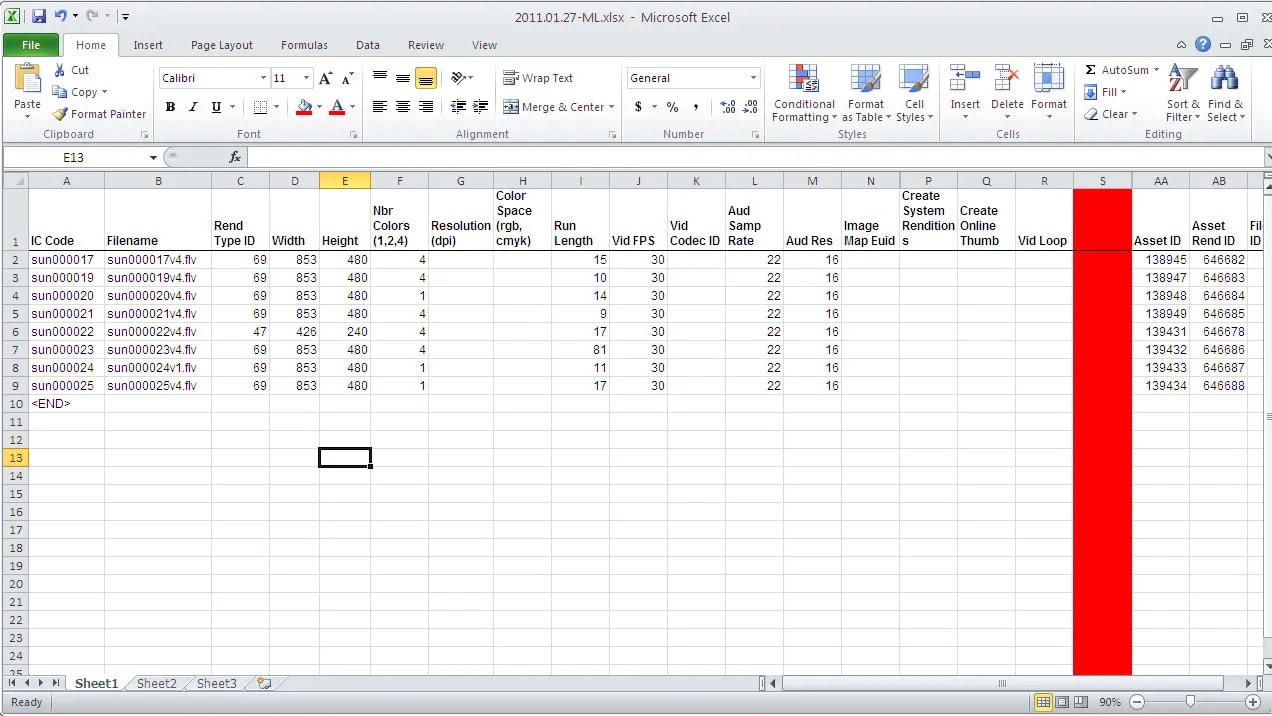
Excel is a powerhouse for data analysis and numbers processing.
Excel
Excel brings immense value to businesses and individuals by providing a versatile platform for data analysis, organization, and calculation. It allows users to create complex spreadsheets, perform advanced calculations, visualize data through charts and graphs, and automate tasks with macros.
Airtable and Excel are both robust platforms, but they serve very different purposes and are designed for distinct types of tasks. Airtable operates more like a database, allowing users to structure and link data in multiple ways. This makes it perfect for content management systems, inventory tracking, and project management. Its interface is highly intuitive, allowing users to switch between different data views such as grid, calendar, or kanban boards. These customization options make Airtable particularly suitable for teams that require flexibility and multifunctionality in their data management solutions. It also shines in the realm of collaboration, updating changes in real-time and featuring an activity feed and mention capabilities.
Excel, on the other hand, is a powerhouse for data analysis and number-crunching. It is the go-to platform for tasks requiring complex formulas, charts, and pivot tables. Excel's primary advantage lies in its advanced features for statistical and financial modeling. It is particularly effective for businesses that need to manage large datasets and perform complex calculations. In terms of pricing, Excel offers more value as it's part of the broader Microsoft 365 package, which also includes other essential business tools like Word, OneDrive, Teams, and SharePoint. However, when it comes to real-time collaboration, Excel lags behind Airtable, requiring users to rely on Excel on the web for simultaneous editing.
When compared head-to-head, both platforms have unique strengths and limitations that make them suited for different types of businesses and projects. If real-time collaboration, flexible views, and easy customization are your top priorities, Airtable is likely the better option. On the other hand, if your business requires heavy data analysis, statistical modeling, and a more robust set of features for financial calculations, Excel would be the more appropriate choice. Both tools offer free trials or demos, so businesses are advised to take both for a spin to better understand which will meet their unique needs most effectively. With each platform excelling in areas where the other falls short, the final decision comes down to the specific requirements and workflow of your organization.

Airtable
Premium
Easily store and organize your data
$1,000 in credits on licences for 1 year
Save up to $1,000
03 Airtable pros and cons
What are the advantages of Airtable?
- Flexibility and customizability: Airtable combines the strengths of a spreadsheet with a relational database, allowing users to organize data in various formats, from grids and calendars to kanban boards and galleries.

- Intuitive user interface: The platform's drag-and-drop functionality and visually appealing interface make it user-friendly, especially for those without extensive database experience.
- Collaboration features: Airtable promotes team collaboration with real-time updates, commenting on specific records, and sharing views or bases with ease.
- Integration capabilities: With Airtable's extensive API and compatibility with platforms like Zapier, it's easy to integrate it with other tools and automate workflows.
- Rich field types: Beyond traditional text and number fields, Airtable offers a variety of field types, including attachments, checkboxes, drop-down lists, and linked records.
What are the disadvantages of Airtable?
- Learning curve for advanced features: While Airtable is user-friendly at the basic level, some users might find it challenging to utilize its more advanced features, particularly in comparison to traditional spreadsheet tools.

- Performance issues with large bases: When dealing with an extensive amount of records, Airtable can sometimes lag or become slower in performance.
- Price point: While there's a free version of Airtable, the more advanced features require a premium subscription, which can be costly for small businesses or individual users.
- Limited formula functionality: Compared to platforms like Excel, Airtable's formula capabilities are limited, making complex data analyses challenging.
- Lack of advanced reporting tools: While Airtable offers various views and some summary features, it doesn't provide in-depth reporting or advanced analytics tools that some businesses may require.
Compare Airtable to other tools


Airtable vs Monday


Airtable vs Asana

Airtable vs Coda

Airtable vs Google Sheets

Airtable vs Smartsheet

Pipedrive vs Airtable
04 Excel pros and cons
What are the advantages of Excel?
- Powerful calculation capabilities: Excel's extensive formula and function library allow users to perform complex calculations, data analyses, and statistical operations with ease.
- Versatility: Excel is not just a spreadsheet tool. It can also be used for data visualization, financial modeling, project tracking, and much more.
- Integration with Microsoft suite: Being a part of the Microsoft Office suite, Excel seamlessly integrates with other Microsoft products such as Word, PowerPoint, and Access.
- PivotTables and data analysis tools: Excel's PivotTable feature provides powerful data summarization and cross-tabulation functionalities. Combined with tools like Data Solver and Analysis ToolPak, Excel becomes a potent tool for data analysis.
- Vast user community: Given its long-standing presence and popularity, there's a massive community of Excel users. This means numerous online resources, forums, templates, and third-party add-ons are available for support and enhancement.
What are the disadvantages of Excel?
- Limited collaboration: Although improvements have been made with Office 365, real-time collaboration in Excel is not as smooth or intuitive as in some other modern cloud-based tools.
- Complexity: While Excel's power is a boon, it can also be a barrier. New users might find it challenging to navigate and utilize its extensive features effectively.
- File corruption and size limitations: Large Excel files can sometimes become corrupt or suffer from performance issues. Sharing and opening massive files can also be problematic.
- Version compatibility: Different versions of Excel can sometimes lead to compatibility issues, where certain features or formatting might not appear the same across versions.
- Lack of database functionality: Unlike relational database systems, Excel isn't designed to manage relationships between tables naturally, which can be a limitation for more complex data management tasks.
Compare Excel to other tools


Excel vs Notion
05 Airtable compared to Excel
Airtable and Excel are both powerful tools for data management, but they cater to different user needs. While Excel is a trusty tool in spreadsheet functionality, renowned for its complex calculations and in-depth data analyses, Airtable merges the simplicity of spreadsheets with the dynamics of a relational database.
This makes Airtable exceptionally suitable for project management and collaborative efforts, offering visually appealing layouts like kanban boards and calendars. Meanwhile, Excel remains a top choice for intricate financial modeling and statistical tasks.
Is Airtable better than Excel?
 Is Airtable better than Excel?
Determining if Airtable is better than Excel depends on the specific use-case. Airtable, with its blend of spreadsheet and database functionalities, excels in collaborative projects and offers diverse layouts, making it ideal for tasks like content calendars or project management.
On the other hand, Excel stands out in traditional spreadsheet operations, especially complex calculations, financial modeling, and in-depth data analyses. While Airtable's interface is more modern and user-friendly, Excel's sheer computational power and versatility make it indispensable for many.
What is Airtable best used for?
Airtable shines as a hybrid platform that merges spreadsheet simplicity with relational database capabilities. Its strength lies in facilitating organized and collaborative workspaces for diverse tasks.
With its visually appealing layouts, such as kanban boards, calendars, and galleries, Airtable is particularly adept at project management, content planning, and inventory tracking. Its intuitive drag-and-drop interface and rich field types, ranging from attachments to dropdown lists, make it a go-to for teams needing a flexible, shared platform to manage and visualize data seamlessly across various projects and workflows.
Can Airtable replace Excel?
Whether Airtable can replace Excel largely depends on the user's specific needs. Airtable's strength lies in its ability to blend spreadsheet features with relational database properties, excelling in collaborative environments and project management tasks. Its versatile views and user-friendly interface make it a favorite for dynamic data organization.
However, for intricate data analyses, complex calculations, and robust financial modeling, Excel remains unparalleled. While Airtable offers a modern approach to data visualization and management, Excel's deep computational capabilities maintain its importance in many sectors. Thus, while Airtable can substitute Excel in some scenarios, it may not entirely replace it in others.
Is Airtable cheaper than Excel?
The cost comparison between Airtable and Excel varies based on specific needs and usage. Airtable’s pricing structure offers a free plan with basic features, but to access more advanced capabilities, premium plans are necessary. These can become costly, especially for larger teams or extensive databases.
Excel, as part of the Microsoft Office Suite, often requires a one-time purchase or a subscription through Office 365. For businesses already invested in the Microsoft ecosystem, Excel might be more cost-effective. Ultimately, the "cheaper" option hinges on the user's requirements, the scale of usage, and the desired integrations and features from each platform.
Is there a better Collaboration software than Airtable?
Whether there's a "better" software than Airtable hinges on your specific data management and collaboration requirements. Airtable provides a unique blend of spreadsheet and database functionalities, facilitating versatile data visualization and project management.
However, alternatives to Airtable like Notion, Trello, and Monday.com might be more suitable for certain scenarios. Notion is a unified workspace tool that merges notes, tasks, and databases. Trello excels in visual task management with its kanban boards, while Monday.com is known for its project tracking and team collaboration features. The choice of the "better" software depends on your specific needs, budget, and desired functionalities. It's essential to assess these aspects to determine which platform aligns best with your operational objectives.
Airtable
Premium
Easily store and organize your data
$1,000 in credits on licences for 1 year
Save up to $1,000
06 Excel compared to Airtable
Excel and Airtable cater to distinct data management needs. Excel, a cornerstone of spreadsheet tools, is revered for its intricate calculations, data analyses, and financial modeling capabilities. Its deep computational prowess makes it a favorite for professionals dealing with extensive datasets and analytical tasks.
Contrastingly, Airtable, blending spreadsheet functionality with relational database features, thrives in collaborative settings. Its versatility in presenting data through various layouts, from kanban boards to calendars, positions it as a preferred tool for dynamic project management and content planning. The choice between them often hinges on the specific intricacies of the task in focus.
Is Excel better than Airtable?
The debate over whether Excel is better than Airtable is shaped by the context in which they're used. Excel, with its robust computational capabilities, is unparalleled for complex data analyses, financial modeling, and intricate calculations. It's a long-standing favorite for professionals who require depth and versatility in data processing.
Conversely, Airtable offers a unique blend of spreadsheet and relational database features, making it stand out for collaborative tasks, project management, and dynamic data visualization. While Excel might excel in traditional data tasks, Airtable brings a fresh, user-friendly approach to organizing and viewing data. The superiority of one over the other is often situational.
What is Excel best used for?
Excel is a powerhouse in the realm of spreadsheet tools, best known for its profound capabilities in handling numerical data, complex calculations, and data analyses. Its vast array of functions, charting options, and PivotTables make it indispensable for financial modeling, statistical analysis, and budgeting.
Professionals across various sectors, from finance to research, lean on Excel's versatility to process large datasets, produce detailed reports, and derive insights. Moreover, its formula-driven environment is adept at automating repetitive tasks, making it a preferred choice for data-driven decision-making and intricate data manipulation tasks.
Can Excel replace Airtable?
Excel's prowess in data manipulation, analysis, and numerical tasks is well-established. While it offers depth in these areas, replacing Airtable with Excel might pose challenges in specific scenarios. Airtable's unique fusion of spreadsheet simplicity with relational database features facilitates collaborative projects, dynamic visualization, and multifaceted data organization, such as kanban boards and calendars. Though Excel has collaborative features via Office 365, its primary strength doesn't lie in visual project management.
Hence, while Excel might supersede Airtable for intricate data tasks, it may not wholly replicate Airtable's user-friendly, visual, and collaborative environment in certain contexts.
Is Excel cheaper than Airtable?
Comparing the costs of Excel and Airtable is contingent on usage specifics. Excel, typically bundled within the Microsoft Office Suite, involves either a one-time purchase or an Office 365 subscription. This package approach might offer value to those already entrenched in the Microsoft ecosystem.
Airtable, on the other hand, presents a tiered model, with a basic free version and escalating costs for premium features and larger teams. For small-scale needs, Airtable might seem economical, but extensive usage could push costs higher. Determining which is "cheaper" requires weighing individual requirements against the feature sets and pricing structures of each tool.
Is there a better Productivity software than Excel?
Whether there's a "better" software than Excel depends on your specific data management and analytical needs. Excel is renowned for its powerful spreadsheet capabilities, offering deep data analysis, financial modeling, and intricate calculations.
However, alternatives to Excel such as Google Sheets, LibreOffice Calc, and Airtable might be more apt for certain users. Google Sheets emphasizes real-time collaboration and cloud-based functionality, while LibreOffice Calc is a free, open-source option with many Excel-like features. Airtable, on the other hand, combines spreadsheet functionality with database characteristics for a unique data management experience. The choice of the "better" software depends on your distinct needs, budget, and desired functionalities.
07 Features comparison
Airtable Edges Ahead of Excel in Workflow Automation and Streamlining
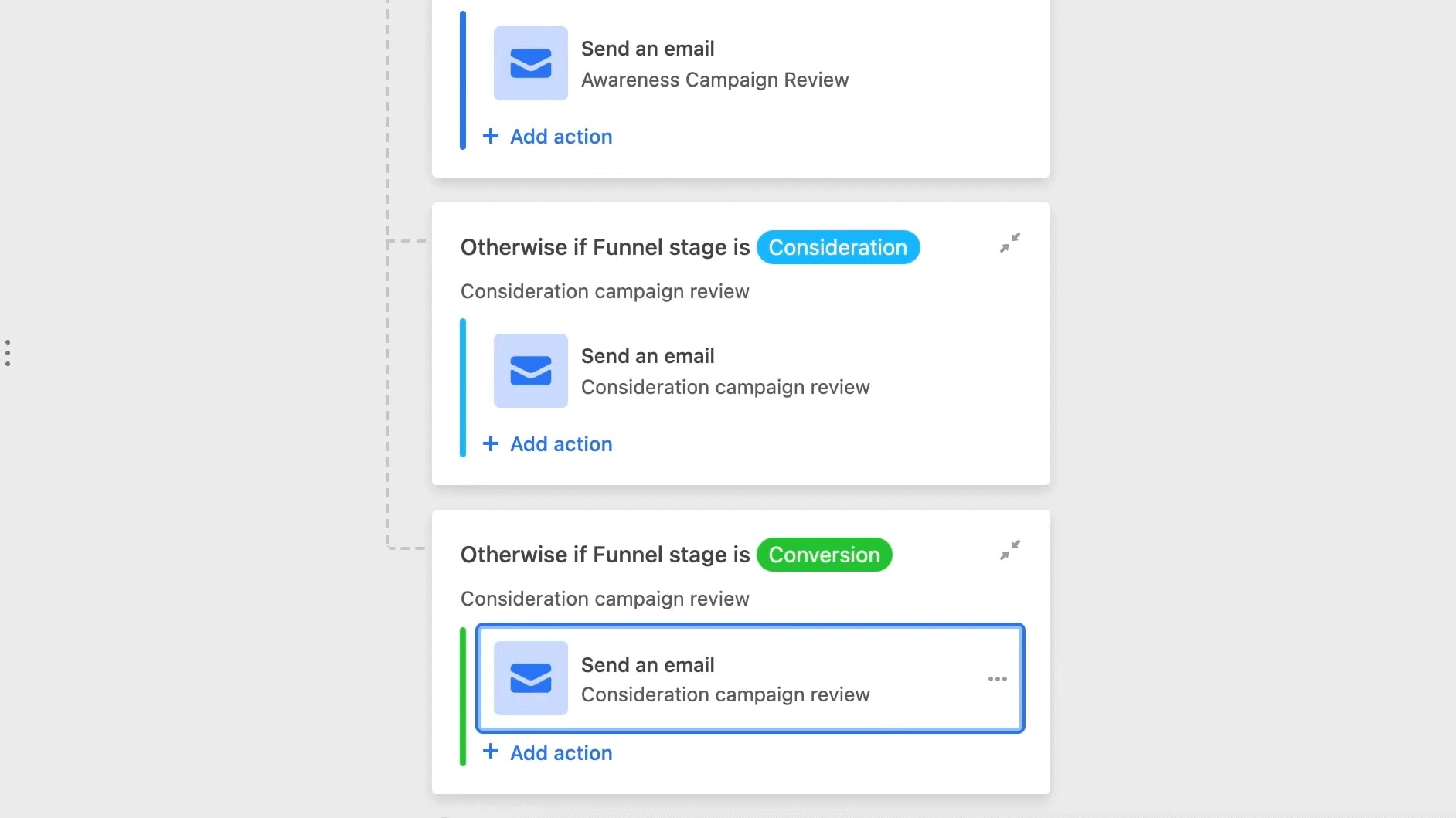
Airtable notably advances in facilitating and automating workflows
Both Airtable and Excel are formidable when it comes to data analysis, but Airtable notably advances in facilitating and automating workflows. With Airtable, users can effortlessly set up automated tasks, reminders, and triggers that drive business processes seamlessly, making data handling and management noticeably more efficient. Examples include automated notifications or movement of records between bases.
Conversely, Excel showcases robust analytical tools, such as Solver, Goal Seek, and PivotTables, that delve deep into data examination. Yet, it doesn't offer the same intuitive automation for day-to-day operations. For those prioritizing streamlined work processes with minimal manual intervention, Airtable clearly holds the advantage.
Airtable Outshines Excel in User Accessibility and Interface Design
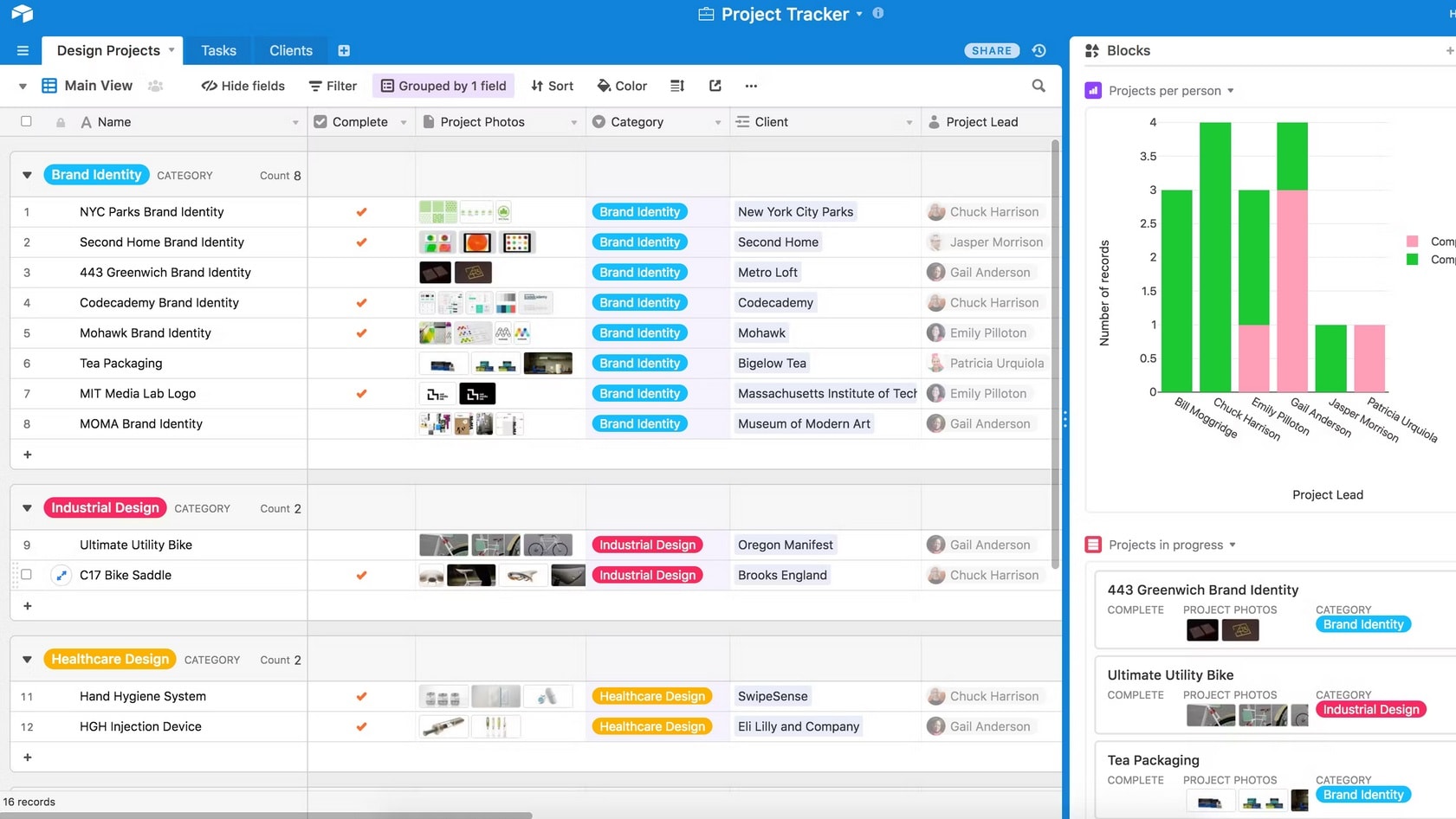
Airtable clearly surpasses Excel when it comes to user-friendliness and ease-of-use.
Airtable clearly surpasses Excel when it comes to user-friendliness and ease-of-use. With its contemporary interface and streamlined design, Airtable makes data management a breeze, especially for beginners. Its drag-and-drop technology simplifies task execution, while its user-friendly tutorials guide newcomers through its features. Customizable fields and varied layout views, like kanban boards and calendars, further enhance its appeal.
Conversely, Excel, with its potent computational strengths, can be daunting for the uninitiated. Its myriad of functions and intricate formulae necessitate more in-depth understanding and training. For those prioritizing a smooth, intuitive interface, Airtable emerges as a preferable option.
Excel Dominates Over Airtable in Formula Proficiency and Analytical Depth

Central to Excel's esteemed reputation is its vast repertoire of formulas and functions
Central to Excel's esteemed reputation is its vast repertoire of formulas and functions. This expansive library, which spans basic arithmetic computations to intricate statistical evaluations, such as regression analysis, t-tests, and ANOVA, empowers users with unmatched computational dexterity. With features like array formulas, conditional logic, and lookup functions (e.g., VLOOKUP and HLOOKUP), Excel offers unparalleled precision and adaptability. This makes it a frontrunner for those who require deep data scrutiny and manipulation.
While Airtable brings commendable features to the table, especially in terms of visual databases and collaboration, it doesn't quite match Excel's depth in formula-driven data analytics.
Airtable Outclasses Excel in Database Customization and Field Versatility
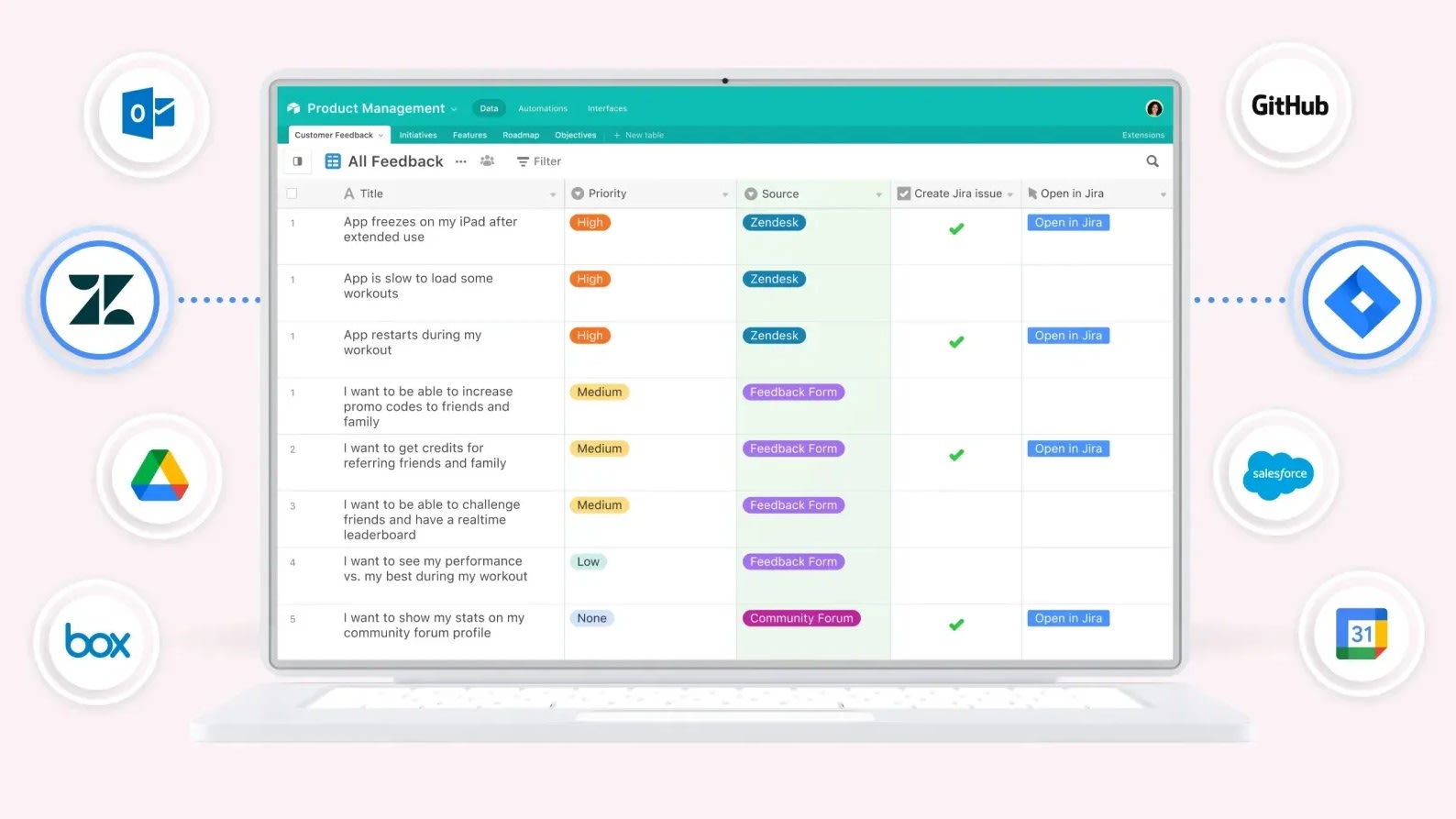
At the core of Airtable's robust offerings is its diverse array of field types
At the core of Airtable's robust offerings is its diverse array of field types, enabling users to mold their databases with pinpoint accuracy to their needs. Whether it's storing images and documents through attachment fields, utilizing date pickers for timeline management, or leveraging multi-select dropdowns for categorization, Airtable serves as a dynamic platform for data collection. Even the option to embed barcodes or link records across tables elevates its customization game.
In contrast, while Excel's data validation tool allows for input constraints and drop-down list creation, it lacks the broad spectrum of field customization inherent to Airtable, making the latter a preferred choice for intricate database structuring.
Excel's PivotTables Eclipse Airtable in Data Manipulation and Summary
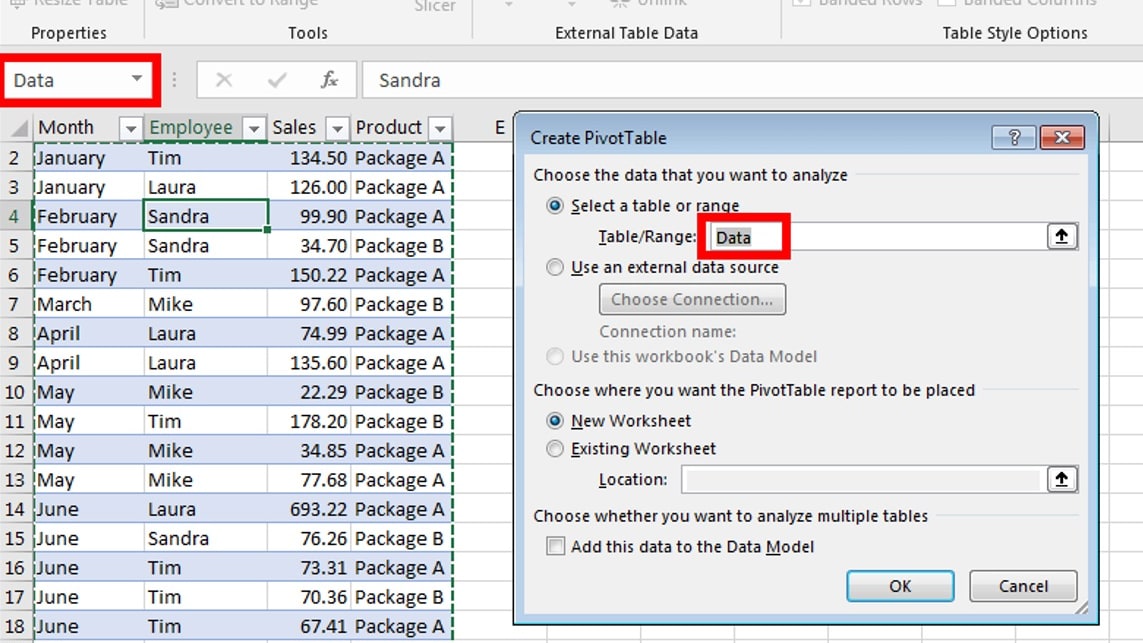
Among Excel's standout capabilities, PivotTables undoubtedly hold a top spot, heralding a new age in data aggregation and analysis
Among Excel's standout capabilities, PivotTables undoubtedly hold a top spot, heralding a new age in data aggregation and analysis. Through PivotTables, users can swiftly dissect vast datasets, extracting valuable insights by rotating, summarizing, and filtering data based on specific criteria. For instance, sales data can be swiftly segmented by region, product, or time period, unveiling patterns and trends with just a few clicks.
Conversely, while Airtable boasts of its ability to curate different views, such as grid, kanban, or calendar, it doesn't quite match the intricate data summarization prowess of Excel's PivotTables. In the realm of detailed data analytics, Excel remains a powerhouse.
Airtable and Excel Shine Equally in Real-Time Collaboration and Teamwork

Airtable's collaboration features are commendable
At the heart of modern data management tools, both Airtable and Excel stand tall, championing commendable collaboration features. Whether it's Airtable's shared views and commenting system or Excel's co-authoring feature in its online version, multiple team members can dive into the same dataset, making edits, comments, and updates synchronously.
For instance, Airtable's block features like the "Gantt" view facilitate project timelines, while Excel's "Share" feature in Office 365 promotes seamless team integration. Such functionalities not only bolster teamwork but also drive efficiency, ensuring that everyone is on the same page with the freshest data at their fingertips.
Airtable Triumphs Over Excel in Seamless Integration and Versatility
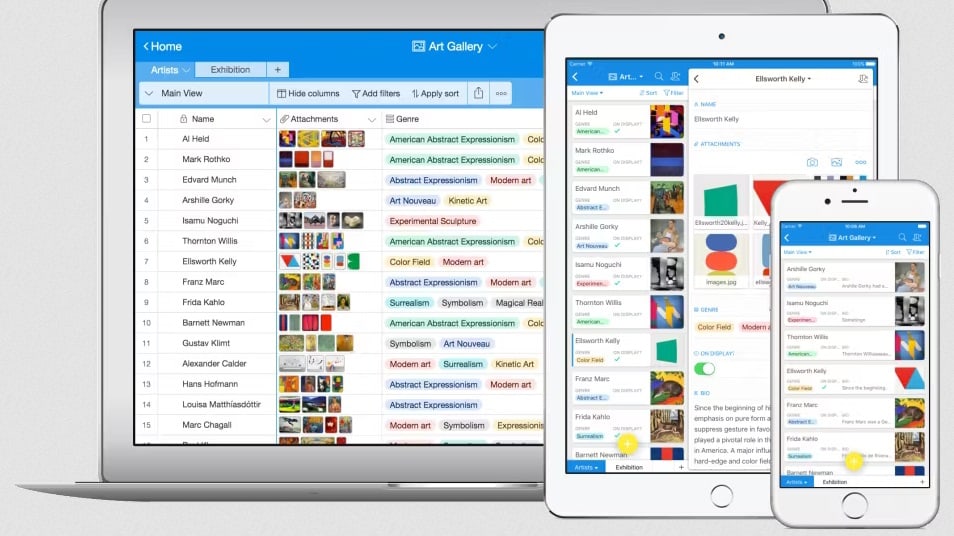
Aitable outperforms Excel in integration capabilities
When comparing integration capabilities, Airtable distinctively outpaces Excel. Its API, combined with an expansive roster of pre-established integrations with renowned platforms like Slack, Google Drive, Dropbox, and Trello, ensures that Airtable sits at the nexus of digital connectivity. Such integrations empower users to smoothly transition data across services, streamlining tasks and bolstering overall efficiency.
On the flip side, Excel's integrative prowess is somewhat limited, largely confined to the Microsoft ecosystem, encompassing tools like SharePoint and Power BI. Additionally, bridging Excel with external tools can sometimes demand a higher technical acumen or intervention from IT specialists. For businesses aiming for widespread tool integration, Airtable undeniably emerges as the superior choice.
08 Airtable vs Excel: Which is the best for your business?
Airtable is the best tool for you if:
- You're seeking a visually appealing platform that emphasizes collaboration with real-time updates and intuitive design elements.
- Customization is paramount, and you want diverse field options ranging from attachments and checkboxes to multi-select dropdowns.
- Seamless integration with popular apps like Slack, Google Drive, and Dropbox is crucial to streamline your workflows.
- You appreciate a platform that combines the simplicity of spreadsheets with the depth of relational database functionality.
- You're keen on a tool that allows you to easily switch between various views, such as grid, kanban, or calendar.
 You're seeking a visually appealing platform that emphasizes collaboration with real-time updates and intuitive design elements.
Excel is the best tool for you if:
- You require powerful data analysis capabilities, including PivotTables and an extensive library of functions for complex calculations.
- Integration within the Microsoft Office Suite is essential for cohesive workflows and data sharing among applications.
- In-depth financial modeling, budgeting, and forecasting are priorities, leveraging Excel's comprehensive formula libraries and financial functions.
- Advanced charting options such as histograms, trendlines, and sparklines are crucial for visualizing data effectively.
- You need macro programming and automation using VBA to enhance productivity and tailor Excel to your specific needs.
Airtable
Premium
Easily store and organize your data
$1,000 in credits on licences for 1 year
Save up to $1,000
09 Alternatives to Airtable & Excel

Notion
Used by 21,470 members
3 months free on the Business plan with Unlimited AI
Save up to $720

Make
Used by 12,643 members
3 months free on the Teams plan (240k credits included)
Save up to $600

Slack
Used by 4,043 members
25% off new plan purchases
Save up to $9,000

ClickUp
Used by 3,460 members
Additional 20% off Unlimited and Business plans for 1 year
Save up to $1,000
10 Promotions on Collaboration software
Airtable and Excel are great tools, but Secret offers promo codes with discounts on over 2250+ different SaaS solutions. New deals are added regularly, helping you save money on your online subscriptions. Get access to codes for other Collaboration software you might want to purchase

Deal for Google Workspace
20% off Standard plans for 1 year
Make promotion
3 months free on the Teams plan (240k credits included)
Notion discounts
3 months free on the Business plan with Unlimited AI

Deal for Google Calendar
20% off Standard plans for 1 year
Promo code for Slack
25% off new plan purchases

Code for QuillBot
30% off the annual Premium plan

Miro promotion code
$1,000 in credits (lifetime validity)

Google Docs discount
20% off Standard plans for 1 year

Monday promotion code
First month free

Retool promotion
1 year free on the monthly Team or Business plan
Start saving on the best SaaS
Secret has already helped tens of thousands of startups save millions on the best SaaS like Microsoft Teams, Google Workspace & many more. Join Secret now to buy software the smart way.