


When people ask me "excel or notion?", it is usually not an inquiry about a list of features. People are actually asking; In which type of environment does my work belong, will it be the document-oriented and calculation-first workspace (Excel), or the workspace that is primarily used for documenting with the ability to function as a simple database (Notion)?
In this article I'll provide a detailed breakdown of all the practical differences you may encounter on a daily basis, such as formulas, reporting, collaboration, security/permissions, integrations, automation, and price.
If you are also looking at discount options, you can find more information by checking out our internal pages for Excel reviews and Notion pricing to match capabilities with cost.
- 01 Excel vs Notion: overview
- 02 What's the difference between Excel and Notion?
- 03 Excel pros and cons
- 04 Notion pros and cons
- 05 Excel compared to Notion
- 06 Notion compared to Excel
- 07 Features comparison
- 08 Excel vs Notion: Which is the best for your business?
- 09 Alternatives to Excel & Notion
- 10 Promotions on Productivity software
- 11 Excel vs Notion: Conclusion
Start saving on the best SaaS
Secret has already helped tens of thousands of startups save millions on the best SaaS like Microsoft Teams, Google Workspace & many more. Join Secret now to buy software the smart way.

01 Excel vs Notion: overview
Both Excel and Notion are great tools to help organize your thoughts; however, each tool has been developed to produce a vastly different outcome. The primary purpose of Excel is to calculate, and therefore, using raw numbers, Excel can develop models, forecasts, and ultimately, create decision-making opportunities through its robust spreadsheet capabilities. Conversely, Notion was developed to be able to link together disparate pieces of data, whether those are notes, tasks, reference materials, etc., and transform them into an organized system that your team can manage and navigate.
You will likely choose Excel if your final product is the actual spreadsheet (e.g., financial model), operational reporting, pivot-based analysis, reconciliation, or any process where the accuracy of formulas is non-negotiable. Organizations have historically defaulted to Excel as their preferred tool due to its widespread adoption and understanding among users. In addition to being easily exchanged between colleagues, and having extensive integration within the Microsoft ecosystem, Excel provides a solid foundation for creating financial models, reports and other related processes.
Conversely, if your final product is a collaborative workspace, company-wide knowledge base, project management center, document repository for processes, and/or database(s) representing "things" such as client, projects, content, inventory, OKR's, etc. with various views, then Notion is likely the best choice. In essence, Notion excels at providing the necessary context for analyzing and interpreting the numbers.
The following table is provided to demonstrate the side-by-side comparisons of features between Excel and Notion to clearly illustrate the choices you need to make.

Pricing plan
Notion offers a free plan and paid tiers, Plus and Business. Excel is typically bundled via Microsoft 365 licensing, the real cost depends on what you already pay.

Excel
Notion
Customer support
Excel benefits from Microsoft’s enterprise support footprint and a massive community. Notion’s support is solid, but escalations and governance needs often push teams to higher tiers.
Excel
Notion
Customer reviews
Excel is praised for power and universality, Notion for flexibility and consolidation. Both have loud fans, and both have predictable pain points at scale.
Excel
Notion
Templates and knowledge base
Notion is purpose built for wikis and repeatable operating systems, templates and linked databases. Excel templates exist, but they’re usually static files rather than living systems.
Excel
Notion
Ease of use
Notion feels approachable for docs and structured tables. Excel is easy for basics, but gets steep once you rely on pivots, Power Query, and advanced modeling patterns.
Excel
Notion
Formulas and calculations
Excel is the calculation engine, rich functions, robust referencing, and mature modeling workflows. Notion formulas are best for database properties, not complex multi sheet analysis.
Excel
Notion
Data analysis and reporting
Excel wins with PivotTables, charting depth, and repeatable transforms. Notion can summarize and visualize, but it’s not designed for heavy analytics or complex reporting packs.
Excel
Notion
Collaboration and permissions
Notion’s page level sharing and workspace permissions are naturally suited to teams. Excel collaboration works well in cloud setups, but governance and version discipline require more rigor.
Excel
Notion
Integrations and ecosystem
Notion integrates well with modern SaaS workflows, especially through integration partners. Excel is strongest inside the Microsoft ecosystem and for data interchange via exports and imports.
Excel
Notion
Automation and workflows
Excel automates computation centric workflows, macros and VBA and automation tools. Notion automates workflow centric logic, database rules, updates, integrated task flows, more naturally.
Excel
Notion
02 What's the difference between Excel and Notion?

Excel's structured spreadsheet workspace
Excel
Transforming numbers into insights: Dive deep with Microsoft Excel.

Notion is a context-first connected workspace
Notion
Knowledge base, project management, note taking, and more. Notion leverages AI to centralize your team's work, facilitate collaboration, ensure proper project follow-up, and boost overall productivity and efficiency.
The main difference is that Excel is a calculation first (calculation) based tool. A tool used to define a model, enter assumptions into one area of the model, formulate the output, and then be able to audit/defend the output from a single location. This is the reason that Excel is still the best financial planning tool, revenue modeling tool, scenario analysis tool, reconciliation tool, and operational reporting tool. In addition, because of the potential cost associated with making small errors, it is also the safest choice if you want a tool that acts similarly to an analytical instrument.
Notion is a context first (context), space to work. The tables in Notion act as databases that you can connect, filter, and view as boards, calendars or timelines. All of the narrative, specifications, Standard Operating Procedures (SOPs), meeting notes, decisions, etc., are located in the same location as the table(s). As such, Notion is the better option when your bottleneck is not related to the amount of time it takes to perform calculations, but rather how fragmented the data is and/or how many locations the data exists (docs, chat threads, spreadsheets, task management tools, etc.) and none of them have the ability to communicate with each other.
Another important factor to consider when comparing Excel and Notion is their free plans. Notion offers a real free plan and has a very clear path to upgrade to a paid version, and I was able to verify this by referencing a trusted authority source Notion’s official pricing page. Meanwhile, Excel is commonly accessed through broader Microsoft licensing rather than a free plan mindset. The result is a simple rule: choose Excel when the model is the product, choose Notion when the workspace is the product.

Notion
Organize teamwork and increase productivity
3 months free on the Business plan with Unlimited AI
Save up to $720
03 Excel pros and cons
What are the advantages of Excel?
- Advanced formulas and modeling depth, Excel supports complex functions, robust referencing, and mature patterns for building models you can audit. If you’re doing forecasting or financial logic, it’s simply the most dependable environment.

- PivotTables and analysis workflows, PivotTables, slicers, and charting let you turn raw exports into readable insights fast. It’s ideal for recurring reporting cycles where stakeholders expect consistent outputs.
- Data preparation with repeatability, Excel workflows can be designed to refresh from the same data sources repeatedly. That makes it effective for cleaning, reshaping, and consolidating operational data.
- Automation options for spreadsheet native processes, macros and scripted logic can eliminate repetitive work, especially in legacy or operations heavy environments. It’s excellent when your process begins and ends in the spreadsheet.
- Universal business language, almost every system exports to Excel, and almost every business user can read an Excel file. That interoperability reduces friction with clients, partners, and finance teams.
What are the disadvantages of Excel?
- Weak knowledge management, Excel doesn’t naturally become a wiki. You can store notes, but it’s hard to keep documentation, decisions, and processes consistently linked to the data that drove them.

- Collaboration can become version chaos, even with cloud co authoring, teams often end up with multiple final variants. Governance is possible, but you have to design it, enforce it, and maintain it.
- Relational structure is awkward, you can approximate databases, but relationships, rollups, and one object referenced everywhere are not native in the way they are in Notion.
- Hidden logic risk, a single flawed formula can distort decisions quietly. Auditing is possible, but it requires discipline and often a second pair of eyes.
- Not optimized for workflow execution, assignments, approvals, and process steps can be bolted on, but it never feels as frictionless as tools designed for workflow and documentation first collaboration.
Compare Excel to other tools


Airtable vs Excel

04 Notion pros and cons
What are the advantages of Notion?
- Docs and databases in one workspace, Notion links narrative and structure, pages, tables, projects, and reference docs can live side by side and stay consistent over time.
- Relational databases with multiple views, one dataset can become a table for operations, a board for execution, and a calendar for planning. That flexibility is practical, not just nice to have.
- Templates that standardize execution, templates reduce reinventing the wheel, onboarding checklists, meeting notes, product specs, and delivery playbooks can be repeatable and easy to maintain.
- Team friendly collaboration and permissions, sharing, commenting, and structuring access is more natural than passing around spreadsheets. It’s built for shared ownership of knowledge.
- Integrations for modern stacks, Notion works well as an ops layer across tools, and you can explore what’s possible via Notion’s integration directory.
What are the disadvantages of Notion?
- Not a heavy analytics engine, Notion formulas are useful, but they’re not designed for serious modeling, pivot style analysis, or deep charting. If the math is the work, Excel is safer.
- Blank page paralysis, flexibility can backfire, without templates and conventions, teams spend too long building the system instead of using it.
- Performance depends on database scale, very large databases and complex pages can feel slower than a dedicated spreadsheet tool for pure data manipulation.
- Import is not a true conversion, you can import CSV or Excel data, but complex workbook logic won’t carry over one to one. You typically rebuild structure and keep calculations elsewhere.
- Advanced admin needs can raise costs, when you require tighter governance, security, or organization wide rollouts, you often end up on higher tier plans.
Compare Notion to other tools


Notion vs Monday

Notion vs Asana

Coda vs Notion

ClickUp vs Notion

Notion vs Slab

Notion vs OneNote
05 Excel compared to Notion
Excel’s advantage is straightforward, it’s where numbers become decisions through a battle tested calculation engine. When your workflow demands precision, finance, ops, analytics, Excel gives you control over assumptions, logic, and outputs.
Notion’s advantage is equally clear, it’s where work becomes durable. Specs don’t vanish in chat. Decisions don’t get lost in folders. Projects don’t drift because the why and the what live in the same place.
Is Excel better than Notion?
 Is Excel better than Notion?
Excel is better than Notion when the core requirement is analytical depth. If you need scenario planning, rigorous forecasting, or repeatable reporting packs, Excel’s formula system and analysis toolkit are the standard for a reason.
Notion can present metrics, but it isn’t designed to be the place where complex computation happens. If your team routinely debates assumptions and needs to trace results back to a model, Excel is the tool I’d bet on.
What is Excel best used for?
Excel is best for financial modeling, budgeting, forecasting, pricing simulations, reconciliations, and KPI reporting. It’s especially strong when you need a workbook that encodes business logic and can be reviewed step by step.
It’s also excellent for turning messy exports into structured datasets, then producing charts and pivots that leaders can digest without reading a database manual.
Can Excel replace Notion?
Excel can replace Notion for simple tracking, lists, basic dashboards, and lightweight planning, particularly in smaller teams where a file is still an acceptable source of truth.
But Excel doesn’t replace Notion well for a living wiki, cross linked documentation, or team execution systems. The moment your work needs to connect tasks, decisions, and reference docs, spreadsheets start feeling like a clever workaround rather than a home.
Is Excel cheaper than Notion?
Excel is often cheaper in real life if your organization already pays for Microsoft 365. In that case, Excel’s incremental cost is close to zero, and your main cost becomes governance and training for advanced use.
If you want to optimize software spend, see our Excel pages and offers, including our review hub at Excel reviews. For Notion, the official tiers are transparent on Notion pricing, and our internal breakdown is available at Notion pricing.
Is there a better Productivity software than Excel?
Better than Excel usually means better for a specific job. If you need real time collaboration as the default, you’ll look at Google Sheets. If you need spreadsheet like structure with database behavior, you’ll look at Airtable. If you need dashboards and BI, Power BI enters the conversation.
To explore options systematically, use our internal roundup of Excel alternatives, it’s a practical shortlist that maps tools to use cases rather than just naming competitors.
Can I transfer Excel to Notion?
Yes, if your Excel file is essentially a dataset, rows and columns, importing it into Notion as a database is usually straightforward. The key is to set the right property types, number, date, select, relation, so you don’t end up with everything as text.
What you typically can’t transfer cleanly is the workbook’s logic, PivotTables, multi tab dependencies, Power Query steps, and heavy formula networks are better kept in Excel, with high level outputs summarized in Notion.
06 Notion compared to Excel
Excel is well-suited to use in the areas of financial modeling, budgeting, forecasting, pricing simulation models, reconciliations, and KPI reporting. If you are using a workbook to embed business logic into your model and/or if you want to allow users to review and understand all components of the workbook, Excel is the ideal tool for this application.
If you have large data sets that you would like to organize as structured data sets and then develop charts or pivots that can be easily understood by users, Excel is the right application for you.
Is Notion better than Excel?
In certain cases, yes, Excel can replace Notion for small-scale tracking/monitoring, lists, light-weight dashboards/planning — primarily in small teams where files are still considered valid sources of information.
However, Excel will not replace Notion for a living wiki, for cross-linked documentation, or for team execution systems. As soon as your workflow requires you to link together tasks, decisions, and reference documents, the spreadsheet begins to feel like a creative solution to a problem instead of a home.
What is Notion best used for?
Notion is ideal for corporate wikis, SOP libraries, onboarding platforms, project management tools, a "lite" version of your CRM, content calendars, editorial pipelines, research libraries, etc. It is particularly beneficial if you want to relate what you are doing to why you are doing it, but do not want to scatter this context over files, or through chat logs.
Can Notion replace Excel?
Notion can be an alternative to Excel for making Operational Dashboards (i.e., for tracking) when your calculations are relatively straightforward and you're only looking for visibility of Statuses, Owners, Timelines, and attachments to a record.
However, if you need to do true modeling, forecasting, or scenario analysis, if you have complex logic, or if you want the ability to have audit-ready computations, Notion is not designed to compete with Excel as a tool for those needs. There is a pattern developing, compute in Excel, then publish and operationalize in Notion.
Is Notion cheaper than Excel?
For example, Notion may be less expensive for individual users or small teams due to how much you can accomplish through the free plan and how the paid plans are priced based on what real collaborations need. For example, you could validate our plan structure by going to Notion’s official pricing and compare it with our internal guide at Notion pricing.
Excel may be less expensive if it is part of your Microsoft license. If you are evaluating pricing options, we have a Notion discount page available here Notion deals.
Is there a better Collaboration software than Notion?
If you enjoy the idea behind Notion, yet desire a more opinionated product with stronger task execution capabilities, a much easier on-boarding experience, or a unique set of permissions; then alternatives to Notion may be useful. Ultimately, the best alternative will depend upon how you're optimizing for projects, documentation, or structured data.
While Excel could potentially be less costly (as long as you already have an active Microsoft License), if you are comparing prices, we also have a page with discounts on Notion here. Notion alternatives, and if you’re comparing work management approaches specifically, our ClickUp vs Notion breakdown is a useful next step.
Can Notion do formulas like Excel?
Notion has the ability to perform formulas; however, those formulas were designed for performing calculations on database property fields, creating derived values from other properties within that database, allowing you to conditionally label records within a database based upon calculated conditions, or as part of your workflow design, as a way to allow for simple scoring/routing of data through your workflow processes. This is ideal when you want to create an operational workflow process.
If the calculation being performed is going to be a major part of the deliverable, it's better to leave the formula in Excel and use Notion to link the calculation to the overall context. The use of Excel for all formula-based calculations will provide a large number of functions to reference from within your Notion application. In addition, there have been many years of development and testing of how to use Excel formulas effectively and efficiently which will make the implementation of formulas in your Notion application much easier.
Notion
Organize teamwork and increase productivity
3 months free on the Business plan with Unlimited AI
Save up to $720
07 Features comparison
Notion Leads for Templates and Building Repeatable Operating Systems

Build repeatable team operating systems with Notion templates
The templates in Notion are much more than just starting points for your template's content, as they can be used to build repeatable systems of operating through the use of Notions' database, views and docs, all which come pre-wired into each new project space.
Templates in Excel have value, however, they are generally a static, one-file artifact that does not provide a natural, interconnected workspace to document, track, and report on work.
If you're attempting to standardize how your teams execute their work, Notion provides you with leverage to do so, while if you're looking to standardize a computation, Excel is still the better tool.
Notion Outclasses Excel for Wiki Grade Documentation and Connected Context
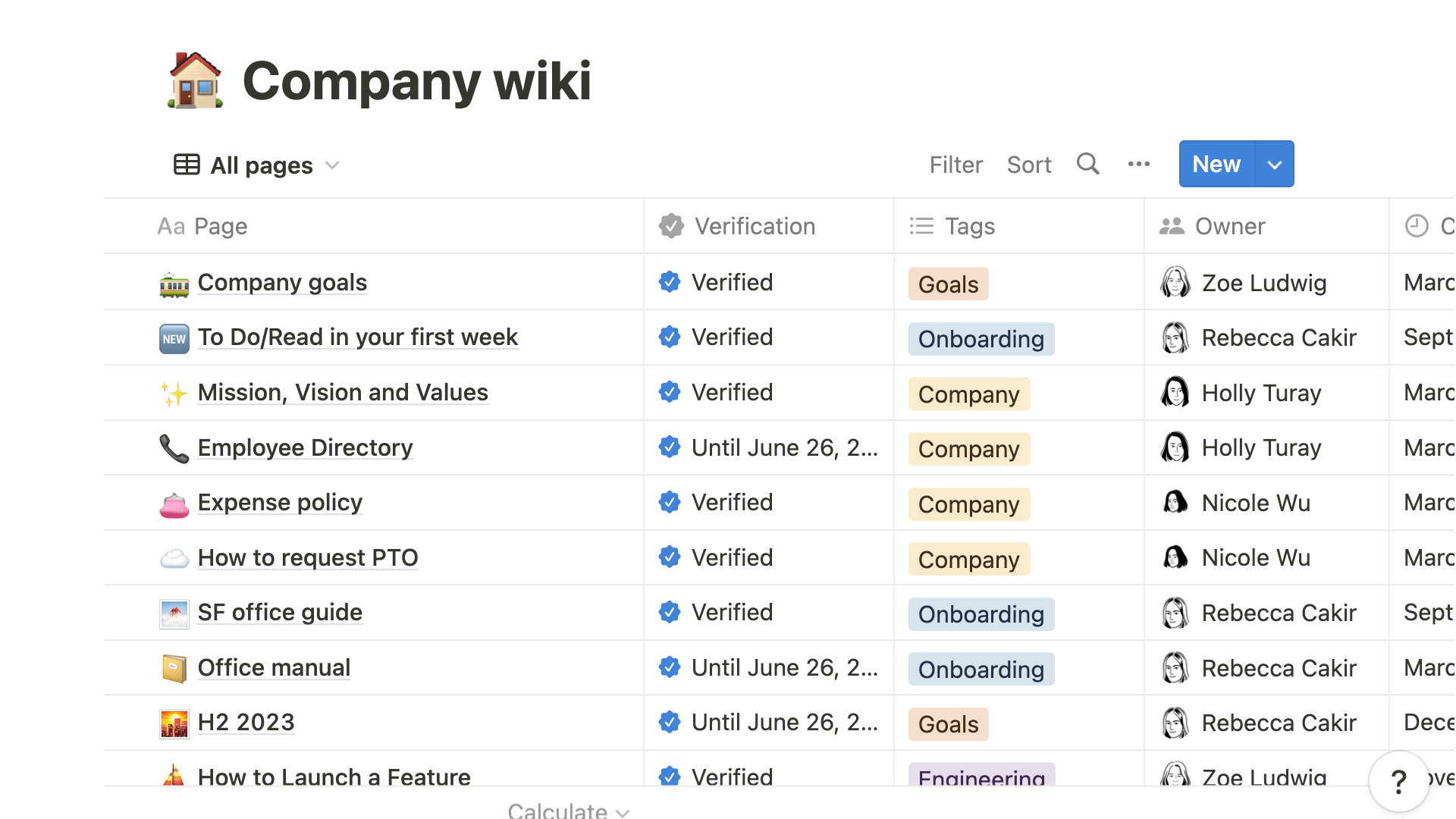
Unify your documentation and project context using Notion
The primary advantage of using Notion lies in its ability to treat documentation as an active participant in a connected context. Projects are linked to the pages of documentation; decisions are tied to the project; and ultimately, decisions are also linked to the original data source — all within a single workspace without creating a folder-based labyrinth of content.
While you can use Excel to document notes; Excel does not inherently become a live knowledge base over time. Inevitably, teams find themselves with many separate documents or files that they must rely on 'tribal knowledge' to understand.
If your problem is explaining the same things, then Notion will be the better system of record for documenting your organization's knowledge.
Excel Dominates Notion for Advanced Formulas and Model Governance
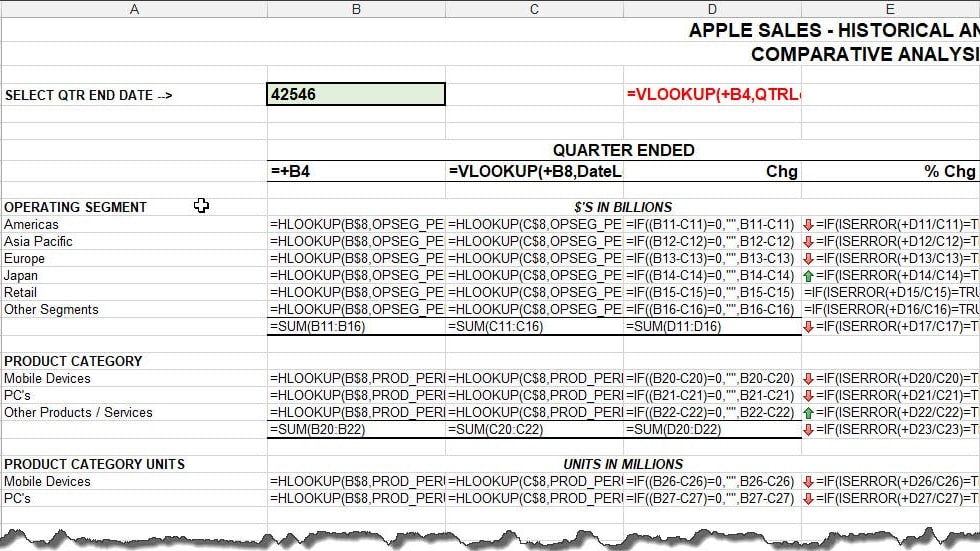
Excel's advanced formulas and model governance
You will never lose sight of your model in Excel; you can establish layers of assumptions, understand how they relate to one another, and you have to be able to validate your model in an accountable manner.
Notion formulae are good at adding derived property information to your databases (for example, a date field as a string) but Notion was never built to create multi-sheet modeled computational pipelines (i.e., it's best used to add derived fields to your record).
I would always use Notion for my narratives and next steps about a particular topic, and if there was a possibility that an incorrect number could impact a decision, I'd build the calculation in Excel and display both the results in Notion and the related narrative and next steps.
Excel Wins for Reporting, Pivoting, and Repeatable Data Analysis

Turn raw data into reliable reports with Excel
While Notion can summarize and present metrics, it is not an environment to do serious analytic work. It is better suited as an operational view of what's going on now, what's stuck, who is responsible for what.
When it comes to serious reporting cycles (e.g. weekly/monthly), the workbench will be Excel and Notion will be the meeting room where your conclusions are shared and action is coordinated.
Notion Is Better for Collaboration and Permissioned Sharing Across Teams
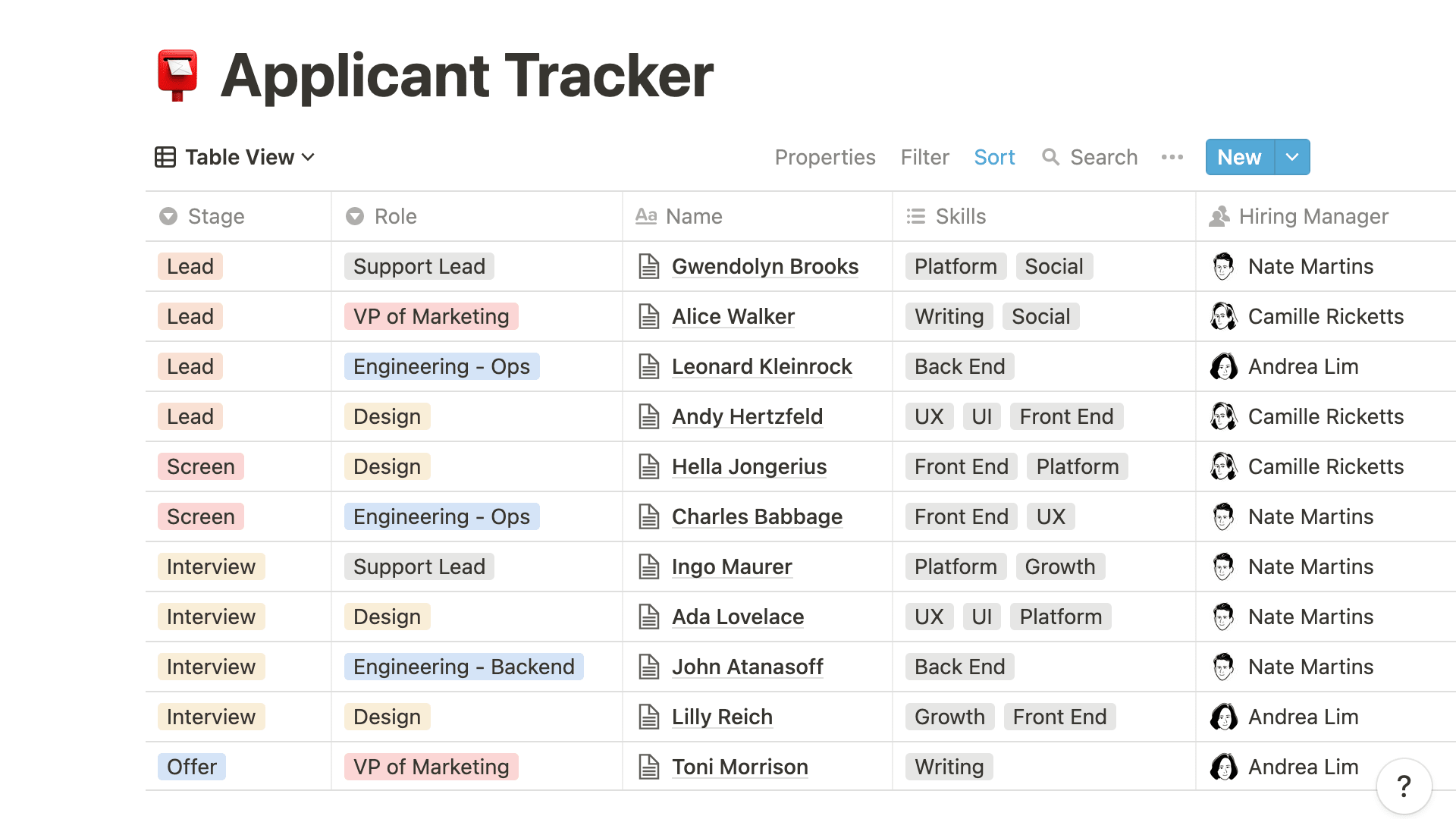
Streamline cross-functional collaboration using Notion
Notion has built-in support for multi-person clarity through comments, @mentions (to get someone's attention), page level permissions, and structured navigation, all of which are designed to allow teams to be in agreement about something faster than they would have been without these tools.
The collaboration features in Excel are similar to those found in Notion; however, if you're working in a cross-functional team environment, where members from different departments are collaborating on projects together, your experience will likely be that Notion provides less operational drag than Excel when it comes to collaboration.
Notion Has the Edge for Modern Integrations and Workflow Connectivity
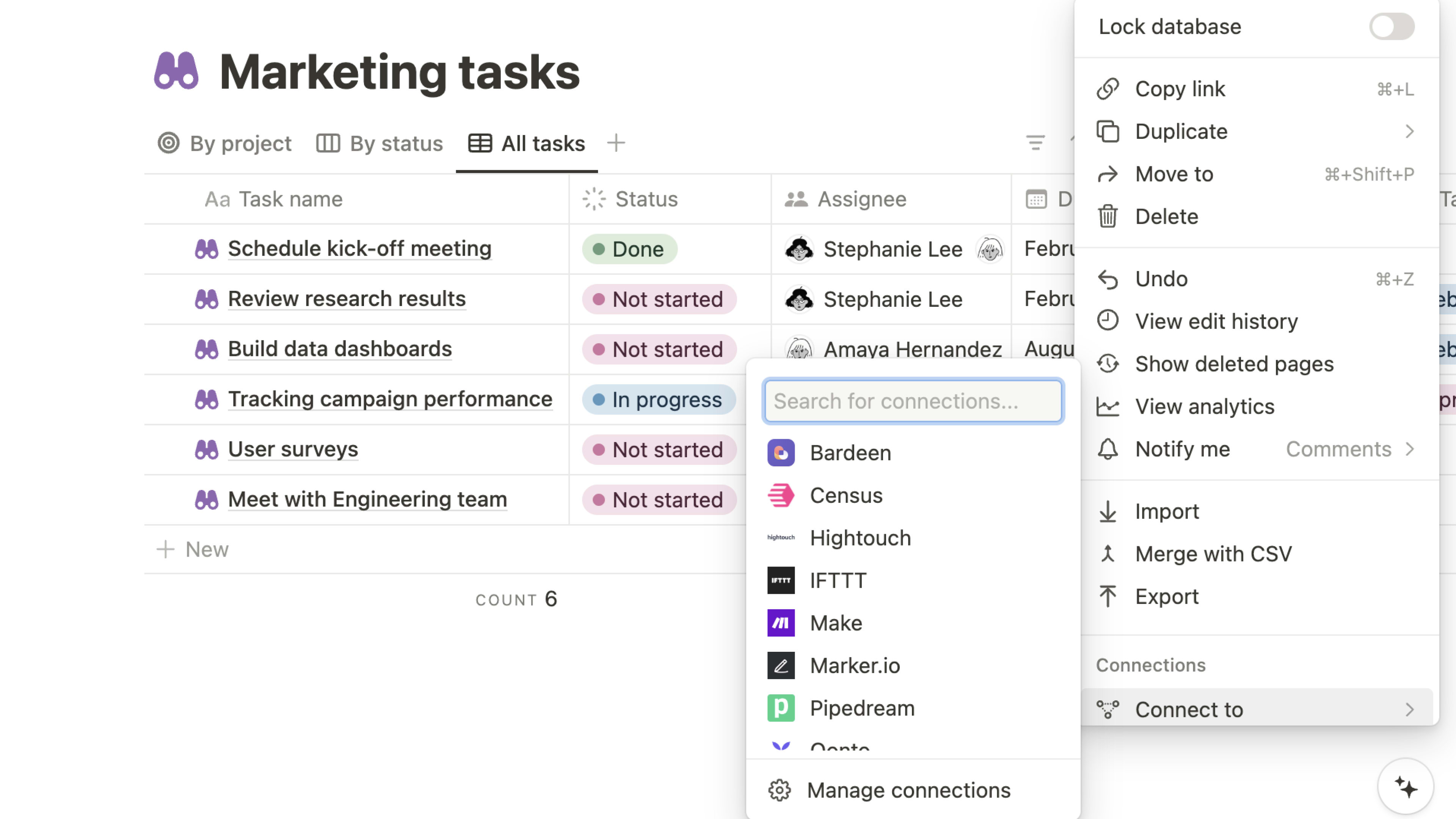
Connect your modern stack with Notion
Notion has its strength as a hub for Modern Stacks since it acts as a single location for both Structured Records (e.g., databases) and Narrative (e.g., pages), and can also be the central location for pipeline integrations to move data back and forth.
Excel is at its best either within an overall Microsoft based stack, or as the one format that all systems use for exchanging information.
If you have multiple systems that your workflow uses and you are looking to utilize Notion as your "ecosystem", see Notion integrations, is the more natural foundation.
Excel Is Stronger for Data Heavy Automation and Spreadsheet Native Processes

Excel powers data-heavy automation through structured query logic
Excel automation is an excellent solution for transforming data, computing output, creating reports from that data set, and the reporting itself when using existing spreadsheet disciplines in your team.
Notion automation focuses primarily on the process state, keeping database(s) consistent as well as advancing tasks and sending information to the proper people in your organization’s system of record and view.
So if you want to automate how you do something (computation), use Excel; if you want to automate how things move around (coordination), use Notion.
Ultimately, the choice will depend on what you really want to remove.
08 Excel vs Notion: Which is the best for your business?
Excel is the best tool for you if:
- You rely on financial models, forecasting, and scenario planning where formula integrity matters.
- You need PivotTables, charting, and repeatable analysis for reporting cycles.
- Your work depends on structured data transformation and consistent outputs for stakeholders.
- You want strong spreadsheet native automation for operational processes.
- You must deliver in a format that’s universally accepted across partners and teams.
 You rely on financial models, forecasting, and scenario planning where formula integrity matters.
Notion is the best tool for you if:
- You want a single workspace for docs, projects, and structured databases.
- Your main pain is fragmented knowledge and duplicated sources of truth.
- You need templates to standardize onboarding, meeting rhythms, SOPs, and execution.
- You manage work through multiple views, table, board, calendar, timeline, off the same dataset.
- You want a tool that’s easy to share, permission, and maintain across teams.
Notion
Organize teamwork and increase productivity
3 months free on the Business plan with Unlimited AI
Save up to $720
09 Alternatives to Excel & Notion

Airtable
Used by 8764 members
$1,000 in credits on licences for 1 year
Save up to $1,000

QuickBooks
Used by 946 members
30% off for 6 months
Save up to $423

Google Docs
Used by 98 members
20% off Standard plans for 1 year
Save up to $3,460

Google Sheets
Used by 84 members
20% off Standard plans for 1 year
Save up to $3,460
10 Promotions on Productivity software
Excel and Notion are great tools, but Secret offers promo codes with discounts on over 2240+ different SaaS solutions. New deals are added regularly, helping you save money on your online subscriptions. Get access to codes for other Productivity software you might want to purchase

Make discounts
3 months free on the Teams plan (240k credits included)

Descript promotion code
35% off annual plans
Airtable promo code 2026
$1,000 in credits on licences for 1 year

Zendesk offer
6 months free (with AI Agents and Copilot)

Google Workspace offer
20% off Standard plans for 1 year

Credits for Fin (ex. Intercom)
$6,500 in Fin AI Agent credits + Intercom helpdesk free for 1 year

Slack coupon code
25% off new plan purchases

Promo codes for Trello
Free forever for up to 10 users

Google Calendar offer
20% off Standard plans for 1 year

Slab coupon
40% off the Startup and Business plans for 12 months
11 Excel vs Notion: Conclusion
If you are trying to choose between Excel and Notion I would rephrase that as follows; Excel is where you do the math and Notion is where you create the coordination. Excel is a better choice when your business needs models and detailed reports that you need to be able to trust, while Notion is a better choice when you need to document your business, clarify your operations, and make sure the decisions you make are in line with the work. In many cases the best approach is not one or the other, but rather use Excel for the heavy lifting and Notion for the narrative, system and execution layers of your business. If you are also considering other related tools, you may want to continue exploring Airtable vs Excel for database style workflows, or browse Notion alternatives if you want a more opinionated workspace.
Ready to optimize pricing? You can check Notion deals and start from Excel reviews to validate fit before you commit.
Start saving on the best SaaS
Secret has already helped tens of thousands of startups save millions on the best SaaS like Microsoft Teams, Google Workspace & many more. Join Secret now to buy software the smart way.