


There is an overwhelming choice of productivity tools currently on the market. Ironically, searching for the right one can consume valuable time better spent on your business. Notion and Todoist are two prominent players in this space, offering task management, note-taking, and basic project management features.
To help you decide which is best for your business needs, we have prepared a comprehensive comparison. We delve into Notion’s and Todoist’s primary use cases and main features, examine their pros and cons, and outline their pricing so you can decide which tool is most suitable for your needs. Let’s dive in!
- 01 Notion vs Todoist: overview
- 02 What's the difference between Notion and Todoist?
- 03 Notion pros and cons
- 04 Todoist pros and cons
- 05 Notion compared to Todoist
- 06 Todoist compared to Notion
- 07 Features comparison
- 08 Notion vs Todoist: Which is the best for your business?
- 09 Alternatives to Notion & Todoist
- 10 Promotions on Collaboration software
Start saving on the best SaaS
Secret has already helped tens of thousands of startups save millions on the best SaaS like Microsoft Teams, Google Workspace & many more. Join Secret now to buy software the smart way.

01 Notion vs Todoist: overview
Notion and Todoist are prominent players in the realm of task management and productivity tools, each offering unique features and benefits tailored to distinct user preferences.
Notion stands out for its versatility and customizable workspace. It provides a flexible platform where users can create databases, notes, wikis, and task lists, all within a single interface. On the other hand, Todoist is known for its simplicity and focused task management capabilities. It offers a straightforward, user-friendly platform designed specifically for managing to-do lists and tasks.
Now, let's delve into the Notion vs. Todoist comparison to help you make an informed decision when selecting the right task management and productivity tool that suits your unique needs.

Ease of use
While Notion has a good UI design, it can involve an initial learning curve. Todoist is praised for its clean user interface and ease of use.

Notion
Todoist
Automation
Notion offers a range of workflow automation, some via its AI assistant. Automation is available on Todoist via integrations.
Notion
Todoist
Customization
Notion is highly customizable and suitable for a range of workflows across departments. Todoist takes a more simplified approach to task management and customization.
Notion
Todoist
Integrations
Notion includes 62+ integrations, including Asana, Canva, and ClickUp. Todoist offers 90+ integrations, including Gmail, Jira, and Chrome. Both integrate with Zapier.
Notion
Todoist
Task management
Todoist is a dedicated task management app. However, both offer robust task management features for creating, assigning, and tracking tasks.
Notion
Todoist
Storage
All Notion’s paid plans come with unlimited file storage. Todoist limits users to 300 active tasks per project.
Notion
Todoist
Templates
Notion provides an extensive range of customizable templates. Todoist offers some native templates for task management and the ability to import templates.
Notion
Todoist
Customer support
Neither offer phone support. Instead, Notion includes 24/7 support with its paid plans and Todoist operates a help ticket system.
Notion
Todoist
Positive reviews
Both receive positive reviews. While some Notion users experience an initial learning curve, others appreciate its advanced features. Todoist users comment on its ease of use.
Notion
Todoist
Pricing plans
Both offer free plans. Notion’s paid plans range from $8-$15/user/per month, while Todoist’s Pro plan costs $4/month and Business plan $6/member/month.
Notion
Todoist
02 What's the difference between Notion and Todoist?
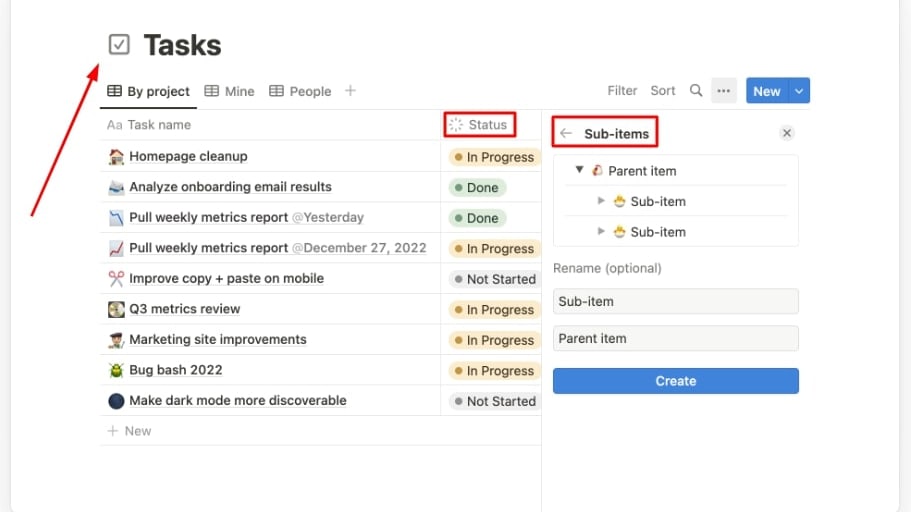
A Task List on Notion with Three Columns for Tasks, Status, and Sub-Items
Notion
Organize teamwork and increase productivity

A Presentation Creation for Task Launch on Todoist Showing its Sub-Tasks, Due Date, Priority Level, and Comments
Todoist
Todoist is a highly efficient task management and to-do list application, designed to help individuals and teams organize their work. With its user-friendly interface, Todoist allows users to create tasks, set deadlines, and categorize them with labels and priorities.
Notion and Todoist are excellent productivity tools that enable you to create, manage, and prioritize tasks easily. Their collaboration features help your team share information and communicate with each other, streamlining your tasks and projects. However, there is a notable difference between them regarding the scope of their application and related features. Todoist is a dedicated task manager with a focus on to-do lists. It lets you organize, label, and break down tasks and filter them by priority. You can create customized to-do lists using projects, sub-projects, tasks, and sub-tasks.
Compared to Todoist, Notion is a versatile, all-in-one productivity solution that goes beyond to-do lists. You can also use it to create company wikis, content calendars, and websites. Notion provides a more granular, detailed view of tasks. It also includes powerful note-taking features, including database creation, and generally more advanced features that support complex task and project management. Its drag-and-drop page builder is highly customizable to your specific workflows. The tradeoff is that Notion can involve an initial learning curve as users familiarize themselves with these advanced features. While Todoist’s features are more basic, the platform offers a simplified, user-friendly task manager requiring no technical knowledge.
This difference in scope influences the platforms’ respective features. For example, Todoist lets you view your tasks on lists or Kanban boards. For many small teams, these options are sufficient. Notion offers more views, including calendars, tables, and timelines, which may suit more complex projects. It’s also worth noting that Todoist is available on more platforms. While both are available on Mac, Windows, iOS, Android, and the web, Todoist is also available on Linux, Apple Watch, and Wear OS (Google). This may influence your decision on which platform is best for your business, depending on how you intend to use it.

Notion
Used by 20461 members
3 months free on the Business plan with Unlimited AI
Save up to $720

Todoist
Used by 2217 members
20% off annual plans
Save up to $24
03 Notion pros and cons
What are the advantages of Notion?
- Versatile and customizable: Notion's biggest strength is its flexibility. You can create a wide range of content and databases, including notes, to-do lists, calendars, databases, and more, all within a single interface. It's highly adaptable to different use cases.

- Collaborative: Notion offers robust collaboration features, making it easy for teams to work together. You can share pages, databases, and projects, and collaborate in real-time. It's particularly useful for remote teams.
- Rich media support: Notion allows you to embed multimedia elements such as images, videos, files, and links directly into your content. This makes it a great platform for creating interactive and visually appealing documents.
- Cross-platform compatibility: Notion is available on multiple platforms, including web, desktop (Windows and macOS), and mobile (iOS and Android). This means you can access your notes and tasks from anywhere.
- Large template library: Notion offers a wide variety of templates for different purposes, from project management to personal journals. These templates can save you time and help you get started quickly.
What are the disadvantages of Notion?
- Learning curve: Notion's versatility can also be a drawback for some users. Its extensive features and options may have a steeper learning curve, especially for beginners.

- Pricing: While Notion offers a free plan with basic features, some of the more advanced features, like collaboration and unlimited storage, are locked behind the paid plans. This might be costly for larger teams or those who need extensive functionality.
- Mobile app limitations: While Notion's mobile app is functional, some users find it less feature-rich and more challenging to use compared to the web or desktop versions.
- Performance issues: Some users have reported performance issues when working with large databases or complex pages. Notion can slow down in such cases, impacting productivity.
- Offline access: While Notion does offer offline access to your content, it may not be as seamless and feature-rich as some dedicated offline note-taking apps.
Compare Notion to other tools


Notion vs Monday

Notion vs Asana

Coda vs Notion

ClickUp vs Notion

Notion vs Fibery

Notion vs Slab
04 Todoist pros and cons
What are the advantages of Todoist?
- Simplicity and user-friendly interface: Todoist is known for its straightforward and easy-to-use interface. It's a great choice for individuals who prefer a simple and intuitive task management tool.
- Cross-platform compatibility: Todoist is available on a wide range of platforms, including web browsers, desktop (Windows and macOS), mobile devices (iOS and Android), and various integrations with other apps. This ensures you can access your tasks from virtually anywhere.
- Task organization: Todoist offers robust task organization features, including project labels, due dates, priorities, and sub-tasks. This allows users to create a structured and organized task list.
- Natural language input: Todoist allows users to add tasks using natural language input. For example, you can type "Meeting with John at 3 pm tomorrow" and Todoist will automatically create a task with the correct date and time.
- Productivity features: Todoist provides productivity-enhancing features like reminders, recurring tasks, and the ability to set goals and track productivity trends over time. It also integrates with the Pomodoro technique for time management.
What are the disadvantages of Todoist?
- Limited collaboration: While Todoist offers sharing and collaboration features, they are relatively basic compared to other task management tools. It may not be the best choice for teams that require extensive collaboration capabilities.
- Free plan limitations: The free version of Todoist has limitations, such as a limited number of projects and reminders. Users with more complex task management needs may need to upgrade to a paid plan.
- Integration limitations: While Todoist does integrate with many other apps and services, it may not have the same level of integration depth as some other task management tools, which can be a limitation for users who rely on specific integrations.
- Customization constraints: Todoist is designed with simplicity in mind, which means it may not offer the same level of customization and flexibility as more complex task management tools. Some users may find this limiting.
- Learning curve for advanced features: While Todoist's basic features are easy to grasp, some of its more advanced features, such as filters and custom views, may require a learning curve to use effectively.
Compare Todoist to other tools

Asana vs Todoist

Trello vs Todoist
ClickUp vs Todoist

Todoist vs Taskade

Todoist vs Microsoft To Do
05 Notion compared to Todoist
When comparing Notion and Todoist, Notion sets itself apart with its versatility and multifaceted approach to task management and information organization. Notion appeals to users who require a single platform to handle a wide range of tasks, from note-taking and project management to database creation and collaborative workspaces. Its customizable nature allows users to adapt it to their unique workflow and needs.
Both Notion and Todoist are robust productivity tools, but the choice between them depends on your specific requirements. Notion offers a comprehensive and adaptable solution suitable for users who prefer a one-stop-shop for various productivity needs. In contrast, Todoist provides a focused and user-friendly task management experience, making it an excellent choice for those who prioritize simplicity and efficiency in their task organization.
Is Notion better than Todoist?
 Is Notion better than Todoist?
Determining whether Notion is better than Todoist hinges on your particular productivity and task management requirements. Notion shines when versatility and customization are key. It excels at offering a unified platform for a variety of tasks, from note-taking and project management to database creation and collaboration. If you value adaptability and a broad range of functionalities, Notion might be the right choice for you.
On the contrary, Todoist stands out for its simplicity and streamlined task management approach. It's an excellent fit for individuals who prioritize a straightforward to-do list experience without the complexity of extensive customization options. If you lean toward a minimalistic and efficient task organization system, Todoist could be the preferred option.
What is Notion best used for?
Notion is a versatile and multifunctional productivity tool best used for tasks like note-taking, project management, database creation, and collaborative workspaces. It offers adaptability and customization, making it suitable for a wide range of personal and professional uses.
Notion excels in scenarios where users require a unified platform to organize and manage various types of information and tasks, from jotting down notes to building complex databases. Its flexibility caters to users seeking a comprehensive and tailored solution for their productivity and organizational needs.
Can Notion replace Todoist?
If you value versatility and a multifunctional platform that goes beyond simple task management, Notion can be a viable alternative to Todoist. Notion's ability to handle various tasks, from note-taking and project management to database creation and collaborative workspaces, makes it suitable for users seeking an all-in-one productivity solution.
However, if your primary focus is streamlined task management and to-do lists, and you prefer a straightforward and user-friendly experience, Todoist may better suit your needs. Todoist excels at creating and managing task lists, setting deadlines, and prioritizing work efficiently.
Is Notion cheaper than Todoist?
When evaluating the pricing of these two productivity tools, it becomes evident that Notion and Todoist follow different pricing models.
Notion offers a pricing model that includes both free and paid plans. The free plan provides basic functionality, while the paid plans offer additional features, such as collaboration and increased storage. Notion's pricing scales with the number of users, making it a potentially cost-effective choice for smaller teams or individuals on the free plan. However, as you add more users and opt for paid plans, the cost can increase.
Todoist, on the other hand, offers a straightforward pricing structure with both free and premium versions. Whether Notion is cheaper than Todoist depends on your specific needs and how you plan to use these tools. Notion's pricing can vary depending on the number of users and chosen features, while Todoist's pricing remains simpler, with a fixed per-user cost for premium features.
Is there a better Collaboration software than Notion?
While Notion is a versatile and feature-rich productivity tool, it's essential to consider whether there might be a better-suited task management and note-taking software for your specific needs.
Some notable alternatives to Notion in the task management and note-taking space include Todoist, Evernote, Microsoft OneNote, ClickUp, and Trello.
The choice of task management and note-taking software depends on your individual or team's unique requirements, including the complexity of your tasks, the need for collaboration, and your preferred user experience. While Notion offers versatility and customization, other platforms may provide a more streamlined and specialized approach to task management and note-taking that better aligns with your productivity goals and workflows.

Notion
Organize teamwork and increase productivity
3 months free on the Business plan with Unlimited AI
Save up to $720
06 Todoist compared to Notion
Todoist distinguishes itself with its simplicity and efficiency in task management and to-do list organization. It's an excellent choice for individuals and teams seeking a straightforward and user-friendly platform for managing tasks and priorities. Todoist's pricing structure includes both a free plan and premium options, making it accessible to a wide range of users with varying task management needs and budgets.
The choice between Todoist and Notion depends on your specific task management and productivity requirements. If you prioritize a simple and efficient task management experience, Todoist may be the better fit. However, if you need a more versatile and customizable platform that can handle a broader range of tasks and workflows, Notion could be the preferred option.
Is Todoist better than Notion?
The answer to this question depends on your specific task management and productivity needs.
Todoist excels in providing a simple and efficient task management experience. It's user-friendly and streamlined, making it an ideal choice for individuals and teams looking for a straightforward way to manage to-do lists and priorities. If you prioritize simplicity and ease of use in your task management tool, Todoist may be the better option for you.
On the other hand, Notion offers versatility and adaptability. It goes beyond task management and provides a multifunctional platform for note-taking, project management, database creation, and collaborative workspaces. If you require a unified workspace that can handle a wide range of tasks and workflows, and you value customization and flexibility, Notion could be the preferred choice.
What is Todoist best used for?
Todoist is a versatile task management and productivity tool primarily designed for individuals and teams seeking efficient task organization. It excels in creating, organizing, and prioritizing tasks and to-do lists. Todoist streamlines personal productivity by enabling users to set deadlines, establish priorities, and track progress effectively. It's a valuable tool for staying organized, managing daily tasks, and achieving personal or team goals.
With cross-platform compatibility, Todoist is suitable for users who need seamless access to their tasks on various devices. Whether for personal task management or team collaboration, Todoist enhances efficiency and ensures tasks are completed efficiently.
Can Todoist replace Notion?
Todoist is primarily designed for task management and to-do lists. It excels at helping individuals and teams create, organize, and prioritize tasks efficiently. It's a straightforward and user-friendly tool, making it ideal for users who prioritize simplicity in task management.
Notion, on the other hand, is a versatile and multifunctional platform that goes beyond task management. It offers features for note-taking, project management, database creation, and collaborative workspaces. If your primary focus is task management and you prefer a straightforward and efficient tool, Todoist may replace Notion effectively for your needs.
Is Todoist cheaper than Notion?
When it comes to comparing the costs of these two productivity tools, it's important to note that they have different pricing models.
Todoist’s pricing is straightforward with both free and premium versions. The premium version, which unlocks advanced features, is typically priced on a per-user basis. This can make it an economical choice for individuals or teams looking for specific task management functionalities without the complexity of scaling costs based on the number of users.
In comparison, Notion's pricing model is based on a combination of free and paid plans. While it offers a free plan with basic functionality, the paid plans offer additional features and customization options. Todoist offers a simpler and more predictable pricing structure, which may be more cost-effective for some users. Notion's pricing can vary based on usage, making it a flexible but potentially costly option, particularly for larger teams.
Is there a better Task Management software than Todoist?
While Todoist is a widely used and efficient task management tool, it's essential to consider whether there might be a more suitable option for your particular task and productivity management requirements.
Several noteworthy alternatives to Todoist in the task management and productivity space include Notion, Microsoft To Do, Trello, Asana, and Wrike.
The choice of task management software depends on factors such as the complexity of your tasks, your preferred user experience, the need for collaboration, and your budget considerations. Each of these alternatives offers unique features and functionalities, so it's important to evaluate which one aligns best with your specific productivity goals and workflows.

Todoist
Simplify your tasks and boost your productivity
20% off annual plans
Save up to $24
07 Features comparison
Notion Edges Out Todoist for Ease of Use
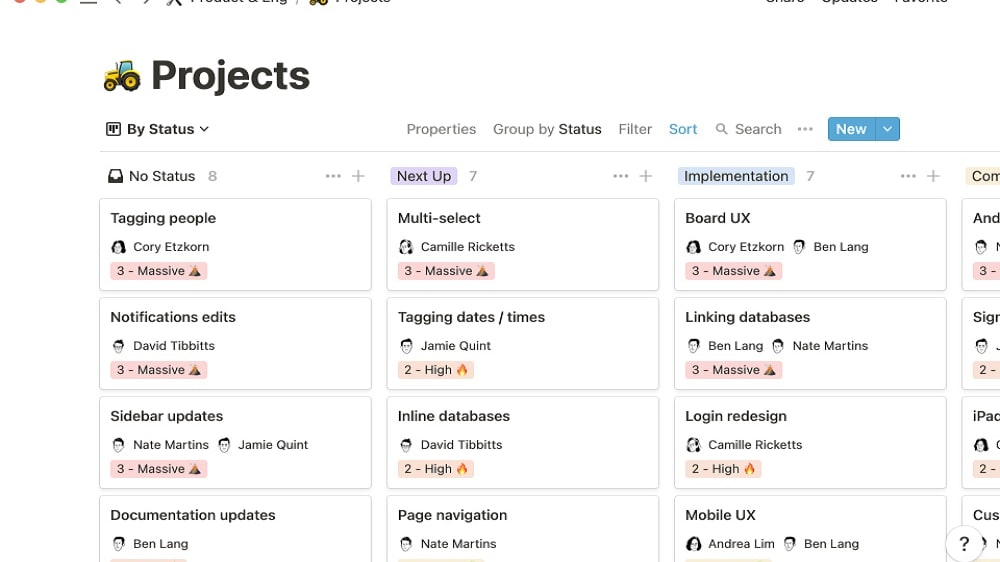
Notion is celebrated for its exceptionally intuitive interface, which seamlessly integrates various productivity tools into one centralized platform.
In the realm of user-friendliness, Notion exhibits a slight but significant advantage over Todoist, catering to a diverse range of needs. Notion is celebrated for its exceptionally intuitive interface, which seamlessly integrates various productivity tools into one centralized platform. For instance, you can create detailed notes, manage complex projects, and even run organized databases, all within the same interface. This unification of features simplifies workflow, reducing the need to navigate between different applications, boosting efficiency for teams and individuals alike.
In contrast, Todoist champions simplicity and minimalism in its task management approach. While this minimalistic design caters well to straightforward task lists and to-do items, some users might find it too stripped-down, craving additional functionalities in a unified workspace.
Todoist's Cross-Platform Versatility Outshines Notion for Mobile Accessibility

Whether it's your computer, smartphone, tablet, or even through voice commands, Todoist ensures your task management remains effortlessly synchronized and accessible.
In the realm of mobile accessibility and cross-platform availability, Todoist indisputably takes the lead, offering users seamless access to tasks and projects across a wide array of devices. Whether it's your computer, smartphone, tablet, or even through voice commands, Todoist ensures your task management remains effortlessly synchronized and accessible. For example, you can quickly add tasks on your smartphone while on the go and later review and complete them on your computer without missing a beat.
While Notion offers a web-based platform that can be accessed from various devices, it may not provide the same level of mobile optimization and cross-device synchronization that Todoist seamlessly delivers. Thus, for users who prioritize uninterrupted and synchronized task management across diverse devices, Todoist stands as the superior choice, exemplifying the essence of mobile accessibility and cross-platform versatility.
Notion and Todoist are Equally Strong in Task Organization
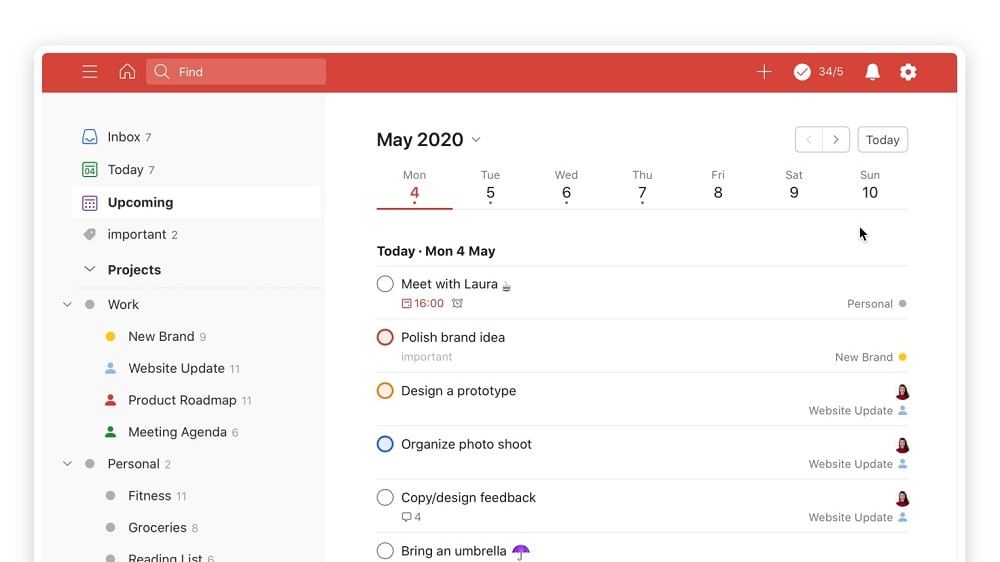
On the other hand, Todoist's To-Do list functionality boasts customizable views, robust sorting, and advanced filtering options
Notion and Todoist, both formidable task management tools, excel in keeping tasks and projects well-organized within a single platform. Notion's task database proves invaluable, offering users a comprehensive approach to tracking progress, managing deadlines, and fostering seamless team collaboration. Users can create dynamic task boards, assign responsibilities, and set notifications, all contributing to efficient task orchestration.
On the other hand, Todoist's To-Do list functionality boasts customizable views, robust sorting, and advanced filtering options. It empowers users to tailor their task lists to their specific needs, ensuring that tasks are easily prioritized and managed.
While Notion's prowess lies in its holistic project management capabilities, Todoist excels in providing a highly customizable task list experience. Users can choose between these tools based on the depth of functionality required for their specific task and project management needs.
Todoist Outperforms Notion with its Integration Variety

Todoist's primary strength lies in its extensive array of integrations, boasting compatibility with a myriad of apps, from productivity software to document management systems, including but not limited to Google Calendar, Dropbox, and Amazon Alexa
When it comes to integration capabilities, Todoist undoubtedly takes the lead, offering a breadth of options that enhance its functionality. Todoist's primary strength lies in its extensive array of integrations, boasting compatibility with a myriad of apps, from productivity software to document management systems, including but not limited to Google Calendar, Dropbox, and Amazon Alexa. This robust integration ecosystem empowers users to seamlessly blend their tasks and projects into their existing digital workflow. For instance, you can effortlessly sync your task deadlines with your Google Calendar or attach relevant Dropbox files to your tasks.
In contrast, Notion, while versatile in its own right, offers a more limited selection of integrations, with basic compatibility for services like Google Drive and Evernote. However, it currently lacks the wide-ranging variety of integrations found in Todoist. Consequently, when seeking a tool that seamlessly incorporates into your workflow alongside a diverse range of applications, Todoist emerges as the preferred choice, providing users with unmatched integration versatility.
Notion Surpasses Todoist in Project Management Capabilities

Notion provides a comprehensive toolkit, enabling users to create dynamic Kanban boards, assign tasks, set up timely notifications, and monitor project progress with ease
In the realm of project management, Notion emerges as the clear frontrunner, offering a multifaceted approach to project organization. Notion provides a comprehensive toolkit, enabling users to create dynamic Kanban boards, assign tasks, set up timely notifications, and monitor project progress with ease. It excels not only in task organization but also in providing a broader, bird's-eye view of various project stages. For instance, you can seamlessly track the development of different project phases, from conception to completion, ensuring nothing falls through the cracks.
In contrast, while Todoist offers task assignment functionality and boasts an intuitive interface for basic task management, it falls short in delivering the detailed project management capabilities that Notion effortlessly provides. Todoist is designed primarily for streamlined to-do lists and may not offer the depth of project oversight and organization found in Notion. Therefore, for those seeking a robust and comprehensive project management solution, Notion stands as the superior choice, offering the versatility and features necessary to keep projects on track and well-organized.
Notion Excels as a Knowledge Base, Outpacing Todoist
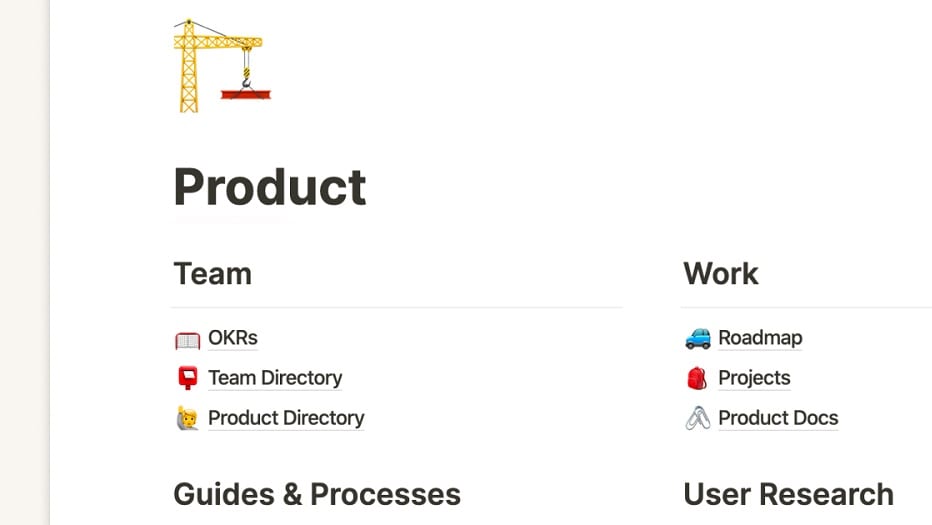
This feature effectively transforms Notion into a robust internal wiki for organizations, fostering efficient knowledge sharing and retrieval.
In the realm of knowledge management and internal documentation, Notion stands out with a unique and powerful feature that allows users to centralize knowledge, streamlining processes such as onboarding new team members and saving invaluable time. This feature effectively transforms Notion into a robust internal wiki for organizations, fostering efficient knowledge sharing and retrieval.
For instance, companies can create comprehensive onboarding guides, FAQs, and documentation repositories within Notion, ensuring that new hires have easy access to critical information. Todoist, although proficient in task management, does not offer a comparable feature for creating and managing a knowledge base.
Todoist's Time and Expense Tracking Excels Ahead of Notion for Financial Insight

This feature proves invaluable for users, allowing them to gain a clear understanding of how much time and money are being allocated to each task and project.
In the realm of financial insight and resource management, Todoist boasts a standout feature that sets it apart—the ability to seamlessly track time and expenses associated with tasks and projects. This feature proves invaluable for users, allowing them to gain a clear understanding of how much time and money are being allocated to each task and project. It facilitates effective budgeting, cost analysis, and the identification of areas for optimization. For example, you can easily determine the total expenses incurred on a specific project or gauge the time spent on different tasks within a project.
Notion, while a versatile tool, does not offer this specific functionality for time and expense tracking, placing Todoist at the forefront in providing users with comprehensive financial insights. Therefore, for those seeking robust financial oversight and resource allocation capabilities, Todoist emerges as the preferred choice, exemplifying its commitment to enhancing productivity and financial efficiency.
08 Notion vs Todoist: Which is the best for your business?
Notion is the best tool for you if:
- You’re seeking a versatile, all-in-one productivity tool that goes beyond basic task management by letting you create notes, databases, wikis, content calendars, and task lists
- Customizable project management features like Kanban boards and notifications are crucial to effectively managing your workflows
- You require a productivity tool with a variety of viewing options, including calendar, table, and timeline views, to oversee your projects effectively
- You manage a remote team and require a robust collaboration solution with versatile workspace functionality to enhance project management and productivity
- You would like access to an extensive range of customizable templates to help you with your project management
 You’re seeking a versatile, all-in-one productivity tool that goes beyond basic task management by letting you create notes, databases, wikis, content calendars, and task lists
Todoist is the best tool for you if:
- You’re in need of a straightforward task management tool to create structured task lists and improve productivity
- You and your team have limited technical expertise and need an intuitive, user-friendly tool that requires no learning curve
- Your work revolves around tasks and you’re looking for a customizable solution to organize your task lists according to different filters, including priority, due dates, labels, and sub-tasks
- You’re in the market for a productivity solution with a dedicated time and expense tracker to assist with budgeting and time management
- You’re seeking a personal productivity solution to help manage daily tasks or achieve personal goals
Notion
Used by 20461 members
3 months free on the Business plan with Unlimited AI
Save up to $720
Todoist
Used by 2217 members
20% off annual plans
Save up to $24
09 Alternatives to Notion & Todoist

Airtable
Used by 8745 members
$1,000 in credits on licences for 1 year
Save up to $1,000

Slack
Used by 3946 members
25% off new plan purchases
Save up to $9,000

ClickUp
Used by 3412 members
Additional 20% off Unlimited and Business plans for 1 year
Save up to $1,000

Zoom Meetings
Used by 2797 members
$20 off per user on the annual Workplace Pro plan
Save up to $180
10 Promotions on Collaboration software
Notion and Todoist are great tools, but Secret offers promo codes with discounts on over 2230+ different SaaS solutions. New deals are added regularly, helping you save money on your online subscriptions. Get access to codes for other Collaboration software you might want to purchase

Google Workspace discounts
20% off Standard plans for 1 year

Deal for nTask
25% off all plans for 1 year
Airtable promo
$1,000 in credits on licences for 1 year

Promo code for Routine
20% off all annual plans
Slack promotion code
25% off new plan purchases

Miro promo code 2026
$1,000 in credits (lifetime validity)

Monday promo code 2026
First month free

Asana promotion
75% off the annual Starter and Advanced plans for 1 year
ClickUp offer
Additional 20% off Unlimited and Business plans for 1 year

Promo code for bolt.new
20% off all plans for the first 3 months
Start saving on the best SaaS
Secret has already helped tens of thousands of startups save millions on the best SaaS like Microsoft Teams, Google Workspace & many more. Join Secret now to buy software the smart way.