


Every project manager needs high-performance software tools to achieve his or her objectives. Organizing tasks, assigning them, tracking them and enabling collaborators to exchange information seamlessly are all essential to a project's success. With so many project management platforms to choose from, it can be hard to find the one that's right for you.
Two SaaS solutions are well known in project management: Asana and Clickup. It's quite possible that you're familiar with these names, but can't quite decide which is the best tool for you. To help you identify the project management software best suited to your startup, in this comparison we look at the differences between these solutions and the specific features of each.
- 01 Asana vs ClickUp: overview
- 02 What's the difference between Asana and ClickUp?
- 03 Asana pros and cons
- 04 ClickUp pros and cons
- 05 Asana compared to ClickUp
- 06 ClickUp compared to Asana
- 07 Features comparison
- 08 Asana vs ClickUp: Which is the best for your business?
- 09 Alternatives to Asana & ClickUp
- 10 Promotions on Collaboration software
Start saving on the best SaaS
Secret has already helped tens of thousands of startups save millions on the best SaaS like Microsoft Teams, Google Workspace & many more. Join Secret now to buy software the smart way.

01 Asana vs ClickUp: overview
The Asana solution is a renowned platform that centralizes numerous functionalities for project teams. The various parties involved in a project can easily exchange information and work together efficiently by centralizing tasks, tags, notes or comments. The ClickUp collaborative solution also centralizes essential functionalities in a single location, to promote fluidity and productivity.
To compare the different features of these two tools and determine which is the best for your project, the best approach is to compare the differentiating elements in a comprehensive table.

Ease of use
Asana's user-friendly interface is as simple to use as it is attractive. ClickUp's UX is colder and less pleasant to get to grips with.

Asana
ClickUp
Positive reviews
Asana has more customer reviews than ClickUp, but scores lower on customer service and value for money.
Asana
ClickUp
Customer support
ClickUp offers 24/7 customer service. Asana offers such support only on the most expensive package.
Asana
ClickUp
Pricing plans
Both solutions offer numerous subscriptions, including a free package. Prices are reasonable, although ClickUp offers a greater variety of plans.
Asana
ClickUp
Task management
ClickUp does task management better than Asana, as the tool lets you easily track and assign tasks via drag-and-drop with advanced features.
Asana
ClickUp
Tracking time and objectives
Both tools offer various project, time and goal tracking functions, but ClickUp stands out for its time tracking.
Asana
ClickUp
Automation features
Asana and ClickUp are two perfect tools for setting up automation processes using pre-designed rules or creating your own automations.
Asana
ClickUp
Workflow and collaboration
ClickUp offers numerous collaborative tools such as Kanban boards and Gantt charts. Asana offers fewer of these, but they are more user-friendly.
Asana
ClickUp
Data analysis
Both project management platforms are capable of producing pleasant, qualitative reports on project progress and team productivity.
Asana
ClickUp
Integrations
Asana offers over 200 integrations including Salesforce or Microsoft Teams. ClickUp offers over 1,000 integrations with services such as Zendesk and Zapier.
Asana
ClickUp
02 What's the difference between Asana and ClickUp?

Clickup's Project Overview Dashboard
Asana
Project management platform
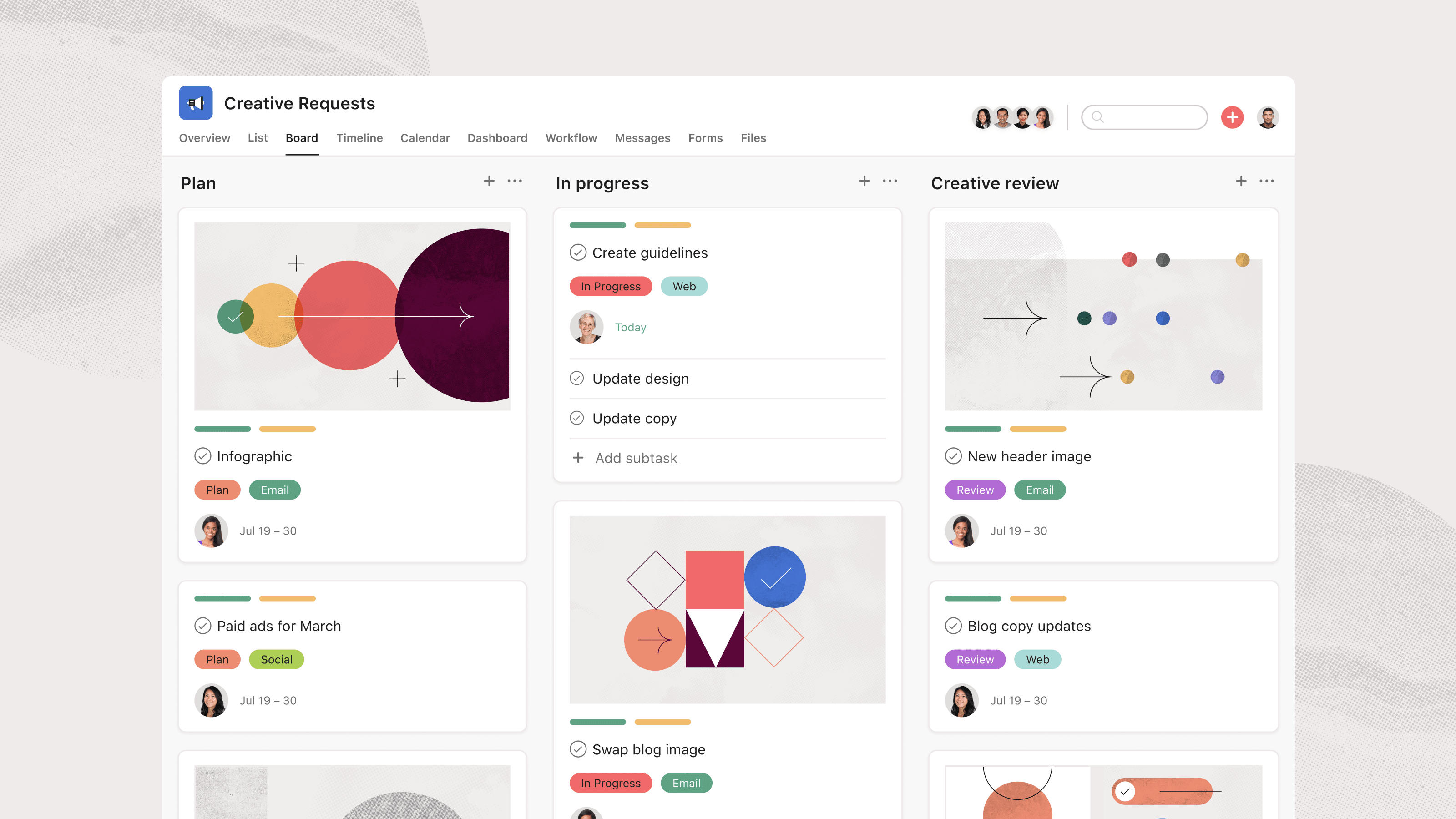
Asana's Board View with Task Stages
ClickUp
ClickUp leverages AI to centralize all the apps and software solutions you use daily. No more juggling your email, project management, and CRM applications—now everything happens in one place.
Both project management platforms are highly relevant and effective solutions. In fact, they integrate most of the functionalities expected by any project manager. Whether it's time tracking, automation tools or efficient workflow management, you can find everything you need with these software packages.
However, the SaaS solution Asana is more expensive to use than ClickUp. Although both tools offer free plans, ClickUp offers a really interesting free plan. It integrates all the features you might need to manage a project. What's more, ClickUp's customer service is available 24/7 to all users, completely free of charge. ClickUp also features greater flexibility in pricing plans, so all types of businesses can find a plan that suits their needs and the budget they intend to allocate to their collaborative tool. ClickUp's pricing is also generally more affordable than Asana's.
The main difference between the two software solutions lies in complexity. If you're looking for a tool that's really easy to learn, fluid, pleasant and intuitive, Asana is ideal. It's also perfectly suited to new users, who don't want to have to use overly advanced features that could end up wasting their time. While ClickUp is also accessible, it's clear that the platform has a greater learning curve. This is because it integrates more advanced functionalities, and it is possible to push customization further than with Asana. So, if you don't mind getting to grips with a slightly more complex piece of software, ClickUp offers you the chance to benefit from advanced time-tracking tools, high-performance optimized workflows and numerous, high-quality reporting tools.

Asana
Used by 941 members
75% off the annual Starter and Advanced plans for 1 year
Save up to $22,491

ClickUp
Used by 3,460 members
Additional 20% off Unlimited and Business plans for 1 year
Save up to $1,000
03 Asana pros and cons
What are the advantages of Asana?
- User-friendly interface: Asana provides a clean and intuitive interface, making it easy for users to navigate and manage tasks efficiently.

- Versatile task management: Asana offers a wide range of features for task management, including assigning tasks, setting due dates, attaching files, and creating subtasks, enabling teams to stay organized and productive.
- Collaboration and communication: Asana fosters teamwork through its built-in communication features, allowing team members to comment, discuss, and collaborate on tasks within the platform.
- Integration capabilities: Asana integrates seamlessly with various other tools and apps, enabling users to centralize their workflows and streamline their processes.
- Customizable workflows: Asana allows users to create custom project templates and workflows, adapting the platform to suit the unique needs of different teams and projects.
What are the disadvantages of Asana?
- Learning curve: While Asana is user-friendly, some users may find it overwhelming at first, especially if they are new to task management tools.

- Limited reporting: Asana's reporting capabilities are not as extensive as some other project management tools, making it less suitable for organizations requiring advanced analytics.
- Subtask limitations: Asana's subtask functionality has certain limitations, which may be restrictive for teams with complex project structures.
- Mobile app limitations: Although Asana has a mobile app, some users find it less robust compared to the web version, leading to potential functionality gaps.
- Pricing tiers: Asana's pricing can be relatively higher for larger teams or organizations with more complex needs, making it less cost-effective for some businesses.
Compare Asana to other tools


Asana vs Monday

Notion vs Asana

Taskade vs Asana

Asana vs Smartsheet

Asana vs Todoist

Asana vs Process Street
04 ClickUp pros and cons
What are the advantages of ClickUp?
- Feature-rich: ClickUp offers a wide range of features, including task management, time tracking, document sharing, goal tracking, and more, making it a comprehensive solution for project management and collaboration.
- Customization: ClickUp allows users to customize workflows, views, and project templates, enabling teams to tailor the platform to their specific needs and preferences.
- Integrations: ClickUp integrates with numerous third-party apps and tools, enhancing productivity and streamlining workflows by centralizing data and communication.
- User-friendly: Despite its extensive capabilities, ClickUp maintains an intuitive and user-friendly interface, ensuring that users can quickly adapt to the platform and start using it effectively.
- Free plan: ClickUp offers a free plan with essential features, making it an attractive option for small teams or startups with limited budgets.
What are the disadvantages of ClickUp?
- Learning curve: ClickUp's extensive features can be overwhelming for some users, resulting in a learning curve, especially for those new to project management software.
- Limited mobile app: While ClickUp has a mobile app, it may not offer the same level of functionality and user experience as the web version, potentially affecting productivity on-the-go.
- Advanced features require paid plans: Some advanced features, such as time tracking and Gantt charts, are only available in higher-tier paid plans, which may limit access for users on the free or lower-priced plans.
- Performance issues: Some users have reported occasional performance issues or slowdowns, which can affect productivity and user experience.
- Pricing tiers: While the free plan is attractive, ClickUp's pricing tiers can become costly as team sizes grow, potentially making it less budget-friendly for larger organizations.
Compare ClickUp to other tools

ClickUp vs Monday

ClickUp vs Coda

ClickUp vs Airtable
ClickUp vs Notion
ClickUp vs Taskade

ClickUp vs Slack
05 Asana compared to ClickUp
Asana and ClickUp are two prominent project management platforms, each offering distinctive strengths to cater to different user preferences.
Asana is known for its flexibility and customization options. It offers a wide range of project templates and automation features, empowering users to tailor workflows to their specific needs. Asana's ability to handle complex projects and its integrations with other tools make it a preferred choice for users seeking advanced customization and automation capabilities. ClickUp shines with its feature-rich platform and user-friendly interface. It provides a centralized hub for seamless team collaboration and efficient task management.
In conclusion, the choice between ClickUp and Asana depends on the specific requirements and preferences of each user. Teams looking for extensive customization options and automation features may prefer Asana while those valuing a user-friendly and straightforward project management approach may find ClickUp more suitable.
Is Asana better than ClickUp?
 Is Asana better than ClickUp?
The comparison between Asana and ClickUp centers on their suitability for different types of teams and project management preferences. Asana's strength lies in its user-friendly interface and streamlined task management capabilities, making it a perfect fit for teams seeking a straightforward and efficient solution without unnecessary complexities. For example, small businesses or startups with limited resources might find Asana's simplicity appealing as it allows them to get started quickly and easily manage their tasks without a steep learning curve.
On the other hand, ClickUp's extensive feature set makes it a powerful tool for businesses requiring a more comprehensive platform to manage diverse tasks and projects. For instance, larger enterprises or organizations with complex workflows and multiple teams might benefit from ClickUp's versatility and the ability to customize the tool to suit their specific needs.
While ClickUp's versatility can be advantageous, its plethora of options might be overwhelming for those seeking a more focused and simplified approach. Some teams may prefer a project management tool that offers a more streamlined and intuitive experience, like Asana, as it allows them to concentrate on their core tasks without getting lost in too many features.
What is Asana best used for?
Asana is best used for simplifying project management. With a straightforward interface and carefully curated features, Asana excels at helping teams track project progress, assign tasks, and set deadlines.
The platform is particularly effective for managing large projects that involve many moving parts and team members. It is also fantastic for creating timelines and setting individual objectives that harmonize with overall company goals.
In summary, Asana is best suited for managing projects of varying sizes and complexities, fostering collaboration, ensuring timely completion of tasks, and aligning team efforts with organizational goals. Its intuitive interface and versatile features make it a valuable tool for project managers and teams across various industries and sectors.
Can Asana replace ClickUp?
Asana can be a viable alternative to ClickUp for certain users and projects, but it may not completely replace ClickUp for everyone, especially those who rely on more advanced and complex features.
Asana's strength lies in its simplicity and user-friendly interface, making it a great choice for teams that prefer a straightforward and easy-to-use project management tool. It excels at task management, team collaboration, and providing a clear visual representation of project progress.
On the other hand, ClickUp is known for its extensive feature set and high level of customization. It offers more advanced capabilities, such as custom task statuses, time tracking, and data analysis, making it suitable for handling complex projects with specific requirements.
Whether Asana can replace ClickUp depends on the specific needs and preferences of the users and the complexity of the projects they are managing. For less complex projects that don't require advanced features, Asana might be a perfect fit and could potentially replace ClickUp. However, for users who heavily rely on ClickUp's advanced functionalities, making the switch to Asana might not be practical or suitable.
Is Asana cheaper than ClickUp?
When considering the pricing of these two productivity tools, it becomes apparent that Asana and ClickUp follow different pricing structures.
Asana’s pricing model includes free and paid plans. The free plan offers basic functionality, while the paid plans provide additional features like advanced collaboration and enhanced project management capabilities. Asana's pricing scales with the number of users, potentially making it a cost-effective choice for smaller teams or individual users on the free plan. However, as your team grows and opts for premium plans, the cost can increase.
ClickUp, on the other hand, adopts a more straightforward pricing approach, offering both free and premium versions. Whether Asana is cheaper than ClickUp depends on your specific requirements and how you intend to utilize these tools. Asana's pricing can fluctuate based on factors like the number of users and the selected features, while ClickUp's pricing remains more uniform, with a fixed per-user cost for premium functionalities.
Is there a better Collaboration software than Asana?
Determining the best project management software depends on the specific needs and preferences of each organization. Asana is a popular choice for its simplicity and user-friendly interface, making it suitable for teams that prioritize ease of use and straightforward project management.
However, alternatives to Asana include ClickUp, Monday.com, Trello, Wrike, Notion and Basecamp offer different strengths and capabilities to cater to different types of teams and projects. The best project management software will depend on factors such as the size and complexity of the projects, the specific features and functionalities required, the level of customization needed, and the team's preference for visual or list-based task management.

Asana
Premium
Project management platform
75% off the annual Starter and Advanced plans for 1 year
Save up to $22,491
06 ClickUp compared to Asana
ClickUp stands out with its feature-rich platform and user-friendly interface. It provides a centralized hub for seamless team collaboration and efficient task management. ClickUp's comprehensive set of tools allows users to create tasks, set priorities, assign deadlines, and track progress effortlessly. Its customizable views and dashboards offer a clear overview of projects, making it a preferred choice for teams valuing simplicity and clarity in project management. Meanwhile, Asana is known for its flexibility and extensive customization options.
In summary, the choice between ClickUp and Asana will depend on the specific needs and preferences of each user. Teams looking for a user-friendly and straightforward project management solution may find ClickUp more suitable.
Is ClickUp better than Asana?
Whether ClickUp is better than Asana depends on the specific needs and preferences of your team and organization.
ClickUp is often favored by larger enterprises or teams that require more in-depth features and customization options. It offers a wide range of capabilities, including custom task statuses, time tracking, Gantt charts, and extensive reporting and analytics. Asana, however, is known for its user-friendly interface and simplicity. It excels at straightforward task management and team collaboration, making it a popular choice for smaller teams or organizations that prioritize ease of use and quick onboarding.
To determine which tool is better for your team, consider factors such as the size and complexity of your projects, the level of customization and data analysis required, the preferences of your team members, and your organization's specific project management needs. By carefully evaluating these factors, you can choose the project management software that aligns best with your team's workflows and helps you achieve your project goals efficiently.
What is ClickUp best used for?
ClickUp is best used for handling complex projects that require advanced features and in-depth data analysis. The platform excels in providing a robust set of tools to efficiently manage tasks and projects with a high level of customization and adaptability to various work styles.
Some of the standout features that make ClickUp an excellent choice for project management include time tracking, goal setting, customization and agile project management.
ClickUp's versatility and comprehensive feature set make it a powerful tool for businesses of all sizes, particularly those managing complex projects with multiple stakeholders and dynamic workflows. Whether you are in software development, marketing, design, or any other industry, ClickUp can be tailored to meet your project management needs and drive efficiency and success in your projects.
Can ClickUp replace Asana?
ClickUp can indeed be a viable replacement for Asana, especially for teams that require a comprehensive suite of features and a high level of customization. ClickUp's extensive functionality and flexibility make it suitable for managing complex projects and meeting diverse project management needs.
However, it's important to note that while ClickUp may offer more extensive features and customization options, some teams may still prefer Asana for its simplicity and ease of use. Asana's straightforward interface and intuitive design make it a popular choice for teams that prioritize quick onboarding and straightforward task management.
Is ClickUp cheaper than Asana?
ClickUp employs a pricing model that includes both free and paid plans. The free plan provides essential functionality, while the paid plans introduce extra features like advanced project management and enhanced collaboration tools. ClickUp's pricing adjusts according to the number of users, potentially making it a cost-effective choice for smaller teams or individual users using the free plan. Nevertheless, as your team expands and selects premium plans, the cost may rise.
Asana, conversely, offers a more structured pricing approach with both free and premium options. Whether ClickUp is cheaper than Asana hinges on your specific requirements and how you intend to utilize these platforms. Asana's pricing can vary based on factors such as the number of users and the features you select, while ClickUp maintains a more straightforward pricing system, with a fixed per-user cost for premium functionalities.
Is there a better Task Management software than ClickUp?
Determining the best project management software depends on the specific needs and preferences of your organization. While ClickUp is an excellent choice for businesses that require a wide range of features and customization options, there are other project management tools that may be better suited for different teams and projects.
Alternatives to ClickUp include Wrike, Monday.com, Jira, Coda, Airtable, and Basecamp, each have their own strengths and cater to different types of teams and projects.
The best project management software will depend on factors such as the size and complexity of your projects, the level of customization and advanced features required, the preferences of your team members, and your organization's specific project management needs.

ClickUp
Boost your productivity
Additional 20% off Unlimited and Business plans for 1 year
Save up to $1,000
07 Features comparison
Asana Has an Edge Over ClickUp for User-Friendliness

Asana's Straightforward and Intuitive Design to Handle Tasks and Maintain a Comprehensive View
Asana's user-friendly interface gives it an edge over ClickUp in terms of ease-of-use. Asana's design is intuitive and straightforward, making it a great choice for users new to project management software. For example, teams can easily create tasks, set due dates, and track progress without the need for extensive training.
In contrast, ClickUp's feature-rich platform offers a wide range of functionalities, which can be overwhelming for some users, especially those who are not familiar with project management software. While ClickUp's extensive capabilities are appreciated by tech-savvy users, teams seeking a simpler, more streamlined interface might find Asana to be a better fit.
The choice between Asana and ClickUp will depend on the user's preference for user-friendliness and the complexity of their projects.
Asana is Better at Automating Repetitive Tasks than ClickUp

Asana's Workflow Automation Tool Dashboard
Asana's strength lies in its exceptional ability to automate repetitive tasks, providing a significant advantage over ClickUp in this aspect. With custom rules and forms, Asana streamlines work requests and standardizes processes, reducing the risk of errors and ensuring efficiency. For example, teams can set up rules to automatically assign tasks based on specific criteria or trigger notifications when certain conditions are met. This level of automation in Asana not only saves time but also enhances productivity by eliminating manual repetitive tasks.
On the other hand, while ClickUp offers an array of intuitive task management features, its automation capabilities are not as extensive as Asana's. Businesses that rely heavily on automation to optimize their workflows may find Asana to be the more suitable choice.
ClickUp's Multitask View Excels Over Asana’s Organized Work Visualization

ClickUp's Multitask View to Manage Multiple Projects
ClickUp's multitask view is a game-changer when it comes to managing multiple projects simultaneously, giving it a significant advantage over Asana's organized work visualization. ClickUp's multitask view allows users to see and work on multiple projects and tasks at the same time, all within a single window. This feature simplifies project navigation and saves valuable time by eliminating the need to switch between different project spaces or tabs.
For example, a marketing manager handling multiple campaigns can easily switch between different project boards, tasks, and deadlines in ClickUp's multitask view, making it seamless to keep track of progress and prioritize tasks efficiently.
Asana, while also providing a shared workspace for various projects, lacks this specific multitask view, which can be a boon for teams dealing with multiple simultaneous projects.
Asana and ClickUp are Equal at Customizing Processes
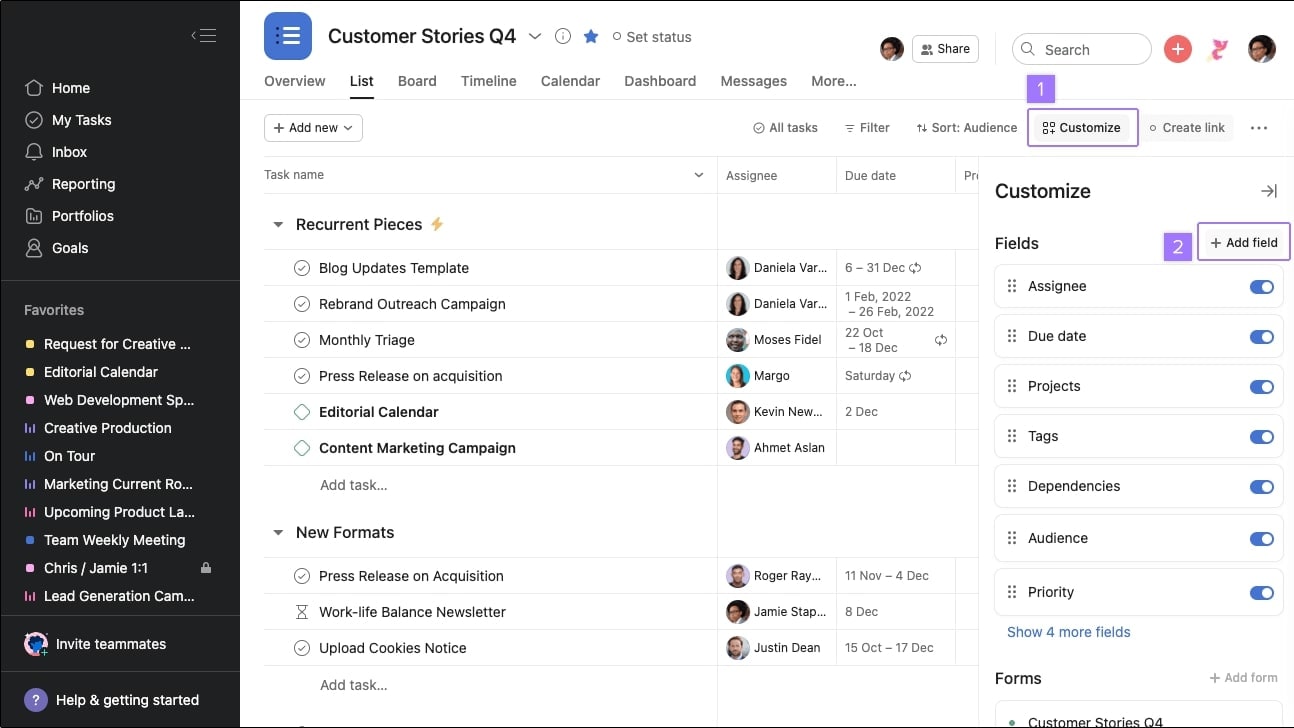
Asana's Customization Options to Add Personalized Fields and Statuses for Tasks
Asana and ClickUp stand equal in their ability to customize processes, providing users with powerful tools to adapt their workflows to specific needs. For instance, teams can create custom fields, task statuses, and priority levels to align with their unique project requirements. Whether it's a product development pipeline with different stages like "Ideation," "Design," and "Testing," or an IT request process involving "New Ticket," "In Progress," and "Resolved" statuses, both Asana and ClickUp allow seamless customization.
Moreover, users can define automation rules to trigger specific actions when certain conditions are met. For example, automatically assigning tasks to team members based on their expertise or sending notifications when due dates are approaching. These customization features enable both platforms to cater to a wide range of industries and use cases effectively.
ClickUp’s Time Tracking Feature Surpasses that of Asana

ClickUp's Time Tracking Feature Showing Estimated Time and Remaining Time per User
ClickUp's time tracking feature surpasses that of Asana with its comprehensive and accurate approach to monitoring productivity. With ClickUp, users can track time for individual tasks or projects, providing detailed insights into the amount of time spent on each activity. This level of granularity allows businesses to accurately bill clients based on hours worked or analyze team efficiency for better resource allocation.
Furthermore, ClickUp's time tracking feature integrates seamlessly with other project management tools, enabling users to view time data alongside task progress and performance metrics. This integration helps teams gain a holistic view of their projects, making informed decisions and optimizing workflows. In contrast, Asana's time tracking capabilities may be more limited, focusing primarily on tracking overall project duration rather than task-specific times.
Asana is Superior at Managing Project Portfolios Compared to ClickUp

Asana's Project Portfolio Management with Status, Progress, Date and Priority
Asana's superiority in managing project portfolios is evident through its robust portfolio management capabilities. With Asana, users can create portfolios to track and visualize the progress of multiple projects collectively. This integrated portfolio view allows stakeholders to gain insights into project statuses, resource utilization, and overall portfolio performance.
For example, a project manager overseeing several marketing campaigns can use Asana's portfolio feature to monitor each campaign's progress, assess resource allocation, and identify potential bottlenecks. This big-picture view enables them to make data-driven decisions, allocate resources efficiently, and prioritize projects based on their impact on the organization's goals.
While ClickUp offers strong project management features, including task prioritization and organization, it lacks the same level of integration for managing project portfolios. Without a dedicated portfolio view, ClickUp users may need to rely on external tools or manual tracking methods to gain a comprehensive overview of their project portfolios.
ClickUp Outshines Asana with a Wider Choice of Integrations

An Example of ClickUp's Native Third-Party Integrations Available
ClickUp's wide range of integrations sets it apart from Asana, making it a preferred choice for users seeking extensive compatibility with other apps. ClickUp's integration capabilities are extensive, with over 1,000 tools being compatible through Zapier. This flexibility allows users to tailor ClickUp to their specific workflows and seamlessly connect it with existing software ecosystems.
Additionally, ClickUp provides native integrations with popular productivity tools, communication software, and customer relationship management (CRM) systems like GitHub, Slack, and Google Drive, offering users a smooth and efficient experience when working with these platforms. While Asana also supports integrations with well-known tools like Slack, Microsoft Teams, and Google Workspace, ClickUp's more extensive integration options make it a better fit for companies with diverse needs and a wide range of software to connect.
08 Asana vs ClickUp: Which is the best for your business?
Asana is the best tool for you if:
- Above all, you want to opt for attractive software with a user-friendly interface to increase employee engagement
- You use a wide range of software tools, and it's essential for you to have access to a variety of integrations with third-party tools
- You're looking for a platform that enables you to automate low-value-added tasks quickly and simply, to simplify the work of your employees
- You're looking for software with robust, relevant project portfolio management features
- You need to manage a large number of collaborators, and require a platform that can handle projects of varying size and complexity
 Above all, you want to opt for attractive software with a user-friendly interface to increase employee engagement
ClickUp is the best tool for you if:
- You think it's important for software to offer a wide variety of pricing plans, so you can choose the one that's best suited to your needs
- You want to choose software with 24/7 customer service to guarantee optimum support
- You're looking for a tool that offers relevant features for task management, tracking and allocation
- You need a platform that offers comprehensive time tracking to manage team productivity more effectively
- You want to use a team management tool that is designed to efficiently manage multiple projects simultaneously
Asana
Used by 941 members
75% off the annual Starter and Advanced plans for 1 year
Save up to $22,491
ClickUp
Used by 3,460 members
Additional 20% off Unlimited and Business plans for 1 year
Save up to $1,000
09 Alternatives to Asana & ClickUp

Notion
Used by 21,470 members
3 months free on the Business plan with Unlimited AI
Save up to $720

Google Workspace
Used by 10,615 members
20% off Standard plans for 1 year
Save up to $3,460

Airtable
Used by 8,898 members
$1,000 in credits on licences for 1 year
Save up to $1,000

Slack
Used by 4,043 members
25% off new plan purchases
Save up to $9,000
10 Promotions on Collaboration software
Asana and ClickUp are great tools, but Secret offers promo codes with discounts on over 2250+ different SaaS solutions. New deals are added regularly, helping you save money on your online subscriptions. Get access to codes for other Collaboration software you might want to purchase
Deal for Google Workspace
20% off Standard plans for 1 year

nTask offer
25% off all plans for 1 year
Airtable deal
$1,000 in credits on licences for 1 year

Routine coupon code
20% off all annual plans
Notion discounts
3 months free on the Business plan with Unlimited AI
Promo code for Slack
25% off new plan purchases

Miro promotion code
$1,000 in credits (lifetime validity)

Monday promotion code
First month free

bolt.new coupon code
20% off all plans for the first 3 months

xTiles discounts
20% off monthly or annual plans
Start saving on the best SaaS
Secret has already helped tens of thousands of startups save millions on the best SaaS like Microsoft Teams, Google Workspace & many more. Join Secret now to buy software the smart way.