


For most teams, efficient project management is crucial. Fortunately, there is an array of tools available that helps you optimize workflows and manage tasks effectively. These platforms are essential for improving team collaboration and enhancing productivity.
Among these options, ClickUp and Coda stand out as leading software, popular with both small startups and large enterprises. To assist you in determining which is better suited for your organization, we've prepared an in-depth comparison of their features below. We’ll walk you through the platforms’ advantages, disadvantages, and key differences to help you decide which aligns best with your team's needs. Let’s explore!
- 01 ClickUp vs Coda: overview
- 02 What's the difference between ClickUp and Coda?
- 03 ClickUp pros and cons
- 04 Coda pros and cons
- 05 ClickUp compared to Coda
- 06 Coda compared to ClickUp
- 07 Features comparison
- 08 ClickUp vs Coda: Which is the best for your business?
- 09 Alternatives to ClickUp & Coda
- 10 Promotions on Task Management software
Start saving on the best SaaS
Secret has already helped tens of thousands of startups save millions on the best SaaS like Microsoft Teams, Google Workspace & many more. Join Secret now to buy software the smart way.

01 ClickUp vs Coda: overview
ClickUp and Coda are distinguished contenders in the realm of task and project management tools, each offering unique features and advantages tailored to meet diverse organizational needs.
ClickUp stands out with its highly versatile and customizable interface, designed to accommodate various project management styles. It provides an extensive range of tools for task management, time tracking, and integrating documents and spreadsheets into a single platform. On the other hand, Coda shines with its unique approach to blending document creation with database functionality. It offers a flexible "doc-as-an-app" approach, allowing teams to build custom workflows and tools directly within a document.
Now, let's explore the ClickUp vs. Coda comparison to help you make an informed decision on selecting the right project management tool that aligns with your specific needs.

Customer support
ClickUp provides extensive customer support with a responsive service team. Coda offers reliable support, but some users may find it less comprehensive compared to ClickUp’s offerings.

ClickUp
Coda
Document & spreadsheet integration
ClickUp integrates basic document and spreadsheet functionalities. Coda merges documents and spreadsheets into a single interface, allowing for dynamic data manipulation and real-time collaboration.
ClickUp
Coda
Task management
ClickUp excels in task management with robust features like Gantt charts, Kanban boards, and custom views. Coda offers task management through customizable docs that adapt to project needs.
ClickUp
Coda
Collaboration tools
ClickUp provides comprehensive collaboration tools, including chat and comment features on tasks. Coda supports collaboration with real-time editing and commenting but is more document-centric.
ClickUp
Coda
Reporting & analytics
ClickUp offers advanced reporting tools for tracking everything from task performance to team productivity. Coda provides basic analytics that are sufficient for most document and project interactions.
ClickUp
Coda
Mobile experience
ClickUp’s mobile app mirrors the desktop experience with full functionality. Coda’s mobile app is useful but some users find it less intuitive compared to the desktop version.
ClickUp
Coda
Ease of use
Both platforms are user-friendly, though ClickUp requires a learning curve due to its extensive features. Coda’s unique interface combines familiarity with innovative features for ease of use.
ClickUp
Coda
Pricing plans
ClickUp offers a scalable pricing model with a feature-rich free tier. Coda also offers flexible pricing options, with its pay-as-you-go model based on usage which is beneficial for scaling.
ClickUp
Coda
Positive reviews
ClickUp is lauded for its comprehensive project management tools and customizability. Coda is appreciated for its innovative approach, combining documents and applications in one versatile tool.
ClickUp
Coda
Integrations
ClickUp integrates seamlessly with hundreds of apps like Slack, GitHub, and Google Drive. Coda also integrates well but focuses on major platforms like Slack and Google Suite.
ClickUp
Coda
02 What's the difference between ClickUp and Coda?

Detailed Project Overviews Mean You Stay On Top of Your Tasks with ClickUp
ClickUp
Boost your productivity

Coda's Unified Interface Brings All Your Project Components Together
Coda
Coda (coda,io) makes it possible to centralize all your documents, data and files of any type and to collaborate effectively with your team. Coda is straightforward and easy to use and drastically enhance your productivity as a team.
ClickUp and Coda are both robust tools designed to enhance project management and team collaboration, but they differ significantly in their core functionalities and user experience.
ClickUp positions itself as a comprehensive project management platform, emphasizing task management, goal setting, and tracking progress across multiple projects and teams. It integrates features like Gantt charts, Kanban boards, and time tracking directly within its interface, making it ideal for teams that need detailed project oversight and the ability to handle complex workflows. ClickUp's strength lies in its ability to customize views and workflows to match the specific needs of different teams within an organization, offering a plethora of integrations that streamline processes and ensure all tools are interconnected.
In contrast, Coda offers a unique blend of document and database functionality, promoting a flexible "doc-as-an-app" model. This approach allows users to create documents that function like apps, integrating tables, buttons, and other interactive elements. Coda is especially beneficial for teams that require a high degree of customization in how they organize information and collaborate. Its platform is less about traditional project management and more about creating an adaptable workspace that can evolve with the team's needs, supporting everything from simple task lists to complex databases and interactive tools.
The difference in orientation between ClickUp and Coda can also be seen in their approach to user interface and experience. ClickChairs offers a more traditional project management layout with structured templates and hierarchical task organization, which can be a boon for teams needing rigorous project tracking. Coda, however, adopts a more fluid and document-centric approach, resembling a blend of a word processor and a spreadsheet, which can be more intuitive for users who prefer a narrative style of organizing information and tasks.
These fundamental differences underline that while both platforms aim to enhance productivity and team collaboration, they cater to distinct management styles and organizational needs. ClickUp is perhaps better suited for teams looking for a robust, all-encompassing project management tool, whereas Coda might be the better choice for teams prioritizing flexibility and a customized documentation approach.

ClickUp
Used by 3318 members
Additional 20% off Unlimited and Business plans for 1 year
Save up to $1,000

Coda
Used by 982 members
7 days free + 15% off annual plans
Save up to $720
03 ClickUp pros and cons
What are the advantages of ClickUp?
- Versatility: ClickUp offers a wide range of features, including task management, document sharing, time tracking, and goal setting, making it adaptable to various project management needs.

- Customization: Users can customize ClickUp to suit their workflow preferences, from creating custom fields and statuses to setting up automation rules, allowing for tailored project management solutions.
- Collaboration tools: ClickUp provides numerous collaboration features such as comments, mentions, and real-time editing, facilitating communication and teamwork among team members.
- Integrations: ClickUp integrates with popular tools like Google Drive, Slack, and GitHub, enabling users to streamline their workflows by connecting all their essential tools in one place.
- Scalability: Whether you're a small team or a large organization, ClickUp can scale with your needs, offering different plans and pricing tiers to accommodate teams of all sizes.
What are the disadvantages of ClickUp?
- Complexity: ClickUp's extensive feature set can be overwhelming for new users, requiring a learning curve to fully grasp its capabilities and make the most of the platform.

- Performance: Some users report occasional performance issues, such as slow loading times or laggy interface, especially when working with large projects or teams.
- Limited mobile app: While ClickUp offers a mobile app for on-the-go access, it may not provide the same level of functionality and ease of use as the desktop version, leading to a somewhat disjointed user experience.
- Cost: While ClickUp offers a free plan with basic features, more advanced functionalities require a paid subscription, which may be costly for smaller teams or startups on a tight budget.
- Customer support: Some users have experienced difficulties with ClickUp's customer support, citing slow response times or lack of resolution for their issues, which can be frustrating when encountering technical problems or needing assistance.
Compare ClickUp to other tools


ClickUp vs Monday

Asana vs ClickUp

ClickUp vs Todoist

ClickUp vs Airtable

ClickUp vs Notion

ClickUp vs Taskade
04 Coda pros and cons
What are the advantages of Coda?
- Flexibility: Coda allows users to create documents that incorporate elements of spreadsheets and databases, enabling flexible and customizable workflows tailored to specific needs.
- Collaboration: With real-time editing and commenting features, Coda facilitates seamless collaboration among team members, allowing multiple users to work together on documents simultaneously.
- Integration: Coda integrates with popular tools like Slack, Google Drive, and GitHub, enabling users to connect their existing workflows and consolidate their work processes within the platform.
- Automation: Coda offers automation features such as buttons, formulas, and conditional formatting, allowing users to streamline repetitive tasks and automate various processes within their documents.
- Community templates: Coda provides a library of pre-built templates created by the community, covering a wide range of use cases from project management to product roadmaps, helping users get started quickly with ready-made solutions.
What are the disadvantages of Coda?
- Learning curve: Due to its unique combination of document, spreadsheet, and database functionalities, Coda can have a steep learning curve for new users, requiring time and effort to become proficient in using the platform effectively.
- Performance: Some users have reported occasional performance issues with Coda, such as slow loading times or laggy interface, especially when working with large documents or complex workflows.
- Limited mobile experience: While Coda offers a mobile app for iOS devices, the mobile experience may not be as robust as the desktop version, lacking certain features and capabilities, which can be limiting for users who need to work on the go.
- Customization complexity: While Coda allows for extensive customization, creating complex workflows or building advanced features may require a deep understanding of the platform's functionalities, making it challenging for users with limited technical expertise.
- Cost: While Coda offers a free plan with basic features, more advanced functionalities and larger team sizes require a paid subscription, which may be costly for smaller teams or startups with limited budgets.
Compare Coda to other tools

Coda vs Notion

Fibery vs Coda
Airtable vs Coda
05 ClickUp compared to Coda
ClickUp and Coda are both versatile platforms for team collaboration and project management. ClickUp offers a comprehensive suite of project management tools, including task management, time tracking, and goal setting, while Coda integrates documents, spreadsheets, and databases into a single platform.
ClickUp excels in its user-friendly interface and extensive customization options, while Coda stands out for its flexibility and powerful automation features. However, ClickUp may be better suited for traditional project management needs, while Coda is ideal for teams seeking to create custom workflows and integrate various data sources.
Is ClickUp better than Coda?
 Is ClickUp better than Coda?
When comparing ClickUp and Coda, it's important to consider specific organizational needs and workflows. ClickUp is generally more effective for those requiring detailed project tracking and a structured task management environment, appealing especially to larger teams needing clear hierarchies and extensive reporting capabilities.
In contrast, Coda offers a more dynamic setup where document creation and management are central, enabling seamless integration of narrative and data, which benefits teams that prioritize adaptability and the blending of communication with data-driven decision-making.
What is ClickUp best used for?
ClickUp is best used for streamlining project management processes across teams of all sizes. Its versatile platform accommodates various project management needs, from task organization and scheduling to team collaboration and goal tracking. ClickUp excels in providing customizable workflows, allowing users to adapt the platform to suit their specific project requirements and workflow preferences.
With features like task assignments, time tracking, and real-time communication tools, ClickUp enhances productivity and fosters efficient collaboration among team members. Whether for agile development, marketing campaigns, or general task management, ClickUp offers a comprehensive solution to effectively manage and track projects from start to finish.
Can ClickUp replace Coda?
While ClickUp and Coda share some overlapping functionalities, they serve different primary purposes and excel in distinct areas. ClickUp is primarily designed for project management, offering features such as task management, time tracking, and team collaboration. On the other hand, Coda integrates documents, spreadsheets, and databases into a unified platform, focusing on flexible workflows and powerful automation capabilities.
While ClickUp may fulfill basic document and spreadsheet needs, it may not fully replace Coda's unique capabilities.
Is ClickUp cheaper than Coda?
Comparing the pricing of ClickUp and Coda reveals differences in their cost structures. ClickUp’s tiered pricing model includes a free plan with basic features and paid plans with additional functionalities tailored to various team sizes and needs.
In contrast, Coda follows a subscription-based pricing model with a single plan offering access to all features, regardless of team size. While ClickUp's free plan may be sufficient for smaller teams, Coda's pricing could be more cost-effective for larger teams seeking access to all features without tiered restrictions.
Is there a better Task Management software than ClickUp?
While ClickUp is a popular and feature-rich project management tool, it's worth exploring whether there might be a better software solution suited to your specific needs.
There are several notable alternatives to ClickUp in the project management space, including Trello, Asana, Monday.com, and Wrike.
Choosing the right project management software should involve a thorough assessment of your team's workflows, collaboration requirements, integration needs, and budget considerations. While ClickUp offers a wide range of features, other platforms may offer unique functionalities or better alignment with your project management goals.

ClickUp
Boost your productivity
Additional 20% off Unlimited and Business plans for 1 year
Save up to $1,000
06 Coda compared to ClickUp
Coda and ClickUp are two versatile platforms catering to different aspects of team collaboration and productivity. Coda stands out for its innovative approach, seamlessly blending documents, spreadsheets, and databases into a single workspace, offering unparalleled flexibility and customization possibilities.
On the other hand, ClickUp focuses primarily on project management, providing comprehensive tools for task organization, time tracking, and team communication. While Coda excels in creating custom workflows and automating processes, ClickUp offers a more traditional project management experience with robust features tailored to streamline project workflows.
Is Coda better than ClickUp?
Deciding between Coda and ClickUp largely depends on your team's operational needs and the complexity of your projects. Coda might be the superior choice for teams that require a high degree of integration between text, data, and automated workflows, making it ideal for projects where collaboration and information fluidity are crucial. Its ability to act as a unified platform for all work processes enhances productivity by reducing the need for multiple tools.
Meanwhile, ClickUp may be preferable for teams that need specialized project management features and a structured environment, but Coda's cohesive interface and adaptability often provide a more streamlined user experience.
What is Coda best used for?
Coda is best used for creating dynamic and customizable workflows that integrate documents, spreadsheets, and databases into a unified platform. Its versatile nature allows teams to build interactive documents that serve as centralized hubs for collaboration, project management, and data analysis.
With powerful automation features and a user-friendly interface, Coda facilitates the creation of tailored solutions for various use cases, including project tracking, product roadmaps, and team dashboards. Whether organizing complex workflows or streamlining everyday tasks, Coda empowers teams to innovate and adapt their workflows to suit their specific needs, making it an ideal tool for enhancing productivity and collaboration.
Can Coda replace ClickUp?
While Coda offers robust capabilities for document creation, collaboration, and workflow automation, it may not fully replace ClickUp's specialized project management features. ClickUp excels in providing a comprehensive suite of tools specifically designed for task organization, team communication, and project tracking.
While Coda's flexibility allows for the creation of custom workflows, it may lack some of the advanced project management functionalities offered by ClickUp, such as Gantt charts, time tracking, and task dependencies. Therefore, while Coda can complement certain aspects of project management, it may not be a direct replacement for ClickUp's tailored solutions for efficient project planning and execution.
Is Coda cheaper than ClickUp?
Comparing the pricing of Coda and ClickUp reveals differences in their cost structures. Coda offers a straightforward subscription-based pricing model with a single plan providing access to all features, regardless of team size.
In contrast, ClickUp follows a tiered pricing model, including a free plan with basic features and paid plans offering additional functionalities tailored to various team sizes and needs. While ClickUp's free plan may suit smaller teams, Coda's pricing could be more cost-effective for larger teams seeking access to all features without tiered restrictions.
Is there a better No-Code Development software than Coda?
While Coda offers a unique blend of document creation, collaboration, and workflow automation, it's important to consider whether there might be a more suitable solution for your specific needs.
There are several notable alternatives to Coda in the productivity and collaboration space, including ClickUp, Notion, Airtable, Basecamp, and Confluence.
The decision to choose a productivity platform should involve a thorough assessment of your team's workflows, customization requirements, integration needs, and budget considerations. While Coda provides a versatile platform for creating custom workflows, other platforms may offer specialized features or better alignment with your organization's workflow management goals.

Coda
All your documents and data in one place.
7 days free + 15% off annual plans
Save up to $720
07 Features comparison
Coda's Extensive Customization Trumps ClickUp's

Coda's Pre-Built Templates Can Be Customized for Your Teams, From Marketing to Finance
Coda distinguishes itself through unparalleled customization options, empowering users to craft tailored solutions to meet their unique requirements. The platform offers a vast array of pre-built templates and interactive controls that can be fully customized to suit diverse needs. For example, teams can create dynamic documents, interactive dashboards, and database-powered apps, all within the same platform.
While ClickUp does provide customizable status updates, the level of personalization offered by Coda surpasses it significantly. With Coda, users have the freedom to create bespoke workflows and interfaces, ensuring that the platform adapts seamlessly to their specific use cases and preferences.
ClickUp Excels in Streamlined Project Management

Easily Manage All Your Tasks with ClickUp's List View
ClickUp stands out for its exceptional project management capabilities, providing users with a comprehensive suite of tools to efficiently manage tasks and track progress. For instance, users can effortlessly create projects, assign tasks, set due dates, and monitor project milestones within a single, intuitive interface. This streamlined approach ensures that teams can collaborate effectively and stay on top of their project timelines.
In comparison, while Coda offers similar functionality through customizable templates, ClickUp's dedicated focus on project management results in a more refined and optimized workflow specifically tailored to the needs of project teams.
Collaboration and Real-Time Editing are Equally Robust in ClickUp and Coda

Build a Team Hub on Coda to Work Collaboratively with Your Team on Different Projects
Both ClickUp and Coda excel in providing environments conducive to collaboration. They offer robust features that facilitate real-time editing, enabling multiple users to collaborate seamlessly on the same document simultaneously. For instance, team members can leave comments, mention collaborators, and track changes in a structured manner, enhancing communication and teamwork.
ClickUp's collaboration tools ensure that team members can stay updated on project progress and provide feedback efficiently. Similarly, Coda empowers teams to collaborate effectively on dynamic documents, spreadsheets, and databases, fostering a culture of transparency and collaboration across the organization.
ClickUp Surpasses Coda in Time Tracking Precision

Track the Time Spent by Each Team Member with ClickUp
When it comes to time tracking, ClickUp definitely takes the lead. With its dedicated time tracking feature, users can meticulously monitor the duration spent on tasks, a critical aspect for businesses billing clients by the hour or striving to optimize team productivity. For example, ClickUp enables users to effortlessly log time against specific tasks, providing valuable insights into project progress and resource allocation.
In contrast, Coda lacks a dedicated time tracking feature, thereby conceding the advantage to ClickUp in this aspect. This precision in time tracking equips ClickUp users with the tools needed to enhance efficiency and accountability within their workflows.
Coda's Interactive Controls Outshine ClickUp's Features

Use Interactive Lists and Include Checkboxes, Dropdowns, and Other Aspects to Facilitate Your Project Management with Coda
Coda distinguishes itself through its innovative inclusion of interactive controls such as buttons, checkboxes, dropdowns, and sliders within documents and spreadsheets. These dynamic features enhance user interaction and facilitate the creation of intuitive interfaces, surpassing the level of interaction offered by ClickUp's features.
For instance, users can create interactive task lists with checkboxes or implement dropdown menus to streamline data entry processes. This emphasis on user experience and interactivity makes Coda an exemplary choice for projects where user engagement and interface design are paramount, offering unparalleled versatility and customization options to meet diverse user needs.
ClickUp's Intuitive Interface Surpasses Coda's Complexity
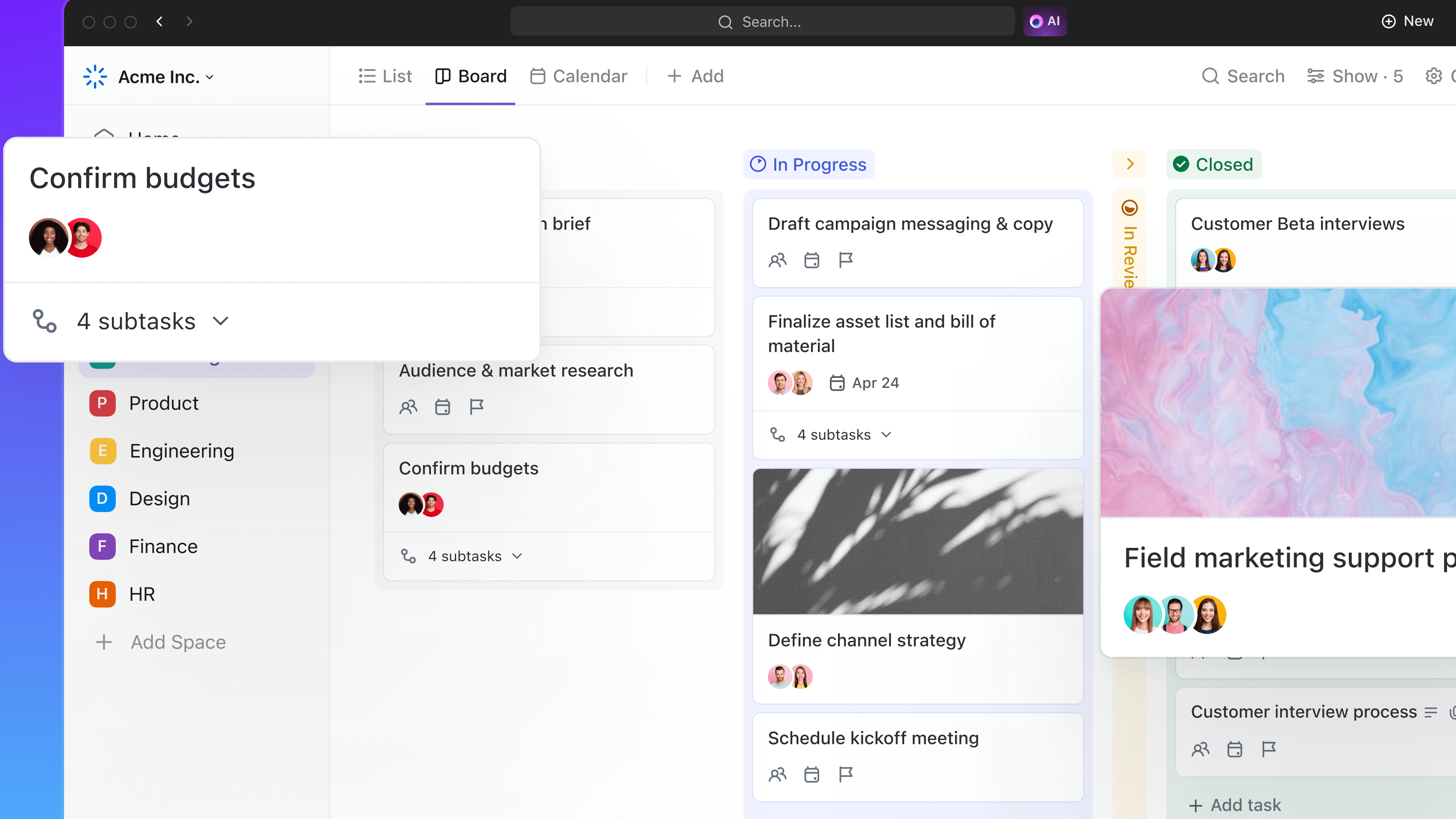
Customize Your View to Suit Your Needs with ClickUp's Drag-and-Drop Editor
ClickUp takes the lead when it comes to ease of use, particularly for businesses seeking a seamless, hassle-free experience. Its interface boasts an exemplary level of organization, providing a clean and intuitive workspace that caters to diverse team preferences. For instance, ClickUp allows effortless customization, enabling users to tailor the platform according to their specific workflow requirements.
Conversely, while Coda boasts a robust feature set, its interface may appear daunting, particularly for newcomers. The platform's extensive functionalities necessitate a steeper learning curve compared to ClickUp. Thus, ClickUp's simplicity coupled with its comprehensive functionality positions it ahead in user-friendliness.
ClickUp Outshines Coda in Integration Diversity
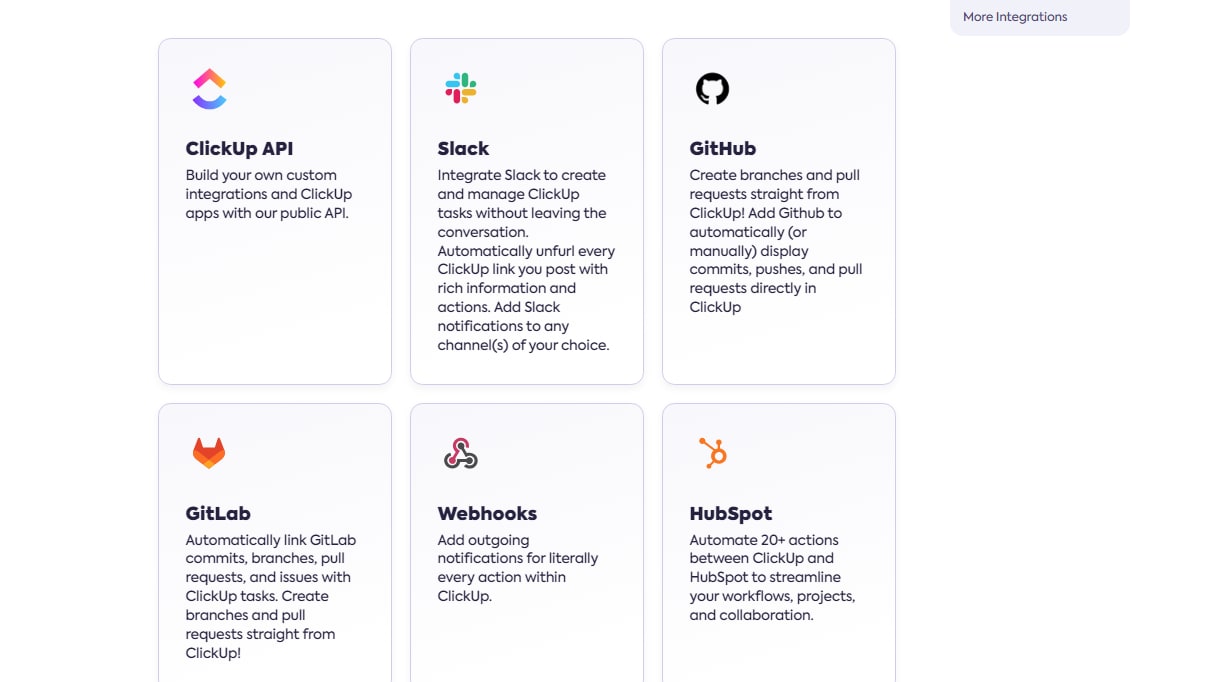
ClickUp Provides a Wide Range of Native Integrations and More to Streamline Your Workflow, Including Slack and HubSpot
When it comes to integration capabilities, both ClickUp and Coda offer an impressive range of options. However, ClickUp takes a slight lead in this aspect. With an extensive library of over 1000 integrations, ClickUp enables seamless connectivity with various third-party applications such as Slack, Google Drive, and GitHub. For example, teams can effortlessly synchronize project tasks between ClickUp and their preferred communication tools, enhancing collaboration and workflow efficiency.
In contrast, while Coda supports integrations with popular platforms like Google Sheets, Slack, and Zapier, its integration offerings are relatively fewer compared to ClickUp. This disparity may slightly limit flexibility for users seeking extensive integration possibilities.
08 ClickUp vs Coda: Which is the best for your business?
ClickUp is the best tool for you if:
- You value a highly intuitive interface that minimizes the learning curve and allows your team to get started quickly without extensive training.
- Your priority is detailed task management with capabilities for setting dependencies, assigning priorities, and tracking time directly within your project management software.
- You require robust integration options with other tools, as ClickUp offers extensive third-party integrations that help in synchronizing all your productivity tools seamlessly.
- Scalability is critical, as ClickUp's features support everything from individual task management to enterprise-level project tracking.
- You are looking for customization at every level, from dashboards to workflows, allowing you to tailor the platform to fit specific project needs and team preferences.
 You value a highly intuitive interface that minimizes the learning curve and allows your team to get started quickly without extensive training.
Coda is the best tool for you if:
- You need a single platform that combines text, tables, and building blocks to create dynamic documents and workflows tailored to your team's specific processes.
- Integration of data and narrative is essential, as Coda allows for the seamless merging of spreadsheet-like databases with written documents, enhancing clarity and context.
- Automation of repetitive tasks is a priority, with Coda’s ability to automate workflows and notifications, significantly boosting efficiency and reducing manual input.
- Collaboration is at the core of your operations, requiring tools that support real-time editing, commenting, and version control in a unified environment.
- You value flexibility in application design, enabling you to develop unique interfaces and tools that perfectly suit your project management and data handling needs.
ClickUp
Used by 3318 members
Additional 20% off Unlimited and Business plans for 1 year
Save up to $1,000
Coda
Used by 982 members
7 days free + 15% off annual plans
Save up to $720
09 Alternatives to ClickUp & Coda

Notion
Used by 19021 members
6 months free on the Business plan with Unlimited AI
Save up to $12,000

Google Workspace
Used by 9451 members
20% off Plus plans for 1 year
Save up to $518

Airtable
Used by 8420 members
$1,000 in credits on licences for 1 year
Save up to $1,000

Slack
Used by 3818 members
25% off new plan purchases
Save up to $9,000
10 Promotions on Task Management and No-Code Development software
ClickUp and Coda are great tools, but Secret offers promo codes with discounts on over 2210+ different SaaS solutions. New deals are added regularly, helping you save money on your online subscriptions. Get access to codes for other Task Management and No-Code Development software you might want to purchase

Monday deal
First month free

Promo code Make
3 months free on the Teams plan (240k credits included)
Airtable coupon code 2026
$1,000 in credits on licences for 1 year

Webflow coupon
22% off annual plans
Notion free credits
6 months free on the Business plan with Unlimited AI

Softr offer
20% off monthly or annual Professional plan
Slack promo code 2026
25% off new plan purchases

Promo code Bubble
30% off on monthly plans for 1 year

Credits for Todoist
20% off annual plans

bolt.new promotion code
20% off all plans for the first 3 months
Start saving on the best SaaS
Secret has already helped tens of thousands of startups save millions on the best SaaS like Microsoft Teams, Google Workspace & many more. Join Secret now to buy software the smart way.