


Choosing the right productivity tool is crucial for the efficiency and success of your team, enabling you to streamline workflows, manage projects effectively, and foster seamless collaboration. However, with numerous options available, it can be challenging to select the best tool that meets your specific needs while avoiding any pitfalls that could hinder your team's productivity.
The good news is that there are powerful tools designed to enhance your productivity. In this article, we take a closer look at the main features and differences between two of the most popular productivity platforms—Fibery vs Coda—to help you decide which one is the best fit for your team.
- 01 Fibery vs Coda: overview
- 02 What's the difference between Fibery and Coda?
- 03 Fibery pros and cons
- 04 Coda pros and cons
- 05 Fibery compared to Coda
- 06 Coda compared to Fibery
- 07 Features comparison
- 08 Fibery vs Coda: Which is the best for your business?
- 09 Alternatives to Fibery & Coda
- 10 Promotions on Productivity software
Start saving on the best SaaS
Secret has already helped tens of thousands of startups save millions on the best SaaS like Microsoft Teams, Google Workspace & many more. Join Secret now to buy software the smart way.

01 Fibery vs Coda: overview
Fibery and Coda are two prominent productivity tools, each offering unique strengths to cater to different user needs.
Fibery is renowned for its flexible and integrated approach to work management. It combines task tracking, project management, and knowledge base features, allowing teams to create custom workflows and seamlessly connect various aspects of their work. Coda, on the other hand, excels in providing a versatile, document-based platform. It merges documents, spreadsheets, and powerful database features into a single customizable interface.
Now, let's delve into the comparison of Fibery vs Coda. We'll explore their key features and functionalities to help you make an informed decision when selecting the ideal collaboration and communication platform for your business.

Customer support
Both Fibery and Coda provide email and chat support. Fibery users highlight the responsive and helpful support team, while Coda offers extensive documentation and community forums for additional help.

Fibery
Coda
Ease of use
Fibery and Coda are both user-friendly with intuitive interfaces. Fibery's flexibility can result in a steeper learning curve, while Coda's document-centric design is easier for new users to grasp quickly.
Fibery
Coda
Collaboration tools
Both platforms excel in collaboration. Fibery offers real-time editing and commenting on tasks, while Coda provides collaborative document creation and live data updates, enhancing team productivity.
Fibery
Coda
Customization
Fibery is highly customizable, allowing users to tailor workspaces to their specific needs. Coda also offers robust customization through templates and integrations but is slightly less flexible than Fibery.
Fibery
Coda
Mobile app quality
Fibery's mobile app is functional but lacks some features of the desktop version. Coda's mobile app is more polished and offers a better user experience, closely mirroring its desktop functionality.
Fibery
Coda
Task management
Fibery provides advanced task management with features like hierarchical tasks and relations. Coda offers solid task management within its documents but may require more setup to achieve similar capabilities.
Fibery
Coda
Reporting and analytics
Fibery offers customizable reports and analytics, allowing in-depth data analysis. Coda provides dynamic tables and charts within documents, making it easier to create and share insightful reports with the team.
Fibery
Coda
Pricing plans
Fibery offers a flexible pricing model with a free tier and paid plans starting at $10/user/month. Coda's pricing ranges from free to $30/user/month, offering advanced features in higher tiers.
Fibery
Coda
Positive reviews
Both Fibery and Coda receive positive reviews. Fibery users appreciate its flexibility and customization options, while some Coda users praise its intuitive document-centric approach but note a learning curve for advanced features.
Fibery
Coda
Integrations
Fibery integrates with tools like Slack, GitHub, and Zapier but has fewer options than Coda. Coda offers extensive integrations, including Google Calendar, Slack, and Jira, making it more versatile for various workflows.
Fibery
Coda
02 What's the difference between Fibery and Coda?

Fibery
All-in-one commercial suite

Coda
Coda (coda,io) makes it possible to centralize all your documents, data and files of any type and to collaborate effectively with your team. Coda is straightforward and easy to use and drastically enhance your productivity as a team.
Both Fibery and Coda are powerful productivity tools offering a range of features designed to streamline team workflows, project management, and collaboration. They share several core functionalities, such as task tracking, document creation, and data organization. The main difference between the two lies in their approach and additional capabilities beyond these core features.
Fibery stands out for its integrated and flexible approach to managing work. It combines tasks, projects, and a knowledge base within a single platform, allowing teams to create custom workflows that adapt to their specific needs. Fibery excels in handling complex, multi-dimensional projects where interconnected data is crucial. Its unique strength is the ability to connect various aspects of work seamlessly, offering a holistic view of projects and their dependencies. This integration can significantly enhance productivity for teams that deal with intricate, interrelated tasks.
Coda, on the other hand, is renowned for its versatile, document-based platform. It blends documents, spreadsheets, and databases into a single customizable interface. Coda’s primary strength lies in its flexibility to create interactive documents that can cater to a wide range of business processes. Whether you need a simple task list, a project tracker, or a sophisticated database, Coda can adapt to your needs. It also offers a variety of templates and integrations that can help teams quickly set up their preferred workflows.
The user interface of Fibery is designed to provide a comprehensive overview, which can be particularly beneficial for teams managing complex projects with many interdependencies. However, this might result in a learning curve for new users as they familiarize themselves with the interconnected features.
Conversely, Coda’s interface is clean and intuitive, making it accessible to users who may prefer a more straightforward approach to creating and managing documents and databases. While it also has a learning curve, its modular nature allows users to start with simple tasks and gradually explore more complex functionalities.
In terms of data visualization and customization, Fibery offers robust options to create tailored views and reports, while Coda excels in providing interactive documents that can evolve with your team's needs.
The choice between Fibery and Coda will depend on your team's specific requirements. If your projects involve complex, interconnected data and you need a highly integrated solution, Fibery may be the better choice. If you prefer a flexible, document-centric approach that can adapt to various business processes, Coda might be the ideal tool for you.

Coda
All your documents and data in one place.
7 days free + 15% off annual plans
Save up to $720
03 Fibery pros and cons
What are the advantages of Fibery?
- Custom workflows and flexibility: Fibery allows teams to create highly customizable workflows tailored to their specific needs. This flexibility helps manage complex projects effectively, adapting to various methodologies and processes.

- Integrated work management: It combines task management, project tracking, and a knowledge base into a single platform, enabling seamless integration and a holistic view of all work-related activities.
- Interconnected data and relationships: Fibery excels in handling interconnected data, making it easy to link tasks, projects, and documents. This feature is particularly useful for teams working on multi-dimensional projects with many dependencies.
- Custom views and reporting: Users can create tailored views and reports, which enhances the ability to visualize data in ways that best suit the team’s needs. This level of customization aids in better decision-making and project oversight.
- Collaboration and communication: Fibery facilitates effective collaboration with features like real-time editing, comments, and mentions, ensuring that team members can communicate and work together efficiently.
What are the disadvantages of Fibery?
- Learning curve: Due to its extensive features and high level of customization, new users might face a steep learning curve. Familiarizing oneself with all functionalities can take time and effort.

- Overwhelming for simple projects: For teams managing simpler projects or those with straightforward requirements, Fibery’s robust feature set might feel overwhelming and unnecessarily complex.
- Limited third-party integrations: Compared to some competitors, Fibery may have fewer integrations with popular third-party tools. This can be a drawback for teams relying heavily on other software for their workflows.
- Performance issues with large data sets: Users have reported performance slowdowns when dealing with very large data sets or complex interconnected data structures, which can affect overall productivity.
- Pricing for small teams: While offering extensive features, the pricing structure may be less favorable for small teams or startups with limited budgets, potentially making it a costly investment for smaller operations.
Compare Fibery to other tools


Fibery vs ClickUp


Notion vs Fibery

Fibery vs Airtable
04 Coda pros and cons
What are the advantages of Coda?
- Versatile document-based platform: Coda combines documents, spreadsheets, and databases into a single, customizable interface, allowing users to create a wide range of interactive documents that can serve various business needs.
- Flexibility and customization: Coda’s modular nature allows users to start with simple setups and progressively add more complex features. This flexibility enables users to tailor their documents to specific workflows and processes.
- Interactive and dynamic documents: Users can create dynamic documents that include interactive elements such as buttons, checkboxes, and charts. This interactivity can significantly enhance user engagement and productivity.
- Integration with other tools: Coda offers robust integrations with popular tools such as Slack, Google Calendar, and Jira. These integrations help streamline workflows by connecting Coda with other essential software used by the team.
- Template library: Coda provides a rich library of templates for various use cases, from project management to product development. These templates can help users quickly set up their workflows and get started with minimal effort.
What are the disadvantages of Coda?
- Learning curve: While Coda is powerful and flexible, new users might face a learning curve as they explore its extensive features and capabilities. Familiarizing oneself with the full range of functionalities can take some time.
- Performance issues with large documents: Users have reported performance slowdowns when working with very large or complex documents. This can impact the overall user experience, especially for data-intensive projects.
- Limited offline access: Coda relies heavily on internet connectivity, and its offline functionality is limited. This can be a drawback for users who need consistent access to their documents without relying on an internet connection.
- Complexity for simple tasks: For users or teams with straightforward requirements, Coda’s extensive feature set might feel overly complex and cumbersome, potentially making it less suitable for simple task management.
- Pricing structure: Coda’s pricing can be a concern for small teams or individual users, especially if they require access to advanced features available only in higher-tier plans. This might make it less accessible for budget-conscious users.
Compare Coda to other tools

Coda vs Notion
Airtable vs Coda
ClickUp vs Coda
05 Fibery compared to Coda
Fibery and Coda are both powerful productivity tools, but they cater to different needs. Fibery excels in handling complex, interconnected projects, offering a highly flexible and integrated approach that combines task management, project tracking, and knowledge base features. It is ideal for teams needing custom workflows and seamless data connections.
In contrast, Coda provides a versatile, document-centric platform that merges documents, spreadsheets, and databases into interactive and customizable interfaces. Coda is best suited for users who require dynamic documents and a wide range of templates to quickly set up diverse business processes. Both tools offer robust capabilities but target different aspects of productivity and collaboration.
Is Fibery better than Coda?
 Is Fibery better than Coda?
Whether Fibery is better than Coda depends on your specific needs and use cases. Fibery is ideal for teams managing complex, interconnected projects requiring custom workflows and seamless integration between tasks and data. Its strength lies in providing a comprehensive, all-in-one solution for project management and knowledge sharing.
On the other hand, Coda excels in creating versatile, interactive documents that integrate the functionalities of documents, spreadsheets, and databases. It is particularly suited for users who need dynamic documents and a broad array of templates for various business processes.
What is Fibery best used for?
Fibery is best used for managing complex and interconnected projects that require a high degree of customization and integration. It excels in providing flexible workflows, combining task management, project tracking, and knowledge base features into a unified platform. This makes it ideal for teams that need to link various aspects of their work seamlessly, ensuring all project elements are interconnected.
Fibery is particularly beneficial for organizations that handle multi-dimensional projects with numerous dependencies, as it offers a comprehensive view and robust reporting capabilities to enhance decision-making and productivity. Its adaptability makes it a powerful tool for dynamic and evolving business environments.
Can Fibery replace Coda?
Fibery and Coda serve different purposes, so whether Fibery can replace Coda depends on your specific needs. Fibery excels in handling complex projects with interconnected data, offering highly customizable workflows and integrated task management. It is ideal for teams requiring detailed project tracking and knowledge base integration.
Coda, however, provides a versatile document-centric platform that combines documents, spreadsheets, and databases into interactive, customizable interfaces. It is best for users needing dynamic documents and diverse templates for various business processes. While Fibery can replace Coda in some scenarios, especially where complex project management is essential, Coda’s flexibility and document-centric features might still be necessary for others.
Is Fibery cheaper than Coda?
Determining whether Fibery is cheaper than Coda depends on the specific pricing plans and the features required by the user. Fibery's pricing is generally competitive, offering various tiers based on team size and feature needs, which can be cost-effective for organizations requiring integrated project management and knowledge base capabilities.
Coda, on the other hand, provides a range of pricing plans with different levels of access to advanced features. While both platforms offer free versions, their premium plans differ in cost and included features.
Is there a better Productivity software than Fibery?
While Fibery is undoubtedly a robust productivity tool with its flexible workflows and integrated project management features, several alternatives might better suit specific needs and preferences.
Coda, for instance, excels with its versatile document-centric platform. Other notable alternatives to Fibery include Notion, Airtable, and ClickUp. Each of these tools offers unique strengths, such as Notion's seamless note-taking and knowledge management, Airtable's powerful database functionalities, and ClickUp's comprehensive task management.
The best productivity software for your team will depend on factors like the features you require, budget constraints, and the specific objectives you aim to achieve in your workflow and project management efforts.
06 Coda compared to Fibery
Coda and Fibery are both powerful tools, but they cater to different needs. Coda offers a versatile, document-centric platform that combines documents, spreadsheets, and databases into interactive and customizable interfaces. It is ideal for teams that require dynamic documents and a wide range of templates for various business processes.
In contrast, Fibery excels in managing complex, interconnected projects with customizable workflows, integrating task management, project tracking, and knowledge base features. Fibery is particularly suited for teams needing detailed project tracking and seamless data connections.
Is Coda better than Fibery?
Whether Coda is better than Fibery depends on your team's specific needs and workflow requirements. Coda is excellent for teams that need versatile, interactive documents combining elements of documents, spreadsheets, and databases. Its strength lies in offering dynamic, customizable interfaces and a wide range of templates, making it highly adaptable for various business processes.
In contrast, Fibery shines in managing complex, interconnected projects with customizable workflows, integrating task management, project tracking, and knowledge base features. It is particularly suited for teams requiring detailed project tracking and seamless data connections.
What is Coda best used for?
Coda is best used for creating versatile and interactive documents that integrate seamlessly with spreadsheets and databases. It excels in transforming documents into dynamic tools that can manage a wide range of business processes, from simple task lists to complex project management systems.
Coda's strength lies in its ability to customize documents with interactive elements such as buttons, tables, and charts, making it ideal for teams that need adaptable workflows and real-time collaboration. Additionally, its extensive library of templates and integrations with other tools enhance its utility, making it a powerful choice for diverse and evolving business needs.
Can Coda replace Fibery?
Whether Coda can replace Fibery depends on your team's specific needs. Coda excels at creating dynamic, interactive documents that combine the functionality of documents, spreadsheets, and databases, making it ideal for adaptable workflows and real-time collaboration.
However, Fibery is particularly strong in managing complex, interconnected projects with customizable workflows and integrated task management and knowledge base features. If your primary need is for flexible, document-centric tools, Coda might suffice. However, for detailed project tracking and managing complex interdependencies, Fibery's specialized features might be indispensable.
Is Coda cheaper than Fibery?
Determining whether Coda is cheaper than Fibery depends on the specific pricing plans and features required. Coda offers a range of pricing tiers, including a free version and premium plans with advanced features. Fibery also provides various pricing options based on team size and functionality needs.
Generally, Coda's pricing may appear more accessible for smaller teams or individual users due to its flexible plans. However, Fibery's cost-effectiveness shines when its integrated project management and knowledge base capabilities are essential.
Is there a better No-Code Development software than Coda?
While Coda is undoubtedly a versatile and powerful productivity tool, the market does offer several alternatives to Coda that might be considered better depending on your specific needs.
For instance, Fibery, Monday, Slite, Wrike, and Asana are just a few tools that provide comprehensive features comparable to Coda's offerings.
The best productivity software for your business will depend on the specific features you require, your budget, and the particular objectives you aim to achieve in your workflow and project management. Each alternative has unique strengths that might align better with your team's needs.
Coda
All your documents and data in one place.
7 days free + 15% off annual plans
Save up to $720
07 Features comparison
Coda Edges Out Over Fibery for Ease-of-Use

When it comes to ease-of-use, Coda edges out over Fibery. Coda’s interface is intuitive and user-friendly, making it easy for new users to get started with minimal training. For example, creating interactive documents and integrating tables, buttons, and charts can be done with simple drag-and-drop actions.
Additionally, Coda offers a vast library of templates for various use cases, which can help users quickly set up their workflows without extensive customization. In contrast, while Fibery offers powerful features and customization options, its complexity can present a steeper learning curve, making it more challenging for users to navigate and utilize effectively from the outset.
Fibery Outshines Coda in Customization Capabilities

In terms of customization, Fibery displays a strong advantage with its no-code platform, allowing users to easily create custom apps and workflows, saving time and automating processes. Whether you need a custom CRM, project management tool, or any other specialized application, Fibery provides a flexible platform tailored to your needs with robust integration capabilities.
For example, you can design a unique task management system that seamlessly integrates with tools like Slack and Google Drive. Coda also offers customization but primarily through its API, which requires specialized knowledge and coding skills, offering less ease of use to the average user. While Coda’s customization options are powerful, they are less accessible to non-technical users compared to Fibery’s intuitive drag-and-drop interface, making Fibery the superior choice for teams seeking easy and extensive customization without the need for advanced technical expertise.
Coda Excels Over Fibery in User Experience

When it comes to user experience, Coda's ability to embed external content and widgets within your documents, such as Google Maps, YouTube videos, and calendars, significantly enhances the interactive experience for users. For example, teams can embed a Google Map to show office locations, include YouTube tutorials directly in project plans, or integrate Google Calendar to track deadlines seamlessly.
Despite Fibery’s powerful built-in features for project management and collaboration, it lacks this level of embedding capability that Coda delivers. Coda’s rich embedding features provide a more engaging and interactive user experience, making it easier for teams to integrate various types of content directly into their workflows.
Both Fibery and Coda Shine in Real-Time Collaboration

Both Fibery and Coda understand the importance of real-time collaboration. Fibery offers a built-in chat feature that allows for immediate team communication within the context of projects, making it easy to discuss tasks and share updates without leaving the platform. For example, team members can chat directly on task boards or within project timelines, ensuring everyone is aligned.
Coda, on the other hand, enables users to work on the same document simultaneously, providing features such as comments and change tracking. This allows users to leave feedback directly in the document, track edits, and ensure that all team members are on the same page. These features in both tools promote efficient and smooth collaboration, catering to different styles of teamwork and communication needs.
Fibery Outperforms Coda in Custom Data Visualizations
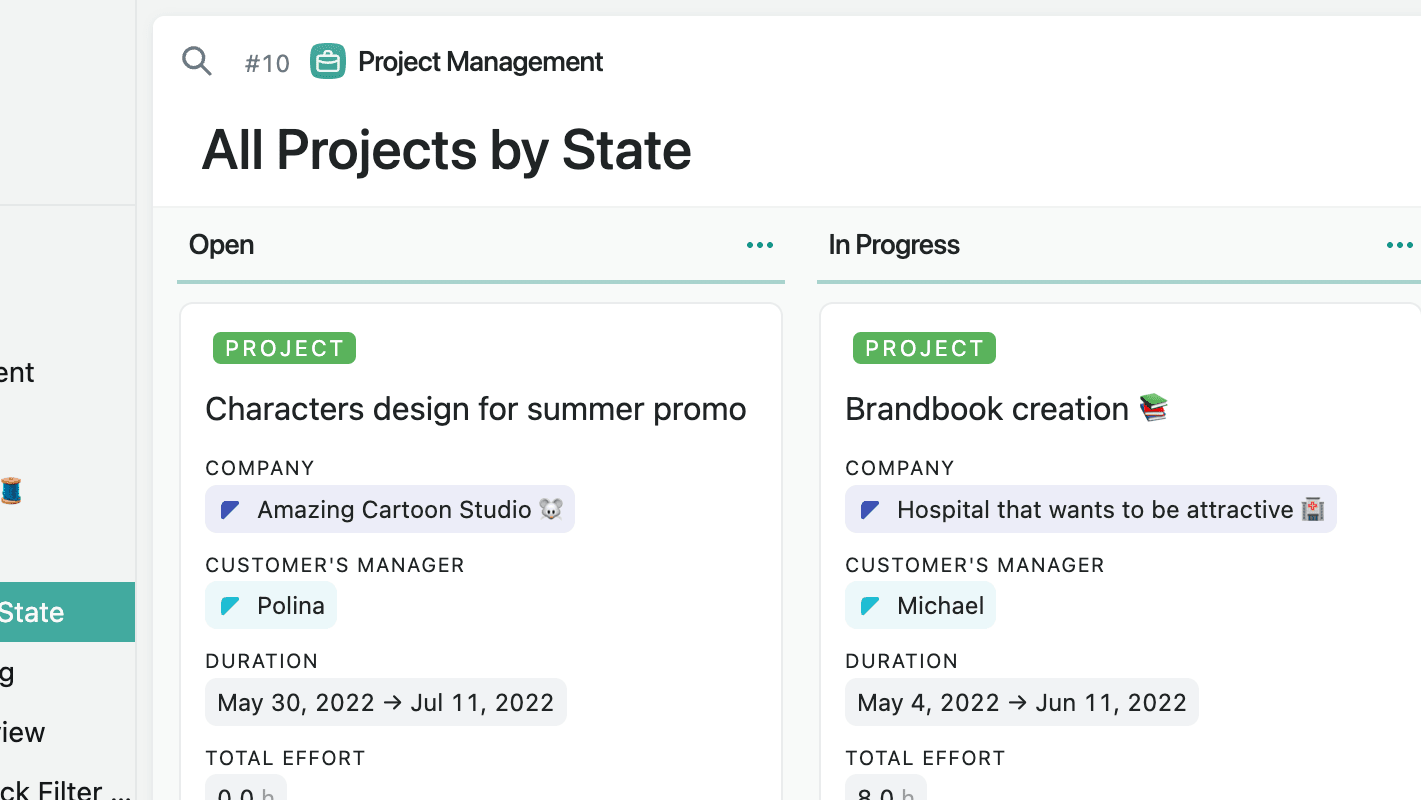
Fibery's strong suit lies in its ability to create custom visualizations and charts, providing an in-depth view of data that is crucial for tracking progress, analyzing trends, and facilitating team communication. For example, teams can build detailed Gantt charts, Kanban boards, and various types of graphs that update in real-time, offering a clear and dynamic representation of project status and performance metrics.
While Coda does offer live spreadsheets embedded within documents, allowing users to perform calculations and basic data manipulations, it doesn't measure up to Fibery's rich graphical visualizations. Fibery’s advanced charting capabilities enable users to gain deeper insights and make data-driven decisions more effectively.
Coda Excels Over Fibery in Automation and Formula Capabilities

While both tools offer forms of automation, Coda takes it a step further with its powerful formula capabilities, mirroring traditional spreadsheets and opening up possibilities for complex data models. For instance, users can create intricate formulas to automate calculations, manage data relationships, and trigger actions based on specific criteria directly within their documents. This enables teams to build sophisticated financial models, dynamic project trackers, and customized reporting systems.
Fibery, though offering automation through custom workflows and integrated apps, doesn't have the same level of sophisticated formula functionality that Coda boasts. This makes Coda particularly advantageous for users who rely heavily on advanced data manipulation and automated processes to enhance their productivity.
Coda Takes the Crown Over Fibery in Integration Capabilities

On comparing the integration capabilities of both tools, Coda takes the crown. Although Fibery provides robust integration options, the sheer range and depth of integrations offered by Coda make it a stronger contender in this field. Coda’s integration possibilities extend across a wide selection of common business tools, such as communication software like Slack, scheduling tools like Google Calendar, and email platforms like Gmail, ensuring seamless sync and collaboration. For example, teams can automate workflows by connecting Coda with Slack for real-time notifications or with Google Calendar for synchronized scheduling.
Additionally, Coda's API is remarkably flexible for custom integrations, allowing connections with project management tools like Trello, CRM systems like Salesforce, and automation services like Zapier and Make. This gives businesses the power to create unique, tailored systems that fit their specific needs. While Fibery does well in integrating with key tools like Jira and Intercom, Coda's expansive arsenal of integration possibilities across multiple software categories provides a more interconnected and adaptable workspace.
08 Fibery vs Coda: Which is the best for your business?
Fibery is the best tool for you if:
- You need a highly customizable platform to create tailored workflows that fit your unique business processes without requiring extensive coding skills.
- Your projects involve complex, interconnected data that requires seamless integration and real-time synchronization across multiple tasks and departments.
- You value an all-in-one solution that combines task management, project tracking, and knowledge base functionalities in a single, cohesive platform.
- Your team benefits from robust data visualization tools that provide deep insights through custom charts and graphs, enhancing decision-making and project oversight.
- You require built-in communication tools for immediate team collaboration, ensuring all project-related discussions remain within the context of your work environment.
 You need a highly customizable platform to create tailored workflows that fit your unique business processes without requiring extensive coding skills.
Coda is the best tool for you if:
- You need a versatile, document-centric platform that integrates documents, spreadsheets, and databases into interactive, customizable interfaces for diverse business processes.
- Your team requires powerful formula capabilities for complex data models and automation, similar to traditional spreadsheet functionalities.
- You value a wide range of integrations with popular business tools like Slack, Google Calendar, and Gmail for seamless workflow synchronization.
- You prefer an intuitive user interface with easy-to-use templates and drag-and-drop elements for quick setup and minimal learning curve.
- You need the ability to embed external content and widgets, such as Google Maps and YouTube videos, to enhance document interactivity and engagement.
Coda
All your documents and data in one place.
7 days free + 15% off annual plans
Save up to $720
09 Alternatives to Fibery & Coda

Notion
Used by 17074 members
6 months free on the Business plan with Unlimited AI
Save up to $12,000

Airtable
Used by 8226 members
$1,000 in credits for 1 year
Save up to $1,000

Slack
Used by 3738 members
25% off new plan purchases
Save up to $9,000

Miro
Used by 3305 members
$1,000 in credits (lifetime validity)
Save up to $1,000
10 Promotions on Productivity and No-Code Development software
Fibery and Coda are great tools, but Secret offers promo codes with discounts on over 2190+ different SaaS solutions. New deals are added regularly, helping you save money on your online subscriptions. Get access to codes for other Productivity and No-Code Development software you might want to purchase
Notion discounts
6 months free on the Business plan with Unlimited AI

Promo code Webflow
1 year free on a CMS site plan

Make promotion
3 months free on the Teams plan (240k credits included)

Bubble promotion
30% off on monthly plans for 1 year
Airtable deal
$1,000 in credits for 1 year

Storylane promo code
20% off annual plans

Deal for Google Workspace
20% off Plus plans for 1 year

forms.app discount
30% off annual plans
Promo code for Slack
25% off new plan purchases

Mobiroller offer
50% off up to 1 year
Start saving on the best SaaS
Secret has already helped tens of thousands of startups save millions on the best SaaS like Microsoft Teams, Google Workspace & many more. Join Secret now to buy software the smart way.