


Choosing the right project management tool can be a pivotal decision for any business—small or large. With multiple tasks, stakeholders, and deadlines to manage, the quest to stay organized can quickly become overwhelming. That's where project management software like ClickUp and Airtable come into play. Both are outstanding in their own right, but they offer different functionalities, pricing models, and user experiences. So, which one is better? Or rather, which one is best suited for your specific business needs?
In this head-to-head comparison between ClickUp and Airtable, we'll delve deep into each platform's features, pricing plans, ease of use, customer support, and more. Whether you're a startup looking to get off the ground quickly or an established organization aiming to optimize your operations, understanding the distinct advantages and limitations of these tools could make all the difference in your project outcomes.
- 01 ClickUp vs Airtable: overview
- 02 What's the difference between ClickUp and Airtable?
- 03 ClickUp pros and cons
- 04 Airtable pros and cons
- 05 ClickUp compared to Airtable
- 06 Airtable compared to ClickUp
- 07 Features comparison
- 08 ClickUp vs Airtable: Which is the best for your business?
- 09 Alternatives to ClickUp & Airtable
- 10 Promotions on Task Management software
Start saving on the best SaaS
Secret has already helped tens of thousands of startups save millions on the best SaaS like Microsoft Teams, Google Workspace & many more. Join Secret now to buy software the smart way.

01 ClickUp vs Airtable: overview
ClickUp and Airtable are two prominent players in the world of productivity and project management software, each with its own set of unique strengths tailored to meet specific user needs.
ClickUp is known for its robust project management capabilities and intuitive interface. It offers a comprehensive platform that focuses on helping teams of all sizes plan, track, and collaborate on tasks and projects. On the other hand, Airtable offers a flexible database and spreadsheet hybrid that can be adapted to various use cases. It's ideal for those who want to create custom databases, manage content, and collaborate with team members using a structured yet customizable approach.
Now, let's dive into the ClickUp vs. Airtable comparison to help you make an informed decision when selecting the right productivity and project management platform for your specific needs and goals.

Security
Airtable’s SOC 2 Type II certification offers an extra layer of security assurance, earning it a 5-star rating. ClickUp also maintains strong security measures but lacks this certification.

ClickUp
Airtable
Customer support
Both platforms offer 24/7 support. ClickUp's reputation for quick responses gives it a 4-star rating, while Airtable's service quality is also strong, earning it a 4-star rating.
ClickUp
Airtable
Pricing plans
ClickUp offers a free plan and more budget-friendly options, making it particularly useful for startups and smaller teams. Airtable's paid plans, while comprehensive, are priced higher especially for additional features.
ClickUp
Airtable
Data management
Airtable's data management capabilities are superior due to its original design as a database tool. ClickUp provides a more general project management approach.
ClickUp
Airtable
Automation
Airtable was designed with a focus on database management, which enables advanced automation features. ClickUp is improving but has not reached the same level of automation capability.
ClickUp
Airtable
Scalability
ClickUp is designed for easy scaling, suitable for rapidly growing businesses. Airtable can also scale but may require more manual adjustments for more complex use-cases.
ClickUp
Airtable
Collaboration
Both ClickUp and Airtable excel in collaboration features, including task assignment and document sharing. Both platforms earn a 4-star rating in this category.
ClickUp
Airtable
Ease of use
Airtable’s user interface is similar to spreadsheets, making it easier to use. ClickUp has many features, but this can be overwhelming for newcomers.
ClickUp
Airtable
Positive reviews
Both ClickUp and Airtable receive strong reviews overall, with users appreciating their powerful features, intuitive interfaces, and excellent customer support. However, ClickUp has a slightly higher rating, likely due to its more comprehensive set of features and customization options.
ClickUp
Airtable
Integrations
With over 1,000 integrations, ClickUp allows for extensive customization and receives a 5-star rating. Airtable, while offering over 850 integrations, falls slightly short compared to ClickUp.
ClickUp
Airtable
02 What's the difference between ClickUp and Airtable?

ClickUp's List View Allowing you to Manage and View all Tasks, Deadlines, Priorities, Status and More
ClickUp
Boost your productivity
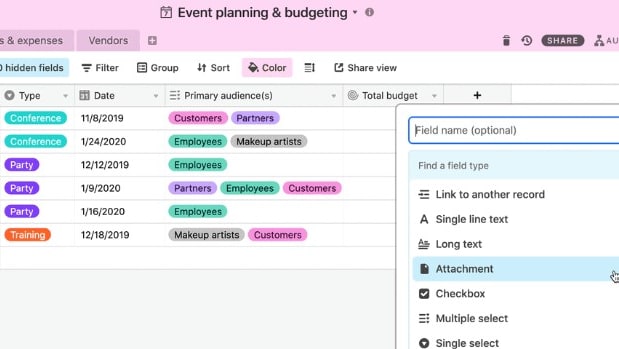
Airtable's Field Creation, Showing Attachments, Checkboxes, Multiple Select and Other Options
Airtable
The power of a relational database, without the need to code or use Excel, is enhanced by AI in Airtable to streamline data organization and optimize workflows efficiently.
When it comes to project management tools, ClickUp and Airtable each offer unique value propositions that distinguish them from each other. Both platforms provide essential project management features such as task assignments, timelines, and collaboration spaces. However, the core difference between the two lies in their approach to flexibility, integrations, and data management.
ClickUp is a tool built for adaptability and customization. It provides users with more than 15 different views, including List, Board, and Calendar views, among others. This flexibility allows teams to tailor their workspace according to specific project requirements or individual preferences. Furthermore, ClickUp offers a wide array of integrations—over 1,000 to be precise. This makes it an incredibly versatile tool for teams already using a variety of other platforms for CRM, coding, or design work. Compared to Airtable, ClickUp is better suited for environments where different departments need a unified but customizable project management solution.
Airtable, on the other hand, excels in the area of data organization and automation. It employs a spreadsheet-like interface that seamlessly blends the functionality of a database with a visual workspace. This makes it ideal for businesses that have complex data organization needs, as it allows you to create fields for text, numbers, dates, and even attachments. Furthermore, Airtable offers robust automation features that help in reducing manual tasks, such as sending routine emails or updating statuses. Compared to ClickUp, Airtable stands out for businesses that need a more structured environment where data integrity and automation are pivotal.
The key takeaway here is that ClickUp and Airtable serve different masteries. ClickUp is an all-encompassing, highly customizable project management tool designed to adapt to a multitude of workflow types. Airtable is more specialized, focusing on offering advanced data management capabilities and automation features. Thus, when making a choice, your decision should be influenced by what your team values more—customization and broad integration capabilities in ClickUp, or advanced data management and automation in Airtable. Overall, ClickUp is a more versatile and feature-rich tool than Airtable. However, Airtable is easier to use and has more advanced automation features.

ClickUp
Used by 3,460 members
Additional 20% off Unlimited and Business plans for 1 year
Save up to $1,000

Airtable
Used by 8,898 members
$1,000 in credits on licences for 1 year
Save up to $1,000
03 ClickUp pros and cons
What are the advantages of ClickUp?
- Versatile features: ClickUp offers a wide array of features, including task management, time tracking, goal setting, document sharing, and more. This versatility allows teams to consolidate their work into a single platform.

- Customization: ClickUp is highly customizable, enabling users to tailor their workspace to fit their specific needs and workflows. Custom fields, views, and templates allow for a personalized experience.
- Collaboration and communication: ClickUp provides tools for effective team collaboration, such as commenting on tasks, assigning responsibilities, and real-time chat, which helps streamline communication and project progress tracking.
- Integration: ClickUp offers integrations with various popular third-party apps and services, allowing users to connect their favorite tools and streamline their workflow.
- Scalability: ClickUp is suitable for small teams and large enterprises alike. It can scale with your organization's growth, offering features and plans for businesses of all sizes.
What are the disadvantages of ClickUp?
- Learning curve: Due to its extensive feature set and customization options, ClickUp may have a steep learning curve for new users. It can take time to explore and fully understand its capabilities.

- Complexity for simple tasks: ClickUp's robustness can sometimes make simple tasks seem more complex than necessary. Users might find it overwhelming for straightforward projects.
- Pricing: While ClickUp offers a free version, its more advanced features and integrations may require a paid subscription. For larger teams or businesses, the cost can be a significant factor.
- Mobile app limitations: Some users have reported limitations in the mobile app compared to the web version, which can impact mobile productivity.
- Dependence on internet connectivity: As ClickUp is a cloud-based tool, it relies on a stable internet connection. Users in areas with unreliable internet access might experience disruptions in their work.
Compare ClickUp to other tools


ClickUp vs Monday

Asana vs ClickUp

ClickUp vs Coda

ClickUp vs Notion

ClickUp vs Taskade

ClickUp vs Slack
04 Airtable pros and cons
What are the advantages of Airtable?
- Flexibility and customization: Airtable's database-like structure allows for versatile use cases. You can customize it to manage a wide range of information, from project tracking to content management, using various views, fields, and configurations.
- User-friendly interface: Airtable's user interface is intuitive and visually appealing. Its spreadsheet-style layout is familiar to many users, making it easy to get started without extensive training.
- Collaboration: Airtable supports real-time collaboration, with features like commenting, sharing, and mentioning team members in discussions, making it easy for teams to work together effectively.
- Integration: Airtable offers a range of integrations with other apps and services, enhancing its functionality and making it easier to connect with the tools your team already uses.
- Cross-platform accessibility: Airtable is accessible across various platforms, including web, mobile, and desktop apps, allowing users to work from anywhere and on any device.
What are the disadvantages of Airtable?
- Limited complexity: While Airtable is highly flexible, it may not be suitable for extremely complex databases or projects. More intricate requirements might be better served by traditional database management systems.
- Scaling challenges: As your data or project complexity grows, Airtable may become less efficient, potentially leading to performance issues or limitations in handling large datasets.
- Pricing: Advanced features and increased storage may require a paid subscription, and costs can add up as your team or usage expands.
- Learning curve for complex setups: Although it's user-friendly, setting up highly customized bases with complex relationships can be challenging and require a good understanding of the platform.
- Limited automation: While Airtable has automation features, they may not be as powerful or extensive as dedicated automation tools, which could limit your ability to streamline processes.
Compare Airtable to other tools

Airtable vs Monday
Airtable vs Asana
Airtable vs Coda

Airtable vs Excel
Airtable vs Notion

Airtable vs Google Sheets
05 ClickUp compared to Airtable
When comparing ClickUp and Airtable, ClickUp stands out with its comprehensive project management capabilities and a highly intuitive user interface. It's designed for teams looking to plan, track, and collaborate on tasks and projects efficiently. ClickUp offers a robust feature set, including task management, time tracking, and goal setting, making it a versatile choice for a wide range of users.
The choice between ClickUp and Airtable depends on the level of project management and data organization required for your specific workflow. ClickUp excels in offering a comprehensive project management solution with intuitive tools, while Airtable provides the flexibility to structure data and processes in a way that suits your unique needs.
Is ClickUp better than Airtable?
 Is ClickUp better than Airtable?
Deciding whether ClickUp is better than Airtable depends on your specific project management and data organization needs. ClickUp shines with its comprehensive project management capabilities and an intuitive interface designed for effective task and project tracking. It's an excellent choice for teams looking for a well-rounded project management solution.
Airtable, on the other hand, offers a unique approach with its flexible database and spreadsheet hybrid. It's the preferred choice for those who require custom databases and data organization that can adapt to various use cases. With Airtable, you have the freedom to structure data and workflows according to your specific requirements, making it a flexible and versatile option.
What is ClickUp best used for?
ClickUp is a versatile and robust platform designed for comprehensive project management and productivity. It is best used by teams and businesses that need a centralized solution for organizing tasks, tracking projects, and enhancing collaboration.
ClickUp offers a wide range of features that allow users to create, assign, and monitor tasks, set priorities, and establish goals. The platform excels in time tracking, providing a valuable tool for teams looking to optimize their time management. Its adaptability and customization options make it suitable for a variety of industries and use cases. ClickUp is the preferred choice for those seeking to streamline project management and improve team productivity.
Can ClickUp replace Airtable?
Whether ClickUp can replace Airtable depends on your specific project management and data organization needs. ClickUp offers comprehensive project management capabilities and a user-friendly interface, making it a versatile choice for various use cases.
Airtable, on the other hand, provides a flexible database and spreadsheet hybrid that can be adapted to multiple scenarios. It's the preferred option for those who need custom databases and highly adaptable data organization.
The decision to replace Airtable with ClickUp or vice versa hinges on the complexity and adaptability of your project and data management requirements. If you need a structured and comprehensive project management solution, ClickUp might be the better choice. However, if you require a highly customizable and adaptable data organization tool, Airtable could be the way to go.
Is ClickUp cheaper than Airtable?
When it comes to pricing, it's important to consider the differences between ClickUp and Airtable. ClickUp’s pricing often provides a cost-effective option for businesses, as it offers a flexible structure based on the specific features and user requirements. This flexibility can be advantageous for businesses looking to align their costs with their actual needs.
On the other hand, Airtable follows a pricing model that may become more expensive as your requirements grow. While Airtable offers a free version, accessing advanced features and scaling up, especially for larger or more complex use cases, may lead to higher expenses. Therefore, the choice between ClickUp and Airtable in terms of cost-effectiveness may depend on your specific project management and data organization needs and how well they align with the pricing structure of each platform.
Is there a better Task Management software than ClickUp?
While ClickUp is a robust project management and productivity tool, it's worth exploring whether there might be a better-suited software for your specific needs.
Several notable alternatives to ClickUp in the project management and productivity space include Trello, Asana, Monday.com, Notion, Airtable, and Wrike.
The choice of project management software depends on your organization's unique goals, budget, and the depth of project management functionality you require. While ClickUp offers a comprehensive set of features and customization options, other platforms may offer specific industry solutions, specialized project management approaches, or integration capabilities that align better with your project management and productivity objectives.

ClickUp
Boost your productivity
Additional 20% off Unlimited and Business plans for 1 year
Save up to $1,000
06 Airtable compared to ClickUp
Airtable distinguishes itself with its flexible database and spreadsheet hybrid, offering a versatile platform for data organization and collaboration. Airtable's pricing structure includes a free version and various paid plans, making it suitable for users with different data management needs and budgets.
While both Airtable and ClickUp excel in their respective areas, the choice between the two depends on your specific requirements. Airtable is a flexible and highly customizable tool ideal for those who need to create custom databases and adapt data organization to unique use cases. It's a compelling choice for individuals and teams looking for a versatile and adaptable platform to structure and manage data.
Is Airtable better than ClickUp?
Deciding whether Airtable is better than ClickUp depends on the nature of your data organization and project management needs. Airtable offers a flexible and highly customizable platform that can adapt to various use cases, making it an attractive option for users seeking adaptable data management.
The choice between Airtable and ClickUp ultimately hinges on the complexity and adaptability of your data management and project management needs. If you prioritize a flexible and customizable data organization tool, Airtable might be the preferable choice. However, if you need a comprehensive project management solution with a wide array of features, ClickUp remains a compelling option.
What is Airtable best used for?
Airtable is a versatile and adaptable tool that is best used for a wide range of data organization and collaboration needs. It's particularly well-suited for individuals and teams looking to create custom databases and structure data according to their specific requirements.
Airtable's strengths and best use cases include data management, project tracking, content management, collaboration, and customization. It is a valuable platform for businesses and teams looking to streamline data organization, track projects and tasks, manage content and media assets, enhance collaboration, and create tailored workflows. Airtable offers flexibility and adaptability, making it a valuable asset for a diverse array of industries and use cases.
Can Airtable replace ClickUp?
Determining whether Airtable can replace ClickUp depends on your specific project management and productivity needs. Airtable is a flexible and highly customizable tool, making it well-suited for data organization, tracking, and collaboration in a wide range of scenarios.
On the other hand, ClickUp is designed as a comprehensive project management and productivity platform, offering features like task management, time tracking, and goal setting, making it an ideal choice for teams looking to streamline their project planning and execution.
The decision between Airtable and ClickUp hinges on the complexity and adaptability of your data organization and project management requirements. If you prioritize flexibility and customized data management, Airtable may be the preferable choice. However, if you need an all-in-one project management solution with a wide range of productivity features, ClickUp remains a compelling option.
Is Airtable cheaper than ClickUp?
In comparing the costs of Airtable and ClickUp, it's crucial to understand that their pricing structures vary significantly. Airtable’s pricing offers a free version and various paid plans, making it accessible for users with different data organization and collaboration needs. This can be cost-effective, particularly for individuals and small teams.
On the contrary, ClickUp's pricing model may be different, potentially involving costs that correspond to the number of users or specific features you require. As your team or project complexity increases, the pricing for ClickUp may vary, potentially leading to higher expenses. Therefore, the choice between Airtable and ClickUp in terms of cost-effectiveness will depend on the scale of your data organization and project management requirements and how well they align with the pricing structure of each platform.
Is there a better Collaboration software than Airtable?
While Airtable is a powerful and adaptable tool for data organization and collaboration, it's worth exploring whether there might be a better-suited software solution for your specific needs.
Several notable alternatives to Airtable in the data management and collaboration space include Microsoft Excel, Google Sheets, Smartsheet, Make, and Trello.
The choice of data management and collaboration software should be based on your unique requirements, budget, and the depth of features needed. While Airtable offers great flexibility, other platforms may provide specific functionalities, industry-specific solutions, or integrations that better align with your data management and collaboration goals.

Airtable
Premium
Easily store and organize your data
$1,000 in credits on licences for 1 year
Save up to $1,000
07 Features comparison
Both ClickUp and Airtable Provide Equally Robust Team Collaboration Features

ClickUp facilitates seamless collaboration by enabling team members to collaborate on projects in real time, edit shared documents collaboratively, and maintain everyone in the loop with customizable status updates
Team collaboration is a paramount aspect for modern productivity, and both ClickUp and Airtable offer robust solutions in this regard. ClickUp facilitates seamless collaboration by enabling team members to collaborate on projects in real time, edit shared documents collaboratively, and maintain everyone in the loop with customizable status updates. This ensures that every team member is well-informed and connected, ultimately enhancing overall productivity and teamwork.
Likewise, Airtable excels in promoting real-time collaboration among team members who are concurrently working on the same database. This dynamic environment enhances the synergy and effectiveness of teams, as everyone can contribute, access, and update information simultaneously. The commitment to real-time collaboration is a shared strength of both tools, ensuring that teams have the most current and accurate information at their disposal.
Airtable Outperforms ClickUp in Data Visualization

Airtable unquestionably takes the lead in the domain of data visualization, offering users the capacity to effortlessly convert their data into captivating visual representations like pie charts, bar graphs, line charts, and more
Airtable unquestionably takes the lead in the domain of data visualization, offering users the capacity to effortlessly convert their data into captivating visual representations like pie charts, bar graphs, line charts, and more. This invaluable feature not only enhances the comprehensibility of data but also facilitates the discovery of patterns, trends, and relationships within the information. Airtable excels in its commitment to providing users with a powerful visual toolkit, making data analysis more accessible and insightful.
In contrast, ClickUp, while proficient in various project management and productivity aspects, does not present dedicated data visualization features. This key distinction sets Airtable apart, positioning it as the superior choice for those who prioritize the visualization of their data. Whether for analytical purposes or for conveying information effectively, Airtable's capabilities in this arena prove to be a significant advantage.
ClickUp Offers Better Project Management Capabilities than Airtable
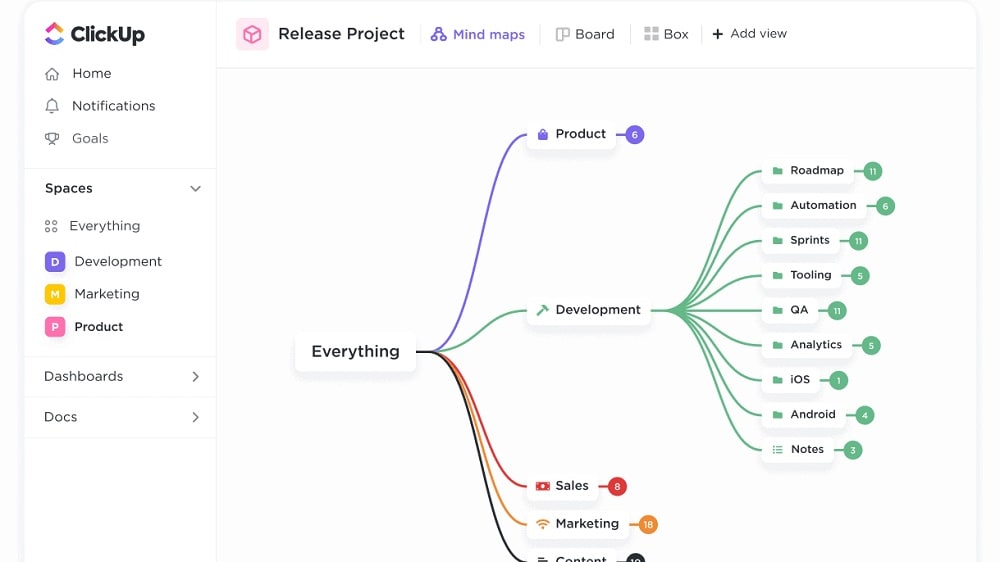
Within ClickUp, users can effortlessly create projects, assign tasks, set due dates, and closely monitor project progress, all within a single, cohesive platform
ClickUp and Airtable, while providing project management capabilities, differ in their approach and depth. ClickUp offers a more comprehensive and user-friendly project management system. Within ClickUp, users can effortlessly create projects, assign tasks, set due dates, and closely monitor project progress, all within a single, cohesive platform. Additionally, ClickUp's multitask view facilitates seamless transitions between various projects, enhancing workflow efficiency.
In contrast, while Airtable does permit project management, it doesn't deliver the same level of intricacy in task tracking and assignment. Airtable's strength lies more in its data organization and collaboration capabilities, making it less specialized for project management in comparison to ClickUp.
ClickUp has the Upper Hand in Time Tracking Over Airtable
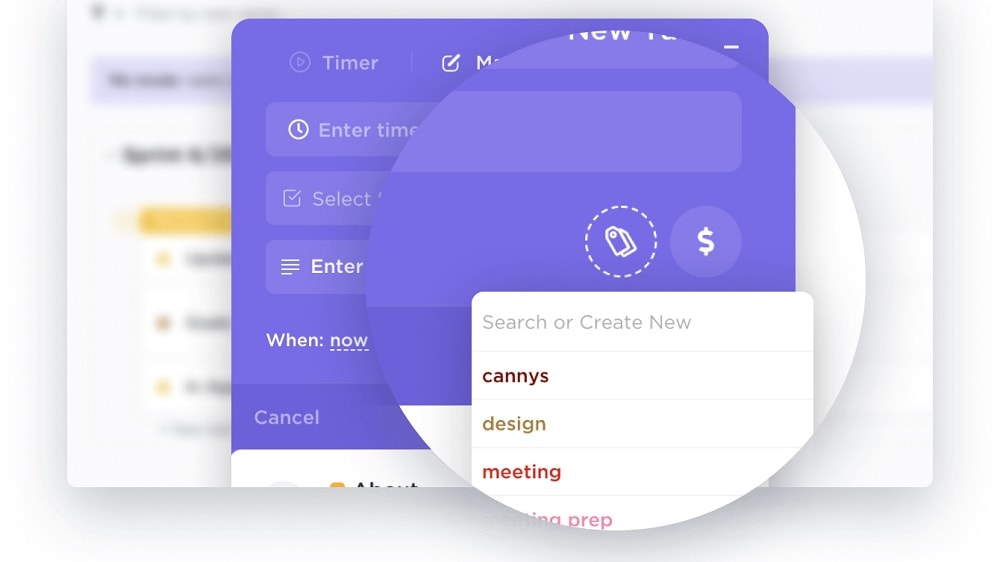
ClickUp distinguishes itself in the domain of time tracking, offering a feature that proves invaluable for users who need to meticulously monitor the time allocated to their tasks.
ClickUp distinguishes itself in the domain of time tracking, offering a feature that proves invaluable for users who need to meticulously monitor the time allocated to their tasks. This functionality serves as a crucial tool for businesses that bill clients on an hourly basis and also for those with a pronounced focus on optimizing productivity. With ClickUp's time tracking capabilities, users can accurately record and manage the time devoted to each task, enhancing both project management and financial tracking.
Conversely, while Airtable does incorporate reminders and notifications, it lacks a dedicated feature solely focused on time tracking. While Airtable excels in data management and collaboration, the absence of a dedicated time tracking feature can be a limitation for users and businesses who prioritize precise time measurement and analysis in their workflows. For these users, ClickUp's dedicated time tracking functionality proves to be a significant advantage.
Airtable is Superior at Data Management Compared to ClickUp
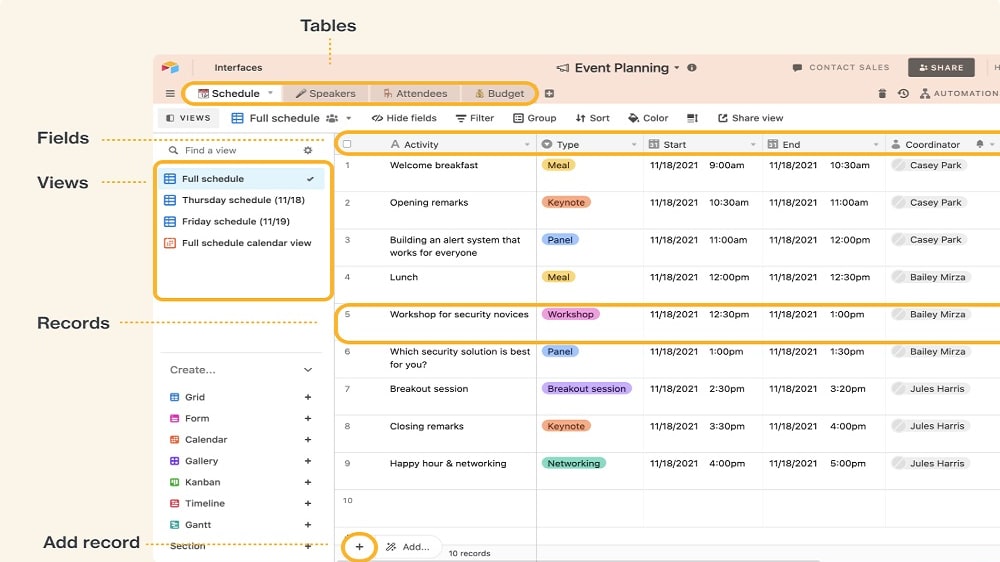
Airtable truly stands out in the realm of data management, and one of its most pronounced strengths is the remarkable capacity to empower users to convert raw data into actionable views, seamlessly automate data workflows, and generate custom reports with remarkable ease, all achievable within just a few clicks.
Airtable truly stands out in the realm of data management, and one of its most pronounced strengths is the remarkable capacity to empower users to convert raw data into actionable views, seamlessly automate data workflows, and generate custom reports with remarkable ease, all achievable within just a few clicks. This remarkable feature set is particularly beneficial for businesses grappling with substantial volumes of data that require efficient handling and interpretation.
Conversely, ClickUp places its primary emphasis on project and task management, which may not furnish users with the same depth and breadth of functionality when it comes to the intricate task of managing and interpreting data. While ClickUp excels in the project management arena, its focus does not lend itself as readily to the comprehensive data management and analysis capabilities that Airtable delivers. For businesses and teams with substantial data management needs, Airtable emerges as a formidable solution.
Airtable Excels Ahead of ClickUp in User-Friendly Design
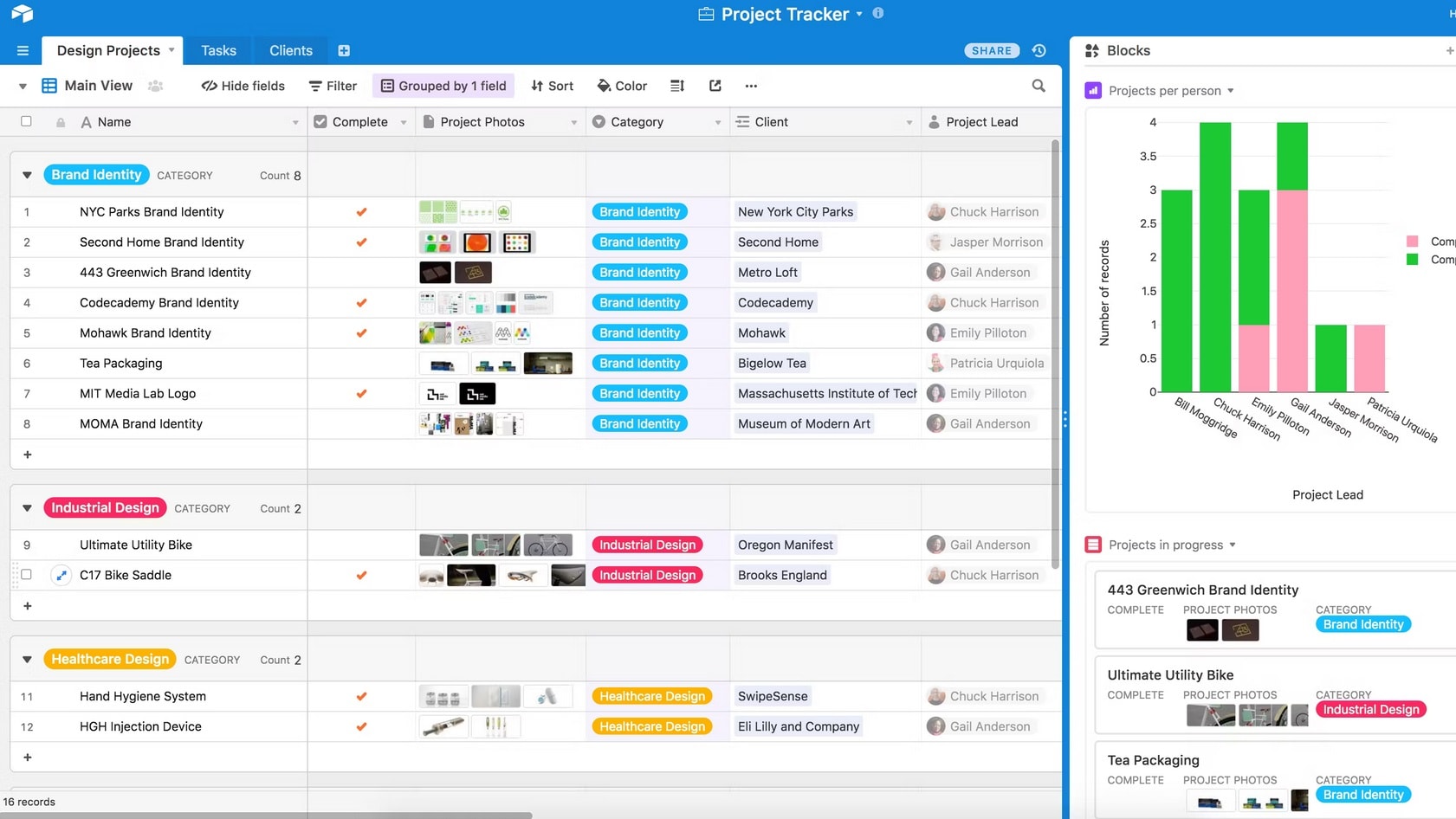
Airtable, on the other hand, offers a visually appealing interface that skillfully combines the concepts of spreadsheets and databases.
In terms of user-friendliness, ClickUp stands out as the top choice. It prioritizes an excellent user experience, offering an intuitive interface that ensures smooth navigation, even for those new to the platform. ClickUp's streamlined design, along with its clear labels and well-structured layout, significantly reduces the learning curve associated with adopting new software. What's more, it provides extensive customization options, allowing users to tailor their workspace to perfectly match their unique needs.
Airtable, on the other hand, offers a visually appealing interface that skillfully combines the concepts of spreadsheets and databases. However, its robust functionality can introduce higher complexity, which may pose a challenge for users who aren't particularly tech-savvy. While Airtable offers a wealth of features, making the most of them may require a deeper understanding of the tool, leading to a steeper learning curve when compared to the more user-friendly ClickUp.
ClickUp’s Impressive Integration Ecosystem Outperforms Airtable’s

ClickUp boasts an extensive integration ecosystem that includes industry-leading communications software, analytics tools, and team collaboration platforms like Slack, GitHub, Google Drive, Trello, and more.
When it comes to integrations, ClickUp surpasses Airtable with a wide array of options. ClickUp boasts an extensive integration ecosystem that includes industry-leading communications software, analytics tools, and team collaboration platforms like Slack, GitHub, Google Drive, Trello, and more. These integrations empower users to seamlessly merge their data and workflows from various tools, consolidating their work within a unified hub. ClickUp further distinguishes itself with a robust API that grants users the capability to craft their own tailor-made integrations, enhancing the platform's convenience and adaptability.
Airtable, while offering a respectable array of integration possibilities with popular services such as Google Sheets, Slack, and Mailchimp, falls short in comparison to ClickUp's extensive selection. While Airtable does have a potent API for developing custom integrations, the prerequisite of coding knowledge could pose a challenge for some users. This limitation may influence the platform's suitability, especially for less tech-savvy teams who prefer a wider range of out-of-the-box integration options.
08 ClickUp vs Airtable: Which is the best for your business?
ClickUp is the best tool for you if:
- You value extensive customization in project management as ClickUp is perfect for teams that want to tailor their work environment extensively
- You require a wide array of integration possibilities to connect seamlessly with other tools and applications you are already using
- You have a tech-savvy team that can take advantage of ClickUp's advanced features to boost productivity and collaboration
- You need to scale quickly, as ClickUp's robust feature set can grow along with your business
- You prioritize 24/7 customer support for resolving issues any time of the day, ensuring uninterrupted workflow
 You value extensive customization in project management as ClickUp is perfect for teams that want to tailor their work environment extensively
Airtable is the best tool for you if:
- You require robust data management capabilities and enjoy a spreadsheet-like interface for database manipulation
- You need built-in automation to create custom workflows, thereby reducing manual tasks and increasing efficiency
- You are working with large datasets and need an intuitive way to visualize and organize that data
- You prefer a project management tool with a focus on data-centric tasks, such as inventory management or content planning
- You have a smaller team and can invest in a more expensive pricing plan for additional features
ClickUp
Used by 3,460 members
Additional 20% off Unlimited and Business plans for 1 year
Save up to $1,000
Airtable
Used by 8,898 members
$1,000 in credits on licences for 1 year
Save up to $1,000
09 Alternatives to ClickUp & Airtable

Notion
Used by 21,475 members
3 months free on the Business plan with Unlimited AI
Save up to $720

Google Workspace
Used by 10,616 members
20% off Standard plans for 1 year
Save up to $3,460

Slack
Used by 4,043 members
25% off new plan purchases
Save up to $9,000

Miro
Used by 3,642 members
$1,000 in credits (lifetime validity)
Save up to $1,000
10 Promotions on Task Management software
ClickUp and Airtable are great tools, but Secret offers promo codes with discounts on over 2250+ different SaaS solutions. New deals are added regularly, helping you save money on your online subscriptions. Get access to codes for other Task Management software you might want to purchase

Monday coupon
First month free
Google Workspace promo code 2026
20% off Standard plans for 1 year
Notion deal
3 months free on the Business plan with Unlimited AI
Miro coupon
$1,000 in credits (lifetime validity)
Slack promo code
25% off new plan purchases

Promo code bolt.new
20% off all plans for the first 3 months

Todoist discounts
20% off annual plans

xTiles deal
20% off monthly or annual plans

Asana deal
75% off the annual Starter and Advanced plans for 1 year

Google Drive coupon code 2026
20% off Standard plans for 1 year
Start saving on the best SaaS
Secret has already helped tens of thousands of startups save millions on the best SaaS like Microsoft Teams, Google Workspace & many more. Join Secret now to buy software the smart way.