


If you're involved in the world of digital design, choosing the right graphic design software is critical. A suitable design tool not only empowers you to bring your creative visions to life but also streamlines your workflow, enhancing productivity and creativity.
This article serves as a crucial resource for anyone torn between Adobe Express and Illustrator. We delve into a side-by-side comparison of both tools, examining their core functionalities, ease of use, feature sets, and suitability for various design tasks. Whether you're designing social media graphics, marketing materials, or intricate vector illustrations, understanding the nuances of Adobe Express and Illustrator will equip you with the knowledge to select the tool that best fits your project requirements and skill level.
- 01 Adobe Express vs Illustrator: overview
- 02 What's the difference between Adobe Express and Illustrator?
- 03 Adobe Express pros and cons
- 04 Illustrator pros and cons
- 05 Adobe Express compared to Illustrator
- 06 Illustrator compared to Adobe Express
- 07 Features comparison
- 08 Adobe Express vs Illustrator: Which is the best for your business?
- 09 Alternatives to Adobe Express & Illustrator
- 10 Promotions on Design software
Start saving on the best SaaS
Secret has already helped tens of thousands of startups save millions on the best SaaS like Microsoft Teams, Google Workspace & many more. Join Secret now to buy software the smart way.

01 Adobe Express vs Illustrator: overview
Adobe Express and Illustrator stand as two significant pillars in Adobe's suite of design software, each tailored to meet different user needs and project requirements.
Adobe Express shines as a user-friendly platform, designed for those who seek a straightforward and accessible tool for their design projects. It excels in enabling quick edits, social media graphics creation, and simple design tasks, making it a popular choice for beginners or non-designers who need to produce visually appealing content without a steep learning curve. On the other hand, Adobe Illustrator is a powerhouse for vector graphic creation, offering an extensive array of advanced tools and features for professional designers and illustrators. It stands out for its precision, versatility, and capability to handle complex design projects, from intricate illustrations to branding and typography work.
When deciding between Adobe Express and Illustrator, it's crucial to consider your specific design needs, skill level, and project complexity. Adobe Express is the ideal solution for quick, simple designs and users seeking a more approachable interface. Meanwhile, Illustrator caters to those requiring advanced functionality and precision for complex, professional-grade design work.

Customer support
Both tools are supported by Adobe's customer service and extensive online tutorials and communities. Users report similar quality of support across Adobe products.

Adobe Express
Illustrator
Ease of use
Adobe Express is designed with simplicity in mind, suitable for quick designs and social media graphics. Illustrator has a steep learning curve, tailored for design professionals requiring detailed and complex illustrations.
Adobe Express
Illustrator
Positive reviews
Adobe Express is praised for its ease of use and accessibility to beginners. Adobe Illustrator is renowned among professionals for its advanced features and precision in vector graphics.
Adobe Express
Illustrator
Pricing plans
Adobe Express offers a free plan with basic features and affordable premium plans. Illustrator is available only through a more expensive Creative Cloud subscription and does not have a free version.
Adobe Express
Illustrator
Feature richness
Illustrator is a full-featured vector graphics editor with advanced capabilities, while Adobe Express offers a more limited set of features focusing on ease and speed.
Adobe Express
Illustrator
Precision and control
Illustrator offers unparalleled precision and control over every aspect of the design, which is essential for professional graphic artists. Adobe Express focuses on simplicity and does not offer fine-grain control.
Adobe Express
Illustrator
Templates and assets
Adobe Express provides a wide range of templates and design assets, making it easy for users to create content quickly. Illustrator offers templates, but it's more focused on creation from scratch.
Adobe Express
Illustrator
Collaboration
Adobe Express offers easier collaboration and sharing options, suited for social media content and quick projects. Illustrator’s collaboration features are less prominent and more suited for professional teams.
Adobe Express
Illustrator
Output and export options
Illustrator provides a wide range of export options in various formats and specifications required for professional print and digital use. Adobe Express has more limited output options, enough for social media and casual use.
Adobe Express
Illustrator
Integrations
Adobe Express integrates well within the Adobe ecosystem and with other simple web tools, including Dropbox and YouTube, but has limited third-party integrations. Illustrator, being a professional tool, integrates extensively with other Adobe products and professional design workflows, like Canto, Brandfolder, and Ziflow.
Adobe Express
Illustrator
02 What's the difference between Adobe Express and Illustrator?

Adobe Express Allows You to Bring Your Ideas to Life Quickly and Easily
Adobe Express
Easily create social graphics, flyers, logos, and more with premium tools and templates.
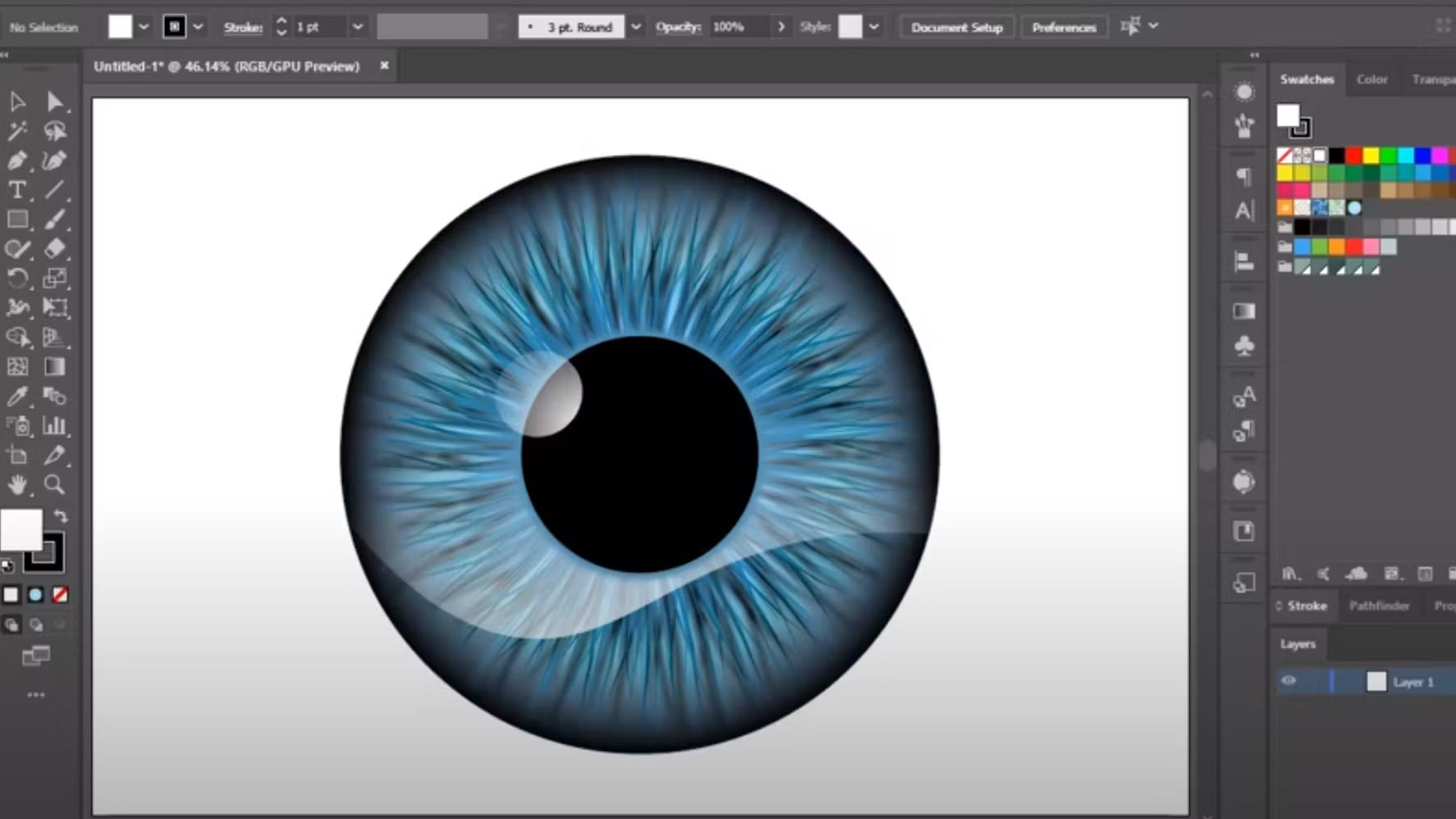
Illustrator's User Interface with Advanced Features for More Intricate Design Needs
Illustrator
Adobe Illustrator is a vector graphics editor and design software developed by Adobe Systems. It allows users to create and edit logos, illustrations, and graphic designs with precision and flexibility. Features include typography, drawing tools, color processing, and creative effects.
Adobe Express and Adobe Illustrator are two prominent tools in Adobe's creative suite, each designed to cater to different aspects of digital design. Understanding the distinctions between them is essential for selecting the right tool for your design needs.
Adobe Express is tailored for users seeking quick, template-driven design solutions. It's an all-in-one web and mobile application designed for creating social media graphics, short videos, and web pages without requiring extensive design skills. This platform is especially beneficial for marketers, bloggers, and small business owners looking to produce professional-looking content with minimal effort. Adobe Express emphasizes ease of use, offering a vast library of templates and design assets that allow users to create visually appealing content swiftly. It operates on a simplified interface that doesn't require deep knowledge of graphic design principles or software use.
In contrast, Adobe Illustrator is a vector graphics editor and design program for professionals who need advanced features and control over their work. Illustrator is the industry standard for creating vector artwork, offering precision and flexibility in designing logos, illustrations, typography, and complex graphical elements. Unlike Adobe Express, Illustrator provides a comprehensive set of tools for drawing, editing, and manipulating designs in detail. It's suited for graphic designers, illustrators, and artists who require a high degree of customization and are willing to invest time in learning the software's extensive features.
The primary difference lies in their intended user base and functionality. Adobe Express appeals to non-designers and those needing quick, effective designs with minimal learning curve, while Illustrator is aimed at design professionals seeking detailed control over their vector graphic projects. Additionally, Illustrator's capability to create complex, scalable vector graphics far surpasses the functionalities offered by Adobe Express, making it a go-to for intricate design work. However, for those who prioritize speed, simplicity, and accessibility, Adobe Express provides an excellent platform for bringing creative ideas to life without the complexity of professional design software.

Illustrator
Design beyond boundaries
7 days free (available through Adobe Creative Cloud)
Save up to $22
03 Adobe Express pros and cons
What are the advantages of Adobe Express?
- User-friendly interface: Adobe Express is designed with simplicity in mind, making it accessible for beginners and those with limited design experience. Its intuitive layout allows users to start creating with little to no learning curve.

- Template-driven design: It offers a vast collection of professionally designed templates, enabling quick and easy creation of graphics, videos, and web pages. This feature is especially useful for users looking to produce visually appealing content without starting from scratch.
- Cross-platform functionality: Adobe Express works seamlessly across various devices, including desktops, tablets, and smartphones. This cross-platform compatibility ensures that users can create and edit their projects on the go.
- Integration with Adobe Stock and Creative Cloud: Users have access to a wide range of high-quality images and design assets from Adobe Stock, as well as the ability to sync with Creative Cloud, enhancing the design process with professional-grade resources.
- Free version available: Adobe Express offers a free tier that provides users with a substantial set of features and capabilities, making it an excellent entry point for individuals or small businesses on a tight budget.
What are the disadvantages of Adobe Express?
- Limited advanced features: Compared to more robust Adobe applications like Photoshop or Illustrator, Adobe Express has limited advanced design features, which might not suffice for complex or highly customized design projects.

- Template dependency: While the vast array of templates simplifies the design process, it can also limit creativity and originality. Users might find it challenging to create something truly unique without relying on pre-designed templates.
- Performance issues on mobile: Some users may experience performance issues or reduced functionality when using Adobe Express on mobile devices, compared to its desktop version.
- Limited file format support: Adobe Express might not support as wide a range of file formats for import and export as other Adobe applications, potentially complicating workflows that require specific formats.
- Features locked behind subscription: While Adobe Express offers a free version, many of its more powerful features and assets are locked behind a subscription model. Users looking to access the full potential of the platform will need to invest in a paid plan.
Compare Adobe Express to other tools


Adobe Express vs Canva


Adobe Express vs Photoshop

Adobe Express vs Adobe Creative Cloud
04 Illustrator pros and cons
What are the advantages of Illustrator?
- Vector-based design: Illustrator excels in creating vector graphics, which are scalable to any size without losing quality. This makes it ideal for logos, icons, and other designs that require resizing for different applications without compromising on clarity or detail.
- Comprehensive toolset: Illustrator provides an extensive array of tools and features that cater to professional designers' needs. From complex path editing to gradient meshes and pattern creation, the software allows for intricate and detailed graphic work.
- Integration with Adobe Creative Cloud: As part of the Adobe Creative Cloud suite, Illustrator integrates seamlessly with other Adobe applications, such as Photoshop and InDesign. This ecosystem allows for a smooth workflow across different design phases and projects.
- Advanced typography controls: Illustrator offers advanced typography features, including character and paragraph styles, kerning, and tracking adjustments, making it perfect for designing unique and beautiful text layouts.
- Widely used and supported: Being an industry-standard software, Illustrator is supported by a vast community of professional designers. Users benefit from a wide range of tutorials, resources, and third-party plugins that extend the software's functionality.
What are the disadvantages of Illustrator?
- Steep learning curve: Illustrator's extensive feature set and professional-grade tools come with a steep learning curve. Beginners may find the software intimidating and require significant time to become proficient.
- Cost: Illustrator is available through a subscription to Adobe Creative Cloud, which can be expensive for individuals or small businesses on tight budgets. Unlike some competitors, there's no one-time purchase option.
- Resource-intensive: Illustrator can be demanding on computer resources, especially when working on complex projects with numerous layers and effects. Users with older or less powerful hardware may experience slower performance.
- Overwhelming for basic tasks: For users who need to perform simple graphic design tasks, Illustrator's complexity and vast array of options can be overwhelming and unnecessary.
- Focus on vector graphics: While Illustrator's focus on vector graphics is a strength, it's not as efficient for editing raster (bitmap) images. Users often need to use it in conjunction with Photoshop for comprehensive image editing capabilities, increasing the overall cost and learning requirements.
05 Adobe Express compared to Illustrator
Adobe Express and Illustrator serve distinct audiences within the realm of digital design. Adobe Express, with its user-friendly interface and plethora of templates, appeals to beginners and those needing quick, attractive designs without a steep learning curve. It's ideal for creating social media content, simple graphics, and web pages efficiently.
On the other hand, Adobe Illustrator caters to professionals and designers requiring precision and flexibility in vector graphic creation. Illustrator's comprehensive toolset supports intricate designs, from logos to typography, offering scalability without loss of quality. While Express offers convenience and accessibility, Illustrator is the go-to for detailed, professional-grade design work, making each tool valuable in its right based on the user's skill level and project complexity.
Is Adobe Express better than Illustrator?
 Is Adobe Express better than Illustrator?
Determining whether Adobe Express is better than Illustrator hinges on the specific needs and expertise of the user. Adobe Express shines in scenarios where speed and simplicity are paramount, providing an accessible platform for those without formal design training to create visually engaging content swiftly.
Its template-driven approach and ease of use make it an excellent choice for quick design tasks. However, for intricate and scalable vector designs requiring meticulous detail and customization, Illustrator stands unmatched. It offers a depth of functionality tailored for design professionals.
What is Adobe Express best used for?
Adobe Express shines as a versatile, web-based design tool ideal for users looking to swiftly create and share visually appealing content. Its strength lies in its ability to simplify the design process through an intuitive interface and a rich library of templates, making it perfect for crafting social media posts, flyers, banners, and short videos.
This platform is especially beneficial for marketers, educators, and small business owners who aim to produce professional-looking designs without the need for advanced graphic design skills. With its emphasis on ease of use, Adobe Express empowers individuals to quickly bring their creative visions to life, enhancing their digital presence and communication efforts with minimal effort.
Can Adobe Express replace Illustrator?
Adobe Express and Illustrator cater to different needs and user bases, making the question of replacement nuanced. Adobe Express is designed for simplicity and speed, offering a range of templates and tools for users without extensive design experience. It's excellent for quick, straightforward design tasks such as social media graphics or simple flyers. Illustrator, however, is a powerful, vector-based design tool for professionals requiring detailed graphic work, such as logo creation, typography, and complex illustrations.
While Adobe Express can complement or serve as an introductory tool for basic design needs, it lacks the advanced capabilities and precision of Illustrator, making it an unlikely replacement for professionals and detailed design work.
Is Adobe Express cheaper than Illustrator?
Adobe Express and Illustrator differ significantly in pricing, reflecting their target users and functionality. Adobe Express offers a basic version for free, providing users with an array of design tools and templates at no cost, although premium features require a subscription.
Illustrator, part of the Adobe Creative Cloud suite, does not have a free version and requires a monthly subscription, which is generally higher than the premium subscription for Adobe Express. Adobe Express’s pricing structure makes it more accessible for individuals or small businesses on a tight budget who need to create professional-looking designs without the full suite of advanced tools that Illustrator offers.
Is there a better Design software than Adobe Express?
While Adobe Express stands out for its user-friendliness and quick design capabilities, considering alternative graphic design software is crucial to meet specific creative needs or preferences.
Notable alternatives to Adobe Express include Canva, PicMonkey, GIMP, and Sketch. Each offers unique strengths: Canva is renowned for its extensive template library and ease of use, making it a strong contender for those prioritizing simplicity and speed. PicMonkey offers robust photo editing and design features, while GIMP, a free and open-source software, provides a comprehensive set of tools for those seeking a no-cost solution. Sketch, primarily favored by UI/UX designers, excels in digital interface design.
Adobe Express is an excellent option for straightforward graphic creation, but exploring these alternatives can offer broader perspectives and help you choose the tool that best fits your creative workflow and objectives.
06 Illustrator compared to Adobe Express
Illustrator and Adobe Express cater to distinct segments of the design community, each excelling in its own right. Illustrator is a powerhouse for creating intricate vector graphics and detailed illustrations, favored by professional designers for its precision and flexibility. Its comprehensive toolset supports a wide range of creative tasks, from logo design to typography.
In contrast, Adobe Express is designed for ease and speed, appealing to non-designers and those requiring quick design solutions. It offers a user-friendly interface and an extensive library of templates, making it ideal for creating simple graphics, social media posts, and web pages. While Illustrator demands a steep learning curve and a subscription, Adobe Express provides an accessible starting point for basic design needs, including a free tier.
Is Illustrator better than Adobe Express?
Asserting whether Illustrator is better than Adobe Express requires a nuanced understanding of user goals and design complexity. Illustrator's unparalleled capabilities in vector graphic creation make it the superior choice for professionals demanding high levels of precision, customization, and scalability in their work.
Its extensive suite of tools enables the crafting of detailed illustrations, logos, and typography that Adobe Express's simpler, template-driven design approach cannot match. However, for individuals seeking rapid, accessible design solutions without the need for advanced features, Adobe Express holds significant appeal.
What is Illustrator best used for?
Adobe Illustrator is best utilized for creating and editing vector graphics, making it the go-to software for professionals and designers seeking precision and scalability in their work. Its robust toolset is ideal for a wide array of design tasks, including logo creation, typography, icon design, and complex illustrations. Illustrator's vector-based approach ensures that designs remain crisp and clear regardless of size, perfect for applications ranging from business cards to billboards.
Additionally, its advanced features support detailed graphic manipulation, allowing for intricate artwork and layout design. Illustrator is favored in industries that demand high-quality visual branding and creative flexibility, establishing it as an essential tool in the professional designer's toolkit.
Can Illustrator replace Adobe Express?
Whether Illustrator can replace Adobe Express depends largely on the user's needs and design proficiency. Illustrator, with its advanced vector graphic capabilities, is tailored for professionals requiring detailed, scalable designs. It excels in creating logos, illustrations, and typography, offering unparalleled precision and control. However, its complexity and cost may not suit everyone, especially those seeking quick, template-driven design solutions.
Adobe Express, on the other hand, is designed for ease of use, enabling rapid creation of social media content, flyers, and simple graphics with minimal learning. For users focused on professional-grade design work, Illustrator is a powerful tool, but for those needing accessibility and simplicity, Adobe Express holds its own valuable place.
Is Illustrator cheaper than Adobe Express?
Comparing the cost of Illustrator to Adobe Express involves considering their target users and provided functionalities. Adobe Illustrator is a professional-grade vector graphics editor offered through Adobe's Creative Cloud subscription, targeting professionals and designers who require advanced design capabilities. Illustrator’s subscription cost reflects its comprehensive feature set and industry-standard status.
In contrast, Adobe Express offers both a free version and a premium subscription at a lower cost than Illustrator's subscription, aiming to attract a broader audience, including casual users and non-designers. While Illustrator provides extensive tools for professional use, Adobe Express presents a more budget-friendly option for those requiring basic design functionalities and quick content creation.
Is there a better Design software than Illustrator?
While Adobe Illustrator is a powerhouse for vector graphic design, exploring alternative software options is crucial for finding the best fit for your specific design needs and preferences.
Several notable alternatives to Illustrator in the graphic design landscape include CorelDRAW, Affinity Designer, Sketch, Figma, and Inkscape.
Choosing the ideal graphic design software hinges on factors such as your specific design requirements, workflow preferences, and budget. Illustrator is renowned for its advanced features and industry-standard status, but these alternatives offer unique advantages. CorelDRAW is celebrated for its versatility in various design projects, Affinity Designer for its affordability and performance, Sketch for its user interface design capabilities, and Inkscape as a free, open-source option.
Illustrator
Design beyond boundaries
7 days free (available through Adobe Creative Cloud)
Save up to $22
07 Features comparison
Adobe Express Shines for Beginners with Its User-Friendly Design

Adobe Express Makes it Easy for You to Create Your Own Visuals Easily
When comparing design software for simplicity, Adobe Express stands out as a beacon of user-friendliness. Its intuitive interface caters to beginners, offering a seamless entry into graphic design. For instance, individuals unfamiliar with design concepts find it effortless to navigate, thanks to its straightforward layout and easily accessible tools. Moreover, Adobe Express boasts an extensive array of templates, presets, and filters, streamlining the creation process for users of all skill levels. For example, a novice can effortlessly craft professional-grade visuals using the platform's pre-designed elements.
In contrast, Adobe Illustrator presents a more challenging learning curve. Its robust features and intricate options cater primarily to seasoned designers well-versed in design fundamentals. For instance, professionals proficient in design principles leverage Illustrator's advanced capabilities to execute intricate design projects with precision. However, for beginners, grappling with Illustrator's complexities can prove daunting and hinder creativity. Despite offering unparalleled design versatility, Illustrator's intricate nature may overwhelm novices, making Adobe Express the preferred choice for its simplicity and ease of use.
Adobe Express Leads in Social Media Planning with Integrated Scheduling

Adobe Express Gives You the Power to Create Draft Posts for Social Media and Schedule Posts for Optimal Reach
Adobe Express emerges as the frontrunner, offering innovative features tailored to streamline social media planning. Within Adobe Express, users can seamlessly map out their social media content, leveraging its intuitive interface to schedule posts and maintain consistency across various online platforms. For instance, a marketing team can effortlessly plan a week's worth of Instagram, Facebook, and Twitter posts directly within the platform, ensuring a cohesive online presence.
Contrastingly, while Illustrator boasts an extensive array of robust design features, its focus lies primarily on graphic creation rather than content management. Despite its prowess in design, Illustrator lacks the integrated scheduling capabilities found in Adobe Express. Thus, for businesses prioritizing efficient content planning and scheduling alongside design prowess, Adobe Express stands as the optimal choice, offering a comprehensive solution to meet modern digital marketing needs.
Illustrator Excels in Scalable Vector Graphics in Comparison to Adobe Express’s More Limited Resizing Capabilities

Illustrator Ensures Your Vector Files, Like Logos and Icons, Are Scaled at High Resolutions
When it comes to creating flexible, scalable graphics, Illustrator is superior. As a vector-based design software, Illustrator utilizes mathematical equations to generate artwork, enabling users to create graphics that can be scaled infinitely without compromising quality. This remarkable feature is particularly advantageous for various applications, including logo design, icon creation, and illustration work. For example, a graphic designer can craft a logo in Illustrator and resize it for various purposes, from business cards to billboards, without experiencing any loss of clarity or sharpness.
In contrast, Adobe Express, while proficient in design, lacks the advanced scalability capabilities inherent in Illustrator. As a result, users may encounter limitations when attempting to resize graphics created in Adobe Express, especially for large-scale printing or high-resolution displays. Thus, for projects requiring utmost precision and scalability, Illustrator remains the preferred choice, empowering designers to create visually stunning graphics with unmatched versatility and clarity.
Adobe Express Dominates with an Extensive Template Library Compared to Illustrator's Focused Graphic Creation
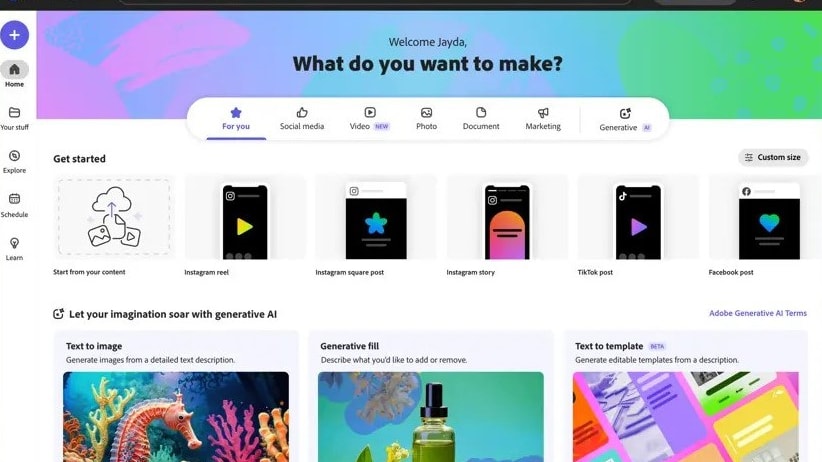
Adobe Express Has a Range of Templates Available to You for Different Requirements, Including Social Media and Videos
Adobe Express outshines Illustrator with its extensive array of professionally designed templates catering to diverse needs. Within Adobe Express, users gain access to a rich assortment of templates meticulously crafted for various purposes, including social media graphics, flyers, posters, and more. These templates serve as invaluable resources, providing users with a starting point to kickstart their design projects while streamlining the creative process. For instance, a small business owner can effortlessly customize a pre-designed flyer template in Adobe Express to promote an upcoming event, saving time and ensuring a polished final product.
Contrarily, while Illustrator offers robust design capabilities, its template offerings are comparatively limited, primarily focusing on graphic creation rather than template provision. Consequently, for users seeking a wide selection of customizable templates to expedite their design endeavors, Adobe Express stands as the preferred choice, offering unparalleled convenience and versatility.
Adobe Express Leads in Typography with Advanced Control, Surpassing Illustrator

Create Your Own Typography Logos and More with Adobe Express
When it comes to typography, Adobe Express emerges as the unequivocal victor, boasting a diverse array of tools tailored to meet the intricate demands of typography enthusiasts. Within Adobe Express, designers gain access to an extensive range of typography features, allowing for precise control over text manipulation. For instance, users can effortlessly adjust kerning, tracking, leading, and other typographic elements to achieve desired aesthetic outcomes. This level of granularity and versatility empowers designers to craft visually captivating typography designs with unparalleled precision.
In contrast, while Illustrator offers notable typography capabilities, its functionality pales in comparison to the comprehensive control afforded by Adobe Express. Despite providing tools for text manipulation, Illustrator's typography features may lack the depth and sophistication found in Adobe Express, limiting designers' ability to execute intricate typographic designs.
Adobe Express and Illustrator Both Excel in Fostering Collaboration

Easily Share and View Documents on Illutrator with Your Team so Everyone is on the Same Page
In the domain of collaborative tools, both Adobe Express and Illustrator stand as pillars of efficiency, fostering seamless teamwork and ensuring project consistency. Illustrator empowers users with robust sharing and commenting features, enabling team members to collaborate effectively on design projects. For instance, designers can share Illustrator files with colleagues for feedback, annotate specific elements, and iterate on designs collaboratively, enhancing communication and productivity.
Similarly, Adobe Express offers real-time collaboration capabilities, allowing multiple users to work simultaneously on design projects. This feature streamlines teamwork by facilitating instant feedback and enabling team members to coordinate efforts seamlessly. For example, a marketing team can collaborate on social media graphics in Adobe Express, ensuring brand consistency and alignment with campaign objectives.
Illustrator Outperforms Adobe Express in Integration Capabilities
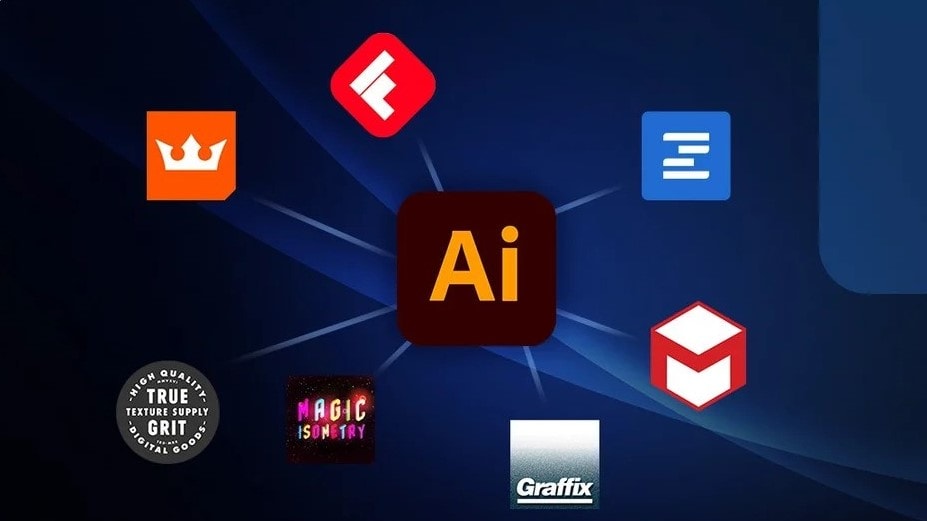
Illustrator Provides You With a Range of Integrations and Plugins to Facilitate Your Workflow Management
When it comes to integration capabilities, Illustrator reigns supreme, offering unparalleled connectivity within the Adobe Creative Cloud ecosystem. For instance, designers benefit from seamless interoperability between Illustrator and other Adobe applications such as Photoshop, InDesign, After Effects, and Premiere Pro. This robust integration facilitates fluid collaboration and enables users to harness the full potential of each tool in a cohesive environment. For example, a graphic designer can seamlessly transfer vector illustrations from Illustrator to Photoshop for further editing without compromising quality or workflow efficiency.
Moreover, Illustrator's integration extends beyond Adobe's suite to include third-party applications and platforms. This includes compatibility with project management tools, allowing teams to incorporate Illustrator files into their workflows seamlessly, and support for various cloud storage solutions, facilitating easy access and sharing of files across devices and team members.
On the other hand, Adobe Express, while possessing some integration features with other Adobe products, pales in comparison to Illustrator's extensive connectivity. Primarily designed as a standalone web-based application, Adobe Express prioritizes simplicity and ease of use over intricate integrations.
08 Adobe Express vs Illustrator: Which is the best for your business?
Adobe Express is the best tool for you if:
- You're a beginner in graphic design looking for an intuitive platform to quickly create professional-looking designs without undergoing a steep learning curve.
- Your primary focus is on producing engaging social media content, flyers, and simple graphics using a vast library of templates and design assets.
- You need a cost-effective solution with a generous free tier that provides access to a wide range of design tools and functionalities.
- You prefer a cross-platform tool that allows you to design and edit your projects seamlessly across various devices, including smartphones and tablets.
- You're working under tight deadlines and require a tool that enables you to swiftly produce and share visually appealing content without the need for advanced design skills.
 You're a beginner in graphic design looking for an intuitive platform to quickly create professional-looking designs without undergoing a steep learning curve.
Illustrator is the best tool for you if:
- You require precision and flexibility in creating scalable vector graphics, such as logos, illustrations, and typography, with an industry-standard tool that offers advanced design capabilities.
- You're a professional designer or illustrator looking for comprehensive control over every aspect of your design, from complex path editing to gradient and pattern manipulation.
- You value integration with other Adobe Creative Cloud apps and services, enhancing your workflow with seamless file sharing, cloud storage, and access to a vast asset library.
- You need a tool that supports a wide range of file formats for export and import, ensuring compatibility and flexibility across various platforms and media.
- You're willing to invest time in learning a sophisticated tool to unlock its full potential, appreciating the depth of features that support intricate and detailed graphic work.
Illustrator
Design beyond boundaries
7 days free (available through Adobe Creative Cloud)
Save up to $22
09 Alternatives to Adobe Express & Illustrator

Canva
Used by 798 members

Adobe Creative Cloud
Used by 446 members

Infogram
Used by 133 members
3 months free on the Business and Teams plans
Save up to $1,062

Photoshop
Used by 130 members
7 days free (available through Adobe Creative Cloud)
Save up to $22
10 Promotions on Design software
Adobe Express and Illustrator are great tools, but Secret offers promo codes with discounts on over 2190+ different SaaS solutions. New deals are added regularly, helping you save money on your online subscriptions. Get access to codes for other Design software you might want to purchase

OpenAI - ChatGPT promo code
$300 in free credits across OpenAI's models through LLM API

Picsart promo code
10% off monthly or annual plans

Promo codes for Magnific (ex. Freepik)
50% off Business plan (Teams) for 1 year

Code for Miro
$1,000 in credits (lifetime validity)

Promo code for Piktochart
50% off the annual Business plan

Promo code CapCut
7 days free + 25% off annual plans

Promo code Shutterstock
25% off all packs and plans
Infogram coupon code 2026
3 months free on the Business and Teams plans

Discount for Framer
1 year free on the Pro Plan

Mobbin promotion
20% off for 1 year on the Pro plan
Start saving on the best SaaS
Secret has already helped tens of thousands of startups save millions on the best SaaS like Microsoft Teams, Google Workspace & many more. Join Secret now to buy software the smart way.