


When it comes to photo editing and graphic design, having access to powerful tools is essential for creating stunning visuals that captivate your audience. Adobe Express and Photoshop are two such tools that offer a wide range of features to enhance your images and unleash your creativity. However, they each have their own strengths and weaknesses, depending on your specific editing needs.
In this comparison, we'll delve into the key differences between Adobe Express and Photoshop to help you determine which tool is best suited for your editing needs. Whether you're a casual photographer looking to touch up your snapshots or a seasoned designer working on intricate projects, understanding the strengths and limitations of each software will empower you to make an informed decision and elevate your editing game.
- 01 Adobe Express vs Photoshop: overview
- 02 What's the difference between Adobe Express and Photoshop?
- 03 Adobe Express pros and cons
- 04 Photoshop pros and cons
- 05 Adobe Express compared to Photoshop
- 06 Photoshop compared to Adobe Express
- 07 Features comparison
- 08 Adobe Express vs Photoshop: Which is the best for your business?
- 09 Alternatives to Adobe Express & Photoshop
- 10 Promotions on Design software
Start saving on the best SaaS
Secret has already helped tens of thousands of startups save millions on the best SaaS like Microsoft Teams, Google Workspace & many more. Join Secret now to buy software the smart way.

01 Adobe Express vs Photoshop: overview
Adobe Express and Photoshop are two heavyweight contenders in the realm of photo editing and graphic design software, each offering its own unique array of features tailored to different user requirements.
Adobe Express is celebrated for its simplicity and accessibility, catering to users who seek a straightforward solution for quick photo enhancements. With its user-friendly interface and basic editing tools, Adobe Express is ideal for beginners or individuals looking to make simple edits to their images without the complexity of a professional-grade software like Photoshop. In contrast, Photoshop reigns supreme as the industry standard for professional photo editing and graphic design. Renowned for its extensive suite of advanced tools and unparalleled editing capabilities, Photoshop empowers users to unleash their creativity and achieve intricate, high-quality results.
In this comparison of Adobe Express vs. Photoshop, we'll explore the key differences between the two software solutions to help you determine which best suits your editing needs. Whether you're a casual photographer looking to enhance your snapshots or a seasoned designer tackling complex projects, understanding the strengths and limitations of each platform will enable you to make an informed decision and elevate your editing workflow.

Customer support
Both services provide comprehensive support through Adobe’s help center, community forums, and in-app guidance. Adobe Express users enjoy a straightforward interface, which reduces the need for extensive support.

Adobe Express
Photoshop
Learning resources
Adobe Express has easy-to-follow tutorials and resources ideal for beginners and casual users. Photoshop offers a vast array of detailed tutorials, courses, and community resources for learning its intricate features.
Adobe Express
Photoshop
Integrations
Adobe Express integrates well with other Adobe products and some social media platforms, which is great for quick edits and shares. Photoshop offers more extensive integrations with other professional design tools and software in Adobe’s Creative Cloud.
Adobe Express
Photoshop
Editing tools
Adobe Express provides basic editing tools suitable for quick and simple graphic creation. Photoshop, on the other hand, is the industry standard for photo editing with an extensive set of advanced tools.
Adobe Express
Photoshop
Layer management
Layer management in Adobe Express is basic, suitable for simple designs. Photoshop’s sophisticated layer management system allows for complex compositions and detailed graphic work.
Adobe Express
Photoshop
File format support
Adobe Express supports essential file formats for casual use. Photoshop supports a comprehensive range of file formats, including specialized ones for professional use in different industries.
Adobe Express
Photoshop
Customer reviews
Adobe Express is appreciated for its simplicity and accessibility, especially for beginners. Photoshop receives outstanding reviews for its advanced features and industry-standard capabilities in professional photo editing.
Adobe Express
Photoshop
Ease of use
Adobe Express is designed for ease of use, with templates and a user-friendly interface suitable for all skill levels. Photoshop is powerful but has a steep learning curve, intended for professionals and serious hobbyists.
Adobe Express
Photoshop
Pricing plans
Adobe Express offers a free basic plan with optional premium features, making it accessible to more users. Photoshop is subscription-based with no free version, which can be costly for some users but reflects its professional-grade tools.
Adobe Express
Photoshop
Template availability
Adobe Express offers a wide range of customizable templates for different types of graphics, which is ideal for quick creations. Photoshop does not focus on templates as it is geared toward custom creation from scratch.
Adobe Express
Photoshop
02 What's the difference between Adobe Express and Photoshop?

Adobe Express is designed with simplicity and accessibility in mind, offering a user-friendly interface and basic editing tools tailored for quick photo enhancements.
Adobe Express
Easily create social graphics, flyers, logos, and more with premium tools and templates.
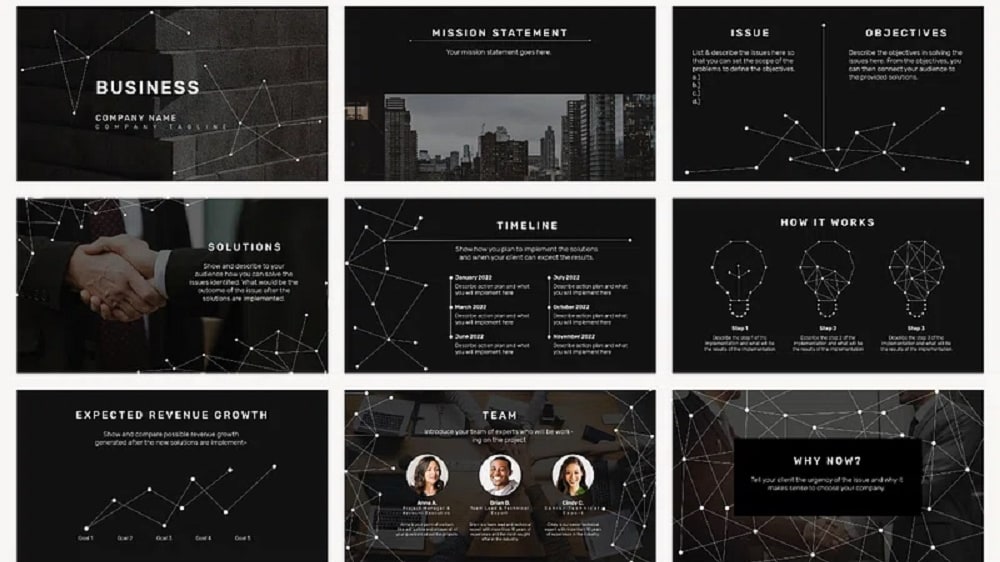
Photoshop is the industry standard for professional photo editing and graphic design, offering a comprehensive suite of advanced tools and features.
Photoshop
Photoshop is a graphics editing software developed by Adobe Systems. It allows users to create, enhance, or edit images, artwork, and illustrations. It offers a range of tools for photo manipulation, retouching, color correction, and graphic design.
Adobe Express and Photoshop are both powerful tools for photo editing and graphic design, but they cater to different user needs and workflows, which can significantly impact your choice between them.
Adobe Express is designed with simplicity and accessibility in mind, offering a user-friendly interface and basic editing tools tailored for quick photo enhancements. It's ideal for beginners or users who prioritize ease of use and efficiency. With Adobe Express, you can perform common editing tasks such as adjusting colors, cropping images, and applying filters with ease. Its mobile-friendly platform makes it convenient for editing on the go, catering to users who need quick edits without the complexity of a professional-grade software like Photoshop.
In contrast, Photoshop is the industry standard for professional photo editing and graphic design, offering a comprehensive suite of advanced tools and features. It's favored by photographers, designers, and artists worldwide for its unparalleled versatility and precision. With Photoshop, you have access to a wide range of editing capabilities, from retouching and compositing to digital painting and 3D design. Its extensive toolset allows for intricate editing and creative manipulation, empowering users to achieve high-quality results across various projects and workflows.
When comparing Adobe Express vs. Photoshop, the key difference lies in their target audience and the complexity of editing tasks they're suited for. Adobe Express excels at providing a streamlined editing experience for quick fixes and simple enhancements, while Photoshop offers unmatched depth and flexibility for professional-grade editing and creative endeavors.
03 Adobe Express pros and cons
What are the advantages of Adobe Express?
- User-friendly interface: Adobe Express features an intuitive and easy-to-navigate interface, making it accessible for beginners and casual users who may not have extensive experience with photo editing software.

- Quick edits: The app is designed for quick and straightforward photo enhancements, allowing users to make basic adjustments such as cropping, color correction, and applying filters with minimal effort.
- Mobile accessibility: Adobe Express is available as a mobile app, enabling users to edit photos on the go using their smartphones or tablets. This convenience is particularly advantageous for users who need to edit and share images while away from their computers.
- Integration with Adobe Creative Cloud: Adobe Express seamlessly integrates with Adobe's Creative Cloud ecosystem, allowing users to easily sync their edited photos across different devices and access additional features and resources available within the Adobe ecosystem.
- Free version available: Adobe Express offers a free version with basic editing features, making it accessible to users who may have budget constraints or are looking for a simple editing solution without the need for advanced features.
What are the disadvantages of Adobe Express?
- Limited features: While Adobe Express is suitable for basic photo editing tasks, it lacks the advanced features and capabilities found in more robust editing software like Photoshop. Users may find themselves restricted in terms of creative options and editing flexibility.

- Lack of advanced editing tools: Users looking to perform complex editing tasks such as advanced retouching, compositing, or working with layers may find Adobe Express lacking in the necessary tools and functionality.
- Dependency on internet connection: The mobile app version of Adobe Express requires an internet connection to access certain features and resources, which may be inconvenient for users in areas with poor connectivity or those who prefer to work offline.
- Limited customization options: Adobe Express offers a limited selection of filters, effects, and adjustment tools compared to more advanced editing software, limiting the degree of customization and creative control available to users.
- Subscription requirement for premium features: While Adobe Express offers a free version with basic features, access to premium features such as additional filters, fonts, and editing tools requires a subscription to Adobe Creative Cloud, which may not be feasible for all users.
Compare Adobe Express to other tools


Adobe Express vs Canva


Adobe Express vs Illustrator

Adobe Express vs Adobe Creative Cloud
04 Photoshop pros and cons
What are the advantages of Photoshop?
- Comprehensive editing tools: Photoshop offers a vast array of advanced editing tools and features, allowing users to perform complex tasks such as retouching, compositing, masking, and working with layers with precision and flexibility.
- High-quality results: With its advanced capabilities and extensive toolset, Photoshop enables users to achieve professional-quality results across various editing and design projects, from photo manipulation to graphic design and digital painting.
- Customization and control: Photoshop provides users with unparalleled customization options, allowing for precise control over every aspect of the editing process. Users can fine-tune adjustments, create intricate designs, and manipulate images to achieve their desired outcomes with precision.
- Integration with Adobe Creative Cloud: As part of the Adobe Creative Cloud ecosystem, Photoshop seamlessly integrates with other Adobe software and services, enabling users to easily share files, access additional resources, and sync their work across different devices.
- Extensive plugin support: Photoshop supports a wide range of third-party plugins and extensions, extending its functionality and allowing users to enhance their editing workflow with additional tools, effects, and features.
What are the disadvantages of Photoshop?
- Steep learning curve: Due to its extensive feature set and complex interface, Photoshop has a steep learning curve, especially for beginners or users transitioning from simpler editing software. Mastering all of Photoshop's capabilities can require significant time and effort.
- Resource intensive: Photoshop is a resource-intensive application, requiring a powerful computer system to run smoothly, especially when working with large files or performing complex editing tasks. Users may experience performance issues on older or less powerful devices.
- High cost: Photoshop is available only through subscription to Adobe Creative Cloud, which can be costly for some users, especially those who only require occasional access to the software or are on a tight budget.
- Overwhelming for simple edits: While Photoshop excels at complex editing tasks, its extensive feature set can be overwhelming for users who only need to perform basic photo enhancements or simple edits. In such cases, a simpler and more user-friendly software may be more suitable.
- Proprietary file format: Photoshop primarily uses its proprietary PSD file format, which may not be compatible with all other software and platforms. This can pose challenges when sharing files with users who do not have access to Photoshop or compatible software.
Compare Photoshop to other tools

Adobe Creative Cloud vs Photoshop
05 Adobe Express compared to Photoshop
Adobe Express offers a simplified, user-friendly interface tailored for quick and easy photo enhancements, perfect for beginners or users seeking a hassle-free editing experience on the go.
In contrast, Photoshop stands as the industry standard for professional-grade photo editing and graphic design, boasting an extensive suite of advanced tools and capabilities for intricate editing tasks and creative endeavors. While Adobe Express excels in simplicity and accessibility, Photoshop provides unparalleled versatility and precision, making it the preferred choice for photographers, designers, and artists worldwide.
Is Adobe Express better than Photoshop?
 Is Adobe Express better than Photoshop?
Deciding whether Adobe Express or Photoshop is better depends largely on the user's needs and skill level. Adobe Express caters to those who desire straightforward, efficient editing without a steep learning curve, ideal for everyday photo adjustments and social media content creation. It democratizes design with its ease of use and rapid results.
On the other hand, Photoshop offers a comprehensive toolset designed for deep, detailed edits and complex compositions, favored by professionals and enthusiasts who demand control and flexibility in their work. Thus, while Adobe Express appeals for its simplicity and quick fixes, Photoshop remains the gold standard for in-depth editing and creative freedom.
What is Adobe Express best used for?
Adobe Express is best used for quick and straightforward photo enhancements, making it ideal for beginners or users who need to perform basic editing tasks with ease. With its user-friendly interface and simplified tools, Adobe Express excels at tasks such as adjusting colors, cropping images, applying filters, and enhancing overall image quality.
It's perfect for individuals who want to quickly improve their photos before sharing them on social media or other platforms. Additionally, Adobe Express's mobile accessibility makes it convenient for editing on the go, catering to users who need to edit and share images while away from their computers.
Can Adobe Express replace Photoshop?
While Adobe Express offers convenient and user-friendly photo editing capabilities, it cannot fully replace the extensive features and advanced tools found in Photoshop. Photoshop stands as the industry standard for professional-grade photo editing and graphic design, providing unparalleled versatility and precision for complex editing tasks and creative endeavors.
While Adobe Express is suitable for quick and basic photo enhancements, Photoshop offers a comprehensive suite of advanced features, such as layering, masking, retouching, and 3D editing, essential for professional-level work. While Adobe Express serves as a simplified alternative for casual users, Photoshop remains essential for professionals and those requiring intricate editing capabilities.
Is Adobe Express cheaper than Photoshop?
Adobe Express is generally more affordable than Photoshop. Adobe Express’s pricing structure offers a free version with basic editing features, making it accessible to users with budget constraints or those seeking a simple editing solution.
Additionally, Adobe Express offers premium features through a subscription to Adobe Creative Cloud, which typically comes at a lower cost compared to a full Photoshop subscription. Photoshop, on the other hand, is priced higher due to its extensive feature set and advanced capabilities, making it more suitable for professionals or users who require complex editing tools.
Is there a better Design software than Adobe Express?
When considering alternatives to Adobe Express, it's crucial to evaluate whether there's a software solution better suited to your specific editing needs.
Several notable competitors to Adobe Express in the realm of photo editing and graphic design include Canva, Pixlr, GIMP, Affinity Photo, and Lightroom.
The choice of a photo editing software depends on factors such as the complexity of your editing tasks, desired level of customization, and your budget. While Adobe Express offers simplicity and ease of use for quick edits, other platforms may excel in advanced editing features, professional-grade capabilities, or specialized tools tailored to specific industries or creative workflows.
06 Photoshop compared to Adobe Express
Photoshop and Adobe Express are both powerful tools for photo editing, yet they cater to different user needs and editing requirements. Photoshop stands as the industry standard, offering a comprehensive suite of advanced tools and features for professional-grade editing tasks such as retouching, compositing, and digital painting.
On the other hand, Adobe Express provides a simplified and user-friendly approach, ideal for quick and basic photo enhancements without the complexity of Photoshop. While Photoshop offers unparalleled versatility and precision, Adobe Express excels in simplicity and accessibility, making it suitable for beginners or users seeking quick edits on the go.
Is Photoshop better than Adobe Express?
Determining if Photoshop is better than Adobe Express involves considering the user's objectives and proficiency in photo editing. Photoshop's robust functionality and intricate toolset cater to professionals and serious hobbyists who require detailed control over their editing processes. Its capabilities allow for the creation of complex digital art, sophisticated retouching, and precise graphic design work, making it indispensable in the realm of professional photography and design.
Adobe Express, while offering ease and speed for basic edits, lacks the depth and breadth of Photoshop's features. Therefore, for those seeking the highest level of creative control and professional output, Photoshop emerges as the superior choice, despite its steeper learning curve.
What is Photoshop best used for?
Photoshop is best used for professional-grade photo editing and graphic design tasks. Its extensive suite of advanced tools and features allows users to perform complex editing tasks such as retouching, compositing, and manipulating images with precision and versatility. From enhancing photos to creating intricate digital artwork, Photoshop empowers users to achieve high-quality results across various creative projects.
Additionally, Photoshop's robust capabilities extend to graphic design tasks such as creating logos, posters, and website designs, making it a versatile tool for professionals in fields such as photography, design, advertising, and digital media production.
Can Photoshop replace Adobe Express?
While Photoshop offers a comprehensive suite of advanced editing tools and features, it may not entirely replace Adobe Express for certain users and editing tasks. Photoshop excels in professional-grade photo editing and graphic design, providing unparalleled versatility and precision for complex editing tasks.
However, Adobe Express serves as a simplified and user-friendly option for quick and basic photo enhancements, ideal for beginners or users seeking a streamlined editing experience. While Photoshop offers a broader range of capabilities, Adobe Express may still have its place for users who prioritize simplicity and efficiency in their editing workflow, depending on their specific needs and preferences.
Is Photoshop cheaper than Adobe Express?
Photoshop is typically priced higher than Adobe Express due to its extensive feature set and advanced capabilities. Adobe Express often offers a free version with basic editing features, making it accessible to users with budget constraints or those seeking a simple editing solution.
In contrast, Photoshop’s pricing structure requires a subscription to Adobe Creative Cloud, which can be more costly. However, the subscription to Adobe Creative Cloud provides access to a comprehensive suite of Adobe software, including Photoshop, Illustrator, and more, making it a cost-effective option for professionals or users who require access to multiple Adobe tools.
Is there a better Design software than Photoshop?
When exploring alternatives to Photoshop, it's essential to assess if there's a software solution better suited to your specific editing requirements.
Several notable competitors in the realm of photo editing and graphic design include Adobe Express, Canva, InDesign, Pixpa, and Figma..
The choice of a photo editing software depends on factors such as the complexity of your editing tasks, desired level of customization, and your budget. While Photoshop offers a comprehensive suite of advanced tools and features for professional-grade editing, other platforms may specialize in simplicity, affordability, or niche editing capabilities tailored to specific creative needs.
07 Features comparison
Both Adobe Express and Photoshop Offer Equally Robust Design Assets

Photoshop enriches its arsenal with advanced tools specifically geared towards photo editing, empowering users to achieve intricate adjustments and enhancements.
Both Adobe Express and Photoshop offer a rich array of design assets. Adobe Express boasts a vast library of high-quality images, icons, and design elements, offering users a rich palette to enhance their projects. Conversely, Photoshop enriches its arsenal with advanced tools specifically geared towards photo editing, empowering users to achieve intricate adjustments and enhancements.
Whether seeking ready-to-use design elements or advanced editing capabilities, both tools cater to varied design requirements, ensuring users can access the assets and features necessary to bring their creative visions to life with precision and flair.
Adobe Express Simplifies Design for Beginners While Photoshop Demands Advanced Skills

Adobe Express stands out for its intuitive interface, making it ideal for beginners or those less experienced in graphic design.
When it comes to user-friendliness, Adobe Express and Photoshop offer distinct experiences tailored to different skill levels. Adobe Express stands out for its intuitive interface, making it ideal for beginners or those less experienced in graphic design. With features like drag-and-drop functionality, preset templates, and accessible tutorials, it simplifies the design process.
Conversely, Photoshop, while powerful, requires a more advanced skill set due to its extensive capabilities and complex interface. For beginners seeking a straightforward approach to design tasks, Adobe Express proves more accessible and manageable, enabling quick creation of high-quality designs without the steep learning curve of Photoshop.
Photoshop Unrivaled in Layering Capabilities When Compared to Adobe Express

Photoshop empowers users with unparalleled control over individual layers within a single image.
Unlike Adobe Express, which lacks advanced layering features, Photoshop empowers users with unparalleled control over individual layers within a single image. This depth enables precise edits, intricate compositions, and seamless integration of multiple elements, elevating the creative possibilities exponentially.
Whether blending images seamlessly, applying selective adjustments, or crafting intricate designs, Photoshop's robust layering functionality remains unmatched, making it the go-to choice for professionals and enthusiasts seeking unparalleled versatility and precision in their editing endeavors.
Adobe Express Leads in Social Media Management, Surpassing Photoshop's Editing Capabilities

When it comes to managing and scheduling social media content, Adobe Express emerges as the frontrunner, offering a built-in feature set for planning, creating, and scheduling posts directly within the platform.
When it comes to managing and scheduling social media content, Adobe Express emerges as the frontrunner, offering a built-in feature set for planning, creating, and scheduling posts directly within the platform. This functionality streamlines content management processes, saving valuable time and ensuring a consistent online presence for users.
In contrast, Photoshop, while unparalleled in image editing capabilities, lacks dedicated tools for social media management. This distinction underscores Adobe Express's suitability for users seeking a comprehensive solution for both image editing and social media content management, reinforcing its position as a versatile tool for modern digital content creation workflows.
Photoshop Excels in Customization, Offering a Tailored Experience Beyond Adobe Express

Photoshop takes the lead by offering a highly customizable environment tailored to users' preferences and requirements.
Photoshop takes the lead by offering a highly customizable environment tailored to users' preferences and requirements. Its extensive array of customizable tools, panels, and shortcuts enables users to personalize their workspace for optimal efficiency and productivity. This tailored setting streamlines workflow, enhances user comfort, and fosters creativity.
In contrast, while Adobe Express boasts an intuitive interface, it lacks the depth of customization found in Photoshop, limiting users' ability to tailor the workspace to their specific needs. Thus, for those prioritizing personalized workflow optimization, Photoshop emerges as the superior choice.
Adobe Express Champions Collaboration, Surpassing Photoshop in Teamwork Capabilities

When it comes to collaboration, Adobe Express shines with its robust features facilitating real-time teamwork on designs.
When it comes to collaboration, Adobe Express shines with its robust features facilitating real-time teamwork on designs. The platform enables team members to collaborate seamlessly, working together on projects concurrently to ensure efficiency and consistency in design workflows.
In contrast, while Photoshop offers collaboration features through its cloud storage, it lacks the real-time collaborative editing functionality found in Adobe Express. This distinction underscores Adobe Express's suitability for collaborative design projects, where simultaneous editing and feedback exchange among team members are essential for achieving cohesive and high-quality outcomes in a timely manner.
Photoshop Leads in Integration, Outpacing Adobe Express for Creative Workflows
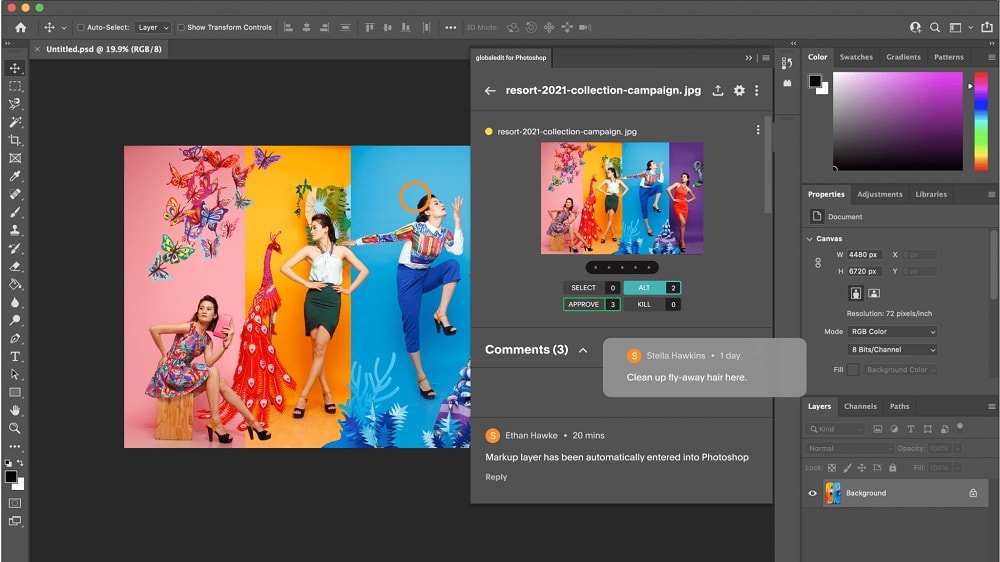
Photoshop seamlessly integrates with various Adobe Creative Cloud applications
The power of a software tool also lies in its ability to integrate with other applications, amplifying its usefulness. While Adobe Express offers basic integration with social media platforms, its scope pales in comparison to Photoshop's robust connectivity. Photoshop seamlessly integrates with various Adobe Creative Cloud applications, including Illustrator, InDesign, and Premiere Pro, facilitating a cohesive creative workflow.
Moreover, it extends its reach to third-party tools like Lightroom and Google Drive, enhancing versatility across diverse creative endeavors. This extensive interoperability makes Photoshop indispensable for professionals navigating complex projects, where seamless data exchange between multiple tools is essential for achieving optimal outcomes and streamlining creative processes.
08 Adobe Express vs Photoshop: Which is the best for your business?
Adobe Express is the best tool for you if:
- You're seeking an intuitive design platform with a user-friendly interface, ideal for beginners or those looking to create high-quality designs without a steep learning curve.
- You require a quick, efficient solution for producing social media content, with features for easy editing, scheduling, and posting directly from the platform to various social networks.
- You value access to a vast library of templates, stock photos, and design assets to craft professional-looking graphics, presentations, and marketing materials with minimal effort.
- Collaboration is key to your workflow, needing a tool that allows multiple users to work on projects simultaneously and share feedback in real-time for seamless teamwork.
- You prefer a more streamlined, less complex tool for your design needs, avoiding the overwhelming array of advanced features and customization options that professional-grade software offers.
 You're seeking an intuitive design platform with a user-friendly interface, ideal for beginners or those looking to create high-quality designs without a steep learning curve.
Photoshop is the best tool for you if:
- You demand unparalleled precision and control over your photo editing and design work, with advanced features for retouching, compositing, and creating complex digital art.
- You value a customizable workspace that can be tailored to your specific project needs, with personalized toolsets, panels, and shortcuts to optimize your creative workflow.
- You are a professional photographer, graphic designer, or digital artist seeking industry-standard software with comprehensive capabilities for detailed and sophisticated image manipulation.
- You require deep integration with other professional creative tools in the Adobe Creative Cloud suite, such as Illustrator, InDesign, and Premiere Pro, for a seamless workflow.
- You are willing to invest time in learning a complex tool to unlock the highest level of creativity and precision in your work, beyond basic photo editing.
09 Alternatives to Adobe Express & Photoshop

Canva
Used by 798 members

Adobe Creative Cloud
Used by 463 members

Infogram
Used by 156 members
3 months free on the Business and Teams plans
Save up to $1,062

Illustrator
Used by 109 members
10 Promotions on Design software
Adobe Express and Photoshop are great tools, but Secret offers promo codes with discounts on over 2240+ different SaaS solutions. New deals are added regularly, helping you save money on your online subscriptions. Get access to codes for other Design software you might want to purchase

Code for OpenAI - ChatGPT
$1,000 in credits across OpenAI's models through OpenRouter

Code for Picsart
10% off monthly or annual plans

Magnific (ex. Freepik) discounts
Additional 38% off the annual Business plan for 1 year

Miro promotion code
$1,000 in credits (lifetime validity)

Piktochart promo
50% off the annual Business plan

CapCut discount code
7 days free + 25% off annual plans

Shutterstock discount code
25% off all packs and plans
Deal for Infogram
3 months free on the Business and Teams plans

Framer promotion
1 year free on the Pro Plan

Mobbin coupon
20% off for 1 year on the Pro plan
Start saving on the best SaaS
Secret has already helped tens of thousands of startups save millions on the best SaaS like Microsoft Teams, Google Workspace & many more. Join Secret now to buy software the smart way.