


Most people do not have trouble with "making slides." Most people have trouble turning vague ideas into a clear story line, then creating that idea to appear credible by a deadline. This is why the Gamma vs. PowerPoint comparison is so important, you are not simply deciding on what tool to use, you are deciding your process.
In this article I will be comparing Gamma which is a web-based AI first platform used to create presentations and Microsoft PowerPoint which is the leading software to create slides and has been the industry standard for decades for compatibility within a corporation.
If you would like to compare pricing and possible cost savings as you read the article, please see the Gamma discount code for free credits and savings on annual plans.
- 01 Gamma vs Microsoft PowerPoint: overview
- 02 What's the difference between Gamma and Microsoft PowerPoint?
- 03 Gamma pros and cons
- 04 Microsoft PowerPoint pros and cons
- 05 Gamma compared to Microsoft PowerPoint
- 06 Microsoft PowerPoint compared to Gamma
- 07 Features comparison
- 08 Gamma vs Microsoft PowerPoint: Which is the best for your business?
- 09 Alternatives to Gamma & Microsoft PowerPoint
- 10 Promotions on AI Design software
- 11 Gamma vs Microsoft PowerPoint: Conclusion
Start saving on the best SaaS
Secret has already helped tens of thousands of startups save millions on the best SaaS like Microsoft Teams, Google Workspace & many more. Join Secret now to buy software the smart way.

01 Gamma vs Microsoft PowerPoint: overview
Both PowerPoint and Gamma are presentation-making tools, however, they were created to optimize for different goals. The most significant difference between the two tools is their focus; Gamma was developed as an easy-to-use, structured presentation creation tool utilizing AI-assisted presentation creation, while PowerPoint focuses on the creative freedom to edit and enhance your presentation in terms of design and polish. Furthermore, due to its integration into the Microsoft Office suite, PowerPoint has become the standard format for business communications (.pptx) within the corporate world.
When you want to quickly create a deck from a prompt or existing content, utilize themes, cards and AI-based editing features to refine your deck and collaborate in real-time using links, not attachments, and with audience tracking and control over how your decks are shared (on the more expensive tiers), use Gamma. When you have a high-end presentation requirement and do not wish to spend time designing and laying out every detail of your deck, Gamma's AI-optimized drafting capabilities can produce a professional-looking draft quickly.
If you need to create a deck that is going to be heavily edited by stakeholders, include advanced animation options and/or will be presented offline (e.g., traveling professionals), PowerPoint would be a safer choice. In addition, if your team is currently working with Microsoft Office 365 and already uses PowerPoint, it would likely continue to be the better option. To illustrate the differences between the two platforms, we will begin comparing them based on features.

Templates and themes
PowerPoint has a massive template ecosystem and deep theme customization. Gamma themes are streamlined and built for fast consistency rather than infinite variation.

Gamma
Microsoft PowerPoint
Export options (PPTX, PDF, link)
Gamma supports export to formats like PPTX and PDF, and it shines with shareable links. PowerPoint remains the gold standard for native .pptx delivery and editing.
Gamma
Microsoft PowerPoint
Analytics and engagement tracking
Gamma can offer detailed engagement analytics on paid tiers, which is valuable for sales and async updates. PowerPoint typically relies on adjacent tools for equivalent insights.
Gamma
Microsoft PowerPoint
Customer support
Gamma offers priority support on paid plans. PowerPoint support depends on your Microsoft plan and can be strong in enterprise contexts with formal support channels.
Gamma
Microsoft PowerPoint
Pricing plan
Gamma pricing is explicit and easy to model per creator. PowerPoint is often bundled, great if you already pay for Microsoft, but less clear if you only need slides.
Gamma
Microsoft PowerPoint
Ease of use
Gamma is good-looking by default and reduces manual formatting. PowerPoint is easy for basics, but mastery takes time if you want consistently polished slides.
Gamma
Microsoft PowerPoint
AI generation (text to deck)
Gamma is AI-native, prompt, generate, iterate. PowerPoint can be AI-assisted depending on your setup, but it’s not the core interaction model.
Gamma
Microsoft PowerPoint
Design control (pixel-level)
PowerPoint wins for precision, complex slide builds, and advanced animation choreography. Gamma prioritizes structured layouts over granular slide engineering.
Gamma
Microsoft PowerPoint
Collaboration
Both support collaboration. Gamma feels like a modern web doc workflow, while PowerPoint collaboration is strongest when your team lives inside Microsoft 365.
Gamma
Microsoft PowerPoint
Customer reviews
PowerPoint benefits from long-standing trust and ubiquity. Gamma is praised for speed and modern output, but expectations around exports and control shape opinions.
Gamma
Microsoft PowerPoint
02 What's the difference between Gamma and Microsoft PowerPoint?

Gamma's AI-powered, draft-first presentation experience
Gamma
Design brilliance, powered by AI

PowerPoint's build-and-polish slide creation workflow
Microsoft PowerPoint
Microsoft Powerpoint is a powerful presentation software that allows users to create visually stunning and professional slide decks. With its wide range of formatting and design options, Powerpoint enables users to effectively communicate their ideas, present data, and engage their audience.
The most obvious distinction is the way to create, both of which fit within the overall process of creating a presentation. The first, and probably biggest, is the initial creative approach. A user of Gamma would follow a "draft-first" method of developing their presentation, beginning with either a prompt, an outline, or by importing existing materials into the tool. As soon as they have generated a structured deck from the input data, the tool allows users to edit the content and visual elements using AI-driven tools for content edits and theme changes. In contrast to other design tools where the focus is on manipulating the layout and location of individual items on a page, a user of Gamma will focus on the development of a cohesive story line and reducing friction in the process.
On the other hand, PowerPoint is a "build-and-polish" model of creating a presentation. Users of PowerPoint will likely construct their own manual or template based structure, and then use PowerPoint to develop the content for each slide with a great deal of control over how the slide is composed. This level of control is the reason PowerPoint has maintained its place as the standard for business use; it is because of this level of control (i.e., predictable formatting, granular control) that PowerPoint remains the top choice among business professionals who need to present and share decks that will be reviewed and edited in formal environments.
There are additional, practical differences between how each tool fits into your organization. For example, Gamma is ideal for organizations where collaboration and iteration are key components of the presentation process, as users of Gamma are able to easily share and work together on a web-based version of their presentation. On the other hand, PowerPoint is ideal for organizations that have standardized on Microsoft products and workflows, and continue to expect "the .pptx" to be sent back and forth. For more information on the two tools themselves, please refer to the pricing and plan options provided by Gamma and PowerPoint’s product overview on Microsoft’s PowerPoint page.

Gamma
Design brilliance, powered by AI
400 credits + 25% off annual plans for Individuals
Save up to $52
03 Gamma pros and cons
What are the advantages of Gamma?
- AI-first drafting, Gamma is excellent at converting messy notes into a clean, presentable narrative. The prompt to deck to iterate loop is dramatically faster than manual slide scaffolding.

- Fast, consistent design without design debt, Gamma’s layouts tend to stay visually consistent across sections, which helps non-designers avoid the Franken-deck look common in rushed PowerPoint builds.
- Shareable link workflow, reviews are smoother when stakeholders can open a link instantly instead of downloading attachments and juggling versions.
- Strong import and export versatility, Gamma supports importing existing materials, including PPTX, and exporting to formats like PPTX and PDF, making it easier to bridge modern creation with traditional requirements.
- Analytics-driven presentations, when available on your plan, engagement analytics give you signals on what actually got read, useful for sales decks, onboarding, and enablement content.
What are the disadvantages of Gamma?
- Less granular layout control, if your work demands pixel-perfect alignment, custom slide architecture, or complex animation choreography, Gamma can feel restrictive.

- Free plan limitations, Gamma’s free tier is great for testing, but it comes with caps, like limited generation per prompt, and you may run into branding or AI usage constraints.
- Export fidelity expectations, if your organization expects a .pptx that behaves exactly like a native PowerPoint file during heavy edits, any exporter can introduce friction.
- Advanced customization is paywalled, deep brand controls, custom fonts, advanced sharing, detailed analytics, sit in higher tiers, which can push teams to upgrade sooner.
- Not yet the universal default, in conservative environments, you may still need PowerPoint as the final delivery format even if Gamma is your drafting engine.
Compare Gamma to other tools


Gamma vs Canva

04 Microsoft PowerPoint pros and cons
What are the advantages of Microsoft PowerPoint?
- Maximum creative control, PowerPoint remains the benchmark for crafting slides precisely, layout, shapes, grids, animation timing, and detailed visual composition.
- Universal compatibility, .pptx is the shared language of business. If multiple stakeholders must edit the deck, PowerPoint reduces friction by default.
- Offline reliability, PowerPoint is dependable when you’re presenting in environments with poor connectivity or strict security policies.
- Enterprise fit, for organizations standardized on Microsoft 365, PowerPoint integrates cleanly into procurement, compliance, and IT governance.
- Massive ecosystem, templates, add-ins, and training resources are abundant, which helps teams scale consistent deck creation.
What are the disadvantages of Microsoft PowerPoint?
- Slower first draft for non-designers, without a strong template system, teams waste time on formatting instead of story, alignment, spacing, and consistency become the hidden tax.
- Inconsistent quality across teams, PowerPoint makes it easy to create functional slides that look unpolished unless there’s a brand system and strong editorial discipline.
- Version sprawl, even with collaboration features, many teams still circulate attachments, creating confusion around final versions.
- Less web-native publishing, PowerPoint is excellent as a presentation file, it’s less naturally suited to link-based, interactive, analytics-driven consumption.
- Pricing complexity, costs can be bundled within Microsoft licensing, which is convenient, but makes it harder to isolate presentation ROI if you’re comparing point solutions.
Compare Microsoft PowerPoint to other tools


Microsoft PowerPoint vs Prezi
05 Gamma compared to Microsoft PowerPoint
Gamma has one major advantage over PowerPoint: velocity (speed). With Gamma you can take your rough outline and turn it into a nice, clean deck with minimal effort. Then you can send the deck as a link to get feedback. Teams are going to love this application for several reasons; they are going to be able to iterate quickly, and they will never have to worry about having their slides produced being a bottleneck in the process.
PowerPoints' strength lies in its certainty. When format consistency is required, you are going to be presenting offline, and/or stakeholders expect you to present using a specific native format, PowerPoint is the safe bet. It will keep everyone on the same page.
Is Gamma better than Microsoft PowerPoint?
 Is Gamma better than Microsoft PowerPoint?
If your goal is to develop a story quickly and easily, and you are willing to sacrifice some creative control (i.e., nudge a few text boxes), and you want to create a visual representation of your ideas quickly and easily, and you are generating content rapidly (i.e., sales outreach, monthly updates, pitch decks, etc.), Gamma can save you hours of time by reducing cycle time.
On the other hand, PowerPoint provides a level of creative control, such as fine-tuning layouts, creating advanced animations, and providing a predictable editing experience downstream. If you are presenting to a board, a large enterprise client, or a brand team that audits every single pixel of your presentation, PowerPoint's control is the clear winner.
What is Gamma best used for?
Gamma is best suited for developing a rapid narrative, creating pitch decks, launching products, turning internal memos into presentations, and enabling content where speed is more important than developing custom slides. This application is ideal when you begin with text, notes, an outline, or imported content and want the application to complete all the heavy lifting on structure and layout.
Gamma is also well-suited for teams who prefer to receive link-based reviews instead of attachments, which reduces the amount of time feedback takes to loop back around and reduces the number of versions created.
Can Gamma replace Microsoft PowerPoint?
While there are certainly modern teams who could use Gamma to replace PowerPoint for daily content creation, especially those that do not require complex animations or deep brand template enforcement, if your deliverables are primarily viewed online (i.e., asynchronous updates, sales follow-up, training), Gamma can handle your entire workflow, start to finish.
In more traditional environments, however, Gamma is typically used as the initial drafting engine, while PowerPoint is used as the final format for formal delivery. In other words, Gamma makes the difficult parts easier (i.e., first drafts), while PowerPoint owns the last piece of the puzzle.
Is Gamma cheaper than Microsoft PowerPoint?
The price of Gamma is simple to understand and centered on the needs of creators, which makes budget planning easier. The transparency of how costs are determined will help create a cost-effective method to grow deck volume when the savings from the Gamma discount offer.
Powerpoint can be effective as an alternative to Gamma at organizations that currently have a license to Microsoft 365, since it comes with the subscription. However, if you only plan to use PowerPoint for creating presentations and value AI-based assistance during the production process, Gamma may provide the best cost to produce output ratio.
Is there a better AI Design software than Gamma?
Plus AI is an alternative to Gamma, with similar AI support but also some unique strengths in terms of how it supports AI-assisted deck workflows; users can use Plus AI's AI assistance to assist them in their slides without having to leave behind their standard slide structure.
Prezi is another alternative to Gamma. Similar to Prezi, Gamma can be used for creative motion storytelling. However, as far as using a tool to tell a story in a non-linear fashion while breaking free from the traditional pace of a slide-by-slide presentation, Prezi has a much stronger advantage over Gamma.
The best choice depends upon what is most important to you when creating your presentation , structured drafting (Gamma), or creative motion storytelling (Prezi) or AI-assisted slide creation (Plus AI). Look also at similar tools by checking the best Gamma alternatives.
Does Gamma work with PowerPoint files?
Yes, it does convert PowerPoint content to be able to be edited as content within Gamma. When you import your current PowerPoint presentation to Gamma, it can become the base for new content that will allow for rapid iterations to occur. Realistically, when we are working with a team on a project, we do not begin at the same place each time – we generally begin with our deck from last quarter.
To gain more information about how the process works and what does not get carried forward, please refer to the "help" section of the Gamma documentation to find this information, how to import PowerPoint into Gamma.
Gamma
Design brilliance, powered by AI
400 credits + 25% off annual plans for Individuals
Save up to $52
06 Microsoft PowerPoint compared to Gamma
PowerPoint will continue to be the best option if your presentations are formal, subject to review by many people, for branding consistency, while you may still have to present without access to an internet connection, and you plan to make extensive edits to the native .pptx file format.
The economic advantage of creating and iterating quickly is what Gamma offers as competition. Therefore, the decision to use either a slide shop, PowerPoint, or quick narrative generator and distributor (Gamma), is dependent on whether your primary need is one of those three.
Is Microsoft PowerPoint better than Gamma?
When you want precision and the ability to control the exact output of your visual content (you include lots of layers of images and/or custom animations, etc.) - then PowerPoint is the way to go. PowerPoint provides you with an environment to control your output to make sure everything works perfectly.
If you are looking for speed, then Gamma is the way to go - however if perfection must happen, then PowerPoint is the way to go.
What is Microsoft PowerPoint best used for?
PowerPoint is ideal for creating very formal presentations for high stakes meetings such as:
-Executive Review Meetings
- Board Decks
- Conference Talks
- Large Client Pitches
Where the actual presentation is as valuable as the message being delivered. Also, PowerPoint is the only true way to create a single visual package that can be opened and edited by multiple individuals using the exact same tools.
Can Microsoft PowerPoint replace Gamma?
Yes, PowerPoint will replace Gamma in that, you can always create a presentation from scratch using PowerPoint templates and skilled staff. Today, many organizations successfully use PowerPoint templates to create their presentations.
However, if speed to a first draft is what is most important to you - PowerPoint will usually add more work to get there. While the final output may be just as good - the time added will not be.
Is Microsoft PowerPoint cheaper than Gamma?
PowerPoint is generally less expensive than other presentation software, as long as you are using it as part of an existing Microsoft bundle to which you have already paid a subscription fee. The incremental cost can be relatively low in this case and it will be much easier to purchase, due to the fact that you are purchasing from a vendor with whom you already have a relationship.
If your goal is to increase your ability to produce decks (or presentations), then Gamma might provide a lower cost per finished deck compared to PowerPoint, Gamma deal page to reduce subscription cost.
Is there a better Presentation software than Microsoft PowerPoint?
If you're looking to create using a different process than PowerPoint's, your options are based upon what you value most. Do you need to design faster, or do you need better branding-templates, if so Canva is often the answer. If you wish to break the linear slide format, then Prezi could be the way to tell your story as well.
To evaluate options systemically, go to top Microsoft PowerPoint alternatives.
What will replace PowerPoint?
PowerPoint isn't as likely to be replaced by one app, but rather surrounded by AI first apps. The current trend is to create/iterate using AI native tools (e.g., Gamma) and then export to pptx when the company requires that file type.
Therefore, we aren’t looking at replacing it with a new file format; instead we are moving towards a new workflow that utilizes more automation for slide creation, has more of a storytelling feel, and more of a web-based feel.
07 Features comparison
Gamma Wins on Built-In Engagement Analytics

Track viewer engagement with Gamma's built-in analytics
If you're sending decks as part of a sales or fundraising effort, being able to understand how your audience is engaged with your content is a valuable signal. Gamma provides extensive engagement metrics on its higher priced tiers, and can enable you to craft more targeted follow-up communications and identify areas of confusion vs. conviction within the content.
PowerPoint does not natively function as an analytical product. You may be able to gain some insight into your audience's behaviors through adjacent tools, but it will never be the same as in Gamma.
So, for those teams that view their decks as a growth asset, and not simply meeting materials, the analytics oriented approach of Gamma can be a significant differentiator.
Gamma Has Clearer Standalone Pricing and Upgrade Logic

Simple, transparent pricing with Gamma
The pricing for Gamma follows clearly defined paths for the plans, as they have a clear plan for the free trial version for small project trials and the next two paid versions for removing branding, increasing the number of generations allowed, and providing additional analytics and customization options for users. This clarity also assists in determining which plan best fits within the budget constraints of individual creators or teams.
Since PowerPoint pricing is typically part of the overall Microsoft suite pricing, it is difficult to determine the actual cost of PowerPoint itself versus the cost of the overall suite.
This is one reason why having a clear method to limit/measure spending for Gamma is important and useful to help create a more transparent view into their costs. If you find yourself wanting to know a way to quickly lower your Gamma spend, the Gamma promo page is the cleanest starting point.
PowerPoint Is Stronger for Enterprise Compatibility and Handoffs

PowerPoint is the standard for enterprise-ready presentations
The greatest advantage of PowerPoint is its compatibility, socially and technologically, since virtually every employee has knowledge about opening a .pptx file, editing it, and presenting it. As such, this shared experience makes it easier for employees to get on board in large organizations and lessens the resistance from using new tools.
It is possible for both PowerPoint and Gamma to coexist; however, if multiple stakeholders need to edit a company's deliverable(s) with tight control over the template, PowerPoint will remain the most compatible destination for these documents.
In these environments, Gamma may serve as an internal drafting tool, while PowerPoint would take over as the final packaging tool.
Gamma Pulls Ahead for AI-Driven Drafting Speed

From prompt to presentation in minutes with Gamma
The primary reason for the speed advantage that Gamma has over PowerPoint is how quick it takes to go from raw materials to a usable deck. With the ability to input an outline or prompt a layout and receive a complete, visually cohesive and formatted content block in minutes, the time saved translates into the number of iterations you have available to you prior to meeting.
While PowerPoint has a developed template system which can be used to generate content blocks at high speeds, the typical requirement of manual assembly to make the content feel presentable can limit the speed of content generation. If your organization relies on starting from a blank slate, then using the AI-centric design process of Gamma will provide an opportunity to increase productivity.
If you want to reduce the cost of scaling that workflow, claim our exclusive Gamma promo code to improve the ROI for frequent creators.
PowerPoint Dominates for Pixel-Perfect Layout and Advanced Motion
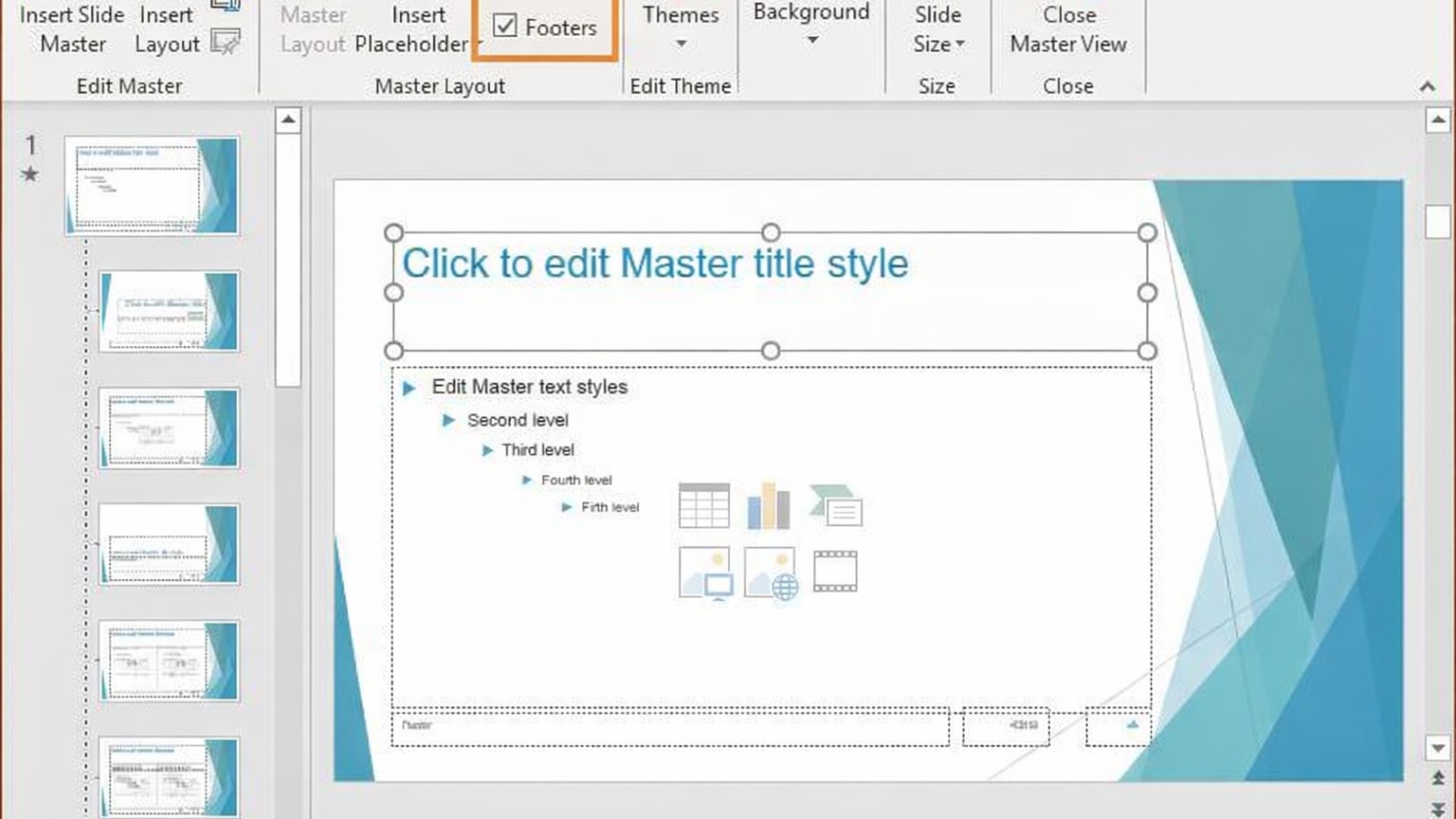
Pixel-perfect design and motion control with PowerPoint
When you have to have very fine grained layout controls, exact alignment, custom grid spacing, build complexity and animation timing that will support your cadence of speech while giving a live presentation, then PowerPoint is the best workshop to use.
Gamma has very intentional opinions regarding layout. Those opinions are good at keeping you from having messes, but they can limit you if you have to create a specific look based on your company's branding requirements, or if the story requires complex staging of visuals.
When precision is required (layout, positioning etc), I always say go with PowerPoint; when speed is required, go with Gamma.
Gamma Is Better for Link-Based Sharing and Feedback Loops
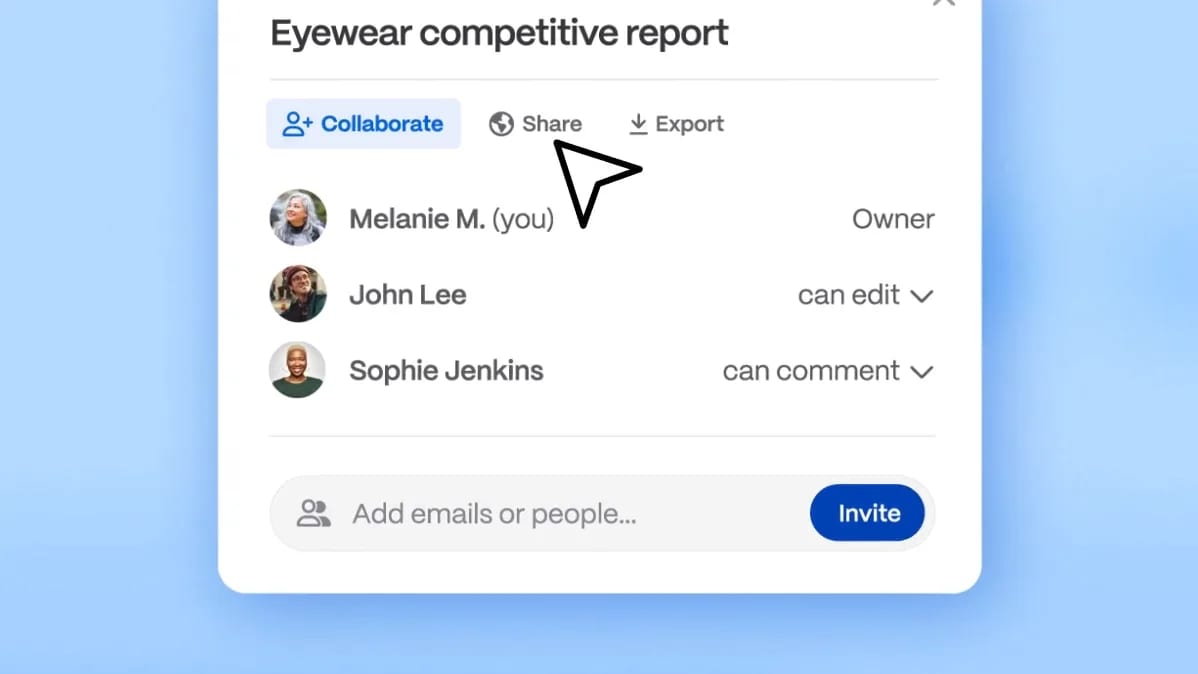
Seamless sharing and real-time collaboration with Gamma
As a web native platform, Gamma's sharing model fits today's typical review cycles where stakeholders open a link, glance over the narrative, and provide feedback quickly. This greatly reduces the friction associated with attachments, local copies, and the confusion around which file was the most current.
Inside of Microsoft 365, PowerPoint has a robust collaboration feature set. However, once a deck moves outside of the company walls, file workflow usually creates version sprawl again. In this case, the link model of Gamma is much easier to manage externally for review purposes.
This is why Gamma works so well for agencies, founders, and go-to-market teams who operate in high velocity modes of rapid iteration.
PowerPoint Has Stronger Market Trust and Review Gravity

PowerPoint's familiar interface that requires no learning curve
Powerpoint has a strong history of market trust that will continue for many years to come, it's the default platform in many board rooms, classrooms, and companies. The level of this type of market trust is very important, especially when you're creating content that needs to be presented to an audience that may be considered conservative or where the deck will need to be passed to other team members without raising questions about tooling.
Gamma builds trust at a different level, which is building trust at a much faster rate by delivering presentations faster and clearer than ever before; this will attract a new type of team member that values being able to rapidly iterate, and can make Gamma a critical part of their process very early on, even though PowerPoint will remain the final product in the formal process of reviewing decks.
The key take away here is not idealistic, choose the presentation tool that is most aligned with the expectations of the people that are going to be editing, approving and consuming your deck.
08 Gamma vs Microsoft PowerPoint: Which is the best for your business?
Gamma is the best tool for you if:
- You need to produce first drafts extremely fast and iterate on narrative weekly.
- You want consistent visual hierarchy without spending time on layout mechanics.
- Your team prefers link-based sharing over emailing attachments.
- You benefit from engagement analytics for sales, onboarding, or internal communications.
- You want clear per-creator pricing and the option to optimize cost via a deal.
 You need to produce first drafts extremely fast and iterate on narrative weekly.
Microsoft PowerPoint is the best tool for you if:
- You need pixel-perfect design control and advanced animations.
- You operate in a .pptx-first organization with heavy stakeholder editing.
- You present offline frequently or in controlled environments.
- Your brand system relies on strict templates and governance.
- You’re already standardized on Microsoft 365 and want maximum compatibility.
Gamma
Design brilliance, powered by AI
400 credits + 25% off annual plans for Individuals
Save up to $52
09 Alternatives to Gamma & Microsoft PowerPoint

Canva
Used by 798 members

Prezi
Used by 71 members
40% off for 1 year
Save up to $91

Plus AI
Used by 67 members

PitchBob
Used by 66 members
50% off the Super Pro plan
Save up to $49
10 Promotions on AI Design and Presentation software
Gamma and Microsoft PowerPoint are great tools, but Secret offers promo codes with discounts on over 2200+ different SaaS solutions. New deals are added regularly, helping you save money on your online subscriptions. Get access to codes for other AI Design and Presentation software you might want to purchase

Credits for Descript
35% off annual plans
Prezi promotion code
40% off for 1 year

Promo code CapCut
7 days free + 25% off annual plans

Promo code Visme
30% off the Pro plan for 1 year

Code for Miro
$1,000 in credits (lifetime validity)

Infogram coupon code 2026
3 months free on the Business and Teams plans

Picsart promo code
10% off monthly or annual plans

Promo code Google Slides
20% off Plus plans for 1 year

Discount for Riverside.fm
20% off your first payment for any monthly or yearly plan

LetsEnhance discounts
50% off 100 and 300 image monthly subscriptions for 1 year
11 Gamma vs Microsoft PowerPoint: Conclusion
Both Gamma and PowerPoint are tools for producing presentations but both embody two distinct production philosophies. Gamma will get you from your idea to your final polished and sharable deck as quickly as possible and works best in situations where you're constantly iterating and want the app to handle the heavy lifting of structuring and laying out slides; however, its limitations become apparent when you require extensive slide engineering, very specific brand guidelines that need to be followed or exact, predictable behavior from multiple users in terms of editing and saving pptx files.
PowerPoint is the gold standard for reliability, compatibility and delivering critical presentations. While PowerPoint may not always be the most efficient, most cost-effective solution, if you have a presentation that needs to be perfect, delivered to a wide audience, and edited by anyone on your team, then PowerPoint is the way to go.
When you can choose what to use and how much money you are willing to spend, start with the cost.Gamma promo code and discounts and the Microsoft PowerPoint deals page, then align your tool with the workflow your team actually lives in.
Start saving on the best SaaS
Secret has already helped tens of thousands of startups save millions on the best SaaS like Microsoft Teams, Google Workspace & many more. Join Secret now to buy software the smart way.