


While selecting an accounting software system can appear administrative in nature; it impacts virtually every aspect of your business operation – such as how fast you receive payment, whether or not you will complete the monthly closing, and how anxious you will be at tax time. The two most recognized cloud-based options for accounting software systems are QuickBooks Online and Xero. Both are well-established, have a large number of users, and can run actual businesses.
In this comparison, I’ll break down the practical differences, not marketing fluff: onboarding friction, reconciliation speed, reporting depth, payroll realities, and what accountants actually care about.
- 01 Quickbooks Online vs Xero: overview
- 02 What's the difference between Quickbooks Online and Xero?
- 03 Quickbooks Online pros and cons
- 04 Xero pros and cons
- 05 Quickbooks Online compared to Xero
- 06 Xero compared to Quickbooks Online
- 07 Features comparison
- 08 Quickbooks Online vs Xero: Which is the best for your business?
- 09 Alternatives to Quickbooks Online & Xero
- 10 Promotions on Accounting software
- 11 Quickbooks Online vs Xero: Conclusion
Start saving on the best SaaS
Secret has already helped tens of thousands of startups save millions on the best SaaS like Microsoft Teams, Google Workspace & many more. Join Secret now to buy software the smart way.

01 Quickbooks Online vs Xero: overview
When considering either QuickBooks Online or Xero, the commonality lies in providing small and mid-sized businesses with a cloud based general ledger to track invoices, bills, reconcile banks and report on their finances. Where the difference lies is not “do they perform accounting?” but rather how each application fits into an individual business’ day-to-day operation rhythms.
QuickBooks Online is usually selected by businesses where accounting is heavily embedded within their operational systems: multiple stakeholders, many exceptions and the need to create custom reporting templates and/or add-ons to accommodate future growth needs. QuickBooks Online is the choice of businesses when they anticipate their financial platform will evolve into a larger system of record than simply accounting.
Xero is typically used as a quick and easy to use bookkeeping solution that focuses on collaboration, primarily with accountants and bookkeepers, along with robust reconciliation tools and an interface that provides a cleaner and faster experience for non-technical users.
To illustrate this further we have created a feature by feature comparison table below.

Invoicing
QuickBooks is strong when you want invoicing tightly connected to accounts receivable and broader finance ops. Xero is excellent for clean quoting and invoicing flows for SMBs.

Quickbooks Online
Xero
Pricing plan
Xero’s US plans are straightforward, and it currently advertises a time-limited US promo. QuickBooks pricing scales by plan and feature depth.
Quickbooks Online
Xero
Customer support
QuickBooks offers plan-based support hours, and Advanced users can get 24/7 support. Xero promotes 24/7 online support via Xero Central and case submission.
Quickbooks Online
Xero
Customer reviews
Both score well overall. In practice, QuickBooks reviews reflect power and complexity, while Xero reviews often praise workflow elegance and reconciliation speed.
Quickbooks Online
Xero
Reporting
QuickBooks Online typically wins when you need deeper report customization and management-ready views. Xero’s reporting is solid, but it can feel lighter at higher complexity.
Quickbooks Online
Xero
Integrations ecosystem
Both integrate with modern SMB stacks. QuickBooks often edges ahead on breadth, especially in the US, while Xero remains strong for common SaaS and finance apps.
Quickbooks Online
Xero
Bank reconciliation
Xero is widely considered a benchmark for reconciliation workflows. QuickBooks is very capable too, but often feels less streamlined when configured for complex setups.
Quickbooks Online
Xero
Best fit by business stage
QuickBooks Online is ideal when you expect finance operations to get complex. Xero is ideal when you want clean bookkeeping with minimal friction from day one.
Quickbooks Online
Xero
Ease of use
Xero tends to feel simpler for daily bookkeeping. QuickBooks Online is richer, with more menus and settings, which helps with edge cases but increases onboarding friction.
Quickbooks Online
Xero
Payroll readiness
If you want payroll tightly tied to accounting, QuickBooks Online is frequently the safer anchor. Xero can work well, but payroll options vary more by region and stack.
Quickbooks Online
Xero
02 What's the difference between Quickbooks Online and Xero?
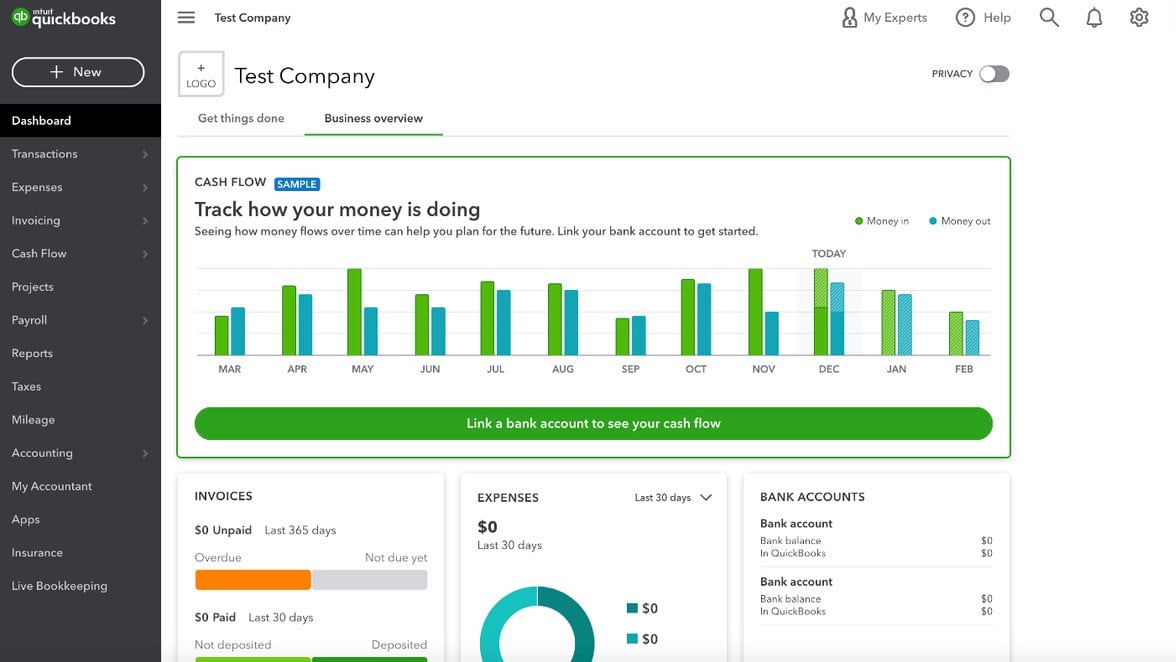
QuickBooks Online’s dashboard with advanced reporting and operational control
Quickbooks Online
Simplify your accounting, streamline your business.
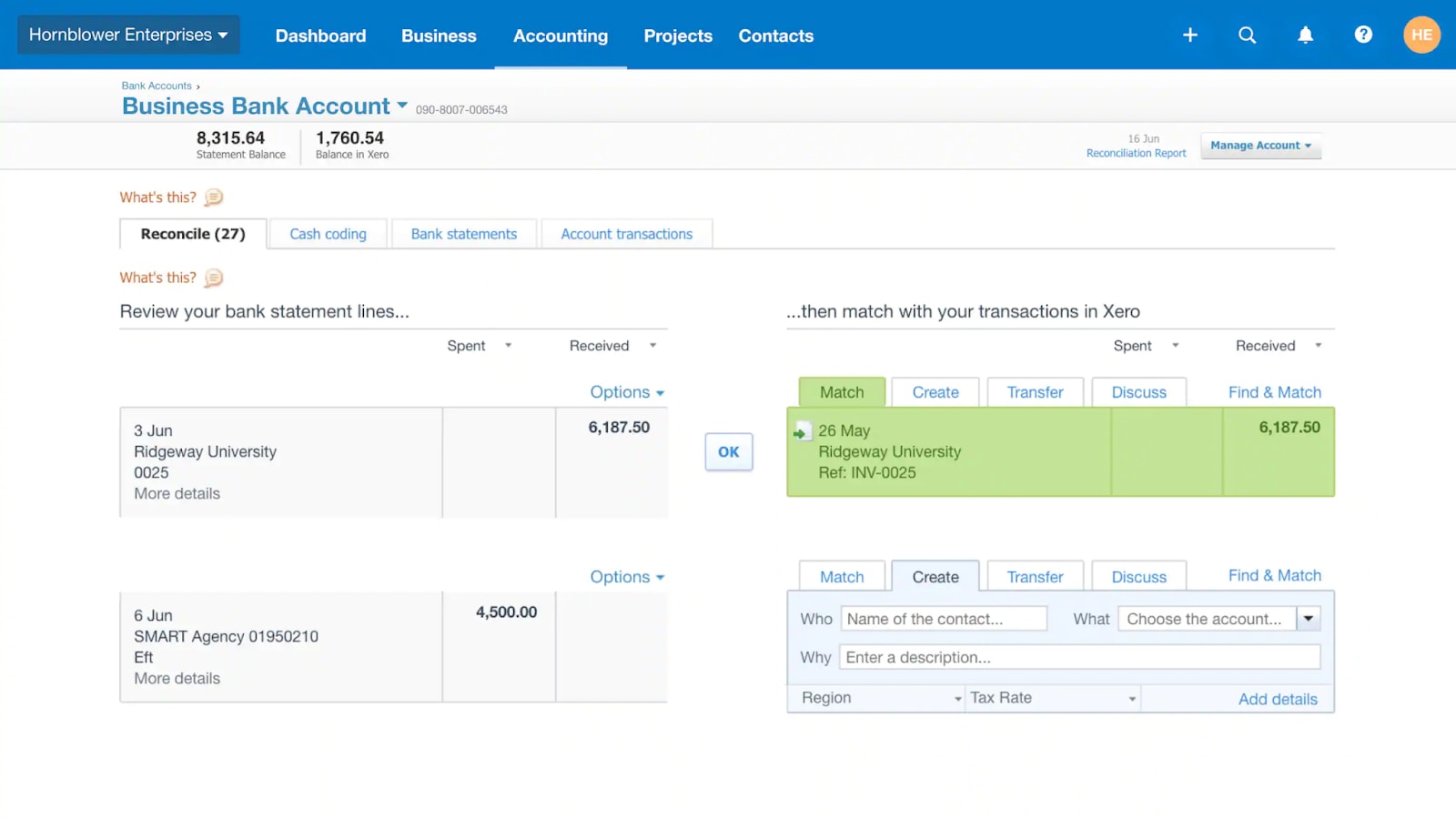
Streamlined bookkeeping and bank reconciliation with Xero
Xero
The Xero platform is the ideal accounting tool for small and medium-sized businesses. With it, you can pay invoices and track expenses and income with ease.
The simplest way to frame it is this: QuickBooks Online is a broader accounting platform, while Xero is a more streamlined bookkeeping experience that still covers serious SMB needs.
QuickBooks Online is the better match when you have, or expect, complexity: layered workflows, more detailed reporting requirements, and stakeholders who want finance to behave like an operating system, not a spreadsheet replacement. It’s also a common choice in the US when teams want accounting tightly connected with payroll and operational finance. For many companies, the trade-off is worth it: more configuration upfront, but fewer compromises later.
Xero shines when you want the books to stay accurate without turning your week into an accounting side quest. Its interface and core flows encourage frequent reconciliation and clean categorization, and the product puts collaboration, with accountants and bookkeepers, at the center. That makes it a strong fit for service businesses, founders who want clarity, and SMBs that prioritize a smooth day-to-day cadence.
About “free plans”: neither tool is truly freemium for ongoing use. What matters more is how the paid plan aligns with your workflow and whether you can access meaningful discounts.

Quickbooks Online
Used by 246 members
50% off for 3 months (US-based companies)
Save up to $352

Xero
Used by 1797 members
80% off for 6 months
Save up to $432
03 Quickbooks Online pros and cons
What are the advantages of Quickbooks Online?
- Reporting depth: While both systems have robust reporting options, if you require more detailed and flexible reporting for your organization, QuickBooks may offer more depth of reporting than Xero, as the complexity of your organization increases.

- Strong ecosystem posture: Because of its broad integration with other applications and services, QuickBooks is often selected as an anchor application. As your business evolves, this can provide you with a single source for integrating new needs such as payments, time tracking, apps and workflows.
- Payroll-friendly setups: For US based Small to Medium Sized Businesses (SMB's), where accounting and payroll is integrated into a single operational process, QuickBooks is a logical choice and reduces manual processing of payroll and month end reconciliations.
- Power for edge cases: At the same time that QuickBooks' complexity makes it difficult for some users to navigate, it provides a level of resilience when dealing with real world accounting issues such as adjustments, exceptions and stakeholder requirements.
- Scale without switching tools too early: When you anticipate growth in your business, QuickBooks can help delay the "we need a new system" moment as it has the capability to support more advanced workflow processes before you outgrow it.
What are the disadvantages of Quickbooks Online?
- Heavier onboarding: QuickBooks Online has a lot of features, which can be overwhelming to many users. It can take longer for founders and small teams to understand how to use it quickly to get the information they need.

- Total cost can creep: In addition to the base price of the system, there are costs associated with adding additional functionality, as well as operational costs such as user training, etc. Therefore, always budget for the tool you will use in 12 months, not the tool you are currently using.
- Setup quality is everything:A poorly set up Chart of Accounts and inconsistent categorization will negatively impact future reports. QuickBooks does not penalize bad configuration; rather, it encourages good configuration.
- Some accountants dislike what they inherit: Accountants often do not like the state of their clients QuickBooks files due to poor configuration, not because the QuickBooks product does not have adequate capabilities.
- Support access varies by plan: Support hours are plan-dependent, and Advanced includes 24/7. That matters if you run finance ops outside standard business hours. (QuickBooks Online customer service hours)
04 Xero pros and cons
What are the advantages of Xero?
- Cleaner day-to-day usability: Xero has cleaner day-to-day use; it is easier to reconcile, code and stay on top of the books as opposed to other options. This ease of use results in less time spent learning how to use the product.
- Excellent reconciliation flow: The reconciliation process is one of the best parts of using Xero. By focusing on reconciliations first, you will have an accurate picture of your cash position and avoid having to deal with "never current" book problems.
- Collaboration by design: Xero was designed to provide the ability for finance professionals to collaborate with business owners. As such, you will no longer experience the last-minute chaos of month-end when trying to figure out what each transaction represents.
- Strong SMB feature coverage: Xero provides many of the features that small businesses need, including invoicing, billing, reporting, expense tracking and integration. However, it does so without feeling overwhelming, allowing the user to focus on the task at hand.
- Support positioning: Xero provides online support 24/7 through Xero Central with case submission, which is valuable for distributed teams. (Xero support availability)
What are the disadvantages of Xero?
- Reporting can feel lighter for complex needs: For those who need more advanced reporting capabilities, Xero may appear light compared to QuickBooks Online.
- Payroll depends on your location and stack: While Xero supports payroll workflows, the best way to implement these may depend on the specific needs of the company. For example, some companies may need to integrate payroll with other systems (e.g. HRIS). Additionally, the availability of payroll functionality may differ based on geographic region.
- Advanced workflows may require add-ons sooner: Once you move beyond basic accounting functions (e.g. inventory, approvals, custom reporting), you may find yourself adding additional apps to Xero to support your workflow.
- Support is case-based: Xero emphasizes online support and raising cases via Xero Central, which some teams love because it’s documented and trackable, and others find slower than phone-first help.
- Migration needs discipline: Switching from QuickBooks to Xero, or the reverse, requires careful mapping of accounts, tax rules, and tracking categories to preserve reporting continuity.
Compare Xero to other tools


FreshBooks vs Xero

Zoho vs Xero

Xero vs QuickBooks
05 Quickbooks Online compared to Xero
QuickBooks Online is generally the better option if you need an accounting solution that will allow you to build out a very structured financial operation without having to rebuild the entire structure of your accounting each time you add a new financial workflow.
Xero has always been a great alternative for those who place a greater emphasis on streamlining their accounting process and getting work done. However, once you start to see your accounting operations becoming increasingly complex, then QuickBooks Online is likely going to be a more stable long-term base of operations.
Is Quickbooks Online better than Xero?
 Is Quickbooks Online better than Xero?
When you define "better" by the ability to provide capabilities under increasing stress (more reporting requests, more integrated systems, etc.) -- then QuickBooks Online is probably the better option. When you think of your finance function as a business process (not just something you do at the end of the quarter), then QuickBooks Online is usually the stronger foundation.
Even though Xero may have the advantage of being more elegant, QuickBooks Online is almost always the safer bet when you anticipate your financial operations are going to require more sophisticated capabilities (such as segmented reporting, exception handling, and providing stakeholders with a level of visibility that extends beyond simple P&L snapshot).
What is Quickbooks Online best used for?
QuickBooks Online is most commonly used by organizations that view accounting as a dynamic and living process (i.e., ongoing invoicing, bill processing, reconciliations, payroll workflows, reporting that management reviews regularly).
QuickBooks Online is particularly valuable for companies where many employees have access to and interact with the company's finance operations, and where the organization requires consistent processes across the different finance functions.
Additionally, QuickBooks Online is useful for companies anticipating significant growth and who would rather invest in a scalable platform that will support increased complexity instead of potentially requiring a replacement platform during mid-scale growth.
Can Quickbooks Online replace Xero?
Yes, QuickBooks Online can completely replace Xero for all of your core accounting functions (e.g., invoicing, bank reconciliation, expense tracking, and reporting). The major question will be whether you are willing to give up some ease of use in the interface for much deeper configurability of your accounting solution.
If you are migrating to QuickBooks Online primarily because you want more robust reporting or a broader range of ecosystem options, then QuickBooks Online is certainly a viable destination. However, do not take a casual approach to migrating your data from one platform to another; ensure that you have rebuilt any rules that were previously established, validated your account mappings, and have planned out how you will compare historical periods post-migration.
Is Quickbooks Online cheaper than Xero?
Sometimes, but don’t compare sticker prices in isolation. The honest comparison is subscription, must-have integrations, and the internal time you spend keeping the books clean. A cheaper plan that causes messy books is rarely cheaper after your accountant bills you for cleanup.
Also, consider discounts. Secret regularly highlights startup-friendly offers, you can check QuickBooks Online deals and compare them against Xero discounts before deciding.
Is there a better Accounting software than Quickbooks Online?
Yes, if your requirements are specific. If your top priority is a smoother bookkeeping experience or you operate with simpler needs, Xero, or other SMB tools, can be better in practice because it reduces friction and errors.
For the desktop version of Quickbooks, you can check this comparison page for Xero vs QuickBooks, which can help you validate the core trade-offs.
Why don’t accountants like QuickBooks Online?
In my experience, most accountants do not say "QuickBooks cannot do it." They say "I am constantly receiving QuickBooks files that are poorly configured." Poorly configured charts of accounts, poor transaction classification, and poorly defined bank rules result in the process of closing the books at year-end to feel similar to an archaeological dig.
The answer to this problem is straightforward: develop a chart of accounts that you will maintain for years to come, establish agreement among team members regarding how transactions will be categorized, and establish a monthly close checklist with your accountant to ensure that your books remain accurate and complete.

Quickbooks Online
Simplify your accounting, streamline your business.
50% off for 3 months (US-based companies)
Save up to $352
06 Xero compared to Quickbooks Online
Xero provides the best in creating an accounting system you will never leave behind; this means you should continuously be reconciling, categorizing and keeping everything organized so that no matter what level of expertise you have, you will always know exactly what is going on in your financial situation. This makes Xero great for founders and other small lean teams who can't afford to spend much time on their finances.
QuickBooks Online is generally more suitable for larger, more complicated organizations but Xero is a better daily partner, especially when working closely with an accountant in regards to your finance operations.
Is Xero better than Quickbooks Online?
If you like having a better user interface, a better reconciliation process, and an overall easier and cleaner way of running your company's finances then Xero would be a better platform for you. Many Small-Medium Businesses (SMBs) see these "soft" benefits as a "hard" return on investment (ROI): fewer errors, quicker month end closings, and less time spent on remembering how to locate a setting.
QuickBooks Online will most likely offer Xero more features and advanced reporting options but for many service businesses and teams that want to be able to quickly view their clean books with little to no resistance then Xero is usually a better option.
What is Xero best used for?
Xero is best suited for small to medium-sized businesses that want to create and maintain a smooth, clear picture of their accounting information through simple tasks such as invoicing, billing, reconciliations, and straight forward reporting that remains current. Xero is also a great option for owners that want to remain visible into their financial situation and an accountant that wants a clean accounting system and not a chaotic data recovery project.
Xero is also a great option if you have a modern cloud based technology stack and you want to be able to easily connect your accounting system with the technology systems you already utilize.
Can Xero replace Quickbooks Online?
Yes, Xero can replace QuickBooks Online for many SMBs, specifically when the organization does not require the additional platform-based capabilities of QuickBooks such as: additional advanced reporting configurations, deeply integrated payroll processes, or additional highly specialized third party applications.
Again, the key is to be disciplined in the migration process: Lock the Cutover date, Map the accounts correctly, and Determine how you will ensure comparability in your reporting after the transition.
Is Xero cheaper than Quickbooks Online?
It depends on your plan and the number of add-on applications you need but ultimately the true cost is Total Ownership: Subscription, Integration Costs, and Time Costs associated with Maintaining Clean Books.
Additionally, Xero US has recently announced limited-time pricing incentives for new direct customers, currently expiring January 30, 2026 which could significantly alter first year economics.
Is there a better Accounting software than Xero?
Yes, if your needs skew towards more complex operations and deeper reporting, quickbooks online may be the better practical fit. Additionally, depending on the industry or niche requirements of your organization, such as advanced inventory management, multi-entity consolidation, or industry-specific accounting requirements, you may need to look beyond both xero and quickbooks online.
Why do accountants prefer Xero?
Many accountants prefer xero because it encourages clean, consistent bookkeeping: reconciliation is fast, audit trails are clear, and the collaboration model reduces the “send me exports” loop. The result is fewer surprises at month-end and less time cleaning up categorizations.
note that preferences vary based on region, practice, and client base. There are plenty of accountants who love quickbooks online too, especially when the file is well-structured and business requires extra reporting and ecosystem breadth.

Xero
Accounting software
80% off for 6 months
Save up to $432
07 Features comparison
Xero Pricing Often Feels Simpler to Operationalize

Xero’s pricing plans are flexible for growing businesses
Pricing is never just the monthly plan, it’s also the cost of time. Xero’s structure in the US is easy to understand. If you’re cost-sensitive, compare a 12-month total cost that includes the add-ons you’ll actually need, and check deal pages before you commit: Xero discount eligibility and terms and QuickBooks Online deal options.
QuickBooks Online pricing scales with feature depth, and it can be a great value when you use the platform’s breadth. But if you buy too much plan too early, you can end up paying for complexity you don’t exploit.
Customer Support: QuickBooks Online Is More Plan-Variable, Xero Is More Case-Based

QuickBooks provides a community and help center for when you need support
Support isn’t only about availability, it’s about how you access help when something breaks at the worst possible time. QuickBooks Online publishes plan-based support hours, and the Advanced plan includes 24/7 support. (QuickBooks Online support hours)
Xero positions support as 24/7 online assistance through Xero Central: start with knowledge base articles, then raise a case via “Contact Xero Support.” (Xero support channels)
If you strongly prefer phone-first support, validate that experience during a trial. If you’re comfortable with documented, case-based support, Xero’s approach can be perfectly effective.
QuickBooks Online Pulls Ahead on Reporting Depth
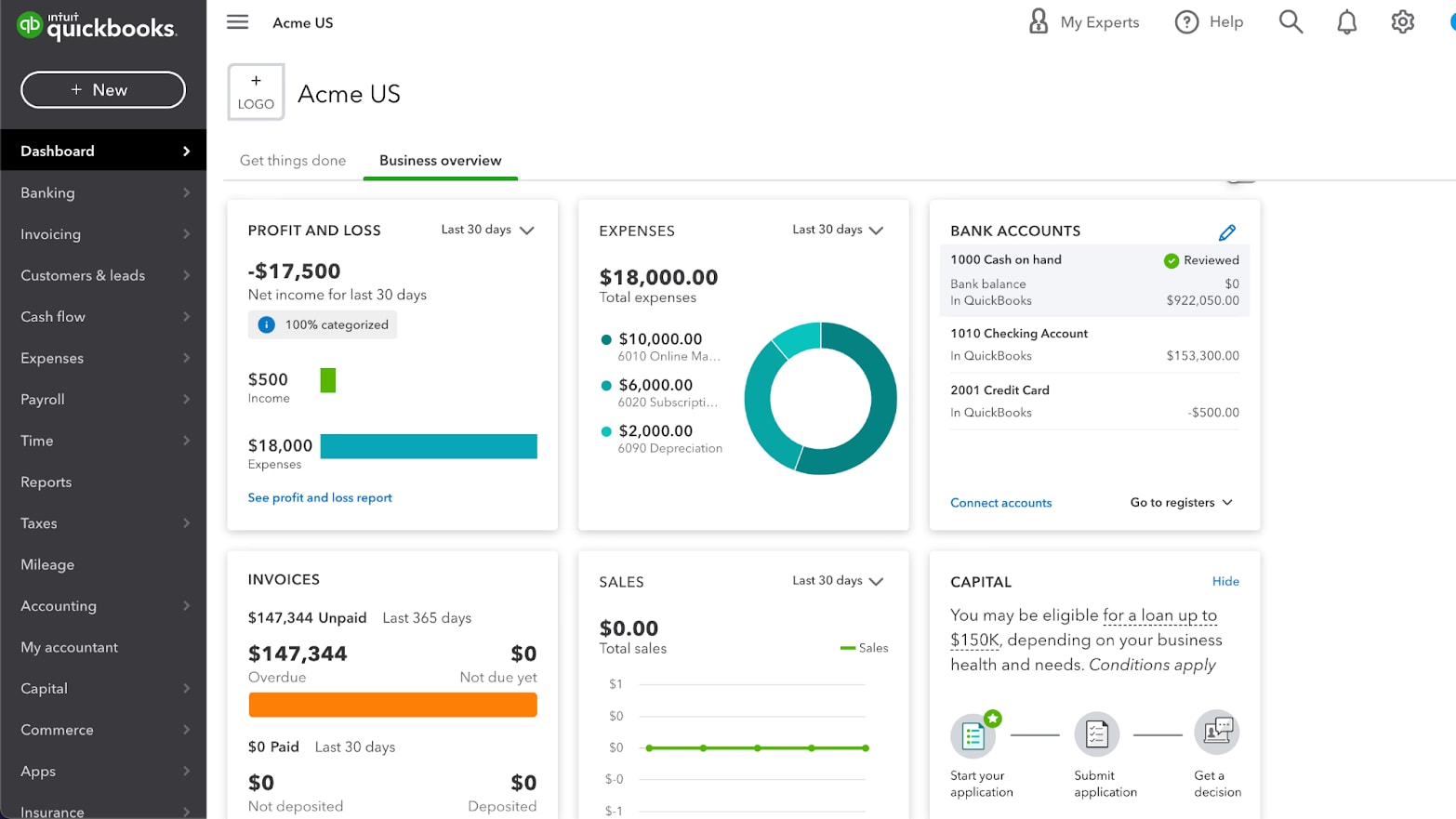
QuickBooks Online provides you with custom reports and financial analysis
Reporting is where QuickBooks Online has consistently earned its reputation: it is generally the better option for companies that require answering unique, detailed questions such as segmental performance, operational views, and leadership level reporting that goes beyond basic reporting.
While Xero offers strong core reporting, it is only when reporting requirements increase, and especially when you need to report to stakeholders such as partners, lenders, or a board, that QuickBooks Online's additional reporting flexibility becomes valuable in eliminating the need for workarounds.
I recommend taking the top 10 questions you would like your accounting to provide answers to, then testing both platforms' ability to produce those answers using minimal spreadsheets.
QuickBooks Online Has an Edge in Ecosystem Breadth

QuickBooks’s broad app ecosystem for complex workflows
Both products provide excellent connectivity to common SMB applications (i.e., payment processors, e-commerce, expense management, etc.). However, the key differentiator is found in situations where you are utilizing a specialized requirement or developing a complex workflow: QuickBooks Online typically has more readily available solutions in these scenarios, especially in U.S.-centric application stacks.
While Xero's ecosystem is equally viable for many businesses, Xero tends to integrate into bookkeeping systems without adding additional layers of complexity (i.e., "patchwork quilts").
Thus, if you anticipate adding multiple financial applications to your stack, QuickBooks Online will generally be a more expansive base to start with. If you prefer a tighter and less complicated accounting system, Xero remains a viable option.
Xero Sets the Pace for Bank Reconciliation Speed

Bank reconciliation on Xero is fast and intuitive
If your goal is to maintain clean books with few mystery transactions, bank reconciliation speed will matter more than just about any other feature. Xero's reconciliation process is one reason why Xero is often recommended for SMBs who seek to maintain timely books (versus "stale" books).
QuickBooks Online also provides excellent reconciliation functionality, however, in practice, reconciliations can sometimes appear to occur within a larger system with more toggling, setting and branching options. This is not a weakness of QuickBooks Online, but rather an inherent design result of its broader platform scope.
In cases where the highest priority is maintaining a current cash picture, Xero's reconciliation ergonomic advantages can be felt.
Xero Excels Ahead of QuickBooks Online for Ease of Use

Xero’s interface is designed for simplicity and everyday accounting
The big advantage that Xero has over QuickBooks Online is that Xero seems to be designed for the rhythm of true SMB accounting: reconcile frequently, categorize quickly, and get back to running the company. The user interface (UI) also appears to be more readable for people who are not accountants which will help to eliminate errors based on confusing the user interface vs accounting logic.
QuickBooks Online may not be hard to use; however, it can appear to be overwhelming. It presents many ways to accomplish similar tasks, which can be beneficial to advanced workflow needs; however, it may also slow down new users or teams that only deal with accounting sporadically.
Therefore, if you are looking to quickly onboard employees to do accounting, Xero is typically the better option. However, if you see yourself needing to perform increasingly complex financial operations, then QuickBooks Online may be the more strategic choice.
QuickBooks Online Is Usually Better for Payroll-Centric Accounting

QuickBooks integrates payroll and accounting in one system
The payroll workflow is an unusually costly workflow when it is not tightly integrated: journal entries, mis-posted liabilities, and recurring month-end cleanups. QuickBooks Online is often selected because it appears as a payroll-friendly anchor (especially in the U.S.), and assists in maintaining payroll and accounting in the same operational loop.
Xero can provide payroll workflow capabilities, however, your specific configuration can be highly dependent upon integration and regional selection considerations, which can further complicate the number of variables involved.
In the case of payroll being critical to your business (due to increasing employee headcount, increasing regulatory/compliance obligations, or unique pay schedules), QuickBooks Online will generally represent the safest operational decision.
08 Quickbooks Online vs Xero: Which is the best for your business?
Quickbooks Online is the best tool for you if:
- You need deeper reporting now, or you know you will within the next 12 to 24 months
- Payroll is central to your workflow and you want tight accounting alignment.
- Your business has exceptions and edge cases that require a more configurable platform.
- You expect to build a larger finance stack and want a broad ecosystem foundation.
- You’re willing to invest in setup and process design to get long-term control.
 You need deeper reporting now, or you know you will within the next 12 to 24 months
Xero is the best tool for you if:
- You want fast adoption across founders and non-finance teammates.
- Your number one KPI is keeping reconciliation current and the books consistently clean.
- You collaborate heavily with an accountant or bookkeeper and want less friction.
- Your needs are solid SMB accounting fundamentals without platform weight.
- You value a calmer UI and predictable workflows more than maximum configurability.
Quickbooks Online
Used by 246 members
50% off for 3 months (US-based companies)
Save up to $352
Xero
Used by 1797 members
80% off for 6 months
Save up to $432
09 Alternatives to Quickbooks Online & Xero

Memberstack
Used by 513 members
50% off for 6 months
Save up to $150

Zoho Books
Used by 378 members
$100 in Zoho Wallet credits
Save up to $100

FreshBooks
Used by 310 members
90% off for 3 months
Save up to $175

Indy
Used by 239 members
1 month free
Save up to $50
10 Promotions on Accounting software
Quickbooks Online and Xero are great tools, but Secret offers promo codes with discounts on over 2250+ different SaaS solutions. New deals are added regularly, helping you save money on your online subscriptions. Get access to codes for other Accounting software you might want to purchase

Code for Qonto
2 months free on the Basic and Smart plans

Promo code for QuickBooks
30% off for 6 months

Stripe offer
$500 in credits
FreshBooks discount code
90% off for 3 months

Promo code Navan
Spend $500, Get $500 in Credit for your next booking

doola promotion code
20% off your first purchase

Credits for Airwallex
2% uncapped cashback on corporate cards
Zoho Books offer
$100 in Zoho Wallet credits

Gusto promo
First month free

Expensify deal
50% off annual subscriptions for 6 months
11 Quickbooks Online vs Xero: Conclusion
In one sentence I can say: QuickBooks Online is better if you have to scale (complexity), and Xero is better when you want to be able to do all of your normal accounting tasks efficiently (clean). There is no "wrong" choice. The issue comes down to which platform will help you optimize for reporting capabilities/breadth (QuickBooks) or efficiency/clarity (Xero).
I try to answer this question by looking at the next twelve months, not the last twelve: Is payroll going to be more important? Are we going to get hit with more reports? Are more employees going to be working on the books? If so, then QuickBooks Online has probably got the right infrastructure for that. On the other hand, if you just want to keep finance disciplined and don't want to turn it into a second job, Xero is tough to beat.
If you’re ready to move, I’d also check the current offers before buying at list price: claim the QuickBooks Online deal and activate the Xero discount.
Start saving on the best SaaS
Secret has already helped tens of thousands of startups save millions on the best SaaS like Microsoft Teams, Google Workspace & many more. Join Secret now to buy software the smart way.