


Meetings fail for a reason other than lack of discussion. The lack of follow-up on decisions made during meetings; incomplete action item assignments; and best practices for serving customers are lost when ideas that could be acted upon are recorded but later forgotten in someone's personal notes.
AI Meeting Assistants make their value by turning those conversations into action items. In this post, I'll give you a comparison of Fathom AI and Otter.ai as if it were coming from an Operator who has used both products, and I will show you what each captures, how each formats the output, how each fits into a workflow, and where the trade-off becomes cost prohibitive.
If you'd like to consider some options while you evaluate, please see Fathom AI promo code: First month free and the Otter.ai promo code: 51% off annual Pro plan.
- 01 Fathom AI vs Otter.ai: overview
- 02 What's the difference between Fathom AI and Otter.ai?
- 03 Fathom AI pros and cons
- 04 Otter.ai pros and cons
- 05 Fathom AI compared to Otter.ai
- 06 Otter.ai compared to Fathom AI
- 07 Features comparison
- 08 Fathom AI vs Otter.ai: Which is the best for your business?
- 09 Alternatives to Fathom AI & Otter.ai
- 10 Promotions on AI Productivity software
- 11 Fathom AI vs Otter.ai: Conclusion
Start saving on the best SaaS
Secret has already helped tens of thousands of startups save millions on the best SaaS like Microsoft Teams, Google Workspace & many more. Join Secret now to buy software the smart way.

01 Fathom AI vs Otter.ai: overview
Both Fathom AI and Otter.ai are AI Meeting Assistants. They are similar in how they work and what they do: they join meetings, record them, create transcripts of the conversations and provide meeting summaries that you can send to others.
The primary difference in the two products lies in their design, Fathom AI is focused on taking the output of meetings and transforming it into measurable outcomes. This means Fathom will automatically create meeting summaries (recap), call out key points (highlight) and identify next steps from the conversation (follow up). Fathom AI’s summary output is designed to be copied/pasted into a CRM note, Slack update, Deal Room etc.
The pricing model for both Fathom AI and Otter.ai is based on a tiered system, where users pay for access to additional features/summary types/next step creation, team workflow integration etc. The free version of Fathom AI allows users to record unlimited meetings and receive unlimited meeting transcription, while each paid tier adds additional functionality.
Otter.ai is designed to help you turn "meetings to searchable knowledge." Otter excels in cases where you need to search, retrieve, or reference content from previous meetings; have an ongoing library of content; use AI-powered chat to ask questions during meetings; and need a work space that enables your team to quickly find answers to questions about meeting discussions that took place after the fact. Otter.ai has a free Basic option, and then it scales into paid plans (Pro, Business, Enterprise) which include additional administrative controls and limits.
Let’s make the differences concrete with a feature-by-feature comparison.

Pricing plan
Fathom offers a free plan with unlimited recording and transcription. Otter’s free Basic plan is generous, but limited to 300 minutes per month.

Fathom AI
Otter.ai
Customer support
Both support typical SaaS channels. Otter explicitly includes prioritized support at Business. Fathom offers a guarantee and team or enterprise support paths.
Fathom AI
Otter.ai
Customer reviews
Sentiment is broadly positive for both. The deciding factor is usually whether you want meeting-to-action, Fathom, or meeting-to-knowledge-base, Otter.
Fathom AI
Otter.ai
Transcription and recording
Fathom’s free plan includes unlimited recordings and transcriptions. Otter’s Basic plan is strong, but capped by monthly minutes.
Fathom AI
Otter.ai
AI summaries quality
Fathom focuses on structured, ready-to-share recaps and templates. Otter summaries are good, but often feel more transcript-driven.
Fathom AI
Otter.ai
Action items
Fathom explicitly ships AI action items in its paid tiers. Otter supports action items too, but the workflow is less sales-ops oriented.
Fathom AI
Otter.ai
Search across meetings
Otter is designed as a searchable repository, plus AI chat across meetings. Fathom adds strong search and shared search in team plans.
Fathom AI
Otter.ai
CRM readiness
Fathom’s Business tier highlights CRM field sync and deal-focused views. Otter reserves custom CRM-style integrations for Enterprise.
Fathom AI
Otter.ai
Meeting workflows and templates
Fathom provides advanced summaries with frameworks, for example sales templates. Otter offers AI meeting workflows and templates at higher tiers.
Fathom AI
Otter.ai
Ease of use
Fathom feels output-first, with fast recaps and clips. Otter feels workspace-first, with transcripts, search, and AI chat across meetings.
Fathom AI
Otter.ai
02 What's the difference between Fathom AI and Otter.ai?
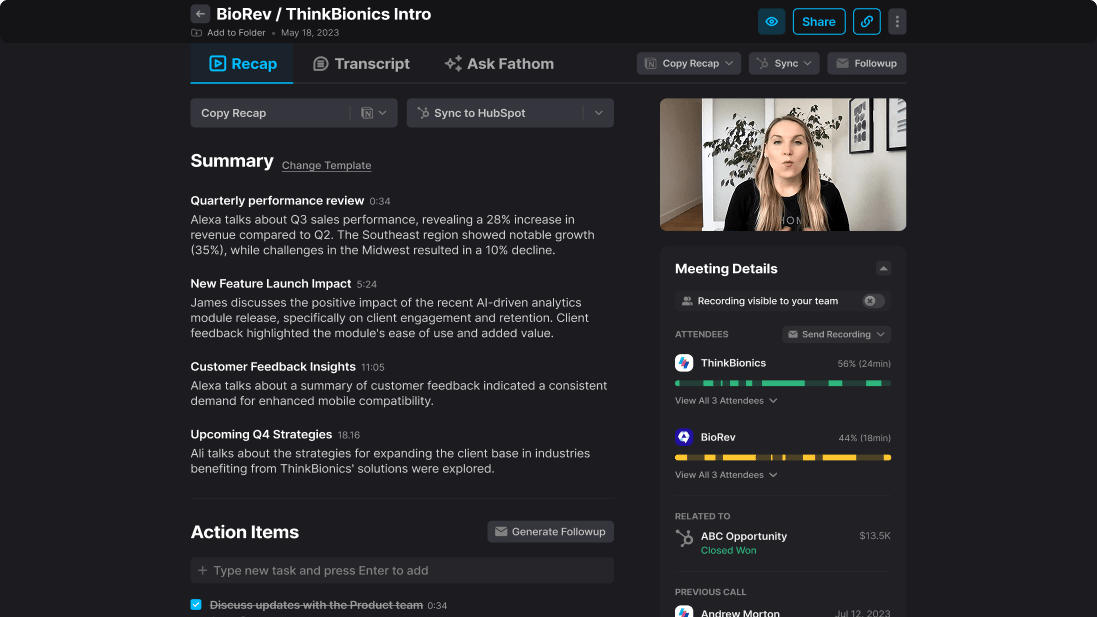
Turn meetings into actionable outcomes with Fathom
Fathom AI
Your AI-powered meeting assistant
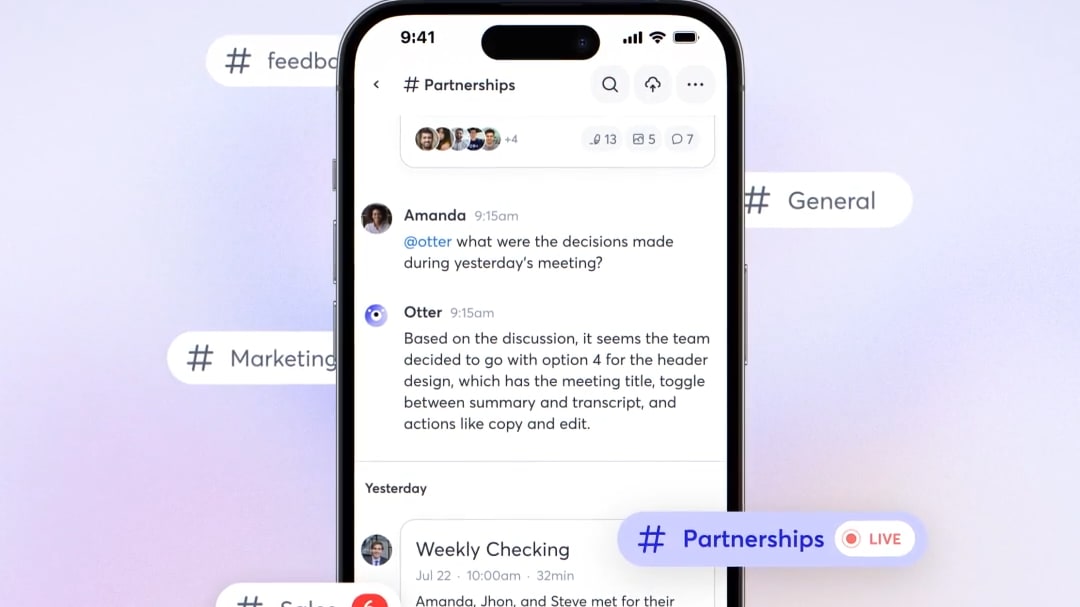
Ask Otter AI questions across your past meetings
Otter.ai
Otter.ai is an AI meeting assistant built to capture conversations automatically, turn them into searchable transcripts, and generate summaries, action items, and follow-ups. What sets it apart is how “meeting-native” it feels: the Otter Notetaker can join Zoom, Google Meet, and Microsoft Teams from your calendar, and you can chat across meetings to pull decisions and context fast. Next, I’ll break down Otter.ai’s strengths, limitations, best-fit users, and top alternatives.
The best way to look at it is as follows - Fathom AI is optimized for execution and Otter.ai is optimized for retrieval. Both will generate a transcript and a summary; however, they have some differences in how they are used on a daily basis. Fathom has its 'center of gravity' on the recap, highlights, structured notes, action items and the ability to share your results. This is why it seems to work so well for sales teams, customer success managers and entrepreneurs who have back-to-back meetings and require their results to be directly usable.
Otter.ai is a different kind of meeting knowledge management application than Fathom. The features that Otter's pricing page lists (AI Chat in and out of meetings, meeting workflow, etc.) are clearly designed to support organizations to review and ask questions about meeting content going forward, rather than simply turning the last meeting into an email follow-up.
Free plans also matter , especially when you are launching to a group of users and do not wish to have to go through procurement. Fathom provides a free version with unlimited recordings and transcriptions which is an excellent benefit for users with heavily scheduled calendars. Otter’s free version, Basic, is more ‘try it with limitations’ that include 300 per month transcription minutes (and several other limitations on the plan.)

Fathom AI
Used by 745 members
First month free on the Premium plan
Save up to $40

Otter.ai
Used by 680 members
51% off annual Pro plan or 33% annual Business plan
Save up to $120
03 Fathom AI pros and cons
What are the advantages of Fathom AI?
- Unlimited recording and transcription on Free, you can adopt it widely without instantly hitting usage walls, which is rare in this category.

- Advanced summaries with meeting templates, the template-driven recap approach makes outputs more consistent across reps and calls, which is useful for sales methodology and onboarding.
- AI action items and follow-up assets, action items are treated as first-class deliverables, rather than an afterthought buried in a long transcript.
- Deal and pipeline orientation for teams, features like CRM field sync and deal views in higher plans indicate a serious revenue workflow design.
- Clips and playlists, great when stakeholders want proof, here’s the exact moment the customer said X, without sitting through full recordings.
What are the disadvantages of Fathom AI?
- Less transcript-workspace DNA, if your primary workflow is collaborative transcript review and long-term retrieval, Otter can feel more native.

- Advanced sales workflows live in higher tiers, CRM sync, deal views, scorecards, and retention controls appear in Business, which may be more than small teams want to pay for.
- Governance decisions still matter, recording policies, participant consent, and retention need to be operationalized internally. The tool can’t do that culture work for you.
- Compliance requires process, even with strong security posture, you still need clear consent and disclosure practices, especially across jurisdictions.
- Not every team wants structured outputs, research teams may prefer raw transcripts and deep search over sales-style summaries.
04 Otter.ai pros and cons
What are the advantages of Otter.ai?
- Searchable meeting repository, Otter is built to help you find things later, not just summarize what happened now.
- AI chat across meetings, useful when you want to ask, “What did we decide about onboarding timelines?” and pull answers spanning multiple calls.
- Strong free entry point, the Basic plan is free and includes meeting integrations and core transcription features, within minutes limits
- Clear scale-up path, Business and Enterprise add admin features, support prioritization, SSO, and compliance controls.
- Good fit for internal teams, product, research, operations, and training teams often benefit from transcript-first workflows.
What are the disadvantages of Otter.ai?
- Free plan minutes cap, 300 minutes per month is fine for occasional use, but meeting-heavy roles will outgrow it quickly.
- CRM-style integrations are more enterprise-leaning, Otter positions custom CRM and dialer integrations at Enterprise, which may be overkill for SMB sales teams.
- Consent perception risk, Otter has faced public allegations and legal scrutiny around recording and consent practices, which increases the importance of explicit participant notification in your process.
- Outputs can be transcript-shaped, if your stakeholders want crisp decision logs and next steps, you may do more post-editing than with Fathom.
- Admin complexity can grow, as you scale workspaces, templates, and governance, you’ll likely invest more in configuration and standard operating rules.
Compare Otter.ai to other tools


Descript vs Otter.ai
05 Fathom AI compared to Otter.ai
Both Fathom and Otter eliminate the cost of taking notes, but they pay you back with two different currencies. Fathom pays back in execution velocity, where the summary is the product, and all other functions support that.
Otter pays back with institutional memory, a living repository of meeting content you can search, question, and re-use across teams. If your organization continues to ask the same questions each quarter, that matters.
Is Fathom AI better than Otter.ai?
 Is Fathom AI better than Otter.ai?
Fathom is better for meetings that are part of a process (i.e., workflow, sales discovery, demo's, on-boarding calls, customer interview, etc.) which can create a plan; pricing and features explicitly allow for this (advanced summary creation, creating action items, conversational assistant, and layers of team collaboration as you go up).
Otter can absolutely do transcription and summaries well, but if your yardstick is “How fast did this call become a clean recap and next steps?”, Fathom usually wins on operational tempo.
What is Fathom AI best used for?
Fathom AI is the best fit for customer facing organizations needing consistent call output, a structured note process which maps to an organization's methodology, objection/requirement capture and organized hand-off to other departments within an organization.
Also, a good option if your organization wants to have a simplified internal deal room (with highlights & playlists), fast access to relevant context with-out having every employee watch all recordings
Can Fathom AI replace Otter.ai?
Yes, if your core requirement is summaries that drive action, and you don’t need a transcript-heavy workspace culture. Many teams don’t actually want a transcript library, they want decisions, owners, and timelines.
No, if your organization treats transcripts as a durable knowledge base and expects to search and chat across meeting history as a default behavior. That’s a scenario where Otter’s product philosophy is a tighter match.
Is Fathom AI cheaper than Otter.ai?
If you require summaries for actionable outcomes, and do not require a work environment culture with a large amount of transcripts (many organizations do not) then yes; you can replace Otter.ai with Fathom AI.
If your organization views transcripts as a long-term knowledge base and would like to be able to search and have conversation based on all past meetings by default then no; in this case, Otter's product philosophy would likely better fit your needs.
To evaluate value with an incentive, you can start with the Fathom AI discount to benefit from 1 month free and compare what you’d pay once you need premium summaries, action items, or team workflows.
Is there a better AI Productivity software than Fathom AI?
Although you enjoy the category of AI meeting assistant tools, you would prefer different trade-offs. Two other credible alternative tools for AI meeting assistant tools that often appear in the same lists as Fathom and Otter, are Fireflies.ai and tl;dv.
If you'd like to explore a few alternatives to Fathom quickly, click on the best Fathom AI alternatives page to broaden your evaluation beyond just two tools.
Is Fathom AI reliable?
Reliability isn’t just asking “does it work,” but can you rely upon your process when things go wrong (noisy background, fast talkers, etc.)? If you need to provide evidence of how your organization handles data, models, and training processes for a security questionnaire, this is also valuable from a risk management standpoint as well.
Fathom is designed with "wrap the call, close the deal" in mind, while if your teams’ output is follow-up calls and CRM maintenance Fathom is far superior in just one week of use.

Fathom AI
Your AI-powered meeting assistant
First month free on the Premium plan
Save up to $40
06 Otter.ai compared to Fathom AI
Both Otter and Fathom remove the burden of note-taking, but they optimize for two very different outcomes.
Fathom is built around execution. The meeting ends, and what you get back is a structured recap, clear action items, and something you can immediately send, log, or act on. The summary isn’t a byproduct — it’s the output.
Otter, on the other hand, is built around memory. It treats meetings as data to be stored, searched, and revisited. Over time, this becomes a knowledge layer your team can query, reference, and learn from across conversations.
Is Otter.ai better than Fathom AI?
If your top priority is search, re-use, and multi-meeting interrogations then Otter is best. The AI chat function through meetings and meeting workflow also support this idea.
Otter is typically the stronger long-term option if you want meeting content to be searchable like documents.
What is Otter.ai best used for?
Otter can best be used in an environment that has many meetings (internal), product development discussion, researching with a subject matter expert, training, and/or operations review where the value of having a searchable transcript will compound over time.
It’s also a strong fit for teams that collaborate directly on meeting artifacts rather than just consuming a final recap.
Can Otter.ai replace Fathom AI?
Yes it is; if you're an administrator who wants to see transcripts and summaries as a second step in your process then Otter will be your first stop when looking at what was said.
However; If you need a well-written meeting recap with next steps clearly outlined to appear as if a person wrote them that has done this before, then you'll probably end up with less editing and context lost with Fathom AI.
Is Otter.ai cheaper than Fathom AI?
The paid options for Otter are competitive to the paid options for Fathom for teams who want administration control and want to use their service more than others. However, The Free option for Otter has a minute limit for meetings so you will likely need to pay sooner for heavy meeting users.
Check out Fathom AI discount code on our deal page and benchmark your expected seat count and meeting volume against Otter’s Pro and Business tiers.
Is there a better Video software than Otter.ai?
Although Otter remains a strong option for transcription and searchable meeting history, the category has expanded with tools that offer different trade-offs depending on how your team works. Several credible alternatives that often appear alongside Otter include Fathom, Notta, Fellow, and Granola.
If you'd like to explore more options, check out the best Otter.ai alternatives page to broaden your evaluation beyond these tools.
Is Otter.ai a safe app? (privacy and consent)
When we think of "safe" from a security posture viewpoint, there are two main components, how vendors handle your data, and how you manage consent for that data. Otter has received public criticism and is under legal review regarding their recording practices, so now is an excellent time to implement participant consent into your meeting culture.
Your validation of the specific items important to you (SSO, audit logs, retention, etc.) and your regulatory needs is just as critical as your safety policy/ configuration when it comes to your meeting tool , regardless of what features your tool offers.

Otter.ai
Never take meeting notes again
51% off annual Pro plan or 33% annual Business plan
Save up to $120
07 Features comparison
Fathom AI Pulls Ahead with Unlimited Recording and Transcription

Never miss a moment with Fathom's AI transcription
The use limit on an AI meeting tool will kill your productivity the moment you start using a true AI assistant in your workflow. And always at the most inconvenient times. End-of-quarter deal cycles; hiring loops; customer escalations.
The basic plan from Otter is good for review, however the plan is based upon a monthly limit of minutes of transcription. This is an important design difference if you are in meetings all day.
Fathom AI Is Better for Structured Summaries and Sales-Grade Templates

Structured, consistent summaries with Fathom
There is a big difference in an "AI Summary" being "technically accurate" versus "practically useful". An AI summary may have all of the events accurately listed but not packaged in a manner that allows your team to identify their pain points, needs, risks, next steps, etc.
Fathom has chosen to focus on structuring call summaries and template-based frameworks as a means of providing more consistent output from each representative; this aligns with manager expectations when reviewing performance (deals) and coaching their representatives.
Fathom is a better choice for creating structured summary templates that can be used by sales teams.There is a big difference in an "AI Summary" being "technically accurate" versus "practically useful". An AI summary may have all of the events accurately listed but not packaged in a manner that allows your team to identify their pain points, needs, risks, next steps, etc.
Fathom AI Delivers Clearer Action Items and Follow-Through
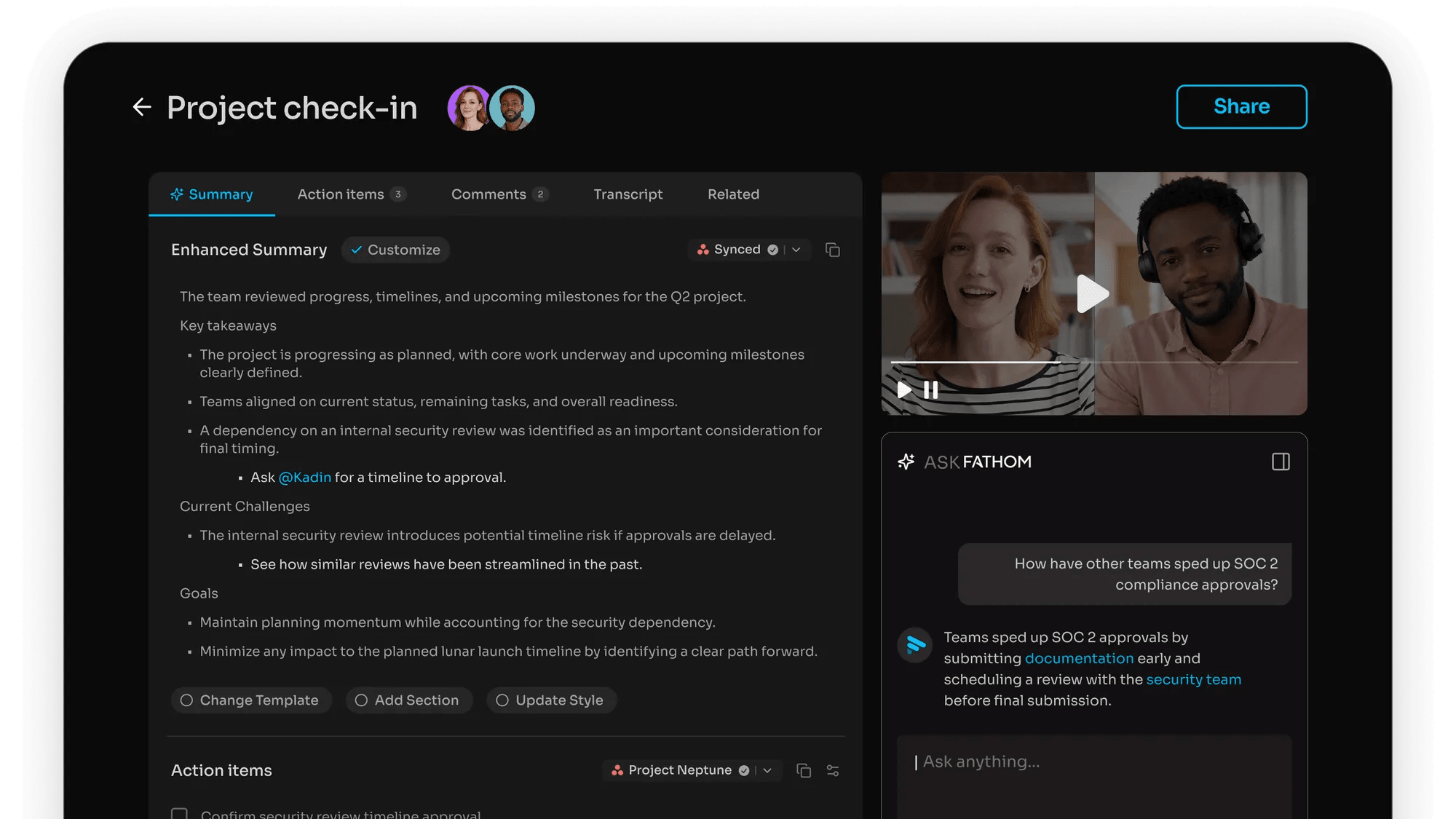
Fathom turns conversations into clear next steps and accountability
Fathom has chosen to focus on structuring call summaries and template-based frameworks as a means of providing more consistent output from each representative; this aligns with manager expectations when reviewing performance (deals) and coaching their representatives.
Otter has the ability to also support meeting workflow and capture tasks. The main focus however, remains centered on intelligent transcription and workspace, and not deal execution.
Fathom is generally the best solution for teams that have an obvious "failure mode" of talking about something, and then no one does anything about it.
Otter.ai Wins for Cross-Meeting Search and Knowledge Retrieval

Turn conversations into a searchable knowledge base with Otter
The form of Otter’s product is meeting content as data. The search, AI chat across meetings, and workspace features show a long term repository use case over single-meeting output.
If your team has frequent questions such as "what did we agree on?" or "who said that exactly?", then Otter's transcript-first approach will be an advantage to your team, not a hindrance.
While Fathom does offer search and organize, Fathom provides the most value in terms of speed to a well done summary versus providing the ability to build a searchable archive of meeting content.
Fathom AI Has the Stronger Deal-to-CRM Story
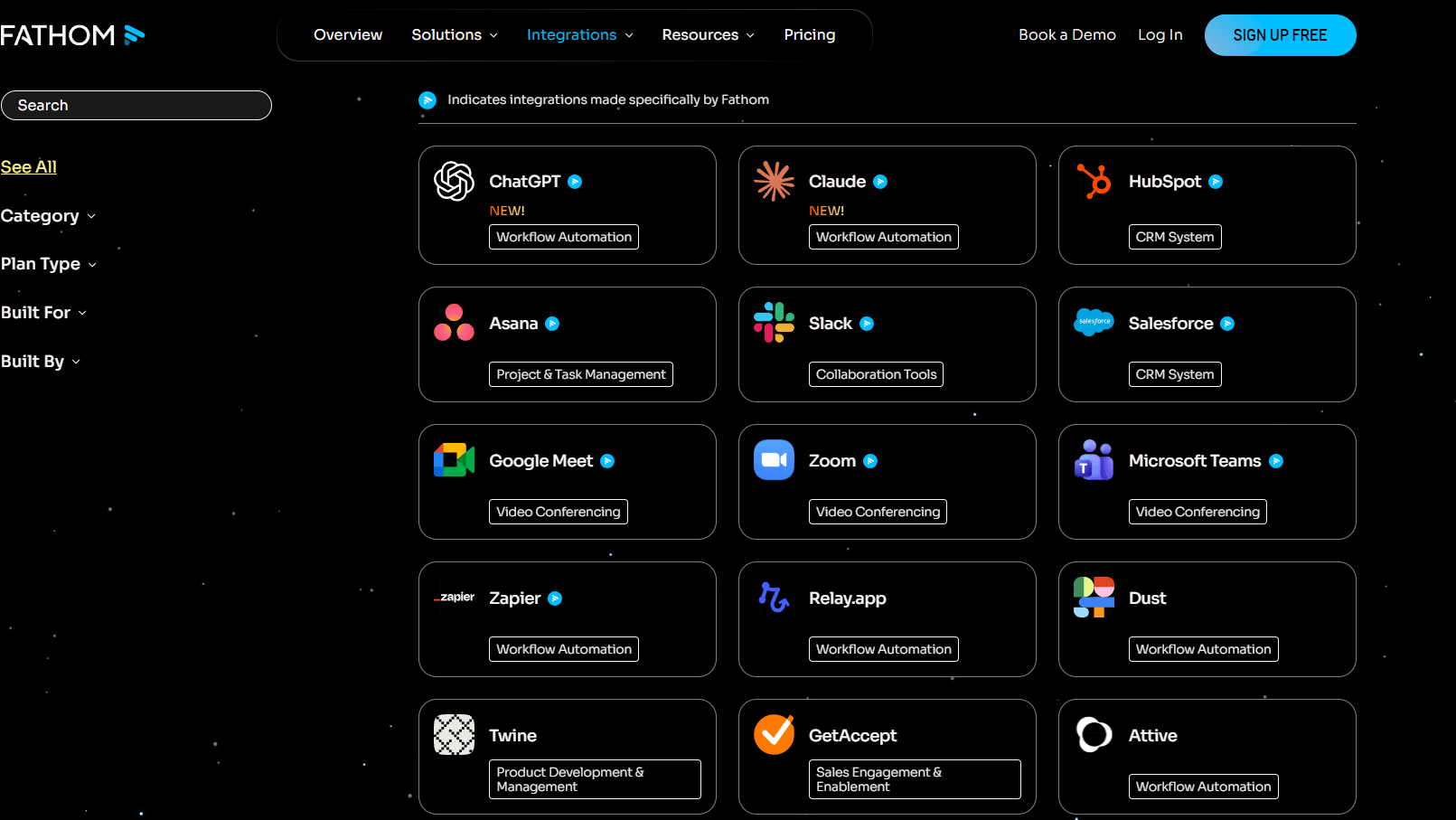
Turn meeting insights into CRM-ready data across your stack on Fathom
While both Otter and Fathom can generate meeting notes, the problem for many revenue teams is that they need to convert these generated notes into CRM fields, pipeline indicators and coaching insights, and do so in a way that doesn't offend their reps.
The Fathom Business tier provides users with CRM field synchronization, deal views, coaching metrics, and scorecards – all of which are basic sales operations primitives (not just general-purpose note-taking capabilities).
Otter can be used for integration as well as enterprise level strength; however, the messaging related to CRM customization is positioned as more of an enterprise function.
Otter.ai Scales Better as a Team Workspace with Admin Controls

Otter's enterprise-grade security for your meeting data
When you move beyond individual productivity the questions are different (who can access which transcripts), how are workspaces managed, what will admins see, and how will templates be used to create consistent output across all departments?
Otter's Business and Enterprise levels offer administrative capabilities in terms of usage analytics, concurrent meetings, and enterprise level security and compliance options (SSO, etc.).
In addition to supporting Team Plans and SSO, Fathom’s workspace-based approach to organizing meetings generally aligns with organizations developing shared meeting workflows. (fathom.ai)
Security: Fathom AI Is Explicit About Compliance, but Both Require Consent Discipline

Protect meeting data with Fathom's compliance-first controls
Fathom has clearly stated its position relative to compliance and the manner in which it will handle your data (including SOC 2 Type II and GDPR-related positioning) and what you should do regarding data deletion and opting out.
Consent cannot be automated with tools. In an all-party environment, if you're going to use tools to capture audio or video, then the participants will always need to be notified as well as there needs to be a repeated process, regardless of who is providing the tool. Fathom has its own privacy policy that explicitly tells users they are required to get permission from others when recording them.
Otter's past issues with recording and consent now make it even more important for your organization to have an unambiguous process in place.
08 Fathom AI vs Otter.ai: Which is the best for your business?
Fathom AI is the best tool for you if:
- You need fast, structured recaps that can be shared with stakeholders without heavy editing.
- Your meetings are part of a revenue workflow, discovery, demos, onboarding, renewals, and you care about next steps more than raw transcripts.
- You want to roll out broadly without getting blocked by recording and transcription limits.
- You value deal coaching signals like scorecards and coaching metrics in the same tool.
- You want to validate ROI with an offer via the Fathom AI promo code.
 You need fast, structured recaps that can be shared with stakeholders without heavy editing.
Otter.ai is the best tool for you if:
- You want a searchable repository of meeting content, not just per-meeting summaries.
- Your teams rely on retrieval and reuse, training, research, internal documentation, and cross-functional alignment.
- You like the idea of AI chat across meetings as a default way to find decisions and context.
- You need clearer admin controls as you scale, including SSO and enterprise features.
- You want a constrained but capable free plan to pilot before upgrading.
Fathom AI
Used by 745 members
First month free on the Premium plan
Save up to $40
Otter.ai
Used by 680 members
51% off annual Pro plan or 33% annual Business plan
Save up to $120
09 Alternatives to Fathom AI & Otter.ai

Riverside.fm
Used by 680 members
20% off your first payment for any monthly or yearly plan
Save up to $189

Granola
Used by 351 members
3 months free on the Business plan
Save up to $126

Lindy.ai
Used by 323 members

Notta.ai
Used by 220 members
20% off monthly or annual plans
Save up to $67
10 Promotions on AI Productivity and Video software
Fathom AI and Otter.ai are great tools, but Secret offers promo codes with discounts on over 2230+ different SaaS solutions. New deals are added regularly, helping you save money on your online subscriptions. Get access to codes for other AI Productivity and Video software you might want to purchase

Google Workspace discounts
20% off Standard plans for 1 year

Code for CapCut
7 days free + 25% off annual plans

Descript deal
35% off annual plans

Snagit coupon
50% off for 1 year

Credits for QuillBot
30% off the annual Premium plan

Code for VEED.IO
30% off all annual and monthly plans

Airtable promo
$1,000 in credits on licences for 1 year

Code for Tella (ex. Tella.tv)
30% off monthly or annual plans

Make free credits
3 months free on the Teams plan (240k credits included)

Code for Klap
50% off monthly and annual plans for 1 year
11 Fathom AI vs Otter.ai: Conclusion
When making a choice between Fathom AI and Otter.ai, focus on what you are trying to optimize for in your organization, rather than comparing features back and forth.
Fathom AI is typically the best fit if you want to have confidence that your meeting will always create usable output to support action, summary content that looks like an operator created it, and actionable next steps that continue to advance deals and projects.
Otter.ai is the better choice if you see meetings as an opportunity to build out a searchable, queryable knowledge base with the ability to ask questions via AI chat and explore a meeting's context through workspace depth.
When you’re ready to test value with deals in mind, start with the Fathom AI deals offers and the Otter.ai promo offers, then pick the tool that matches your operating model, not just your curiosity
Start saving on the best SaaS
Secret has already helped tens of thousands of startups save millions on the best SaaS like Microsoft Teams, Google Workspace & many more. Join Secret now to buy software the smart way.