


You need to manage your start-up's accounts in the best possible way to ensure your financial stability and keep track of day-to-day operations. That's why it's essential to buy high-performance, reliable accounting software. That way, you can concentrate on what's really important: running your business.
There are two well-known names to consider when making your choice: Zoho Books and QuickBooks. So that you can select the best tool for your business, we offer you a Zoho Books vs QuickBooks comparison. In it, we assess the differences and features of the two platforms in detail.
- 01 Zoho Books vs QuickBooks: overview
- 02 What's the difference between Zoho Books and QuickBooks?
- 03 Zoho Books pros and cons
- 04 QuickBooks pros and cons
- 05 Zoho Books compared to QuickBooks
- 06 QuickBooks compared to Zoho Books
- 07 Features comparison
- 08 Zoho Books vs QuickBooks: Which is the best for your business?
- 09 Alternatives to Zoho Books & QuickBooks
- 10 Promotions on Accounting software
Start saving on the best SaaS
Secret has already helped tens of thousands of startups save millions on the best SaaS like Microsoft Teams, Google Workspace & many more. Join Secret now to buy software the smart way.

01 Zoho Books vs QuickBooks: overview
Zoho Books and QuickBooks stand out as leading contenders in the realm of accounting and financial management software, each catering to distinct business needs with their unique strengths.
Zoho Books is well-regarded for its holistic approach, presenting users with an integrated suite of applications that cover not just accounting but also CRM and project management. On the other hand, QuickBooks shines as a dedicated accounting and financial management solution, making it a top choice, particularly for small to mid-sized businesses seeking robust bookkeeping and precise financial tracking tools.
To make an informed decision regarding the ideal accounting and financial management software for your business, let's delve into the specific comparison of Zoho Books vs QuickBooks, considering your unique business requirements.

Data analysis
In both cases, you can benefit from a large number of relevant reports. QuickBooks offers 80 reports and Zoho 50.

Zoho Books
QuickBooks
Payroll management
QuickBooks manages the payroll process natively, whereas with Zoho it is necessary to use third-party integrations such as Zoho Payroll.
Zoho Books
QuickBooks
Customer support
In both cases, support can be reached by phone, chat or email. QuickBooks offers live support 24/7.
Zoho Books
QuickBooks
Mobile app
Both invoicing software packages have a mobile application. Zoho even offers support for Windows tablets and Kindle devices.
Zoho Books
QuickBooks
Ease of use
Both tools have a pleasant user interface. However, Zoho is a little easier to configure.
Zoho Books
QuickBooks
Invoicing
Each platform offers predefined invoice templates. The advantage of Zoho is that you can send 1,000 invoices with the free package.
Zoho Books
QuickBooks
Documentation
Both tools offer video tutorials, online courses and text documents. Zoho goes a step further by offering face-to-face training.
Zoho Books
QuickBooks
Positive reviews
Zoho is better rated overall, particularly for ease of use, but QuickBooks has many more customer reviews.
Zoho Books
QuickBooks
Pricing plans
Both platforms offer three subscription plans. However, Zoho offers a free plan, which is not the case with QuickBooks.
Zoho Books
QuickBooks
Integrations
QuickBooks connects to over 650 third-party applications, including Square and MailChimp. Zoho offers fewer, but still integrates Microsoft 365 and Stripe.
Zoho Books
QuickBooks
02 What's the difference between Zoho Books and QuickBooks?

Zoho Books's Customer-Related Transaction Dashboard with Relative User Details
Zoho Books
Your financial companion in a digital world

QuickBooks's Dashboard Detailing Labor Costs, Payroll, Expenses, Profit, and more
QuickBooks
Quickbooks is a software that will allow you to manage your accounting quickly and easily. Record your expenses with simple photos, analyze your cash flow, manage your unpaid bills, and many other tasks that will simplify your accounting life.
When comparing the two tools, Zoho Books and Quickbooks, it is difficult to identify a single main difference. In fact, while the two accounting platforms offer relatively similar and comprehensive functionality, they differ in two main respects. The first difference is that Zoho Books really comes into its own when integrated with the other software offered by Zoho. The second difference is the target audience. This is because while Zoho Books is perfect for smaller businesses that don't have time to waste, Quickbook is relevant for businesses that are starting to grow. Let's find out more about this together.
Let's go back to the first difference: integrations. Quickbooks offers over 650 integrations with third-party software. As a result, the tool integrates easily with existing business workflows. Zoho, on the other hand, offers a much smaller number of third-party integrations. However, this accounting software interfaces seamlessly with tools such as Zoho Workplace, Zoho CRM Plus, Zoho People Plus and Zoho Expense. In other words, if you're a regular user of Zoho solutions, we recommend you opt for Zoho Books, as you'll be able to take full advantage of it.
Furthermore, it's true that both Zoho Books and Quickbooks are perfectly suited to small and medium-sized businesses. Their prices are affordable and the ergonomics are pleasant. However, Zoho Books offers a free package. This is attractive because it allows you to send up to 1,000 invoices a year. In other words, it's ideal for start-ups that can't afford to spend a lot. They'll be able to take advantage of this comprehensive free package. In addition, the number of users included by Zoho Books is between 1 and 15, compared with 1 to 25 for Quickbooks. This demonstrates once again that Zoho Books is the ideal choice for small teams.

Zoho Books
Used by 367 members
$100 in Zoho Wallet credits
Save up to $100

QuickBooks
Used by 940 members
30% off for 6 months
Save up to $423
03 Zoho Books pros and cons
What are the advantages of Zoho Books?
- Comprehensive accounting suite: Zoho Books offers a comprehensive suite of accounting tools, including invoicing, expense tracking, inventory management, and financial reporting, providing businesses with all the necessary features to manage their finances effectively.

- User-friendly interface: The software is known for its user-friendly interface, making it accessible to users with varying levels of accounting expertise. This ease of use can save time and reduce the learning curve for employees.
- Integration capabilities: Zoho Books seamlessly integrates with other Zoho applications and a wide range of third-party software, allowing businesses to create a customized software ecosystem that suits their specific needs.
- Mobile accessibility: Zoho Books offers mobile apps for both iOS and Android devices, enabling users to manage their finances on the go, making it a convenient option for businesses with remote or on-the-move operations.
- Affordability: Zoho Books is competitively priced, particularly for small and medium-sized businesses, making it a cost-effective choice for those looking for robust accounting software without breaking the bank.
What are the disadvantages of Zoho Books?
- Limited advanced features: While Zoho Books is suitable for many businesses, it may lack some advanced accounting features that larger or more complex organizations require, such as multi-entity support or advanced payroll management.

- Customer support: Some users have reported mixed experiences with Zoho's customer support, with occasional delays or difficulties in getting timely assistance.
- Scalability: While it's excellent for small to medium-sized businesses, Zoho Books may face limitations in scalability for larger enterprises with more complex financial needs.
- Learning curve for new users: Despite its user-friendly design, new users may still face a learning curve, especially if they are not familiar with accounting terminology and processes.
- Offline functionality: Zoho Books relies heavily on an internet connection, and offline functionality is limited. This can be a drawback in areas with unreliable or slow internet access.
Compare Zoho Books to other tools


Zoho Books vs TallyPrime
04 QuickBooks pros and cons
What are the advantages of QuickBooks?
- User-friendly: QuickBooks is known for its user-friendly interface, making it accessible to individuals with limited accounting knowledge.
- Comprehensive accounting: It offers a wide range of accounting features, including invoicing, expense tracking, payroll management, and financial reporting.
- Integration: QuickBooks integrates with numerous third-party applications, allowing businesses to customize and expand their accounting software's functionality.
- Scalability: QuickBooks offers different versions tailored to various business sizes, from sole proprietors to larger enterprises, ensuring scalability.
- Strong support: QuickBooks provides robust customer support, including online resources, a community forum, and customer service options.
What are the disadvantages of QuickBooks?
- Cost: Depending on the version and add-ons, QuickBooks can be relatively expensive, which may be a drawback for small businesses with tight budgets.
- Learning curve: While user-friendly, QuickBooks can still have a learning curve, especially for complex accounting tasks or advanced features.
- Limited multi-user capabilities: Some versions of QuickBooks have limitations when it comes to multiple users accessing the software simultaneously.
- Data file size: The size of the QuickBooks data file can become an issue over time, particularly for larger businesses, potentially leading to performance problems.
- Industry-specific features: While QuickBooks can be customized, it may lack certain industry-specific features that businesses in niche markets require.
Compare QuickBooks to other tools


Pennylane vs QuickBooks

FreshBooks vs QuickBooks

HoneyBook vs QuickBooks

Xero vs QuickBooks

Gusto vs QuickBooks

Expensify vs QuickBooks
05 Zoho Books compared to QuickBooks
When it comes to comparing Zoho Books and QuickBooks, Zoho Books stands out for its versatility and affordability, making it an attractive choice for businesses in search of comprehensive accounting and financial management solutions. Zoho's pricing options, including competitive plans and a free trial, accommodate a broad spectrum of businesses, from startups to well-established enterprises, all seeking to optimize their financial operations without stretching their budget.
Both Zoho Books and QuickBooks excel in enhancing financial efficiency, but the decision between the two hinges on your specific needs. Zoho Books offers a cost-effective solution with a focus on flexibility and customization, making it particularly well-suited for businesses aiming to streamline their financial processes and adapt to ever-changing requirements.
Is Zoho Books better than QuickBooks?
 Is Zoho Books better than QuickBooks?
The decision of whether Zoho is better than QuickBooks ultimately depends on your unique accounting and financial management needs. Zoho Books offers a versatile and cost-effective option, featuring a user-friendly interface and a comprehensive suite of applications designed to cater to a variety of business sizes and industries. It allows for extensive customization and offers integration capabilities to adapt to diverse workflows, making it suitable for businesses with evolving financial requirements.
Zoho emphasizes adaptability and affordability, while QuickBooks specializes in accounting and financial management. QuickBooks is particularly advantageous for small to medium-sized enterprises and offers a deep set of accounting features, including robust reporting and payroll management, making it an excellent choice for those prioritizing precise financial tracking and analysis.
What is Zoho Books best used for?
Zoho Books is a key component of the versatile suite of Zoho business applications, designed to support various facets of business operations. Its primary strengths revolve around providing an integrated platform for managing customer relationships, streamlining accounting and financial processes, enhancing project management, and facilitating collaboration among teams.
Zoho's adaptability and scalability make it a valuable resource for businesses across different industries, helping them streamline operations and achieve greater efficiency in their day-to-day tasks. Whether you run a small business, a growing startup, or a well-established enterprise, Zoho Books and its suite of applications can be tailored to meet your specific needs, making it a versatile and valuable asset for your business.
Can Zoho Books replace QuickBooks?
Zoho offers a comprehensive suite of business applications, including accounting software, which can serve as a viable alternative to QuickBooks for many businesses.
Zoho Books’s software provides essential features such as invoicing, expense tracking, financial reporting, and payroll management. It's particularly well-suited for small to medium-sized businesses looking for a cost-effective and user-friendly solution to manage their finances. However, it's important to note that while Zoho can replace QuickBooks for many businesses, QuickBooks remains a specialized accounting software with a deep focus on financial management, particularly for larger enterprises with complex financial needs.
Is Zoho Books cheaper than QuickBooks?
When evaluating the cost of Zoho and QuickBooks, there are distinct pricing variations worth considering. Zoho Books’s pricing options provides a cost-effective alternative with a range of subscription plans tailored to different business sizes and needs. It offers competitive pricing options, including a free trial, making it a budget-friendly choice for many businesses, especially startups and small enterprises.
On the other hand, QuickBooks generally tends to have a higher price point, which can be a significant factor for businesses operating on a tight budget. Zoho's pricing flexibility may make it a more cost-effective choice for businesses looking to optimize their financial management without overspending.
Is there a better Accounting software than Zoho Books?
While Zoho Books is a comprehensive business application, it's worth exploring whether there might be a more suitable software for your specific needs.
There are several noteworthy alternatives to Zoho Books in the world of accounting and financial management software, including QuickBooks, Wave, FreshBooks, and Xero.
The choice of software depends on various factors, such as the size of your company, industry-specific requirements, and budget constraints. While Zoho Books offers a wide range of applications for various business functions, alternative software solutions may specialize in specific areas or provide a different pricing structure that better aligns with your business objectives.

Zoho Books
Your financial companion in a digital world
$100 in Zoho Wallet credits
Save up to $100
06 QuickBooks compared to Zoho Books
QuickBooks distinguishes itself with its specialization in accounting and financial management, positioning it as the go-to choice for businesses focused on precise financial tracking and comprehensive reporting. QuickBooks's pricing structure, though offering various plans, is often more aligned with the needs of small to medium-sized enterprises seeking robust financial solutions.
While both QuickBooks and Zoho Books excel in financial management, the decision between the two hinges on your specific requirements. QuickBooks shines as the preferred option for businesses necessitating in-depth accounting features, sophisticated payroll management, and advanced financial reporting capabilities.
Is QuickBooks better than Zoho Books?
Determining whether QuickBooks is superior to Zoho Books hinges on the specific accounting and financial management needs of your business. QuickBooks stands out by offering a specialized and comprehensive suite of accounting tools, making it an excellent fit for businesses that prioritize precise financial tracking, in-depth reporting, and comprehensive payroll management.
The choice between QuickBooks and Zoho Books ultimately depends on factors such as the size of your business, industry-specific requirements, and the extent to which you require specialized accounting features. While QuickBooks provides extensive accounting capabilities, Zoho Books takes a more holistic approach to business management, offering a broader suite of applications that go beyond accounting.
What is QuickBooks best used for?
QuickBooks excels as a specialized accounting and financial management tool designed primarily for businesses and organizations of varying sizes. It is an ideal choice for businesses seeking to efficiently manage their financial transactions, invoicing, expense tracking, payroll processing, and overall financial health.
QuickBooks's strengths lie in its comprehensive set of accounting features, including double-entry accounting, financial reporting, tax preparation, and budgeting capabilities. It is invaluable for businesses requiring precise financial tracking, compliance with tax regulations, and detailed financial reporting. Its specialization in accounting and financial management makes it an essential tool for businesses aiming to streamline their financial operations, ensure accuracy in their financial records, and make informed financial decisions to support growth and stability.
Can QuickBooks replace Zoho Books?
QuickBooks has the potential to replace Zoho Books, but this decision depends on your specific business's accounting and financial management requirements. QuickBooks is a specialized accounting software known for providing comprehensive solutions for financial tracking, reporting, and management.
If your primary focus is on precise financial accounting, payroll processing, tax compliance, and advanced financial reporting, QuickBooks' specialization in these areas may make it a suitable replacement for Zoho's accounting features. However, it's crucial to consider how this decision aligns with your broader business objectives. Zoho Books offers a more holistic approach to business management, encompassing CRM, project management, and collaboration tools, among others.
Is QuickBooks cheaper than Zoho Books?
When comparing the cost of QuickBooks to Zoho Books, there are notable differences in pricing structures that warrant consideration. QuickBooks’s pricing model may be perceived as higher, particularly for businesses with more extensive financial management requirements, as it offers advanced features and capabilities that cater to these needs.
In contrast, Zoho Books presents a more cost-effective alternative, offering a range of pricing plans tailored to various business sizes and requirements. Zoho's competitive pricing options, including affordable plans and a free trial, ensure accessibility for startups, small businesses, and enterprises alike. This affordability makes Zoho Books an appealing budget-friendly choice for many users seeking comprehensive business applications without exceeding their financial constraints.
Is there a better Accounting software than QuickBooks?
QuickBooks is a powerful accounting and financial management software, but it's crucial to explore whether there might be a more suitable solution for your specific financial requirements.
Several noteworthy alternatives to QuickBooks in the accounting and financial management realm include Zoho Books, Xero, Freshbooks, and Synder.
The choice of accounting software depends on factors such as the complexity of your financial needs, budget constraints, and industry-specific requirements. While QuickBooks offers comprehensive accounting features, other software solutions may cater better to your specific business context or provide a different pricing structure that aligns more closely with your financial objectives.

QuickBooks
Optimize your accounting and invoicing management with ease.
30% off for 6 months
Save up to $423
07 Features comparison
Zoho Outperforms QuickBooks in Multi-Currency Support
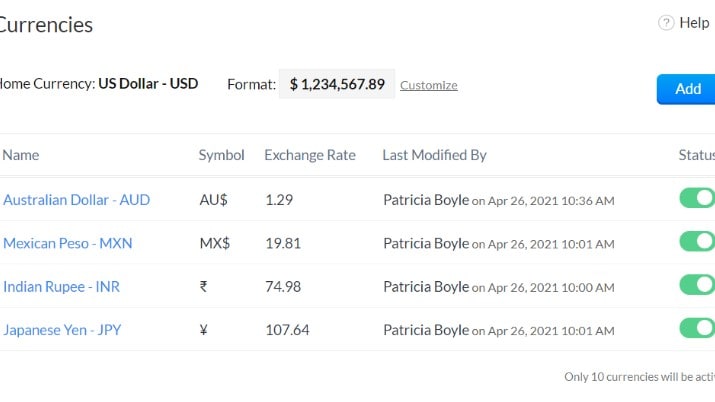
Select Different Currencies According to Different Customers on Zoho Books
Zoho Books stands out as a powerful solution for businesses engaged in global operations, demonstrating its prowess in handling transactions across multiple currencies. This capability proves invaluable for companies with international clients or a global footprint. For instance, if you're a business that sells products or services internationally, Zoho Books empowers you to seamlessly invoice clients in their local currency, simplifying transactions and enhancing customer satisfaction.
On the other hand, QuickBooks doesn't prominently feature multi-currency support in its primary offerings. This limitation may restrict its versatility for businesses engaged in international transactions, potentially leading to challenges in managing foreign currency accounts, exchange rate adjustments, and precise financial tracking across borders.
QuickBooks Offers Better Automation in Tax Calculations than Zoho Books

QuickBooks's Automated Tax Center to Simplify Your Tax Management
QuickBooks excels in simplifying tax management by automatically calculating taxes on various financial transactions, including purchases, sales, and payrolls. This automation significantly reduces the burden of manual tax calculations, minimizing the risk of errors. For instance, QuickBooks can automatically apply the correct sales tax rate based on your location and the type of product or service sold, ensuring compliance with tax regulations.
In contrast, while Zoho Books is a robust accounting tool, it does not emphasize automated tax calculation as a standalone feature. Users may need to manually input and calculate taxes, which can be time-consuming and increase the potential for errors, particularly for businesses dealing with complex tax regulations or operating in multiple tax jurisdictions.
QuickBooks Provides More Advanced Cash Flow and Forecasting Features than Zoho Books

QuickBooks Allows You to Gain Insights into Your Cash Flow for 90 Days
QuickBooks takes a significant lead in providing businesses with real-time visibility of their cash flow by securely connecting to their bank accounts, allowing users to access a dynamic cash flow forecast. This feature proves to be an invaluable asset for businesses, enabling them to plan and manage their finances effectively. For instance, QuickBooks can show you a projected cash flow based on your upcoming income and expenses, helping you make informed financial decisions.
While Zoho Books offers comprehensive financial reporting, including the generation of cash flow statements, it does not explicitly highlight real-time cash flow tracking and forecasting, a feature that QuickBooks excels in. This real-time capability in QuickBooks empowers businesses to have a more immediate and precise grasp of their financial health, making it a preferred choice for those seeking enhanced financial planning and control.
Zoho Books Takes the Lead Ahead of QuickBooks for User-Friendliness
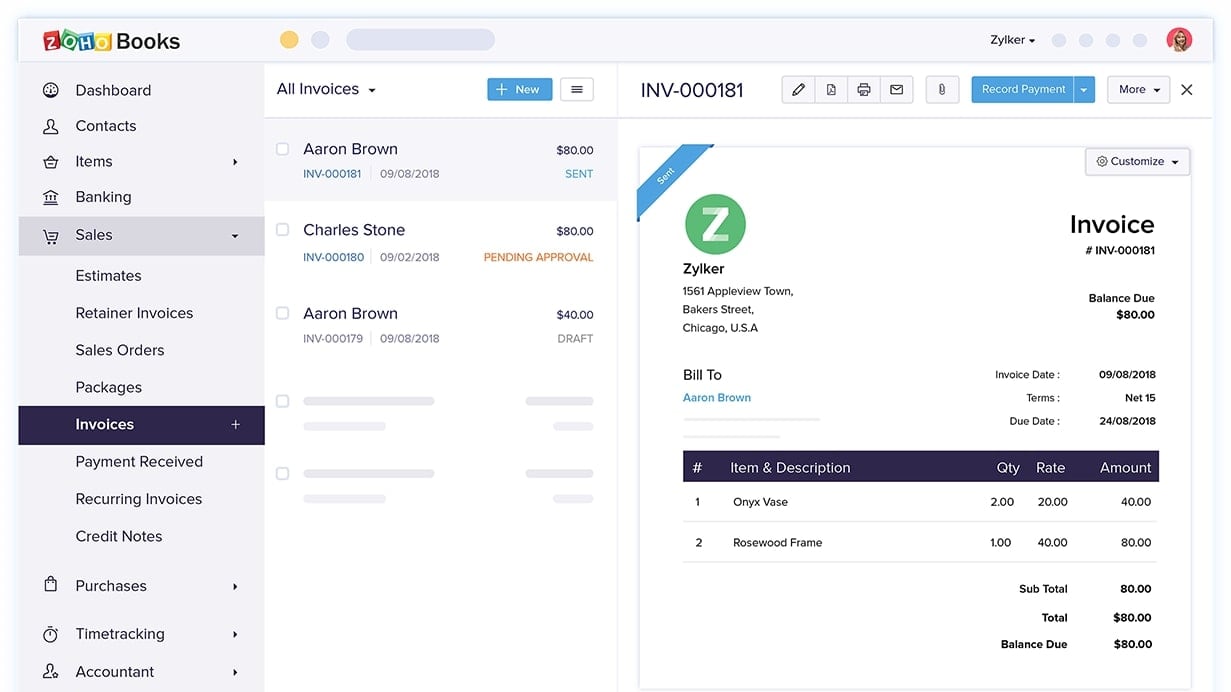
Create Professional and Customized Invoices Easily with Zoho Books's User-Friendly Tool
While both Zoho Books and QuickBooks prioritize user-friendliness, Zoho Books shines with its exceptional ease-of-use. Its clear and intuitive interface sets it apart, ensuring even users new to accounting software can navigate it effortlessly. For instance, when creating an invoice in Zoho Books, users can simply input customer details, add line items, and send it within minutes.
In contrast, QuickBooks, though powerful, may appear daunting to beginners due to its extensive feature set. For instance, QuickBooks offers advanced inventory management, which can be overwhelming for small businesses with limited inventory needs.
Zoho Books is Superior for Invoicing Compared to QuickBooks

Insert Your Digital Signature on Invoices Created with Zoho Books to Ensure Security and Confidence
Zoho Books excels in the realm of invoicing thanks to its user-friendly interface and extensive customization capabilities. Its intuitive design streamlines the process of creating professional invoices while offering ample room for personalization to align with your brand identity. For instance, Zoho Books allows you to easily add your company logo and customize the color scheme to match your branding guidelines.
Moreover, Zoho Books provides versatile options for sending invoices to clients, supporting various formats such as PDFs and HTML, and offering online payment integration to expedite the payment process. In contrast, while QuickBooks enables personalized invoice creation and tracking, it lacks the granular customization and versatility in invoice formatting provided by Zoho Books, which can be especially beneficial for businesses aiming to maintain a consistent and polished brand image across all financial documents.
Both Zoho Books and QuickBooks have an Equal Emphasis on Collaboration

QuickBooks's User Controls Where You Can Add Team Members and Accountants
Both Zoho Books and QuickBooks prioritize collaboration features, enhancing teamwork and efficient financial management. Zoho Books enables seamless collaboration by granting controlled access to team members, accountants, or financial advisors, allowing them to work collaboratively while maintaining data security. For example, your accountant can access the necessary financial information to provide you with accurate advice and insights.
Likewise, QuickBooks offers a platform for streamlined collaboration with your accountant directly within their platform. This feature promotes real-time communication, enabling you to share financial data, receive guidance, and address financial challenges promptly.
QuickBooks Provides a More Extensive Integration Library Compared to Zoho

A Selection of QuickBooks's Ecommerce Integrations, Including Shopify and Squarespace
When evaluating integration capabilities, QuickBooks takes the lead. Its extensive support for third-party applications, spanning ecommerce sales platforms to customer relationship management (CRM) systems, ensures a highly connected and adaptable system. For instance, QuickBooks seamlessly integrates with popular apps like Shopify, Squarespace and Etsy for effective order, product and inventory management.
This adaptability allows QuickBooks to easily align with an existing business framework, enhancing workflow efficiency. In contrast, Zoho Books primarily focuses on integrating within its suite of business applications. While this is convenient for users already utilizing Zoho's ecosystem, it may feel limiting when attempting to connect with a diverse range of external tools, such as CRM systems or e-commerce platforms.
08 Zoho Books vs QuickBooks: Which is the best for your business?
Zoho Books is the best tool for you if:
- You run a small or medium-sized business seeking affordable and user-friendly accounting software
- You value customization and integration capabilities to tailor the software to your unique financial workflows
- You require essential accounting features like invoicing, expense tracking, and financial reporting
- You want a holistic business management solution that can seamlessly integrate with other Zoho applications
- You prioritize cost-effectiveness without compromising on essential financial management features
 You run a small or medium-sized business seeking affordable and user-friendly accounting software
QuickBooks is the best tool for you if:
- You need efficient financial management, offering features like invoicing, expense tracking, and financial reporting for businesses of all sizes
- Tax compliance is crucial; QuickBooks excels in automating tax calculations, deductions, and filings, saving time and reducing errors
- You prefer user-friendly accounting software; its intuitive interface and comprehensive tutorials make financial tasks accessible to non-accountants
- Integration with other business tools is essential; QuickBooks seamlessly connects with various apps and services, streamlining workflow
- You seek industry-specific solutions; QuickBooks offers tailored versions for contractors, retailers, nonprofits, and more, addressing unique business needs effectively
Zoho Books
Used by 367 members
$100 in Zoho Wallet credits
Save up to $100
QuickBooks
Used by 940 members
30% off for 6 months
Save up to $423
09 Alternatives to Zoho Books & QuickBooks

Xero
Used by 1721 members
80% off for 6 months
Save up to $432

FreshBooks
Used by 303 members
90% off for 3 months
Save up to $175

Quickbooks Online
Used by 232 members
50% off for 3 months (US-based companies)
Save up to $352

TallyPrime
10 Promotions on Accounting software
Zoho Books and QuickBooks are great tools, but Secret offers promo codes with discounts on over 2230+ different SaaS solutions. New deals are added regularly, helping you save money on your online subscriptions. Get access to codes for other Accounting software you might want to purchase
Xero coupon code 2026
80% off for 6 months

Credits for Qonto
2 months free on the Basic and Smart plans

Deal for Stripe
$500 in credits
Code for FreshBooks
90% off for 3 months
Quickbooks Online discount
50% off for 3 months (US-based companies)

Navan promo code
Spend $500, Get $500 in Credit for your next booking

doola promo code 2026
20% off your first purchase

Airwallex coupon code
2% uncapped cashback on corporate cards

Gusto coupon code 2026
First month free

Expensify promo
50% off annual subscriptions for 6 months
Start saving on the best SaaS
Secret has already helped tens of thousands of startups save millions on the best SaaS like Microsoft Teams, Google Workspace & many more. Join Secret now to buy software the smart way.