


Choosing the right scheduling tool is crucial for optimizing appointment setting and managing personal or business calendars effectively. These tools not only simplify the process of booking meetings but also improve time management, reduce scheduling conflicts, and enhance overall productivity. Furthermore, scheduling platforms can facilitate better client interactions and streamline administrative tasks.
With numerous options available, how do you determine the best scheduling solution for your needs? In this article, we assist you by offering a comprehensive comparison of two widely used scheduling tools, Calendly vs Zoho Bookings. By examining their key features and primary differences, you'll be better equipped to make an informed decision that suits your business's unique requirements.
- 01 Calendly vs Zoho Bookings: overview
- 02 What's the difference between Calendly and Zoho Bookings?
- 03 Calendly pros and cons
- 04 Zoho Bookings pros and cons
- 05 Calendly compared to Zoho Bookings
- 06 Zoho Bookings compared to Calendly
- 07 Features comparison
- 08 Calendly vs Zoho Bookings: Which is the best for your business?
- 09 Alternatives to Calendly & Zoho Bookings
- 10 Promotions on Scheduling software
Start saving on the best SaaS
Secret has already helped tens of thousands of startups save millions on the best SaaS like Microsoft Teams, Google Workspace & many more. Join Secret now to buy software the smart way.

01 Calendly vs Zoho Bookings: overview
Calendly and Zoho Bookings are two prominent players in the realm of scheduling and appointment management tools, each offering unique advantages tailored to meet specific user requirements.
Calendly is widely recognized for its streamlined scheduling capabilities, particularly among professionals and teams focused on minimizing administrative tasks. It provides a user-friendly platform that excels in simplifying the process of setting up meetings, integrating seamlessly with various calendar types, and automating reminders. On the other hand, Zoho Bookings offers a comprehensive suite of booking and scheduling tools suitable for a wide range of industries. In addition to appointment scheduling, Zoho Bookings provides features like multi-staff management, customization of booking pages, and integration with other Zoho apps, enhancing overall business operations.
To make an informed decision between Calendly and Zoho Bookings, it's crucial to consider your specific business needs, customer interaction dynamics, and operational requirements. Calendly may be the ideal choice for individuals and teams looking for a highly efficient and straightforward scheduling solution, whereas Zoho Bookings offers a broader array of features that are particularly useful for businesses requiring detailed customization and integration capabilities.

Scalability
Calendly is highly scalable, suitable for individual users up to large enterprises. Zoho Bookings fits well within an SME environment, particularly for those already using other Zoho products.

Calendly
Zoho Bookings
Positive reviews
Calendly is highly praised for its user-friendly interface and efficient scheduling capabilities. Zoho Bookings is valued for its flexibility and integration within the Zoho ecosystem.
Calendly
Zoho Bookings
Pricing plans
Calendly offers a straightforward pricing structure with a popular free plan. Zoho Bookings provides a competitive pricing model, especially attractive for existing Zoho users.
Calendly
Zoho Bookings
Market focus
Calendly is ideal for a broad range of users from freelancers to large corporations. Zoho Bookings is particularly effective for current Zoho users and small to medium-sized businesses.
Calendly
Zoho Bookings
Ease of use
Calendly’s interface is exceptionally intuitive, making it easy for new users to set up and manage. Zoho Bookings offers robust functionality but with a slight learning curve.
Calendly
Zoho Bookings
Automation features
Calendly excels in automation, streamlining appointment scheduling without manual intervention. Zoho Bookings also offers automation but is more focused on customization within the Zoho suite.
Calendly
Zoho Bookings
Customer support
Both platforms provide solid customer support, with Calendly offering extensive online resources and Zoho Bookings benefiting from Zoho’s comprehensive customer service network.
Calendly
Zoho Bookings
Mobile experience
Both platforms have functional mobile apps that allow for managing appointments on the go, though Calendly’s app is noted for its simplicity and ease of use.
Calendly
Zoho Bookings
Integrations
Calendly integrates seamlessly with a wide array of tools including Google Calendar, Office 365, and Salesforce. Zoho Bookings integrates well within the Zoho ecosystem and supports basic external integrations.
Calendly
Zoho Bookings
Reporting and analytics
Calendly provides basic analytics on meeting types and scheduling rates. Zoho Bookings offers detailed reports, especially useful within the context of the broader Zoho CRM and analytics tools.
Calendly
Zoho Bookings
02 What's the difference between Calendly and Zoho Bookings?

Calendly is Free to Use for Individuals, With Appropriate Plans for Teams and Those Needing Additional Features
Calendly
Simple scheduling for busy people

Zoho Bookings Offers Different Plans to Suit Your Needs, Including a Forever Free Plan and Flex Plan for Custom Requirements
Zoho Bookings
Zoho Bookings is an all-encompassing scheduling solution for businesses and professionals who demand streamlined appointment and resource management. This platform facilitates effortless booking, rescheduling, and synchronization of appointments, enhancing client engagement and operational efficiency.
Calendly and Zoho Bookings are both robust scheduling platforms, but they offer distinct approaches to booking and calendar management, making each suitable for different user needs. Understanding these differences can guide you in choosing the right tool for your organizational demands.
Calendly is celebrated for its simplicity and efficiency, particularly in environments where quick meeting setups are essential. It's a highly intuitive tool that's easy to learn and use, making it ideal for individuals, small teams, and businesses that require straightforward scheduling without extensive customization. Calendly excels in automating the booking process, offering seamless integrations with popular calendar services, and providing a clean interface that allows users to set availability and let others book times without back-and-forth communication. This functionality makes it a favorite among professionals who need to manage external consultations and appointments efficiently.
In contrast, Zoho Bookings is more feature-rich and customizable, catering to businesses that require detailed control over their scheduling processes. It integrates deeply with other Zoho products, which is beneficial for users already within the Zoho ecosystem. Zoho Bookings supports complex scenarios like multi-staff scheduling, service and class bookings, and the ability to manage multiple locations. Its customization features allow businesses to tailor almost every aspect of the booking experience, from the appearance of booking pages to automated workflows that handle reminders, follow-ups, and even invoicing.
When comparing the two, another key difference is their pricing and feature sets offered at various tiers. Calendly's straightforward pricing structure is beneficial for users looking for a no-fuss solution with predictable costs, while Zoho Bookings' tiered features can appeal to businesses scaling their operations and needing more sophisticated tools.
Finally, the choice might also depend on whether you prefer a tool that integrates well with a wider ecosystem (Zoho Bookings) or one that focuses solely on optimizing the scheduling experience (Calendly). Each platform’s strengths cater to different organizational needs, from individual freelancers to large enterprises.

Zoho Bookings
Hassle-free scheduling for businesses
$100 in Zoho Wallet credits
Save up to $100
03 Calendly pros and cons
What are the advantages of Calendly?
- Saves time: Calendly automates the scheduling process, eliminating the back-and-forth emails usually required to find a suitable meeting time.

- User-friendly interface: It has an intuitive and easy-to-use interface both for the scheduler and the invitees, making it simple to set up and join meetings.
- Integration: Calendly integrates seamlessly with popular calendar platforms like Google Calendar, Outlook, and others, ensuring that your schedule is always up to date.
- Customization options: It allows you to customize your availability, meeting types, and even branding, which can enhance professionalism and user experience.
- Analytics and insights: Provides analytics on scheduling patterns, no-show rates, and other metrics, which can be useful for optimizing your scheduling process.
What are the disadvantages of Calendly?
- Limited free version: The free version of Calendly has limitations on the number of event types and integrations available, which may require upgrading to a paid plan for more functionality.

- Dependence on internet access: Since it's a web-based tool, it requires a stable internet connection for both scheduling and joining meetings.
- Complex event sequences: Handling complex meeting sequences or specific scheduling rules can be challenging, as Calendly primarily focuses on straightforward scheduling.
- Privacy concerns: Some users may have privacy concerns since Calendly accesses your calendar data to function properly, which could be a consideration depending on your sensitivity to data sharing.
- User adoption: Not all invitees may be comfortable using Calendly, which could lead to confusion or resistance among some participants, especially those unfamiliar with the tool.
Compare Calendly to other tools


Calendly vs Cal.com

04 Zoho Bookings pros and cons
What are the advantages of Zoho Bookings?
- Integration with Zoho suite: Zoho Bookings seamlessly integrates with other Zoho apps like Zoho CRM, Zoho Mail, and Zoho Calendar, providing a comprehensive business management solution.
- Customizable booking pages: Users can customize their booking pages with branding elements, custom fields, and personalized URLs, enhancing the professional appearance and user experience.
- Automated reminders: Zoho Bookings sends automated reminders to both users and clients about upcoming appointments, reducing no-show rates and improving efficiency.
- Advanced scheduling options: It offers advanced scheduling features such as buffer times between appointments, recurring bookings, and group bookings, catering to different scheduling needs.
- Analytics and reporting: Zoho Bookings provides analytics and reporting tools that offer insights into booking trends, client behavior, and appointment history, helping businesses optimize their scheduling processes.
What are the disadvantages of Zoho Bookings?
- Complex setup: Setting up Zoho Bookings may require some time and effort, especially for users unfamiliar with Zoho's ecosystem or those new to scheduling tools.
- Cost: While Zoho Bookings offers a free plan, some advanced features and integrations may require upgrading to a paid plan, which can add to operational costs.
- Learning curve: Users who are new to Zoho products or complex scheduling requirements may find the learning curve steep, especially when configuring integrations or customizing settings.
- Limited customization in free version: The free version of Zoho Bookings has limitations on customization options compared to paid plans, which may restrict branding and feature enhancements.
- Dependence on internet connectivity: Like most online scheduling tools, Zoho Bookings requires a stable internet connection for scheduling and accessing appointments, which could be a limitation in certain environments.
05 Calendly compared to Zoho Bookings
Calendly and Zoho Bookings are both powerful scheduling tools but cater to different user needs. Calendly excels with its intuitive interface, seamless integration with various calendars, and time-saving automation. It's ideal for individuals and small teams needing straightforward scheduling without extensive customization.
In contrast, Zoho Bookings offers robust customization options, integrates deeply with Zoho's ecosystem, and provides advanced features like group bookings and detailed analytics. It suits businesses looking for a more customizable and integrated solution within the Zoho suite.
Is Calendly better than Zoho Bookings?
 Is Calendly better than Zoho Bookings?
When comparing Calendly and Zoho Bookings, it's crucial to consider the specific requirements of a business or individual. Calendly is highly favored for its simplicity and effectiveness, making it a popular choice for those who value a quick setup and ease of use.
On the other hand, Zoho Bookings is preferable for organizations that require a comprehensive tool that can adapt to complex scheduling needs. This flexibility is particularly beneficial for businesses that already use other Zoho applications, as it allows for a smoother workflow and centralized control. Therefore, the better option depends on the user's specific needs for integration, customization, and simplicity.
What is Calendly best used for?
Calendly is best used for streamlining and automating the scheduling process. It efficiently handles appointment bookings by eliminating the back-and-forth communication often required to find a suitable time. Ideal for professionals, teams, and businesses of all sizes, Calendly integrates seamlessly with popular calendar platforms, allowing users to set availability preferences and customize meeting types.
Its user-friendly interface and automated reminders minimize scheduling errors and reduce no-shows, making it particularly beneficial for sales meetings, client consultations, interviews, and any scenario where time management and efficiency are paramount.
Can Calendly replace Zoho Bookings?
Calendly offers robust scheduling capabilities but may not entirely replace Zoho Bookings for all users. While Calendly excels in simplicity, automation, and integration with various calendars, Zoho Bookings provides deeper customization options, advanced scheduling features, and seamless integration within the Zoho ecosystem.
Businesses requiring extensive customization, such as complex booking rules or deep integration with other Zoho apps like CRM or Mail, may find Zoho Bookings more suitable. However, for straightforward scheduling needs with a focus on ease of use and time-saving automation, Calendly remains a highly effective and popular choice.
Is Calendly cheaper than Zoho Bookings?
Calendly generally offers a simpler pricing structure compared to Zoho Bookings, often making it a more cost-effective option for users primarily seeking basic scheduling functionality. While Calendly provides a free plan with limited features, its premium plans are competitively priced for additional functionalities like multiple event types and integrations.
In contrast, Zoho Bookings’s pricing structure offers a free tier with basic features but requires a paid plan for advanced capabilities and deeper integration within the Zoho suite.
Is there a better Scheduling software than Calendly?
When considering scheduling tools like Calendly, exploring alternative software options is crucial to finding the best fit for your scheduling and appointment needs.
Several notable alternatives to Calendly include tools like Zoho Bookings, Acuity Scheduling, Calendesk, ScheduleOnce, and Doodle. Each of these platforms offers unique features such as deeper customization options, integrated workflows, and specialized functionalities that may better suit specific business requirements or industry standards.
Selecting the ideal scheduling software depends on factors such as ease of use, integration capabilities with existing tools, and scalability to accommodate future needs. Exploring these alternatives can help you pinpoint the software that best aligns with your scheduling efficiency goals and organizational workflow.
06 Zoho Bookings compared to Calendly
Zoho Bookings and Calendly are both efficient scheduling tools but cater to different needs. Zoho Bookings excels with extensive customization options, deep integration within the Zoho suite, and advanced features like group bookings and detailed analytics. It's ideal for businesses seeking a highly tailored scheduling solution with robust reporting capabilities.
In contrast, Calendly offers simplicity, user-friendly interface, and seamless integration with various calendars, making it perfect for individuals and small teams looking to automate and streamline scheduling processes quickly.
Is Zoho Bookings better than Calendly?
When evaluating Zoho Bookings against Calendly, the decision largely hinges on the scale and specifics of the user's requirements. Zoho Bookings stands out for businesses that demand a more intricate and adjustable scheduling system, especially those that are already entrenched in the Zoho ecosystem.
The ability to deeply customize its features to fit specific workflows makes it a compelling choice for organizations that need a comprehensive scheduling tool that goes beyond basic appointment setting. Thus, for larger organizations or those requiring detailed coordination and analytics within their scheduling processes, Zoho Bookings often proves to be the superior option.
What is Zoho Bookings best used for?
Zoho Bookings excels as a versatile scheduling tool tailored for businesses needing customizable booking solutions. It's ideal for managing appointments, reservations, and services with its deep integration into the Zoho ecosystem, offering seamless connectivity with CRM, email, and other Zoho apps. Zoho Bookings supports advanced scheduling needs such as group bookings, recurring appointments, and resource allocation.
It's particularly beneficial for service-based industries, educational institutions, and healthcare providers looking to streamline operations, enhance customer experience, and gain insights through detailed analytics. Zoho Bookings' flexibility and customization options make it a robust choice for optimizing scheduling processes across various sectors.
Can Zoho Bookings replace Calendly?
Zoho Bookings offers extensive customization and integration capabilities within the Zoho ecosystem, making it a powerful scheduling tool. However, whether it can entirely replace Calendly depends on specific business needs. Zoho Bookings excels in complex scheduling scenarios, group bookings, and detailed analytics, making it suitable for businesses requiring tailored solutions.
Conversely, Calendly focuses on simplicity, user-friendly interface, and seamless integration with various calendars, ideal for quick and automated scheduling processes.
Is Zoho Bookings cheaper than Calendly?
Zoho Bookings and Calendly offer different pricing structures that cater to varying business needs.
While Calendly’s pricing model is straightforward with options ranging from a free plan to premium tiers for additional features, Zoho Bookings similarly offers a free plan but requires a paid subscription for advanced functionalities and deeper integration within the Zoho ecosystem. The cost-effectiveness of each platform depends on factors such as the extent of customization required, integration needs with other tools, and the scale of scheduling operations.
Is there a better Scheduling software than Zoho Bookings?
When evaluating scheduling tools like Zoho Bookings, exploring alternative software options is crucial to finding the best fit for your scheduling and appointment management needs.
Several notable alternatives to Zoho Bookings include tools such as Calendly, Microsoft Bookings, Calendar, YouCanBookMe, and OnceHub. Each of these platforms offers unique features such as simplicity, seamless integration with various calendars, and specialized functionalities that may better suit specific business requirements or industry standards.
Choosing the ideal scheduling software depends on factors like ease of use, integration capabilities with existing tools, and scalability to accommodate future needs. Exploring these alternatives can help you pinpoint the software that best aligns with your scheduling efficiency goals and organizational workflow.
Zoho Bookings
Hassle-free scheduling for businesses
$100 in Zoho Wallet credits
Save up to $100
07 Features comparison
Calendly Excels in Customizable Meeting Types Compared to Zoho Bookings

Set the Duration, Location, Time, and Other Aspects of Your Events with Calendly
Calendly surpasses Zoho Bookings in the customization of meeting types, offering users the ability to create various meeting options with specific durations, locations, and customizable questions for attendees. For example, users can set up different types of appointments such as initial consultations, follow-up meetings, or group sessions, each tailored with unique details to streamline scheduling.
In contrast, while Zoho Bookings allows for collecting customer contact information and basic details, Calendly provides more extensive and refined customization capabilities, enhancing flexibility and meeting the diverse scheduling needs of businesses and professionals alike. Therefore, for tailored meeting experiences, Calendly proves to be the superior choice.
Zoho Bookings Leads in Data Security and Compliance Compared to Calendly
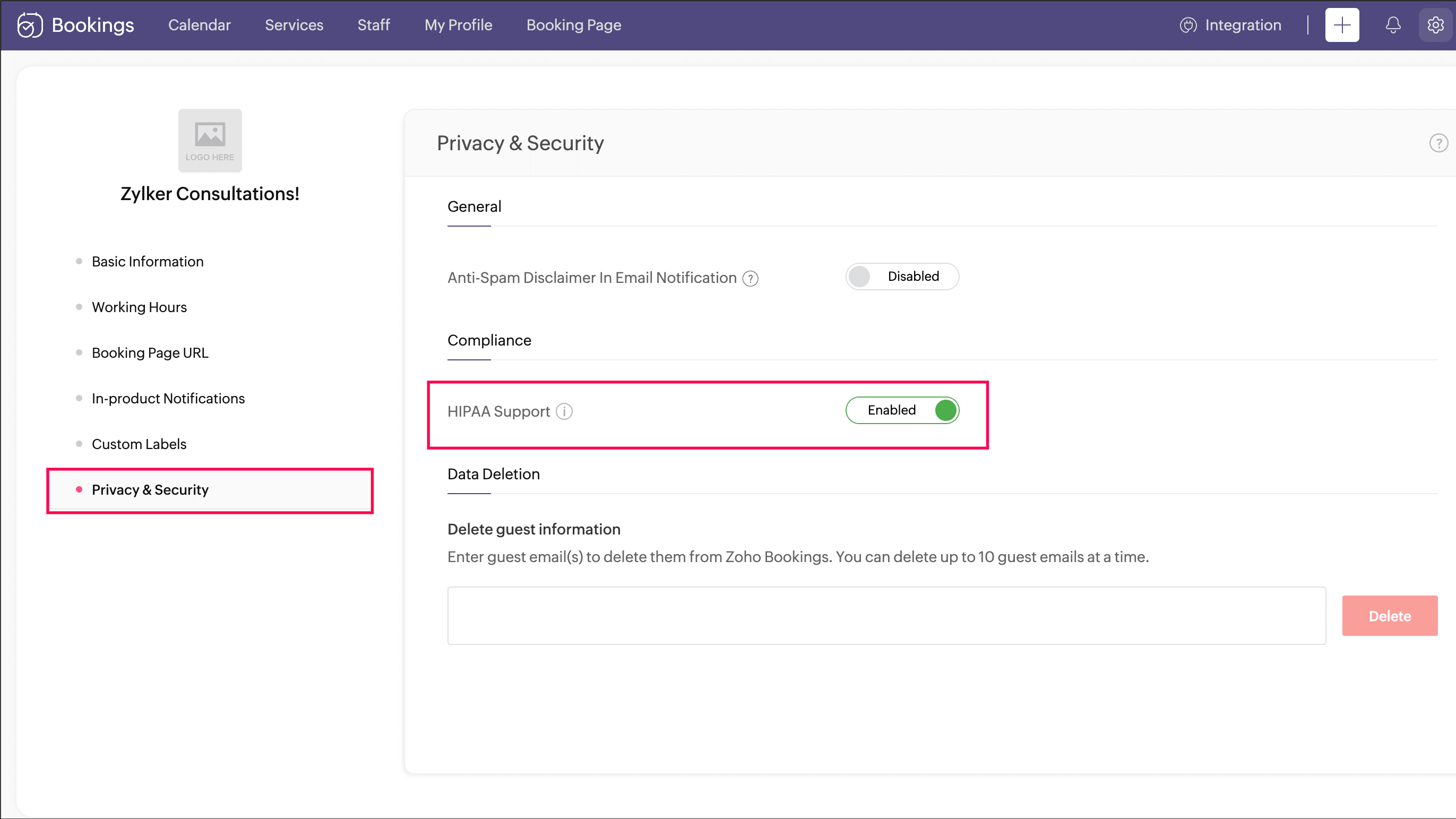
Zoho Bookings Ensures GDPR and HIPAA Compliance for the Protection of Your Customers' Data
Ensuring data security is crucial in today's digital landscape, and Zoho Bookings excels with robust measures to protect sensitive customer information. It prioritizes data privacy with stringent security protocols, including GDPR compliance and certification as a Business Associate Agreement (BAA) for HIPAA-sensitive data. Zoho Bookings' commitment to maintaining high standards of data protection enhances trust and reliability for users handling confidential information.
In contrast, while Calendly implements advanced access controls, it lacks specific details on comprehensive data protection measures similar to those outlined by Zoho Bookings, making Zoho Bookings the preferred choice for organizations prioritizing stringent data security practices.
Calendly Excels Ahead of Zoho Bookings for User-Friendliness
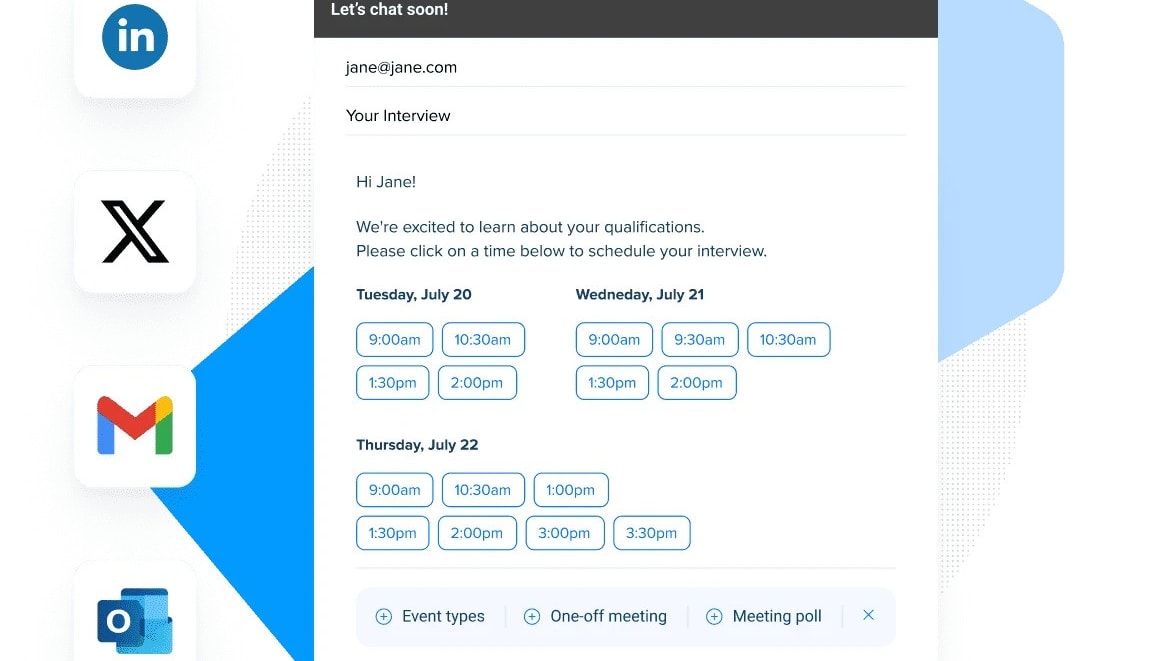
Easily Connect Your Calendar to Calendly and Create Scheduling Links for Seamless Bookings
When it comes to user-friendliness, Calendly clearly outshines Zoho Bookings with its intuitive design and straightforward interface. Calendly prioritizes simplicity, making it exceptionally easy for users to navigate and schedule appointments effortlessly. For instance, its clean dashboard and step-by-step setup guides ensure even beginners can quickly integrate their calendars and start using the tool effectively.
In contrast, Zoho Bookings, while offering extensive customization capabilities, may require a bit more technical understanding to configure initially. This customization depth can be advantageous for businesses with specific needs but may pose a learning curve for those seeking a more straightforward scheduling solution like Calendly.
Calendly Leads in Comprehensive Activity Tracking Compared to Zoho Bookings
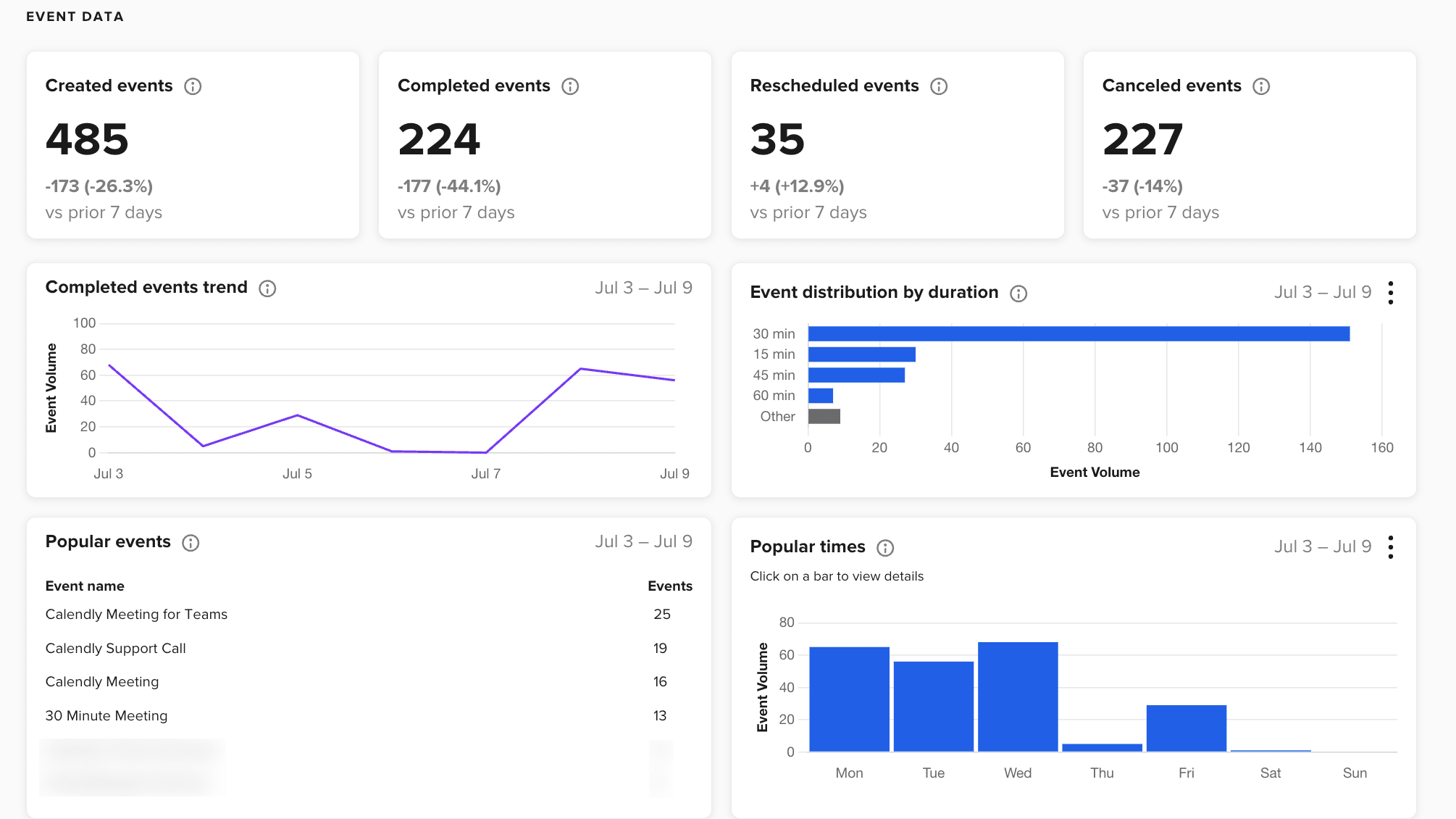
Gain Insights into Your Event Data with Calendly, Including Events Created, Completed, and Cancelled
Calendly excels over Zoho Bookings in activity tracking capabilities, offering detailed insights into invite acceptance rates, reschedule rates, and overall meeting metrics. This level of monitoring enables users to optimize scheduling efficiency and enhance productivity effectively. For instance, Calendly's analytics dashboard provides actionable data that helps users understand booking trends and improve scheduling processes.
In contrast, while Zoho Bookings provides visibility into appointments and staff availability, its reporting focuses primarily on booking insights, which may not offer the same depth of activity tracking as Calendly. Therefore, for robust activity monitoring and optimization, Calendly proves to be the superior choice.
Zoho Bookings and Calendly are Equally Efficient at Scheduling Meetings

Allow Your Customers to Book Meetings Easily on Zoho Bookings through Embeddable Booking Pages, Setting Your Availablity and Listing Your Services
Both Zoho Bookings and Calendly excel in automating scheduling processes, reducing the need for extensive email exchanges. Calendly allows users to set availability and syncs seamlessly with personal calendars like Google Calendar and Outlook, simplifying the booking process for invitees.
Similarly, Zoho Bookings integrates with Google, Zoho, and Microsoft calendars to prevent double-bookings, ensuring accurate scheduling and efficient time management. By leveraging these automated features, both tools effectively streamline appointment scheduling, minimize scheduling conflicts, and enhance overall productivity by eliminating the tedious back-and-forth of arranging meeting times.
Calendly Offers Superior Integration Flexibility Compared to Zoho Bookings
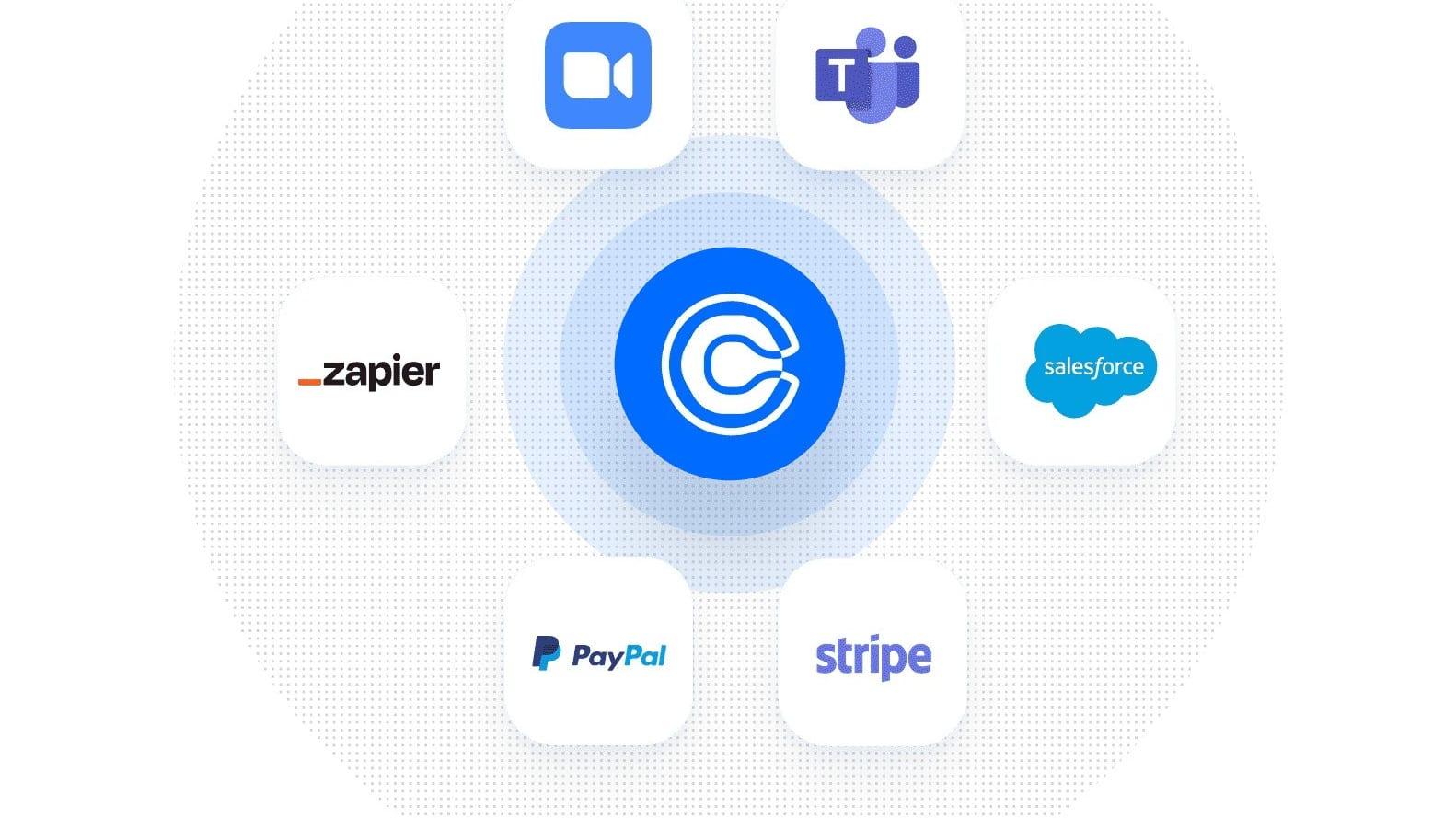
Calendly Seamlessly Integrates with a Number of Different Sofware, Including Zoom, Stripe, and Salesforce
Both Calendly and Zoho Bookings excel in platform flexibility and integration capabilities, but Calendly edges ahead with its extensive compatibility across a wide range of third-party applications. For example, Calendly seamlessly integrates with popular productivity tools, payment gateways, and other software like Google Calendar, Office 365, Outlook, Zapier, Salesforce, Stripe, and PayPal. This robust integration ecosystem enhances connectivity and streamlines workflows for users across various platforms and industries.
By offering such extensive integration options, Calendly provides users with more flexibility to customize their scheduling processes and integrate seamlessly with their existing tech stack, making it a preferred choice for many businesses seeking comprehensive connectivity solutions.
Zoho Bookings Excels in Customizable Email Notifications Compared to Calendly

Customize Your Zoho Bookings's Email Notifications with Specific Meeting Information, Customer Data, Images, and More
Zoho Bookings offers a distinct advantage with its robust customization options for email notifications. Users can personalize emails with HTML formatting, insert images for visual appeal, and tailor content to reflect their brand's tone and style. Additionally, Zoho Bookings allows for dynamic details such as booking specifics and personalized messages, enhancing customer communication and engagement.
In contrast, while Calendly efficiently automates reminders and notifications, it does not provide the same level of customization for email content and branding. Therefore, businesses looking to personalize customer interactions through detailed email customization would find Zoho Bookings a more suitable choice.
08 Calendly vs Zoho Bookings: Which is the best for your business?
Calendly is the best tool for you if:
- You value simplicity and an intuitive user interface that allows you to set up and manage appointments without a steep learning curve.
- You're looking for a cost-effective solution that integrates smoothly with multiple calendar types, enhancing your scheduling efficiency without additional software overhead.
- Your primary need is rapid deployment and ease of use, enabling you and your team to begin scheduling with minimal configuration.
- Automation is a key requirement, especially if you want to streamline appointment confirmations, reminders, and follow-ups, saving time and reducing manual input.
- You operate as a freelancer or part of a small team and need a straightforward tool that simplifies rather than complicates the scheduling process.
 You value simplicity and an intuitive user interface that allows you to set up and manage appointments without a steep learning curve.
Zoho Bookings is the best tool for you if:
- You require extensive customization options to tailor the scheduling experience precisely to your business processes and customer interactions.
- Your organization benefits from deep integration with CRM, email marketing, and other Zoho suite applications, streamlining all customer interactions.
- Advanced features such as group bookings, recurring appointments, and detailed analytics are essential for managing your operations effectively.
- You value having robust reporting capabilities that provide insights into booking trends, staff performance, and customer behaviors to optimize your services.
- Your business needs a flexible solution that can handle complex booking scenarios, including multiple locations, services, and staff members.
Zoho Bookings
Hassle-free scheduling for businesses
$100 in Zoho Wallet credits
Save up to $100
09 Alternatives to Calendly & Zoho Bookings

Google Workspace
Used by 10340 members
20% off Standard plans for 1 year
Save up to $3,460

HubSpot
Used by 2917 members
90% off the Professional and Enterprise plans for 1 year
Save up to $7,000

Zoom Meetings
Used by 2836 members
$20 off per user on the annual Workplace Pro plan
Save up to $180

Cal.com
Used by 632 members
20% off for 1 year
Save up to $88
10 Promotions on Scheduling software
Calendly and Zoho Bookings are great tools, but Secret offers promo codes with discounts on over 2240+ different SaaS solutions. New deals are added regularly, helping you save money on your online subscriptions. Get access to codes for other Scheduling software you might want to purchase

Google Calendar promo code 2026
20% off Standard plans for 1 year

Calendar promo
50% off all plans for 1 year
Cal.com discounts
20% off for 1 year

Credits for Calendesk
20% off for 1 year

Doodle deal
20% off the monthly Pro plan

Discount for Livestorm
Forever Free Plan with 25 live attendees per event

Discount for CatchApp Bookings
75% off for 1 year

Reply io coupon code 2026
14 days free

Promo code Routine
20% off all annual plans
Start saving on the best SaaS
Secret has already helped tens of thousands of startups save millions on the best SaaS like Microsoft Teams, Google Workspace & many more. Join Secret now to buy software the smart way.