


When you choose a company email service, you are not simply buying email accounts for employees. You are choosing an ecosystem for the way your company team will share documents, schedule appointments, set up security, onboard new employees etc. Google Workspace and Zoho Mail are similar enough in that both can provide professional email on your company's domain name, but they differ greatly in their philosophy of doing so.
This article will explain the major differences (in a "real world" sense) between these two services including; deliverability practices by admins, administrative control, collaborative capabilities, the friction from migrating to another service, and the costs associated with each.
If you are looking to cut down your monthly subscriptions for all your services, you may want to check the Google Workspace promo code for Plus plans before you commit to a yearly contract.
- 01 Google Workspace vs Zoho Mail: overview
- 02 What's the difference between Google Workspace and Zoho Mail?
- 03 Google Workspace pros and cons
- 04 Zoho Mail pros and cons
- 05 Google Workspace compared to Zoho Mail
- 06 Zoho Mail compared to Google Workspace
- 07 Features comparison
- 08 Google Workspace vs Zoho Mail: Which is the best for your business?
- 09 Alternatives to Google Workspace & Zoho Mail
- 10 Promotions on Collaboration software
- 11 Google Workspace vs Zoho Mail: Conclusion
Start saving on the best SaaS
Secret has already helped tens of thousands of startups save millions on the best SaaS like Microsoft Teams, Google Workspace & many more. Join Secret now to buy software the smart way.

01 Google Workspace vs Zoho Mail: overview
At a high-level, Google Workspace (previously G-Suite) is a complete suite of products for work with email as the entry point and collaboration as the main focus. All of Gmail, Calendar, Drive, Docs, and Meet are designed to be one shared and interconnected workplace that you can search through, share through, and manage from a single administrator dashboard.
On the other hand, Zoho Mail is an email-focused product that expands into a much larger suite if you so choose; Zoho has a very large and diverse collection of applications. Many small to medium sized businesses find it appealing because it offers professional email hosting, reasonable management, and affordable pricing in relation to cost control. It does this all while offering no obligation to use their document collaboration operating system if you do not need one.
Here is a side by side comparison of features between Google Workspace and Zoho Mail that are commonly used when purchasing business email.

Customer support
Google offers tiered Customer Care options for admins. Zoho offers solid support resources, but the experience often depends on plan and complexity.

Google Workspace
Zoho Mail
Customer reviews
Workspace benefits from massive adoption and predictable UX. Zoho Mail is frequently praised for value, especially by cost-conscious teams.
Google Workspace
Zoho Mail
Deliverability & authentication (SPF, DKIM, DMARC)
Both support modern email authentication. Workspace feels more “set-and-forget” for many orgs, while Zoho can require more hands-on tuning during rollout.
Google Workspace
Zoho Mail
Ease of use
Workspace wins for most teams thanks to Gmail familiarity and tight app-to-app flows. Zoho Mail is clear, but can feel less “second nature” at first.
Google Workspace
Zoho Mail
Pricing plan
Zoho Mail is typically more cost-efficient for email-only needs. Workspace pricing becomes attractive when Drive, Docs, and Meet replace separate tools.
Google Workspace
Zoho Mail
Migration & setup
Both can be migrated cleanly with planning. Zoho provides specific migration paths from Google Workspace, while Workspace migration is straightforward for Gmail-centric targets.
Google Workspace
Zoho Mail
Security & admin policies
Workspace generally provides deeper policy depth for larger org governance. Zoho covers essentials well for SMB setups and straightforward security baselines.
Google Workspace
Zoho Mail
Collaboration suite
Workspace dominates for real-time co-editing and file sharing via Drive. Zoho Mail is email-first unless you add additional Zoho workplace apps.
Google Workspace
Zoho Mail
Storage & file sharing
Drive’s sharing model and discovery are core Workspace strengths. Zoho storage is workable, but the broader collaboration workflow is usually less standardized.
Google Workspace
Zoho Mail
Integrations & ecosystem
Workspace integrates widely with third-party SaaS and identity stacks. Zoho Mail is strongest when you’re already invested in Zoho’s business suite.
Google Workspace
Zoho Mail
02 What's the difference between Google Workspace and Zoho Mail?

Real-time collaboration with Google Meet in Google Workspace
Google Workspace
A complete suite to improve employee productivity

Zoho Mail's all-in-one inbox for focused business communication
Zoho Mail
Zoho Mail offers a powerful and reliable email solution for businesses, providing value through its robust features, security, and affordability. With Zoho Mail, users can have a professional email address with their own domain, benefit from ad-free and clutter-free communication, and collaborate seamlessly with teams through shared calendars, contacts, and tasks.
The primary distinction is what each is built upon. Google Workspace was created with collaborative applications at its core (e.g., shared drives, document-based workflows, live meeting links, commenting threads, etc.) – where the routing layer is based on email. The majority of the value of this platform is derived from the speed with which teams can transition from "message," to "document," to "decision" – all within the same context. Therefore, if your company creates drafts, proposal outlines, product specifications and shared workbooks; those elements will show up as actual throughput in terms of time.
Zoho Mail is designed with an email-focused approach as well, although more intentionally so than Google Workspace. As such, it typically makes the most sense when your workflow revolves mainly around the inbox, calendar, and a few shared email accounts. Furthermore, if you prefer to maintain a simple tool chain and would prefer to avoid committing to the full productivity worldview of Google Workspace right out of the gate; then Zoho Mail may be a good fit.
While Zoho Mail can integrate with a larger suite of tools; it's simply not necessary to purchase the entire suite immediately. This can matter greatly when considering items such as burn rates, a small IT department, and/or users who require nothing more than a functional mailbox and clean web client.
In terms of free access; the comparisons that people make ("is Zoho Mail free similar to Gmail") are usually apples-to-oranges comparisons. Consumer Gmail is a free, personal service; whereas, Google Workspace is the paid business version of Google Apps and is used for both the creation of custom domain email and admin control. Zoho Mail does offer a free plan in various areas of the world, however the free plan is subject to limitations (such as web-only access, and user limits); and availability varies by region.

Google Workspace
A complete suite to improve employee productivity
20% off Standard plans for 1 year
Save up to $3,460
03 Google Workspace pros and cons
What are the advantages of Google Workspace?
- Frictionless adoption (Gmail UX): Most hires already know Gmail. That reduces training time and makes rollout faster across sales, ops, and leadership.

- Best-in-class real-time collaboration: Docs, Sheets, and Slides make co-editing, commenting, and version history feel native, not bolted on.
- Drive sharing that scales: When permissions and link-sharing are used correctly, Drive is a powerful mechanism for cross-team alignment and external collaboration.
- Admin and governance depth: Workspace provides robust admin controls for identities, policies, and user lifecycle management, especially valuable as headcount grows.
- Mature support tiers: Google offers a structured Customer Care portfolio with tiered response times and 24/7 coverage for higher-severity cases depending on support level.
What are the disadvantages of Google Workspace?
- Can be overkill for “just email”: If your team doesn’t collaborate heavily in docs or meetings, you can end up paying for a suite you underuse.

- Governance takes discipline: Without intentional rules, shared drives and link-sharing can produce content sprawl and unclear ownership.
- Admin complexity increases with scale: The power is there, but it often demands an IT owner, or a strong ops function, to keep policies consistent.
- Meeting needs may outgrow Meet for some teams: Specialized webinar and event workflows sometimes push teams to dedicated platforms.
- Pricing optimizations require attention: Seat growth, storage, and support upgrades can change the cost profile quickly if you don’t review usage regularly.
Compare Google Workspace to other tools


Gmail vs Google Workspace


Microsoft Teams vs Google Workspace

Google Workspace vs Squarespace

Google Workspace vs Microsoft 365

Zoho vs Google Workspace

Google Drive vs Google Workspace
04 Zoho Mail pros and cons
What are the advantages of Zoho Mail?
- Cost-efficient for email-first teams: Zoho Mail is typically compelling when you mainly need custom-domain email and core admin functions.
- Flexible plan structure: Zoho separates entry mail plans from more advanced mail and archival capabilities, and documents entitlements clearly.
- Practical admin features: Domain management, policies, and org-level controls cover what most SMBs actually need day to day.
- Migration tooling when moving from Google: Zoho supports multiple migration paths from Google Workspace and documents common pitfalls, such as Gmail labels creating duplicate folder migrations if misconfigured.
- Strong fit inside the Zoho ecosystem: If Zoho CRM, Zoho Desk, or Zoho Projects are already part of your operating model, Zoho Mail can reduce vendor sprawl.
What are the disadvantages of Zoho Mail?
- Collaboration depth isn’t the default: If your team expects Google-style document collaboration as a baseline, Zoho Mail alone won’t replicate that experience.
- Less universal familiarity: Users coming from Gmail may need time to adapt to different UI patterns and shortcuts.
- Integrations can be less automatic in best-of-breed stacks: Zoho works great with Zoho. With some third-party stacks, you may do more configuration work.
- Free plan limitations matter in practice: Even where available, web-only access and constraints can be a deal-breaker for businesses that need IMAP or mobile clients.
- Migration still requires planning: Aliases, shared mailboxes, routing rules, and SPF, DKIM, and DMARC are easy to underestimate, regardless of tool.
05 Google Workspace compared to Zoho Mail
Google Workspace is "the standardization & scalability" solution. It will excel when you wish to have a unified identity system, collaboration layer and one predictable experience through email, files and meetings. On the other hand, Zoho Mail is modular. It is ideal when you need a solid and cost-effective business email solution, and you would like to extend your stack only when you have a true need to do so.
In short, Google Workspace is a productivity operating system and Zoho Mail is an email platform that can become a Suite when you desire to do so.
Is Google Workspace better than Zoho Mail?
 Is Google Workspace better than Zoho Mail?
For teams that collaborate frequently on shared proposal documents, budgeting spreadsheets, product documentation, and client deliverables, Google Workspace is generally preferred since the collaboration primitives are deeply integrated. You don't simply attach files; you are able to share controlled access, comment in line, and maintain a single source of truth.
If email is the primary workload and you want tight cost control without purchasing a complete collaboration suite, then Zoho Mail may be a better choice. However, if you measure productivity in how quickly you can co-author and decide, Google Workspace has a significant advantage.
What is Google Workspace best used for?
Google Workspace is best suited for organizations that consider email as the entry point to a broader workflow — drafting in Docs, reviewing in comments, storing in shared drives, and meeting in Calendar and Meet. It is especially well suited for distributed teams, which have asynchronous collaboration and quick sharing as part of their daily habits.
Additionally, Google Workspace is a good fit for high-growth companies, due to the fact that onboarding is fast. The interface is familiar, and the toolset is consistent across departments.
Can Google Workspace replace Zoho Mail?
Yes, Google Workspace can replace Zoho Mail for core business email hosting, custom domains, aliases, and admin management. Where Google Workspace extends beyond replacement is collaboration.
If your team currently utilizes separate tools for Docs, file sharing, and meetings, Google Workspace can integrate these into a single environment.
The majority of the migration work is operational, such as migrating mailboxes, DNS changes (MX, SPF, DKIM, DMARC), and mapping shared addresses. If you plan this accordingly, the switch should be clean.
Is Google Workspace cheaper than Zoho Mail?
In scenarios where email alone is being used, it typically is not; Zoho Mail has a cost advantage on raw per-mailbox economics. The equation will likely shift in favor of Google Workspace if Workspace can replace multiple subscriptions (file storage, office application, meeting applications) that were previously purchased separately.
If you are leaning towards purchasing Google Workspace, it would be wise to validate the discount opportunity prior to making the purchase to minimize the risk.You can review the Google Workspace promo code for Standard and Plus plans and see whether it makes the suite pricing feel more rational.
Is there a better Collaboration software than Google Workspace?
Yes. If you define "better" as simply less than the full suite of Google products, then yes, there are some business email hosts that may be a better fit depending on your needs like Microsoft 365 or Zoho Mail. Some businesses prefer a simpler email host, different privacy position, or a suite of products centered around a different company than Google.
When considering business email providers other than Google Workspace, begin by identifying and researching alternative business email providers by collaborating with others, by cost, or by what administrative requirements will need to be met.
Can I move Zoho Mail to Gmail?
Yes. And it's relatively easy to do so, but you'll need to do so like an engineer, rather than like a magician. A good way to do this is to first authenticate your domain using Google Workspace; secondly, import all of your historical email, most commonly via IMAP or a migration tool; thirdly, swap your MX records once you've decided to receive incoming email for your domain in Gmail.
Plan out the rough edges too: aliases, catch-all routing, shared mailboxes, and authentication records.
Changing these quickly can cause deliverability problems (missing emails) that appear randomly to end-users.
Google Workspace
A complete suite to improve employee productivity
20% off Standard plans for 1 year
Save up to $3,460
06 Zoho Mail compared to Google Workspace
When evaluating Zoho Mail against Google Workspace, we should first consider how each service is defined by its approach to the collaborative workspace.Zoho Mail is best considered as a practical business e-mail solution. The product does not require you to purchase into the full collaboration vision.
The design of the product is centered around delivering you business class e-mail accounts, administration tools and a predictable cost model. This design makes Zoho Mail most appealing to organizations whose main requirement is simply e-mail.
Conversely, Google Workspace is positioned as a different type of bet. Organizations pay for a suite of products because the suite of products is a leverage point for their overall productivity. Therefore, if your organization does not need the suite level of features then Zoho Mail will likely win.
Is Zoho Mail better than Google Workspace?
Zoho Mail is better suited for organizations that have a primary requirement of business class e-mail hosting with a focus on cost discipline. In other words, if your end-users spend most of their time within e-mail and calendar and do not create or collaborate on many documents, then paying for Workspace may be unnecessary overhead.
Additionally, Zoho Mail may be a good option for organizations that are already invested in the Zoho Ecosystem. Using Zoho Mail would mean fewer vendors, fewer admin consoles and fewer moving parts in your IT infrastructure.
What is Zoho Mail best used for?
Zoho Mail is best suited for small to medium-sized businesses (SMB) and teams who wish to use custom domain e-mail addresses, have administrative controls over their e-mail environment and desire a simple webmail experience.
Additionally, Zoho Mail is an ideal solution for teams that have multiple role based e-mail addresses such as sales@, billing@ and support@ and that value simplicity in their technology stack.Zoho Mail is also a good option for organizations that wish to establish an e-mail platform that they can grow into later, without the need to purchase a full productivity suite at inception.
Can Zoho Mail replace Google Workspace?
Zoho Mail is best suited for small to medium-sized businesses (SMB) and teams who wish to use custom domain e-mail addresses, have administrative controls over their e-mail environment and desire a simple webmail experience.
Additionally, Zoho Mail is an ideal solution for teams that have multiple role based e-mail addresses such as sales@, billing@ and support@ and that value simplicity in their technology stack.Zoho Mail is also a good option for organizations that wish to establish an e-mail platform that they can grow into later, without the need to purchase a full productivity suite at inception.
Is Zoho Mail cheaper than Google Workspace?
In many situations, yes, Zoho Mail is cheaper when you compare mailbox to mailbox. Google Workspace becomes cost-justified when you’re extracting value from the full suite instead of paying for separate tools.
Even if you choose Workspace, you don’t have to pay full price by default. The Google Workspace Plus plan discount can materially reduce the first-year cost for teams that need the suite advantages.
Is there a better Email Marketing software than Zoho Mail?
Depending on what you are looking for from an application , whether you are looking for a "collaboration first" suite, a "more enterprise heavy" governance model, or a "different integration ecosystem," then yes, there may be something like Google Workspace or Microsoft 365. It would make sense to select an application that fits your operating model rather than having your operating model fit the application. Here are a few concrete alternatives companies often compare with Zoho Mail
Is Zoho Mail as free as Gmail?
Not like most people think of it. Gmail's free plan is a personal email service. A business email with a custom domain and admin controls is a different type of service and requires payment for the business level, which is what Google Workspace does.
Zoho Mail has a free plan that is documented, but includes limitations such as web-based only, and only available regionally. For most companies, if they require any of the typical business features such as IMAP, mobile clients, routing, SSO, or archive grade control over their emails, they will likely end up on a paid plan.
07 Features comparison
Google Workspace is a Step Ahead for Ease of Use

Gmail's familiar interface reduces training time and boosts team efficiency
Ease of use is where Google Workspace quietly prints ROI. When users already know Gmail shortcuts, labels, search operators, and Calendar flows, you reduce training debt. That matters most in sales and customer-facing teams where seconds add up and tool friction becomes a real opportunity cost.
Zoho Mail is not complicated, but it’s less culturally ubiquitous. Expect a short adaptation period. Users will relearn keyboard shortcuts, navigation patterns, and settings locations. The gap isn’t about capability, it’s about reflexes.
If you’re rolling out to non-technical teams or hiring fast, Workspace’s familiarity can be a surprisingly decisive advantage.
Zoho Mail Often Wins on Pricing Plan Clarity for Email-Only Teams
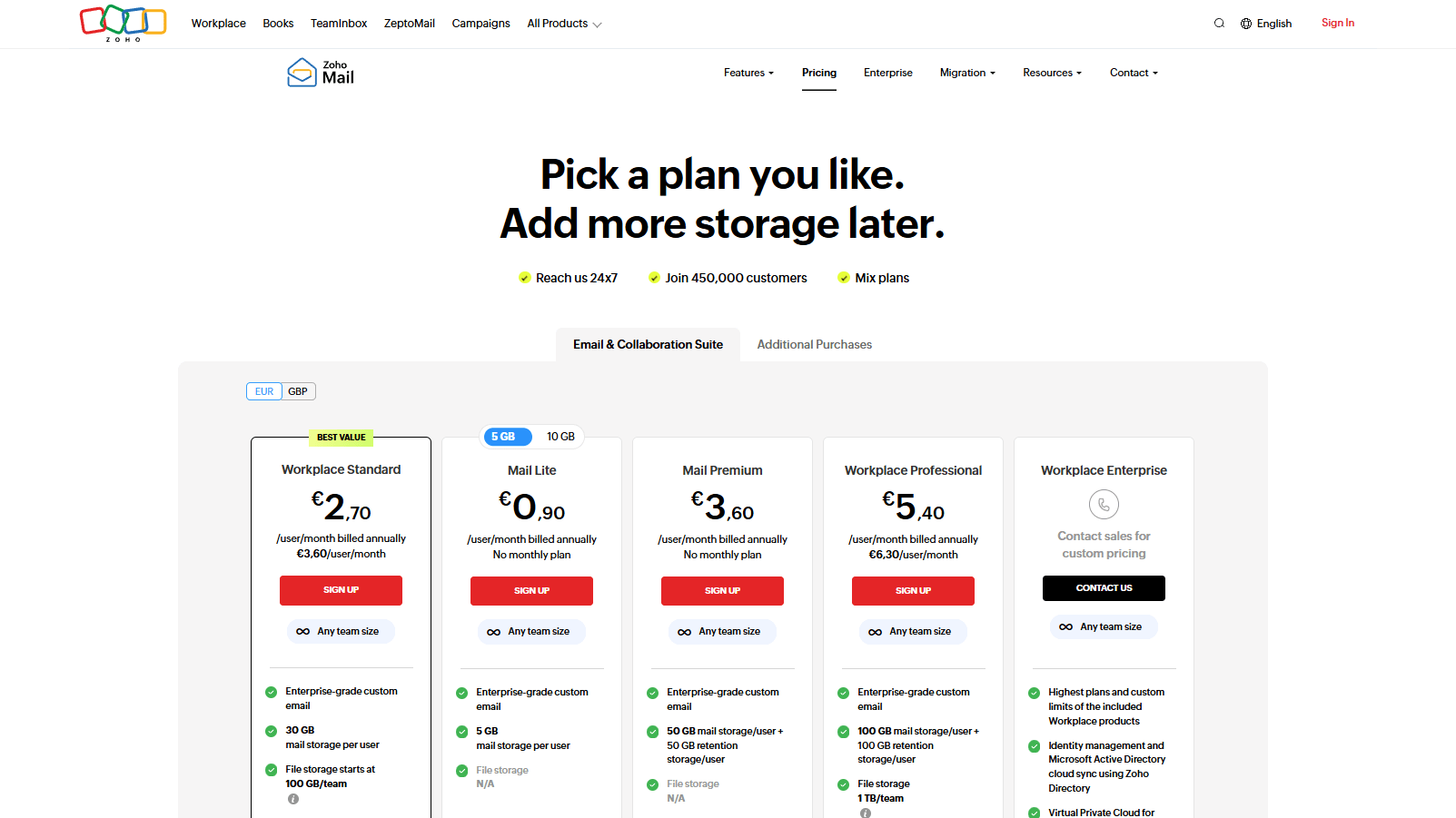
Transparent Zoho Mail pricing designed for email-first teams
If all you want to do is send business emails correctly, Zoho Mail has a clearer cost story. Zoho Mail's documentation clearly outlines what features are available at no charge versus entry level versus paid, particularly with regards to archived storage and advanced controls.
The cost of Workspace may seem higher than Zoho Mail since you're purchasing a suite. However, that is the very reason you are purchasing Workspace. If your team is already spending money on separate services such as cloud storage, an office suite and/or a meeting tool, then Workspace can provide you with a lower total cost of ownership for your entire application stack, regardless of the cost of the mailbox itself.
There is one simple rule: Zoho Mail for email first costs, Google for suite driven cost savings and collaboration.
Zoho’s Documented Migration Paths Reduce Risk when Moving from Google

One-click migration tools for moving to Zoho Mail
Migrations are rarely difficult due to the actual tool used to perform the migration. Instead, migrations are difficult due to the unique characteristics of each organization (edge cases). One of the key factors that sets Zoho apart from other email providers is the level of detail provided within the migration documentation, particularly when it comes to migrating Gmail Labels, which can cause duplicate folders and bloated mailboxes if migrated improperly.
Additionally, Zoho provides multiple migration methods, including one-click, app-based migrations from Google Workspace and Microsoft 365, as well as IMAP. One-size-fits-all migration approaches commonly fail in hybrid environments.
Regardless of whether you're migrating to Zoho or migrating to Google, consider the migration to be a project. Create an inventory of employee aliases, routing rules, authentication records, and shared mailboxes prior to performing any DNS changes.
Google Workspace provides Stronger Admin and Governance Controls for Scaling Orgs
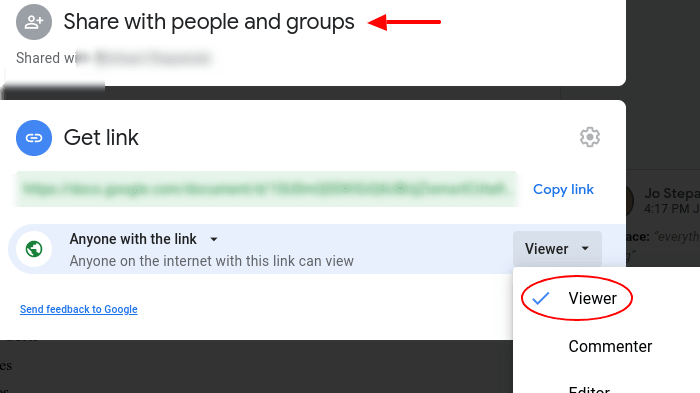
Granular sharing permissions and access controls in Google Workspace
Admin quality will become increasingly important once you exceed the number of people who personally know each other. At that time you will require standardized offboarding procedures, controlled sharing, group based permissions and predictable policy enforcement. Workspace is designed for that type of organization. It includes a single administrative console that allows for the standardization of your organization.
Zoho Mail meets the basic admin needs of most small and medium size businesses. However, if you operate in a regulated industry, or if you have strict access governance requirements, the maturity of Google's product offering may make it a better option for you.
If your IT department thinks in terms of policies and guardrails, Workspace will likely feel like a natural fit.
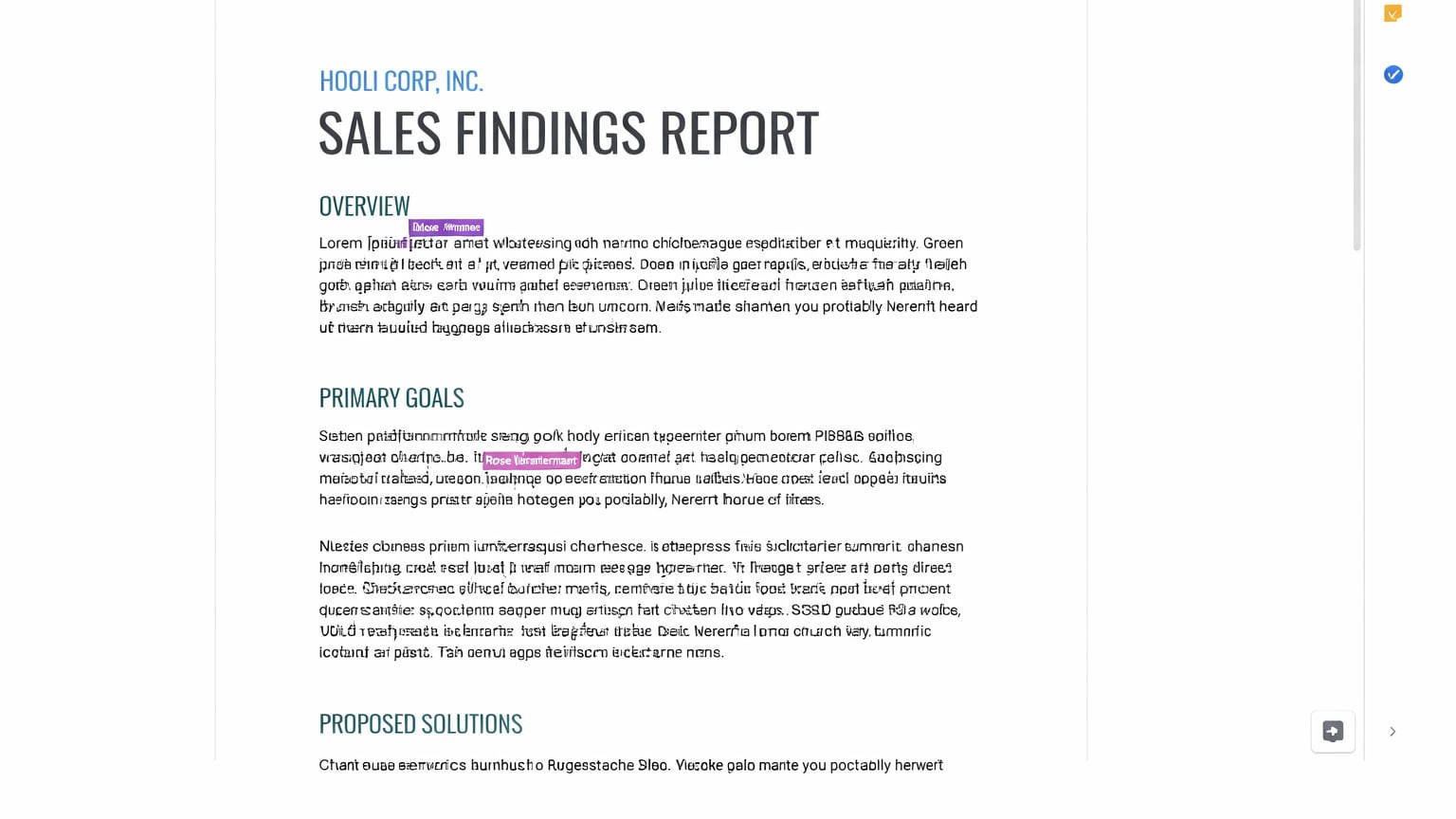
Google Workspace Dominates Collaboration Apps by Design

Multiple collaborators editing simultaneously in Google Docs
The fact that Docs and Sheets have built-in collaboration capabilities (such as live editing, commenting, suggesting changes, etc.) make many businesses happy to pay a higher cost per user for the collaboration features included with Workspace.
While there are many ways to collaborate using Zoho Mail, this collaboration feature is only available when you're utilizing the rest of the Zoho stack. In some cases, this can be beneficial; however, this is generally a different baseline compared to Google's collaboration features. The way most businesses use their collaboration tools, Google's collaboration is always the default way of doing things whereas Zoho Mail's collaboration options require a business to intentionally choose to utilize them.For many businesses whose internal workflow is centered around co-authoring documents, reviewing, and quickly approving, Workspace will likely provide a more collaborative experience than Zoho Mail.
Google Workspace is Stronger for Storage and Sharing Workflows that involve External Stakeholders
Secure link-based file sharing and version control with Google Drive
One of the primary issues associated with email applications (and therefore email platforms) is external sharing. Many times, users who attempt to share a document with external parties may find themselves dealing with confusing attachments, version drift, and ambiguous ownership. Google Drive is designed to prevent these types of issues through the use of link-based sharing and permissioning models. Additionally, Google Drive allows teams to create shared drives with structured access controls to ensure that sensitive information is not shared with unauthorized individuals.
Zoho Mail does allow for the ability to store documents, but the shared file safety and version control processes associated with the Google Drive platform are much more universally accepted. As such, a business would need to develop additional processes to train employees and document procedures to achieve consistent results when storing and sharing files.
If a business frequently shares files with clients, agencies, and contractors, then the document-sharing processes associated with the Google Drive platform represent a significant operational advantage.
Google Workspace wins Integrations and Ecosystem Reach for Best-of-Breed Stacks

Extensive third-party integrations through the Google Workspace marketplace
A large number of SaaS applications are natively integrated with Google. This includes native integration for Google OAuth, Google Calendar, Google Drive pickers, and Gmail Addons. Because of the high degree of native integration across so many different applications, integrating these applications into your technology stack requires significantly less effort and creates a more cohesive technology ecosystem.
Zoho Mail provides native integration with other Zoho applications, primarily when you're running all of your applications within the Zoho ecosystem. When a company runs all of its applications within the same vendor ecosystem (i.e. Zoho), this can create a number of benefits related to integration and usability.
Therefore, the primary decision regarding whether to utilize Google Workspace or Zoho Mail will depend on the architecture of your technology stack and whether you prefer to run a best-of-breed SaaS application stack (which would typically point towards Google) or a suite-centric SaaS application stack (which would typically point towards Zoho).
08 Google Workspace vs Zoho Mail: Which is the best for your business?
Google Workspace is the best tool for you if:
- You collaborate in shared documents daily and want real-time co-authoring as the default workflow.
- You want faster rollout because your team already knows Gmail and Google Calendar.
- You need stronger admin governance as headcount and departments scale.
- You prefer a suite that consolidates email, meetings, storage, and docs into one platform.
- You run a best-of-breed SaaS stack and want broad, low-friction integrations.
 You collaborate in shared documents daily and want real-time co-authoring as the default workflow.
Zoho Mail is the best tool for you if:
- You want professional email hosting with a cost-first mindset.
- Your workflow is primarily email and calendar, and document collaboration is secondary.
- You’re already invested in Zoho apps and want a more coherent ecosystem.
- You value a more modular approach, add capabilities only when they’re justified.
- You want migration options that support different infrastructure realities, one-click, IMAP, and more.
Google Workspace
A complete suite to improve employee productivity
20% off Standard plans for 1 year
Save up to $3,460
09 Alternatives to Google Workspace & Zoho Mail

Google Cloud (GCP)
Used by 11891 members
$2,000 in credits for 1 year if you never raised funds // $350,000 in credits for 2 years if you did
Save up to $350,000

Slack
Used by 3967 members
25% off new plan purchases
Save up to $9,000

Miro
Used by 3583 members
$1,000 in credits (lifetime validity)
Save up to $1,000

ClickUp
Used by 3421 members
Additional 20% off Unlimited and Business plans for 1 year
Save up to $1,000
10 Promotions on Collaboration and Email Marketing software
Google Workspace and Zoho Mail are great tools, but Secret offers promo codes with discounts on over 2240+ different SaaS solutions. New deals are added regularly, helping you save money on your online subscriptions. Get access to codes for other Collaboration and Email Marketing software you might want to purchase

Airtable promo
$1,000 in credits on licences for 1 year

Discount for Brevo (ex. Sendinblue)
50% off Starter and Standard Plans

Notion promotion
3 months free on the Business plan with Unlimited AI

Code for ActiveCampaign
90% off any annual plan for the first year
Slack promotion code
25% off new plan purchases

Bouncer promotion
20% off on Pay-as-you-go
Miro promo code 2026
$1,000 in credits (lifetime validity)

lemlist promotion code
First month free

Monday promo code 2026
First month free

Customer.io discount
1 year free on the Essentials plan (30k profiles)
11 Google Workspace vs Zoho Mail: Conclusion
I would say that if you could distill my summary of these two platforms into a single statement, then Google Workspace is probably the best value for those who rely on their ability to collaborate with others on an ongoing basis, whereas Zoho Mail represents the better option for those whose work relies heavily upon the efficiency of email, and also for cost conscious organizations. I wouldn't say that choosing Google over Zoho (or vice versa) will lead to making the wrong choice, but rather to choose either one without truly understanding its unique set of features which may never be utilized.If you’re leaning toward Google Workspace, I strongly recommend validating savings before you lock in seats.
Start with the Google Workspace promo code for Standard and Plus plans to reduce first-year cost, and keep your tooling budget sane.
For additional product detail and official technical references, you can consult Google Workspace Customer Care and Zoho Mail plans and entitlements.
Start saving on the best SaaS
Secret has already helped tens of thousands of startups save millions on the best SaaS like Microsoft Teams, Google Workspace & many more. Join Secret now to buy software the smart way.