


Selecting the right productivity tools is akin to setting the foundational blocks for business success. In an era dominated by digital technology, the question is no longer whether you need productivity tools, but which one would serve your organizational goals the best. A poor choice could decrease communication, hamper document sharing, or even bottleneck workflows.
We will conduct a comprehensive, side-by-side comparison of two leading productivity platforms—Zoho and Google Workspace. We will scrutinize them across a variety of key criteria including which one has the better features, pricing, ease of use, and customer support, among other criteria. This in-depth analysis will offer you valuable insights, enabling you to make a well-informed decision about which platform is the best for your business’s unique needs.
- 01 Zoho vs Google Workspace: overview
- 02 What's the difference between Zoho and Google Workspace?
- 03 Zoho pros and cons
- 04 Google Workspace pros and cons
- 05 Zoho compared to Google Workspace
- 06 Google Workspace compared to Zoho
- 07 Features comparison
- 08 Zoho vs Google Workspace: Which is the best for your business?
- 09 Alternatives to Zoho & Google Workspace
- 10 Promotions on CRM software
Start saving on the best SaaS
Secret has already helped tens of thousands of startups save millions on the best SaaS like Microsoft Teams, Google Workspace & many more. Join Secret now to buy software the smart way.

01 Zoho vs Google Workspace: overview
Zoho and Google Workspace are prominent contenders in the realm of office productivity and collaboration tools, each with unique offerings tailored to different user preferences and requirements.
Zoho is renowned for its comprehensive suite of business applications that cover everything from email and document collaboration to project management and CRM. It offers a wide range of productivity tools, including Zoho Mail, Zoho Docs, and Zoho Projects. On the other hand, Google Workspace (formerly G Suite) is celebrated for its seamless integration with Google's ecosystem, including Gmail, Google Drive, Google Docs, and more.
In the Zoho vs. Google Workspace comparison, we'll delve into the specific strengths and offerings of each platform to help you make an informed decision based on your office productivity and collaboration needs.

Customization
Zoho offers a higher level of customization, allowing businesses to tailor the service to their specific needs, while Google Workspace is less flexible in this regard.

Zoho
Google Workspace
Customer Support
Google Workspace offers 24/7 robust support with extensive online resources, while Zoho provides a strong knowledge base and email support but may lack responsiveness during off-hours..
Zoho
Google Workspace
Ease of Use
Google Workspace stands out for its user-friendly interface, while Zoho also offers a streamlined user experience but with a steeper learning curve.
Zoho
Google Workspace
Collaboration Tools
Google Workspace excels in collaboration tools like Google Meet and Google Chat, making remote collaboration easier than Zoho. This makes it more apt for remote and global teams, that are now more common than ever.
Zoho
Google Workspace
Offline Availability
Google Workspace offers better offline capabilities, allowing users to access and edit documents without an internet connection, a feature Zoho lacks.
Zoho
Google Workspace
Security Features
Zoho takes the lead in security features, offering end-to-end encryption and strong compliance standards, whereas Google Workspace has reliable, but standard security features. Both Zoho and Google Workspace provide robust data security, including data encryption at rest and in transit, two-factor authentication, and TLS encryption for email data.
Zoho
Google Workspace
Storage Options
Google Workspace provides more generous storage options, especially for higher-tier plans, while Zoho offers lesser storage at a similar price point. While Zoho's WorkDrive still offers generous storage plans for the cost, Google Drive excels in seamless integration across all Google Workspace apps, facilitating easy file sharing and collaboration.
Zoho
Google Workspace
Customer Reviews
Both Zoho and Google Workspace have strong customer reviews, but Google Workspace has a slight edge due to seamless integration with other Google services.
Zoho
Google Workspace
Pricing Plan
Zoho offers more budget-friendly plans, making it more suitable for SMEs, whereas Google Workspace can be pricier but offers a more comprehensive feature set. Zoho mail starts at EUR 0.9/user, whereas Google Workspace starts at EUR 5.7//user ($6).
Zoho
Google Workspace
Integrations
Zoho offers a wide range of integrations with tools with Salesforce and Zapier, while Google Workspace seamlessly integrates with Google’s ecosystem and other third-party applications.
Zoho
Google Workspace
02 What's the difference between Zoho and Google Workspace?

Zoho Workplace's All-In-One Dashboard, Showing All Files and Communications in One Place
Zoho
All-in-one customer relationship management software

Gmail's Email Dashboard as Part of Google Workspace, Allowing for Efficient Collaboration and Communication
Google Workspace
Home to the apps that more than 3 billion users know and love – Gmail, Calendar, Drive, Meet and more. Now with Gemini for Workspace to boost productivity with AI. Try it free for 14 days.
When it comes to choosing the right productivity tool, Zoho and Google Workspace stand out as leading contenders. However, the core difference lies in their respective focuses: Zoho offers a highly customizable and integrated suite of applications, while Google Workspace places its bet on simplicity and real-time collaboration.
Zoho excels in providing a variety of apps that cater to almost every aspect of business operations—be it CRM, accounting, email marketing, or project management. The company takes pride in offering a broad spectrum of functionalities all under one roof, designed to cater to businesses that need a highly specialized set of tools. This is especially useful for small to medium-sized businesses (SMEs) who are looking for cost-effective, unified solutions. The user interface might have a steeper learning curve, but it rewards users with a high degree of flexibility and customization options. Zoho also supports third-party integrations, but its primary focus is to encourage users to stay within its ecosystem for a streamlined experience.
On the other hand, Google Workspace is renowned for its user-friendly interface and its emphasis on real-time collaboration. The suite includes Gmail, Google Calendar, Google Drive, Google Meet, and more, all seamlessly integrated for maximum efficiency. Google Workspace is designed for businesses that prioritize quick, real-time collaboration and are comfortable working in a cloud-based environment. The platform also offers robust integration with other tools and platforms; however, its main strength lies in how well its native tools work together. While Google Workspace may not offer as many specialized tools as Zoho, it delivers an exceptionally smooth user experience and is ideal for companies that already rely on Google's ecosystem.
In summary, Zoho is for those who require a multifaceted, customizable suite of business tools, while Google Workspace is tailored for businesses looking for streamlined, real-time collaborative solutions. The choice between the two would thus largely depend on what aspects are more crucial for your business operations.

Zoho
Used by 1620 members
$3,000 in credits for 1 year
Save up to $3,000

Google Workspace
Used by 10506 members
20% off Standard plans for 1 year
Save up to $3,460
03 Zoho pros and cons
What are the advantages of Zoho?
- Comprehensive suite: Zoho offers a wide range of business applications, including email, CRM, project management, and more, all integrated into a single suite. This comprehensive approach can simplify your software stack and improve workflow efficiency.

- Affordability: Zoho is known for its competitive pricing, making it a cost-effective choice for small and medium-sized businesses. It offers a free plan and various affordable pricing tiers for its paid services.
- Customization: Zoho applications are highly customizable. Users can tailor workflows, forms, and reports to their specific business needs without extensive coding knowledge, providing flexibility and adaptability.
- Integration capabilities: Zoho integrates seamlessly with numerous third-party applications and services, allowing users to connect their favorite tools and streamline their processes. It also offers an API for further customization.
- Security and privacy: Zoho places a strong emphasis on security and data privacy. It offers features like two-factor authentication (2FA), data encryption, and compliance with GDPR and other data protection regulations.
What are the disadvantages of Zoho?
- Learning curve: Some users may find Zoho's interface and features slightly complex, particularly if they are new to the platform. It can take time to get accustomed to the various tools and functionalities.

- Limited offline access: While Zoho has made strides in improving offline access, some of its applications may still require an internet connection for full functionality. This can be a drawback for users in areas with unreliable connectivity.
- Mobile app variability: The quality and features of Zoho's mobile apps can vary between different applications. Some users may find certain mobile apps less robust compared to their web counterparts.
- Customer support: While Zoho offers customer support, some users have reported varying levels of responsiveness and effectiveness in addressing their issues, particularly for free or lower-tier plans.
- Scalability challenges: While Zoho is suitable for small to medium-sized businesses, some larger enterprises may find it lacking in advanced enterprise features or scalability options compared to other platforms designed specifically for large organizations.
Compare Zoho to other tools


Zoho vs Monday

Zoho vs Salesforce

Zoho vs Xero

Odoo ERP vs Zoho

Freshworks vs Zoho

Zoho vs HubSpot
04 Google Workspace pros and cons
What are the advantages of Google Workspace?
- Robust collaboration tools: Google Workspace offers a suite of powerful collaboration tools, including Gmail, Google Drive, Google Docs, Google Sheets, and Google Slides. These tools allow for real-time editing and seamless collaboration among team members.
- Cloud-based: All of Google Workspace's applications are cloud-based, which means you can access your work from anywhere with an internet connection. This flexibility is particularly useful for remote work and distributed teams.
- Scalability: Google Workspace is suitable for businesses of all sizes, from small startups to large enterprises. It offers various pricing plans that can scale with your organization's needs.
- Integration with Google ecosystem: If your organization already relies on Google services like Google Calendar, Google Meet, and Google Contacts, Google Workspace integrates seamlessly with these tools, creating a unified ecosystem for productivity and communication.
- Security and compliance: Google Workspace provides robust security features, including data encryption, two-factor authentication (2FA), and regular security updates. It also complies with various industry standards and regulations, making it suitable for businesses with strict security and compliance requirements.
What are the disadvantages of Google Workspace?
- Cost: While Google Workspace offers a free plan (formerly G Suite Basic), its paid plans can become costly as you add more users or require advanced features. This can be a disadvantage for small businesses with tight budgets.
- Learning curve: Some users may find Google Workspace's extensive features and settings a bit overwhelming, especially if they are new to the platform. It can take time to learn how to fully utilize all the tools and settings.
- Offline access: While Google Workspace allows some offline access to documents, it may not be as seamless as working with desktop applications for users who frequently need to work without an internet connection.
- Limited offline Features: Certain advanced features and add-ons may not be available when working offline, limiting functionality in some cases.
- Privacy concerns: Some users and organizations may have concerns about the data privacy and data mining practices associated with Google services, particularly in the context of email scanning and ad personalization. It's important to review Google's privacy policies and settings to address these concerns.
Compare Google Workspace to other tools


Gmail vs Google Workspace

Microsoft Teams vs Google Workspace

Google Workspace vs Zoho Mail

Slack vs Google Workspace

Google Workspace vs Squarespace

Google Drive vs Google Workspace
05 Zoho compared to Google Workspace
When comparing Zoho and Google Workspace, Zoho stands out with its extensive suite of business applications and customization options. Zoho provides a comprehensive package that includes email, CRM, project management, and more, all integrated into a single platform. This versatility is well-suited for businesses looking for a unified solution to streamline their operations and adapt to unique workflows.
While both Zoho and Google Workspace are powerful productivity and collaboration suites, the choice between them hinges on your specific business needs. Zoho excels in offering a wide range of customizable tools, making it an excellent choice for businesses seeking flexibility and the ability to tailor their software stack to meet specific requirements. It's particularly beneficial for small and medium-sized businesses looking for an affordable yet comprehensive solution.
Is Zoho better than Google Workspace?
 Is Zoho better than Google Workspace?
Deciding whether Zoho is better than Google Workspace depends on your specific office productivity and collaboration requirements. Zoho distinguishes itself with its comprehensive suite of business applications, encompassing email, CRM, project management, and more, all under one roof. This versatility is well-suited for businesses seeking an all-in-one solution to streamline their operations and accommodate unique workflows.
Conversely, Google Workspace seamlessly integrates with Google's ecosystem, providing a familiar and user-friendly interface, along with real-time collaboration features. It's an excellent choice for organizations deeply entrenched in the Google ecosystem or those in search of a collaborative and user-friendly environment for their daily work.
What is Zoho best used for?
Zoho is best used as a versatile suite of business applications designed to streamline various aspects of your organization's operations. It excels in scenarios where you need to manage multiple functions such as email communication, customer relationship management (CRM), project management, document collaboration, and more, all within a single platform.
Zoho's strength lies in its ability to cater to the diverse needs of small and medium-sized businesses, offering a comprehensive solution that adapts to various workflows and requirements. Whether you are looking to centralize communication, track customer interactions, manage projects efficiently, or collaborate on documents seamlessly, Zoho provides a cohesive ecosystem to enhance productivity and streamline your business processes. It's particularly beneficial for organizations seeking an integrated solution to simplify their software stack and improve overall efficiency.
Can Zoho replace Google Workspace?
The question of whether Zoho can replace Google Workspace depends on your particular office productivity and collaboration needs. Zoho stands as a comprehensive suite of business applications, including email, CRM, project management, and more, providing a holistic solution for streamlining various aspects of your organization.
However, Google Workspace offers seamless integration with Google's ecosystem, offering a user-friendly interface and real-time collaboration features. If your organization relies heavily on Google's suite of tools, and you prioritize a familiar and collaborative environment, transitioning to Zoho may not fully align with your requirements.
Is Zoho cheaper than Google Workspace?
When comparing the cost of Zoho to Google Workspace, there are notable distinctions to take into account. Zoho’s pricing structure is competitive and can be advantageous for small and medium-sized businesses, with various pricing plans tailored to different needs. Some Zoho applications even have free versions available, allowing for cost-effective access to essential tools.
The decision between Zoho and Google Workspace in terms of cost depends on your organization's size, requirements, and budget constraints. Zoho's pricing structure can offer affordability and flexibility, especially for smaller businesses, while Google Workspace may be a preferred choice for those deeply integrated into the Google ecosystem and willing to invest in its suite of tools.
Is there a better CRM software than Zoho?
Considering alternatives to Zoho is an important approach to ensure you select the best fit for your specific needs.
There are several noteworthy alternatives to Zoho, including Google Workspace (formerly G Suite), Microsoft 365 (formerly Office 365), HubSpot, Freshworks, and Slack, among others. Each of these solutions offers unique features and capabilities tailored to various aspects of office productivity, collaboration, and communication.
Your choice of software depends on the specific requirements of your organization, including factors like preferred tools, scalability, and integration needs. While Zoho is a comprehensive suite with a focus on customization and affordability, these alternatives may provide distinct advantages, such as seamless integration with existing workflows, industry-specific solutions, or robust collaborative features that align better with your business goals and objectives.

Zoho
Premium
All-in-one customer relationship management software
$3,000 in credits for 1 year
Save up to $3,000
06 Google Workspace compared to Zoho
When considering Google Workspace in comparison to Zoho, Google Workspace stands out with its extensive ecosystem of office productivity and collaboration tools. It offers a seamless integration with popular Google services such as Gmail, Google Drive, Google Docs, and more, providing a familiar environment for users who rely on Google's ecosystem.
The decision between Google Workspace and Zoho depends on your organization's specific priorities and workflow preferences. Google Workspace excels in offering a user-friendly, integrated environment for those heavily invested in the Google ecosystem, while Zoho provides versatility and customization options that can appeal to businesses looking to centralize their software stack and improve overall efficiency.
Is Google Workspace better than Zoho?
The question of whether Google Workspace is better than Zoho hinges on your specific office productivity and collaboration requirements. Google Workspace offers a comprehensive ecosystem of office productivity tools seamlessly integrated into Google's services. It excels at providing a user-friendly environment and real-time collaboration features.
The choice between Google Workspace and Zoho depends on your organization's particular priorities and workflow preferences. Google Workspace is a strong fit for those deeply embedded in the Google ecosystem or looking for a collaborative, user-friendly environment. Conversely, Zoho is an excellent choice for businesses seeking a unified solution to simplify their software stack and improve overall efficiency.
What is Google Workspace best used for?
Google Workspace is a versatile suite of office productivity and collaboration tools designed to streamline various aspects of workplace communication, document management, and collaboration. It excels in creating a unified environment for teams and organizations to work seamlessly and efficiently.
Google Workspace is best used for tasks such as email communication through Gmail, real-time document collaboration with Google Docs, Sheets, and Slides, and efficient scheduling with Google Calendar. Its cloud-based nature allows for easy access to files and information from any device with an internet connection, making it ideal for remote work and team collaboration.
Can Google Workspace replace Zoho?
When considering whether Google Workspace can replace Zoho, it's crucial to evaluate your specific office productivity and collaboration requirements.
Google Workspace offers a suite of office productivity tools, including Gmail, Google Drive, Google Docs, and more, all seamlessly integrated into a unified ecosystem. It excels in providing a user-friendly interface and real-time collaboration features, making it an attractive choice for organizations that rely on the Google ecosystem or prioritize collaborative work.
The decision to replace Zoho with Google Workspace or vice versa depends on your organization's specific priorities and workflow preferences. Google Workspace is well-suited for those looking for a collaborative, user-friendly environment, while Zoho is a strong fit for businesses aiming to simplify their software stack and enhance overall efficiency. Ultimately, the choice should align with your unique business needs and technology preferences.
Is Google Workspace cheaper than Zoho?
When considering whether Google Workspace is cheaper than Zoho, it's important to note that both platforms have different pricing structures catering to diverse user needs.
Google Workspace operates on a per-user pricing model, where costs can increase as you add more users and require advanced features. While it does offer a free plan with limited features, the pricing can vary based on the edition (such as Standard or Plus) and additional services required.
The decision on whether Google Workspace is cheaper than Zoho depends on your organization's size, requirements, and budget constraints. Smaller businesses may find Zoho's pricing more affordable, while larger enterprises with complex needs may need to carefully evaluate both options to determine which aligns better with their budget and requirements.
Is there a better Collaboration software than Google Workspace?
In the realm of office productivity and collaboration software, Google Workspace is undoubtedly a prominent choice. However, it's essential to explore whether there may be a more suitable solution for your specific needs.
There are several noteworthy alternatives to Google Workspace, including Microsoft 365 (formerly Office 365), Zoho, Slack, ClickUp, Monday.com, and Dropbox Business, among others. Each of these solutions offers distinct features and capabilities tailored to various aspects of office productivity, communication, and collaboration.
The decision on whether there's a better software than Google Workspace depends on your organization's unique priorities, workflow preferences, and requirements. While Google Workspace provides a robust ecosystem for collaborative work, other alternatives may offer advantages such as specialized industry solutions, seamless integration with existing tools, or specific features that better align with your business goals and objectives.

Google Workspace
A complete suite to improve employee productivity
20% off Standard plans for 1 year
Save up to $3,460
07 Features comparison
Google Workspace Leads in Enhanced Security and Compliance Versus Zoho

Google Workspace stands out with its robust security features
Both platforms offer secure solutions, but Google Workspace stands out with its robust security features. It goes the extra mile to ensure the safety of your business data with advanced threat protection, data loss prevention measures, and encryption. These security measures provide a solid defense against potential threats and breaches.
Moreover, Google Workspace enhances security by incorporating Mobile Device Management controls, adding an extra layer of protection, which is particularly beneficial for businesses heavily reliant on mobile devices for their operations. This comprehensive approach to security demonstrates Google Workspace's commitment to safeguarding sensitive information and maintaining a secure work environment for businesses.
Google Workspace Excels Ahead of Zoho for User-Friendliness

Google Workspace is renowned for its inherent ease-of-use, featuring intuitive interfaces that significantly lower the learning curve for users, especially those new to the platform
Google Workspace edges out Zoho with a slight advantage when it comes to user-friendliness. Google Workspace is renowned for its inherent ease-of-use, featuring intuitive interfaces that significantly lower the learning curve for users, especially those new to the platform. Its cohesive design philosophy is evident across various applications like Docs, Sheets, and Slides, ensuring a seamless transition between tasks without the confusion that often accompanies software switches.
While Zoho is also user-friendly, it may demand a tad more time for users to become fully acquainted with its distinct interface and extensive array of tools. This complexity, though not overly challenging, can make Google Workspace appear even more accessible and user-centric in comparison. Consequently, Google Workspace maintains an edge when it comes to user accessibility and overall ease-of-use, making it a preferred choice for many seeking a hassle-free and efficient productivity experience.
Google Workspace Excels in Collaboration and File Sharing Compared to Zoho

Google Workspace employs a centralized approach to collaborative work and file sharing, with a focus on seamless real-time collaboration
Google Workspace employs a centralized approach to collaborative work and file sharing, with a focus on seamless real-time collaboration. This suite of tools facilitates simultaneous editing and commenting on documents, sheets, and slides, providing a highly efficient platform for teams.
While Zoho does offer similar features, Google Workspace stands out in terms of the fluidity and ease of real-time collaboration. The smoothness of collaborative work within Google Workspace significantly enhances productivity, making it the preferred choice for teams that heavily rely on collaboration.
Zoho and Google Workspace are Equal at Centralizing your Needs

They enable businesses to centralize their operations within a single platform, streamlining workflows and enhancing overall productivity.
Both Zoho and Google Workspace stand out for their ability to offer a comprehensive suite of tools that cater to various business needs. These platforms excel in providing a wide range of services, encompassing everything from messaging and scheduling meetings to creating presentations and storing critical documents.
Whether you're seeking efficient communication, seamless collaboration, or organized data management, both Zoho and Google Workspace present compelling options. They enable businesses to centralize their operations within a single platform, streamlining workflows and enhancing overall productivity.
Zoho is Better at Managing Sales and Finances than Google Workspace
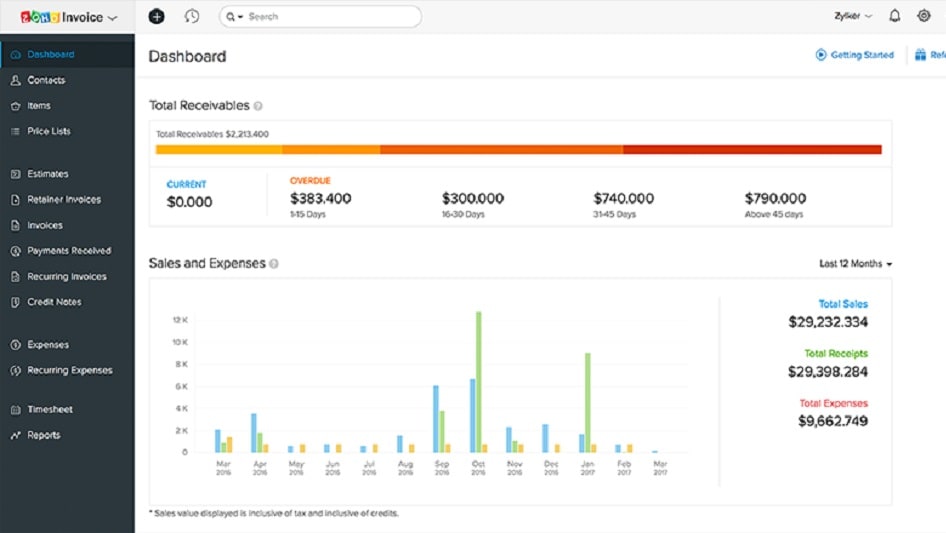
Its robust offerings include a CRM, customer support software, affiliate management, invoice creation, stock tracking, and subscription management.
Zoho stands out by offering a comprehensive suite of tools designed to streamline sales and financial management. Its robust offerings include a CRM, customer support software, affiliate management, invoice creation, stock tracking, and subscription management. This array of integrated tools surpasses what Google Workspace offers in this domain.
Zoho's integrated solutions empower startups and businesses to centralize their operations effectively. This consolidation helps streamline various processes and accelerates sales across multiple channels. In contrast, while Google Workspace provides a range of productivity tools that aid in business management, they are not as specialized or fully developed as the tools available within the Zoho ecosystem.
Zoho is Superior at Project Management than Google Workspace
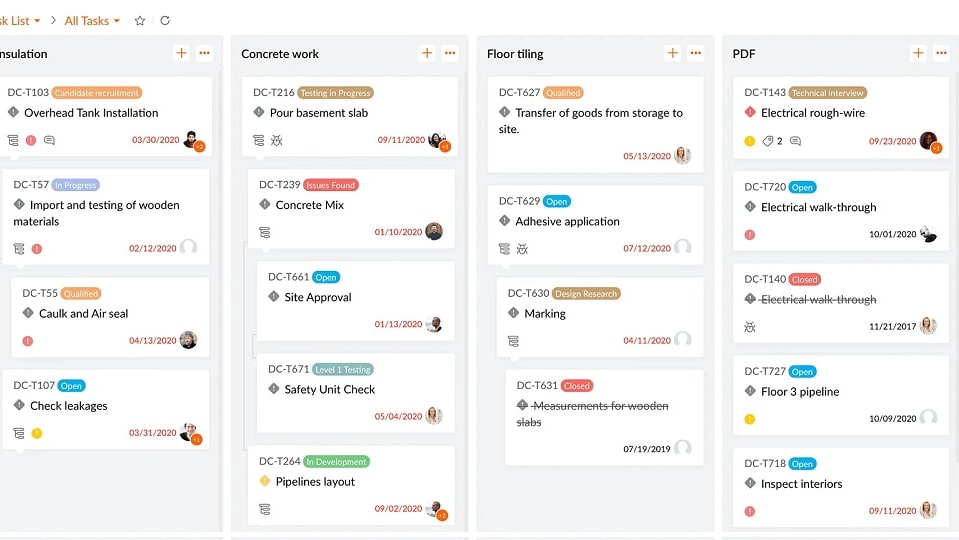
Zoho distinguishes itself through dedicated project management tools like Sprints and BugTracker, which offer robust capabilities for efficient project management.
Zoho distinguishes itself through dedicated project management tools like Sprints and BugTracker, which offer robust capabilities for efficient project management. These applications empower users to manage, track, and collaborate on projects seamlessly. Zoho's specialized project management features contribute significantly to streamlined workflows and enhanced project control.
In contrast, Google Workspace, while excelling in various office productivity and collaboration areas, lacks the specialized project management features found within Zoho. While it provides a comprehensive suite of tools for communication, document management, and collaboration, it may not offer the same depth of project management functionality as Zoho's dedicated project management applications.
Zoho’s Integration Capabilities Triumph Over Google Workspace
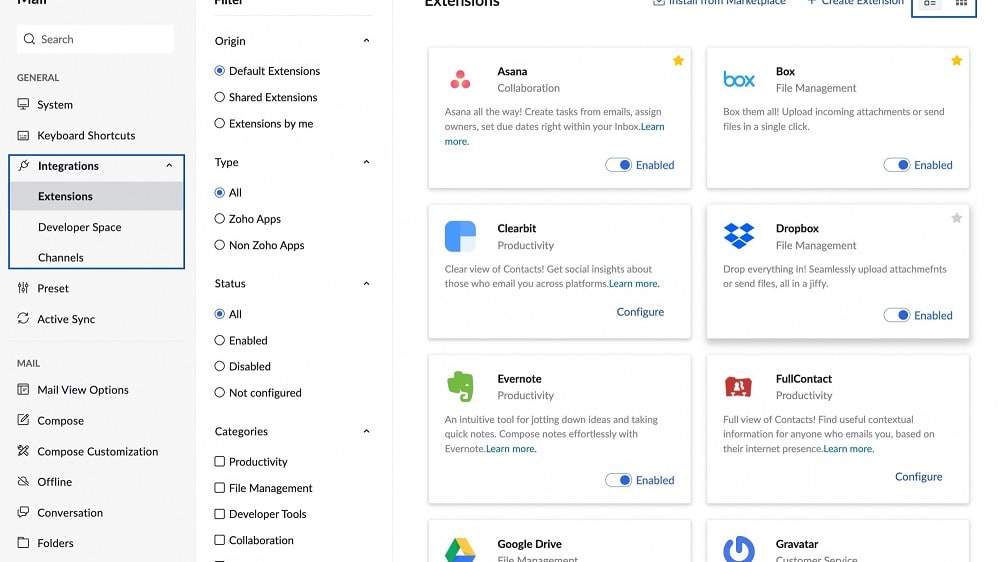
Zoho boasts an impressive repertoire of over 800 integrated business and productivity applications, ranging from CRM and HR to finance and project management.
When it comes to integration capabilities, both Google Workspace and Zoho have their strengths, but Zoho takes the lead due to its extensive suite of products and third-party integrations. Zoho boasts an impressive repertoire of over 800 integrated business and productivity applications, ranging from CRM and HR to finance and project management. This comprehensive range fosters seamless data flow within its ecosystem, enhancing productivity and operational efficiency.
In contrast, while Google Workspace excels in integrating its own suite of apps like Google Drive, Calendar, and Gmail, it falls slightly short in comparison to Zoho's vast selection of integrations. While Google Workspace offers a robust set of native integrations, businesses seeking a more extensive array of integration possibilities may find Zoho to be the superior choice. For those in need of a comprehensive and highly customizable integration environment, Zoho emerges as the preferred option.
08 Zoho vs Google Workspace: Which is the best for your business?
Zoho is the best tool for you if:
- You need a comprehensive suite of business applications to streamline various aspects of your organization's operations.
- Customization and adaptability to specific workflows are crucial for your business needs.
- You are looking for an affordable solution with competitive pricing plans.
- You require extensive integration capabilities to connect with third-party tools and services.
- Security and data privacy are top priorities for your organization, and you need features like two-factor authentication and data encryption.
 You need a comprehensive suite of business applications to streamline various aspects of your organization's operations.
Google Workspace is the best tool for you if:
- Collaboration is a top priority, and you need real-time co-editing and communication features for efficient teamwork.
- Seamless integration with Google's ecosystem is essential, including Gmail, Google Drive, and Google Calendar.
- You prefer a user-friendly interface and ease of use, especially for teams new to the platform.
- Scalability is crucial, and you want a solution that can grow with your organization's needs.
- Advanced security features such as two-factor authentication and data loss prevention are critical for safeguarding your business data.
Zoho
Used by 1620 members
$3,000 in credits for 1 year
Save up to $3,000
Google Workspace
Used by 10506 members
20% off Standard plans for 1 year
Save up to $3,460
09 Alternatives to Zoho & Google Workspace

Slack
Used by 4008 members
25% off new plan purchases
Save up to $9,000

Pipedrive
Used by 3031 members
30% off for 12 months
Save up to $3,564

HubSpot
Used by 2928 members
90% off the Professional and Enterprise plans for 1 year
Save up to $7,000

Zendesk
Used by 2874 members
6 months free (with AI Agents and Copilot)
Save up to $50,000
10 Promotions on CRM and Collaboration software
Zoho and Google Workspace are great tools, but Secret offers promo codes with discounts on over 2250+ different SaaS solutions. New deals are added regularly, helping you save money on your online subscriptions. Get access to codes for other CRM and Collaboration software you might want to purchase
HubSpot coupon
90% off the Professional and Enterprise plans for 1 year

Credits for Airtable
$1,000 in credits on licences for 1 year
Pipedrive discount code
30% off for 12 months
Slack discount
25% off new plan purchases

folk CRM promotion code
14 days free + 20% off annual plans

Miro discount code
$1,000 in credits (lifetime validity)

Notion coupon code 2026
3 months free on the Business plan with Unlimited AI

Monday discount code
First month free
Zendesk promo
6 months free (with AI Agents and Copilot)

Asana coupon code 2026
75% off the annual Starter and Advanced plans for 1 year
Start saving on the best SaaS
Secret has already helped tens of thousands of startups save millions on the best SaaS like Microsoft Teams, Google Workspace & many more. Join Secret now to buy software the smart way.