


Efficient website analytics tools are essential for understanding user behavior and improving the user experience. Hotjar and Clarity are two prominent options in this space. Both of them offer valuable insights into how users interact with your website, but they have distinct features and advantages.
In this article, we'll conduct a thorough comparison of Hotjar vs Clarity, evaluating their key features, pricing models, and primary differences. By the end of this comparison, you'll be better equipped to choose the analytics tool that best suits your website's needs and goals.
- 01 Hotjar vs Microsoft Clarity: overview
- 02 What's the difference between Hotjar and Microsoft Clarity?
- 03 Hotjar pros and cons
- 04 Microsoft Clarity pros and cons
- 05 Hotjar compared to Microsoft Clarity
- 06 Microsoft Clarity compared to Hotjar
- 07 Features comparison
- 08 Hotjar vs Microsoft Clarity: Which is the best for your business?
- 09 Alternatives to Hotjar & Microsoft Clarity
- 10 Promotions on Data Analytics software
Start saving on the best SaaS
Secret has already helped tens of thousands of startups save millions on the best SaaS like Microsoft Teams, Google Workspace & many more. Join Secret now to buy software the smart way.

01 Hotjar vs Microsoft Clarity: overview
Hotjar and Clarity are two prominent contenders in the realm of website analytics tools, each offering a unique set of features tailored to address the diverse needs of website owners and developers.
Hotjar is recognized for its user-friendly interface and a suite of tools that include heatmaps, session recordings, and feedback polls. It excels in visualizing user behavior on websites, helping businesses pinpoint areas of improvement in user experience. On the other hand, Clarity offers a similar array of features, including heatmaps, session recordings, and more, with the backing of Microsoft's reputation for data security and privacy.
Now, let's embark on a detailed comparison of Hotjar vs. Clarity to aid you in making an informed decision when selecting the most suitable website analytics tool for your specific needs.

Customer Support
Hotjar has great customer service, but it has been eclipsed by Clarity’s superb customer service, with users lauding them for speed and help.

Hotjar
Microsoft Clarity
Pricing Plan
Hotjar offers flexible pricing options suitable for different business sizes, making it versatile. Clarity, being free to use, scores for affordability, but its feature set may be limited compared to Hotjar's paid plans.
Hotjar
Microsoft Clarity
Ease of use
Both platforms offer intuitive UIs, with Clarity having a few more bugs, making Hotjar the go-to choice in this regard.
Hotjar
Microsoft Clarity
Integrations
Hotjar integrates with the most popular third party platforms (Slack, WP, Shopify, etc.). On the other hand, Clarity offers only one tool, Google Analytics.
Hotjar
Microsoft Clarity
Dashboards
Clarity draws inspiration from MS BI, with its amazing Dashboards. Hotjar’s are not bad at all, but compared to Clarity’s they look drab.
Hotjar
Microsoft Clarity
User feedback tools
Hotjar helps you get feedback from web visitors, on the other hand, Clarity doesn’t provide surveys and feedback tools for collecting vital information.
Hotjar
Microsoft Clarity
Knowledge base
Hotjar has extensive documentation, product tours, demos and much more. Clarity offers an FAQ, documentation and details which you can receive via email with the support team.
Hotjar
Microsoft Clarity
Customer Reviews
Both platforms are highly praised on Captera, with Hotjar getting better grades overall.
Hotjar
Microsoft Clarity
Heatmaps
Both platforms come packed with a ton of heatmaps (click, scroll, and area heatmaps). A slight advantage goes to Clarity thanks to its browser extension.
Hotjar
Microsoft Clarity
Session recordings
Hotjar and Clarity both offer robust session recording features, but Hotjar's user-friendly interface and additional tools make it superior. Clarity, while strong, rates slightly lower.
Hotjar
Microsoft Clarity
02 What's the difference between Hotjar and Microsoft Clarity?

Hotjar provides a variety of features, including heatmaps, session recordings, and on-site feedback polls.
Hotjar
Easily improve user experience on your website

Clarity primarily emphasizes user session recordings.
Microsoft Clarity
Microsoft Clarity is the revolutionary analytics suite, designed to illuminate the hidden aspects of your website's user experience. Clarity offers the tools to dissect and understand user interactions, enabling you to elevate your website's performance and user satisfaction. Drive your site's evolution from analytics to insights.
Hotjar and Clarity are two tools that offer insights into how users behave on websites. While they have some similarities, there are differences that set them apart. Hotjar is a tool for analyzing user behavior and gathering feedback, helping you understand how visitors interact with your website. On the other hand, Clarity focuses on recording and replaying user sessions, allowing you to watch recordings of how users navigate your site.
Hotjar provides a variety of features, including heatmaps, session recordings, and on-site feedback polls. Heatmaps visualize user interactions by showing where visitors click, move their mouse, and scroll on your website. Session recordings allow you to watch video replays of user sessions, giving you a view of how visitors explore your site. Feedback polls enable you to collect input from users so that you can better understand their needs and enhance the user experience.
In contrast, Clarity primarily emphasizes user session recordings. It captures every interaction on your website, enabling you to replay sessions and gain insights into user behavior. With Clarity's information, you can observe how users navigate through your site, identify any challenges they may face along the way, and assess their engagement with different elements. This level of detail proves invaluable in pinpointing usability issues while optimizing conversion funnels and enhancing website performance.
To summarize, both Hotjar and Clarity offer insights into user behavior on your website; however, they differ in terms of their focus. Hotjar provides a range of tools like heatmaps and on-site feedback to aid in understanding user behavior and enhancing the user experience. Conversely, Clarity specializes in session recordings, which allow for an exploration of user sessions to obtain detailed insights. When making your choice between the two options, consider your specific goals and priorities to determine which tool aligns best with your needs.

Hotjar
Easily improve user experience on your website
40% off all annual plans
Save up to $928
03 Hotjar pros and cons
What are the advantages of Hotjar?
- User-friendly interface: Hotjar features an intuitive and user-friendly interface, making it accessible for both beginners and experienced users.

- Multiple insights: It provides a comprehensive suite of tools, including heatmaps, session recordings, surveys, and more, offering various insights into user behavior.
- Visual data: Hotjar's visual representation of data through heatmaps and session recordings makes it easy to understand user interactions and pain points on your website.
- Affordable pricing: It offers competitive pricing, making it accessible for businesses of all sizes, with a free plan available for basic features.
- Feedback collection: Hotjar allows you to collect user feedback through surveys and polls, enabling you to gather qualitative insights and suggestions for improvements.
What are the disadvantages of Hotjar?
- Limited A/B testing: Hotjar's A/B testing capabilities are limited compared to some dedicated A/B testing tools, which may not be sufficient for in-depth experimentation.

- Session recording limits: Depending on your plan, Hotjar may have limitations on the number of session recordings you can store, which can be a drawback for large websites.
- Privacy concerns: While Hotjar has implemented measures to protect user privacy, session recording tools can potentially capture sensitive user information if not configured properly.
- Learning curve: While user-friendly, some advanced features may require a learning curve for users who want to make the most of Hotjar's capabilities.
- Integration challenges: Integrating Hotjar with certain website platforms or content management systems can sometimes be challenging, requiring technical expertise.
Compare Hotjar to other tools


Hotjar vs Amplitude


Hotjar vs FullStory

Hotjar vs Mixpanel

Hotjar vs Google Analytics

Lucky Orange vs Hotjar

Hotjar vs Mouseflow
04 Microsoft Clarity pros and cons
What are the advantages of Microsoft Clarity?
- Session recordings: Clarity offers session recordings, allowing you to watch how users interact with your website in real-time. This feature helps you identify usability issues and understand user behavior.
- Heatmaps: Heatmaps visually represent user clicks, cursor movements, and scrolling behavior, making it easy to pinpoint areas of interest and interaction on your site.
- Integration with Microsoft: Clarity is backed by Microsoft, which adds a layer of credibility and security to the tool. Users may have greater confidence in data privacy and reliability.
- Free to use: Microsoft Clarity offers a free plan, making it accessible to small businesses and individuals with limited budgets.
- Privacy-focused: Clarity is designed with privacy in mind and anonymizes user data, making it compliant with data protection regulations like GDPR.
What are the disadvantages of Microsoft Clarity?
- Limited advanced features: Clarity's feature set is more limited compared to some other web analytics tools, which may not meet the needs of larger or more complex websites.
- No A/B testing: Unlike some competitors, Clarity does not offer A/B testing functionality, which can be a drawback for businesses looking to conduct split tests.
- Limited integrations: Clarity has fewer third-party integrations compared to some other analytics tools, potentially limiting its compatibility with other software in your tech stack.
- Learning curve: While Clarity is user-friendly, mastering its features and getting the most out of the tool may require some learning for less experienced users.
- Session recording storage: Depending on your plan, Clarity may have limits on the number of session recordings you can store, which can be a limitation for websites with high traffic.
05 Hotjar compared to Microsoft Clarity
Hotjar and Clarity are both web analytics tools designed to help businesses understand user behavior on their websites. Hotjar stands out for its user-friendly interface and a comprehensive suite of features, including heatmaps, session recordings, and feedback surveys. It excels in providing visual insights and offers A/B testing functionality for optimizing web pages.
Clarity, backed by Microsoft, is known for its privacy-focused approach, ensuring compliance with data protection regulations. It offers similar features but may have fewer advanced capabilities. The choice between Hotjar and Clarity depends on your specific needs, with Hotjar excelling in usability and Clarity offering added privacy assurance.
Is Hotjar better than Microsoft Clarity?
 Is Hotjar better than Microsoft Clarity?
Determining whether Hotjar is better than Clarity depends on your specific requirements. Hotjar offers an intuitive user interface and a rich feature set, including heatmaps, session recordings, and feedback tools, making it an excellent choice for those seeking comprehensive insights into user behavior. It's particularly user-friendly and suits various website sizes.
In contrast, Clarity, backed by Microsoft, prioritizes privacy, ensuring data protection compliance. While it offers similar features, it may lack some advanced capabilities. Your choice between Hotjar and Clarity should consider factors like usability, privacy concerns, and the specific analytics features you need to enhance your website's user experience.
What is Hotjar best used for?
Hotjar is best used for optimizing websites by gaining valuable insights into user behavior. It excels in providing tools like heatmaps, session recordings, and feedback surveys to help website owners and marketers understand how visitors interact with their sites. Heatmaps visually display user clicks and cursor movements, while session recordings allow you to watch real user sessions.
This information can be invaluable for identifying areas of improvement in web design, user experience, and conversion rates. Hotjar is particularly useful for businesses looking to enhance their websites, increase user engagement, and make data-driven decisions to optimize their online presence.
Can Hotjar replace Microsoft Clarity?
Hotjar and Clarity serve similar purposes but have distinct strengths and features. Whether Hotjar can replace Clarity depends on your specific needs. Hotjar is renowned for its user-friendly interface, offering heatmaps, session recordings, and feedback tools for understanding user behavior. It's a versatile choice for optimizing websites and gaining insights into user interactions.
On the other hand, Clarity, backed by Microsoft, emphasizes privacy and data protection. While it offers similar features, it may lack some advanced capabilities. Replacing Clarity with Hotjar depends on your priorities, with Hotjar excelling in usability, while Clarity provides added privacy assurance.
Is Hotjar cheaper than Microsoft Clarity?
Hotjar and Clarity have distinct pricing structures, and whether one is cheaper than the other depends on your specific requirements. Hotjar’s pricing structure offers competitive pricing with different plans, including a free option with limited features. Its affordability makes it accessible to businesses of various sizes.
In contrast, Clarity provides some features for free but offers additional enterprise-level services at a cost. Comparing the cost-effectiveness of Hotjar and Clarity depends on your budget, the scale of your website, and the specific analytics and privacy features you prioritize. It's essential to evaluate both tools' pricing plans to determine which aligns better with your needs and financial considerations.
Is there a better Data Analytics software than Hotjar?
When it comes to website analytics and user feedback tools, it's essential to explore whether there might be a better option than Hotjar that aligns more closely with your specific needs.
Several alternatives to Hotjar in the website analytics space include Crazy Egg, Google Analytics, Mixpanel, and VWO (Visual Website Optimizer). Each of these tools offers unique features and capabilities, catering to different aspects of website optimization and user behavior analysis.
The choice of a website analytics tool depends on your specific objectives, the depth of insights required, ease of integration with your website, and budget considerations. While Hotjar excels in user-friendliness and visual data representation, other tools may provide more advanced testing capabilities or specialized features that better suit your website optimization goals.
Hotjar
Easily improve user experience on your website
40% off all annual plans
Save up to $928
06 Microsoft Clarity compared to Hotjar
Clarity and Hotjar are both potent tools for website analytics and user behavior analysis. Clarity places a strong emphasis on data privacy and security. It offers similar analytics features while adding credibility in data protection.
In contrast, Hotjar is renowned for its user-friendliness, offering features like heatmaps, session recordings, and user feedback tools. It excels in visually representing data, aiding in user experience optimization. The choice between Clarity and Hotjar depends on your specific priorities; Hotjar is ideal for its usability and visual insights, while Clarity assures stringent privacy compliance and the backing of a tech giant.
Is Microsoft Clarity better than Hotjar?
Determining whether Clarity is better than Hotjar depends on your specific needs and priorities. Clarity, with Microsoft's backing, emphasizes data privacy and security, making it a compelling choice for those prioritizing these aspects. It offers features similar to Hotjar, such as heatmaps and session recordings.
Hotjar, on the other hand, is renowned for its user-friendliness and visual data representation. It provides a comprehensive suite of tools for optimizing website user experiences and gathering user feedback. The choice between Clarity and Hotjar hinges on factors like data privacy, usability, and the specific features you require to analyze and improve user behavior on your website.
What is Microsoft Clarity best used for?
Clarity is best used for enhancing website analytics while prioritizing data privacy. This tool allows businesses to gain valuable insights into user behavior while maintaining stringent data protection compliance. Clarity's features, such as heatmaps and session recordings, provide a comprehensive view of website interactions. Its suitability extends to organizations with heightened privacy concerns or those operating in regulated industries.
By emphasizing security and anonymity, Clarity offers a robust solution for businesses seeking analytics tools that align with privacy regulations. It's particularly valuable when optimizing website user experiences while ensuring data protection and compliance are at the forefront of operations.
Can Microsoft Clarity replace Hotjar?
Whether Clarity can replace Hotjar depends on your specific needs and priorities. Clarity and Hotjar are both website analytics tools, but they have different strengths. Clarity, with Microsoft's backing, emphasizes data privacy and compliance, making it a strong choice for organizations with stringent privacy requirements. It offers features similar to Hotjar, such as heatmaps and session recordings.
Hotjar, on the other hand, excels in user-friendliness and visual data representation, making it ideal for those seeking a straightforward tool for optimizing website user experiences and gathering user feedback. Replacing Hotjar with Clarity depends on factors like privacy concerns, usability, and the specific features essential for your website analytics and optimization goals.
Is Microsoft Clarity cheaper than Hotjar?
The affordability of Clarity compared to Hotjar depends on various factors. Clarity offers a free plan, making it appealing for budget-conscious users. However, Hotjar also provides a free plan with limited features.
When it comes to paid plans, Hotjar offers different pricing tiers to accommodate various business sizes and budgets. Clarity, on the other hand, may have pricing options that differ in terms of scalability. Determining whether Clarity is cheaper than Hotjar depends on the specific features you need, the scale of your website, and your budget constraints. It's advisable to evaluate both tools' pricing structures to determine which aligns better with your requirements.
Is there a better Application Monitoring software than Microsoft Clarity?
When considering alternatives to Clarity in the website analytics and user behavior analysis field, it's essential to explore whether there's a better-suited software for your specific requirements.
Several notable competitors to Clarity in this space include Hotjar, Crazy Egg, Google Analytics, and Mixpanel. Each of these tools offers unique features and capabilities catering to different aspects of website optimization and user behavior analysis.
The choice of a website analytics tool depends on your specific objectives, the depth of insights required, ease of integration with your website, and budget considerations. While Clarity emphasizes data privacy and security, other platforms may provide more advanced testing capabilities or specialized features that align better with your website optimization goals.
07 Features comparison
Hotjar Offers Superior User-Friendliness Over Clarity
When it comes to ease-of-use, Hotjar sets the bar high. Its intuitive interface welcomes users with simplicity and accessibility. Navigating through the platform is a breeze, even for those with limited technical know-how. Hotjar goes the extra mile by offering a visual setup guide, allowing newcomers to grasp the tool's functionalities swiftly. The straightforward design and plain language used in its features make it inclusive for non-tech-savvy individuals.
Conversely, Clarity, while offering an array of comprehensive features, may present a steeper learning curve. It lacks a beginner-friendly quick-start guide upon the initial login, potentially requiring users to invest more time in mastering its intricacies. However, for individuals with a moderate level of technical expertise, Clarity's depth and complexity can prove to be a valuable asset, once they overcome the initial hurdle.
Hotjar Outshines Clarity in Integration Capabilities

Its compatibility with numerous third-party applications, including WordPress, Shopify, Wix, Google Tag Manager, and more, ensures seamless integration with your existing tech-stack.
Hotjar shines in terms of integration capabilities. Its compatibility with numerous third-party applications, including WordPress, Shopify, Wix, Google Tag Manager, and more, ensures seamless integration with your existing tech-stack. This comprehensive support simplifies data synchronization and workflow optimization, eliminating the need for extensive custom development.
Clarity, while not matching Hotjar in terms of quantity, takes a quality-focused approach to integrations. It excels in seamlessly connecting with major industry tools like Google Analytics, Power BI, and Azure Machine Learning. Clarity prioritizes in-depth integration with these influential platforms, enhancing the depth of data analysis and insights. For businesses valuing robust and impactful integrations over sheer quantity, Clarity's approach may prove to be more appealing and efficient.
Hotjar’s Conversion Funnels Prove More Comprehensive than Clarity’s
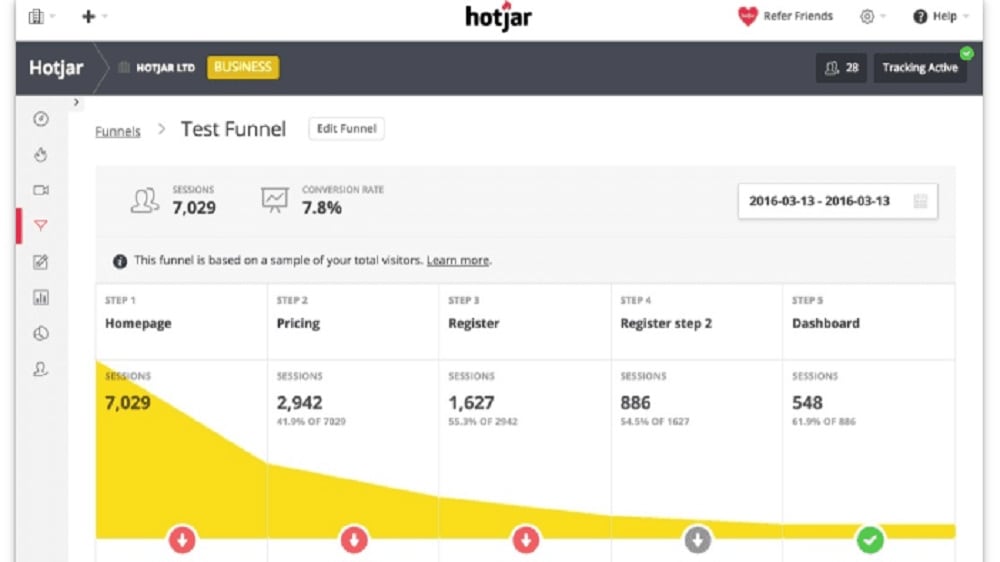
Hotjar's conversion funnels feature takes a more comprehensive approach
Hotjar and Clarity both offer insights into user behavior for conversion rate optimization. However, Hotjar's conversion funnels feature takes a more comprehensive approach. It not only identifies drop-off points but also assists in fine-tuning your funnels to enhance conversion rates.
Hotjar's conversion funnels allow you to pinpoint precisely where visitors are exiting the funnel and take proactive steps to optimize those specific stages. This level of granularity enables more effective conversion rate improvements.
In contrast, Clarity's A/B testing feature serves its purpose but may not provide the same depth of analysis for funnel optimization as Hotjar's conversion funnels. For users seeking extensive insights and conversion rate enhancements, Hotjar's approach proves more advantageous.
Hotjar and Clarity are Equally Robust for User Feedback Collection
Hotjar empowers you to gather direct feedback from website visitors through customizable polls and surveys, allowing you to capture their thoughts, preferences, and pain points in real-time.
Hotjar and Clarity excel in user feedback collection, each with its unique approach. Hotjar empowers you to gather direct feedback from website visitors through customizable polls and surveys, allowing you to capture their thoughts, preferences, and pain points in real-time.
On the other hand, Clarity focuses on generating reports and insights derived from user behavior data. It provides a different perspective by analyzing user actions to uncover valuable insights into user behavior and potential areas for website improvement.
Both tools offer powerful ways to understand your customers, but they approach user feedback from different angles. Hotjar prioritizes real-time, direct engagement, while Clarity emphasizes data-driven insights derived from user behavior patterns. Your choice depends on the depth and immediacy of feedback you require for website enhancement.
Clarity’s Privacy-Focused Features Give an Edge Over Hotjar
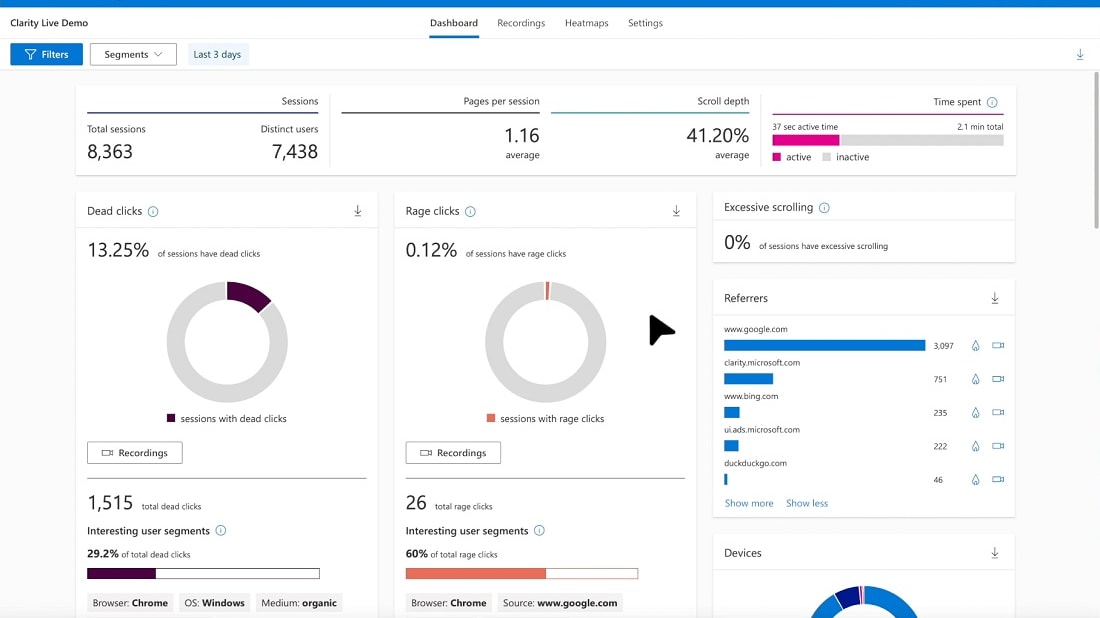
Clarity's privacy-focused design is tailored to meet stringent data protection regulations, such as GDPR, by anonymizing and aggregating user data
In the realm of data privacy, Clarity holds a distinct advantage over Hotjar. Clarity's privacy-focused design is tailored to meet stringent data protection regulations, such as GDPR, by anonymizing and aggregating user data. This meticulous approach ensures that user privacy remains paramount.
For instance, Clarity takes care to mask sensitive user information, ensuring that individual identities are never at risk of exposure. The platform's commitment to data privacy aligns with the growing significance of safeguarding user data in today's digital landscape.
While Hotjar offers robust features, those with heightened concerns about data privacy may find Clarity's approach more reassuring and compliant with evolving privacy regulations. The choice between the two tools ultimately depends on your organization's privacy priorities and requirements.
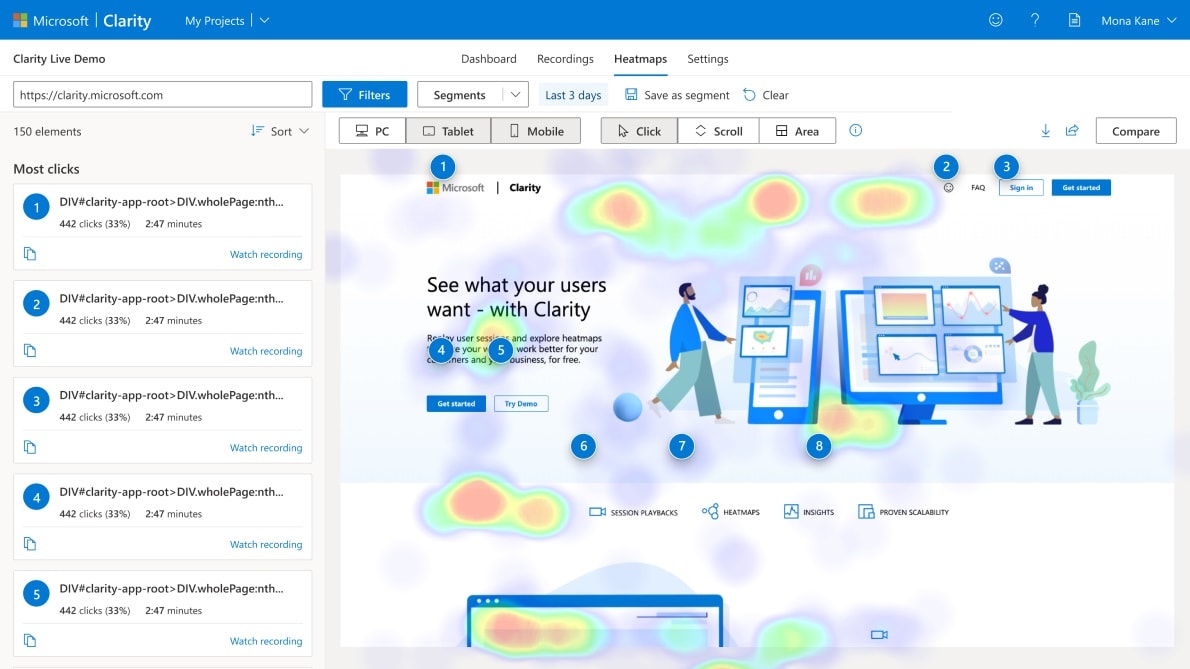
Clarity Excels Ahead of Hotjar in Click Tracking

Clarity's click tracking feature stands out for its thoroughness
When it comes to behavior analytics, both Hotjar and Clarity offer valuable insights. However, Clarity's click tracking feature stands out for its thoroughness. It records every user click on your website, including interactions with less popular elements, links, and buttons. This meticulous tracking provides extensive data for optimizing your site's layout and design.
Hotjar, on the other hand, provides behavior analytics but may not offer the same level of granularity in click tracking as Clarity. While Hotjar provides valuable insights into user behavior, Clarity's click tracking ensures that no user interaction goes unnoticed, allowing for a more comprehensive analysis of your website's performance. For those prioritizing meticulous click tracking, Clarity's feature may prove more beneficial.
Hotjar Offers Superior Visitor Recordings Compared to Clarity
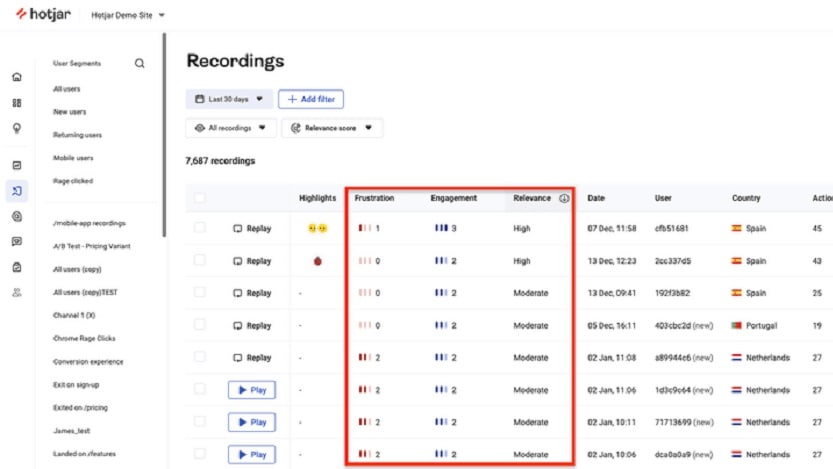
Hotjar's session recordings provide intricate details of user engagement on your website
Hotjar and Clarity both offer session recording features, but Hotjar takes a more comprehensive approach. Hotjar's session recordings provide intricate details of user engagement on your website. It not only allows you to watch users' interactions but also offers valuable insights into visitor behavior patterns. With Hotjar, you can pinpoint specific areas of improvement with ease.
In contrast, Clarity provides functional session recording capabilities, but it may not offer the same level of granularity as Hotjar. While Clarity's session recordings serve their purpose, they may not provide the same depth of insights into user behavior and website optimization. For users seeking in-depth analytics and precise feedback, Hotjar's approach proves to be more effective.
08 Hotjar vs Microsoft Clarity: Which is the best for your business?
Hotjar is the best tool for you if:
- You're looking for a comprehensive understanding of user behavior through detailed heatmaps, session recordings, and user feedback.
- User-friendliness is a top priority, and you want an intuitive platform that's easy to navigate.
- Your goal is to enhance website user experiences, increase engagement, and boost conversion rates effectively.
- You value a tool with versatile integration capabilities, allowing seamless alignment with your existing tech-stack, including platforms like WordPress, Shopify, and Google Tag Manager.
- You prefer a platform that offers a visual setup guide to simplify initial setup and configuration, making it accessible to users of all technical levels
 You're looking for a comprehensive understanding of user behavior through detailed heatmaps, session recordings, and user feedback.
Microsoft Clarity is the best tool for you if:
- You require robust session recording capabilities and advanced click tracking for in-depth user behavior analysis, ideal for optimizing website performance.
- Quality integrations with major tools like Google Analytics, Power BI, and Azure Machine Learning are essential for your data analytics workflow.
- You prioritize depth over breadth in your integrations, focusing on getting the most impactful insights from your connected tools.
- You have a moderate level of technical expertise, allowing you to fully utilize Clarity's powerful features and functionalities.
- You are committed to compliance with data protection regulations like GDPR and prioritize user privacy, ensuring your analytics approach aligns with these regulations.
Hotjar
Easily improve user experience on your website
40% off all annual plans
Save up to $928
09 Alternatives to Hotjar & Microsoft Clarity

Slack
Used by 3799 members
25% off new plan purchases
Save up to $9,000

Mixpanel
Used by 1378 members
1 year free
Save up to $50,000

Sentry
Used by 1227 members
6 months free on the Teams plan
Save up to $180

Amplitude
Used by 542 members
3 months free on the Plus plan
Save up to $183
10 Promotions on Data Analytics and Application Monitoring software
Hotjar and Microsoft Clarity are great tools, but Secret offers promo codes with discounts on over 2200+ different SaaS solutions. New deals are added regularly, helping you save money on your online subscriptions. Get access to codes for other Data Analytics and Application Monitoring software you might want to purchase
Promo codes for Mixpanel
1 year free
Sentry discounts
6 months free on the Teams plan

Google Cloud (GCP) promotion
$2,000 in credits for 1 year if you never raised funds // $350,000 in credits for 2 years if you did

Discount for Zenduty
$3,500 in credits

Google Ads offer
Spend $500, get $500 // Spend $1,000, get $750 // Spend $1,500, get $1,000 in FREE ad credit

Dotcom-Monitor discount code
50% off for 1 year

Semrush promo code
14 days free on Semrush One

Discount for Instatus
1 year free on Pro Plan
Amplitude free credits
3 months free on the Plus plan

TestMu AI (formerly LambdaTest) coupon code 2026
30% off any annual subscription plan
Start saving on the best SaaS
Secret has already helped tens of thousands of startups save millions on the best SaaS like Microsoft Teams, Google Workspace & many more. Join Secret now to buy software the smart way.