


Ever thought about a tool that helps you understand user behavior and boost your website's performance? As digital enthusiasts, we’ve frequently found ourselves at a crossroads when it comes to selecting the perfect analytics tool. We researched through various sources and read through many reviews and finally landed on two promising contenders: Hotjar and Mixpanel.
Both of these tools offer unique approaches to understanding user behavior. The question remains: which one will really unlock insights and drive my digital strategy to new heights? In quest to find the winner, let us together explore their strengths, weaknesses, and real-world applications. So, whether you're aiming to enhance user experiences, boost conversions, or refine your marketing strategies, join us as we uncover the nuances of these two powerful analytics tools.
- 01 Hotjar vs Mixpanel: overview
- 02 What's the difference between Hotjar and Mixpanel?
- 03 Hotjar pros and cons
- 04 Mixpanel pros and cons
- 05 Hotjar compared to Mixpanel
- 06 Mixpanel compared to Hotjar
- 07 Features comparison
- 08 Hotjar vs Mixpanel: Which is the best for your business?
- 09 Alternatives to Hotjar & Mixpanel
- 10 Promotions on Data Analytics software
Start saving on the best SaaS
Secret has already helped tens of thousands of startups save millions on the best SaaS like Microsoft Teams, Google Workspace & many more. Join Secret now to buy software the smart way.

01 Hotjar vs Mixpanel: overview
Hotjar and Mixpanel are prominent analytics tools, each catering to distinct needs in the realm of user behavior tracking and analysis.
Hotjar is renowned for its heatmap and user session recording capabilities. It provides detailed insights into how users interact with websites, allowing businesses to optimize user experience by identifying engagement patterns and pain points. Mixpanel, on the other hand, excels in event-based analytics and user segmentation. It offers a comprehensive suite of tools for tracking specific user actions, creating funnels, and segmenting users based on their behavior, enabling businesses to gain deep insights into user journeys and tailor their strategies accordingly.
Now, let's explore the comparison of Hotjar vs Mixpanel. We'll delve into their key features and functionalities to assist you in making an informed choice when selecting the optimal analytics solution for your business.

Real-time tracking
Hotjar focuses on visual behavior tracking for holistic analysis. Mixpanel, however, excels in real-time event tracking for deep insights.

Hotjar
Mixpanel
User segmentation
Mixpanel offers robust user segmentation features for precise targeting. Hotjar, on the other hand, provides simpler segmentation capabilities.
Hotjar
Mixpanel
Funnel analysis
Mixpanel’s funnel analysis offers detailed tracking of user actions, while Hotjar provides a visual approach to understand behaviors.
Hotjar
Mixpanel
Customer support
Mixpanel offers a variety of support options, including email and chat support, as well as professional services for enterprise customers.
Hotjar
Mixpanel
Positive reviews
Both Hotjar and Mixpanel have received positive reviews for their respective strengths.
Hotjar
Mixpanel
Ease of use
Mixpanel's interface is more complex due to its advanced tracking capabilities that might require some learning. Hotjar’s interface proves more intuitive in comparison.
Hotjar
Mixpanel
Event tracking
Hotjar enables easy event tracking with user behavior insights while Mixpanel excels with advanced capabilities and detailed analytics.
Hotjar
Mixpanel
Cohort analysis
Mixpanel provides more advanced cohort analysis capabilities than Hotjar for in–depth segmentation and insights into behavior patterns.
Hotjar
Mixpanel
Pricing plans
Hotjar is known for its affordable entry-level plans, making it accessible for small businesses.
Hotjar
Mixpanel
Integrations
Both Hotjar and Mixpanel offer a wide range of third-party app integrations with popular tools and platforms, like HubSpot, Slack and Intercom.
Hotjar
Mixpanel
02 What's the difference between Hotjar and Mixpanel?

Hotjar's Visual Heatmaps Showing User-Website Engagement
Hotjar
Easily improve user experience on your website

Mixpanel's Real-Time Key Performance Indicator Dashboard
Mixpanel
Mixpanel is event-based analytics for builders who need answers from their data at their fingertips. When everyone in the organization can see—and learn from—the impact of their work, they are poised to make better decisions. Companies like Uber, Netflix, Pinterest, CNN, Samsara, and Yelp use Mixpanel to understand their customers, measure progress, and endeavor to make better decisions.
As we delve into the comparison of Hotjar vs Mixpanel, we uncover the nuanced differences that set these two tools apart. One key distinction lies in their user segmentation capabilities, with Mixpanel showcasing its prowess in this area. The extensive toolkit it offers enables users to craft highly specific and intricate user segments based on a multitude of attributes and behaviors. This level of granularity empowers businesses to precisely pinpoint user groups, extracting insights that drive targeted actions and optimizations. In contrast, Hotjar provides a more streamlined user segmentation experience, which may be well-suited for simpler analyses and quicker insights.
Moving on to cohort analysis, Mixpanel once again takes the lead. Its cohort analysis feature allows users to create cohorts by grouping individuals who share common characteristics or behaviors within a specific time frame. This functionality provides invaluable insights into user retention, engagement patterns, and conversion rates. On the other hand, while cohort analysis is less emphasized in Hotjar, the platform excels in other areas such as heatmaps, session recordings, and user surveys. Hotjar's approach centers around helping businesses understand how users interact with their website in real-time moments, rather than tracking their behavior within predefined cohorts.
The choice between Hotjar and Mixpanel hinges on your specific business needs. If you require intricate user segmentation with a comprehensive toolkit, Mixpanel might be the preferred option. Alternatively, if your focus is on gaining immediate insights into user interactions and engagement through visual tools, Hotjar could be more suitable. Both tools offer unique strengths, and the decision should be driven by the depth of analysis and granularity required to derive actionable insights tailored to your business objectives.

Hotjar
Used by 987 members
40% off all annual plans
Save up to $928

Mixpanel
Used by 1435 members
1 year free
Save up to $50,000
03 Hotjar pros and cons
What are the advantages of Hotjar?
- Visual insights: Hotjar offers heatmaps, session recordings, and click maps, providing a visual understanding of user behavior and interactions on your website.

- User feedback: The platform enables you to collect feedback through surveys and polls, helping you gather insights directly from your users.
- User segmentation: While not as complex as Mixpanel, Hotjar still offers user segmentation tools to categorize and analyze user groups for targeted insights.
- Ease of use: Hotjar's user-friendly interface makes it accessible to users of varying technical backgrounds, allowing quick setup and utilization.
- Affordability: Hotjar offers a range of pricing plans, including a free version with limited features, making it accessible for businesses with different budgets.
What are the disadvantages of Hotjar?
- Limited analytics depth: Hotjar's analytics may lack the depth and complexity offered by more specialized tools like Google Analytics or Mixpanel.

- Less advanced segmentation: While Hotjar provides user segmentation, it may not satisfy the needs of businesses requiring intricate segmentation for detailed analysis.
- Limited integrations: Hotjar's integrations are more limited compared to other tools, potentially affecting its compatibility with your existing software stack.
- Cohort analysis: Unlike Mixpanel, Hotjar places less emphasis on cohort analysis, which could be a drawback for businesses needing this specific feature.
- Limited conversion attribution: Hotjar's attribution capabilities may not be as advanced as dedicated analytics tools, potentially limiting your ability to analyze and attribute conversions accurately.
Compare Hotjar to other tools


Hotjar vs Microsoft Clarity

Hotjar vs FullStory

Hotjar vs Google Analytics

Lucky Orange vs Hotjar

Hotjar vs Mouseflow

Hotjar vs Crazy Egg
04 Mixpanel pros and cons
What are the advantages of Mixpanel?
- Advanced analytics: Mixpanel provides in-depth analytics and customizable event tracking, allowing you to track user interactions and behaviors with precision.
- Cohort analysis: Mixpanel excels in cohort analysis, helping you understand user trends over time and assess the impact of changes on user behavior.
- User segmentation: The platform offers powerful user segmentation capabilities, enabling you to create highly specific user groups for targeted analysis.
- Real-time tracking: Mixpanel provides real-time data updates, allowing you to monitor user actions and behavior as they occur on your website or app.
- Integration possibilities: Mixpanel offers a wide range of integrations with other tools and platforms, allowing you to connect your data and streamline your workflow.
What are the disadvantages of Mixpanel?
- Learning curve: Mixpanel's advanced features may come with a steeper learning curve, requiring users to invest time in understanding its capabilities.
- Complexity: While powerful, Mixpanel's complexity might be overkill for businesses with simpler analytics needs, potentially leading to unnecessary complexity.
- Cost: Mixpanel's pricing can be relatively higher, especially for businesses with larger user basis or extensive data tracking requirements.
- Limited visual insights: Mixpanel's visual reporting capabilities, such as heatmaps and session recordings, are less comprehensive compared to dedicated tools like Hotjar.
- User feedback: While Mixpanel offers some user feedback features, it may not be as robust as other tools like Hotjar when it comes to collecting direct user opinions.
Compare Mixpanel to other tools


Mixpanel vs Amplitude

Mixpanel vs Segment
Mixpanel vs Google Analytics

Mixpanel vs CleverTap

MoEngage vs Mixpanel
05 Hotjar compared to Mixpanel
When comparing Hotjar and Mixpanel, Hotjar shines with its visual insights and user feedback features. Hotjar's heatmaps, session recordings, and user surveys provide a holistic view of user behavior and opinions. These tools allow you to identify pain points, optimize user experience, and gather direct feedback.
While both tools offer valuable insights, Hotjar is the choice for businesses seeking an intuitive and visual approach to understanding user interactions, which is particularly helpful for UX/UI optimization and identifying conversion bottlenecks. On the contrary, Mixpanel is tailored for those who require granular data analysis and want to dissect user behavior patterns in depth. The decision between Hotjar and Mixpanel hinges on your preference for visual insights or advanced analytics to meet your specific digital optimization goals.
Is Hotjar better than Mixpanel?
 Is Hotjar better than Mixpanel?
Determining whether Hotjar is unequivocally superior to Mixpanel is nuanced, given their distinct strengths. Hotjar impresses with its capacity to visualize user behavior through heatmaps and session recordings, offering qualitative insights into website or app interactions.
In contrast, Mixpanel shines in event-based tracking and holistic analytics, empowering users with granular, data-driven perspectives. The determination of "better" hinges on your business's particular requirements and objectives. Hotjar excels in capturing user experience nuances, while Mixpanel offers in-depth quantitative analysis—making the choice contingent upon your analytical priorities.
What is Hotjar best used for?
Hotjar shines as a powerful tool for capturing and interpreting visualized user behavior data. Its foremost application lies in its heatmaps, session recordings, and surveys, granting businesses the ability to meticulously scrutinize user interactions within their website or application.
By closely analyzing these insights, businesses can refine their user interface, elevate overall user experience, and pinpoint opportunities for enhancement. For instance, analyzing heatmap data might reveal the most clicked areas of a webpage, guiding layout optimization, while session recordings could unveil navigation bottlenecks, prompting targeted improvements.
Can Hotjar replace Mixpanel?
While Hotjar excels at providing insightful visualizations of user behavior, it doesn't match the comprehensive data analytics strength of Mixpanel.
Mixpanel's strength lies in its sophisticated event-based tracking, enabling in-depth analysis through funnel, cohort, and retention reports. For instance, Mixpanel's event-based tracking can precisely outline the steps users take within an application, allowing businesses to optimize conversion paths.
While Hotjar provides qualitative insights, it falls short in offering the intricate quantitative analysis capabilities that Mixpanel delivers. Thus, if your focus leans toward intricate data analytics, Hotjar cannot entirely substitute for Mixpanel's quantitative depth.
Is Hotjar cheaper than Mixpanel?
When evaluating costs, Hotjar presents a more economical option than Mixpanel. While the pricing divergence mirrors the variation in feature depth and services, Hotjar's affordability is appealing for those focused on straightforward visual user behavior analysis.
A startup with limited resources could find Hotjar's pricing structure better aligned with their budget, allowing them to gain valuable insights into user interactions without overextending expenses. However, businesses requiring advanced event tracking and comprehensive analytics might find Mixpanel's higher price point justifiable for the deeper insights it offers.
Is there a better Data Analytics software than Hotjar?
When it comes to analytics software, Hotjar is undeniably a valuable tool, offering insights into user behavior and website performance. However, the realm of analytics tools presents a variety of alternatives to Hotjar’s software that might better suit your particular needs.
Tools like Google Analytics, Mixpanel, Kissmetrics, Amplitude, and Lucky Orange provide diverse sets of features for tracking and analyzing user interactions. The choice of the best analytics software depends on your goals and priorities. If comprehensive user behavior insights and visual representation are your focus, Hotjar might be an excellent choice.

Hotjar
Easily improve user experience on your website
40% off all annual plans
Save up to $928
06 Mixpanel compared to Hotjar
When comparing Mixpanel and Hotjar, Mixpanel takes the lead in sophisticated analytics and user behavior tracking. Mixpanel's event tracking, cohort analysis, and user segmentation allow businesses to dive deep into data, understanding intricate user behaviors and deriving actionable insights. This level of granularity enables targeted optimizations and informed decision-making.
Mixpanel is ideal for businesses that require in-depth data analysis and want to make data-driven decisions. It's a powerful choice for businesses aiming to understand user behaviors at a granular level. Conversely, Hotjar caters to those who prioritize visual and qualitative insights for website optimization and enhancing user satisfaction. The choice between Mixpanel and Hotjar ultimately depends on your preference for advanced analytics or visual feedback to align with your specific digital optimization objectives.
Is Mixpanel better than Hotjar?
The determination of whether Mixpanel surpasses Hotjar hinges on the context of your business needs.
If your operations heavily depend on in-depth data analysis, Mixpanel's prowess in event-based tracking and data-driven insights provides a definitive advantage. For instance, a large e-commerce platform seeking to optimize its conversion funnel and assess user retention rates would find Mixpanel's robust event tracking and cohort analysis invaluable.
On the other hand, if your focus leans toward understanding user behavior through visualizations, Hotjar's heatmaps and session recordings may prove more suitable. The choice ultimately depends on the analytical depth required to achieve your business objectives.
What is Mixpanel best used for?
Mixpanel excels in quantitative data analysis, making it an ideal choice for businesses seeking profound insights into user behavior and product usage. Its event tracking feature allows you to meticulously monitor user interactions, enabling you to optimize conversion funnels.
An e-commerce platform can analyze the steps leading to a successful purchase, identifying potential drop-offs. Furthermore, Mixpanel's cohort analysis aids in understanding user retention patterns over time. This level of analysis is invaluable for making informed decisions and tailoring strategies.
Therefore, if your business requires data-driven insights to enhance user experiences and drive growth, Mixpanel's quantitative capabilities are highly advantageous.
Can Mixpanel replace Hotjar?
Mixpanel offers robust data analytics, but it can't fully replace Hotjar's unique visual representation capabilities.
If you want to understand how users navigate your e-commerce site and pinpoint areas where they encounter issues, Hotjar's heatmaps and session recordings provide visual insights. Mixpanel, while excellent for event tracking, doesn't provide the same intuitive visualization.
So, if your goal is to enhance user experience through qualitative analysis, Hotjar remains the superior choice. The decision hinges on whether you prioritize data-driven quantitative insights (Mixpanel) or user interaction visuals (Hotjar).
Is Mixpanel cheaper than Hotjar?
When it comes to pricing, Mixpanel’s pricing plans tend to be more costly when compared to Hotjar. This cost discrepancy is attributed to the advanced analytical features that Mixpanel offers.
Mixpanel's event-based tracking, detailed funnel analysis, and cohort reporting come with a premium. Businesses seeking in-depth data analysis and advanced insights might find Mixpanel's higher price point justified. However, if you're looking for a more budget-friendly solution that provides visual user behavior insights, Hotjar's pricing structure could be a more attractive option for your business. The decision should be based on your specific analytical needs and budget constraints.
Is there a better Data Analytics software than Mixpanel?
When it comes to analytics software, Mixpanel is undoubtedly a robust tool for tracking user interactions and deriving insights. However, alternatives to Mixpanel could potentially align better with your distinct needs.
Consider exploring tools like Google Analytics, Crazy Egg, Heap Analytics, Kissmetrics, and Segment. The choice of the ideal analytics software depends on your specific goals and requirements. If detailed user behavior analysis and insights are your primary focus, Mixpanel is a solid choice.

Mixpanel
Premium
Product analytics platform
1 year free
Save up to $50,000
07 Features comparison
Mixpanel Takes the Lead in Data Management Abilities Compared to Hotjar

Mixpanel's Data View Filters with Filters like Multiple Event, Event Property and User Profile Property
When it comes to data management, Mixpanel proves to be superior to Hotjar. Mixpanel equips users with robust data management tools that allow seamless organization and editing of collected data. This feature empowers users to contextualize their data effectively, enhancing the accuracy of their user behavior analysis. Beyond data collection, Mixpanel facilitates data cleaning and organization, ensuring that businesses work with precise and reliable information.
Mixpanel enables users to segment and tag their data according to user attributes, events, or actions, leading to more refined analysis. On the other hand, while Hotjar offers exceptional analytics, it doesn't offer the same comprehensive suite of data management features that Mixpanel provides.
Hotjar's Exceptional User Feedback Collection Surpasses Mixpanel
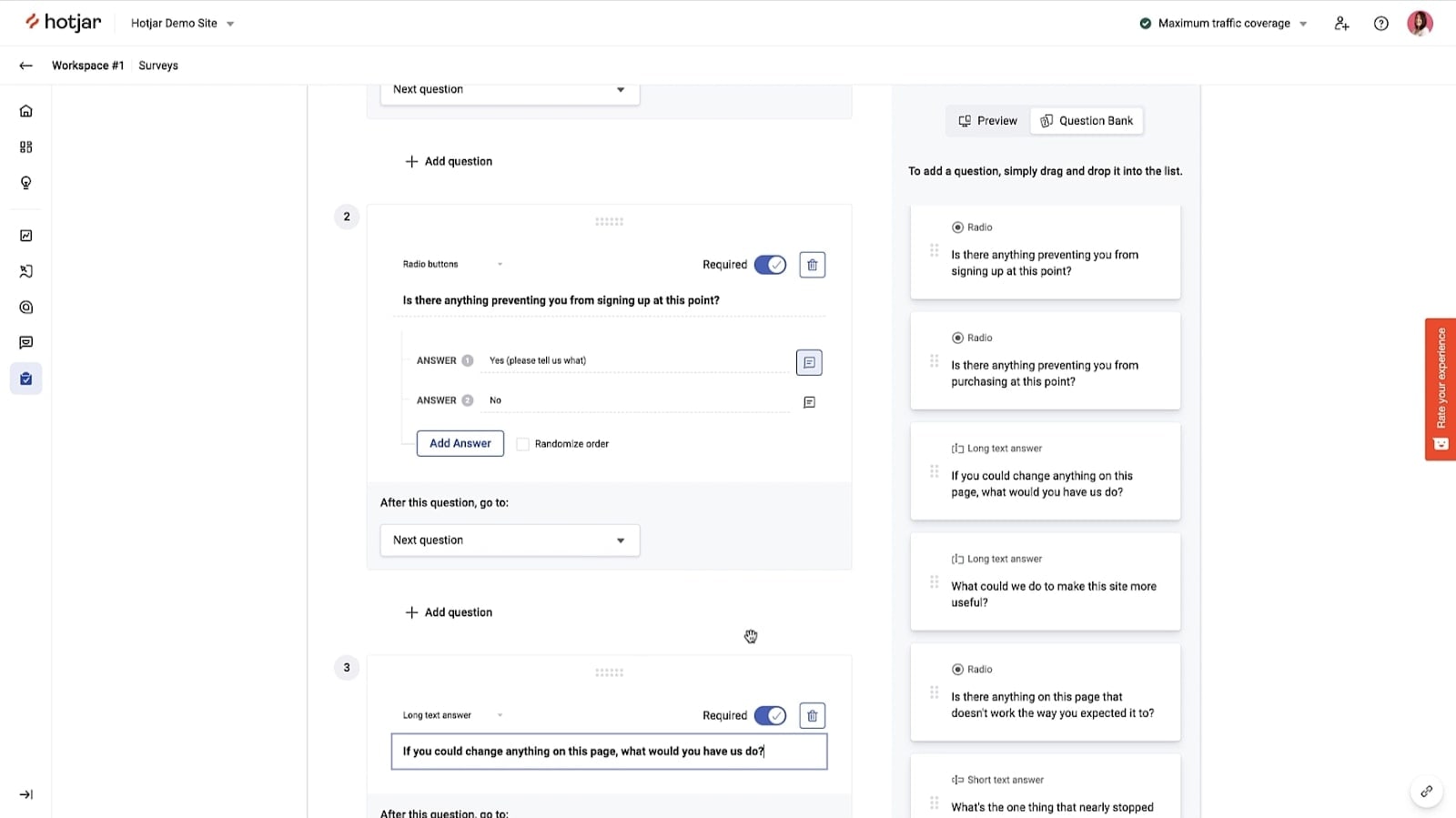
Hotjar's Feedback Dashboard to Create Survey Questions Using the Drag-and-Drop Editor
When it comes to gathering valuable user feedback, Hotjar shines as a frontrunner, offering an array of tools designed to capture insights directly from website visitors. Hotjar's feedback polls, incoming feedback system, and surveys empower businesses to engage with their audience in real-time, facilitating immediate understanding of user sentiments and preferences. Through these features, companies can uncover pain points, identify opportunities for improvement, and enhance user experience based on direct input.
In contrast, Mixpanel does not offer an equivalent mechanism for collecting direct user feedback. While Mixpanel excels in quantitative data analysis and event tracking, it lacks the interactive and direct nature of Hotjar's feedback tools.
Mixpanel and Hotjar Excel Equally in Interactive Reporting Capabilities

Hotjar's Conversion Funnel Analysis Showing User Churn and Converion Rate
Mixpanel and Hotjar both present powerful features to help businesses understand and analyze user behavior on their websites. Mixpanel's interactive reports allow users to filter data dynamically, enabling them to drill down and extract precise insights from the collected data. Similarly, Hotjar provides interactive heatmaps and conversion funnel analysis, enabling businesses to visually identify user engagement patterns and optimize their website accordingly.
Mixpanel's interactive reports may help an e-commerce site segment user activity to understand which products are most popular within a specific demographic. On the other hand, Hotjar's heatmaps can showcase which sections of a webpage attract the most clicks or engagement.
While Mixpanel's interactive reports allow for granular data analysis to answer specific questions, Hotjar's visual tools provide a user-friendly interface to comprehend user behavior patterns swiftly.
Hotjar's Intuitive Interface Puts It Ahead of Mixpanel in User-Friendliness

Hotjar's User-Friendly Dashboard, Showing Key User Metrics in One Place
When evaluating the user-friendliness of Hotjar and Mixpanel, it becomes evident that Hotjar excels with its user-centric design and ease of use. Hotjar's commitment to providing a seamless experience is apparent from the moment you start using the platform. Its dashboard presents information in a clear and visually appealing manner, allowing both beginners and experienced users to swiftly comprehend and analyze data. For instance, creating heatmaps and session recordings in Hotjar is a straightforward process, enabling users to quickly gain insights into user interactions.
On the other hand, Mixpanel, while offering a wealth of features, presents a steeper learning curve for newcomers. Navigating through Mixpanel's interface may require more time and effort to fully harness its capabilities. The complexity of data tracking and analysis in Mixpanel can be overwhelming for those unfamiliar with the tool, potentially leading to a less intuitive experience.
Hotjar Outshines Mixpanel for Visitor Segmentation
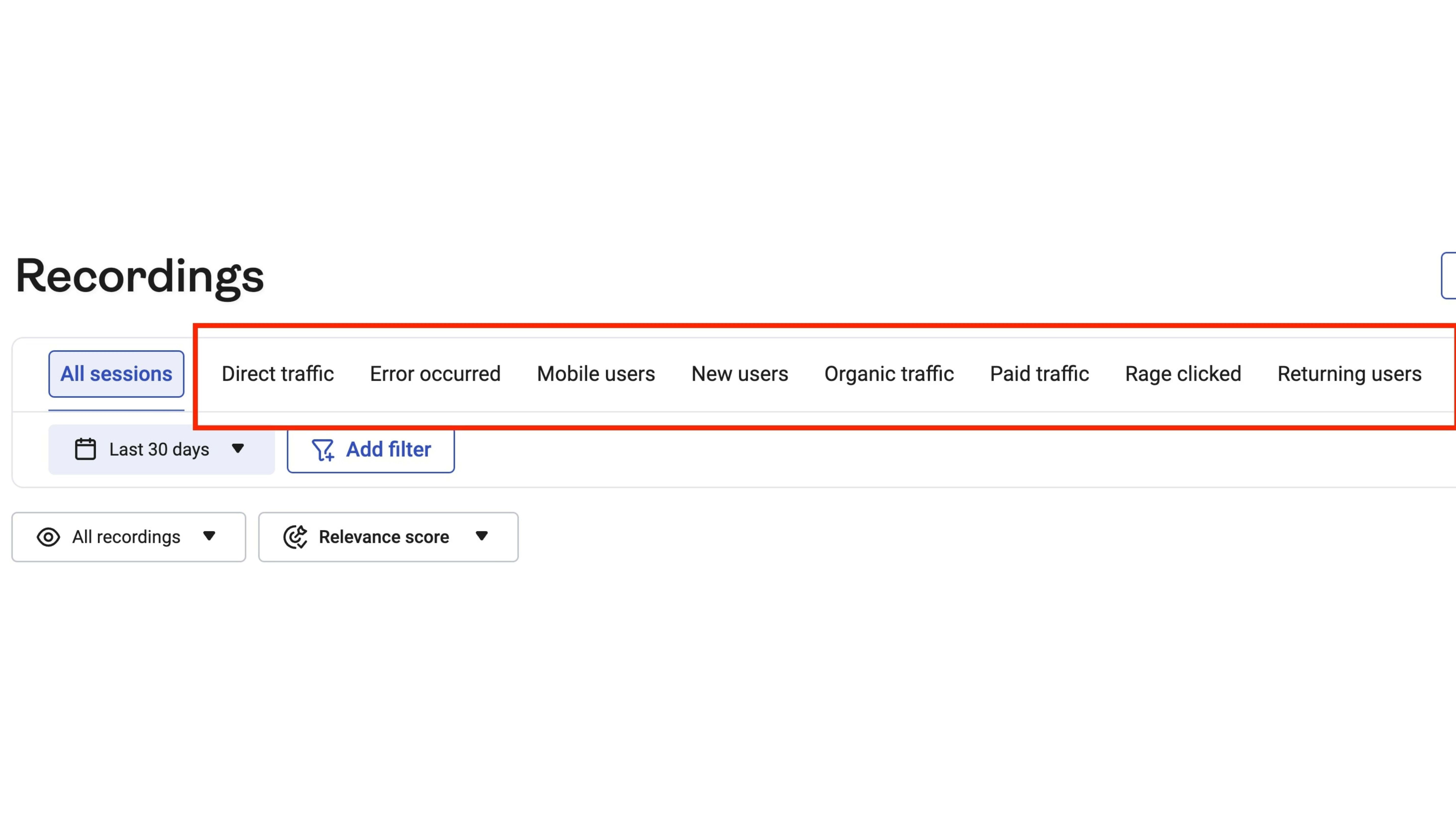
Hotjar's Predefined Segments for You to Analyze Different Sessions, Traffic, Users, and More
When delving into visitor segmentation capabilities between Hotjar and Mixpanel, Hotjar proves to be the stronger contender. Hotjar's visitor segmentation functionality offers a deeper level of granularity by allowing you to categorize website visitors based on their behaviors and attributes. This enables businesses to gain valuable insights into distinct user groups, their interactions, and preferences. For instance, Hotjar's advanced segmentation could help an e-commerce site understand how different user segments navigate their online store, leading to tailored improvements for each group.
In contrast, Mixpanel's segmentation primarily revolves around product attributes. While this provides insights into product-related behavior, it may not offer the same level of nuanced understanding of user interactions as Hotjar's visitor-focused segmentation. Mixpanel's approach might be suitable for businesses aiming to analyze how users interact with specific product features but could lack the comprehensive insight into broader visitor behaviors that Hotjar provides.
Mixpanel's Superior Dashboard and Alert Capabilities Over Hotjar
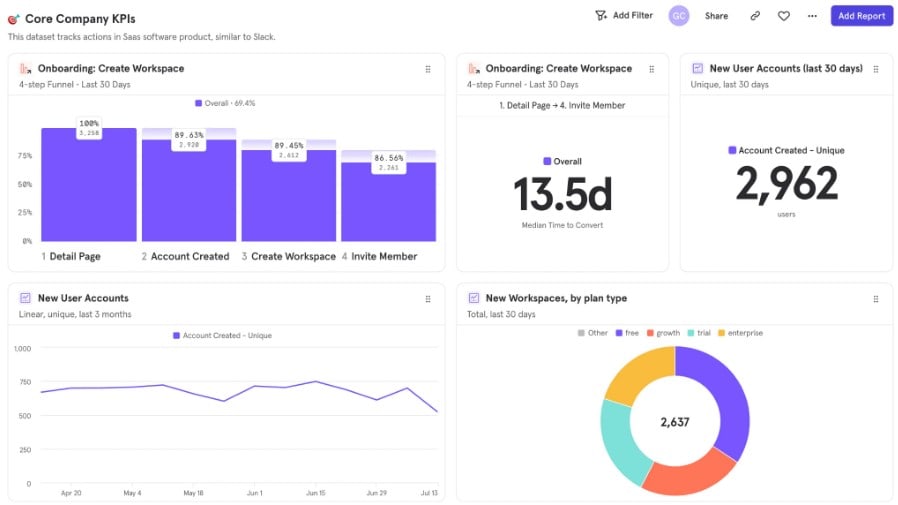
Mixpanel Boards, Allowing You to View Important Stats with Insights, Flows, Funnels, and Retention Reports
In the realm of data tracking and real-time awareness, Mixpanel takes the lead with its exceptional dashboarding and alert features. Mixpanel empowers users to create personalized dashboards tailored to their specific metrics and KPIs, fostering a comprehensive visual overview of their data landscape. Moreover, Mixpanel's alert system allows users to set up notifications for significant events or changes, ensuring immediate awareness and timely actions.
On the other hand, while Hotjar excels in behavioral tracking and insightful analytics, it falls short in offering an equally robust dashboarding and alert framework. Hotjar's focus leans more towards visualizing user behavior through heatmaps and session recordings, rather than comprehensive dashboard customization and real-time alerts.
Mixpanel's Extensive Integrations Take the Lead Over Hotjar
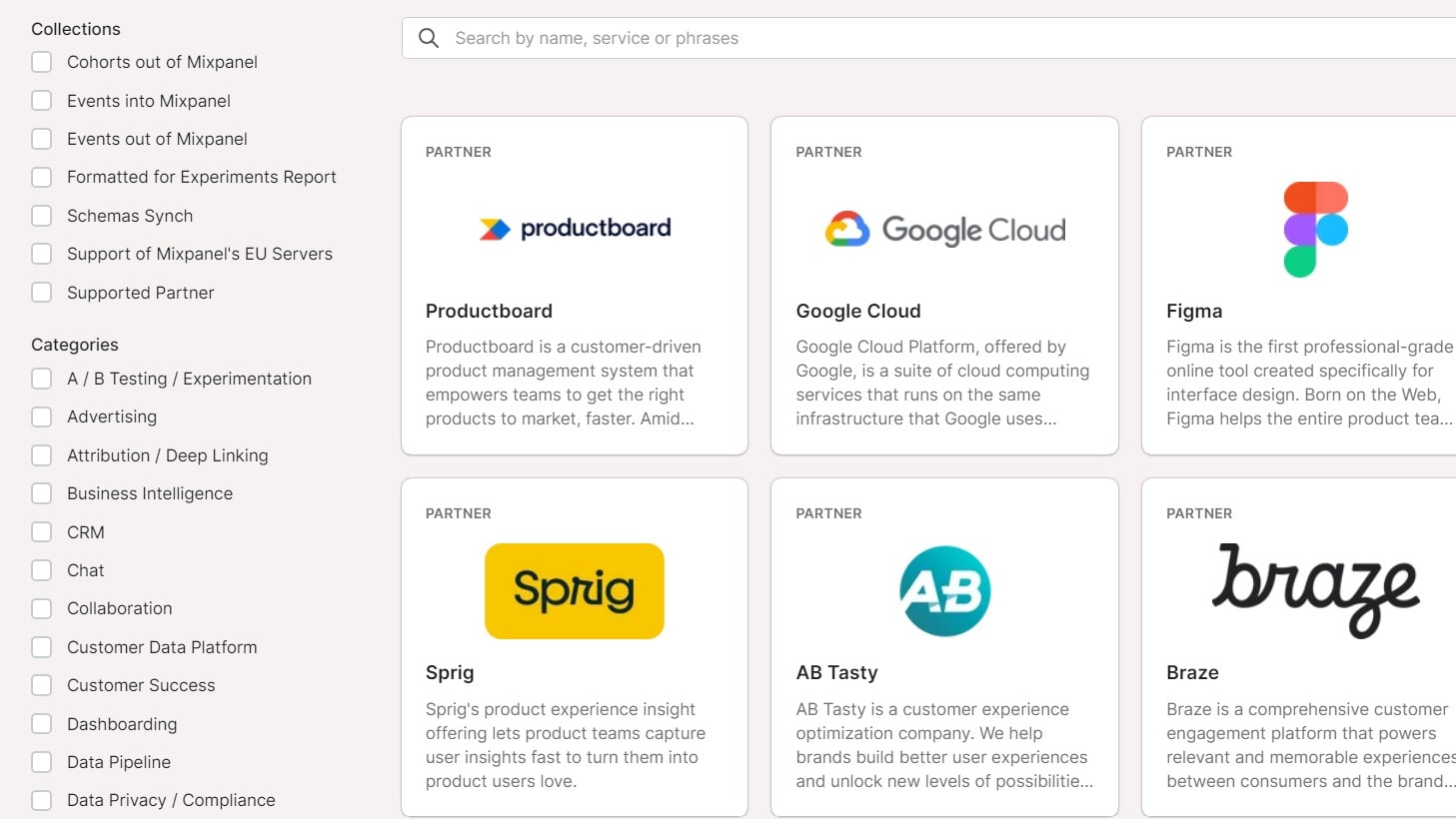
A Selection of Mixpanel's Integrations, Including Google Cloud and Figma
When examining the integration capabilities of Mixpanel and Hotjar, Mixpanel emerges as the winner with its robust and versatile integration options. Mixpanel's wide-ranging compatibility with various platforms, including iOS, Android, JavaScript, Python, PHP, Java, and more, showcases its adaptability in diverse tech environments. This level of integration flexibility empowers businesses to seamlessly incorporate Mixpanel into their existing systems, enhancing data analysis capabilities. For instance, if your business relies heavily on multiple platforms like mobile apps and web applications, Mixpanel's ability to connect effortlessly with these technologies provides a significant advantage.
While Hotjar offers integration options, particularly with popular content management systems like WordPress and Drupal, it doesn't encompass the same breadth of integration possibilities as Mixpanel. While Hotjar's integrations cater to specific needs, Mixpanel's wide selection covers a broader spectrum of technologies and systems, making it the preferred choice for businesses with complex infrastructures seeking comprehensive data analysis across various platforms.
08 Hotjar vs Mixpanel: Which is the best for your business?
Hotjar is the best tool for you if:
- You prioritize visual insights through heatmaps, session recordings, and user surveys for optimizing user experience
- Your focus is on quickly understanding user interactions and engagement patterns through intuitive visualizations
- You need an affordable analytics solution with user-friendly interfaces accessible to users of varying technical backgrounds
- Your goal is to gather direct user feedback through surveys and polls to enhance your website's performance
- Your business requires a tool that offers user segmentation for basic targeting and analysis
 You prioritize visual insights through heatmaps, session recordings, and user surveys for optimizing user experience
Mixpanel is the best tool for you if:
- You require in-depth quantitative analysis and event-based tracking to understand user behaviors with precision
- Your business goals involve advanced cohort analysis for insights into user retention, engagement patterns, and conversion rates
- You seek robust user segmentation capabilities for precise targeting and tailored strategies
- Real-time tracking of user actions is essential for your analytics needs
- You are willing to invest time in learning the tool's advanced features to derive deep insights into user behavior
Hotjar
Used by 987 members
40% off all annual plans
Save up to $928
Mixpanel
Used by 1435 members
1 year free
Save up to $50,000
09 Alternatives to Hotjar & Mixpanel

Slack
Used by 3917 members
25% off new plan purchases
Save up to $9,000

Sentry
Used by 1299 members
6 months free on the Teams plan
Save up to $180

Amplitude
Used by 581 members
3 months free on the Plus plan
Save up to $183

LiveSession
Used by 167 members
50% off the Pro plan for 6 months
Save up to $594
10 Promotions on Data Analytics software
Hotjar and Mixpanel are great tools, but Secret offers promo codes with discounts on over 2220+ different SaaS solutions. New deals are added regularly, helping you save money on your online subscriptions. Get access to codes for other Data Analytics software you might want to purchase

Google Cloud (GCP) promotion
$2,000 in credits for 1 year if you never raised funds // $350,000 in credits for 2 years if you did

Google Ads offer
Spend $500, get $500 // Spend $1,000, get $750 // Spend $1,500, get $1,000 in FREE ad credit

Semrush promo code
14 days free on Semrush One
Amplitude free credits
3 months free on the Plus plan

Code for Databricks
$21,000 in credits for 1 year

Moesif coupon code 2026
50% off for 3 months for the plan Grow
LiveSession free credits
50% off the Pro plan for 6 months

mongoDB free credits
$500 in credits for 1 year

Adriel deal
21 days free

SerpApi discount
50% off for 12 months
Start saving on the best SaaS
Secret has already helped tens of thousands of startups save millions on the best SaaS like Microsoft Teams, Google Workspace & many more. Join Secret now to buy software the smart way.