


Digital marketers know the importance of a robust web analytic tool. You all will agree when we say that data is the lifeblood of any successful online strategy. It enables businesses to make informed decisions, understand user behavior, and ultimately drive growth. When you make a simple search query for the best web analytic tool, the web will present you with a plethora of options to choose from. And to your surprise, each tool will claim to offer unique features and benefits. We know that not all are created equal.
Therefore, to overcome the challenge of finding the best tool, we have thoroughly explored and compared various web analytics tools. Finally we have narrowed down our choice to the two popular options-Hotjar and Google Analytics. Let's explore the details and understand the intricacies to discern their differences and determine which one holds the edge for your analytics journey.
- 01 Hotjar vs Google Analytics: overview
- 02 What's the difference between Hotjar and Google Analytics?
- 03 Hotjar pros and cons
- 04 Google Analytics pros and cons
- 05 Hotjar compared to Google Analytics
- 06 Google Analytics compared to Hotjar
- 07 Features comparison
- 08 Hotjar vs Google Analytics: Which is the best for your business?
- 09 Alternatives to Hotjar & Google Analytics
- 10 Promotions on Data Analytics software
Start saving on the best SaaS
Secret has already helped tens of thousands of startups save millions on the best SaaS like Microsoft Teams, Google Workspace & many more. Join Secret now to buy software the smart way.

01 Hotjar vs Google Analytics: overview
Hotjar and Google Analytics stand as dependable web and data analytics software, each offering unique features that cater to distinct business needs.
Hotjar's appeal lies in its user-friendly interface and affordability, making it an attractive choice for startups and smaller businesses aiming to delve into website analytics. On the other hand, Google Analytics stands as a powerhouse, offering a comprehensive suite of tools for businesses of all sizes. Its robust data tracking, audience segmentation, and conversion tracking capabilities provide deeper insights into website performance.
Now, let's delve into the Hotjar vs. Google Analytics comparison to help you make an informed decision when selecting the right tool for in-depth analysis and strategic decision-making.

Positive reviews
Both Hotjar and Google Analytics have received positive reviews from their respective users for their unique strengths.

Hotjar
Google Analytics
Analyse du formulaire
Google Analytics provides some form tracking capabilities, although Hotjar's form analysis is more detailed and user-friendly.
Hotjar
Google Analytics
Conversion funnels
Google Analytics provides a robust and comprehensive approach to conversion funnels, with more advanced segmentation and detailed insights.
Hotjar
Google Analytics
Multi-platform tracking
Google Analytics emphasizes data-driven insights, providing valuable multi-platform tracking capabilities. Hotjar focuses more on user behavior and interactions.
Hotjar
Google Analytics
Customer support
Hotjar provides excellent customer support through live chat and email. Google Analytics offers a comprehensive Help Center and community forums to address queries along with email support.
Hotjar
Google Analytics
Pricing plans
Hotjar's affordability and flexible plans are well-suited for cost-conscious users, while Google Analytics' free version and premium offerings cater to a wide spectrum of analytical needs.
Hotjar
Google Analytics
Ease of use
Hotjar boasts an intuitive and user-friendly interface, Google Analytics, with its advanced capabilities, may have a steeper learning curve.
Hotjar
Google Analytics
Feedback and surveys
Google Analytics offers some limited survey capabilities while Hotjar excels in real-time feedback collection and survey creation.
Hotjar
Google Analytics
Integrations
Hotjar provides a wide selection of integrations, including Segment, Slack and HubSpot, while Google Analytics’s API allows for seamless integration through its API and with other Google products.
Hotjar
Google Analytics
Real-time reporting
Hotjar provides real-time visualizations through heatmaps and recordings yet Google Analytics offers real-time data on website traffic and broader user metrics.
Hotjar
Google Analytics
02 What's the difference between Hotjar and Google Analytics?

Hotjar's Live Playback Recordings of User Interactions on Your Website
Hotjar
Easily improve user experience on your website

Google Analytics's Website Visitor Acquisition Overview
Google Analytics
Google Analytics is a web analytics platform that tracks how your users find and interact with your website, giving you the data to make smarter decisions about traffic, content, and conversions.
Hotjar and Google Analytics stand as formidable web analytics tools, each possessing its own set of strengths and distinct features. Delving deeper into their functionalities reveals differences that cater to varying analytical needs.
Hotjar shines in its qualitative approach to data visualization, offering a dynamic insight into user behavior. Through its innovative features like heatmaps and visitor recordings, Hotjar paints a vivid picture of user interactions. Heatmaps display color-coded patterns highlighting where users click, move their mouse, and scroll. Visitor recordings provide a play-by-play video of user sessions, allowing you to see firsthand how users navigate your website.
In contrast, Google Analytics takes a quantitative route, presenting a wealth of metrics and data related to website performance, user demographics, behavior, and conversions. It offers an extensive array of reports and visualizations that provide a comprehensive overview of website traffic and engagement. While Google Analytics does offer some visual insights, such as graphs and charts, it doesn't provide the same level of dynamic visual data as Hotjar's heatmaps and visitor recordings.
Another notable divergence is their approach to gathering user feedback and conducting on-page surveys. Hotjar empowers you to create customizable polls and surveys that appear strategically during a user's visit. This real-time feedback mechanism captures user opinions on specific elements of your website, aiding in informed decision-making for improvements. Conversely, Google Analytics lacks native survey features, necessitating integration with third-party tools or manual setup of survey forms.
Your choice between Hotjar and Google Analytics hinges on your specific analytical goals. Hotjar's qualitative insights offer a window into user behavior through dynamic visualizations, while Google Analytics excels in quantitative data, offering a comprehensive array of metrics. If real-time user feedback is a priority, Hotjar's survey capabilities provide a valuable edge.

Hotjar
Easily improve user experience on your website
40% off all annual plans
Save up to $928
03 Hotjar pros and cons
What are the advantages of Hotjar?
- Visual user insights: Hotjar's heatmaps and visitor recordings provide a visual representation of user interactions, helping you understand how visitors engage with your website.

- Real-time feedback: The ability to create polls, surveys, and feedback widgets enables you to gather real-time insights from users, aiding in improving user experience.
- Conversion funnels: Hotjar's conversion funnels feature allows you to analyze the user journey, identify drop-off points, and optimize your website for better conversions.
- User experience optimization: Hotjar's tools enable you to identify usability issues, optimize navigation, and enhance user experience, leading to improved website performance.
- Multi-platform tracking: Hotjar is compatible with various platforms and devices, allowing you to track user behavior and engagement across different channels.
What are the disadvantages of Hotjar?
- Limited quantitative data: Hotjar primarily focuses on qualitative data, which might limit your ability to gather comprehensive quantitative insights about your website's performance.

- Complex analytics: While Hotjar's visualizations are intuitive, users might find its more complex analytics features, like form analysis, less user-friendly.
- Data privacy concerns: Since Hotjar records user sessions, there could be privacy concerns related to capturing sensitive information, which requires careful management and compliance.
- Limited e-commerce tracking: Hotjar's capabilities for e-commerce tracking and reporting might not be as robust as some dedicated e-commerce analytics tools.
- Integration challenges: Integrating Hotjar with certain platforms or content management systems might require additional setup or customization, which could be time-consuming.
Compare Hotjar to other tools


Hotjar vs Microsoft Clarity


Hotjar vs FullStory

Hotjar vs Mixpanel

Lucky Orange vs Hotjar

Hotjar vs Mouseflow

Hotjar vs Crazy Egg
04 Google Analytics pros and cons
What are the advantages of Google Analytics?
- Comprehensive data tracking: Google Analytics provides a wide range of quantitative data, offering insights into website traffic, user demographics, behavior, conversion rates, and more.
- Robust reporting: The platform offers in-depth and customizable reporting tools, allowing you to create various types of reports tailored to your specific goals.
- Integration with Google products: Google Analytics seamlessly integrates with other Google products, such as Google Ads and Google Search Console, providing a holistic view of your online presence.
- Ecommerce tracking: Google Analytics offers detailed ecommerce tracking features, enabling businesses to monitor sales, revenue, and product performance for online stores.
- Advanced segmentation: The ability to create custom segments based on user attributes and behaviors enables precise analysis and targeting for more effective marketing campaigns.
What are the disadvantages of Google Analytics?
- Complex interface: Google Analytics can be overwhelming for beginners due to its extensive features and complex interface, requiring a learning curve for effective use.
- Limited visual insights: While it provides some visualizations, Google Analytics doesn't offer the dynamic visual data of tools like Hotjar's heatmaps and visitor recordings.
- Privacy concerns: Businesses need to ensure compliance with data privacy regulations and may need to anonymize or mask user data to address potential privacy concerns.
- Delayed data reporting: Google Analytics may have a slight delay in data reporting, which might affect real-time decision-making for certain time-sensitive campaigns.
- Customization challenges: While powerful, customizing Google Analytics to track specific events or behaviors on your website may require technical expertise or developer assistance.
Compare Google Analytics to other tools


Semrush vs Google Analytics
Mixpanel vs Google Analytics
05 Hotjar compared to Google Analytics
When evaluating Hotjar and Google Analytics, Hotjar offers a unique approach to web analytics with its focus on qualitative data and dynamic user insights. Hotjar stands out by providing visualizations like heatmaps and visitor recordings, offering a real-time view of user interactions and behavior on your website. In contrast, Google Analytics is a robust quantitative analytics tool that provides comprehensive data on website traffic, demographics, and conversion rates.
Hotjar's strength lies in its ability to capture and present user behavior visually, making it easier to identify specific pain points, optimize user experiences, and enhance website usability. Heatmaps visually display where users click, move their mouse, and scroll, providing actionable insights to improve page layouts and content placement. Visitor recordings offer a play-by-play view of user sessions, helping you understand user journeys and uncover usability issues.
Is Hotjar better than Google Analytics?
 Is Hotjar better than Google Analytics?
Determining whether Hotjar is better than Google Analytics depends on the specific needs of your business. Hotjar offers a distinctive approach with its focus on qualitative insights through heatmaps, session recordings, and on-site surveys. For example, heatmaps visually highlight where users click, move their mouse, and scroll on your website, aiding in optimizing layout and content placement. Session recordings provide a play-by-play of user interactions, offering an invaluable understanding of user behavior.
In essence, Hotjar's strengths lie in its visual and experiential insights, ideal for optimizing user experiences, while Google Analytics provides extensive numerical data for data-driven decision-making. Therefore, the determination of which tool is better hinges on aligning their features with your specific goals and requirements.
What is Hotjar best used for?
Hotjar's primary utility revolves around providing businesses with actionable insights into user behavior, facilitating improvements in user experience (UX) and user interface (UI). Its heatmaps visually depict user interactions, such as clicks and scrolling patterns, enabling businesses to optimize page layouts and content placement. Session recordings offer a play-by-play of user journeys, aiding in identifying pain points and enhancing navigation.
Additionally, Hotjar's feedback polls and surveys solicit direct user input, offering valuable perspectives on website or app usability. This comprehensive approach makes Hotjar an ideal tool for businesses aiming to fine-tune their digital platforms to meet user expectations and enhance overall satisfaction.
Can Hotjar replace Google Analytics?
Hotjar and Google Analytics serve distinct but complementary purposes, making them valuable when used together.
Hotjar's visual tools offer a qualitative perspective, showing how users navigate, interact, and engage with a website. In contrast, Google Analytics provides quantitative data, detailing user demographics, traffic sources, and conversion rates. While Hotjar reveals the "why" behind user behavior, Google Analytics uncovers the "what" and "how" aspects of user engagement. Combining both tools yields a comprehensive understanding of user interactions and aids in making informed decisions for optimizing website performance.
Is Hotjar cheaper than Google Analytics?
Hotjar's pricing structure, while it does offer a free plan, starts at a lower cost point than Google Analytics 360. Hotjar's qualitative insights into user interactions, like heatmaps and session recordings, may justify its expense for businesses keen on enhancing user experience.
Conversely, Google Analytics' quantitative data may align better with those prioritizing broader traffic analysis and demographics. Google Analytics offers a cost-effective solution with its free plan, ideal for many businesses seeking fundamental insights into user behavior. The premium Google Analytics 360 option, although more expensive, provides advanced features for larger enterprises.
Is there a better Data Analytics software than Hotjar?
There are several web analytic software alternatives to Hotjar that cater to diverse business requirements.
Mixpanel, Crazy Egg, Lucky Orange and Google Analytics are prominent names known for their extensive service offerings and advanced capabilities. These platforms provide a comprehensive suite of tools to analyze website performance, user behavior, and optimize user experiences.
However, if your focus is on simplicity, cost-effectiveness, and ecological awareness, Hotjar remains a strong contender. While other web analytics solutions offer robust quantitative data, Hotjar's emphasis on visual insights makes it particularly valuable for businesses seeking to understand the "why" behind user behavior.
Hotjar
Easily improve user experience on your website
40% off all annual plans
Save up to $928
06 Google Analytics compared to Hotjar
When evaluating Google Analytics and Hotjar, Google Analytics shines with its robust quantitative analysis capabilities and extensive data tracking. Google Analytics offers a wide array of quantitative metrics and reports that provide deep insights into website traffic, user demographics, behavior, and conversion rates. Its user-friendly interface allows users to analyze key performance indicators and make informed decisions based on data.
For those who prioritize comprehensive quantitative data and reporting, Google Analytics stands as a reliable choice. It empowers businesses to track and measure website performance metrics and derive actionable insights from the data. In contrast, Hotjar's emphasis on qualitative data makes it appealing to users seeking a deeper understanding of user behavior and website usability.
Is Google Analytics better than Hotjar?
Determining the superior software hinges on your specific analytical needs. Google Analytics excels in providing comprehensive insights into user demographics, conversion tracking, traffic sources analysis, and website user flow assessment. For instance, Google Analytics can help you pinpoint the geographic locations of your visitors, track the effectiveness of your marketing campaigns, and understand the pages where users drop off most frequently.
However, it may not offer the immediate and visual experiential insights that Hotjar delivers through its dynamic heatmaps and visitor recordings, which allow you to witness user interactions in real-time.
What is Google Analytics best used for?
Google Analytics shines as a tool for in-depth analysis of quantitative data. It assists businesses in gaining insights into key aspects of their online presence. It allows you to grasp the demographics of your audience, revealing valuable information about age, gender, and interests. You can also discern the effectiveness of your marketing strategies by identifying the sources of incoming traffic, such as organic search, referral links, or paid ads.
Additionally, Google Analytics provides a user journey map, helping you visualize how visitors navigate through your website. This data-driven approach makes it indispensable for businesses seeking to optimize their online strategies based on solid quantitative insights.
Can Google Analytics replace Hotjar?
Google Analytics and Hotjar fulfill distinct roles that make them complementary rather than interchangeable. Google Analytics excels at delivering quantitative data, offering insights into user demographics, traffic sources, and conversion rates. However, it lacks the visual and experiential insights that Hotjar provides through features like heatmaps and visitor recordings. Hotjar, on the other hand, allows you to see how users interact with your website in real-time, identifying areas for improvement.
To obtain a comprehensive understanding of user behavior, combining both tools is advantageous. Google Analytics supplies the quantitative foundation, while Hotjar contributes the qualitative perspective, resulting in a more holistic view for optimizing user experiences.
Is Google Analytics cheaper than Hotjar?
Comparing the cost of Google Analytics and Hotjar involves understanding their pricing models and the value they bring. Google Analytics offers a free version that provides essential insights, making it an attractive option for budget-conscious businesses. However, Google Analytics 360, designed for enterprises with advanced data needs, comes with a substantial price tag. Hotjar, on the other hand, starts at a more affordable rate, catering to businesses looking for visual and experiential insights.
A small e-commerce store might find Google Analytics' free version sufficient for tracking website traffic and conversions. In contrast, a mid-sized company aiming to optimize user experiences might benefit from Hotjar's heatmaps and visitor recordings.
Is there a better Data Analytics software than Google Analytics?
In the realm of web analytics software, Google Analytics stands as a dominant player, offering a wealth of quantitative data and insights into user behavior. However, depending on your unique business requirements, there are alternatives to Google Analytics that might align more closely with your goals.
Software such as Amplitude, Mixpanel, Adobe Analytics and Hotjar offer a broad spectrum of services and advanced capabilities. These platforms cater to businesses seeking a comprehensive suite of tools to analyze website performance, user interactions, and optimize digital experiences.
07 Features comparison
Understanding Conversion Funnels is More Efficient with Hotjar than Google Analytics

Hotjar's user-centric design and visual representation of funnels make it more intuitive for identifying drop-off points and optimizing user journeys.
Hotjar's approach to understanding conversion funnels provides a distinct advantage over Google Analytics.
Hotjar's user-centric design and visual representation of funnels make it more intuitive for identifying drop-off points and optimizing user journeys. For instance, Hotjar's funnel visualization showcases each step in a clear and easy-to-digest manner, facilitating rapid identification of bottlenecks.
While Google Analytics offers funnel analysis, Hotjar's emphasis on visual clarity and user-friendliness streamlines the process. This streamlined approach empowers businesses to take prompt action to enhance conversion rates by addressing pain points. Ultimately, Hotjar's conversion funnel feature offers a more efficient and actionable way to optimize user experiences and drive conversions.
Google Analytics Offers Better Data Visualization and Monitoring Tools than Hotjar

Google Analytics stands out for its robust suite of data visualization and monitoring tools, enabling businesses to glean detailed insights into their website's performance.
Google Analytics stands out for its robust suite of data visualization and monitoring tools, enabling businesses to glean detailed insights into their website's performance.
The dashboards, scorecards, and motion charts offer dynamic representations of data trends over time, making it easier to track changes and identify patterns. For instance, Google Analytics allows users to create custom dashboards that display key metrics at a glance, facilitating quick decision-making.
While Hotjar excels in user behavior analysis with its heatmaps, Google Analytics provides a more comprehensive range of visual tools that offer a deeper understanding of data trends, making it a preferred choice for businesses seeking in-depth monitoring and analysis capabilities.
Hotjar and Google Analytics are Equal When it Comes to Feedback Collection

Hotjar employs feedback polls and incoming feedback features, allowing websites to gather real-time opinions and suggestions from visitors.
Hotjar and Google Analytics are on par when it comes to feedback collection, each offering robust mechanisms for gathering valuable insights from users.
Hotjar employs feedback polls and incoming feedback features, allowing websites to gather real-time opinions and suggestions from visitors. Google Analytics, meanwhile, leverages custom reports to delve into various aspects such as advertising performance, audience behavior, and conversion rates. For instance, Hotjar's feedback polls can be strategically placed to capture user sentiments on specific pages, while Google Analytics' custom reports can provide detailed feedback on the effectiveness of different marketing campaigns.
Hotjar Excels Ahead of Google Analytics for User-Friendliness
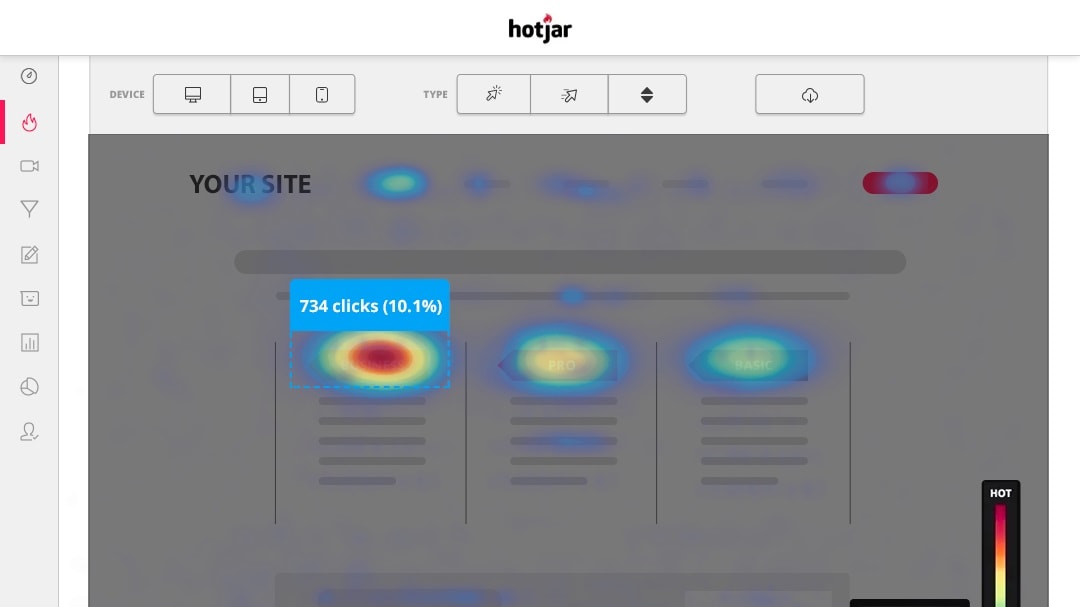
Hotjar shines in terms of user-friendliness, especially for newcomers.
Hotjar shines in terms of user-friendliness, especially for newcomers. Its user-centric design, clear presentation, and simplified reporting give it an edge over Google Analytics in terms of ease-of-use.
While Google Analytics delivers comprehensive data, its intricate interface might pose a challenge to individuals lacking data analysis experience. In contrast, Hotjar's visual heatmaps, recordings, and funnels provide instant insights, aiding users in grasping their website's performance effortlessly. A small business owner could swiftly identify user behavior patterns through Hotjar's visual heatmaps, enhancing their website's design, while Google Analytics might demand a steeper learning curve.
Hotjar Excels at Providing Visitor Recordings Compared to Google Analytics

Hotjar distinguishes itself through its visitor recordings feature, which provides an unparalleled understanding of user behavior.
Hotjar distinguishes itself through its visitor recordings feature, which provides an unparalleled understanding of user behavior.
By offering the ability to watch actual user sessions, Hotjar goes beyond Google Analytics' statistical approach. For instance, with visitor recordings, you can witness users' mouse movements, clicks, and scrolling patterns, helping identify areas of friction or engagement. This granular level of insight empowers businesses to optimize user experiences with precise knowledge of how visitors interact with specific elements.
While Google Analytics offers valuable data, Hotjar's visitor recordings provide a more immersive and tangible view, making it a potent tool for enhancing website usability and conversions.
Hotjar Provides a Wider Range of Third-Party App Integrations than Google Analytics
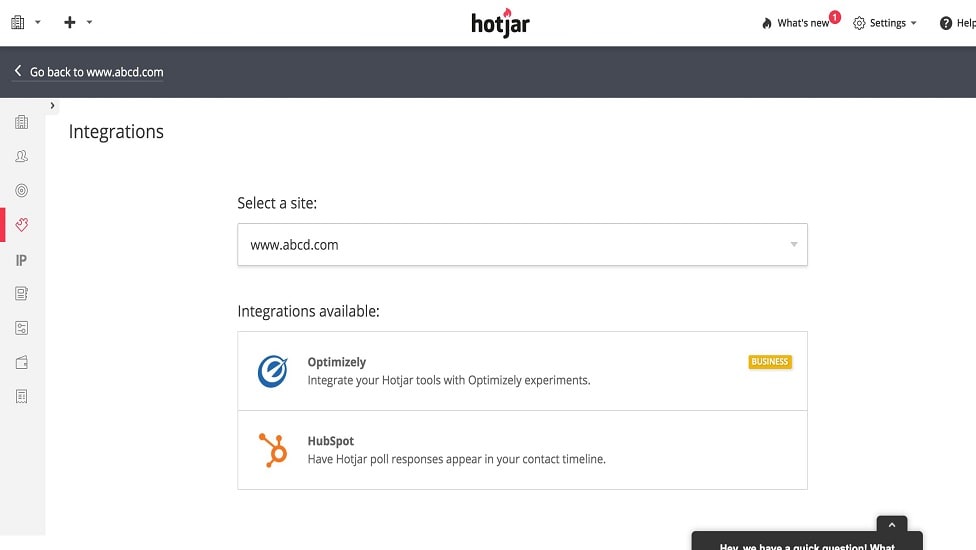
Hotjar excels in its range of third-party app integrations, offering compatibility with a diverse array of platforms beyond website builders.
Hotjar excels in its range of third-party app integrations, offering compatibility with a diverse array of platforms beyond website builders. For instance, Hotjar seamlessly integrates with popular customer relationship management (CRM) systems like HubSpot and Salesforce, enhancing user data management and analysis. This flexibility is especially valuable for businesses utilizing multiple tools in their operations.
On the other hand, Google Analytics provides integrations primarily centered around Google's own suite of products. While both tools facilitate integration, Hotjar's broader spectrum of third-party options offers enhanced versatility, making it an advantageous choice for businesses seeking to create an interconnected ecosystem of tools for holistic data analysis and insights.
Google Analytics Provides Superior Segmentation Analysis than Hotjar

With Google Analytics, businesses can dive deep into subsets of data, examining specific user behaviors, demographics, and conversion paths.
Google Analytics offers an advanced level of Segmentation Analysis that surpasses what Hotjar provides.
With Google Analytics, businesses can dive deep into subsets of data, examining specific user behaviors, demographics, and conversion paths. This segmentation capability enables comprehensive insights into user preferences and interactions. For example, Google Analytics can help identify which geographical regions contribute the most to conversions or analyze how different user segments engage with specific content.
While Hotjar also supports visitor segmentation based on behaviors and characteristics, Google Analytics' robust segmentation tools allow for more intricate and nuanced analysis, making it a preferred choice for businesses seeking in-depth insights into user behavior and performance.
08 Hotjar vs Google Analytics: Which is the best for your business?
Hotjar is the best tool for you if:
- You prioritize visual insights: Hotjar's heatmaps and visitor recordings offer real-time visual data on user interactions for enhancing user experience
- You seek user feedback: Hotjar's customizable surveys and polls provide real-time user opinions, aiding in informed decision-making
- You want conversion optimization: Hotjar's conversion funnels help identify drop-off points, enabling you to improve website conversions
- You're a small business: Hotjar's affordability and user-friendly interface make it suitable for startups and small businesses
- You value real-time monitoring: Hotjar provides immediate feedback through visualizations, aiding quick adjustments to your website
 You prioritize visual insights: Hotjar's heatmaps and visitor recordings offer real-time visual data on user interactions for enhancing user experience
Google Analytics is the best tool for you if:
- You need comprehensive data: Google Analytics offers extensive quantitative insights into website traffic, user demographics, and behavior
- You prioritize data-driven decisions: Google Analytics' advanced reporting and segmentation enable precise analysis for strategic decision-making
- You want ecommerce tracking: Google Analytics provides detailed ecommerce insights for online stores, including sales and revenue tracking
- You require integration with Google products: Google Analytics seamlessly integrates with Google Ads and other tools, offering a holistic view
- You manage larger enterprises: Google Analytics 360 offers more advanced features for in-depth data analysis and enterprise-level needs
Hotjar
Easily improve user experience on your website
40% off all annual plans
Save up to $928
09 Alternatives to Hotjar & Google Analytics

Slack
Used by 3883 members
25% off new plan purchases
Save up to $9,000

Mixpanel
Used by 1428 members
1 year free
Save up to $50,000

Sentry
Used by 1286 members
6 months free on the Teams plan
Save up to $180

Amplitude
Used by 578 members
3 months free on the Plus plan
Save up to $183
10 Promotions on Data Analytics software
Hotjar and Google Analytics are great tools, but Secret offers promo codes with discounts on over 2220+ different SaaS solutions. New deals are added regularly, helping you save money on your online subscriptions. Get access to codes for other Data Analytics software you might want to purchase
Mixpanel promotion
1 year free

Google Cloud (GCP) discount
$2,000 in credits for 1 year if you never raised funds // $350,000 in credits for 2 years if you did

Promo code Google Ads
Spend $500, get $500 // Spend $1,000, get $750 // Spend $1,500, get $1,000 in FREE ad credit

Credits for Semrush
14 days free on Semrush One
Amplitude discount code
3 months free on the Plus plan

Databricks promo code 2026
$21,000 in credits for 1 year

Moesif discounts
50% off for 3 months for the plan Grow

LiveSession discount code
50% off the Pro plan for 6 months

mongoDB discount code
$500 in credits for 1 year

Adriel offer
21 days free
Start saving on the best SaaS
Secret has already helped tens of thousands of startups save millions on the best SaaS like Microsoft Teams, Google Workspace & many more. Join Secret now to buy software the smart way.