


When it comes to creating modern workspaces for planning, documenting knowledge and delivering products faster, there are few options available today; Linear and Notion are two of them.
As organizations move toward being modern, product-based companies, many will experience a common pain point at some time: planning happens in one system, execution happens in another, and somewhere along the line, the "why" becomes lost on a sprint board or in a doc graveyard. Both tools address this issue, but in entirely different ways, which also means there are very different trade-offs.
I'll be comparing Linear vs Notion from a practical perspective in this post: how they function in real-world workflow scenarios (triage, planning, documentation, stakeholder alignment) as well as what each is truly good at doing, so you can make an informed decision when deciding which to use in your stack. If you're interested in reading about other tools, you may also be interested in our in-depth comparison of Notion's collaboration features versus those of Confluence
- 01 Linear vs Notion: overview
- 02 What's the difference between Linear and Notion?
- 03 Linear pros and cons
- 04 Notion pros and cons
- 05 Linear compared to Notion
- 06 Notion compared to Linear
- 07 Features comparison
- 08 Linear vs Notion: Which is the best for your business?
- 09 Alternatives to Linear & Notion
- 10 Promotions on Application Development software
- 11 Linear vs Notion: Conclusion
Start saving on the best SaaS
Secret has already helped tens of thousands of startups save millions on the best SaaS like Microsoft Teams, Google Workspace & many more. Join Secret now to buy software the smart way.

01 Linear vs Notion: overview
From the outside, Linear and Notion may seem alike as "product management tools." However, there are major differences in their layers: Linear is a project team execution engine, while Notion is a flexible platform for shared workspaces and workflows.
Linear focuses on high-signal issue tracking; fast intake, consistent states, cycles and sprints, and a workflow that remains clean despite a large backlog. The type of tool that rewards disciplined product and engineering teams that want speed and crispness over endless options for customizations. On JoinSecret's Linear pricing page you will find a Freemium model, paid levels, and a lowest priced plan at $8 per user per month.
Notion is more similar to a company-wide workspace layer; docs, wikis, databases, and low-level task management to be used by Product, Ops, Marketing, and Leadership in one common structure. One of Notion's greatest advantages is to convert random data into easily navigated and reused knowledge particularly if you establish template and database schema standards.
To better illustrate the features of each we have provided the following side-by-side feature snapshot.

Issue tracking depth
Linear is purpose-built for issues, including triage, states, and cycles. Notion can track tasks via databases, but lacks delivery-native conventions and fast issue workflows.

Linear
Notion
Docs and knowledge base
Notion is a full documentation and wiki system. Linear captures context inside issues and projects, but it’s not designed to be a long-lived knowledge repository.
Linear
Notion
Project planning views
Linear excels for roadmaps tied to delivery cadence. Notion is highly flexible with views, but planning quality depends on how well your databases are modeled.
Linear
Notion
Reporting and analytics
Linear is stronger for delivery-oriented signals, like cycle progress and backlog health. Notion reporting is powerful, but heavily dependent on database design and discipline.
Linear
Notion
Customer support
Both provide solid support resources. The practical difference is scope, Notion serves many personas and workflows, Linear’s support content maps tightly to product delivery use cases.
Linear
Notion
Pricing plan
Linear offers a Free plan plus paid tiers with a clear starting point, $8 per user per month on JoinSecret. Notion’s tiers are also clear, with Free, Plus, Business, and Enterprise plans.
Linear
Notion
Customer reviews
Both tools are generally well reviewed. Real-world satisfaction is driven more by fit than features, engineers favor Linear’s speed, cross-functional teams favor Notion’s versatility.
Linear
Notion
Integrations ecosystem
Notion connects broadly across teams, while Linear connects strongly with dev tooling. Notion also supports a native Linear integration for real-time issue previews.
Linear
Notion
Permissions and governance
Notion typically wins for organization-wide content governance. Linear fits product-team access models, but it isn’t a full wiki governance tool.
Linear
Notion
Workflow automation
Linear’s workflow is opinionated and consistent. Notion can automate around databases, but it usually needs more governance to stay coherent over time.
Linear
Notion
Ease of use
Linear is fast and low-ceremony once adopted. Notion is intuitive for writing, but advanced databases and cross-team standards can raise the learning curve.
Linear
Notion
02 What's the difference between Linear and Notion?
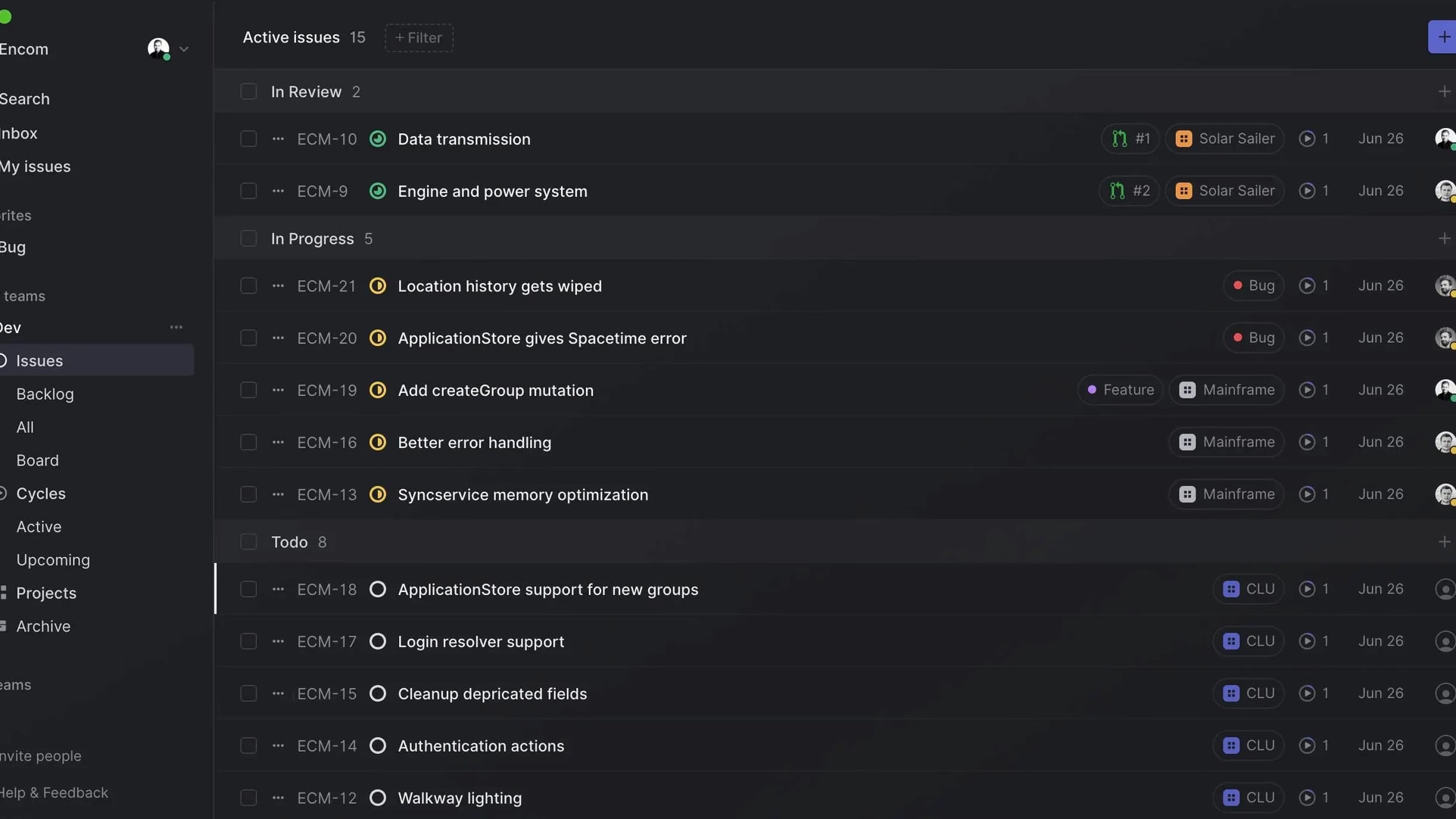
A typical Linear workspace focused on active issue management
Linear
Streamline your product development
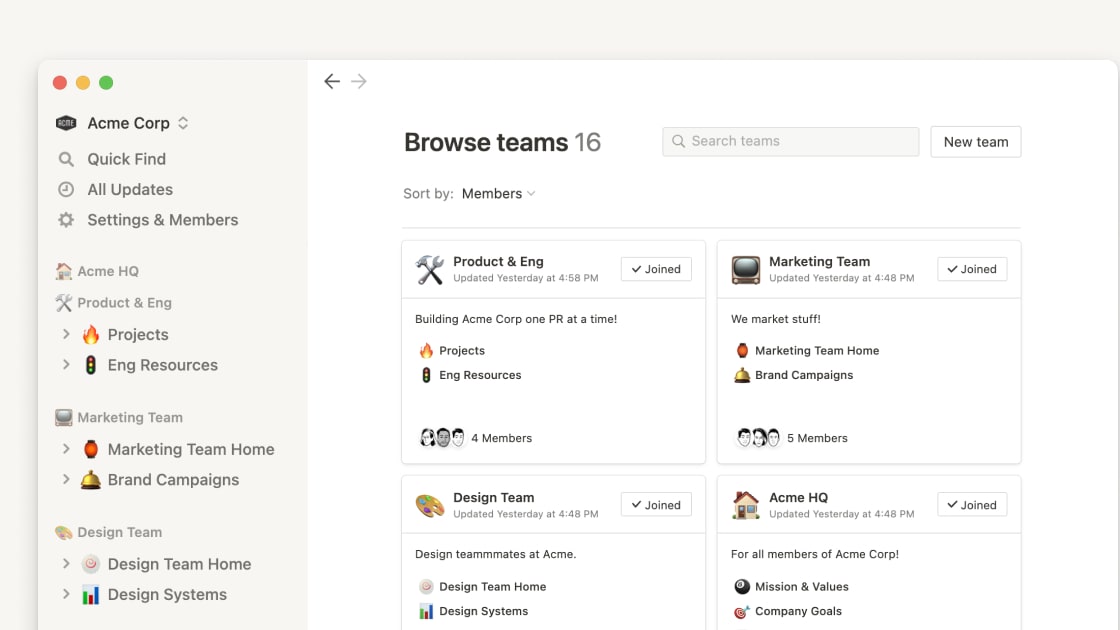
Notion centralizes documentation, databases, and workflows
Notion
Knowledge base, project management, note taking, and more. Notion leverages AI to centralize your team's work, facilitate collaboration, ensure proper project follow-up, and boost overall productivity and efficiency.
The easiest way to frame the comparison is that Linear is optimized for throughput and Notion is optimized for common context. If the constraint in your organization is "we cannot deliver with regularity," then Linear may solve the mechanical problem. However, if the constraint is "we are unable to find/reuse knowledge," then Notion is likely to solve the problem of organizational memory.
Linear performs well when the work is inherently heavy in execution (a continuous flow of bugs, a steady stream of product requirements which must be converted into scoped issues, a constant need to triage a backlog and a cycle/sprint based cadence). As an opinionated tool by design, you will spend less time building a system, and more time using a system.
Notion is a very different beast. While Notion can support task-based functionality, the real power of Notion lies in creating workflows that are composable; pages for narrative documentation, databases for structured work, and templates for repeatable process work. Notion excels as a single source of truth for specifications, decisions, Standard Operating Procedures (SOPs), onboarding and cross-functional programs that require as much agreement as execution.
Both tools have free offerings (free plans) and linear offers a free tier, with additional tiers available at $8 per user per month. Notion also offers a free tier and lists its per-member pricing tiers (Plus, Business, Enterprise) in the same manner as Linear. While both tools offer free tiers, in reality, Linear's free tier is an excellent trial for a product team, and Notion's value grows as more teams rely on common databases and documentation standards.

Notion
Organize teamwork and increase productivity
3 months free on the Business plan with Unlimited AI
Save up to $720
03 Linear pros and cons
What are the advantages of Linear?
- High-velocity issue tracking: Linear is built for triage and execution, not just task lists. That makes it easier to keep a backlog actionable instead of bloated.

- Opinionated workflows that reduce admin overhead: You don’t need to spend weeks designing custom workflows. Teams often ship faster because the tool encourages consistency by default.
- Cycles and sprints that stay operationally lightweight: Planning stays close to execution, with less ceremony than heavyweight tools. It’s ideal for teams that want cadence without bureaucracy.
- Cleaner handoffs between product and engineering: Specs can stay in Notion, but execution in Linear remains crisp, especially when you enforce a standard for definition of ready at intake.
- Clear plan structure for scaling: JoinSecret outlines a Free plan and a paid starting price, which simplifies procurement and forecasting.
What are the disadvantages of Linear?
- Not a true knowledge base: You can store context in issue descriptions and comments, but it’s not designed for long-lived documentation or company wiki navigation.

- Less natural for non-product teams: Marketing or People teams can use it, but the mental model is engineering-first. Notion is usually better as the cross-functional home.
- Customization is intentionally constrained: If your organization wants highly bespoke workflows everywhere, Linear may feel restrictive compared to database-driven systems.
- Process maturity required: Linear amplifies good habits. If intake is chaotic, you may need triage rules and ownership first, or the tool won’t magically create discipline.
- May create tool overlap: If you already run deep Jira or GitHub and GitLab workflows, partial adoption can lead to duplication unless you commit to a clear source of truth.
04 Notion pros and cons
What are the advantages of Notion?
- Best-in-class documentation and wiki behavior: Notion is designed to keep specs, decisions, and team knowledge discoverable and reusable, especially when paired with templates and database conventions.
- Databases for build-your-own workflows: You can model processes like OKRs, product discovery, content pipelines, hiring, or vendor tracking without writing code.
- Cross-functional adoption: Notion works for product, ops, marketing, and leadership, which makes it easier to standardize how information is created and shared.
- Strong plan transparency: Notion publishes clear tiers and what they unlock, including advanced permissions and SAML SSO on Business.
- Native Linear integration for previews: Pasting Linear links into Notion can render previews of issues and projects, keeping stakeholders informed without forcing them into the tracker.
What are the disadvantages of Notion?
- Governance is not optional: Without owners, templates, and naming rules, Notion can devolve into a maze of pages and duplicated databases.
- Execution discipline is harder to enforce: Notion can track tasks, but it doesn’t naturally push teams toward fast triage, strict states, and delivery-centric rituals like a dedicated tracker.
- Database complexity can become a tax: Relations and rollups are powerful, but it’s easy to build something clever that’s also fragile or slow to maintain.
- Inconsistent implementations across teams: Two teams can build radically different project systems, which makes cross-team reporting and alignment harder.
- Scaling permissions may require higher tiers: Many governance features, including SAML, are associated with business-grade plans.
Compare Notion to other tools


Notion vs Monday


Notion vs Asana

Coda vs Notion

ClickUp vs Notion

Notion vs Slab

Notion vs OneNote
05 Linear compared to Notion
Linear and Notion are often used in conjunction, but they're both useful for different reasons. Use Linear as your precision tool that will keep your execution clean and on track while using pressure. Notion is your space that can be flexible to allow your team to see what's happening across multiple areas of work.
The decision as to which one will be your primary platform will depend on how much rigor you want in a specific area; either delivery (Linear) or knowledge/process (Notion).
Is Linear better than Notion?
 Is Linear better than Notion?
When shipping is your primary problem: managing bug triage quickly; owning issues clearly; creating consistent delivery schedules; and making sure the backlog doesn't turn to sludge... Linear is better than Notion.
Notion will allow you to do "task tracking", however Linear has a design for executing on those tasks, no matter how large of an engineering organization you are. Therefore if your entire engineering team uses this tool throughout their workday, that design advantage makes a huge difference.
What is Linear best used for?
Linear is ideal for product and engineering delivery (issue intake, prioritizing, sprint and cycle planning and close feedback loops from product to design to engineering).
Linear is also an excellent fit for teams looking for a "tracker" with an opinion on how to maintain healthy backlog hygiene versus a completely blank slate that would require continuous customized configuration.
Can Linear replace Notion?
Yes it would be possible to replace linear with the portion of Notion that is simply tracking work, but this is particularly true if your current Notion implementation is simply an array of tasks in a database that has a Kanban view.
However, Linear cannot replace Notion as a wiki, decision log, or company-wide workspace. If you want to create a long-lasting repository for knowledge (documentation), Notion is still the best system of record.
Is Linear cheaper than Notion?
If a product team is purchasing an execution tracker specifically for their project team, Linear can be more cost-effective due to Linear's flat rate pricing that begins at $8 per user/month with a free tier available.
The price of Notion will be less if your workspace uses Notion for documentation and a very small percentage of your tasks are tracked using Notion, since Notion provides transparent pricing plans based upon member levels.Startups can unlock a Linear discount: one year free on the Basic or Business plans
Is there a better Application Development software than Linear?
Depending upon your definition of "better", if you are looking for deeper customization options, workflow complexity and corporate level administration, then tools such as Jira are usually grouped with Linear when being compared.
Alternatively, if you prefer the tracking system to be closer to your code and CI/CD workflow then GitHub or GitLab based workflows may be a better fit for some organizations.
And if you’re exploring alternatives more broadly, you can also check out our list of Linear alternatives here
Is Linear better than Jira?
Linear is generally preferred by teams that are focused on speed, simplicity, and keeping overhead low. When your most frustrating experience with the tracker is "we're spending so much time setting up the tracker we have little to no time working," Linear will generally make a big difference.
Jira is typically preferred when you need customized workflows, advanced permissions, dependency mapping across projects or enterprise-wide control. If you are already deep into the Atlassian eco-system, then Jira's compatibility with other products can help offset the extra cost and effort needed to maintain it. For additional information, you may want to consider our comparison between Notion and jira
06 Notion compared to Linear
When you are using your main tool for managing the team's shared understanding of what they have to do (and not just tracking issues), Notion is a better option than Linear. When there are several teams that want to collaborate on a single platform, but don't want to adopt an "engineering first" workflow, then Notion is a much stronger choice.
Linear can be integrated with Notion as well. This is because Linear can send link previews back to Notion, which means that stakeholders will see a view of their work (without creating a second execution system).
Is Notion better than Linear?
When your team requires documentation, a wiki and flexible workflows to be able to coexist, Notion will be a better option for you. This isn't just hype; teams waste countless hours explaining themselves repeatedly with a lack of context and tribal knowledge.
If your team has cross-functional responsibilities such as product, ops, marketing, sales and leadership, it's more likely that Notion becomes the central location that teams can reference.
What is Notion best used for?
Notion is at its best as a platform for creating a company-wide knowledge system where specifications, decision records, onboarding portals, SOPs, research libraries and database driven systems (e.g. OKRs) or road maps are stored.
In addition to this, Notion makes workflows transparent to stakeholders who may not be technical so they don't have to use an issue tracker simply to see how projects are progressing.
Can Notion replace Linear?
If your team executes lightly (you simply use a Kanban, a content calendar or a list of tasks without having to enforce formal triage, state or sprint) then Notion could be used as an alternative to Linear.
However, when your team cares about establishing and maintaining consistent delivery mechanisms, intake rules, team member responsibilities and sprint commitments, Notion will likely become your team's documentation/planning tool and Linear will continue to serve as your team's execution tool.
Is Notion cheaper than Linear?
The pricing plans posted by Notion can seem very affordable, especially if Notion will be replacing several tools such as a Wiki, Docs and basic project management. You may utilize a promotional code for Notion from JoinSecret
Is there a better Collaboration software than Notion?
If you prefer an enterprise wiki with a higher degree of similarity to your company's engineering tool stack and/or a more traditional wiki, then Confluence may be a good alternative, especially if your team has an existing relationship with Atlassian.
If you're looking at using a tool like Obsidian for personal knowledge management or a "local first" type of approach; then you'll find the comparison of Notion vs Obsidian helpful here.
Is Anytype better than Notion?
If control over data (as in locally) and the desire for privacy are your primary goals, Anytype may be a better option than Notion. If you don't mind a smaller community of users, as well as an alternative way of collaborating with others, then Anytype will likely be the better option. On the other hand, if you're using any of the platforms for Personal Knowledge Management and you're willing to make some sacrifices in terms of what I'd call "autonomy" -- Anytype may be the better option for you.
If you're working in teams and looking at a platform to use for shared workspaces, internal publishing of knowledge and standardized workflows throughout various departments -- Notion would likely be the better option for you.
In short, Anytype wins on autonomy -- Notion wins on adoption and workflow consistency.
Notion
Organize teamwork and increase productivity
3 months free on the Business plan with Unlimited AI
Save up to $720
07 Features comparison
Linear Excels Ahead of Notion for Issue Triage and Execution Velocity

Linear's triage workflow allows teams to prioritize and assign incoming issues
Linear is better than Notion for creating work from issues and moving them through the pipeline quickly. Linear has its roots in the moment when an issue moves from being a request to being actual work: intake, priority assignment, who owns the work, and what state the work is in. The tool was designed to support rapid feedback cycles; as such, the process of triaging issues does not have the same sense of ritual or ceremony that it would in tools which are less suited to this type of workflow.
Although Notion can be used to keep track of tasks, it does not inherently create the constraints on your team's execution of work which are necessary for your teams to maintain a healthy level of execution. As such, if you want to determine whether success is measured by how quickly ambiguous requests become clear, actionable work, then Linear is the better option.
Notion Dominates Linear for Documentation, Wikis, and Long-Lived Knowledge

Notion's structured pages and databases support long-lived, reusable knowledge
Notion is a tool to preserve durable context: product specifications, RFCs, strategy documents, onboarding documents, decision logs, and standard operating procedures (SOPs). Notion does not merely hold information; however, it also provides the ability to navigate through that information as well as make it reusable. This is how companies prevent having to have the same conversation multiple times.
Linear supports context in the form of issues, but this is inherently ephemeral: issues close, cycles end, and projects ship. While Linear is excellent at supporting the needs of delivery, it is not good at preserving knowledge for continuous knowledge usage.
If you are looking for an authority source for knowledge management concepts, the Atlassian guide on wikis vs documentation systems is a helpful lens for what Notion is often used for in practice.
Linear Is Better for Sprint and Cycle Operations, While Notion Is Better for Flexible Planning
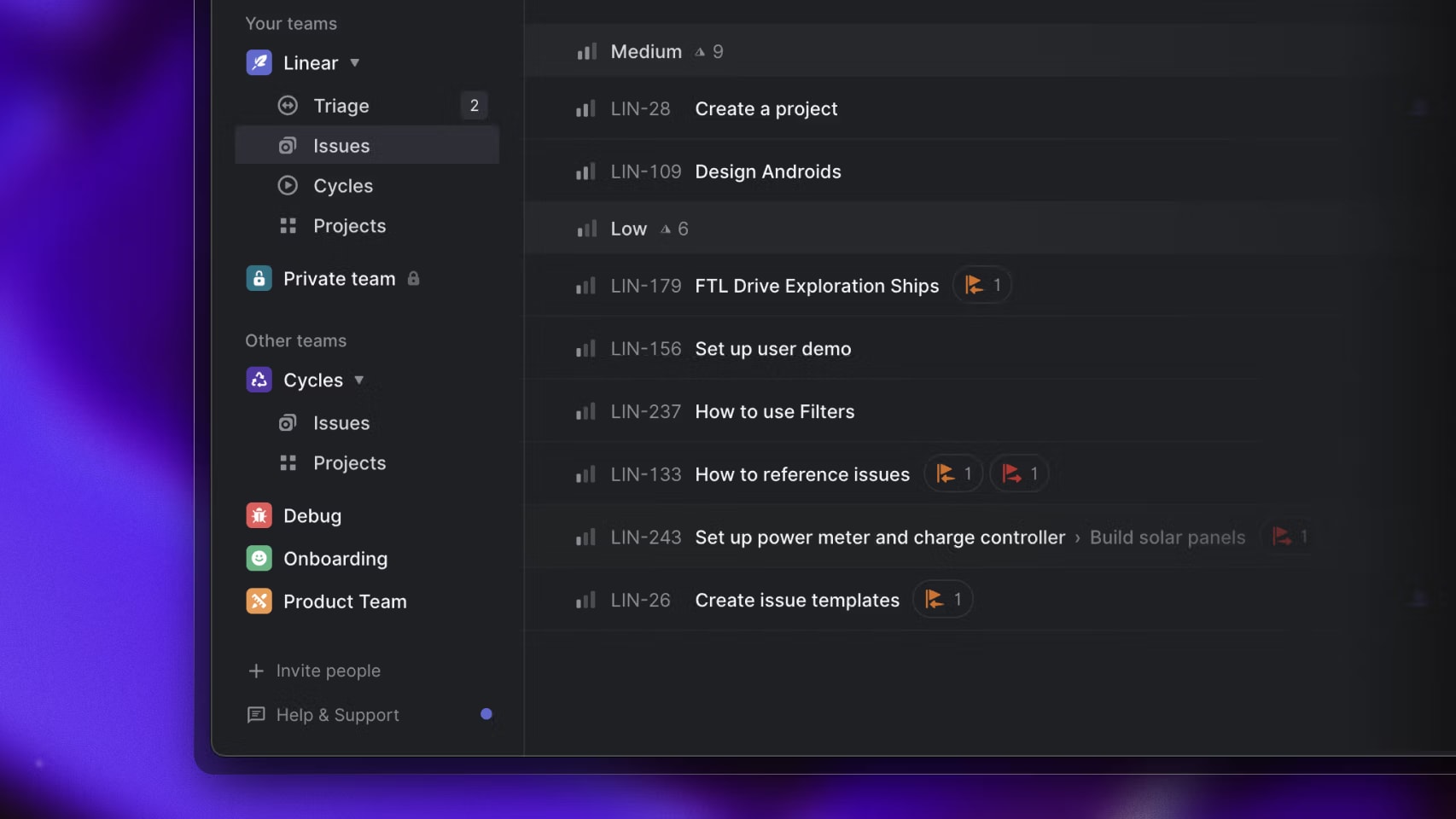
Teams execute within defined cycles and structured issue queues in Linear
Linear is intended to allow you to execute on a delivery cadence with minimal overhead. It provides a factory floor view of product development: in progress, blocked, and likely shipping.
Notion is better suited to support the planning process across departments and time frames; strategy; quarterly initiatives; OKRs; as databases can be structured based on whatever needs to happen in your business.
A common practical approach is to develop the strategic narrative in Notion and then move work to Linear when it is ready to be executed.
Notion Integrates Linear More Natively for Stakeholder Visibility, Without Tracker Sprawl

Linear issues can be embedded inside Notion documents for stakeholder visibility
A frequent anti-pattern is putting all stakeholders into your issue tracker. With the Notion Linear integration, which supports link previews, you will be able to put a live version of whatever relevant context exists on your spec documents, roadmaps or stakeholder update documents directly inside those documents.
This allows you to maintain a single narrative document approach within Notion while maintaining a clean execution process within Linear.
You may also connect them through a larger automation layer if desired, using third party workflow tools such as Zapier’s Linear to Notion automation.
Notion Outperforms Linear for Permissions and Content Governance at Scale
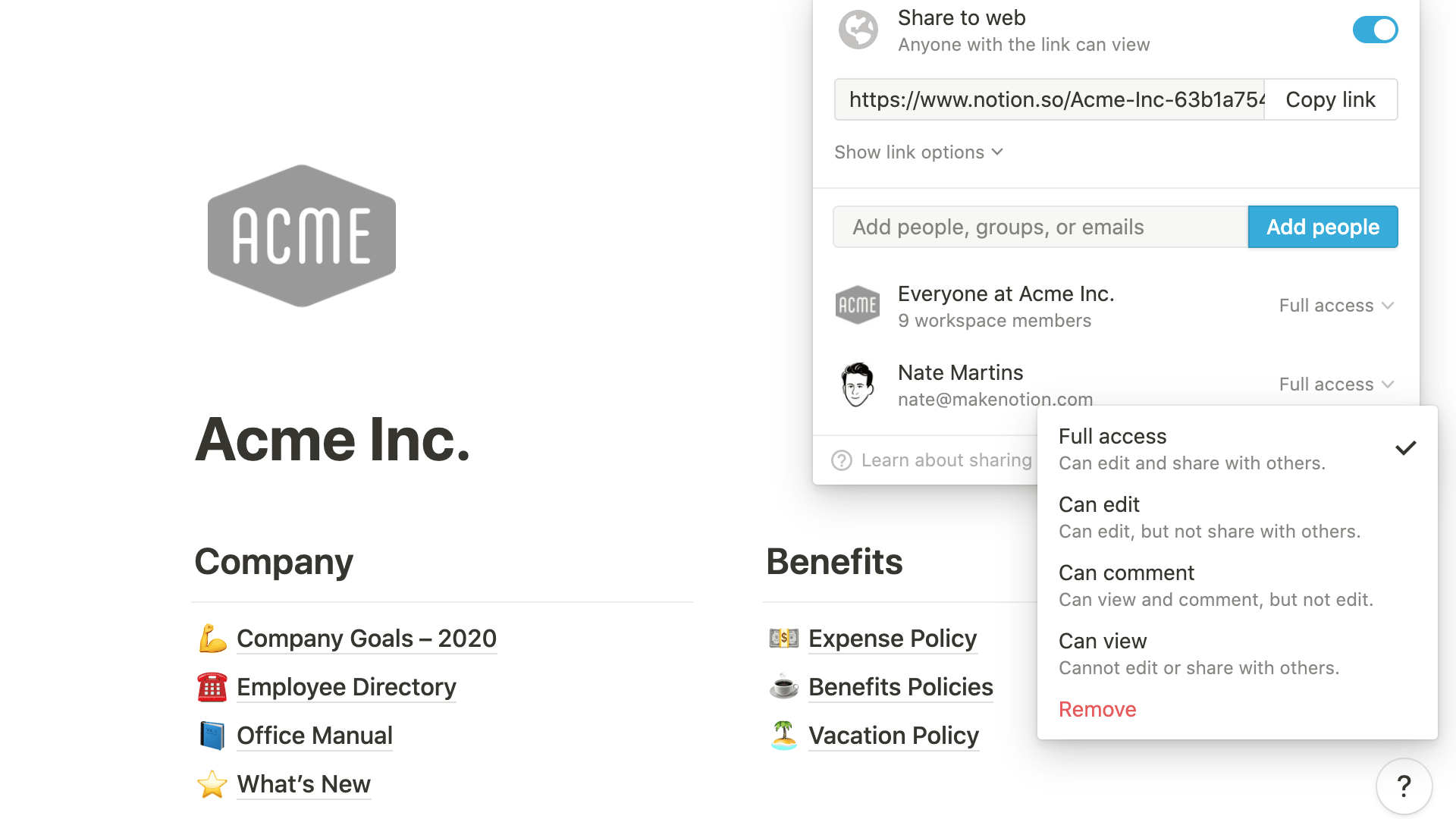
Notion allows granular page- and databse-level permissions across teams
When you use Notion as an internal source of information, then governance becomes important. For example; Who can create or edit? Who has the authority to publish? How will team members know if what they are reading is accurate? And most importantly, how will we keep from creating the same database in five different ways?
Linear provides good enough access control for delivering products, however it was never intended to be a knowledge governance platform for entire companies. This is not a weakness in Linear - this is its strength in focus.
Notion provides a better foundation for organizations looking to have more control over their internal knowledge.
Notion Beats Linear for Cross-Functional Workflows and Database-Driven Systems
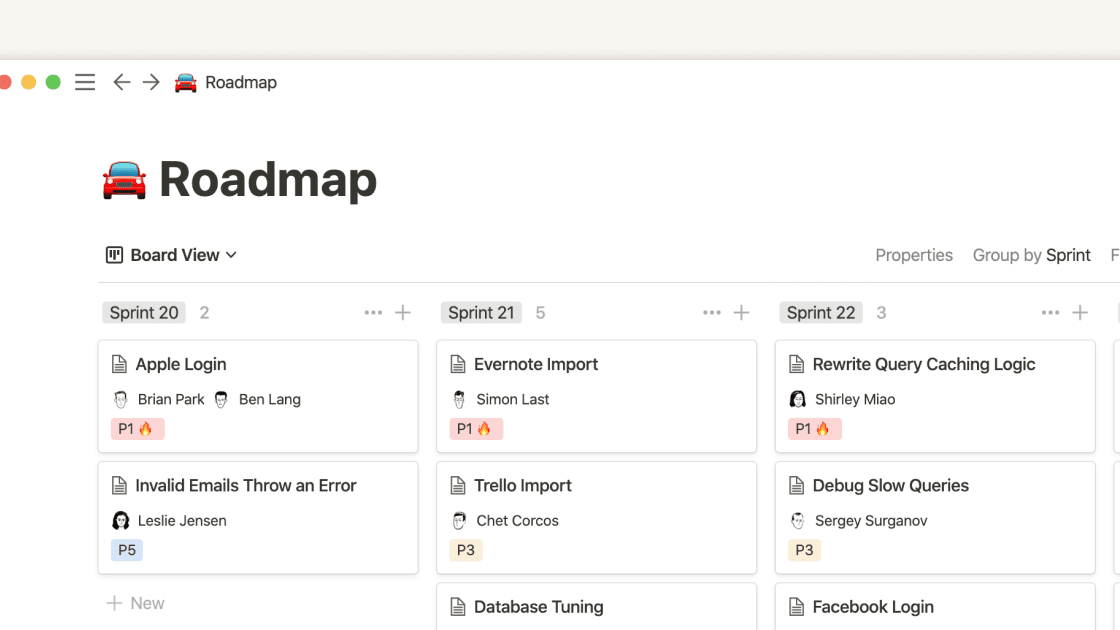
Structured properties and multiple views allow Notion to function as an operational system of record
Notion lets you build real database driven systems that are operational in nature with a non-technical approach: content pipelines; user research libraries; meeting trackers; lightweight CRMs; recruiting workflows etc.
While Linear can be used to track some aspects of cross functional work, it will never be able to act as a system of record or a platform for operational processes. It is ultimately an engineering execution tool, therefore if you tried to use Linear as the central platform for your marketing operations you would probably have to wrestle with the product to get what you want out of it.
If the primary design consideration of your product is flexibility, then Notion is the better choice.
Linear Usually Wins on Day-to-Day Usability for Engineers, Notion Wins for Writers and Operators

Linear's board view emphasizes clarity, speed, and minimal UI overhead
Linear is designed to be as fast as possible for the things you do most often (capture an issue, switch from one state to another, plan/groom). When engineers are spending eight hours or more a day in a tool, every little piece of UI optimization counts. Linear has been designed with that as its top priority.
Notion is very easy to write in and organize content. However, designing advanced workspaces, defining relations, rollup calculations, and template governance can be more like a craft than just a habit if you are doing them daily.
If you are working on execution-heavy tasks, Linear will feel much faster. If you are working on documentation and coordinating other people's work, Notion will likely feel more natural.
08 Linear vs Notion: Which is the best for your business?
Linear is the best tool for you if:
- You need serious issue tracking with fast triage and clear ownership boundaries.
- Your product organization runs on cycles and sprints, and you want planning to map tightly to shipping.
- You want an opinionated workflow that reduces the tool-admin tax on engineering leads.
- You’re replacing a messy spreadsheet or a Notion task database with a real execution system.
- You want a clear pricing ladder, including a Free plan and paid tiers starting at $8 per user per month
 You need serious issue tracking with fast triage and clear ownership boundaries.
Notion is the best tool for you if:
- You want a company wiki that becomes the source of truth for specs, decisions, and SOPs.
- You need flexible, database-driven workflows across departments, including Ops, Marketing, Product, and People.
- Your biggest pain is context fragmentation, not knowing where information lives or whether it’s current.
- You want one workspace for docs, planning, and publishing internal updates.
- You value governance capabilities as you scale, including more granular controls available on business-grade plans.
Notion
Organize teamwork and increase productivity
3 months free on the Business plan with Unlimited AI
Save up to $720
09 Alternatives to Linear & Notion

ClickUp
Used by 3446 members
Additional 20% off Unlimited and Business plans for 1 year
Save up to $1,000

GitHub
Used by 2124 members

Monday
Used by 1551 members
First month free
Save up to $80

Asana
Used by 933 members
75% off the annual Starter and Advanced plans for 1 year
Save up to $22,491
10 Promotions on Application Development and Collaboration software
Linear and Notion are great tools, but Secret offers promo codes with discounts on over 2250+ different SaaS solutions. New deals are added regularly, helping you save money on your online subscriptions. Get access to codes for other Application Development and Collaboration software you might want to purchase

Deal for Retool
1 year free on the monthly Team or Business plan

Discount for Google Workspace
20% off Standard plans for 1 year

Code for bolt.new
20% off all plans for the first 3 months

Airtable promotion code
$1,000 in credits on licences for 1 year

Auth0 deal
1 year of the B2B Professional plan free

Credits for Slack
25% off new plan purchases

Promo code Mobbin
20% off for 1 year on the Pro plan

Miro coupon code
$1,000 in credits (lifetime validity)

Lovable promo code
15% off annual Pro and Business plans
Monday coupon code
First month free
11 Linear vs Notion: Conclusion
The value of this comparison is lost if you enforce one specific outcome for both tools. Linear is a tool that works as a scalpel to remove 'noise' from how things get done (execution) and it provides an honest look at how products get delivered. Notion is a tool that allows you to turn scattered pieces of information into common ground and creates repeatable systems.
My practical suggestion is that if you have problems with "engineering throughput" and "backlog health", begin by implementing Linear as a solution and use Notion to document your process, or some other Wiki, where your documentation will remain long after your implementation has been completed. On the flip side, if you're experiencing 'knowledge chaos' and inconsistent processes, implement Notion first, and then when your product team requires a tool to manage their "execution engine" they can implement Linear as a solution.
If you want to cut down on your stack size you can take advantage of the Notion discount for startups . And for Linear, you can also redeem our promo code to get one year free on the Basic or Business plans.
Start saving on the best SaaS
Secret has already helped tens of thousands of startups save millions on the best SaaS like Microsoft Teams, Google Workspace & many more. Join Secret now to buy software the smart way.