


In today's fast-paced business environment, choosing the right project management tool is not just an option—it's a necessity. The right platform can make the difference between a project that's delivered on time and within budget, and one that's fraught with delays and cost overruns. With a bunch of features, pricing options, and user experiences to consider, making an informed decision can be overwhelming.
That's where this blog post comes in. We aim to simplify your decision-making process by offering a comprehensive, head-to-head comparison between two of the industry's leading project management tools: Notion and Jira. Whether you're a small business looking for a flexible all-in-one workspace or a larger enterprise in need of a specialized software development platform, this blog will provide valuable insights as to which is better for you. We'll delve into various parameters such as features, pricing, ease of use, and customer support to help you determine which platform is best suited for your business needs.
- 01 Notion vs Jira: overview
- 02 What's the difference between Notion and Jira?
- 03 Notion pros and cons
- 04 Jira pros and cons
- 05 Notion compared to Jira
- 06 Jira compared to Notion
- 07 Features comparison
- 08 Notion vs Jira: Which is the best for your business?
- 09 Alternatives to Notion & Jira
- 10 Promotions on Collaboration software
Start saving on the best SaaS
Secret has already helped tens of thousands of startups save millions on the best SaaS like Microsoft Teams, Google Workspace & many more. Join Secret now to buy software the smart way.

01 Notion vs Jira: overview
Notion and Jira are two prominent players in the realm of project management and team collaboration, each catering to distinct user needs.
Notion is renowned for its flexibility and adaptability, making it a versatile choice for various project management and knowledge-sharing purposes. Notion's user-friendly interface and extensive customization options are particularly favored by teams seeking a unified platform. On the other hand, Jira stands out as a robust tool, especially popular among software development and IT teams. Jira is designed with a focus on agile project management and issue tracking.
To make an informed decision between Notion and Jira, it's crucial to assess your team's specific requirements, project complexity, and collaboration needs. Notion excels in providing a flexible environment for versatile project management, while Jira offers specialized tools tailored for teams engaged in software development and agile methodologies.

Positive reviews
Both Notion and Jira have strong customer reviews on Capterra, with Notion slightly leading at 4.7/5. Jira's 4.4/5 rating is also commendable, especially given its focus on a specialized user base. Notion is an all-in-one workspace for various tasks whereas Jira is highly specialized for Agile software development.

Notion
Jira
Customer support
Jira is known to have better customer support including tickets, training, email and phone support; whereas Notion only offers email support. This makes Jira better off for specialized, and urgent tasks as there are several ways to seek support.
Notion
Jira
Pricing plans
Both Notion and Jira offer free plans with advanced features starting at $8/user/month and $7.75/user/month, respectively. The value for the price is comparable, depending on your specific needs. They both offer free plans as well.
Notion
Jira
Ease of use
Notion is known for its general-purpose design, making it more accessible for a broader audience. Jira, while powerful, has a steeper learning curve, especially for non-technical users.
Notion
Jira
Reporting
Jira offers extensive reporting features, including pre-built reports for Agile teams. Notion is less robust in this area, offering basic project dashboards but lacking specialized reporting features.
Notion
Jira
Collaboration
Both platforms offer strong collaboration features. Notion provides a blend of individual note-taking capability with larger document creation. Jira focuses more on workflow-based collaboration.
Notion
Jira
Customization
Notion allows for extensive customization, making it adaptable for various needs. Jira is also customizable but within the confines of its primary focus on software development, offering features like custom workflows.
Notion
Jira
Flexibility
Notion aims to be an "all-in-one workspace," offering a wide range of functionalities. Jira is more specialized, focusing primarily on software development and Agile methodologies.
Notion
Jira
Task management
While both offer task management, Notion provides more flexibility for various uses, but Jira is purpose-built for project tracking.
Notion
Jira
Integrations
Jira offers a staggering 3,000+ possible integrations, making it a more versatile choice for complex projects. Notion is still expanding its integration capabilities and currently offers fewer options. However, Notion does have an AI assistant, making it easier to manage different types of tasks.
Notion
Jira
02 What's the difference between Notion and Jira?

Notion's Note-Taking Capability to Build a One-Stop Information Hub for Teams
Notion
Organize teamwork and increase productivity
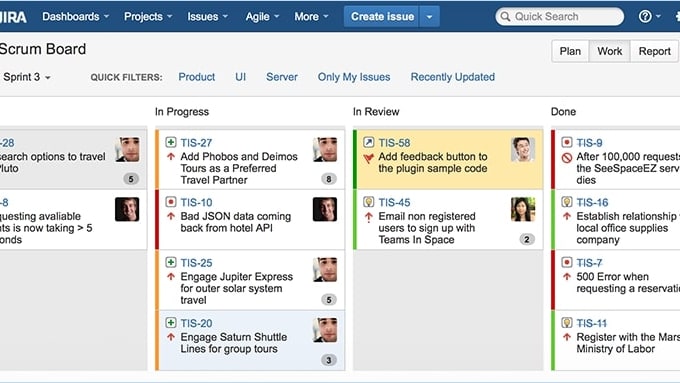
Jira's Team Scrum Board for a Comprehensive View of Tasks
Jira
Jira is a powerful project management tool designed to help your team organize, track, and manage their work efficiently. It offers versatile features for breaking down complex projects into manageable tasks, setting milestones, and mapping dependencies.
Notion and Jira serve different primary purposes and audiences. Notion started as a note-taking app and has evolved into an all-in-one workspace designed for a general audience. It aims to centralize content, projects, data, and client work, offering a high level of flexibility and a clean, simple interface. On the other hand, Jira was specifically crafted for project management in the realm of software development and issue tracking. It's a tool that excels in handling complex projects with intricate task breakdowns and is particularly adept at managing multiple projects and generating reports.
Notion shines in its flexibility and ease of use. Its platform covers a broad range of functionalities, including note-taking, internal wikis, task management, and document creation. This makes it particularly useful for small to medium-sized teams who require a blend of individual note-taking capabilities with larger document creation and storage. Notion's flexibility extends to its project views as well; it offers users grid and calendar views, in addition to Kanban boards, all of which are highly customizable. This adaptability makes it a strong choice for teams that need a versatile but not overly complex platform for managing tasks and documents. Jira, on the other hand, compared to Notion, is a powerhouse when it comes to specialized project management features, particularly for Agile teams. It offers Scrum boards, roadmaps, and other Agile-minded features, along with advanced functionalities like code repositories and custom workflows. Moreover, Jira boasts an impressive library of over 3,000 possible integrations, making it a more versatile choice for complex, specialized projects. Its reporting capabilities are especially robust, useful for projects with multiple touchpoints and associated data. While it may have a steeper learning curve, especially for those unfamiliar with Agile methodologies or software development, its specialized features make it an invaluable tool for those in these fields.
In summary, while both Notion and Jira offer robust project management capabilities, they excel in different areas. Notion is the go-to for general-purpose project management with a focus on flexibility and ease of use. Jira is the specialist, offering advanced features for software development and Agile project management.

Notion
Used by 21069 members
3 months free on the Business plan with Unlimited AI
Save up to $720

Jira
Used by 612 members
Free forever for up to 10 users
Save up to $980
03 Notion pros and cons
What are the advantages of Notion?
- Versatility: Notion is highly versatile and adaptable. It can be used for a wide range of purposes, including note-taking, project management, knowledge sharing, task tracking, and more. Its flexibility makes it suitable for individuals, teams, and businesses across various industries.

- Customization: Notion allows users to create databases, templates, and layouts to suit their specific needs. You can design your workspace to match your workflow, which can enhance productivity and organization.
- Collaboration: Notion offers robust collaboration features, enabling real-time editing and commenting, making it a suitable choice for teams working together on projects. It's easy to share information and work collaboratively within the platform.
- Rich media support: Notion supports rich media integration, including embedding files, images, videos, and links. This feature enhances the visual appeal and functionality of your documents and databases.
- Cross-platform accessibility: Notion is available on multiple platforms, including web, desktop, and mobile applications. This cross-platform compatibility ensures that you can access and update your content from anywhere.
What are the disadvantages of Notion?
- Learning curve: Notion's extensive features and flexibility can result in a steep learning curve for new users. Understanding how to fully utilize the platform may take some time.

- Pricing: While Notion offers a free plan, some advanced features and integrations are only available with a paid subscription. For larger teams or businesses, the cost of multiple subscriptions can add up.
- Mobile app limitations: The mobile app, while functional, has limitations compared to the desktop version. Some complex database and layout configurations may not work as seamlessly on mobile devices.
- Limited offline access: Notion primarily relies on an internet connection. While it's possible to access some content offline, it may not be as feature-rich or practical when working without an internet connection.
- No Gantt Charts or advanced project management: Notion is not a dedicated project management tool like some other options, such as Asana or Trello. It lacks features like Gantt charts or advanced project tracking, which might be a drawback for teams with complex project management needs.
Compare Notion to other tools


Notion vs Monday

Notion vs Asana

Coda vs Notion

ClickUp vs Notion

Notion vs Fibery

Notion vs Slab
04 Jira pros and cons
What are the advantages of Jira?
- Customization: Jira provides extensive customization options, allowing teams to tailor their workflows, issue types, and fields to match their specific processes. This flexibility makes it suitable for various project management needs.
- Agile support: Jira is designed with a strong focus on agile methodologies. It offers features like Scrum and Kanban boards, sprint planning, and burndown charts, making it an excellent choice for software development and agile project management.
- Powerful issue tracking: Jira's robust issue tracking capabilities enable teams to log, prioritize, and manage tasks, bugs, and feature requests efficiently. Customizable workflows and issue linking enhance the visibility and control over project progress.
- Integration ecosystem: Jira integrates seamlessly with a wide range of third-party tools and apps. This integration ecosystem allows teams to extend Jira's functionality and connect it to other software they use for development, collaboration, and automation.
- Scalability: Jira can scale with your organization as it grows. Whether you're a small startup or a large enterprise, Jira can accommodate your project management needs, making it a versatile choice for businesses of various sizes.
What are the disadvantages of Jira?
- Complexity: Jira's extensive features can be overwhelming for new users. It often requires a learning curve to master its capabilities fully, which might slow down initial adoption.
- Cost: Jira's pricing structure, especially for larger teams and organizations, can be relatively high. Licensing fees and add-on costs may make it less cost-effective for smaller companies or startups.
- Resource intensive: Running Jira can be resource-intensive, particularly for large instances. It may require dedicated servers or cloud resources, which can add to the operational costs.
- Steep setup: The initial setup of Jira, including customizing workflows and issue types, can be time-consuming. Teams might need to invest effort into configuring the system to align with their processes.
- Overkill for simple projects: For smaller teams or simple projects, Jira's extensive features and agile focus might be overkill. It can lead to unnecessary complexity and overhead when a more straightforward project management tool would suffice.
Compare Jira to other tools

Asana vs Jira
ClickUp vs Jira

Zendesk vs Jira

Freshservice vs Jira
05 Notion compared to Jira
When comparing Notion and Jira, Notion distinguishes itself with its versatility and adaptability, catering to a wide range of project management and collaboration needs. It's the preferred choice for those who value a unified platform that can handle tasks, notes, documentation, and more, all within a single environment. Notion's pricing structure, though it may require a subscription for certain advanced features, reflects its value for users seeking a flexible and versatile workspace.
One of Notion's standout features is its customization capabilities. Users can design their own databases, templates, and layouts to fit their unique workflows, boosting productivity and organization. To make an informed choice between Notion and Jira, it's crucial to consider your specific project management needs, team size, and workflows. Notion excels in providing a flexible and versatile workspace, while Jira offers specialized tools tailored for teams engaged in software development and agile methodologies.
Is Notion better than Jira?
 Is Notion better than Jira?
Deciding whether Notion is better than Jira depends on your particular needs and preferences. If you value flexibility, versatility, and a unified platform capable of accommodating a wide range of project management and collaboration tasks, Notion often stands out as the preferred choice, even if it comes with certain subscription costs.
Notion excels in its ability to adapt to your specific workflow, allowing you to create custom databases, templates, and layouts. This level of personalization enhances productivity and organization, making it an ideal choice for a variety of users, including individuals, teams, and businesses across different industries. On the other hand, if your team is primarily focused on software development, agile methodologies, and detailed issue tracking, Jira may be the better fit.
What is Notion best used for?
Notion finds its best application as a versatile productivity and collaboration tool. It's particularly valuable for individuals, teams, and businesses looking for a unified platform that accommodates a wide range of tasks, from project management and note-taking to knowledge sharing and task tracking.
Notion's customization options allow users to create tailored databases, templates, and layouts to match their unique workflows, enhancing organization and productivity. It serves as a collaborative workspace where teams can work together, share information, and manage projects efficiently. Notion's adaptability and cross-platform accessibility make it a powerful choice for those seeking a flexible solution for various professional and personal needs.
Can Notion replace Jira?
Replacing Jira with Notion can be a strategic decision for your project management and collaboration needs, particularly if your organization values versatility and adaptability. While Jira excels in agile project management and issue tracking, Notion offers a unified platform that can serve a wide range of purposes and users, making it an attractive alternative.
Notion's key advantages include its customization capabilities and the ability to create tailored databases, templates, and layouts. It provides a flexible environment for project management, note-taking, knowledge sharing, and task tracking, accommodating a broad spectrum of workflows and user preferences. While Jira specializes in software development and agile methodologies, Notion's versatility extends its appeal to a broader audience.
Is Notion cheaper than Jira?
Notion subscription costs are typically more budget-friendly compared to Jira, which can be on the expensive side, particularly for larger teams. Notion offers a free plan with some limitations and reasonably priced paid plans. In contrast, Jira's pricing can significantly escalate with more users, additional features, and necessary add-ons, making it a more substantial financial commitment.
For smaller organizations or those with budget constraints, Notion's cost-effectiveness may be an appealing factor. It provides essential project management and collaboration features at a reasonable price point, making it an attractive option for cost-conscious users.
Is there a better Collaboration software than Notion?
While Notion is a versatile and highly adaptable productivity and collaboration tool, it's always a good practice to explore alternative software options to ensure that you're using the best fit for your particular needs.
There are several notable alternatives to Notion in the realm of productivity and collaboration software, including Trello, Asana, Monday.com, Microsoft OneNote, and Evernote.
Selecting the right software solution depends on your unique requirements, work style, and goals. If you value Notion's flexibility and customization but are looking for alternatives with different features or a more specific focus, these options offer a range of possibilities.

Notion
Organize teamwork and increase productivity
3 months free on the Business plan with Unlimited AI
Save up to $720
06 Jira compared to Notion
Jira distinguishes itself as a powerful project management and issue tracking tool when compared to Notion. It offers a specialized suite of features tailored for agile methodologies and software development, making it an ideal choice for teams in these domains. Jira's pricing structure, however, can be substantial, reflecting its advanced set of agile project management capabilities.
One of Jira's standout features is its deep integration with agile practices, offering features like Scrum and Kanban boards, sprint planning, and burndown charts. This specialization is particularly advantageous for teams that require meticulous issue tracking and management within the context of software development projects, ensuring a highly focused approach to project management.
Is Jira better than Notion?
Deciding whether Jira holds an advantage over Notion requires a comprehensive assessment of your organization's distinctive project management and collaboration needs. For some, Jira's strengths are evident in its specialization in agile project management, issue tracking, and comprehensive features tailored for software development and IT teams. Its in-depth functionality can significantly enhance project visibility and control.
For instance, businesses and teams in need of robust agile project management, detailed issue tracking, and advanced software development capabilities often find Jira to be a top contender. However, it's important to note that determining which platform is "better" is subjective in the realm of project management and collaboration software. What excels for one team may not align with the specific workflows, scale, or requirements of another, underscoring the importance of thoroughly evaluating your organization's individual needs when making this critical decision.
What is Jira best used for?
Jira is optimally employed as a project management and issue tracking tool, primarily for software development and IT teams. Its specialized features and robust capabilities cater to organizations and teams engaged in agile methodologies, project tracking, and software development projects.
For example, software development teams looking to manage complex projects, track issues, and implement agile practices often find Jira to be the ideal choice. Its Scrum and Kanban boards, sprint planning, and extensive customization options empower teams to execute agile project management methodologies effectively. Moreover, Jira goes beyond basic project management, offering advanced features such as extensive issue linking and in-depth reporting, which are invaluable for teams focused on software development and IT tasks.
The specialization of Jira in these areas makes it a top choice for organizations seeking a powerful, agile-focused project management and issue tracking solution.
Can Jira replace Notion?
The feasibility of Jira replacing Notion depends on your specific use case and the priorities of your organization. In cases where your needs are primarily centered around agile project management, detailed issue tracking, and specialized software development features, Jira can certainly be considered as an alternative.
However, if your organization values versatility, adaptability, and the ability to create custom databases, templates, and layouts for a variety of tasks and collaboration, Notion's features may be indispensable. For example, teams that require a unified platform to manage diverse projects, documents, and notes may find Notion to be the preferred choice, even if Jira offers specialized agile-focused capabilities.
Is Jira cheaper than Notion?
In terms of pricing, Jira's cost structure typically presents a more substantial investment compared to Notion. Notion offers a free plan with basic features and reasonably priced paid plans, making it an attractive option for individuals and organizations with various budgets.
On the other hand, Jira's pricing can significantly increase as you add more users, or require additional features. This cost structure is often reflective of Jira's specialized agile project management and software development capabilities. While Jira may be a preferred choice for larger teams and enterprises needing its specialized features, smaller organizations and cost-conscious users may find Notion to be a more budget-friendly option for their project management and collaboration needs.
Is there a better IT Management software than Jira?
While Jira offers a comprehensive set of features tailored for agile project management and software development, it's always a good practice to explore alternative project management and collaboration software to ensure that you're using the best fit for your specific needs.
Several notable alternatives to Jira in the project management and collaboration arena include Trello, Asana, ClickUp, Notion, and Wrike.
Selecting the right software solution depends on your unique requirements, team size, and the nature of your projects. If you value Jira's specialization in agile methodologies and software development but are looking for alternatives with different features, workflows, or pricing structures, these options offer a range of possibilities.

Jira
From ideas to action
Free forever for up to 10 users
Save up to $980
07 Features comparison
Notion Takes the Lead Against Jira for Ease of Use
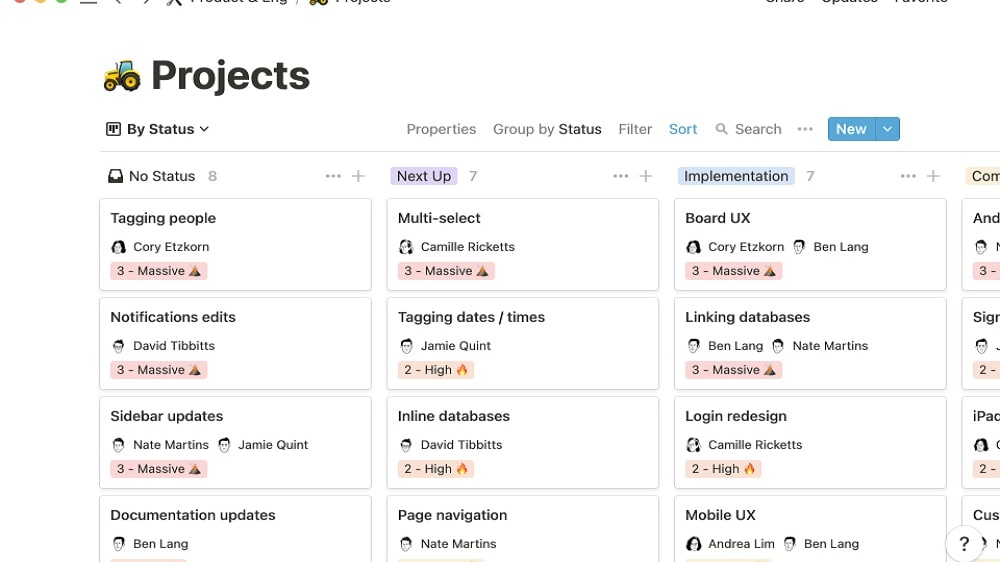
Notion's strength lies in its intuitive design and user-friendly interface.
In terms of user-friendliness, Notion outshines Jira. Notion's strength lies in its intuitive design and user-friendly interface. Its simplicity shines with a drag-and-drop feature that effortlessly caters to users of all levels, allowing them to build workflows quickly and effectively. Notion functions as a unified, coherent platform for writing, planning, collaborating, and organizing – akin to a collection of versatile Lego blocks that can be endlessly connected.
On the contrary, Jira comes with a steeper learning curve. Its intricate interface and extensive functionality primarily target software development teams experienced in Agile methodologies, potentially overwhelming newcomers and non-technical users. While Jira excels as a robust project management tool, there's room for improvement in its user experience to match the simplicity offered by Notion.
Jira Exceeds Notion at Agile Project Management

Jira boasts a rich heritage in agile methodologies, delivering robust support for Scrum and Kanban practices via features such as sprint planning, backlog management, and agile boards.
Jira boasts a rich heritage in agile methodologies, delivering robust support for Scrum and Kanban practices via features such as sprint planning, backlog management, and agile boards.
In contrast, Notion offers fundamental project management functionalities but doesn't match Jira's depth in agile methodology. Notion's strengths lie in its versatile application for various tasks and collaboration, while Jira excels in catering to the intricate needs of agile-focused teams in software development and project management. Therefore, while Jira is the preferred choice for agile enthusiasts, Notion serves a more general purpose, appealing to a broader audience with diverse productivity and organization needs.
Jira is Best for Custom Workflows Compared to Notion
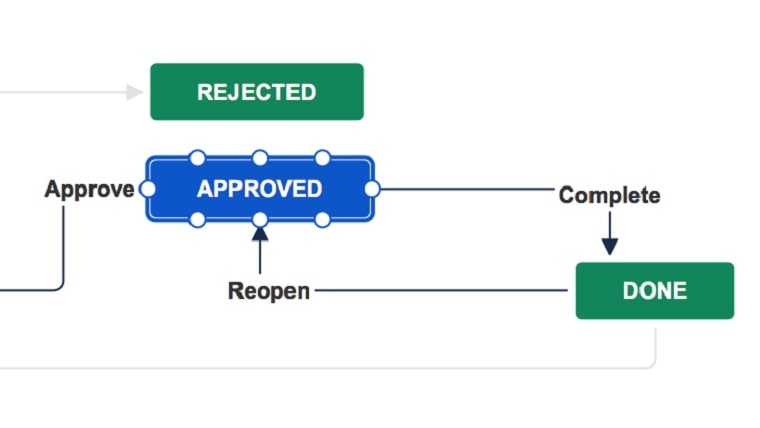
Jira excels in the domain of custom workflows, offering teams the capacity to craft and apply distinctive progression stages that align precisely with their particular project management requirements.
Jira excels in the domain of custom workflows, offering teams the capacity to craft and apply distinctive progression stages that align precisely with their particular project management requirements. While Notion does provide Kanban-style project management, it falls short in terms of workflow customization compared to the extensive flexibility Jira offers.
Jira's strength lies in its ability to accommodate intricate, tailored workflows, making it an ideal choice for teams seeking precision in their project management processes. In contrast, Notion, although versatile in various aspects, may not meet the same level of specificity when it comes to workflow customization.
Notion and Jira are Both Efficient in Task Database and Issue Tracking
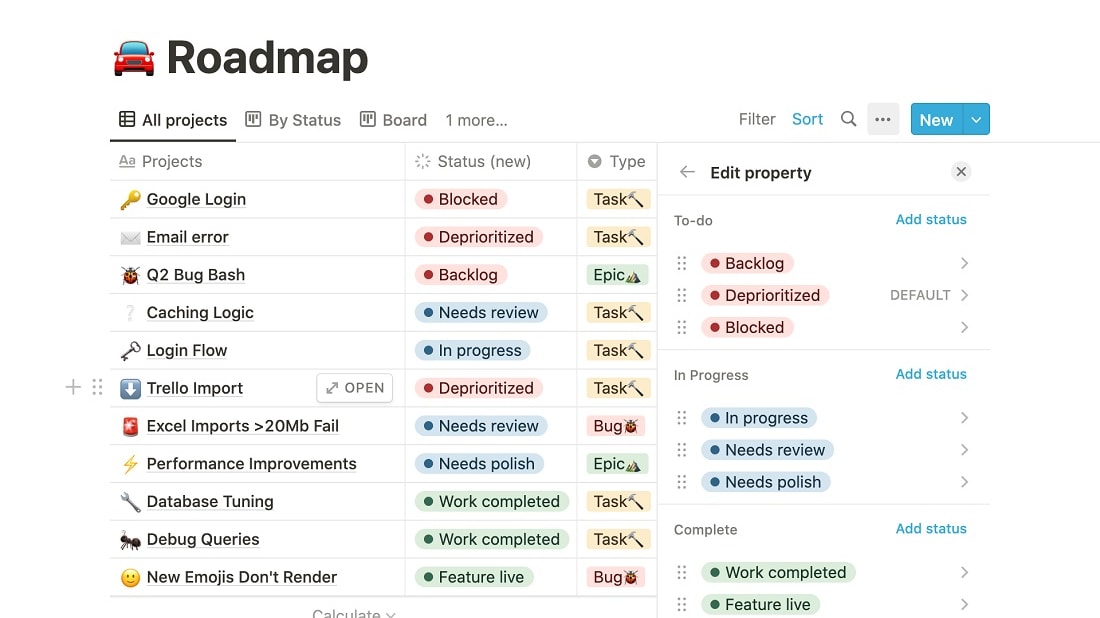
Notion's task database offers a comprehensive view of tasks, including their status and deadlines, facilitating an all-encompassing overview.
Notion and Jira both provide robust solutions for task and issue management. Notion's task database offers a comprehensive view of tasks, including their status and deadlines, facilitating an all-encompassing overview. On the other hand, Jira's issue tracking system empowers teams to efficiently manage, prioritize, and track both bugs and tasks with precision.
Each platform excels in its own way, with Notion being a versatile tool suited for a wide range of tasks and collaboration, and Jira being specialized in agile project management and detailed issue tracking, making it an ideal choice for software development and project management teams.
Notion Excels Ahead of Jira at Note-Taking and Document Management

Notion provides users with a user-friendly and aesthetically pleasing platform for effortless note-taking and organization.
Notion provides users with a user-friendly and aesthetically pleasing platform for effortless note-taking and organization. Users can format text, embed external content, and incorporate various media types seamlessly.
In contrast, Jira, while offering documentation features, is primarily tailored for issue tracking and project management rather than serving as a dynamic, comprehensive note-taking solution. Notion excels in its flexibility and visual appeal, making it a versatile choice for a wide range of users, while Jira's focus remains primarily on the management of tasks and projects within a team-oriented framework.
Notion is More Effective than Jira for Templates
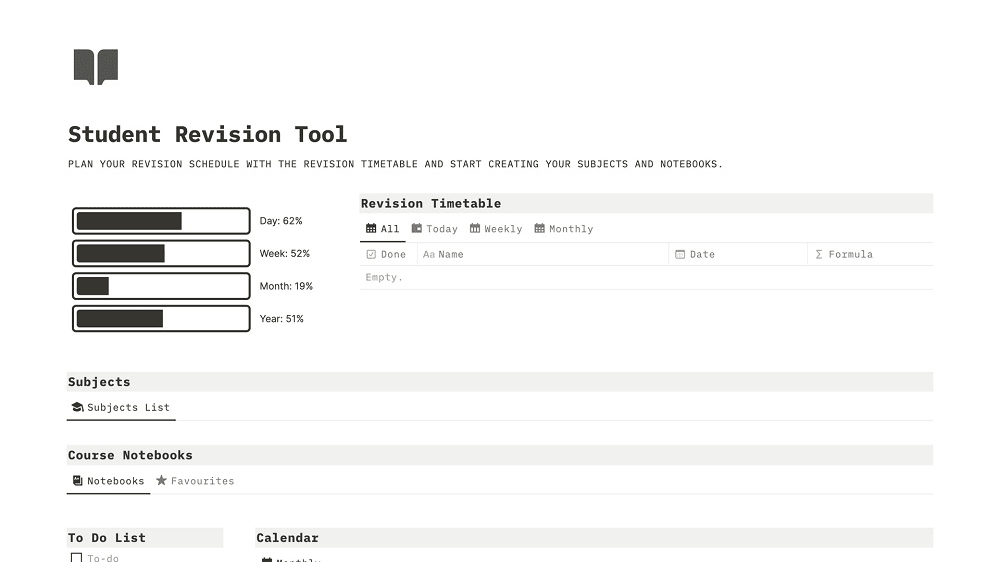
Notion offers a broad selection of pre-made templates designed by experienced users, streamlining the process of setting up projects quickly and efficiently.
Notion offers a broad selection of pre-made templates designed by experienced users, streamlining the process of setting up projects quickly and efficiently. In contrast, Jira, although featuring customizable workflows, doesn't match the extensive library of user-friendly templates offered by Notion. These templates in Notion cater to a diverse array of requirements, enhancing user experience and expediting project initiation.
While Jira provides flexibility in workflow design, Notion's vast template gallery stands out as a valuable resource for a wide range of users and teams seeking simplicity and convenience in project setup, regardless of their specific needs.
Jira Provides More Extensive Integration Options than Notion

Jira boasts an extensive list of integrations with a wide range of analytics tools, communications software, productivity tools, and customer relationship management (CRM) systems, including GitHub, Slack, GitLab, Google Drive, and Zendesk.
In the domain of integrations, Jira takes the lead. Jira boasts an extensive list of integrations with a wide range of analytics tools, communications software, productivity tools, and customer relationship management (CRM) systems, including GitHub, Slack, GitLab, Google Drive, and Zendesk. It seamlessly integrates with other Atlassian products like Confluence, Bitbucket, and Trello, creating a holistic ecosystem tailored for tech-centric teams.
In contrast, Notion, being relatively new, is still expanding its integration capabilities. Presently, it connects with essential tools like Google Calendar, Google Drive, and Evernote. However, it lacks integrations with popular professional tools such as Slack or GitHub, potentially limiting its usefulness for tech-focused teams and larger organizations. While Notion is steadily expanding its integrations, Jira currently offers a more comprehensive array of integration possibilities.
08 Notion vs Jira: Which is the best for your business?
Notion is the best tool for you if:
- You require an all-in-one solution with Notion's flexibility making it ideal for businesses that want a single platform for note-taking, task management, and document storage
- Your team comprises individuals from various departments or disciplines as Notion's general-purpose design can accommodate a wide range of needs
- You value a clean, simple interface and a shorter learning curve. Notion is the more user-friendly option
- Your projects require different visual representations like Kanban boards, calendars, or lists. Notion offers these customizable views
- You produce a lot of internal or external content then you may find Notion's robust content creation and collaboration features particularly useful
 You require an all-in-one solution with Notion's flexibility making it ideal for businesses that want a single platform for note-taking, task management, and document storage
Jira is the best tool for you if:
- You follow agile methodologies as Jira is designed with Agile teams in mind, offering features like Scrum boards and sprints, making it ideal for software development
- Your projects are complex and data-driven with Jira's extensive reporting features that can provide valuable insights
- You require numerous integrations. Businesses that rely on a multitude of other tools will benefit from Jira's vast library of over 3,000 possible integrations
- Your business is heavily into software development or follows specialized project management workflows then Jira is tailored for these needs
- If you manage larger teams or more complex projects as Jira offers more advanced features and scalability options, making it suitable for growing businesses
Notion
Used by 21069 members
3 months free on the Business plan with Unlimited AI
Save up to $720
Jira
Used by 612 members
Free forever for up to 10 users
Save up to $980
09 Alternatives to Notion & Jira

Airtable
Used by 8844 members
$1,000 in credits on licences for 1 year
Save up to $1,000

Slack
Used by 4010 members
25% off new plan purchases
Save up to $9,000

ClickUp
Used by 3442 members
Additional 20% off Unlimited and Business plans for 1 year
Save up to $1,000

Zoom Meetings
Used by 2889 members
$20 off per user on the annual Workplace Pro plan
Save up to $180
10 Promotions on Collaboration and IT Management software
Notion and Jira are great tools, but Secret offers promo codes with discounts on over 2250+ different SaaS solutions. New deals are added regularly, helping you save money on your online subscriptions. Get access to codes for other Collaboration and IT Management software you might want to purchase

Google Workspace promotion
20% off Standard plans for 1 year

CCleaner promotion code
20% off for 1 year
Airtable coupon code 2026
$1,000 in credits on licences for 1 year

GitLab coupon code
12 months free on the Ultimate license
Slack promo code 2026
25% off new plan purchases

Freshservice promo code
14 days free

Miro deal
$1,000 in credits (lifetime validity)

Avast free credits
50% off for 1 year

Monday deal
First month free

Instatus free credits
1 year free on Pro Plan
Start saving on the best SaaS
Secret has already helped tens of thousands of startups save millions on the best SaaS like Microsoft Teams, Google Workspace & many more. Join Secret now to buy software the smart way.