


If you are responsible for managing your organization's productivity and collaboration tools, then choosing between Azure and Microsoft 365 is a critical decision. These two platforms belong to different categories but play essential roles in empowering your business operations and enhancing overall efficiency.
Choosing between Azure and Microsoft 365 is akin to selecting the right CRM platform for your sales team. Both have distinct features, use cases, and pricing structures. In this article, we will compare Azure and Microsoft 365, delving into their key features, differences, and pricing models to help you make an informed decision for your business's specific needs. Whether you need a robust cloud infrastructure or a comprehensive productivity suite, this comparison will guide you towards the right choice for your organization.
- 01 Microsoft Azure vs Microsoft 365: overview
- 02 What's the difference between Microsoft Azure and Microsoft 365?
- 03 Microsoft Azure pros and cons
- 04 Microsoft 365 pros and cons
- 05 Microsoft Azure compared to Microsoft 365
- 06 Microsoft 365 compared to Microsoft Azure
- 07 Features comparison
- 08 Microsoft Azure vs Microsoft 365: Which is the best for your business?
- 09 Alternatives to Microsoft Azure & Microsoft 365
- 10 Promotions on AI Development software
Start saving on the best SaaS
Secret has already helped tens of thousands of startups save millions on the best SaaS like Microsoft Teams, Google Workspace & many more. Join Secret now to buy software the smart way.

01 Microsoft Azure vs Microsoft 365: overview
Azure and Microsoft 365 are two prominent players in the realm of cloud computing and productivity software, each designed to address distinct organizational needs.
Azure, Microsoft's cloud computing platform, is renowned for its scalability, flexibility, and robust infrastructure services. It caters to businesses in search of a dependable cloud infrastructure that can host, manage, and deploy applications and services with a focus on reliability and security. On the other hand, Microsoft 365, formerly Office 365, falls within the productivity and collaboration software category. It offers a comprehensive suite of tools like Word, Excel, PowerPoint, Teams, and more, aimed at enhancing communication, collaboration, and document management within organizations.
To make an informed decision between Azure and Microsoft 365, it's crucial to assess your specific business requirements, team preferences, and growth objectives. Azure excels in providing cloud infrastructure, while Microsoft 365 empowers teams with a suite of productivity and collaboration tools. Selecting the right fit for your organization depends on your precise needs and priorities in the domains of cloud computing and productivity software.

Customer reviews
Azure is acclaimed for its comprehensive cloud services and flexibility, while Microsoft 365 is highly rated for its productivity and collaboration tools that are essential in many workplaces.

Microsoft Azure
Microsoft 365
Data management
Azure offers extensive data management services including databases, AI, and analytics. Microsoft 365's data management is primarily through Office applications and OneDrive storage.
Microsoft Azure
Microsoft 365
Scalability
Azure provides scalable solutions for businesses of all sizes, with a wide range of computing resources available on-demand. Microsoft 365 scales well within the constraints of its subscription plans.
Microsoft Azure
Microsoft 365
Integrations
Azure offers extensive integrations across a wide range of cloud computing services. Microsoft 365 integrates seamlessly within the Microsoft ecosystem and with numerous third-party applications.
Microsoft Azure
Microsoft 365
Compliance and regulatory standards
Azure provides comprehensive compliance solutions across various industries, vital for cloud-based operations. Microsoft 365 adheres to compliance standards, particularly for office-based software and data storage.
Microsoft Azure
Microsoft 365
Pricing plans
Azure's pricing is based on a pay-as-you-go model, offering flexibility depending on usage. Microsoft 365 offers subscription-based pricing, which is simple and predictable, suitable for businesses of all sizes.
Microsoft Azure
Microsoft 365
Customer support
Both services benefit from Microsoft's robust support network. Azure has complex technical support for cloud services, while Microsoft 365 offers extensive support for office productivity tools.
Microsoft Azure
Microsoft 365
Security features
Azure offers robust cloud security solutions, including advanced threat protection. Microsoft 365 provides comprehensive security features tailored to protect data in office applications and services.
Microsoft Azure
Microsoft 365
Application development
Azure is a key platform for application development, offering various tools and environments for developers. Microsoft 365 focuses on productivity and doesn’t offer application development platforms.
Microsoft Azure
Microsoft 365
Ease of use
Azure, with its broad range of services, has a steeper learning curve. Microsoft 365's tools are widely used and known for their user-friendly interfaces.
Microsoft Azure
Microsoft 365
02 What's the difference between Microsoft Azure and Microsoft 365?

Azure is designed to cater to businesses looking for a robust cloud infrastructure that can host, manage, and scale applications and services with a strong focus on scalability, flexibility, and security.
Microsoft Azure
Empowering your cloud journey with Microsoft Azure

Microsoft 365 is aimed at enhancing communication, collaboration, and document management within organizations
Microsoft 365
Microsoft 365 brings tremendous value to businesses by providing a comprehensive suite of productivity tools and cloud services. It combines familiar and powerful applications like Word, Excel, and PowerPoint with advanced collaboration features, cloud storage, and security.
Azure and Microsoft 365 are two distinct categories of Microsoft's cloud services, each tailored to address specific business needs and objectives.
Azure is Microsoft's cloud computing platform and infrastructure service. It provides a wide array of services, including virtual machines, databases, networking, and storage solutions. Azure is designed to cater to businesses looking for a robust cloud infrastructure that can host, manage, and scale applications and services with a strong focus on scalability, flexibility, and security. It serves as the backbone for building, deploying, and managing various types of applications and services.
In contrast, Microsoft 365 falls under the category of productivity and collaboration suites. It offers a comprehensive set of productivity tools, including popular applications like Word, Excel, PowerPoint, Teams, and Outlook. Microsoft 365 is aimed at enhancing communication, collaboration, and document management within organizations. It provides a seamless experience for users to create, edit, share, and collaborate on documents and projects, making it a valuable solution for businesses looking to improve teamwork and productivity.
When choosing between Azure and Microsoft 365, it's essential to understand your organization's specific needs and goals. Azure is the preferred choice for those seeking a powerful cloud infrastructure to host and manage applications and services, with a focus on scalability and security. On the other hand, Microsoft 365 is the go-to solution for businesses looking to enhance productivity, communication, and collaboration through a suite of integrated productivity tools.

Microsoft Azure
Premium
Empowering your cloud journey with Microsoft Azure
$5,000 in credits for 6 months if you didn't raise funds // Up to $150,000 in credits for 2 years if you did
Save up to $150,000
03 Microsoft Azure pros and cons
What are the advantages of Microsoft Azure?
- Scalability: Azure offers excellent scalability, allowing you to easily adjust your resources up or down based on your needs. This flexibility is particularly useful for handling traffic spikes or accommodating business growth without significant downtime.

- Wide range of services: Azure provides a vast array of cloud services, including computing, storage, databases, networking, AI, analytics, and more. This extensive service catalog allows you to build and deploy diverse applications and solutions.
- Hybrid capabilities: Azure offers robust hybrid cloud capabilities, allowing you to integrate your on-premises infrastructure with the cloud seamlessly. This is beneficial for businesses with existing data centers or specific compliance requirements.
- Security and compliance: Microsoft has invested heavily in Azure's security features, providing various tools and certifications to help protect your data and meet regulatory requirements. Azure's security center and compliance offerings make it a secure choice for many organizations.
- Global presence: Azure has data centers located in numerous regions worldwide, ensuring low-latency access and redundancy options. This global presence makes it suitable for businesses with an international reach.
What are the disadvantages of Microsoft Azure?
- Complex pricing: Azure's pricing model can be complex to navigate, with various services, pricing tiers, and usage options. It's crucial to monitor your usage carefully to avoid unexpected costs.

- Learning curve: While Azure offers extensive capabilities, it may have a steeper learning curve for beginners compared to some other cloud platforms. Training and expertise may be required to maximize its potential.
- Integration challenges: Integrating existing on-premises systems with Azure can be challenging, especially for organizations with complex legacy architectures. Migration and integration efforts may require significant time and resources.
- Potential for over-provisioning: Due to the ease of scaling resources in Azure, some users may over-provision resources, leading to unnecessary costs. Proper resource management and optimization are essential to control expenses.
- Service outages: Like any cloud service, Azure can experience occasional service outages or disruptions. While Microsoft has a strong track record of reliability, businesses should have contingency plans for such situations.
Compare Microsoft Azure to other tools


Microsoft Azure vs Microsoft SharePoint


DigitalOcean vs Microsoft Azure

Microsoft Azure vs AWS Activate

Microsoft Azure vs Google Cloud (GCP)

Microsoft Azure vs OneDrive

Snowflake vs Microsoft Azure
04 Microsoft 365 pros and cons
What are the advantages of Microsoft 365?
- Productivity tools: Microsoft 365 offers a comprehensive suite of productivity tools, including Word, Excel, PowerPoint, Outlook, Teams, and more. These tools are widely used in businesses and provide a familiar and efficient environment for document creation, collaboration, and communication.
- Cloud-based collaboration: Microsoft 365 enables seamless collaboration among team members, regardless of their location. With features like real-time co-authoring and cloud storage, teams can work together on documents and projects efficiently.
- Security features: Microsoft 365 includes robust security and compliance features, such as threat protection, data loss prevention, and identity management. These tools help protect your data and ensure compliance with industry regulations.
- Scalability: Microsoft 365 is highly scalable, allowing organizations to add or remove users and services as needed. This scalability is particularly beneficial for growing businesses or those with fluctuating workforce sizes.
- Regular updates and support: Microsoft provides regular updates and support for Microsoft 365, ensuring that users have access to the latest features, security patches, and improvements. This helps keep your organization's software up-to-date and secure.
What are the disadvantages of Microsoft 365?
- Subscription costs: Microsoft 365 operates on a subscription-based pricing model, which can be a recurring expense for businesses. While it provides value, some organizations may find the cost over time to be a drawback.
- Internet dependency: Microsoft 365 relies on an internet connection for full functionality. If you experience internet outages or have employees working in areas with limited connectivity, this can be a significant inconvenience.
- Learning curve: While the productivity tools in Microsoft 365 are user-friendly, mastering all the features and integrations can take time. Training and support may be necessary to maximize its potential.
- Data privacy concerns: Storing sensitive data in the cloud may raise privacy concerns for some organizations. While Microsoft has robust security measures, data breaches are a potential risk, and organizations should have appropriate data governance practices in place.
- Integration challenges: Integrating Microsoft 365 with existing on-premises systems or other third-party applications can be complex, depending on your organization's IT environment. Proper planning and expertise may be required to ensure seamless integration.
Compare Microsoft 365 to other tools


Google Workspace vs Microsoft 365
05 Microsoft Azure compared to Microsoft 365
Azure and Microsoft 365 are distinct offerings from Microsoft, catering to different aspects of cloud computing and productivity. Azure is a cloud computing platform providing infrastructure services, ideal for scalable application hosting.
Microsoft 365, on the other hand, offers a suite of productivity tools for communication and collaboration. While Azure empowers businesses with cloud infrastructure, Microsoft 365 enhances teamwork and document management. Your choice depends on whether you require robust cloud infrastructure (Azure) or comprehensive productivity and collaboration tools (Microsoft 365), making it crucial to align your selection with your organization's specific needs and objectives.
Is Microsoft Azure better than Microsoft 365?
 Is Microsoft Azure better than Microsoft 365?
Azure and Microsoft 365 are not directly comparable as they serve different purposes. Azure is a cloud computing platform providing infrastructure services, while Microsoft 365 offers productivity and collaboration tools.
The choice between them depends on your organization's needs. If you require cloud infrastructure and application hosting, Azure is the better choice. Conversely, if you need a suite of productivity tools for communication and collaboration, Microsoft 365 is the solution. It's not a matter of one being better than the other; rather, it's about selecting the one that aligns with your specific business requirements.
What is Microsoft Azure best used for?
Azure is best used for a wide range of cloud computing needs. It excels in hosting and managing applications and services, providing a scalable and flexible infrastructure. Organizations rely on Azure for building and deploying web apps, databases, virtual machines, and more. It's particularly suitable for businesses seeking robust cloud solutions, disaster recovery, and data storage.
Azure's extensive service catalog, global presence, and security features make it ideal for developing, testing, and scaling applications while ensuring data security and compliance. Whether you require a cloud platform for web hosting, data analytics, or machine learning, Azure provides the infrastructure and tools to meet those needs.
Can Microsoft Azure replace Microsoft 365?
Azure and Microsoft 365 are distinct offerings, each serving different purposes. Azure is primarily a cloud computing platform, providing infrastructure services and hosting capabilities, while Microsoft 365 is a suite of productivity and collaboration tools.
While Azure can host some services that complement Microsoft 365, it cannot replace it. Microsoft 365 is essential for tasks like document creation, email, and team collaboration. Azure, on the other hand, focuses on providing the infrastructure and services needed to support applications and services. To meet your organization's needs effectively, it's often necessary to use both Azure and Microsoft 365 in tandem rather than replacing one with the other.
Is Microsoft Azure cheaper than Microsoft 365?
The cost of Azure compared to Microsoft 365 depends on your organization's specific usage and requirements. Azure’s pricing offers a pay-as-you-go pricing model, where you pay for the resources and services you use. Microsoft 365, on the other hand, follows a subscription-based pricing model per user.
For some organizations, Azure can be cost-effective, especially if they require cloud infrastructure for hosting applications or services. Microsoft 365 is typically a more cost-effective choice for organizations primarily seeking productivity and collaboration tools. It's essential to analyze your needs, usage patterns, and budget to determine which platform aligns better with your cost considerations.
Is there a better AI Development software than Microsoft Azure?
When evaluating software options, it's crucial to explore alternatives to Azure to determine the best fit for your organization's unique cloud computing needs.
Several notable alternatives to Azure in the cloud computing space include Amazon Web Services (AWS), Google Cloud Platform (GCP), IBM Cloud, and Oracle Cloud.
Choosing the right cloud computing platform depends on various factors, including your organization's size, workload requirements, budget constraints, and specific service offerings. While Azure is a strong contender for many cloud computing scenarios, exploring these alternatives can help you make an informed decision that aligns precisely with your cloud infrastructure needs and long-term objectives.
Microsoft Azure
Premium
Empowering your cloud journey with Microsoft Azure
$5,000 in credits for 6 months if you didn't raise funds // Up to $150,000 in credits for 2 years if you did
Save up to $150,000
06 Microsoft 365 compared to Microsoft Azure
Microsoft 365 and Azure are distinct offerings from Microsoft, each serving different purposes. Microsoft 365 is a suite of productivity and collaboration tools, including Word, Excel, Teams, and Outlook, designed to enhance communication, teamwork, and document management within organizations.
In contrast, Azure is a cloud computing platform providing infrastructure services, ideal for hosting, managing, and scaling applications and services. While Microsoft 365 empowers users with productivity tools, Azure focuses on delivering a flexible and scalable cloud infrastructure. The choice between them depends on your organization's specific needs, whether productivity and collaboration or cloud infrastructure, and often involves using both in tandem to meet diverse requirements.
Is Microsoft 365 better than Microsoft Azure?
Microsoft 365 and Azure serve distinct purposes, making direct comparison challenging. Microsoft 365 is a suite of productivity tools, ideal for enhancing collaboration and communication within organizations. Azure, on the other hand, is a cloud computing platform providing infrastructure services for application hosting and management.
It's not a matter of one being better than the other; rather, it's about alignment with specific business needs. Microsoft 365 is invaluable for productivity, while Azure excels in cloud infrastructure. Often, organizations find the most effective approach involves utilizing both platforms in harmony to fulfill their comprehensive productivity and cloud computing requirements.
What is Microsoft 365 best used for?
Microsoft 365 is best used for enhancing productivity and collaboration within organizations. It offers a comprehensive suite of productivity tools such as Word, Excel, PowerPoint, Teams, and Outlook, enabling efficient document creation, real-time collaboration, and seamless communication among teams, whether in the office or remotely.
Microsoft 365 is particularly valuable for businesses seeking a unified platform for email, document management, video conferencing, and project coordination. It empowers users to work together effectively, manage tasks, and streamline workflows. Microsoft 365's cloud-based services also ensure accessibility and updates, making it an essential choice for businesses aiming to boost efficiency and teamwork.
Can Microsoft 365 replace Microsoft Azure?
Microsoft 365 and Azure serve distinct and complementary roles, making it impractical to replace one with the other. Microsoft 365 is a suite of productivity and collaboration tools, ideal for enhancing teamwork, communication, and document management within organizations. In contrast, Azure is a cloud computing platform offering infrastructure services, tailored for hosting and managing applications and services.
While Microsoft 365 empowers productivity, Azure provides the scalable cloud infrastructure needed to support diverse applications. Businesses often find it beneficial to use both platforms simultaneously, as they fulfill different aspects of organizational needs, ensuring efficient productivity and robust cloud computing capabilities.
Is Microsoft 365 cheaper than Microsoft Azure?
The cost comparison between Microsoft 365 and Azure depends on your organization's specific requirements. Microsoft 365’s pricing follows a subscription-based pricing model per user, making it more cost-effective for businesses primarily seeking productivity and collaboration tools. In contrast, Azure uses a pay-as-you-go model, with costs varying depending on resource usage and infrastructure needs.
While Azure can be cost-effective for hosting applications, it may incur higher costs for extensive computing resources. The choice between them should align with your budget and organizational needs, with careful consideration of usage patterns and desired functionalities to determine which platform offers the most cost-efficient solution.
Is there a better software than Microsoft 365?
While Microsoft 365 offers a comprehensive suite of productivity and collaboration tools, it's essential to consider alternative software options to ensure the best fit for your specific business requirements.
Several notable alternatives to Microsoft 365 in the productivity software landscape include Google Workspace (formerly G Suite), Apple iWork, Zoho Office Suite, and LibreOffice.
The selection of the ideal productivity software depends on your organization's unique needs, preferences, and budget. Microsoft 365 may excel in its integration with Windows environments, but exploring these alternatives can provide valuable insights and help you make an informed decision that aligns perfectly with your productivity and collaboration objectives.
07 Features comparison
Azure Excels at IoT Solutions More than Microsoft 365

Azure's IoT Hub stands as a testament to its IoT prowess, offering a comprehensive platform for the development of IoT applications with an emphasis on secure device connectivity and management
When we talk about Internet of Things (IoT) solutions, Azure undeniably holds a distinctive edge over Microsoft 365. Azure's IoT Hub stands as a testament to its IoT prowess, offering a comprehensive platform for the development of IoT applications with an emphasis on secure device connectivity and management. This feature is invaluable for businesses operating in sectors heavily reliant on technology, manufacturing, or logistics, where IoT plays a pivotal role. For instance, Azure IoT Hub enables organizations to connect and manage a multitude of IoT devices, collect real-time data, and harness this information for enhanced decision-making and operational efficiency.
Conversely, Microsoft 365, while excelling in productivity and collaboration tools, does not extend its offering to include IoT-specific features or functionalities. This clear distinction underlines the specialized capabilities of Azure in the IoT domain, making it the preferred choice for businesses seeking to capitalize on the potential of IoT technology.
Azure Proves More Scalable than Microsoft 365

Azure empowers users with a superior scalability feature, allowing for the flexible adjustment of resources in response to dynamic business needs.
Azure offers superior scalability compared to Microsoft 365. Azure empowers users with a superior scalability feature, allowing for the flexible adjustment of resources in response to dynamic business needs. This dynamic resource scaling, which can be swiftly scaled up or down as required, brings a distinct advantage for optimizing performance while keeping costs in check.
With Azure's scalability, businesses, regardless of their size, can seamlessly upgrade or downgrade services, ensuring that startups, mid-sized enterprises, and large corporations all find a tailored solution. Microsoft 365, on the other hand, primarily focuses on offering collaborative tools and office applications, lacking the robust scalability capabilities that Azure provides.
Azure Offers a More Extensive Integration Ecosystem Compared to Microsoft 365

Azure boasts a vast array of integration options, showcasing compatibility with a diverse range of databases, programming languages, and essential tools
In terms of integration capabilities, Azure emerges as the frontrunner, overshadowing Microsoft 365. Azure boasts a vast array of integration options, showcasing compatibility with a diverse range of databases, programming languages, and essential tools. It serves as a formidable platform for the development, deployment, and management of applications and services, facilitating seamless incorporation into complex business ecosystems.
Moreover, Azure's status as a leading public cloud vendor ensures compatibility with thousands of third-party applications and software, fostering unparalleled versatility. On the contrary, while Microsoft 365 excels in providing seamless integrations within its product suite and with other Microsoft offerings, its reach beyond this realm may not match Azure's breadth.
Microsoft 365 Better Facilitates Team Collaboration Compared to Azure
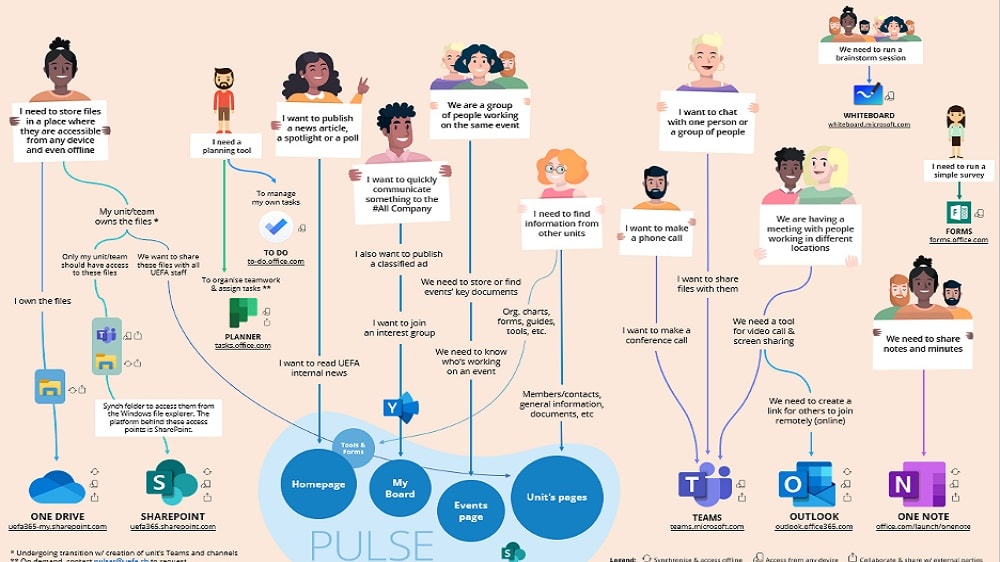
Microsoft 365 offers a comprehensive suite of tools specifically designed to foster teamwork and seamless communication within organizations.
When evaluating team collaboration capabilities, Microsoft 365 stands as the superior choice, surpassing Azure in this arena. Microsoft 365 offers a comprehensive suite of tools specifically designed to foster teamwork and seamless communication within organizations. Prominent among these is Microsoft Teams, a versatile platform that integrates chat, video conferencing, and application integration, offering a holistic collaborative environment. Additionally, SharePoint, a core component of Microsoft 365, provides a robust platform for creating intranet sites and managing workflows, enhancing collaborative workflows.
Conversely, while Azure excels in providing a plethora of technical features and cloud services, it does not place as heavy an emphasis on providing tools and solutions for teamwork and communication. Azure's primary focus revolves around cloud infrastructure and application hosting, making it less suited for organizations seeking comprehensive team collaboration tools.
Microsoft 365 Trumps Azure in Document Creation and Editing

Microsoft 365 offers a comprehensive suite of productivity tools, including the widely acclaimed Word, Excel, and PowerPoint
When it comes to creating and editing documents, Microsoft 365 undoubtedly takes the lead, surpassing Azure's capabilities. Microsoft 365 offers a comprehensive suite of productivity tools, including the widely acclaimed Word, Excel, and PowerPoint, recognized as industry standards for document creation, data analysis, and presentation development. These tools provide a seamless and user-friendly environment for crafting and editing documents, spreadsheets, and presentations, catering to a wide range of business needs.
In contrast, Azure, while offering a diverse array of technical features and cloud computing capabilities, does not provide analogous document creation services. Azure's primary focus revolves around cloud infrastructure and application hosting rather than the document-centric functions that Microsoft 365 excels at.
Azure and Microsoft 365 are Equally Competent at Data Handling
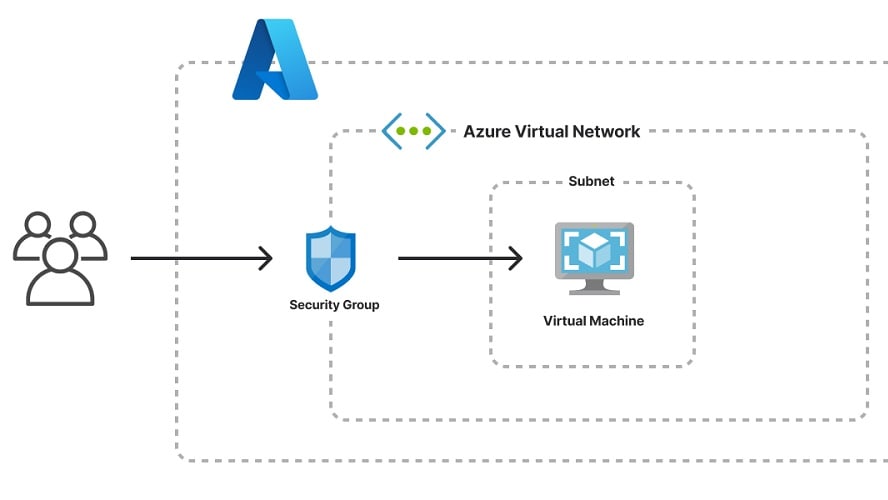
Azure takes the lead with its robust array of advanced analytics and machine learning tools, designed to process and dissect substantial datasets.
When it comes to data management and analysis, both Azure and Microsoft 365 shine brightly, each offering its unique set of capabilities. Azure takes the lead with its robust array of advanced analytics and machine learning tools, designed to process and dissect substantial datasets. These tools empower businesses to extract valuable insights, make data-driven decisions, and enhance their operations. For instance, Azure's Azure Machine Learning service enables predictive analytics, helping organizations forecast trends and patterns.
On the other hand, Microsoft 365 boasts the powerhouse that is Excel, a venerable tool for data analysis and visualization. With Excel, users can effortlessly create intricate financial models, interpret vast datasets, and craft visually appealing charts and graphs to convey complex information effectively.
Microsoft 365 Surpasses Azure for User-Friendliness and Customization

Microsoft 365 boasts a suite of well-known applications
When it comes to ease-of-use, Microsoft 365 stands out as the more accessible choice for the average business user when compared to Azure. Microsoft 365 boasts a suite of well-known applications such as Word, Excel, PowerPoint, and Outlook, all seamlessly optimized for cloud-based collaboration. Its user interface is exceptionally clean, intuitive, and effortlessly navigable, making it welcoming even to those with limited technical expertise.
In contrast, while Azure is not inherently challenging to use, it caters more toward developers and IT professionals. Azure's cloud computing services can present complexities for users outside these specialized fields. Its interface, although powerful, might appear intricate to those not well-versed in cloud infrastructure management, potentially requiring a steeper learning curve.
08 Microsoft Azure vs Microsoft 365: Which is the best for your business?
Microsoft Azure is the best tool for you if:
- You require a robust cloud infrastructure for hosting and scaling applications and services.
- You need advanced analytics and machine learning capabilities for data-driven insights.
- Your organization values seamless integration with a wide range of databases, programming languages, and tools.
- You aim to develop, deploy, and manage applications efficiently in a cloud environment.
- You seek a flexible and scalable solution suitable for businesses of all sizes and industry sectors.
 You require a robust cloud infrastructure for hosting and scaling applications and services.
Microsoft 365 is the best tool for you if:
- You require a suite of productivity tools, including Word, Excel, PowerPoint, and Outlook, for efficient document creation and collaboration.
- Your organization prioritizes seamless communication and teamwork through tools like Microsoft Teams.
- You need a user-friendly environment for email management and scheduling with Outlook.
- You seek a cloud-based solution for document storage, sharing, and real-time co-authoring.
- Your business values a well-integrated productivity suite that enhances workflow efficiency and supports diverse collaboration needs.
Microsoft Azure
Premium
Empowering your cloud journey with Microsoft Azure
$5,000 in credits for 6 months if you didn't raise funds // Up to $150,000 in credits for 2 years if you did
Save up to $150,000
09 Alternatives to Microsoft Azure & Microsoft 365

Google Cloud (GCP)
Used by 11290 members
$2,000 in credits for 1 year if you never raised funds // $350,000 in credits for 2 years if you did
Save up to $350,000

DigitalOcean
Used by 6989 members
$200 in credits
Save up to $200

AWS Activate
Used by 6117 members
Up to $100,000 in credits or 20-50% off your monthly spend through an AWS partner (must be spending $100+/month)
Save up to $300,000

Slack
Used by 3742 members
25% off new plan purchases
Save up to $9,000
10 Promotions on AI Development and software
Microsoft Azure and Microsoft 365 are great tools, but Secret offers promo codes with discounts on over 2190+ different SaaS solutions. New deals are added regularly, helping you save money on your online subscriptions. Get access to codes for other AI Development and software you might want to purchase
Google Cloud (GCP) coupon
$2,000 in credits for 1 year if you never raised funds // $350,000 in credits for 2 years if you did

Code for Gemini API
$300 Gemini API credit

Deal for Apify
20% off monthly plans for 3 months

Webflow promo code
1 year free on a CMS site plan

Credits for GitLab
12 months free on the Ultimate license

Promo code Animoto
50% off annual plans

GitHub offer
$10,000 in credits for 12 months

JetBrains discount
6 months free + 50% off all JetBrains tools (up to 10 licences)

Fathom AI deal
First month free on the Premium plan

B12.io deal
25% off the monthly Website plan for 12 months (200 credits)
Start saving on the best SaaS
Secret has already helped tens of thousands of startups save millions on the best SaaS like Microsoft Teams, Google Workspace & many more. Join Secret now to buy software the smart way.