


A comprehensive cloud-based collaboration and document management solution is essential for modern businesses. It facilitates efficient information sharing, document collaboration, and team productivity. Azure and SharePoint are two widely used platforms that cater to different aspects of this category, offering distinct features and capabilities.
In this article, we will delve into a comparison of Azure and SharePoint, both of which are prominent players in the realm of cloud-based collaboration and document management. While both platforms serve the overarching goal of enhancing collaboration and data management within organizations, they do so in unique ways.
- 01 Microsoft Azure vs Microsoft SharePoint: overview
- 02 What's the difference between Microsoft Azure and Microsoft SharePoint?
- 03 Microsoft Azure pros and cons
- 04 Microsoft SharePoint pros and cons
- 05 Microsoft Azure compared to Microsoft SharePoint
- 06 Microsoft SharePoint compared to Microsoft Azure
- 07 Features comparison
- 08 Microsoft Azure vs Microsoft SharePoint: Which is the best for your business?
- 09 Alternatives to Microsoft Azure & Microsoft SharePoint
- 10 Promotions on AI Development software
Start saving on the best SaaS
Secret has already helped tens of thousands of startups save millions on the best SaaS like Microsoft Teams, Google Workspace & many more. Join Secret now to buy software the smart way.

01 Microsoft Azure vs Microsoft SharePoint: overview
Azure and SharePoint are prominent contenders in the realm of cloud-based collaboration and document management, each bringing distinct capabilities to the table to address specific organizational needs.
Azure, Microsoft's cloud computing platform, shines with its robust infrastructure services and versatile cloud environment. It caters to businesses looking to host applications, manage resources, and deploy scalable solutions seamlessly. In contrast, SharePoint, another Microsoft offering, is specialized in document management, content collaboration, and intranet creation. SharePoint excels in providing a structured platform for storing, sharing, and collaborating on documents and other content within a secure and controlled environment.
When deciding between Azure and SharePoint, it's essential to evaluate your organization's specific needs and objectives. If your primary focus is on building and managing a scalable cloud infrastructure to host applications and services, Azure is the go-to choice. However, if your primary requirement revolves around efficient document management, content collaboration, and creating a secure digital workplace, SharePoint emerges as the more tailored solution for your business.

Customer support
Both services offer comprehensive support from Microsoft. Azure's support is extensive due to its wide array of services, while SharePoint's support is more focused on collaboration and office integration.

Microsoft Azure
Microsoft SharePoint
Ease of use
Azure has a steep learning curve due to its vast capabilities. SharePoint is generally user-friendly, especially for those already familiar with Microsoft Office products.
Microsoft Azure
Microsoft SharePoint
Integrations
Azure integrates with many services and supports various programming languages, databases, and OS. SharePoint integrates well within the Microsoft ecosystem and with various third-party applications.
Microsoft Azure
Microsoft SharePoint
Development tools
Azure provides a full suite of developer tools for application development, whereas SharePoint is not a development platform but offers tools for customizing and automating workflows.
Microsoft Azure
Microsoft SharePoint
Storage solutions
Azure provides a wide range of storage solutions, including blob, file, queue, and disk storage. SharePoint offers document storage that is optimized for collaboration and is part of the broader Office 365 suite.
Microsoft Azure
Microsoft SharePoint
Security
Azure offers cutting-edge security features for cloud services. SharePoint provides robust security within the platform, but as a SaaS product, it relies heavily on Azure's infrastructure.
Microsoft Azure
Microsoft SharePoint
Deployment options
Azure allows deployment on the cloud, hybrid, or on-premises environments, offering flexibility. SharePoint Online is primarily cloud-based, with limited on-premises deployment for SharePoint Server.
Microsoft Azure
Microsoft SharePoint
Customer reviews
Azure is praised for its extensive cloud services and solutions, while SharePoint is valued for its collaborative features and integration with Microsoft Office.
Microsoft Azure
Microsoft SharePoint
Pricing plans
Azure offers a pay-as-you-go pricing model that can be cost-effective depending on usage. SharePoint's pricing is often bundled with Office 365 subscriptions, which may not be as flexible.
Microsoft Azure
Microsoft SharePoint
Scalability
Azure provides highly scalable cloud infrastructure to meet the needs of any size project. SharePoint's scalability is generally tied to the Office 365 subscription plan and server capacity.
Microsoft Azure
Microsoft SharePoint
02 What's the difference between Microsoft Azure and Microsoft SharePoint?
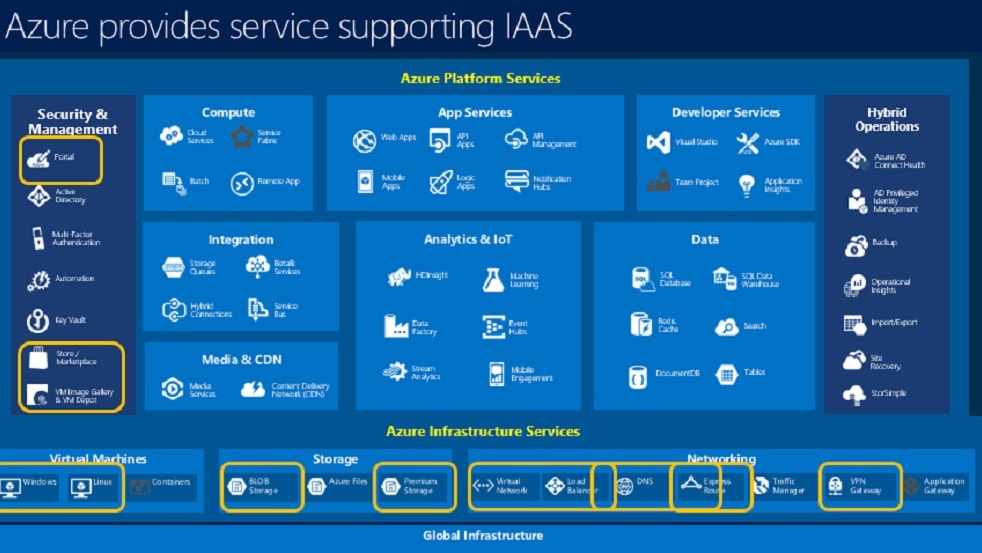
Azure, Microsoft's cloud computing platform, is primarily focused on providing a comprehensive infrastructure for hosting applications and managing resources in a scalable and flexible cloud environment.
Microsoft Azure
Empowering your cloud journey with Microsoft Azure

SharePoint's primary objective is to create a structured and secure platform for storing, sharing, and collaborating on documents and other content.
Microsoft SharePoint
Microsoft SharePoint is a versatile platform designed for teamwork, offering tools to create websites, securely store, organize, share, and access information from any device.
Azure and SharePoint are two distinct platforms that cater to different aspects of cloud-based collaboration and document management, with notable differences in their scope and functionality.
Azure, Microsoft's cloud computing platform, is primarily focused on providing a comprehensive infrastructure for hosting applications and managing resources in a scalable and flexible cloud environment. It offers a wide range of services, including virtual machines, databases, networking, and analytics, making it suitable for businesses with diverse IT needs. Azure's strength lies in its ability to support the deployment of various applications and services, making it a versatile solution for organizations seeking a robust cloud infrastructure.
On the other hand, SharePoint, also a Microsoft product, specializes in document management, content collaboration, and intranet creation. SharePoint's primary objective is to create a structured and secure platform for storing, sharing, and collaborating on documents and other content. It offers features like version control, workflow automation, and customizable intranet sites, making it an ideal choice for organizations looking to enhance teamwork and knowledge sharing.
One key difference between Azure and SharePoint is their core focus. Azure is primarily an infrastructure-as-a-service (IaaS) and platform-as-a-service (PaaS) solution, focusing on providing a cloud infrastructure and platform for various applications. SharePoint, on the other hand, is a collaboration and document management solution designed to optimize content management and facilitate collaboration within organizations.
When deciding between Azure and SharePoint, it's essential to assess your organization's specific requirements. If your primary goal is to build and manage a scalable cloud infrastructure to host applications and services, Azure is the preferred choice. However, if your primary need revolves around efficient document management, content collaboration, and creating a secure digital workplace, SharePoint emerges as the more tailored and suitable solution for your business.

Microsoft Azure
Premium
Empowering your cloud journey with Microsoft Azure
$5,000 in credits for 6 months if you didn't raise funds // Up to $150,000 in credits for 2 years if you did
Save up to $150,000
03 Microsoft Azure pros and cons
What are the advantages of Microsoft Azure?
- Scalability: Azure provides scalable cloud resources that can easily accommodate your business's growing needs. You can scale up or down as required, ensuring cost-efficiency and performance optimization.

- Global presence: Azure has a vast global network of data centers, allowing you to deploy resources in various regions worldwide. This enables low-latency access for your users and ensures high availability.
- Comprehensive service offering: Azure offers a wide range of services, including virtual machines, databases, AI and machine learning, IoT, and more. You can find solutions for various use cases without the need for extensive third-party integrations.
- Hybrid capabilities: Azure seamlessly integrates with on-premises environments, facilitating hybrid cloud setups. This is beneficial for businesses looking to extend their existing infrastructure to the cloud gradually.
- Security and compliance: Azure provides robust security features and compliance certifications, making it suitable for organizations with stringent security and regulatory requirements. It offers features like identity management, encryption, and threat detection.
What are the disadvantages of Microsoft Azure?
- Complexity: The sheer breadth of Azure services can be overwhelming for newcomers. Setting up and configuring resources can be complex, and it may require a learning curve.

- Cost management: While Azure provides cost-effective solutions, monitoring and managing costs can be challenging. Without proper governance and monitoring, expenses can escalate quickly.
- Support costs: Premium support options can be expensive, and free support may not always be sufficient for addressing complex issues promptly.
- Vendor lock-in: Like other cloud providers, Azure may lead to vendor lock-in if you heavily rely on Azure-specific services. Migrating away from Azure can be challenging and costly.
- Downtime: While Azure aims for high availability, occasional outages can occur. Businesses need to implement redundancy and disaster recovery strategies to mitigate downtime risks.
Compare Microsoft Azure to other tools


DigitalOcean vs Microsoft Azure


Microsoft Azure vs AWS Activate

Microsoft Azure vs Google Cloud (GCP)

Microsoft Azure vs OneDrive

Microsoft Azure vs Microsoft 365

Snowflake vs Microsoft Azure
04 Microsoft SharePoint pros and cons
What are the advantages of Microsoft SharePoint?
- Document management: SharePoint excels at document management, providing a secure and organized platform for storing, sharing, and collaborating on documents. Version control, metadata, and workflow capabilities enhance document control and collaboration.
- Collaboration: SharePoint offers robust collaboration features, including team sites, intranet portals, and integration with Microsoft Teams. It fosters teamwork, knowledge sharing, and communication within organizations.
- Integration with Microsoft 365: SharePoint seamlessly integrates with other Microsoft 365 applications like Word, Excel, Outlook, and OneDrive. This integration enhances productivity and allows for efficient document editing and sharing.
- Customization and extensibility: SharePoint is highly customizable, allowing organizations to create tailored solutions with custom workflows, web parts, and applications. It supports both no-code and developer-friendly customization options.
- Security and compliance: SharePoint provides robust security features, including access controls, encryption, and data loss prevention (DLP). It also supports compliance with various regulatory standards, making it suitable for industries with stringent requirements.
What are the disadvantages of Microsoft SharePoint?
- Complexity: SharePoint can be complex to set up and configure, especially for organizations without dedicated IT expertise. The multitude of features and options may require a learning curve.
- Cost: Licensing costs for SharePoint and associated services can add up, particularly for larger organizations. Additionally, customization and development efforts can contribute to overall expenses.
- Performance challenges: Large SharePoint environments may face performance issues if not properly optimized. Inefficiently designed sites and document libraries can lead to slow load times.
- Limited mobile experience: While SharePoint has mobile apps, the mobile experience is not as intuitive and feature-rich as the desktop version, which can be a drawback for users who require on-the-go access.
- User adoption: SharePoint's success depends on user adoption. If employees are not trained or motivated to use the platform effectively, it may not realize its full potential within an organization.
Compare Microsoft SharePoint to other tools


Microsoft SharePoint vs Box
05 Microsoft Azure compared to Microsoft SharePoint
Azure and SharePoint, both Microsoft products, serve distinct purposes in the world of cloud computing and collaboration. Azure is primarily a cloud platform offering infrastructure and services for application hosting and scalability. It supports diverse IT requirements and global deployments.
On the other hand, SharePoint is a collaboration and document management solution, focusing on content organization, sharing, and team collaboration. While Azure is suitable for businesses needing scalable cloud infrastructure, SharePoint excels in optimizing content collaboration and knowledge sharing. Understanding their unique strengths is essential when deciding which platform aligns better with your organization's specific needs.
Is Microsoft Azure better than Microsoft SharePoint?
 Is Microsoft Azure better than Microsoft SharePoint?
Comparing Azure and SharePoint is like comparing apples and oranges, as they serve different purposes. Azure is a cloud computing platform, ideal for hosting applications and managing infrastructure, while SharePoint is a collaboration and document management solution, designed for content organization and teamwork.
The choice between them depends on your specific needs. If you require scalable cloud resources, Azure is the way to go. If you aim to enhance collaboration and document management, SharePoint is the better choice. In essence, it's not about one being better than the other; it's about which aligns more closely with your organization's objectives and requirements.
What is Microsoft Azure best used for?
Azure is best used for cloud computing and infrastructure needs. It provides a robust platform for hosting applications, managing virtual machines, databases, and networking resources. Azure's scalability is ideal for businesses looking to expand or scale down as required. It also offers a wide range of services, including AI, machine learning, and IoT, making it suitable for diverse IT projects.
Additionally, Azure's global network of data centers ensures low-latency access and high availability. Overall, Azure is a versatile solution for organizations seeking a flexible and comprehensive cloud environment to meet their specific application hosting and infrastructure demands.
Can Microsoft Azure replace Microsoft SharePoint?
Azure and SharePoint serve distinct purposes, making it challenging to directly replace one with the other. Azure is a cloud computing platform that provides infrastructure and services for application hosting and scalability. SharePoint, on the other hand, is a collaboration and document management solution tailored for content organization and teamwork.
While Azure can host SharePoint deployments, it doesn't replicate SharePoint's collaboration and document management features. So, Azure can complement SharePoint by providing a robust infrastructure, but it can't entirely replace SharePoint for content collaboration and intranet creation, as they serve different functions within an organization's IT ecosystem.
Is Microsoft Azure cheaper than Microsoft SharePoint?
Azure and SharePoint have distinct pricing structures and serve different purposes, so direct cost comparisons can be challenging. Azure charges for cloud computing resources and infrastructure, and costs vary based on usage and services employed. SharePoint's costs depend on factors like licensing, user counts, and additional services. Azure costs may add up if used extensively for hosting SharePoint deployments.
In some cases, SharePoint Online (part of Microsoft 365) may offer a more cost-effective solution, especially for smaller organizations. Ultimately, the cost comparison depends on specific usage, requirements, and whether the focus is on infrastructure (Azure) or collaboration (SharePoint).
Is there a better AI Development software than Microsoft Azure?
While Azure offers a comprehensive suite of cloud computing and infrastructure services, it's prudent to explore alternative cloud platforms to ensure you find the best fit for your specific requirements.
Several notable alternatives to Azure in the cloud computing arena include Amazon Web Services (AWS), Google Cloud Platform (GCP), IBM Cloud, and Oracle Cloud.
The choice of the optimal cloud platform depends on factors such as your organization's scalability needs, preferred technology stack, and specific cloud services required. If you value Microsoft's ecosystem and require a versatile cloud environment, Azure may align well with your objectives. Nevertheless, evaluating these alternatives can provide valuable insights and assist you in making an informed decision that best suits your unique cloud computing needs.
Microsoft Azure
Premium
Empowering your cloud journey with Microsoft Azure
$5,000 in credits for 6 months if you didn't raise funds // Up to $150,000 in credits for 2 years if you did
Save up to $150,000
06 Microsoft SharePoint compared to Microsoft Azure
SharePoint and Azure, both Microsoft products, cater to distinct aspects of organizational needs. SharePoint excels as a collaboration and document management solution, facilitating content sharing and teamwork within secure environments. It focuses on features like intranet portals, document versioning, and workflow automation.
In contrast, Azure serves as a cloud computing platform, providing infrastructure and services for scalable application hosting and data management. It supports a wide array of IT requirements, making it versatile for diverse projects. To decide between SharePoint and Azure, one must consider their specific objectives: SharePoint for content collaboration and Azure for cloud infrastructure and application hosting.
Is Microsoft SharePoint better than Microsoft Azure?
Comparing SharePoint and Azure is akin to comparing apples and oranges, as they serve distinct purposes. SharePoint is a collaboration and document management solution designed for content organization and team collaboration. It excels at fostering teamwork and knowledge sharing. In contrast, Azure is a cloud computing platform, ideal for hosting applications and managing infrastructure. It offers scalability and versatility for diverse IT needs.
Rather than one being better than the other, the choice depends on your organization's specific objectives. If content collaboration and intranet creation are paramount, SharePoint shines. For scalable cloud infrastructure and application hosting, Azure is the preferred choice.
What is Microsoft SharePoint best used for?
SharePoint is best used for effective collaboration, document management, and content organization within organizations. It provides a secure and structured platform for teams to create, share, and collaborate on documents, files, and information. SharePoint's features include document version control, workflow automation, and customizable intranet sites, making it ideal for enhancing teamwork and knowledge sharing. It seamlessly integrates with other Microsoft 365 applications, further streamlining productivity and communication.
SharePoint is particularly valuable for businesses seeking to create a digital workplace that promotes efficient collaboration and ensures that content is organized and easily accessible, improving overall productivity and teamwork.
Can Microsoft SharePoint replace Microsoft Azure?
SharePoint and Azure serve fundamentally different purposes within the realm of technology. SharePoint is a collaboration and document management solution focused on content organization and team collaboration. Azure, on the other hand, is a cloud computing platform providing infrastructure and services for application hosting and data management. SharePoint cannot replace Azure, nor vice versa, as they are complementary tools rather than substitutes.
While SharePoint can be hosted on Azure infrastructure, it doesn't replicate Azure's comprehensive cloud capabilities. The choice between them depends on specific organizational needs—SharePoint for collaboration and content management and Azure for scalable cloud infrastructure and application hosting.
Is Microsoft SharePoint cheaper than Microsoft Azure?
SharePoint and Azure have distinct pricing models, making direct cost comparisons challenging. SharePoint's costs depend on factors like licensing, user counts, and additional services, and can be cost-effective for collaboration needs.
Azure’s pricing, on the other hand, charges for cloud computing resources and infrastructure, with costs varying based on usage and services employed. The cost-effectiveness of either platform depends on specific usage scenarios. For smaller organizations focusing on collaboration, SharePoint Online (part of Microsoft 365) may offer a more cost-effective solution. However, larger enterprises with diverse IT requirements may find Azure's pricing competitive when considering its versatile cloud infrastructure capabilities.
Is there a better Collaboration software than Microsoft SharePoint?
While SharePoint offers powerful document management and collaboration capabilities, it's prudent to explore alternative collaboration and document management software options to ensure you find the best match for your specific needs.
Several notable alternatives to SharePoint in the collaboration and document management arena include Google Workspace, Dropbox Business, Box, and Confluence.
The choice of the ideal collaboration and document management software depends on your organization's unique requirements, preferences, and objectives. If you value Microsoft's ecosystem and require a robust platform for content organization and teamwork, SharePoint may align perfectly with your goals. However, considering these alternatives can provide valuable insights and help you make a well-informed decision that best suits your specific collaboration and document management needs.
07 Features comparison
SharePoint Takes the Lead Against Azure for Ease of Use
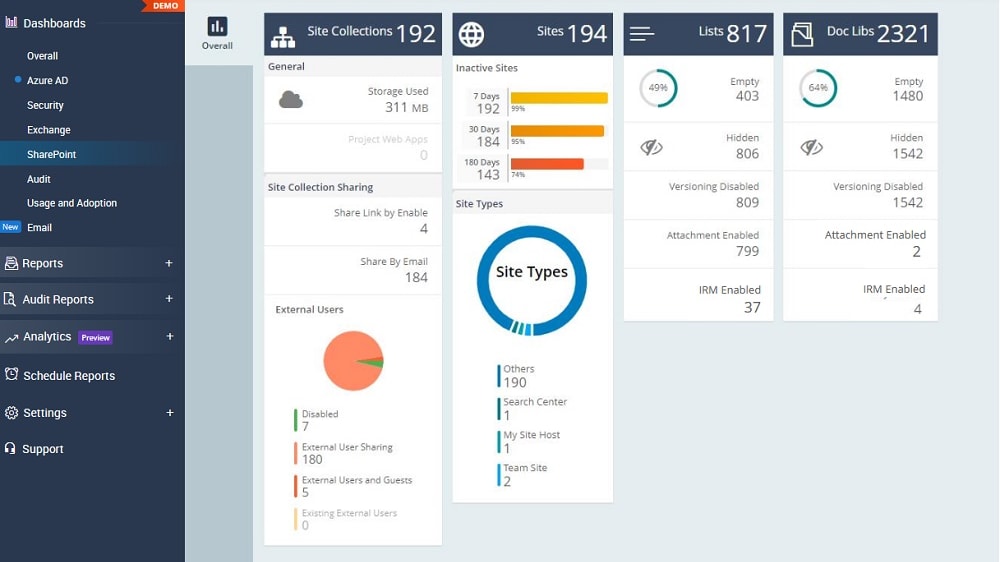
SharePoint is designed to enhance content collaboration and teamwork seamlessly.
When it comes to ease of use, SharePoint clearly outshines Azure with its intuitive interface and ease of navigation. SharePoint is designed to enhance content collaboration and teamwork seamlessly. For instance, its user-friendly team sites allow users to create, share, and edit documents effortlessly, promoting efficient collaboration. Moreover, SharePoint's customizable intranet portals provide a user-centric experience, making it easy for employees to access essential information and resources.
Azure, while powerful, leans more towards technical complexity due to its role as a cloud computing platform. It caters to a different set of users, such as IT professionals and developers, who may find its interface and terminology more technical and less intuitive. In contrast, SharePoint focuses on providing a user-friendly environment for non-technical users, making it the preferred choice when prioritizing ease of use in a collaboration and document management tool.
Azure Outshines SharePoint in Robust Integration Capabilities

Azure's extensive set of integration services seamlessly connects with various third-party applications and services
When it comes to integration capabilities, Azure outshines SharePoint by offering a broader spectrum of options and flexibility. Azure's extensive set of integration services seamlessly connects with various third-party applications and services. For instance, Azure Logic Apps allows users to build workflows that connect to popular software-as-a-service (SaaS) applications, providing automation and data flow possibilities. Moreover, Azure's compatibility with diverse programming languages and frameworks makes it suitable for creating custom integrations.
SharePoint, while offering integration capabilities, is primarily focused on enhancing content collaboration and document management within its ecosystem. While it integrates smoothly with other Microsoft 365 apps, its scope is narrower compared to Azure's extensive integration possibilities. Azure's versatility in connecting with a wide range of external systems and services makes it the preferred choice for organizations seeking comprehensive integration solutions.
Azure and SharePoint are Equally Scalable

Azure's scalability is exemplified through its ability to adjust computing resources dynamically, ensuring cost efficiency and top-notch performance.
In the scalability arena, both Azure and SharePoint earn high marks, catering to businesses poised for growth or transformation. Azure's scalability is exemplified through its ability to adjust computing resources dynamically, ensuring cost efficiency and top-notch performance. For instance, businesses can seamlessly scale their web applications up or down based on user traffic, preventing over-provisioning and unnecessary costs.
SharePoint, too, offers scalability by allowing organizations to adapt to evolving requirements through extensive customization options. Users can create custom workflows, add additional features, and develop tailored solutions as their business expands. SharePoint's scalability is reflected in its ability to serve as an adaptable platform for diverse needs, from intranet sites to document management systems.
SharePoint Offers Superior Collaboration Capabilities than Azure
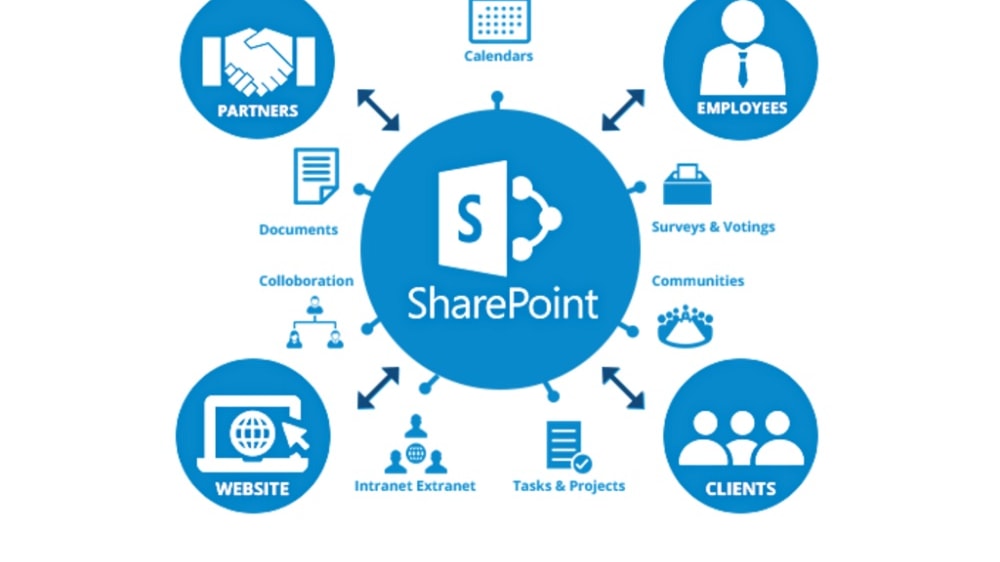
SharePoint's team sites serve as dedicated spaces where teams can create, share, and edit documents in real-time.
SharePoint takes center stage with a suite of features tailored for seamless teamwork. SharePoint's team sites serve as dedicated spaces where teams can create, share, and edit documents in real-time. For instance, co-authoring capabilities allow multiple users to work on documents simultaneously, enhancing productivity. Additionally, SharePoint's centralized knowledge hub offers easy access to critical information, fostering knowledge sharing and informed decision-making.
Azure, while feature-rich in its own right, doesn't prioritize collaboration-specific functionalities to the same extent as SharePoint. Azure primarily focuses on cloud infrastructure and application hosting, making it a versatile platform for IT professionals and developers but less oriented toward enhancing teamwork.
SharePoint Leads in Workflow Automation Compared to Azure

SharePoint offers a comprehensive set of automation tools that empower businesses to streamline their processes effectively
While Azure offers an impressive suite of features, SharePoint takes the lead in workflow automation. SharePoint offers a comprehensive set of automation tools that empower businesses to streamline their processes effectively. For instance, SharePoint's built-in workflow capabilities allow users to design custom workflows tailored to their specific business needs. These workflows can automate tasks such as document approval, task assignments, and notifications, reducing manual efforts and minimizing the scope for errors.
Azure, while featuring a range of automation options, primarily targets cloud computing and infrastructure management. Its automation services are designed for managing cloud resources, making it the go-to choice for tasks like scaling applications and provisioning virtual machines.
However, SharePoint's robust workflow automation capabilities make it the superior choice for businesses seeking to optimize internal processes, enhance productivity, and reduce manual intervention.
Azure Excels at IoT Solutions Beyond SharePoint

Azure's IoT Hub offers a dedicated platform for secure IoT application development, seamless connectivity, and efficient management.
When it comes to harnessing the power of IoT, Azure emerges as the undisputed leader. Azure's IoT Hub offers a dedicated platform for secure IoT application development, seamless connectivity, and efficient management. For example, organizations can use Azure IoT Hub to connect and manage millions of IoT devices, enabling real-time data collection and analysis for predictive maintenance or operational insights.
In contrast, while SharePoint excels in content collaboration and document management, it lacks the IoT-focused infrastructure and tools that Azure offers. SharePoint's primary focus is on enhancing teamwork and content organization within its ecosystem.
Azure Proves More Flexible than SharePoint

Azure's flexibility shines through its support for a wide range of programming languages, frameworks, and operating systems.
In the realm of flexibility, Azure takes the lead with its extensive options for customization and adaptability. Azure's flexibility shines through its support for a wide range of programming languages, frameworks, and operating systems. For instance, developers can choose from languages like Python, Java, .NET, and more, and deploy applications on various platforms, including Windows, Linux, and Kubernetes. This versatility empowers businesses to tailor their projects precisely to their unique preferences and requirements.
SharePoint, while feature-rich, is inherently geared towards content collaboration and document management, which can limit its adaptability for highly customized projects or applications. Its focus is on enhancing teamwork and content organization within its ecosystem. Azure's flexibility, offering a broader spectrum of development choices, makes it the preferred choice for organizations seeking tailor-made solutions that align precisely with their technological and coding preferences.
08 Microsoft Azure vs Microsoft SharePoint: Which is the best for your business?
Microsoft Azure is the best tool for you if:
- You require scalable cloud infrastructure for hosting applications and managing resources efficiently.
- Your organization seeks a versatile cloud environment to support diverse IT requirements.
- You value a global network of data centers for low-latency access and high availability.
- You need robust security features and compliance certifications for data protection.
- You want to seamlessly integrate with other Microsoft services and tools for a unified ecosystem.
 You require scalable cloud infrastructure for hosting applications and managing resources efficiently.
Microsoft SharePoint is the best tool for you if:
- Your organization needs a robust document management and content collaboration solution for efficient teamwork.
- You want a secure and structured platform for document sharing and version control.
- You value seamless integration with Microsoft 365 apps like Word, Excel, and Teams.
- Customizable intranet portals and workflow automation are essential for your operations.
- Compliance with regulatory standards is crucial, and you require features like data loss prevention and access controls for secure content management.
Microsoft Azure
Premium
Empowering your cloud journey with Microsoft Azure
$5,000 in credits for 6 months if you didn't raise funds // Up to $150,000 in credits for 2 years if you did
Save up to $150,000
09 Alternatives to Microsoft Azure & Microsoft SharePoint

Google Cloud (GCP)
Used by 11959 members
$2,000 in credits for 1 year if you never raised funds // $350,000 in credits for 2 years if you did
Save up to $350,000

DigitalOcean
Used by 7570 members

AWS Activate
Used by 6261 members
Up to $100,000 in credits or 20-50% off your monthly spend through an AWS partner (must be spending $100+/month)
Save up to $300,000

Slack
Used by 4002 members
25% off new plan purchases
Save up to $9,000
10 Promotions on AI Development and Collaboration software
Microsoft Azure and Microsoft SharePoint are great tools, but Secret offers promo codes with discounts on over 2250+ different SaaS solutions. New deals are added regularly, helping you save money on your online subscriptions. Get access to codes for other AI Development and Collaboration software you might want to purchase
Google Cloud (GCP) offer
$2,000 in credits for 1 year if you never raised funds // $350,000 in credits for 2 years if you did

Google Workspace promo
20% off Standard plans for 1 year

Webflow offer
40% off annual plans

Credits for Airtable
$1,000 in credits on licences for 1 year

Promo code GitLab
12 months free on the Ultimate license

Notion coupon code 2026
3 months free on the Business plan with Unlimited AI

Discount for Animoto
50% off annual plans
Slack discount
25% off new plan purchases

JetBrains discounts
6 months free + 50% off all JetBrains tools (up to 10 licences)

Miro discount code
$1,000 in credits (lifetime validity)
Start saving on the best SaaS
Secret has already helped tens of thousands of startups save millions on the best SaaS like Microsoft Teams, Google Workspace & many more. Join Secret now to buy software the smart way.