


Whether you're managing contracts for a small startup or overseeing document workflows in a large corporation, choosing the right e-signature solution is crucial for streamlining your operations. In this discussion, we compare two prominent e-signature platforms—PandaDoc vs signNow. Both tools are designed to facilitate efficient document signing and management, but they cater to different needs and offer unique features.
In this article, we delve into the specifics of each platform, examining the pros and cons of PandaDoc and signNow. We explore the main differences between the two to help you determine which platform is better suited for your business’s document management requirements. By understanding the strengths and limitations of each option, you can make an informed decision that optimizes your workflow and enhances your operational efficiency.
- 01 PandaDoc vs signNow: overview
- 02 What's the difference between PandaDoc and signNow?
- 03 PandaDoc pros and cons
- 04 signNow pros and cons
- 05 PandaDoc compared to signNow
- 06 signNow compared to PandaDoc
- 07 Features comparison
- 08 PandaDoc vs signNow: Which is the best for your business?
- 09 Alternatives to PandaDoc & signNow
- 10 Promotions on Contract Management software
Start saving on the best SaaS
Secret has already helped tens of thousands of startups save millions on the best SaaS like Microsoft Teams, Google Workspace & many more. Join Secret now to buy software the smart way.

01 PandaDoc vs signNow: overview
PandaDoc and signNow are leading contenders in the world of digital e-signature platforms, each offering distinct features and advantages tailored to different user requirements.
PandaDoc is renowned for its comprehensive document management capabilities and integration options. It provides a robust platform for creating, managing, and tracking documents at every stage of the signing process. This makes it particularly suitable for businesses that require detailed workflows and customizations in their document management. Conversely, signNow is prized for its simplicity and efficiency. With a user-friendly interface and straightforward functionality, it simplifies the e-signature process, allowing users to quickly send and sign documents without complex setup or training.
Now, let's delve into the PandaDoc vs. signNow comparison to assist you in making an informed decision when it comes to choosing the right e-signature platform for your specific needs.

Pricing plans
PandaDoc offers plans starting from $19/user/month, which includes unlimited document uploads. signNow starts at $8/user/month, appealing for its lower cost entry-level plan.

PandaDoc
signNow
Positive reviews
Both PandaDoc and signNow receive favorable reviews for their ease of use and efficient workflow capabilities, though PandaDoc often receives additional praise for its customization options.
PandaDoc
signNow
API access
PandaDoc provides a powerful API for custom integration, suitable for enterprises needing deep integration capabilities. signNow’s API is simpler, geared more towards basic usage.
PandaDoc
signNow
Customer support
PandaDoc provides comprehensive support including 24/7 live chat and a detailed knowledge base. signNow offers support, but some users note slower response times.
PandaDoc
signNow
Ease of use
PandaDoc's interface is highly intuitive with a gentle learning curve, while signNow is straightforward but less intuitive when it comes to advanced features.
PandaDoc
signNow
Integrations
PandaDoc integrates with over 100 apps including Salesforce, Zapier, and Shopify, enhancing its versatility. signNow offers fewer integrations, focusing mainly on essential business tools like Microsoft and Google suites.
PandaDoc
signNow
Document tracking
PandaDoc allows real-time tracking of document status with detailed analytics on viewer interactions. signNow provides basic tracking features which are functional but less detailed.
PandaDoc
signNow
Security features
PandaDoc offers robust security features including advanced encryption and compliance with multiple standards like GDPR. signNow also provides strong security but with fewer compliance certifications.
PandaDoc
signNow
Template management
PandaDoc shines with its vast array of customizable templates and the ability to save and reuse signatures. signNow offers templates but they are not as flexible or varied.
PandaDoc
signNow
Mobile app
Both tools offer mobile apps that are well-rated. PandaDoc’s app is praised for its full functionality, while signNow’s app is noted for its simplicity and ease of use.
PandaDoc
signNow
02 What's the difference between PandaDoc and signNow?

PandaDoc's Ready-Made and Custom-Designed Templates Increase Engagement with Your Audience
PandaDoc
Eliminate paperwork by digitizing your documents with e-signatures

signNow Offers Straightforward Integrations with Tools Like Salesforce and NetSuite
signNow
Speed up records management with the signNow tool. Sign documents, generate agreements, negotiate contracts quickly, and accept payments seamlessly, all with legally binding online signatures.
PandaDoc and signNow share many standard features of an e-signature platform, including the ability to securely sign documents, track document status, and support for multiple signatories. However, a significant difference between the platforms lies in their target audiences, influencing the features they offer.
PandaDoc is designed for businesses needing comprehensive document management, including robust integration capabilities with CRM systems, payment modules, and custom workflow automation. It offers a wide range of templates and advanced analytical tools, making it suitable for enterprises that require detailed insights into their document handling processes. In contrast, signNow caters more to smaller businesses and individuals who need a straightforward, no-frills solution. It provides a simple user interface and essential features that allow users to manage e-signatures efficiently without the complexity of additional integrations.
Another key difference between PandaDoc and signNow is their template offerings. Templates are a crucial tool for standardizing document processes in a company. PandaDoc boasts an extensive library of customizable templates suitable for various business needs, from sales proposals to HR documents. On the other hand, signNow offers a more limited selection but covers essential document types, focusing on ease of use and faster setup.
A final distinction is in their approach to integration and scalability. PandaDoc integrates deeply with many business tools like Salesforce, HubSpot, and Zoho, offering seamless functionality across sales, marketing, and document management ecosystems. This integration capability makes PandaDoc a powerful option for larger organizations looking to maintain consistency and automation across platforms. Conversely, signNow offers straightforward integration options geared towards immediate usability and simpler application, which might be more appealing to smaller businesses or those with less complex needs.

PandaDoc
Used by 1211 members
20% off monthly Starter and Business plans for 12 months
Save up to $156

signNow
Used by 254 members
60% off annual plans
Save up to $240
03 PandaDoc pros and cons
What are the advantages of PandaDoc?
- Ease of use: PandaDoc is known for its user-friendly interface and intuitive document creation tools, making it easy for users to create, send, and sign documents without extensive training.

- Integration capabilities: It integrates with a wide range of third-party applications such as CRM systems (Salesforce, HubSpot), payment processors (Stripe, PayPal), and cloud storage services (Google Drive, Dropbox), enhancing its utility and workflow automation.
- Document tracking: Users can track the status of documents in real-time, including when they are opened, viewed, and signed. This feature provides transparency and helps streamline the document management process.
- Templates and customization: PandaDoc offers a variety of templates for different types of documents (proposals, contracts, agreements), which can be customized to reflect your brand identity. This saves time and ensures consistency in document formatting.
- Security: It employs industry-standard security measures such as SSL encryption and compliance with regulations like GDPR and HIPAA, ensuring the confidentiality and integrity of sensitive documents.
What are the disadvantages of PandaDoc?
- Cost: Depending on the features and number of users, PandaDoc can be relatively expensive compared to some competitors, especially for small businesses or startups with limited budgets.

- Learning curve for advanced features: While basic functionalities are easy to grasp, mastering advanced features like workflow automation or complex document customization may require more time and training.
- Offline access limitations: PandaDoc primarily operates online, so users may face limitations when needing to work offline or in environments with unreliable internet connectivity.
- Customization constraints: While it offers customization options, some users may find the level of customization limited compared to other document automation platforms, especially when it comes to design flexibility.
- Customer support: While PandaDoc provides customer support via email and chat, some users have reported that response times can vary, and more complex issues may take longer to resolve.
Compare PandaDoc to other tools


Proposify vs PandaDoc

PandaDoc vs Docusign

DocSend vs PandaDoc
04 signNow pros and cons
What are the advantages of signNow?
- Ease of use: signNow offers a straightforward and user-friendly interface, making it easy for users to create, send, and sign documents quickly. The platform's simplicity contributes to its appeal for users who prioritize efficiency.
- Integration capabilities: It integrates with a wide range of third-party applications such as Google Drive, Dropbox, Salesforce, and more. This integration capability enhances workflow efficiency by allowing seamless document management across different platforms.
- Mobile-friendly: signNow provides robust mobile apps for iOS and Android, enabling users to sign and manage documents on the go. This mobile accessibility is beneficial for users who need to handle documents while away from their desks.
- Advanced features: signNow offers advanced features like document templates, role-based signing, custom branding, and conditional logic. These features cater to users needing more customization and automation in their document workflows.
- Security: The platform prioritizes security with features like SSL encryption, SOC 2 Type II compliance, and GDPR compliance. These measures help protect sensitive information and ensure document integrity.
What are the disadvantages of signNow?
- Limited document editing: Unlike some competitors, signNow’s document editing capabilities are somewhat limited. Users may find it challenging to make extensive changes to documents after they've been created.
- Cost: signNow’s pricing structure can be seen as a drawback for smaller businesses or startups, as it may be relatively expensive compared to other electronic signature solutions, especially for basic feature sets.
- Customer support: While signNow offers customer support via email and phone, some users have reported mixed experiences with response times and the effectiveness of support provided, especially for more complex issues.
- Reporting and analytics: The platform's reporting and analytics capabilities are not as robust as some competitors, which may be a drawback for organizations needing detailed insights into document activity and performance.
- Learning curve for advanced features: Similar to other platforms, mastering signNow’s advanced features like workflow automation and API integrations may require additional time and resources, which could be challenging for users with limited technical expertise.
Compare signNow to other tools

signNow vs Docusign

Dropbox Sign (ex. HelloSign) vs signNow
05 PandaDoc compared to signNow
PandaDoc and signNow are both popular electronic signature and document management platforms. PandaDoc excels with its user-friendly interface, robust document tracking, and extensive template library, ideal for businesses needing streamlined document workflows and customization. It integrates well with various third-party apps, enhancing overall efficiency. However, it can be pricey for smaller enterprises.
signNow offers similar ease of use and strong integration capabilities with mobile-friendly features. It prioritizes security and advanced customization options but may lack in document editing capabilities and robust customer support.
Is PandaDoc better than signNow?
 Is PandaDoc better than signNow?
PandaDoc often emerges as the superior choice for larger organizations or those that require extensive document automation and customization due to its comprehensive features and seamless integrations with multiple business applications. It offers an expansive template library and detailed document tracking, which significantly enhance workflow efficiency.
Conversely, signNow, with its cost-effectiveness and strong mobile support, is highly suitable for businesses with a tight budget or those primarily operating remotely. Both platforms ensure high-level security and legal compliance, but the decision between PandaDoc and signNow largely depends on specific business needs and financial considerations.
What is PandaDoc best used for?
PandaDoc is best used for streamlining document creation, sending, and signing processes. It excels in industries requiring frequent proposals, contracts, and agreements, offering a user-friendly interface and extensive template library for quick customization.
Its document tracking feature provides real-time insights into recipient interactions, enhancing transparency and workflow efficiency. Ideal for businesses of all sizes, PandaDoc integrates seamlessly with CRM systems and other tools, facilitating automated document workflows. Its robust security measures ensure compliance with industry standards, making it a reliable choice for maintaining document confidentiality and integrity in sectors such as sales, legal, and finance.
Can PandaDoc replace signNow?
PandaDoc can indeed replace signNow for many users, particularly those looking for a comprehensive document management solution that extends beyond electronic signatures. PandaDoc not only supports e-signatures but also offers robust features like document automation, integration capabilities with various CRM systems, and advanced analytics. This suite of features makes it particularly suitable for sales and marketing teams that require more functionality around document handling.
While signNow focuses primarily on e-signature services, PandaDoc's broader toolset provides a versatile alternative that caters to a wider range of business needs, making it a viable replacement for signNow in many organizational contexts.
Is PandaDoc cheaper than signNow?
When comparing PandaDoc and signNow, pricing plays a crucial role for many users. PandaDoc offers a free plan with basic features, which is ideal for startups, individuals or small teams needing minimal document management and e-signature capabilities. Their paid plans, which provide more advanced features, start at a price that is generally competitive with signNow's offerings.
signNow, on the other hand, does not have a free version and its paid plans commence at a slightly higher rate than PandaDoc's entry-level paid option. Therefore, for users looking for the most economical choice, particularly at the entry level, PandaDoc’s pricing often emerges as the more affordable option.
Is there a better Contract Management software than PandaDoc?
Determining if there's a "better" software than PandaDoc depends on your specific document management needs and priorities. PandaDoc excels with its user-friendly interface, extensive template library, and robust integration capabilities.
However, alternatives to PandaDoc like signNow, DocuSign, HelloSign, and Adobe Sign offer different strengths. DocuSign is renowned for its compliance and security features, HelloSign is known for simplicity and ease of use, and Adobe Sign integrates seamlessly with Adobe products. The choice of the "better" software depends on factors such as document volume, customization requirements, integration needs, and budget considerations.

PandaDoc
Eliminate paperwork by digitizing your documents with e-signatures
20% off monthly Starter and Business plans for 12 months
Save up to $156
06 signNow compared to PandaDoc
signNow and PandaDoc are both prominent solutions for electronic signatures and document management. signNow offers straightforward usability and strong mobile accessibility, making it ideal for users needing quick document signing capabilities on the go. It emphasizes security with features like SOC 2 Type II compliance and GDPR readiness.
In contrast, PandaDoc excels with a more extensive template library, robust document tracking, and advanced customization options. It integrates seamlessly with CRM systems and other business tools, enhancing workflow automation.
Is signNow better than PandaDoc?
signNow may be considered better than PandaDoc for users who prioritize mobility, ease of use, and affordability. Its streamlined design and strong mobile functionality make it highly accessible, allowing users to execute document signings efficiently from any device. This makes signNow particularly appealing to smaller businesses or freelancers who need reliable, secure e-signature solutions without the complexity of additional features.
While PandaDoc offers deeper customization and integration capabilities, signNow’s focus on simplicity and cost-effectiveness can be more aligned with the needs of those who require straightforward, quick document management without extensive setup or maintenance.
What is signNow best used for?
signNow is best used for streamlining electronic signature processes across various documents. It excels in industries requiring efficient document management, such as legal, real estate, and finance. signNow’s user-friendly interface and mobile accessibility facilitate quick document signing and sharing, ideal for remote teams and clients. It offers robust security features like encryption and compliance certifications, ensuring document integrity and regulatory adherence.
signNow’s integration capabilities with popular platforms like Salesforce and Google Drive further enhance workflow efficiency. Whether for contracts, agreements, or approvals, signNow simplifies and accelerates the document signing process while maintaining high levels of security and compliance.
Can signNow replace PandaDoc?
signNow can replace PandaDoc for users primarily focused on electronic signature functionalities. It offers a streamlined, user-friendly platform that excels in enabling secure and efficient document signing. For organizations that require straightforward e-signature services without the need for additional document management features, signNow presents a viable alternative. Its competitive pricing and emphasis on compliance and security make it appealing for businesses in industries like real estate, healthcare, and legal services.
However, for those who need advanced features such as document automation, CRM integrations, or detailed analytics, signNow might not fully substitute the extensive capabilities provided by PandaDoc.
Is signNow cheaper than PandaDoc?
When considering whether signNow is cheaper than PandaDoc, it’s essential to assess the specific needs and scale of your business. signNow offers a straightforward pricing structure that might appeal to businesses primarily looking for e-signature services. Its plans begin at a lower price point compared to PandaDoc's entry-level paid options. However, PandaDoc provides a free version that's suitable for basic needs, which signNow lacks.
Therefore, for minimal document signing and management requirements, PandaDoc could be more cost-effective. But for businesses ready to commit financially to more advanced e-signature functionalities, signNow’s starting plans might be more budget-friendly.
Is there a better Digital Signature software than signNow?
Determining if there's a superior software to signNow depends on your specific electronic signature and document management needs.
Alternatives to signNow like PandaDoc, Yousign, GetAccept, Honeybook, and Signaturely offer distinct strengths. Yousign is known for its robust compliance features tailored to European standards, GetAccept excels in providing a comprehensive sales enablement platform with advanced document tracking, Honeybook is favored for its all-in-one business management tools tailored to small businesses and freelancers, and Signaturely stands out for its simplicity and affordability. The choice of the optimal software largely depends on factors such as document complexity, integration requirements, and budget considerations.

signNow
Cloud-based electronic signature solution
60% off annual plans
Save up to $240
07 Features comparison
PandaDoc and signNow Both Provide Exceptional Electronic Signature Solutions with Distinct Advantages

PandaDoc's Legally Binding eSignatures Comply with Necessary Regulations to Reduce Your Lengthy Document Cycle
Both PandaDoc and signNow are recognized for their reliable and legally binding electronic signature capabilities. PandaDoc emphasizes compliance with UETA and ESIGN regulations, ensuring that signatures are legally recognized and enforceable. This compliance extends across all plans, allowing for unlimited signatures, which enhances flexibility for businesses of varying sizes.
Similarly, signNow offers seamless electronic signing capabilities, accessible anytime and from any electronic device. This efficiency accelerates the document signing process, benefiting users with streamlined workflows and improved document turnaround times. Overall, both platforms excel in providing secure and efficient electronic signature solutions, meeting the stringent requirements of modern business practices.
PandaDoc Excels in User-Friendliness Over signNow

Use PandaDoc's Drag-and-Drop Feature to Create Your Document Seamlessly
In comparing ease-of-use between these two SaaS tools, PandaDoc comes out ahead. Its interface is intuitively designed, catering to users of all levels. For instance, PandaDoc's drag-and-drop feature simplifies document creation and customization processes significantly. This approach ensures that users can efficiently generate and personalize documents without extensive training.
In contrast, signNow, while robust in functionality, often requires more time for users to familiarize themselves, relying on tutorials and guides for effective utilization. Therefore, for businesses prioritizing efficiency and straightforward navigation in document management software, PandaDoc stands out as the preferred option due to its user-centric design and accessibility.
PandaDoc and signNow Differ in Integration Approaches to Suit Varied Business Needs
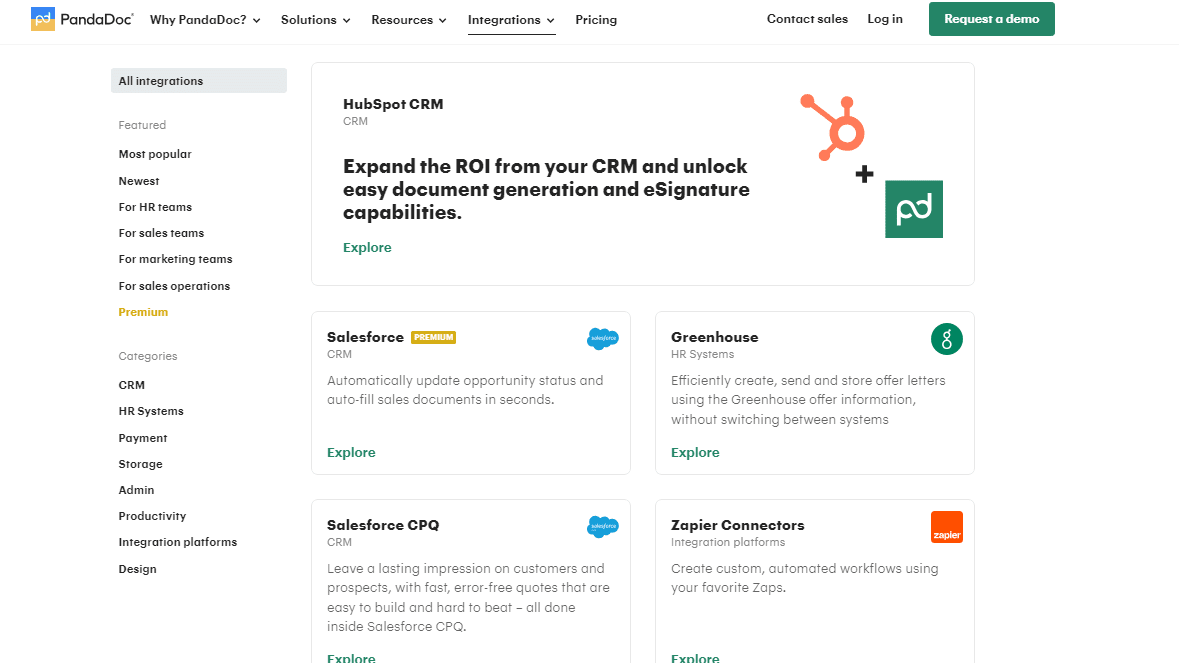
Connect PandaDoc to Your Workflow with a Range of Different Software, Including Pipedrive, Stripe, and Monday
On the aspect of integration capabilities, both PandaDoc and signNow hold their own; however, they cater to slightly different needs. PandaDoc shines with a diverse array of integrations, including major CRM systems like Salesforce, HubSpot, and Zoho. This extensive integration support is ideal for businesses relying heavily on these platforms for streamlined sales and marketing operations.
In contrast, signNow focuses on niche integrations, catering to industry-specific tools that may not be as widely recognized but are crucial for specialized workflows. Both platforms offer API access for custom integrations, providing flexibility based on whether your business requires broad compatibility or specialized connections.
PandaDoc Excels in Document Collaboration and Lifecycle Management

PandaDoc Centralizes Your Communication and Collaboration so All Your Team Members Stay Updated in Real-Time
While both tools provide tracking features, PandaDoc stands out with its comprehensive tools for approval workflows, analysis, and negotiation stages. The platform offers robust capabilities to track each phase of a document's lifecycle, ensuring transparency and efficiency throughout the process. For example, PandaDoc's collaboration tools allow stakeholders to review, comment, and approve documents seamlessly, enhancing teamwork and decision-making.
Conversely, signNow provides tracking via its Analytics Dashboard but lacks the focused emphasis on detailed approval processes and negotiation stages provided by PandaDoc. Therefore, businesses seeking meticulous document lifecycle management may find PandaDoc to be the optimal choice.
signNow Excels in Document Automation Efficiency

signNow's Document Groups Allow You to Route Documents to Groups of Users Using Predefined Conditions
Although both tools aim to simplify work processes, signNow shines with its robust automation features tailored for document signing and management. For instance, signNow offers automated document routing, reminders, and notifications, seamlessly integrating these functionalities into existing workflows. This automation streamlines processes and enhances efficiency in document handling.
On the other hand, while PandaDoc also streamlines tasks, its primary focus lies in contract generation and management rather than extensive process automation. Therefore, businesses looking to automate document workflows specifically for signing and management tasks may find signNow to be the more suitable choice due to its dedicated automation features and seamless integration capabilities.
PandaDoc and signNow Both Excel in Data Security, Catering to Different Compliance Needs

Create Passwords to Secure Your Documents Within signNow
Both PandaDoc and signNow prioritize data security with stringent measures and certifications. PandaDoc, in addition to SOC 2 Type 2 compliance like signNow, also maintains PCI DSS Level 1 certification, ensuring secure processing of payment information. Conversely, signNow emphasizes HIPAA compliance, crucial for handling sensitive healthcare data securely.
Both platforms employ robust encryption protocols for data in transit and at rest, stored securely in compliant cloud environments. These measures ensure comprehensive protection of user data, meeting industry standards and regulations. Whether handling financial transactions or sensitive healthcare information, businesses can trust both PandaDoc and signNow for their commitment to data security and compliance.
signNow Excels in Flexibility and Customization with Advanced Features
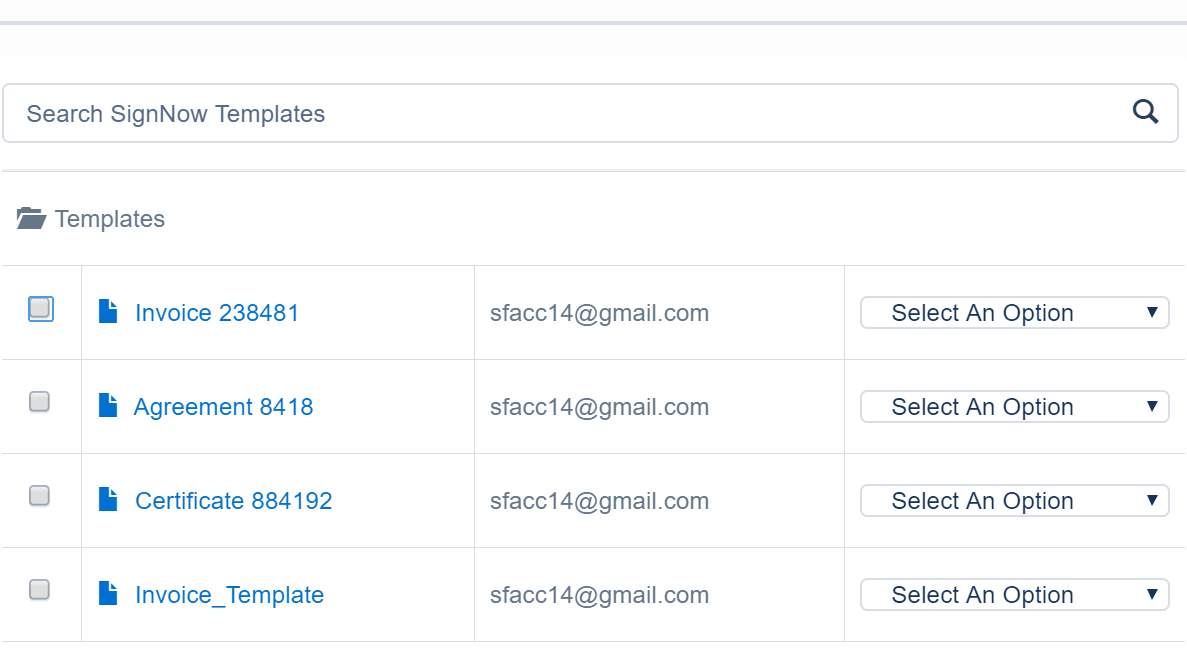
Access a Range of Different signNow Templates to Faciliate Your Document Creation
When it comes to document management, signNow distinguishes itself with exceptional flexibility and customization options. Its powerful API enables seamless integration with other systems, facilitating tailored document workflows. signNow supports conditional logic for automated processes and offers reusable templates, allowing users to personalize document creation, editing, signing, and sharing according to specific business needs.
In contrast, while PandaDoc also supports document creation and basic editing functionalities, it does not emphasize the same level of customization and personalization features as signNow. Therefore, businesses seeking extensive customization capabilities and adaptable document workflows may find signNow to be the preferred solution.
08 PandaDoc vs signNow: Which is the best for your business?
PandaDoc is the best tool for you if:
- You require a vast array of customizable templates and advanced document automation to streamline your sales and marketing processes efficiently.
- Seamless integration with CRM systems like Salesforce and HubSpot is crucial for maintaining continuity and data accuracy across your business operations.
- Your business demands robust document tracking features that provide real-time updates on document status, ensuring greater control over the sales cycle.
- You need a platform that supports unlimited electronic signatures and extensive collaboration tools to enhance team productivity and client interactions.
- Enhanced security with compliance standards such as SOC 2 Type II is essential for your document management needs, ensuring data protection and privacy.
 You require a vast array of customizable templates and advanced document automation to streamline your sales and marketing processes efficiently.
signNow is the best tool for you if:
- Straightforward, efficient electronic signature capabilities are your primary requirement, especially if you value quick setups and easy operations without needing extensive training.
- You often handle document signings remotely and require a mobile-friendly platform that ensures access and functionality across all types of devices.
- Cost-effectiveness is a priority, and you're looking for a budget-friendly option that provides essential e-signature functionalities without the additional frills.
- Compliance with rigorous standards such as GDPR and SOC 2 Type II is critical for your operations, particularly in sectors handling sensitive information.
- You prefer a user-friendly interface that doesn't sacrifice performance, offering essential integrations with tools like Google Drive and Dropbox for streamlined workflows.
PandaDoc
Used by 1211 members
20% off monthly Starter and Business plans for 12 months
Save up to $156
signNow
Used by 254 members
60% off annual plans
Save up to $240
09 Alternatives to PandaDoc & signNow

Docusign
Used by 704 members
First month free and 40% off annual plans
Save up to $350

DocSend
Used by 687 members
90% off your annual DocSend plan
Save up to $1,620

Yousign
Used by 346 members

forms.app
Used by 246 members
30% off annual plans
Save up to $177
10 Promotions on Contract Management and Digital Signature software
PandaDoc and signNow are great tools, but Secret offers promo codes with discounts on over 2250+ different SaaS solutions. New deals are added regularly, helping you save money on your online subscriptions. Get access to codes for other Contract Management and Digital Signature software you might want to purchase

Captain Contrat coupon
15% discount on service fees (except creation on estimate)

Deal for Signaturit
50% off on Business, Business + and API plans
DocSend discounts
90% off your annual DocSend plan

Deal for Signitic
30% off for 1 year

PartnerStack promotion
15% off for 1 year

Code for pdfFiller
First month free

Deel discounts
$1,500 credit on Payroll, HR or IT plans

Snapchat Ads promotion
Spend $350, get $375 FREE ad credit

LegalPlace promo
15% off business creation plans for 1 year

Ledgy offer
25% off your first year
Start saving on the best SaaS
Secret has already helped tens of thousands of startups save millions on the best SaaS like Microsoft Teams, Google Workspace & many more. Join Secret now to buy software the smart way.