


Selecting the appropriate proposal management tool is crucial for optimizing your business's efficiency in creating, sending, and tracking proposals. These tools streamline the proposal process, improve collaboration among team members, and ensure timely follow-ups with clients. Moreover, proposal management platforms can enhance document customization, simplify e-signature processes, and provide valuable analytics to refine your proposal strategies.
With numerous options available, how do you determine the ideal solution for your business needs? In this article, we present a comprehensive comparison between Proposify and PandaDoc. By examining their key features, pricing structures, and unique offerings, you'll gain valuable insights to make an informed decision for your proposal management requirements.
- 01 Proposify vs PandaDoc: overview
- 02 What's the difference between Proposify and PandaDoc?
- 03 Proposify pros and cons
- 04 PandaDoc pros and cons
- 05 Proposify compared to PandaDoc
- 06 PandaDoc compared to Proposify
- 07 Features comparison
- 08 Proposify vs PandaDoc: Which is the best for your business?
- 09 Alternatives to Proposify & PandaDoc
- 10 Promotions on Prospecting software
Start saving on the best SaaS
Secret has already helped tens of thousands of startups save millions on the best SaaS like Microsoft Teams, Google Workspace & many more. Join Secret now to buy software the smart way.

01 Proposify vs PandaDoc: overview
Proposify and PandaDoc stand as reputable contenders in the domain of proposal and contract management, and document automation platforms, each catering to distinct user preferences and business requirements.
Proposify shines with its user-friendly interface and focus on streamlining the proposal creation process. It offers a range of templates, customization options, and collaboration features tailored to meet the needs of sales and marketing teams. Conversely, PandaDoc provides a comprehensive suite of document management tools, including e-signatures, document analytics, and workflow automation. Its robust features make it a suitable choice for businesses seeking to streamline their entire document creation and management process.
To make a well-informed choice between Proposify and PandaDoc, it's essential to evaluate your specific business needs, team dynamics, and proposal objectives. Proposify may be the preferred option for teams looking for a straightforward and intuitive proposal management solution, while PandaDoc offers a broader array of document automation capabilities, making it suitable for businesses requiring end-to-end document management solutions.

Document analytics
PandaDoc provides comprehensive analytics for documents, which is essential for sales teams, while Proposify offers basic analytics features.

Proposify
PandaDoc
Integrations
PandaDoc offers a larger array of integrations with popular platforms like Salesforce and Zoho CRM, compared to Proposify's strong but more limited integration options.
Proposify
PandaDoc
Mobile accessibility
PandaDoc's mobile app is more feature-rich, allowing users to create, send, and sign documents on the go, whereas Proposify's mobile experience is more limited.
Proposify
PandaDoc
Positive reviews
Both platforms are well-regarded, but Proposify may be highlighted for its user-friendly proposal editor, while PandaDoc could be noted for its comprehensive document management system.
Proposify
PandaDoc
Ease of use
Proposify is known for its sleek interface and ease of use, especially in creating and managing proposals, whereas PandaDoc offers a wide range of features that may come with a steeper learning curve.
Proposify
PandaDoc
Customer support
While both offer solid support, PandaDoc has a slight edge due to its 24/7 customer service and extensive online resources.
Proposify
PandaDoc
Pricing plans
Proposify offers competitive pricing but with fewer tiers than PandaDoc, which provides more scalable options catering to businesses of all sizes.
Proposify
PandaDoc
Document tracking
PandaDoc's document tracking is very detailed, offering real-time notifications, while Proposify's tracking system is robust but less detailed.
Proposify
PandaDoc
Customization options
Proposify shines with highly customizable proposal templates, whereas PandaDoc offers flexibility but with some limits on the design.
Proposify
PandaDoc
Security features
Both services provide excellent security measures including SSL encryption, but PandaDoc has an edge with its advanced compliance standards.
Proposify
PandaDoc
02 What's the difference between Proposify and PandaDoc?

Proposify's Easy-To-Use Editor, Giving You the Freedom to Create Your Proposals and Customize Them
Proposify
Seal the deal smarter, faster with Proposify.

Create Your Own Documents With PandaDoc's Document Editor, Editing Blocks, Fields, and More As You See Fit
PandaDoc
Take the work out of your document workflow and focus on what really matters – your business.
When comparing Proposify and PandaDoc, it's essential to understand the differences between these two leading proposal management platforms to make an informed decision for your business needs.
Proposify offers a sleek and intuitive interface, designed to simplify the proposal creation process. With a focus on customizable templates, collaboration tools, and streamlined workflows, Proposify is well-suited for sales and marketing teams seeking to create professional proposals efficiently. Its user-friendly approach makes it particularly appealing for smaller teams and businesses looking for a straightforward solution.
On the other hand, PandaDoc provides a comprehensive suite of document automation tools, extending beyond proposal management to include features such as e-signatures, document analytics, and workflow automation. This broader scope makes PandaDoc suitable for businesses looking to streamline their entire document creation and management process. While PandaDoc may have a steeper learning curve initially due to its extensive feature set, the depth of functionality it offers can significantly enhance productivity and efficiency for larger teams and enterprises.
One notable difference between Proposify and PandaDoc lies in their pricing and plans. Proposify offers tiered pricing plans based on the number of users and features required, with a focus on affordability for smaller teams. In contrast, PandaDoc's pricing structure is more flexible, offering a range of plans tailored to accommodate varying business sizes and needs, including options for enterprise-level customization and scalability.

PandaDoc
Eliminate paperwork by digitizing your documents with e-signatures
20% off monthly Starter and Business plans for 12 months
Save up to $156
03 Proposify pros and cons
What are the advantages of Proposify?
- User-friendly interface: Proposify offers an intuitive and easy-to-use interface, making it simple for users to create, edit, and send proposals without extensive training or technical expertise.

- Customizable templates: The platform provides a variety of professionally designed proposal templates that users can customize to match their branding and style, saving time and effort in proposal creation.
- Collaboration features: Proposify facilitates seamless collaboration among team members by allowing them to work on proposals simultaneously, leave comments, and track changes in real-time, enhancing teamwork and productivity.
- Proposal analytics: Proposify offers robust analytics and reporting tools that enable users to track the performance of their proposals, including insights into client engagement, proposal views, and conversion rates, helping users refine their strategies and improve their success rates.
- Integration capabilities: Proposify integrates with a wide range of third-party applications and tools, including CRM systems like Salesforce and project management platforms like Trello, enabling users to streamline their workflow and connect Proposify with their existing tools and processes.
What are the disadvantages of Proposify?
- Limited customization options: While Proposify offers customizable templates, some users may find the customization options to be somewhat limited compared to other proposal management platforms, restricting their ability to tailor proposals to specific client needs and preferences.

- Pricing: Proposify's pricing plans may be prohibitive for smaller businesses or individual users, particularly those with limited proposal volume or budget constraints, as the platform's features are geared more towards mid-sized and enterprise-level clients.
- Learning curve: While Proposify is generally user-friendly, some users may experience a learning curve when first using the platform, particularly when exploring advanced features or customization options, requiring additional time and effort to become proficient.
- Template limitations: While Proposify offers a variety of templates, some users may find the selection to be limited or not fully customizable to their needs, potentially resulting in proposals that lack the desired visual appeal or branding consistency.
- Customer support: Although Proposify offers customer support, some users have reported occasional delays or challenges in accessing timely assistance, which can be frustrating when encountering technical issues or seeking guidance on using the platform effectively.
04 PandaDoc pros and cons
What are the advantages of PandaDoc?
- Comprehensive document management: PandaDoc offers a wide range of document management features beyond proposal creation, including e-signatures, document analytics, and workflow automation, making it a versatile tool for managing various types of documents and processes.
- Customization options: PandaDoc provides extensive customization options for creating proposals, contracts, and other documents, allowing users to tailor their documents to match their branding and style, enhancing professionalism and client engagement.
- Integration capabilities: PandaDoc integrates seamlessly with popular CRM systems like Salesforce, as well as other business tools such as Google Drive, Dropbox, and Microsoft Office, enabling users to streamline their workflow and connect PandaDoc with their existing tools and processes.
- Collaboration features: PandaDoc facilitates collaboration among team members by allowing them to work on documents simultaneously, leave comments, and track changes in real-time, enhancing teamwork and productivity.
- Automation and workflow optimization: PandaDoc offers advanced automation and workflow optimization features, such as document templates, approval workflows, and document status tracking, helping users streamline their document creation and approval processes, saving time and reducing errors.
What are the disadvantages of PandaDoc?
- Pricing: PandaDoc's pricing plans may be expensive for smaller businesses or individual users, particularly those with limited document volume or budget constraints, as the platform's features are geared more towards mid-sized and enterprise-level clients.
- Learning curve: While PandaDoc is generally user-friendly, some users may experience a learning curve when first using the platform, particularly when exploring advanced features or customization options, requiring additional time and effort to become proficient.
- Template limitations: While PandaDoc offers a variety of templates, some users may find the selection to be limited or not fully customizable to their needs, potentially resulting in documents that lack the desired visual appeal or branding consistency.
- Customer support: Although PandaDoc offers customer support, some users have reported occasional delays or challenges in accessing timely assistance, which can be frustrating when encountering technical issues or seeking guidance on using the platform effectively.
- Security concerns: While PandaDoc takes measures to ensure the security of user data and documents, some users may have concerns about the security and privacy of sensitive information, particularly when sharing documents containing confidential or proprietary information.
Compare PandaDoc to other tools


PandaDoc vs signNow


PandaDoc vs Docusign

DocSend vs PandaDoc
05 Proposify compared to PandaDoc
Proposify and PandaDoc are leading proposal management platforms, each with distinct strengths. Proposify offers a user-friendly interface and customizable templates, ideal for smaller teams or businesses focused on streamlined proposal creation.
On the other hand, PandaDoc provides comprehensive document management features, including e-signatures and workflow automation, catering to larger enterprises with complex document needs. While Proposify excels in simplicity and ease of use, PandaDoc offers a broader array of functionalities for organizations requiring advanced document automation and collaboration tools.
Is Proposify better than PandaDoc?
 Is Proposify better than PandaDoc?
Determining whether Proposify is better than PandaDoc depends on specific business needs. Proposify excels in simplicity and customizable templates, ideal for smaller teams focused on streamlined proposal creation.
Conversely, PandaDoc offers comprehensive document management features, including e-signatures and workflow automation, catering to larger enterprises with complex document needs. While Proposify prioritizes user-friendly interfaces, PandaDoc provides advanced functionalities for organizations requiring extensive document automation and collaboration tools.
What is Proposify best used for?
Proposify is best used for streamlining the proposal creation process. It provides customizable templates and intuitive tools that make it easy to create professional-looking proposals quickly. Ideal for sales teams, marketing professionals, and freelancers, Proposify facilitates collaboration, tracks proposal activity, and enhances client engagement. Its user-friendly interface simplifies the entire proposal management workflow, from initial drafting to final delivery.
Whether pitching new business ideas, submitting project proposals, or closing deals, Proposify empowers users to create compelling proposals efficiently, ultimately helping businesses win more clients and accelerate growth.
Can Proposify replace PandaDoc?
While both Proposify and PandaDoc are robust proposal management platforms, the decision to replace one with the other depends on specific business needs. Proposify excels in simplifying proposal creation with its intuitive interface and customizable templates, ideal for smaller teams and straightforward proposal workflows.
PandaDoc, on the other hand, offers a broader range of document management features, including e-signatures and workflow automation, suitable for larger enterprises with complex document needs. While Proposify can fulfill basic proposal requirements, PandaDoc's extensive functionality may be necessary for organizations requiring advanced document automation and collaboration tools.
Is Proposify cheaper than PandaDoc?
Determining whether Proposify is cheaper than PandaDoc depends on various factors, including the specific features and usage needs of the business. Proposify offers tiered pricing plans tailored to different user levels, providing flexibility for businesses of varying sizes.
While Proposify’s pricing may be more cost-effective for smaller teams or those with simpler proposal requirements, PandaDoc offers a broader range of functionalities, which may justify its higher price point for organizations with complex document management needs.
Is there a better Prospecting software than Proposify?
While Proposify offers a range of features for proposal management, it's crucial to explore alternative software options to ensure you find the best fit for your specific requirements.
Several notable alternatives to Proposify in the proposal management space include PandaDoc, GetAccept, DocSend, and Cacheflow.
The selection of the ideal proposal management software depends on factors such as customization needs, collaboration preferences, and budget considerations. If you prioritize user-friendly interfaces, customizable templates, and streamlined proposal workflows, Proposify may be a strong choice.
06 PandaDoc compared to Proposify
PandaDoc and Proposify are leading contenders in the realm of proposal management software, each with distinct strengths. PandaDoc stands out with its comprehensive suite of document management features, including e-signatures and workflow automation, making it a versatile solution for businesses with complex document needs.
Proposify, on the other hand, excels in its user-friendly interface and customizable templates, catering well to smaller teams and straightforward proposal workflows. While PandaDoc offers extensive functionality for advanced document automation and collaboration, Proposify prioritizes simplicity and ease of use.
Is PandaDoc better than Proposify?
Determining whether PandaDoc is better than Proposify depends on specific business needs. PandaDoc shines with its comprehensive document management features, including e-signatures and workflow automation, catering to businesses with complex document needs.
Conversely, Proposify excels in user-friendly interfaces and customizable templates, ideal for smaller teams with straightforward proposal workflows. While PandaDoc offers advanced functionalities for document automation and collaboration, Proposify prioritizes simplicity and ease of use.
What is PandaDoc best used for?
PandaDoc is best utilized for comprehensive document management, offering a wide array of features beyond proposal creation. Ideal for businesses of all sizes, PandaDoc facilitates seamless document creation, collaboration, and e-signature workflows. Its versatility extends to contracts, quotes, and other business documents, making it a valuable tool for sales teams, HR departments, and legal professionals alike.
With advanced automation capabilities and real-time tracking, PandaDoc streamlines document processes, enhances productivity, and ensures compliance. Whether negotiating contracts, sending quotes, or obtaining signatures, PandaDoc empowers users to manage their documents efficiently, ultimately driving business growth and success.
Can PandaDoc replace Proposify?
Determining whether PandaDoc can replace Proposify depends on specific business needs and preferences. PandaDoc offers a comprehensive suite of document management features, including e-signatures and workflow automation, making it suitable for businesses with complex document needs beyond proposals.
While Proposify excels in its user-friendly interface and customizable templates tailored for proposal creation, PandaDoc's broader functionality may be advantageous for organizations requiring advanced document automation and collaboration tools.
Is PandaDoc cheaper than Proposify?
Determining whether PandaDoc is cheaper than Proposify depends on several factors, including the specific features and usage needs of the business. PandaDoc offers tiered pricing plans tailored to different user levels, providing flexibility for businesses of varying sizes. While it may offer a broader range of functionalities, PandaDoc’s pricing may vary based on the features required.
Conversely, Proposify offers pricing plans geared towards streamlined proposal creation, potentially making it a more cost-effective option for businesses with simpler proposal workflows.
Is there a better Contract Management software than PandaDoc?
While PandaDoc offers comprehensive document management features, exploring alternative options can help ensure the best fit for your specific requirements.
Several notable alternatives to PandaDoc in the document management and proposal creation space include Proposify, DocuSign, signNow, Zoho Sign, and Oneflow.
Choosing the ideal document management software depends on factors such as customization needs, collaboration preferences, and budget considerations. If you prioritize streamlined document creation and robust analytics, PandaDoc may be suitable.
PandaDoc
Eliminate paperwork by digitizing your documents with e-signatures
20% off monthly Starter and Business plans for 12 months
Save up to $156
07 Features comparison
Proposify's Precision in Real-Time Proposal Tracking Surpasses PandaDoc

Proposify's Proposal Metrics Gives You a Clear Overview of the Time Spent on Each Section of Your Proposal
Proposify distinguishes itself with its meticulous real-time tracking of proposals. Users can monitor client engagement, including when a proposal is opened, the time spent on each section, and the ultimate acceptance or rejection status. For instance, Proposify's detailed tracking enables users to gauge client interest levels and tailor follow-up strategies accordingly.
While PandaDoc also provides tracking capabilities, its focus extends to the broader document lifecycle. Therefore, Proposify's specific emphasis on real-time proposal tracking offers users more immediate feedback and actionable insights, enhancing the effectiveness of proposal management strategies and driving business success.
PandaDoc Leads in Integration Versatility for Seamless Workflow

PandaDoc Integrates With A Range of Different SaaS Software, Like Pipedrive, Stripe, and HubSpot
Shifting gears to integration possibilities, PandaDoc emerges as the clear frontrunner. Its robust integration capabilities encompass a vast spectrum of platforms, including renowned CRM systems like Salesforce and HubSpot, popular payment gateways such as PayPal and Stripe, and widely-used project management tools like Asana and Trello. This expansive range of integrations facilitates seamless workflow transitions between diverse platforms, offering users a comprehensive and efficient toolset.
While Proposify also facilitates integrations with select CRM and payment systems like Salesforce and Stripe, its scope pales in comparison to PandaDoc's extensive array. Consequently, for businesses seeking enhanced interoperability and streamlined processes, PandaDoc proves to be the superior choice. It enables efficient data exchange and workflow automation, ultimately optimizing productivity and saving valuable time.
PandaDoc's Enhanced Security Measures Surpass Proposify's
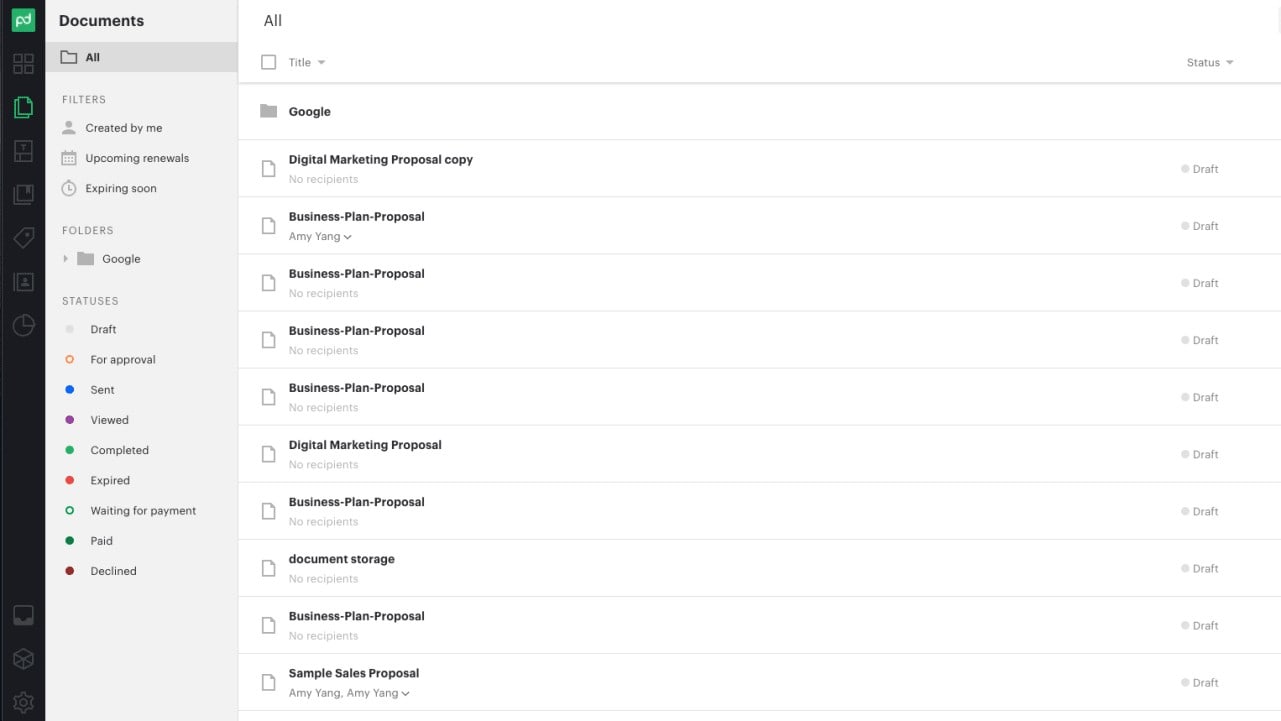
Create Custom Folders and Efficiently Organize Your Documents for Secure Storage
PandaDoc underscores its dedication to data security through its 'Safe and secure' feature. With SOC 2 Type 2 compliance, encryption of user data in transit and at rest, and storage in a compliant cloud, PandaDoc ensures comprehensive data protection. For instance, the platform prioritizes safeguarding sensitive information such as client contracts and financial documents, offering users peace of mind regarding data security.
In contrast, while Proposify provides essential security features, it lacks the detailed emphasis on security measures evident in PandaDoc's offerings. Thus, PandaDoc's robust security protocols position it as a preferable choice for businesses prioritizing data security and compliance.
Proposify's Intuitive Design Surpasses PandaDoc for User-Friendliness

Proposify's Content Library, Showing All the Templates You Can Use For Your Proposals and Agreements
When it comes to ease-of-use, Proposify outshines PandaDoc with its seamlessly navigable interface. Proposify's aesthetically pleasing layout enhances user experience, simplifying proposal creation. For instance, Proposify's easily searchable templates expedite the process, allowing users to swiftly locate and customize proposal models. Moreover, the platform offers comprehensive instructional guides and robust support systems, ensuring users can maximize its features with ease.
While PandaDoc also boasts a user-friendly interface, its layout may appear cluttered and overwhelming, particularly for novices, potentially leading to a steeper learning curve. Thus, Proposify's emphasis on intuitive design places it ahead of PandaDoc for effortless usability, especially for newcomers in the SaaS arena.
PandaDoc's Robust Document Management Surpasses Proposify's Focus
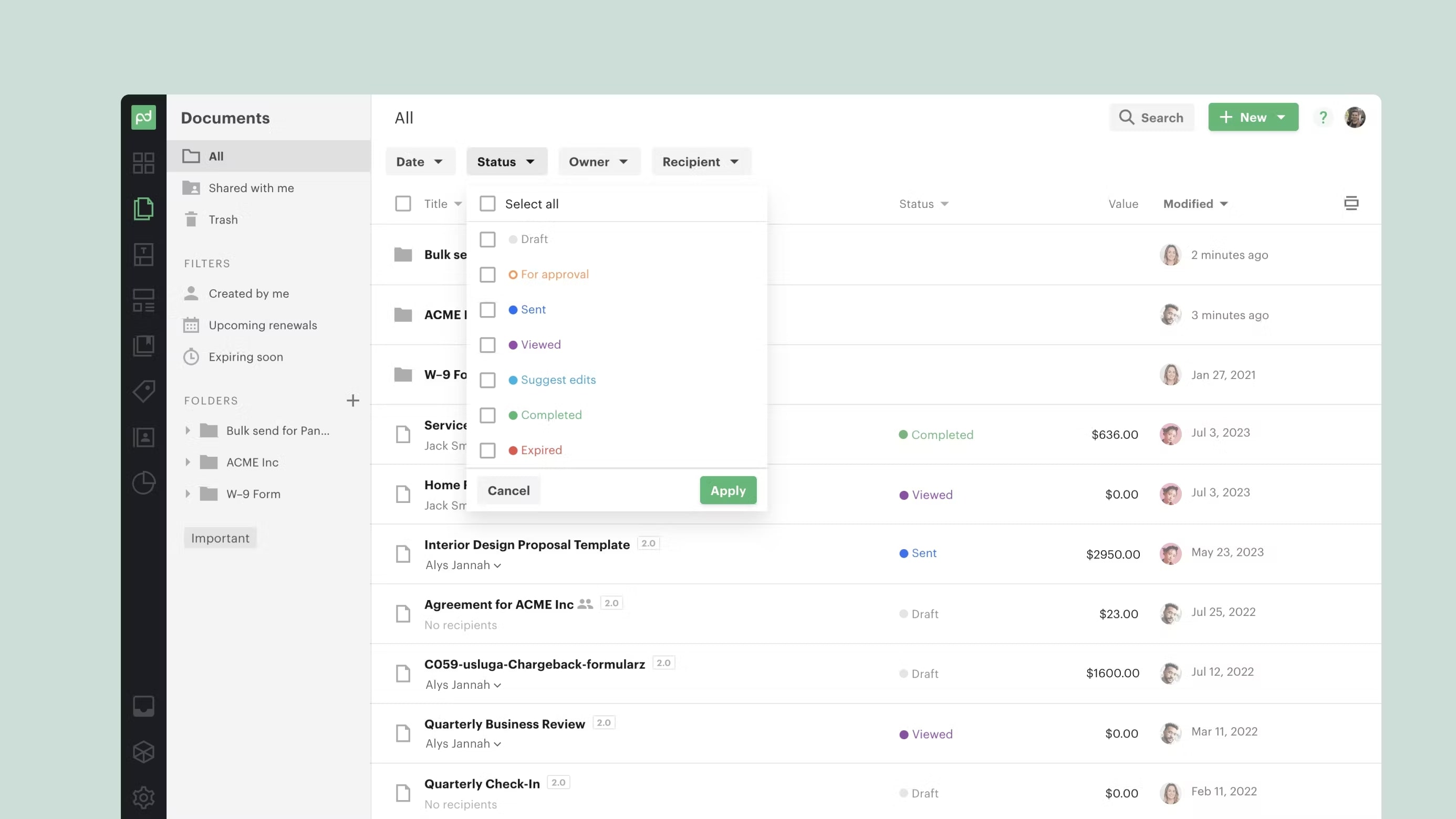
Manage, Share, and Store All of Documents In One Place with PandaDoc
PandaDoc distinguishes itself with its comprehensive 'Streamline' feature. While both tools incorporate proposal creation and e-signature capabilities, PandaDoc offers a holistic solution by empowering users to generate, manage, negotiate, and analyze all types of documents within a single platform. For example, PandaDoc facilitates seamless contract negotiations, document tracking, and analytics, streamlining the entire document lifecycle.
In contrast, Proposify adopts a more focused approach, prioritizing proposal creation and tracking functionalities. Therefore, for businesses seeking a versatile document management system encompassing all aspects of document handling, PandaDoc proves to be the superior choice.
Proposify and PandaDoc Both Simplify Signatures for Seamless Business Transactions

Design and Store Your Own Signature to Use For Present and Future Documents With Proposify
Both Proposify and PandaDoc offer an electronic signature feature, revolutionizing the traditional document signing process. Clients can conveniently sign documents within the respective platforms, eliminating the need for in-person meetings and expediting the closing process.
For instance, Proposify's seamless e-signature functionality allows clients to digitally sign proposals, contracts, and agreements directly within the platform, ensuring a smooth and efficient transaction process. Similarly, PandaDoc provides a user-friendly interface for clients to effortlessly sign documents electronically, enhancing convenience and expediting business operations. Thus, both tools prioritize user convenience and efficiency, showcasing their commitment to streamlining business transactions.
PandaDoc's Comprehensive Collaboration Outshines Proposify's
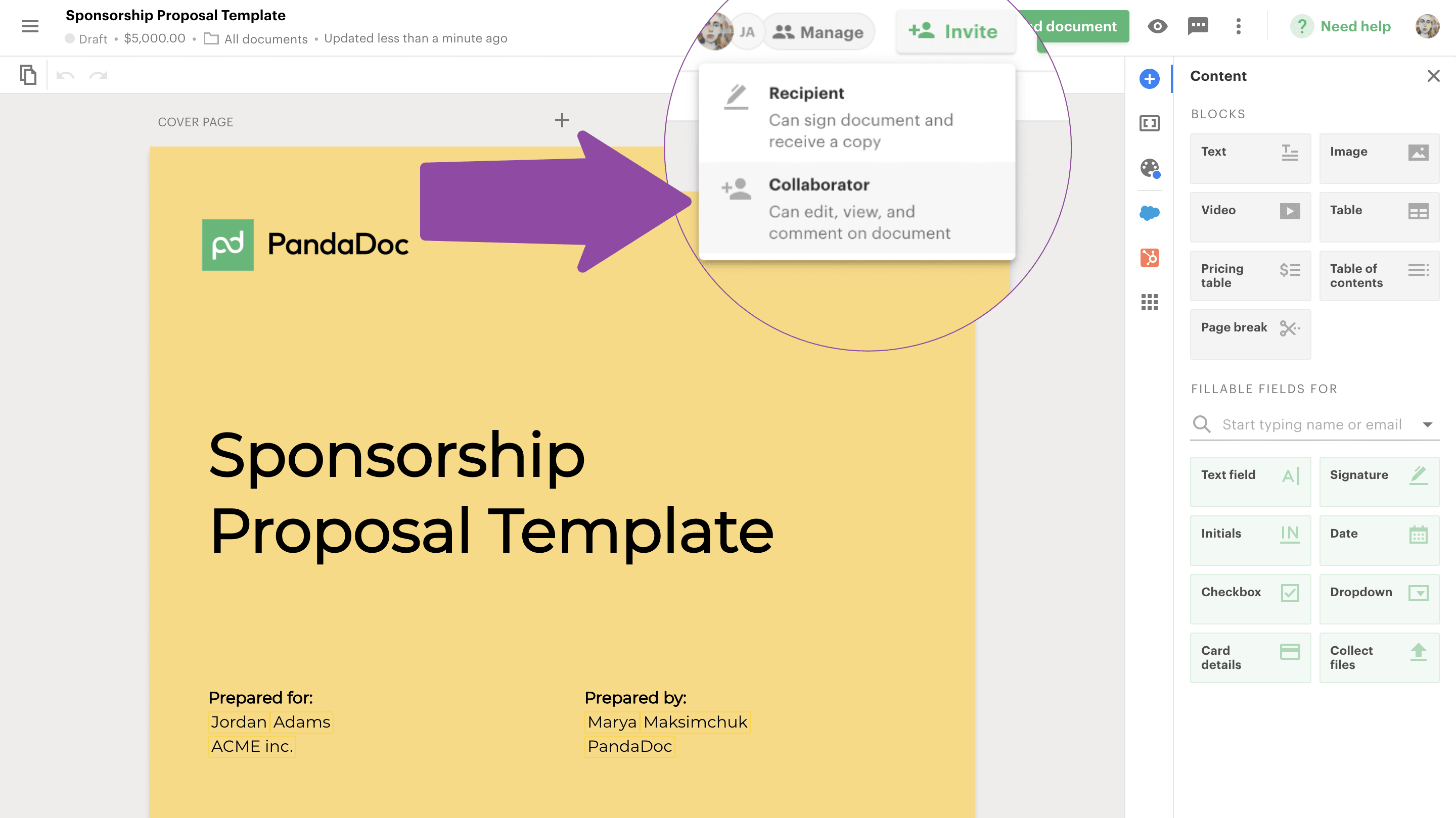
Easily Share Document Access With Your Collaborators, Working Together on Your Proposals for Great Efficiency
PandaDoc's 'Collaborate' feature empowers users to oversee document approvals, tracking, analysis, and negotiations within a single platform, providing unparalleled control over document management. For instance, teams can collaborate seamlessly on contracts, proposals, and agreements, streamlining the entire document lifecycle.
In contrast, while Proposify offers convenient features like content libraries for quick access to frequently used content, its collaborative capabilities are not as extensive as PandaDoc's. Therefore, PandaDoc's robust collaboration functionality offers users a comprehensive solution for document collaboration and management, enhancing productivity and efficiency across teams and organizations.
08 Proposify vs PandaDoc: Which is the best for your business?
Proposify is the best tool for you if:
- You are a small to medium-sized business seeking a user-friendly platform with customizable templates for streamlined proposal creation and tracking.
- You value simplicity and ease of use in a proposal management tool, catering to your straightforward workflow and project needs.
- Your priority is to enhance client engagement and professionalism through professionally designed proposals and efficient collaboration features.
- You require a platform that offers comprehensive analytics and reporting capabilities to track proposal performance and optimize sales strategies effectively.
- You seek a solution that integrates seamlessly with your existing workflow and tools, enhancing productivity and streamlining proposal processes effortlessly.
 You are a small to medium-sized business seeking a user-friendly platform with customizable templates for streamlined proposal creation and tracking.
PandaDoc is the best tool for you if:
- You are a large enterprise or organization with complex document management needs, seeking a versatile platform with robust features such as e-signatures and workflow automation.
- You prioritize comprehensive document lifecycle management, including document generation, negotiation, tracking, and analysis, within a single platform for enhanced efficiency.
- Your business requires strict adherence to data security standards and compliance regulations, and PandaDoc's SOC 2 Type 2 compliance and encryption features meet your stringent security requirements.
- You seek a solution that offers extensive integration capabilities with various CRM systems, payment gateways, and project management tools, enabling seamless workflow integration and collaboration across platforms.
- You value a solution that provides comprehensive support and resources, including training materials, customer support, and a knowledge base, to ensure optimal utilization of the platform's features and functionalities.
PandaDoc
Eliminate paperwork by digitizing your documents with e-signatures
20% off monthly Starter and Business plans for 12 months
Save up to $156
09 Alternatives to Proposify & PandaDoc

Docusign
Used by 707 members
First month free and 40% off annual plans
Save up to $350

DocSend
Used by 687 members
90% off your annual DocSend plan
Save up to $1,620

Cacheflow
Used by 154 members
The Startup Accelerator Plan for $5,000
Save up to $7,000

Fiverr Workspace
Used by 130 members
20% off your first Fiverr Pro order
Save up to $149
10 Promotions on Prospecting and Contract Management software
Proposify and PandaDoc are great tools, but Secret offers promo codes with discounts on over 2250+ different SaaS solutions. New deals are added regularly, helping you save money on your online subscriptions. Get access to codes for other Prospecting and Contract Management software you might want to purchase

Pipedrive promotion code
30% off for 12 months

Credits for Captain Contrat
15% discount on service fees (except creation on estimate)

Clay coupon code 2026
14 days free + 10% off annual plans
DocSend promo code
90% off your annual DocSend plan

HubSpot coupon code
90% off the Professional and Enterprise plans for 1 year

PartnerStack coupon
15% off for 1 year

Apollo.io coupon
50% off the annual Basic or Professional plan for 1 year (Up to 5 seats)

signNow coupon code
60% off annual plans

Deal for Crunchbase
20% off for 1 year

Deel promo code
$1,500 credit on Payroll, HR or IT plans
Start saving on the best SaaS
Secret has already helped tens of thousands of startups save millions on the best SaaS like Microsoft Teams, Google Workspace & many more. Join Secret now to buy software the smart way.