


Selecting the appropriate no-code development platform is essential for efficiently building web applications without extensive coding. These platforms empower users to create web applications, automate processes, and manage data with ease. They also play a crucial role in reducing development time and costs while increasing agility and flexibility. Furthermore, no-code development platforms offer a user-friendly interface, enabling individuals with minimal coding experience to develop robust applications.
Numerous options are available in the realm of no-code development platforms, but how do you determine which one suits your specific needs? In this article, we aim to assist you by providing a comprehensive comparison of two prominent platforms: Softr vs Retool. By delving into their key features and distinct characteristics within the no-code development category, you'll be better equipped to make an informed decision for your business or project.
- 01 Softr vs Retool: overview
- 02 What's the difference between Softr and Retool?
- 03 Softr pros and cons
- 04 Retool pros and cons
- 05 Softr compared to Retool
- 06 Retool compared to Softr
- 07 Features comparison
- 08 Softr vs Retool: Which is the best for your business?
- 09 Alternatives to Softr & Retool
- 10 Promotions on No-Code Development software
Start saving on the best SaaS
Secret has already helped tens of thousands of startups save millions on the best SaaS like Microsoft Teams, Google Workspace & many more. Join Secret now to buy software the smart way.

01 Softr vs Retool: overview
Softr and Retool are two notable contenders in the world of no-code development platforms, each catering to distinct user requirements and use cases.
Softr is renowned for its user-friendly interface and versatility in building web applications and automating processes. It is an excellent choice for users seeking an intuitive platform that excels in creating web applications without coding. In contrast, Retool focuses on empowering developers to create custom internal tools and applications swiftly. It stands out for its flexibility and the ability to build applications with a wide range of data sources and APIs.
To make an informed decision between Softr and Retool, it's essential to evaluate your specific project requirements, technical expertise, and desired level of customization. Softr is an excellent choice for those seeking a user-friendly, no-code solution for web application development, while Retool excels in providing flexibility and customization options for more complex application needs.

Mobile responsiveness
Softr focuses on responsive web apps that work seamlessly on mobile devices. Retool is primarily desktop-oriented, though it offers some support for mobile responsiveness.

Softr
Retool
Template variety
Softr provides a wide range of templates suitable for various industries and app types. Retool also offers templates but with a focus on internal tools for businesses and developers.
Softr
Retool
Ease of Use
Softr is designed for ease and simplicity, appealing to users without technical backgrounds. Retool has a steeper learning curve but is extremely powerful in the hands of developers.
Softr
Retool
Community and resources
Softr has a growing community and a good range of resources for learning. Retool has a highly active community and extensive documentation, providing excellent support for developers.
Softr
Retool
Customizability
Softr allows significant visual and functional customizations, ideal for business apps. Retool excels in customizability, particularly for developers looking to create highly specialized internal tools.
Softr
Retool
Data management
Softr is suitable for simple to moderately complex data scenarios. Retool is robust in data management, allowing for complex queries, transformations, and connections to multiple data sources.
Softr
Retool
Customer Support
Softr provides a variety of support channels including community forums and direct support. Retool is known for its excellent customer support, particularly for enterprise customers requiring more complex implementations.
Softr
Retool
Customer Reviews
Softr is praised for its user-friendly approach to app creation, while Retool is highly regarded for its powerful interface and ability to connect with virtually any database or API.
Softr
Retool
Pricing Plan
Softr offers competitive pricing with a robust free plan, making it accessible for small projects. Retool's pricing reflects its enterprise focus, with plans that scale with the usage and advanced features offered.
Softr
Retool
Integrations
Softr integrates well with common business and marketing tools. Retool stands out in this area with its vast array of integrations, allowing developers to connect to any REST, GraphQL, or gRPC API with ease.
Softr
Retool
02 What's the difference between Softr and Retool?

Softr is renowned for its user-friendly, intuitive interface, making it an ideal choice for individuals and businesses seeking to build web applications and automate processes without the need for extensive coding knowledge
Softr
Build business apps with AI — that actually work

Retool caters to a more technically inclined audience, emphasizing flexibility and customization
Retool
Retool lets you build your own internal tools in minutes. Whether you need to manage customer tickets, your sales pipeline, or simply do reporting, with Retool you build the tools you need according to your company's needs.
Softr and Retool are two distinct players in the realm of no-code development platforms, each with its own set of features and capabilities tailored to meet specific user needs.
Softr is renowned for its user-friendly, intuitive interface, making it an ideal choice for individuals and businesses seeking to build web applications and automate processes without the need for extensive coding knowledge. With a focus on simplicity and ease of use, Softr offers a wide range of templates and integration options, making it a suitable platform for those looking to streamline their web application development efforts.
On the other hand, Retool caters to a more technically inclined audience, emphasizing flexibility and customization. It empowers developers to create custom internal tools and applications quickly, making it an excellent choice for teams that require advanced solutions and integration capabilities. With Retool, users have the freedom to connect to a wide variety of data sources and APIs, allowing for highly customized application development.
One key difference between Softr and Retool lies in their target user base and use cases. Softr is designed to be user-friendly and accessible to individuals and small teams, making it suitable for a wide range of projects, especially those where coding expertise may be limited. In contrast, Retool is geared towards users with more advanced technical skills and is better suited for projects that demand a high level of customization and integration with external data sources.
Additionally, the level of complexity and depth of functionality varies between the two platforms. Softr offers a straightforward approach to web application development, while Retool provides a more extensive toolkit for creating complex and customized internal tools and applications.

Softr
Used by 1,493 members
20% off monthly or annual Professional plan
Save up to $333

Retool
Used by 1,239 members
1 year free on the monthly Team or Business plan
Save up to $60,000
03 Softr pros and cons
What are the advantages of Softr?
- User-friendly interface: Softr provides an intuitive and user-friendly interface, making it accessible to individuals with little to no coding experience. This ease of use allows users to quickly create web applications and websites without a steep learning curve.

- Templates and widgets: Softr offers a library of templates and pre-built widgets that can significantly speed up the development process. Users can choose from a variety of templates and customize them to suit their specific needs.
- No-code development: As a no-code platform, Softr eliminates the need for coding skills, enabling non-technical users to create functional web applications. This can save time and resources for businesses and individuals.
- Integration options: Softr supports integrations with popular third-party tools and services, allowing users to connect their applications to various data sources, APIs, and external systems.
- Responsive design: Softr automatically generates responsive designs, ensuring that websites and applications created with the platform look and function well on different devices and screen sizes.
What are the disadvantages of Softr?
- Limited customization: While Softr provides a range of customization options, it may not offer the same level of flexibility and customization as traditional web development. Users with highly specific design and functionality requirements may find it limiting.

- Scalability: Softr is best suited for smaller to medium-sized projects. Larger and more complex applications may outgrow the platform's capabilities, leading to scalability issues.
- Costs: Softr's pricing structure can become expensive as your project or business grows. Users may find themselves paying higher subscription fees as they require more features and resources.
- Limited control over hosting: Softr hosts the websites and applications created on its platform. While this is convenient for many users, it means you have limited control over hosting configurations and may not be able to host your application on your preferred server.
- Dependency on Softr: Once you build your application on Softr, you become dependent on the platform for hosting and maintenance. If the platform experiences downtime or undergoes changes, it can impact your application's availability and functionality.
Compare Softr to other tools


Softr vs Webflow

Softr vs Airtable

Softr vs Bubble

Softr vs Glide

Softr vs WordPress.com

Softr vs Adalo
04 Retool pros and cons
What are the advantages of Retool?
- Rapid development: Retool allows developers and technical users to create custom internal tools and applications quickly. Its drag-and-drop interface and pre-built components make it easy to build functional tools without writing extensive code.
- Data integration: Retool excels at connecting to various data sources and APIs. It provides seamless integration with databases, REST APIs, GraphQL, and more, enabling users to work with diverse data sets and systems.
- Customization: Retool offers a high degree of customization. Users can tailor the look, feel, and functionality of their applications to meet specific business requirements, resulting in highly tailored and efficient tools.
- Collaboration: Retool supports collaboration among team members. Multiple users can collaborate on the same project, making it suitable for building and maintaining shared internal tools within organizations.
- Security and compliance: Retool prioritizes security and compliance, making it suitable for businesses and industries with strict data security requirements. It offers features like user authentication, access controls, and audit logs to ensure data protection.
What are the disadvantages of Retool?
- Learning curve: While Retool is designed to be user-friendly, it may still have a learning curve for non-technical users. Creating complex applications may require some familiarity with SQL and scripting.
- Cost: Retool's pricing can be relatively high, especially for larger teams and organizations. The cost may become a limiting factor for smaller businesses or startups.
- Deployment limitations: Retool primarily focuses on creating internal tools, which means that deploying customer-facing applications or websites may not be its strong suit. It's best suited for in-house applications.
- Limited no-code functionality: Retool is not a true no-code platform. While it simplifies development for technical users, non-technical users may still find it challenging to use without some coding knowledge.
- Scalability: While Retool is suitable for many use cases, extremely large or complex applications may face scalability challenges. Users with such requirements may need to consider more specialized development tools.
Compare Retool to other tools

Retool vs Bubble
Airtable vs Retool
05 Softr compared to Retool
Softr and Retool are two distinct no-code development platforms. Softr is user-friendly, ideal for those without extensive coding experience, offering templates and integration options for web applications.
In contrast, Retool targets technical users, allowing for rapid creation of custom internal tools, with robust data integration capabilities. Softr excels in simplicity and accessibility, while Retool prioritizes customization and data connectivity. Your choice between them depends on your project's complexity and your team's technical proficiency, with Softr favoring ease of use and Retool offering more advanced customization and integration for internal tool development.
Is Softr better than Retool?
 Is Softr better than Retool?
Determining whether Softr is better than Retool depends on specific project needs and user expertise. Softr is a user-friendly, no-code platform suitable for those without extensive coding knowledge, focusing on web application development. Retool, on the other hand, targets technical users who need to build custom internal tools with robust data integration.
Softr prioritizes simplicity and accessibility, while Retool offers advanced customization and data connectivity. The choice between them hinges on your project's complexity and your team's technical proficiency, with Softr emphasizing ease of use and Retool catering to more advanced customization and internal tool development requirements.
What is Softr best used for?
Softr is best used for creating web applications and automating processes without the need for extensive coding expertise. It is an ideal solution for individuals and businesses looking to quickly build web-based tools, websites, or dashboards.
Softr offers a user-friendly interface and a range of templates, making it particularly suitable for those with minimal technical knowledge. It excels in simplifying tasks such as data collection, content management, and building interactive web pages. Softr's strengths lie in its ease of use and its ability to empower non-developers to create functional web applications efficiently.
Can Softr replace Retool?
Softr and Retool serve distinct purposes and are not direct replacements for each other. Softr is designed for creating web applications with a focus on simplicity and accessibility, making it suitable for users with limited coding experience. On the other hand, Retool is tailored for building custom internal tools and applications with advanced data integration capabilities, targeting technical users and developers.
While both platforms have their merits, Softr is not a comprehensive replacement for Retool, as their core functionalities and use cases differ significantly. The choice between them depends on the specific project requirements and the level of technical expertise available within the team.
Is Softr cheaper than Retool?
Softr and Retool have distinct pricing structures based on their different functionalities and target audiences. Softr’s pricing generally offers more budget-friendly options, making it potentially cheaper for individuals, small teams, or businesses with limited resources. Its pricing plans cater to various needs, including a free plan with basic features.
In contrast, Retool, with its advanced data integration and customization capabilities, tends to have a higher price point, which may be more suitable for larger enterprises with specific technical requirements. The cost comparison between Softr and Retool depends on your project's complexity, user base, and the features essential to your development needs.
Is there a better No-Code Development software than Softr?
When evaluating software options for your needs, it's essential to consider if there's a better alternative to Softr in the realm of no-code development platforms.
Several notable alternatives to Softr in the no-code development category include Retool, Bubble, Adalo, and OutSystems.
The selection of the ideal no-code development platform depends on your specific project requirements, technical expertise, and customization needs. If you prioritize user-friendly interfaces, ease of use, and simplicity, Softr may be a strong candidate. However, exploring these alternatives can provide valuable insights and help you make an informed decision that aligns perfectly with your no-code development goals and aspirations.

Softr
Build business apps with AI — that actually work
20% off monthly or annual Professional plan
Save up to $333
06 Retool compared to Softr
Retool and Softr are distinct no-code development platforms, each catering to different user needs. Retool is designed for building custom internal tools and applications, offering advanced data integration capabilities, making it ideal for technical users and developers.
In contrast, Softr is a user-friendly platform focused on web application development and automation, targeting individuals and businesses with limited coding experience. Retool prioritizes customization and data connectivity, while Softr emphasizes simplicity and accessibility. The choice between Retool and Softr depends on your project's complexity, your team's technical expertise, and whether you require advanced internal tool development or web application creation with ease of use.
Is Retool better than Softr?
Determining whether Retool is better than Softr depends on your specific project requirements and technical proficiency. Retool excels at building custom internal tools and applications, offering advanced data integration capabilities and flexibility. It's ideal for developers and technical users who require precise control and extensive customization. In contrast, Softr is designed for simplicity and accessibility, making it suitable for those with limited coding experience, focusing on web application development.
The choice between Retool and Softr hinges on your project's complexity and your team's expertise, with Retool offering advanced customization and data connectivity, while Softr prioritizes ease of use and straightforward web application creation.
What is Retool best used for?
Retool is best used for building custom internal tools and applications with a strong focus on data integration and flexibility. It empowers developers and technical users to create efficient, tailor-made solutions that streamline workflow processes and data management within organizations.
With its robust features and extensive customization options, Retool is particularly valuable for businesses that require specialized tools to access and manipulate data from various sources, databases, and APIs. It excels in automating tasks, enhancing data visualization, and optimizing internal operations, making it a versatile choice for companies seeking to improve efficiency and productivity through the development of custom internal applications.
Can Retool replace Softr?
Retool and Softr serve different purposes in the realm of software development, and they are not direct replacements for each other. Retool is primarily designed for building custom internal tools and applications with a strong emphasis on data integration and customization. In contrast, Softr is geared toward creating web applications and automating processes with a user-friendly, no-code approach.
While both tools have their merits, Retool is not a comprehensive substitute for Softr, as their core functionalities and target audiences differ significantly. The choice between them depends on the specific project requirements, technical expertise, and whether you prioritize advanced customization or simplicity in web application development.
Is Retool cheaper than Softr?
Retool and Softr have distinct pricing structures based on their unique functionalities and use cases. In general, Softr tends to offer more budget-friendly options, making it potentially cheaper for individuals, small teams, or businesses with limited resources. Softr's pricing plans cater to a wide range of needs, including a free plan with basic features.
Conversely, Retool’s pricing typically has a higher price point due to its advanced data integration and customization capabilities, which may be more suitable for larger enterprises with specific technical requirements. The cost comparison between Retool and Softr depends on your project's complexity, user base, and the features essential to your development needs.
Is there a better Application Development software than Retool?
When evaluating software options for your specific needs, it's essential to explore whether there's a better alternative than Retool in the realm of custom internal tool development.
Several notable alternatives to Retool in this category include Bubble, OutSystems, Adalo, and AppSheet.
The choice of the ideal platform for building custom internal tools hinges on your project's complexity, technical proficiency, and customization requirements. Retool offers advanced data integration and flexibility, making it a strong candidate for specific use cases. Nevertheless, exploring these alternatives can provide valuable insights and help you make an informed decision that aligns perfectly with your internal tool development needs and aspirations.

Retool
Premium
Design and create internal tools for your company
1 year free on the monthly Team or Business plan
Save up to $60,000
07 Features comparison
Softr Excels in Data Integration for Enhanced Application Performance

For example, if your business relies on a robust CRM system powered by Google Sheets, Softr enables you to build a custom CRM application that leverages this data effortlessly.
When comparing data integration capabilities, Softr takes a significant lead. This platform excels at seamlessly incorporating business data, particularly from sources like Airtable and Google Sheets, into the applications you create. For example, if your business relies on a robust CRM system powered by Google Sheets, Softr enables you to build a custom CRM application that leverages this data effortlessly.
This feature is invaluable for businesses heavily reliant on data management and optimization, ensuring that their applications perform at their best. Softr's emphasis on these integrations can streamline workflows, boost productivity, and provide a competitive edge.
In contrast, Retool, while a powerful tool in its own right, does not emphasize data integration to the same extent as Softr, making it potentially less suitable for businesses seeking comprehensive data-driven application development.
Retool Excels in Collaborative Editing, While Softr Focuses on Simplicity
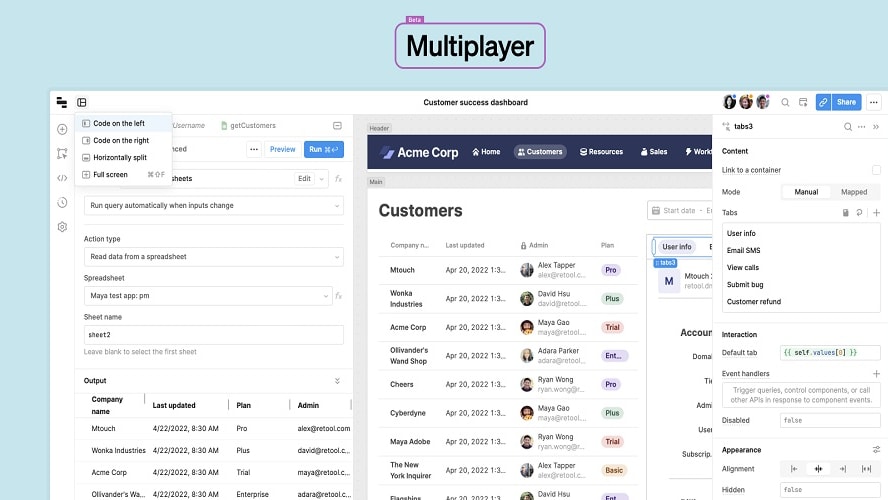
Retool offers a powerful feature: real-time collaborative editing, allowing team members to work simultaneously on tools.
When it comes to collaborative editing capabilities, Retool outshines Softr. Retool offers a powerful feature: real-time collaborative editing, allowing team members to work simultaneously on tools. This functionality is a significant advantage for businesses that prioritize frequent collaboration, as it enhances productivity and ensures that multiple team members can contribute seamlessly to projects. For instance, developers can collaborate on building custom internal tools, making adjustments and improvements in real-time.
In contrast, the feature list for Softr does not explicitly mention collaborative functionalities. While Softr prioritizes simplicity and user-friendliness, it may not be the ideal choice for organizations that heavily emphasize collaborative editing and real-time teamwork.
Softr Excels in User-Friendliness, While Retool Requires Coding Proficiency

Designed with non-technical users in mind, Softr offers an intuitive interface and comprehensive guides, empowering individuals with minimal technical skills.
In the realm of no-code development platforms, the distinction between Softr and Retool lies in their ease of use. Softr emerges as the clear winner in terms of user-friendliness. Designed with non-technical users in mind, Softr offers an intuitive interface and comprehensive guides, empowering individuals with minimal technical skills. For instance, creating a dynamic web application with data integration on Softr can be as straightforward as using a spreadsheet.
On the contrary, Retool, although powerful, demands a higher coding proficiency to unlock its full potential. While it simplifies app development, non-technical users may find the learning curve steeper. Tasks that might be effortless in Softr, like advanced data querying and visualization, often require coding expertise in Retool.
Retool Takes the Lead in Swift Deployment, While Softr Focuses on Ease of Use

The platform enables users to swiftly deploy their custom tools, facilitating immediate utilization—a crucial advantage for businesses requiring rapid tool deployment to meet tight deadlines or address emerging needs
In the realm of rapid deployment of tools and applications, Retool emerges as a standout performer. The platform enables users to swiftly deploy their custom tools, facilitating immediate utilization—a crucial advantage for businesses requiring rapid tool deployment to meet tight deadlines or address emerging needs. For example, a customer support team can create and deploy a real-time ticketing system using Retool to enhance efficiency and responsiveness in record time.
Conversely, while Softr excels in providing features that prioritize ease of use and customization, it does not explicitly highlight instant deployment as one of its primary offerings. Softr shines in enabling users to build web applications with minimal technical knowledge but may not cater to businesses with urgent deployment requirements.
Both Softr and Retool Offer User-Friendly, Drag-and-Drop Interfaces for Efficient Development

For instance, in Softr, users can effortlessly drag and drop elements onto the canvas to build web applications without writing code
Softr and Retool share a common strength in their user-friendly drag-and-drop interfaces, which simplify the application and tool-building process. These intuitive interfaces significantly enhance efficiency by eliminating the need for advanced web technology knowledge. Users, regardless of their technical expertise, can concentrate on creating functional and well-designed applications.
For instance, in Softr, users can effortlessly drag and drop elements onto the canvas to build web applications without writing code. Similarly, Retool's interface empowers users to design custom internal tools by simply selecting and arranging components, catering to both technical and non-technical team members.
Softr's Payment Integration Simplifies Transactions and Security

Softr distinguishes itself with its robust payment integration capabilities, allowing users to seamlessly accept payments for products or services directly through their applications.
Softr distinguishes itself with its robust payment integration capabilities, allowing users to seamlessly accept payments for products or services directly through their applications. This feature streamlines the customer experience and enhances revenue generation. Softr's comprehensive approach extends to handling security and compliance aspects tied to payments, alleviating concerns and ensuring a secure transaction process. For instance, an e-commerce business can easily implement payment gateways like Stripe or PayPal within their Softr-built application, simplifying the purchasing process for customers.
In contrast, Retool does not prominently feature payment integration in its main capabilities, giving Softr a notable advantage in this area. For businesses requiring secure and hassle-free payment processing within their applications, Softr's specialized functionality makes it a compelling choice.
Retool Leads in Integration Capabilities, but Softr Excels in User-Friendliness

With support for over a hundred pre-built integrations, including major databases and APIs, Retool provides developers with a robust toolkit for connecting and integrating the software with various tools seamlessly
When comparing integration capabilities, Retool and Softr unveils distinct strengths. Retool takes the lead when it comes to integration capabilities. With support for over a hundred pre-built integrations, including major databases and APIs, Retool provides developers with a robust toolkit for connecting and integrating the software with various tools seamlessly. For example, it effortlessly connects to databases like MySQL, PostgreSQL, and APIs such as Google Sheets or Salesforce, enabling comprehensive data management and application development.
Conversely, Softr, while offering integrations, presents a narrower scope. It prioritizes seamless integration with Airtable and major payment gateways, making it an excellent choice for businesses centered around these specific tools. However, the range and quantity of integrations available in Softr are comparatively limited, especially when compared to Retool's extensive lineup.
08 Softr vs Retool: Which is the best for your business?
Softr is the best tool for you if:
- You need to quickly create web applications without extensive coding skills, ideal for startups and small teams.
- You prioritize user-friendly, no-code development, making it accessible to non-technical users.
- Your business relies on Airtable or Google Sheets for data management, Softr's seamless integration capabilities make it an excellent choice.
- You seek simplicity and efficiency in developing data-driven applications without complex coding requirements.
- You're looking for a cost-effective solution for web application development and automation, Softr offers competitive pricing plans for various project sizes.
 You need to quickly create web applications without extensive coding skills, ideal for startups and small teams.
Retool is the best tool for you if:
- You require advanced customization and data integration capabilities in building custom internal tools and applications.
- Your team has coding proficiency, Retool offers flexibility for developing complex, data-driven tools efficiently.
- You prioritize real-time collaborative editing and teamwork on internal tools, Retool provides a superior collaborative environment.
- Your operation demands rapid deployment of custom tools to meet tight deadlines, Retool's swift deployment feature is a significant advantage.
- You need to connect and integrate your tools with multiple data sources and APIs to optimize workflow efficiency and productivity.
Softr
Used by 1,493 members
20% off monthly or annual Professional plan
Save up to $333
Retool
Used by 1,239 members
1 year free on the monthly Team or Business plan
Save up to $60,000
09 Alternatives to Softr & Retool

Airtable
Used by 8,945 members
$1,000 in credits on licences for 1 year
Save up to $1,000

Slack
Used by 4,081 members
25% off new plan purchases
Save up to $9,000

ClickUp
Used by 3,503 members
Additional 20% off Unlimited and Business plans for 1 year
Save up to $1,000

Base44
Used by 3,315 members
10 Promotions on No-Code Development software
Softr and Retool are great tools, but Secret offers promo codes with discounts on over 2250+ different SaaS solutions. New deals are added regularly, helping you save money on your online subscriptions. Get access to codes for other No-Code Development software you might want to purchase

Deal for Make
3 months free on the Teams plan (240k credits included)

Replit coupon
6 months free on the Core plan

Webflow promotion
40% off annual plans

Auth0 deal
1 year of the B2B Professional plan free

Deal for Bubble
30% off on monthly plans for 1 year

Promo code Mobbin
20% off for 1 year on the Pro plan
Airtable promotion code
$1,000 in credits on licences for 1 year

Lovable promo code
15% off annual Pro and Business plans

Notion offer
3 months free on the Business plan with Unlimited AI

AWS Activate deal
Up to $100,000 in credits or 20-50% off your monthly spend through an AWS partner (must be spending $100+/month)
Start saving on the best SaaS
Secret has already helped tens of thousands of startups save millions on the best SaaS like Microsoft Teams, Google Workspace & many more. Join Secret now to buy software the smart way.