


Database management tools are pivotal in organizing and optimizing the data-driven operations of modern businesses. They provide robust frameworks for managing databases, developing internal tools, and automating workflows. In the vast landscape of database management solutions, making an informed choice that aligns with your organization's specific requirements is crucial.
This article focuses on comparing two prominent database management tools: Airtable and Retool. We aim to offer a comprehensive analysis of their key functionalities and distinct features. By the end of this piece, you'll gain a deeper insight into which tool, Airtable or Retool, better suits your business's data management and application development needs.
- 01 Airtable vs Retool: overview
- 02 What's the difference between Airtable and Retool?
- 03 Airtable pros and cons
- 04 Retool pros and cons
- 05 Airtable compared to Retool
- 06 Retool compared to Airtable
- 07 Features comparison
- 08 Airtable vs Retool: Which is the best for your business?
- 09 Alternatives to Airtable & Retool
- 10 Promotions on Collaboration software
Start saving on the best SaaS
Secret has already helped tens of thousands of startups save millions on the best SaaS like Microsoft Teams, Google Workspace & many more. Join Secret now to buy software the smart way.

01 Airtable vs Retool: overview
Airtable and Retool are two prominent tools in the world of software development and data management, each catering to distinct needs and preferences.
Airtable is highly regarded for its flexibility in creating custom databases and project management solutions. It offers a user-friendly interface that excels in helping teams organize, collaborate on, and automate various aspects of their work. With a strong emphasis on simplicity and adaptability, Airtable provides a range of templates and tools tailored for businesses and developers seeking to streamline their data management and workflow processes. On the other hand, Retool stands out for its comprehensive application building capabilities, encompassing not just data management but also frontend development and automation. Retool is ideal for businesses and developers looking for a versatile platform to build custom applications, dashboards, and tools, offering advanced features for connecting to APIs, databases, and other data sources.
The choice between Airtable and Retool depends largely on your specific development and data management goals. If your focus is primarily on creating customized databases and project management solutions with ease, Airtable might be your best choice. However, if you're in search of a more integrated solution that allows you to build powerful applications and tools with a wide range of data sources and functionalities, Retool could be the more suitable option for your software development needs.

Pricing Plan
Airtable offers a freemium plan with paid plans for advanced features, Retool's pricing is tailored more towards enterprise solutions with a developer focus.

Airtable
Retool
Database capabilities
Airtable acts as a database with a visual interface, while Retool connects to existing databases to build internal tools quickly.
Airtable
Retool
Visual development
Airtable's interface is highly visual and intuitive, suitable for non-technical users, while Retool offers a visual interface with a focus on developers.
Airtable
Retool
Customer Reviews
Airtable is often praised for its user-friendly interface and flexibility, while Retool is appreciated for its developer-centric approach and customizability.
Airtable
Retool
Customer Support
Both platforms offer strong support, with extensive documentation and responsive customer service teams.
Airtable
Retool
Deployment
Airtable allows for easy sharing and deployment of bases, whereas Retool specializes in deploying internal tools with robust permissions and controls.
Airtable
Retool
Customization
Airtable offers customizable views and fields, Retool provides extensive customization for creating bespoke tools and interfaces.
Airtable
Retool
Collaboration features
Airtable's strong collaboration features allow for easy team sharing and editing, whereas Retool is more focused on individual developer use.
Airtable
Retool
Ease of Use
Airtable's spreadsheet-like interface is very accessible to non-developers, whereas Retool requires more technical knowledge for setup and use.
Airtable
Retool
Integrations
Airtable integrates well with various apps for a no-code experience, like Zapier and Slack, while Retool offers more technical integrations geared towards developers, like MongoDB and Firebase.
Airtable
Retool
02 What's the difference between Airtable and Retool?

Airtable is a versatile and user-friendly platform primarily used for creating and managing custom databases, project management solutions, and collaborative workspaces.
Airtable
Easily store and organize your data

Retool is focused on empowering developers and businesses to build custom web applications and tools quickly.
Retool
Retool lets you build your own internal tools in minutes. Whether you need to manage customer tickets, your sales pipeline, or simply do reporting, with Retool you build the tools you need according to your company's needs.
Airtable and Retool are both powerful tools designed to enhance productivity and streamline data-related tasks, yet they serve distinct purposes and come with different features.
Airtable is a versatile and user-friendly platform primarily used for creating and managing custom databases, project management solutions, and collaborative workspaces. It offers a wide range of customizable templates, making it easy for users to organize data, track projects, and collaborate with team members. Airtable's strengths lie in its flexibility, as it allows users to build databases and workflows tailored to their specific needs without requiring extensive technical knowledge. It's particularly well-suited for teams that need to organize and share structured data efficiently.
On the other hand, Retool is focused on empowering developers and businesses to build custom web applications and tools quickly. It provides a platform to create frontend interfaces for data visualization, interaction, and automation. Retool is known for its extensive library of pre-built components and integrations with various data sources, including APIs, databases, and third-party services. It's a powerful tool for businesses and developers who want to build custom applications, dashboards, and internal tools without starting from scratch. Retool is especially valuable for businesses that need to connect disparate data sources and create bespoke applications to support their unique workflows.
The key difference between Airtable and Retool lies in their core functionalities. Airtable excels at data organization, collaboration, and customization, while Retool focuses on application development and integration. When choosing between the two, consider your specific needs. If you require a platform to create custom databases and project management solutions with ease, Airtable is a solid choice. On the other hand, if you're looking to build powerful custom applications, dashboards, and tools that interact with various data sources, Retool provides the flexibility and developer-friendly features to meet those requirements.

Airtable
Used by 8693 members
$1,000 in credits on licences for 1 year
Save up to $1,000

Retool
Used by 1187 members
1 year free on the monthly Team or Business plan
Save up to $60,000
03 Airtable pros and cons
What are the advantages of Airtable?
- User-friendly interface: Airtable's interface is intuitive and user-friendly, making it easy for both technical and non-technical users to create and manage databases, spreadsheets, and collaborative workspaces.

- Customization: Airtable allows for extensive customization, from creating custom fields and data types to defining relationships between tables. This flexibility makes it suitable for a wide range of use cases.
- Templates: Airtable provides a variety of templates for common use cases, such as project management, content planning, and event tracking. These templates can save users time and help them get started quickly.
- Collaboration: Airtable is designed for collaboration, enabling multiple team members to work on the same database simultaneously. Real-time updates and commenting features facilitate teamwork and communication.
- Integration: Airtable offers integration with many third-party apps and services, allowing users to connect their databases to other tools they use, such as Zapier, Slack, and Google Workspace. This enhances workflow automation and data synchronization.
What are the disadvantages of Airtable?
- Limited advanced functions: While Airtable is highly customizable, it may lack some of the advanced functions and capabilities found in dedicated database management systems like SQL databases. Complex data modeling and queries can be challenging.

- Cost: Airtable's pricing can become expensive as your usage and storage needs grow. The free plan has limitations, and the cost of upgrading to higher-tier plans can add up for larger teams or organizations.
- Scaling limitations: While suitable for small to medium-sized projects, Airtable may not be the best choice for handling massive datasets or extremely complex data relationships. It can become sluggish with very large databases.
- Limited reporting and analytics: Airtable's reporting and analytics capabilities are basic compared to specialized BI (Business Intelligence) tools. Users seeking advanced data visualization and reporting may find it lacking.
- Offline access: Airtable is primarily a cloud-based platform, and it requires an internet connection to access and edit data. Lack of robust offline capabilities can be a limitation for users in areas with unreliable connectivity.
Compare Airtable to other tools


Airtable vs Monday

Airtable vs Asana

Airtable vs Coda

Airtable vs Excel

Airtable vs Google Sheets

Airtable vs Smartsheet
04 Retool pros and cons
What are the advantages of Retool?
- Rapid application development: Retool enables fast application development by providing a wide range of pre-built components and integrations with various data sources, including APIs, databases, and third-party services. Developers can build applications with minimal coding effort.
- Customization: Retool allows for extensive customization of user interfaces and workflows. Developers can create bespoke applications tailored to their specific needs, with full control over the design and functionality.
- Data integration: Retool excels at connecting to multiple data sources, making it easy to build applications that interact with various databases and APIs. This versatility is valuable for businesses with diverse data needs.
- Real-time collaboration: Retool provides real-time collaboration features, allowing multiple team members to work on the same application simultaneously. This enhances teamwork and communication among developers and stakeholders.
- Security and access control: Retool offers robust security features, including role-based access control (RBAC) and user authentication. This ensures that sensitive data and applications are protected and accessible only to authorized users.
What are the disadvantages of Retool?
- Learning curve: While Retool is developer-friendly, it may have a learning curve for those who are not experienced in web development. Users with limited coding skills may find it challenging to leverage the platform's full potential.
- Cost: Retool's pricing can be relatively high, particularly for larger teams or organizations. The cost of using Retool can increase as you scale and require more features or user licenses.
- Complexity: Building complex applications with Retool may require a deep understanding of web development concepts, including JavaScript, CSS, and APIs. Complex use cases may still require custom coding.
- Dependency on external services: Since Retool relies on integrations with external data sources and services, any disruptions or changes in those services can impact the functionality of Retool applications. This dependency can introduce potential vulnerabilities.
- Limited offline access: Retool is primarily a cloud-based platform, and it requires an internet connection to access and use applications. Lack of robust offline capabilities may be a limitation for users in areas with unreliable connectivity.
Compare Retool to other tools


Retool vs Bubble

Softr vs Retool
05 Airtable compared to Retool
Airtable is a versatile platform known for its user-friendly interface and flexibility in creating custom databases and project management solutions. It excels at data organization and collaboration but may have limitations with complex data modeling.
In contrast, Retool focuses on rapid application development, offering pre-built components and data integrations for building custom web applications. It provides extensive customization options but has a steeper learning curve, making it more suitable for users with web development skills. Both tools offer unique strengths, so the choice between Airtable and Retool depends on specific project requirements and the level of technical expertise available.
Is Airtable better than Retool?
 Is Airtable better than Retool?
It's not accurate to definitively state that Airtable is better than Retool or vice versa, as they serve different purposes and cater to distinct needs. Airtable excels in customizable database management and project organization, with an intuitive interface suitable for various users. In contrast, Retool focuses on rapid application development, enabling developers and businesses to build custom web applications with pre-built components and data integrations.
The choice between the two depends on your specific project requirements. Airtable is ideal for data management and collaboration, while Retool shines in application development and data integration. The decision hinges on your goals and expertise.
What is Airtable best used for?
Airtable is best used for creating and managing custom databases, collaborative workspaces, and project management solutions. Its user-friendly interface and flexibility make it an excellent choice for organizing and tracking various types of data, from customer information to content calendars. It's particularly valuable for teams that need a tool to streamline data management, collaborate on tasks, and automate workflows without requiring extensive technical knowledge.
Airtable's customization options, templates, and integration capabilities further enhance its suitability for a wide range of use cases, making it a versatile platform for businesses, project teams, and individuals seeking efficient data organization and collaboration solutions.
Can Airtable replace Retool?
Airtable and Retool serve different purposes and are not interchangeable. Airtable excels at creating customizable databases and project management solutions, primarily for data organization and collaboration. In contrast, Retool is focused on rapid application development, allowing users to build custom web applications with pre-built components and data integrations.
While both tools offer customization options, they cater to distinct needs. Airtable is ideal for data management, while Retool is designed for creating applications. Choosing between them depends on your specific project requirements, and they can even complement each other in certain workflows, with Airtable handling data management and Retool providing application development capabilities.
Is Airtable cheaper than Retool?
Airtable and Retool have different pricing structures, and whether one is cheaper than the other depends on your specific usage and requirements. Airtable’s pricing offers a free plan with limitations, making it accessible for small teams and personal use. Its paid plans are tiered based on features and usage.
Retool, on the other hand, is relatively more expensive, with pricing typically based on the number of users or seats. The cost of Retool can add up for larger teams or organizations. Ultimately, the relative cost-effectiveness of Airtable or Retool will depend on the scale of your project and the features you require, so it's essential to assess your needs and budget accordingly.
Is there a better Collaboration software than Airtable?
When searching for the right software for your data management and collaboration needs, it's essential to explore alternatives to Airtable, especially if you require specific functionalities or capabilities.
Some noteworthy alternatives to Airtable include Notion, Trello, Monday.com, and Smartsheet.
The choice of the most suitable software depends on factors such as your project complexity, team collaboration requirements, and integration needs. Airtable is recognized for its ease of use and flexibility in creating customized databases and project management solutions. However, exploring these alternatives might reveal a tool that aligns better with your specific data management and workflow objectives, offering features and functionalities that cater precisely to your needs.

Airtable
Premium
Easily store and organize your data
$1,000 in credits on licences for 1 year
Save up to $1,000
06 Retool compared to Airtable
Retool and Airtable are distinct tools serving different purposes. Retool is focused on rapid application development, enabling users to create custom web applications with pre-built components and data integrations. It's ideal for developers and businesses seeking to build interactive tools and dashboards.
In contrast, Airtable excels at data organization and management, offering customizable databases and collaborative workspaces. It's user-friendly and suitable for various use cases, from project management to content planning. The choice between Retool and Airtable depends on your specific needs – Retool for application development and data integration, and Airtable for data organization and collaboration.
Is Retool better than Airtable?
Retool and Airtable are distinct tools designed for different purposes. Retool specializes in building custom web applications that integrate with various data sources and workflows, making it ideal for businesses with complex application needs. Airtable, on the other hand, excels in database and spreadsheet management, offering simplicity and versatility.
Whether Retool is better than Airtable depends on your specific requirements. If you require advanced custom applications, Retool may be the better choice. However, if your primary need is straightforward data organization and collaboration, Airtable could be the more suitable option. It's essential to assess your project's goals and select the tool that aligns best with them.
What is Retool best used for?
Retool is best used for rapid application development, particularly for creating custom web applications and tools. It empowers developers and businesses to build interactive and data-driven applications quickly. With its extensive library of pre-built components and integrations, Retool is ideal for creating bespoke dashboards, internal tools, and interfaces that interact with various data sources and APIs.
It's a powerful solution for those looking to streamline workflows, automate tasks, and build tailored applications to support their unique business processes. Retool's flexibility and developer-friendly features make it particularly valuable for projects where speed, customization, and data integration are essential.
Can Retool replace Airtable?
Retool and Airtable serve different primary purposes and are not direct replacements for each other. Retool is designed for rapid application development, enabling users to create custom web applications and tools quickly, whereas Airtable excels in data organization and collaboration through customizable databases and project management solutions.
While both tools offer customization options, they cater to distinct needs. Retool is ideal for building interactive applications, while Airtable is more suitable for managing and organizing data efficiently. The choice between Retool and Airtable depends on your specific project requirements, and they can even complement each other in workflows that require both application development and data management.
Is Retool cheaper than Airtable?
Retool and Airtable serve distinct purposes, making direct cost comparisons challenging. Retool’s pricing structure primarily focuses on building custom web applications with integrated data sources and workflows, catering to businesses with more complex needs. Its pricing can vary based on usage and customization.
Airtable, on the other hand, excels in database and spreadsheet management, offering a wide range of templates for various tasks. It generally has a straightforward pricing structure, suitable for teams seeking simple data organization.
The cost comparison depends on your specific requirements. If you need robust custom applications, Retool’s pricing might be cost-effective. For basic data management, Airtable could be the more affordable choice. Evaluate both based on your project's needs and budget.
Is there a better Application Development software than Retool?
When seeking alternatives to Retool for rapid application development and custom web application creation, it's essential to evaluate whether another software better aligns with your specific requirements.
Prominent alternatives to Retool in this domain include OutSystems, Mendix, AppSheet, and Microsoft Power Apps. Each of these platforms brings its own strengths and focuses on distinct aspects of application development. While Retool excels in its flexibility and pre-built components, these alternatives might offer features or pricing models that more closely match your project's objectives. Whether you need advanced app-building capabilities, specific integration options, or cost-effective solutions, exploring these alternatives can lead to a choice that better suits your development needs, potentially providing advantages over Retool in specific areas.

Retool
Premium
Design and create internal tools for your company
1 year free on the monthly Team or Business plan
Save up to $60,000
07 Features comparison
Airtable Proves More Efficient in Data Automation Compared to Retool
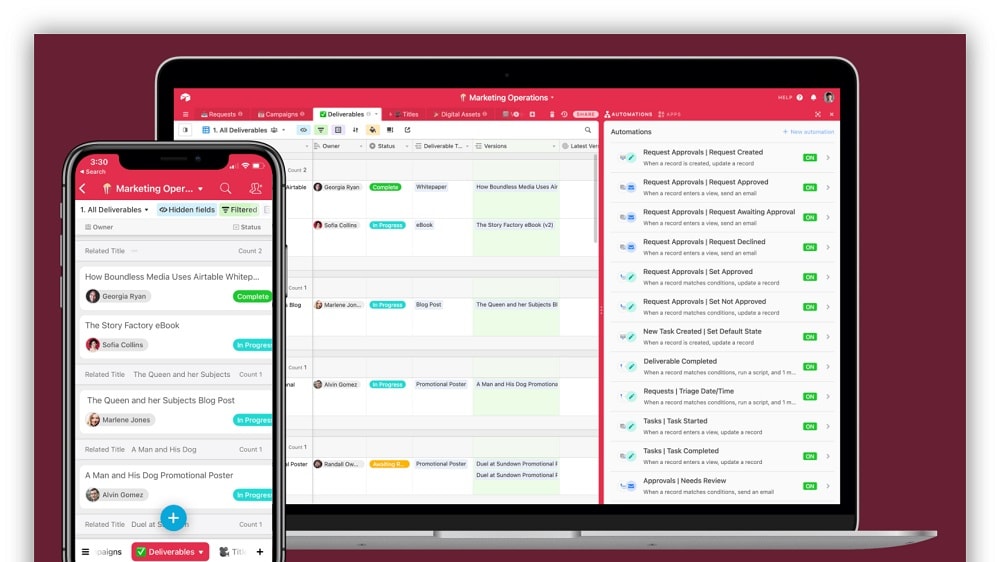
Airtable distinguishes itself by offering an array of features designed to streamline automated workflows for managing recurring tasks and critical business processes.
Airtable distinguishes itself by offering an array of features designed to streamline automated workflows for managing recurring tasks and critical business processes. Unlike Retool, which provides pre-built modules, Airtable's automation feature presents a more versatile approach to data management. Users can automate a wide spectrum of tasks, from straightforward to highly intricate processes, reducing manual effort and enhancing efficiency.
This continuous automation empowers businesses to allocate their resources and attention to more strategic and essential aspects, without the burden of mundane, repetitive tasks. Airtable's robust automation capabilities make it a valuable asset for businesses seeking to optimize their operations and productivity.
Retool's Enhanced Customization Elevates Flexibility Beyond Airtable

Retool takes customization a step further by empowering users to build their own components and create bespoke solutions tailored to specific business needs.
In the realm of customization, Retool offers a more advanced level of flexibility compared to Airtable. While Airtable allows users to customize their databases with various field types, Retool takes customization a step further by empowering users to build their own components and create bespoke solutions tailored to specific business needs. This added level of flexibility makes Retool a remarkably versatile tool for customization.
For example, in Retool, users can craft custom applications, widgets, and interfaces that precisely align with their unique requirements, providing a high degree of adaptability. Retool's robust customization capabilities position it as an ideal choice for businesses seeking tailored solutions that go beyond traditional data management.
Airtable Delivers Superior Data Visualization Compared to Retool

Airtable allows users to transform their data into visually compelling representations, including pie charts, bar graphs, and line charts.
When it comes to data visualization, Airtable offers a notable advantage over Retool. Airtable allows users to transform their data into visually compelling representations, including pie charts, bar graphs, and line charts. These visualizations are instrumental in conveying data insights and identifying patterns or trends within datasets. For instance, businesses can use Airtable to create interactive dashboards that offer at-a-glance insights into their data, aiding in decision-making.
In contrast, while Retool boasts a user-friendly drag-and-drop interface for application development, it does not offer a dedicated data visualization component. Consequently, in terms of data presentation and visualization, Airtable's functionality proves to be more robust and conducive to supporting decision-making processes. Whether it's analyzing sales performance or tracking project milestones, Airtable's data visualization capabilities enhance data-driven decision support.
Airtable Provides Better Task Management than Retool
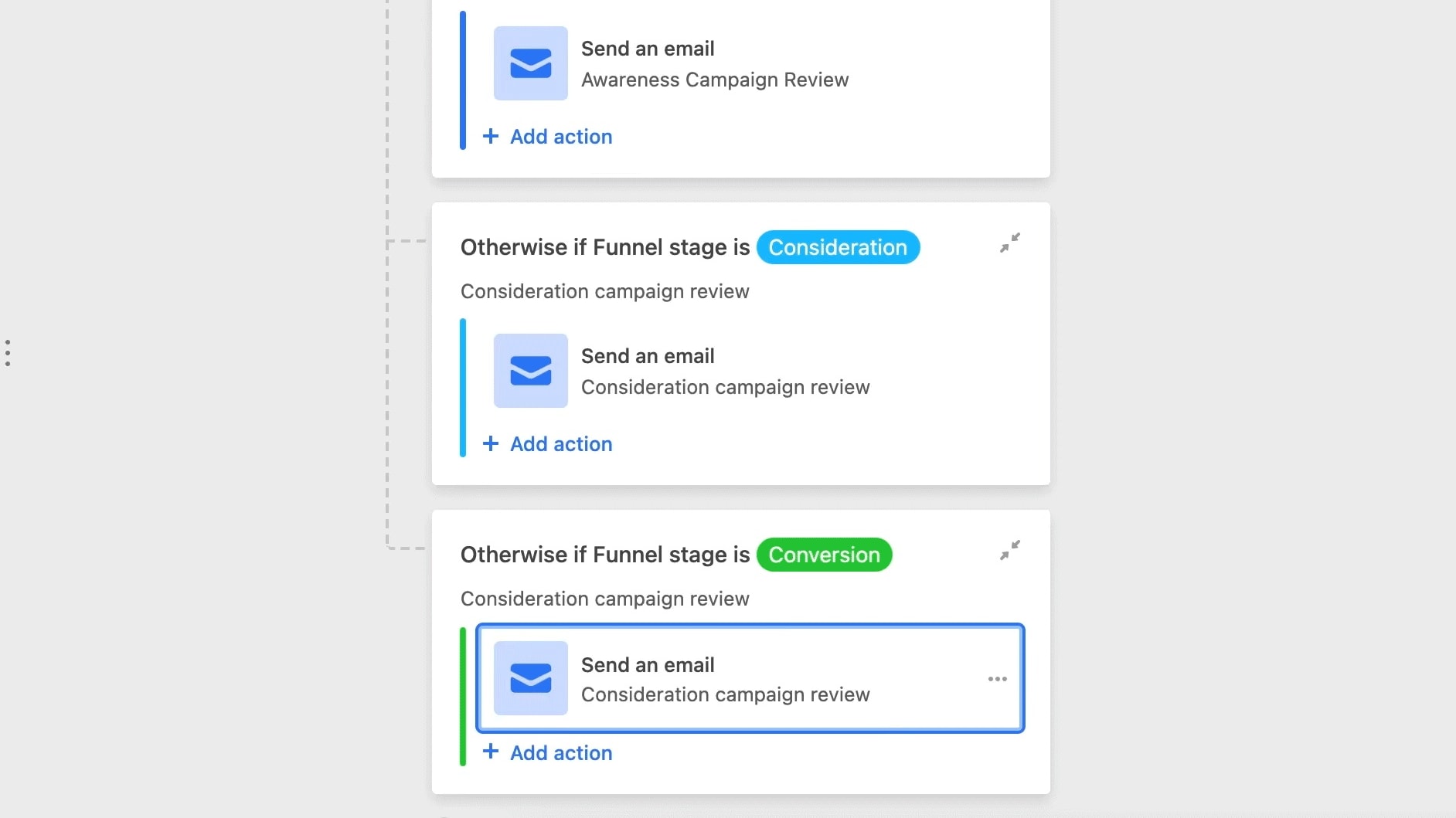
Airtable empowers users with the capability to set up notifications and reminders for critical tasks and deadlines.
In the realm of task management, Airtable establishes an advantage over Retool. While Retool excels in the rapid deployment of tools, it lacks a dedicated notification or reminder feature. In contrast, Airtable empowers users with the capability to set up notifications and reminders for critical tasks and deadlines. This functionality ensures that no vital task slips through the cracks, enhancing organizational efficiency.
For instance, users can create notifications to alert team members about upcoming project milestones or deadlines, facilitating timely action and reducing the risk of oversight. Airtable's robust task management, coupled with its notification system, proves to be a valuable asset for maintaining productivity and accountability.
Real Time Collaboration Is Comparable Between Airtable and Retool

Airtable allows multiple users to collaborate on the same base simultaneously, with real-time updates
Airtable and Retool both offer comprehensive collaboration capabilities, ensuring seamless teamwork and productivity. Airtable allows multiple users to collaborate on the same base simultaneously, with real-time updates. Similarly, Retool boasts real-time collaborative editing, fostering efficient collaboration among team members. For instance, in Airtable, teams can collectively work on project planning, with each member contributing in real-time. Retool facilitates collaborative application development, allowing developers to work together seamlessly on custom tools and dashboards. These collaborative features in both tools keep everyone on the same page, enhance communication, and contribute to more productive and efficient workflows, catering to various collaborative needs.
Airtable's User-Friendly Interface Outperforms Retool
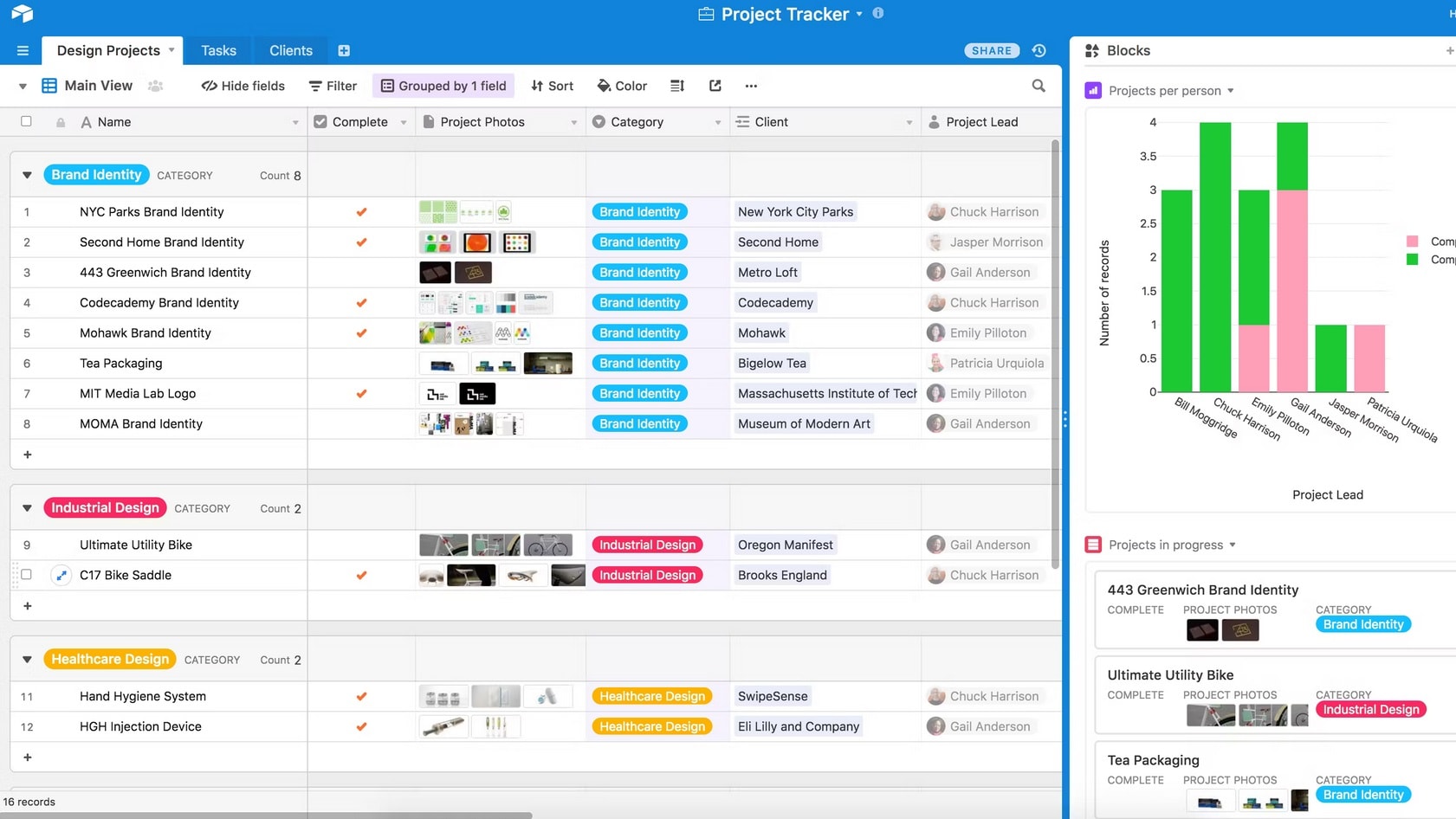
Airtable outshines Retool in terms of user-friendliness, making it an accessible choice for a wide range of users.
Airtable outshines Retool in terms of user-friendliness, making it an accessible choice for a wide range of users. With its intuitive interface, Airtable allows users of all technical backgrounds to quickly adapt to the platform. For instance, new users can easily navigate the interface, customize workspaces, and efficiently manage data without a steep learning curve.
In contrast, Retool, while offering robust features for building custom internal tools, caters to a more technically proficient audience. Its interface demands a higher level of technical expertise to fully harness its capabilities. As a result, Airtable stands out as the more user-friendly option, ensuring usability for a broader spectrum of users.
Retool's Robust Integrations Outshine Airtable
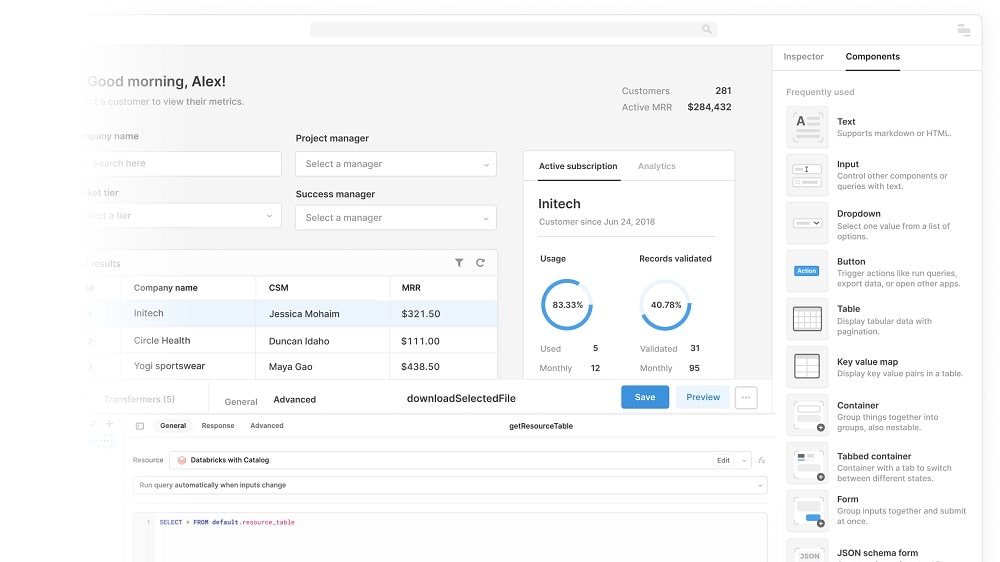
Retool seamlessly integrates with nearly all SQL and NoSQL databases and supports REST and GraphQL APIs, allowing for extensive customization and data control.
In the arena of integration capabilities, Retool outperforms Airtable by a considerable margin. While both platforms facilitate integrations with major third-party applications, Retool goes the extra mile by providing a comprehensive array of integration options. Retool seamlessly integrates with nearly all SQL and NoSQL databases and supports REST and GraphQL APIs, allowing for extensive customization and data control. Moreover, Retool's built-in widgets enable the creation of interface elements that can effortlessly display data from diverse sources.
Conversely, while Airtable offers API access to data tables and built-in support for custom apps, it falls short in comparison to the expansive integration capabilities Retool offers. Therefore, for superior software interoperability, Retool emerges as the more suitable choice.
08 Airtable vs Retool: Which is the best for your business?
Airtable is the best tool for you if:
- You need a user-friendly platform for creating customized databases and project management solutions effortlessly.
- You want a versatile platform that allows you to collaborate with your team and organize data efficiently.
- You require a solution that offers a wide range of customizable templates for various use cases.
- You seek a tool that integrates seamlessly with other apps and services to streamline your workflow.
- You prefer a tool that provides real-time collaboration features and is suitable for both technical and non-technical users.
 You need a user-friendly platform for creating customized databases and project management solutions effortlessly.
Retool is the best tool for you if:
- You're a developer or business looking to build custom web applications and internal tools rapidly with pre-built components and integrations.
- You need a platform that connects to various data sources, including databases and APIs, for application development.
- You want to create customized dashboards, interfaces, and tools that interact with real-time data.
- You value flexibility and customization in application development while minimizing coding effort.
- You're seeking a solution to empower your team with efficient app development capabilities, even if you're not a seasoned developer.
Airtable
Used by 8693 members
$1,000 in credits on licences for 1 year
Save up to $1,000
Retool
Used by 1187 members
1 year free on the monthly Team or Business plan
Save up to $60,000
09 Alternatives to Airtable & Retool

Notion
Used by 20244 members
3 months free on the Business plan with Unlimited AI
Save up to $720

Make
Used by 12340 members
3 months free on the Teams plan (240k credits included)
Save up to $600

Slack
Used by 3923 members
25% off new plan purchases
Save up to $9,000

ClickUp
Used by 3396 members
Additional 20% off Unlimited and Business plans for 1 year
Save up to $1,000
10 Promotions on Collaboration and Application Development software
Airtable and Retool are great tools, but Secret offers promo codes with discounts on over 2230+ different SaaS solutions. New deals are added regularly, helping you save money on your online subscriptions. Get access to codes for other Collaboration and Application Development software you might want to purchase

Promo codes for Google Workspace
20% off Standard plans for 1 year

OpenAI - ChatGPT coupon
$1,000 in free credits across OpenAI's models through LLM API
Discount for Notion
3 months free on the Business plan with Unlimited AI

Auth0 promo code 2026
1 year of the B2B Professional plan free
Code for Slack
25% off new plan purchases

Mobbin free credits
20% off for 1 year on the Pro plan

Credits for Miro
$1,000 in credits (lifetime validity)

Promo code Lovable
15% off annual Pro and Business plans

Credits for Monday
First month free

AWS Activate promo code 2026
Up to $100,000 in credits or 20-50% off your monthly spend through an AWS partner (must be spending $100+/month)
Start saving on the best SaaS
Secret has already helped tens of thousands of startups save millions on the best SaaS like Microsoft Teams, Google Workspace & many more. Join Secret now to buy software the smart way.